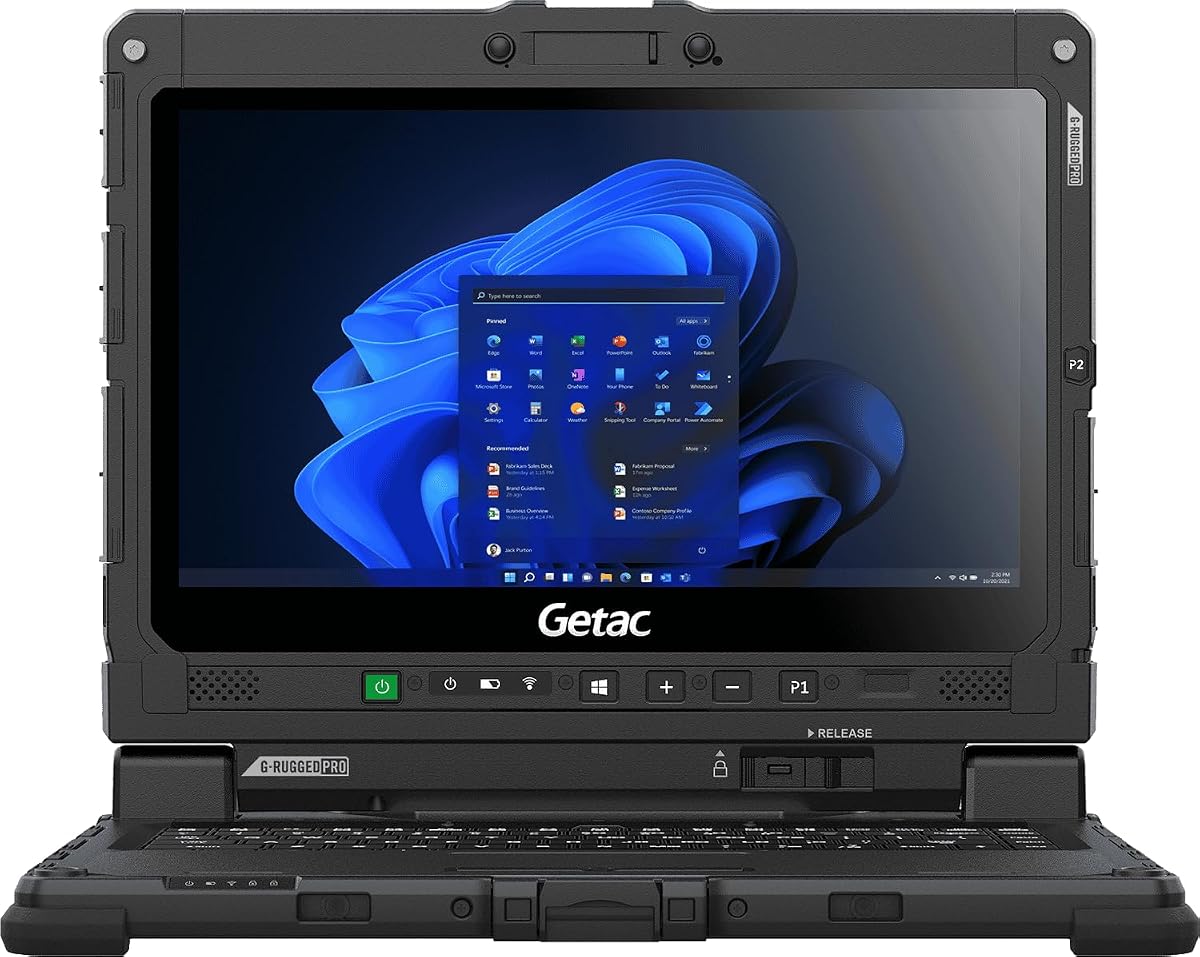
Getac Renewed K120 12.5" Rugged Laptop
5.0Editor score
1200 Nits Sunlight Readable Screen
12.5 Inch FHD Touchscreen
MIL-STD-810H Rugged Certified
Finding a laptop that remains visible under direct sunlight is crucial for outdoor professionals. High brightness displays and durable builds ensure productivity even in the harshest environments like construction sites or field research.
We evaluated ten top models based on screen brightness, processing power, and rugged certifications. Our analysis covers everything from consumer ultrabooks to industrial-grade machines designed to withstand extreme conditions.
Each pick highlights specific strengths such as battery life or sunlight readability. Prices and availability change frequently so always verify current details before purchasing your next outdoor computing solution today.
5.0Editor score

4.1Editor score

As an Amazon Associate we earn from qualifying purchases.
The following table compares key specifications across all ten models to help you choose the right device for your specific outdoor computing needs and environmental conditions.


The MUNBYN IRX17 is a top-tier industrial laptop rated at 4.1 stars offering incredible outdoor visibility. Its 1000 nits display ensures your work is clearly visible even under direct sunlight.
We may earn a commission when you buy through this link, at no additional cost to you.
Powered by an Intel i7-1255U processor and 32GB DDR5 RAM this machine handles demanding CAD and data analysis tasks with ease. The 512GB SSD is user-replaceable allowing for future storage expansion up to 4TB.
While it is heavy and expensive the durability is unmatched. The IP65 rating and MIL-STD-810H certification mean it can withstand dust water jets and extreme temperatures without performance degradation.
Professionals working in construction oil rigs or field research should buy this laptop. It combines high-performance computing with rugged reliability making it the ultimate tool for harsh environments.
The 1000 nits sunlight-readable display provides unparalleled clarity. Whether you are on a construction site or conducting field research the screen remains vibrant and legible under direct sunlight conditions.
With IP65 protection and MIL-STD-810H certification this laptop is built to last. It resists dust water jets and physical shock ensuring reliable operation in the most demanding industrial environments.
We may earn a commission when you buy through this link, at no additional cost to you.
This Getac K120 offers a stunning 1200 nits display which is brighter than most competitors. Rated 5.0 stars it delivers excellent value as an Amazon Renewed unit that has been professionally inspected.
We may earn a commission when you buy through this link, at no additional cost to you.
The 8th Gen Intel Core i5 and 16GB RAM provide solid field performance. The capacitive touchscreen works with gloves and the LumiBond display technology ensures visibility in harsh lighting conditions.
It is lighter than most rugged options which aids portability. However the processor is older so it may struggle with heavy 3D modeling compared to newer high-end models.
Field technicians looking for a reliable lightweight solution will find this ideal. It balances performance ruggedness and cost effectively making it a smart choice for budget-conscious outdoor workers.
At 1200 nits this display outshines many competitors. The LumiBond technology protects against scratches while maintaining incredible brightness levels that remain visible even in direct daylight.
Buying renewed allows access to premium rugged hardware at a fraction of the cost. It comes with a 90-day warranty ensuring you get a reliable device without the full new price tag.
We may earn a commission when you buy through this link, at no additional cost to you.
The Getac S510 brings modern AI power with an Intel Core Ultra 5 125U. It features a 1000 nits 15.6 inch touchscreen perfect for professionals needing high resolution and interaction.
We may earn a commission when you buy through this link, at no additional cost to you.
With 32GB DDR5 RAM and a 1TB SSD this device handles massive data sets effortlessly. The dedicated Copilot key provides easy access to AI assistance streamlining complex workflows in the field.
It is rated IP53 which offers good protection but is less robust than IP65. The premium features are balanced by the cost which is higher than standard consumer laptops.
Enterprise users requiring AI capabilities and ruggedness should consider this model. It merges top-tier processing power with the durability needed for professional field operations.
The Intel Core Ultra 5 125U delivers AI-powered multitasking capabilities. The dedicated Copilot key allows you to access intelligent features with a single press improving daily productivity.
Thunderbolt 4 and USB 3.2 ensure fast data transfer speeds. This connectivity supports high-resolution external displays and rapid storage access essential for field data management.
We may earn a commission when you buy through this link, at no additional cost to you.
The MUNBYN IRX16 mirrors the IRX17 but uses an i5 processor. It maintains the bright 1000 nits display and robust IP65 waterproof protection for demanding outdoor tasks.
We may earn a commission when you buy through this link, at no additional cost to you.
It features 16GB DDR5 RAM and a replaceable SSD making it flexible for various industrial applications. The physical camera switch ensures privacy when needed during confidential work.
While the processor is less powerful than the IRX17 it handles general engineering software efficiently. The waterproof rating ensures resilience against rain and dusty environments without fail.
Professionals needing a balance of price and protection will appreciate this model. It provides all the essential rugged features at a slightly more accessible tier than the i7 version.
This model meets IP65 standards for dust and water resistance. It can withstand heavy rain and water jets making it ideal for outdoor work in variable weather conditions.
A built-in physical switch controls the camera for privacy. This hardware level control ensures your video feed is active only when you explicitly allow it.
We may earn a commission when you buy through this link, at no additional cost to you.
This HP OmniBook 3 features a Snapdragon processor offering up to 41 hours of battery life. The 2K OLED display provides rich colors and crisp details for general productivity tasks.
We may earn a commission when you buy through this link, at no additional cost to you.
It is lightweight and portable making it perfect for mobile workers who need extended run time. The AI features and Wi-Fi 6E ensure smooth connectivity and intelligent task management.
However the 300 nits brightness is low for direct sunlight. It struggles in bright outdoor environments compared to the rugged models. It is better suited for shaded areas.
Users needing all-day battery life for indoor use should pick this. It balances modern design with efficiency though it lacks the high brightness required for harsh sunlight.
Up to 41 hours of battery life ensures you stay productive. Fast charging gets you back to work quickly without needing constant power sources during long shifts.
The 2K OLED display offers stunning contrast and color. This visual fidelity makes it great for media consumption and general work in controlled lighting environments.
We may earn a commission when you buy through this link, at no additional cost to you.
The HP OmniBook 3 16 inch offers a spacious 2K touchscreen for multitasking. With 16GB RAM and an AMD Ryzen 3 processor it handles daily tasks smoothly.
We may earn a commission when you buy through this link, at no additional cost to you.
Its large display is great for document editing and video conferencing. The HD camera with HDR auto-switch ensures clear video even in challenging light conditions.
However 8GB RAM is limited for heavy multitasking. Also it lacks rugged protection so it is best for office use rather than rough outdoor environments.
Professionals needing a large screen for presentations will find this useful. It is a solid general-purpose laptop but not designed for bright sunlight or harsh conditions.
The 16 inch screen offers more workspace for multitasking. You can view multiple windows side by side comfortably enhancing productivity for complex work tasks.
Touchscreen capability allows intuitive navigation and interaction. This feature is particularly useful for presentations or tasks requiring direct screen manipulation.
We may earn a commission when you buy through this link, at no additional cost to you.
This Dell 15.6 laptop features ComfortView to reduce blue light for eye comfort. The FHD display is sharp but lacks high brightness for outdoor visibility.
We may earn a commission when you buy through this link, at no additional cost to you.
Powered by an Intel Core i5 it provides standard productivity power. The hinge design offers ergonomic support for comfortable typing sessions over long periods.
It is designed for standard office environments rather than outdoor use. The lack of rugged features and moderate brightness limits its use in direct sunlight.
Students and office workers seeking reliable support should consider this model. It offers a balanced experience for indoor computing but lacks sunlight capabilities.
ComfortView software reduces harmful blue light emissions. This helps keep your eyes comfortable during extended screen viewing times reducing strain and fatigue.
The Core i5 processor handles everyday tasks with ease. It is sufficient for web browsing document editing and general business applications.
We may earn a commission when you buy through this link, at no additional cost to you.
This HP laptop offers a large 17.3 inch display with anti-glare technology. The AMD Ryzen 5 processor and 16GB RAM ensure smooth performance for general tasks.
We may earn a commission when you buy through this link, at no additional cost to you.
The anti-glare coating helps reduce reflections indoors. However the 300 nits brightness is still not enough for bright sunlight. It is better for indoor use.
The privacy shutter and Copilot key add modern convenience features. It is a versatile laptop but not suitable for outdoor work requiring high screen visibility.
Home users and students will find this size appealing for productivity. It provides a large workspace but lacks the high brightness needed for direct sunlight.
The 17.3 inch screen provides ample viewing area. This allows for comfortable multitasking and media consumption without needing external monitors.
A built-in webcam shutter provides easy privacy protection. This ensures your camera is physically blocked when not in use.
We may earn a commission when you buy through this link, at no additional cost to you.
The Panasonic Toughbook FZ-55 MK1 is a rugged laptop rated 4.7 stars. It features a 1000 nit display for clear visibility in bright environments.
We may earn a commission when you buy through this link, at no additional cost to you.
With MIL-STD-810H certification and IP53 sealing it resists dust and water. It includes a stylus pen and 4G LTE connectivity ensuring you stay connected anywhere.
This is a renewed unit so it may show minor signs of wear. The older i7 processor is sufficient for general field tasks but not heavy 3D design.
Field engineers needing reliable hardware should consider this model. It delivers trusted rugged performance and high brightness at a potentially lower cost point.
Panasonic Toughbooks are known for extreme reliability. This model brings that legacy to a renewed option offering great value for budget-conscious buyers.
Built-in 4G LTE ensures connectivity where Wi-Fi fails. You can stay connected with multi-carrier support no matter where your work takes you.
We may earn a commission when you buy through this link, at no additional cost to you.
The Dell 16 Laptop DC16251 features a modern Intel Core 7 processor and FHD+ screen. It offers adaptive thermals for efficient performance and ComfortView Plus for eye comfort.
We may earn a commission when you buy through this link, at no additional cost to you.
Its edge-to-edge display provides an immersive viewing experience. The 16GB RAM supports multitasking for business tasks effectively.
It is not designed for outdoor use. The brightness is standard for indoor use and it lacks rugged protections needed for harsh environments.
Office workers and students needing a modern consumer laptop should choose this. It balances power and portability but does not meet bright sunlight needs.
Adaptive thermals sense the surface and adjust power usage. This ensures efficient performance and keeps the device running cool on various surfaces.
ComfortView Plus reduces blue light while preserving color. This ensures accurate visuals while keeping your eyes comfortable during long use.
We may earn a commission when you buy through this link, at no additional cost to you.
Choosing the right laptop for sunlight requires focusing on display brightness, durability, and performance. This guide outlines key factors to help you select a device that fits your environment.
Brightness is the most critical factor for sunlight. Look for at least 1000 nits to ensure visibility under direct sunlight. Standard laptops with 300 nits will be washed out outside.
Prioritize brightness ratings when comparing screens. Higher nits guarantee legibility regardless of environmental lighting.
IPS and Matte finishes reduce glare better than glossy screens. LumiBond or anti-glare coatings improve outdoor clarity significantly.
Select matte or specialized coatings to minimize reflections effectively.
Rugged laptops feature IP65 or IP53 ratings and MIL-STD-810H certification. These ensure protection against water dust and drops in harsh sites.
Verify military and ingress ratings for outdoor reliability.
Field work requires Intel Core i7 or AMD Ryzen processors. Ensure enough RAM (16GB+) for multitasking and design apps.
Choose high-core CPUs for complex field applications.
Battery should last all day without charging. Rugged laptops often have hot-swappable batteries for continuous use.
Check battery specs for field longevity needs.
Touchscreens allow interaction with gloves. Capacitive screens respond even with protective gear.
Opt for glove-compatible touch for field use.
Wi-Fi 6E and Ethernet ensure fast data transfer. GPS and SIM slots help in remote areas.
Confirm connection options for field networking.
Rugged models cost more but offer longevity. Consumer laptops are cheaper but may fail in harsh conditions.
Balance upfront cost with long-term reliability.
Keep the screen clean with a soft cloth to maintain brightness. Dust and dirt can block light and reduce visibility in sunlight.
Store the laptop in a protective case when not in use to avoid physical damage and weather exposure.
Regularly check battery health and firmware updates to ensure smooth operation in field conditions.
At least 1000 nits are needed for direct sunlight. Standard 300 nit screens become unreadable in bright outdoor conditions.
Yes rugged laptops offer better durability for field work. They withstand dust water and drops which protects your investment.
Anti-glare is crucial for reducing glare. It helps maintain visibility even in shaded outdoor conditions.
Higher brightness drains battery faster. Use power-saving modes when visibility allows to extend runtime.
Consumer laptops can be used outdoors briefly. But they lack rugged features and high brightness for reliable field work.
High performance like Intel Core i7 is best for CAD. It ensures smooth rendering even in hot outdoor environments.
Use a microfiber cloth to clean gently. Avoid using water directly on the screen to prevent damage.
Yes renewed rugged options can save money. Check Amazon Renewed for certified models at lower prices.
The MUNBYN IRX17 Getac K120 and Getac S510 top our list for high brightness and ruggedness. Each model offers distinct strengths for different professional outdoor needs.
Prioritize brightness and durability above all for sunlight. Ensure the laptop meets environmental requirements before making your purchase decision.
Prices and stock change so always check current offers. Verify specs match your workflow before finalizing your order today.