
Omada AX3000 Wireless Access Point EAP650
4.5Editor score
Free cloud management included
Ultra-slim modern design
Five year warranty coverage
Compare the top 10 commercial wireless router models for business networking performance security and scalability in October 2026 to find your ideal network
Finding the right commercial wireless router is essential for modern business operations. A reliable network ensures seamless connectivity for employees, guests, and IoT devices while maintaining strong security protocols against evolving digital threats.
This guide evaluates ten top-rated commercial wireless routers based on performance features and scalability. We analyze technical specifications user management capabilities and security features to help you choose the best fit for your organization.
Each product overview highlights key strengths and ideal use cases for different business sizes. Prices and availability may change so verify current listings before purchasing to ensure you get the most up-to-date offer for your needs.
4.5Editor score

4.2Editor score

4.3Editor score
This side-by-side comparison highlights the core specifications and unique selling points of each commercial wireless router to simplify your decision-making process for enterprise-grade networking hardware.





The ASUS ExpertWiFi EBR63 stands out as a top choice for businesses needing robust yet manageable wireless infrastructure. With a solid rating and strong feature set, it balances performance and ease of use effectively.
We may earn a commission when you buy through this link, at no additional cost to you.
It offers up to five SSIDs to separate devices for different scenarios like guest access or IoT. The customizable guest portal allows branding that matches your business identity without complex IT setup.
While it lacks extensive port options, the USB backup WAN ensures connectivity during main line failures. This reliability is crucial for small to medium enterprises needing consistent uptime.
Buy this if you want commercial-grade security and remote management without hiring dedicated staff. It is an ideal pick for offices or retail shops needing scalable and secure networks.
Custom guest portals let you tailor login pages with your business name and templates.
Use the USB port to connect a mobile hotspot for backup internet access automatically.
We may earn a commission when you buy through this link, at no additional cost to you.
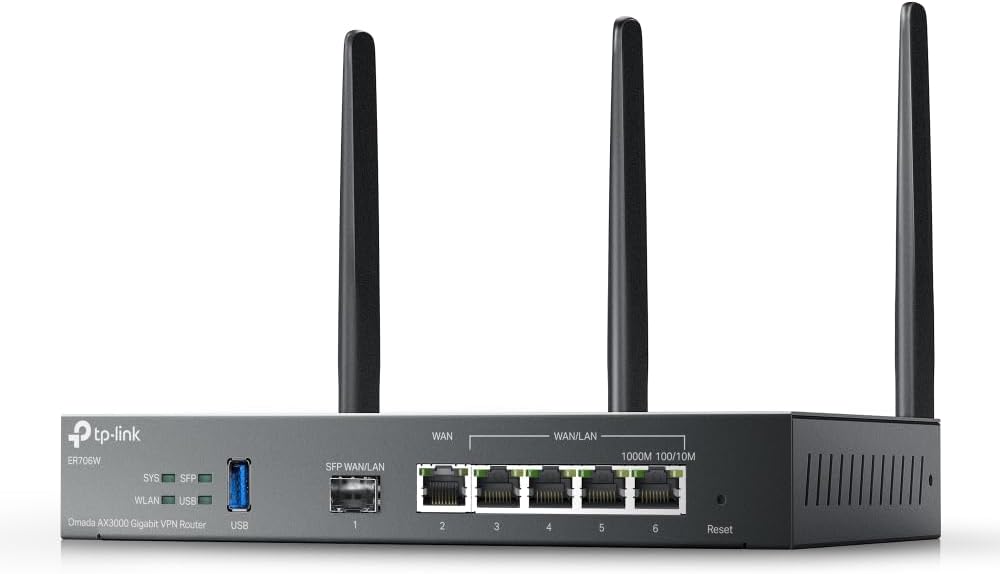
The Omada ER706W is designed for networks needing flexible WAN options and VPN security. It handles multiple internet lines efficiently to maximize bandwidth usage and reduce costs.
We may earn a commission when you buy through this link, at no additional cost to you.
Its load balancing across five WAN ports ensures you use all available bandwidth. The SFP slot adds future-proofing for fiber connections without extra adapters.
Integration with Omada access points creates a unified network management system. This is useful for businesses already using TP-Link or Omada gear.
Choose this router if you have multi-line broadband or need advanced routing features. It is best for IT teams comfortable with SDN controllers and complex configurations.
Up to five WAN ports enable load balancing and redundancy for critical business operations.
Supports SSL IPSec WireGuard and other VPN protocols for secure remote employee connections.
We may earn a commission when you buy through this link, at no additional cost to you.
The Ruckus R750 access point is built for areas with many connected devices like stadiums or conference centers. It delivers consistent performance where other routers might struggle under load.
We may earn a commission when you buy through this link, at no additional cost to you.
Its design focuses on ultra-dense environments to prevent congestion and dropouts. Ruckus hardware is known for durability and long-term reliability in professional settings.
While it requires a separate controller or cloud setup, the management offers deep control over traffic. This is ideal for enterprises needing granular network oversight.
Invest in this AP if you manage high-traffic areas. It ensures guests and staff stay connected smoothly without frustrating slow speeds.
Engineered to maintain speeds even when hundreds of devices connect simultaneously.
Built with commercial-grade components for continuous operation in demanding environments.
We may earn a commission when you buy through this link, at no additional cost to you.
The Ruckus R670 brings Wi-Fi 7 capabilities to mainstream businesses with its advanced antenna and multi-gigabit ports. It is a premium choice for those needing top-tier performance.
We may earn a commission when you buy through this link, at no additional cost to you.
BeamFlex+ adaptive antenna technology maximizes coverage and reduces errors automatically. This results in faster speeds and fewer dropped connections for users.
Integration of BLE and Zigbee allows unified networks for smart devices without extra hardware. This convergence simplifies IT management for IoT and security systems.
Choose this access point if budget allows and you need future-proof technology. It is ideal for modern offices or smart buildings requiring high reliability and speed.
BeamFlex+ adjusts signals in real time to avoid obstacles and boost throughput.
Wi-Fi 7 and Matter support prepare your network for upcoming smart home standards.
We may earn a commission when you buy through this link, at no additional cost to you.
The NETGEAR Orbi 970 mesh system covers up to 10000 square feet with blazing fast Wi-Fi 7 speeds. It is perfect for large spaces needing seamless roaming without dead zones.
We may earn a commission when you buy through this link, at no additional cost to you.
Quad-band technology reserves a dedicated lane for satellite traffic ensuring speed remains consistent. This prevents slowdowns even when many devices connect simultaneously.
Setup is straightforward via the Orbi app which guides you through each step. Once running it manages devices and guest access easily for remote owners.
Select this system if you have a large facility or multi-story building. It ensures every room has fast reliable internet without requiring complex cabling.
Move between rooms without losing connection as the mesh system handles transitions automatically.
Ten Gig ports support high-speed wired connections for servers or gaming PCs.
We may earn a commission when you buy through this link, at no additional cost to you.
The Omada EAP650 offers excellent value with free cloud management and high speeds in a compact design. It is ideal for small businesses needing reliable Wi-Fi without extra costs.
We may earn a commission when you buy through this link, at no additional cost to you.
It supports PoE for easy installation without nearby power outlets. The slim appearance blends into modern offices or hotels without disrupting aesthetics.
Omada SDN integration allows centralized control if you expand your network later. This scalability means you can grow without replacing existing hardware.
Pick this AP if you want a cost effective solution for indoor spaces. It provides solid performance and reliable support for typical commercial needs.
Free cloud management allows remote control without buying a physical controller.
Power over Ethernet or DC adapter allows installation almost anywhere in the building.
We may earn a commission when you buy through this link, at no additional cost to you.
The Ubiquiti U6+ is a reliable wireless access point with high-speed transfer rates and PoE support. It is perfect for businesses already invested in the Ubiquiti ecosystem.
We may earn a commission when you buy through this link, at no additional cost to you.
It supports up to 3 Gbit/s which is sufficient for most modern applications. Encryption features protect your valuable data from unauthorized access effectively.
Wall mountable design ensures it can be placed where signal strength is best. This form factor is useful in tight commercial spaces.
Choose this AP if you use other UniFi gear. It integrates seamlessly into existing networks for consistent management and performance.
Three gigabit per second speeds handle video calls and large file transfers easily.
Built-in encryption keeps business communications private and safe from interception.
We may earn a commission when you buy through this link, at no additional cost to you.
The TP-Link BE400 uses the latest Wi-Fi 7 features like Multi-Link Operation for better performance. It offers future-ready connectivity for new devices like latest smartphones and laptops.
We may earn a commission when you buy through this link, at no additional cost to you.
Six streams provide up to 6.5 Gbps total bandwidth for fast downloads and streaming. Multi-gigabit Ethernet ports ensure wired devices keep up with wireless speeds.
TP-Link is a signatory of the CISA Secure-by-Design pledge ensuring safety. This focus on security helps protect your network from common threats.
Buy this router if you want modern features at a reasonable price. It is great for small offices needing fast secure connections without complexity.
Transfers data across bands simultaneously to lower latency and improve reliability.
HomeShield provides parental controls and real-time IoT security out of the box.
We may earn a commission when you buy through this link, at no additional cost to you.
The NETGEAR Nighthawk WiFi 7 router delivers up to 9.3 Gbps across three bands for fast reliable connections. It is designed to handle busy homes or offices with many users.
We may earn a commission when you buy through this link, at no additional cost to you.
The dedicated 6GHz band ensures fast devices get their own lane without slowing down. This keeps video calls and gaming smooth even during peak usage.
The Nighthawk app allows easy setup and management remotely. You can pause devices or test speeds quickly from your phone.
Choose this router if you need a balance of speed and coverage. It fits well for businesses up to 2500 sq ft needing modern Wi-Fi standards.
Keeps the newest devices fast and free from congestion on older bands.
2.5 Gig ports support multi-gig internet plans for faster wired speeds.
We may earn a commission when you buy through this link, at no additional cost to you.
The ASUS RT-BE88U delivers blazing fast Wi-Fi 7 speeds and includes two 10G wired ports. It is built for demanding applications needing massive data transfer capacity.
We may earn a commission when you buy through this link, at no additional cost to you.
Its AI WAN detection ensures always-on internet by automatically switching to backup connections. This reliability is vital for businesses that cannot afford downtime.
Security is handled by AiProtection Pro powered by Trend Micro for thorough protection. This includes site-to-site VPN support for remote office connections.
Pick this router if you need maximum speed and wired capacity. It is ideal for creative studios or IT hubs needing 10G connections and mesh scalability.
Supports ultra-fast NAS connections and 10G networks simultaneously.
Detects internet drops and switches to mobile tethering automatically to keep online.
We may earn a commission when you buy through this link, at no additional cost to you.
Choosing the right commercial wireless router requires evaluating several technical factors to match your business needs and budget effectively.
Wi-Fi 6 and Wi-Fi 7 are the current standards for business networks. Wi-Fi 6 offers efficiency for many devices while Wi-Fi 7 adds speed and lower latency.
For modern deployments choose Wi-Fi 6 or newer to future-proof your investment against growing device demands.
Estimate the square footage and layout of your business space to determine the needed range. Large areas may require mesh systems or multiple access points.
Ensure the router covers all critical areas without dead zones to maintain productivity.
Count the total number of connected devices including phones, laptops, and IoT sensors. Routers vary in how many connections they can handle smoothly.
Select a router with a device capacity higher than your current count to avoid slowdowns.
Business routers should include advanced security like WPA3 and intrusion protection. Many offer free subscriptions to antivirus services for network-wide safety.
Prioritize models with built-in firewalls and encryption to protect sensitive company data.
Check for sufficient Ethernet ports for wired devices and support for multi-gigabit speeds. USB ports can add backup internet or storage capabilities.
Ensure the ports match your existing hardware and future network expansion plans.
Remote management apps and cloud dashboards simplify network administration. Look for intuitive interfaces that do not require deep technical expertise.
Easy management tools save time and reduce the need for dedicated IT staff.
Choose a system that supports adding more access points or nodes as you grow. Mesh compatibility allows seamless expansion without replacing the main router.
Scalable options protect your initial investment by accommodating business growth.
Commercial equipment often comes with better warranties than consumer models. Check for technical support availability and replacement policies before buying.
Reliable support ensures quick resolution if hardware issues disrupt your network.
Install the router in a central elevated location away from obstructions. Place it on a stable surface to ensure optimal signal distribution throughout your office.
Update the firmware regularly to patch security vulnerabilities and improve performance. Set automatic updates if the manufacturer supports this feature for hassle-free maintenance.
Monitor connected devices occasionally to ensure no unauthorized access occurs. Use the admin interface to track usage and block suspicious activity as needed.
Commercial routers offer better security protocols higher device capacity and longer warranty support. They often include features like VLANs guest portals and remote management essential for business use.
Yes most routers require a separate modem to connect to your ISP. Some combo units exist but pure routers work best with fiber or cable modems for speed.
High-end commercial routers can handle 200 or more devices simultaneously. Mid-range models usually support up to 100 devices depending on the model and usage.
Yes Wi-Fi 6 routers are backward compatible with older Wi-Fi standards. This means legacy devices still connect while newer ones enjoy faster speeds.
Mesh systems provide seamless roaming across large areas without dead zones. Multiple nodes work together to blanket your entire space with consistent strong signal.
Cloud management allows access from anywhere without local hardware. It is ideal for remote teams while local apps offer faster control without internet dependency.
Replace routers every three to five years to maintain security and speed. Regular updates keep performance optimal but hardware ages faster than software.
Built-in network protection acts like antivirus for all connected devices. Extra subscription tools may add layers of defense but check if your router includes these free.
This guide highlights ten top commercial wireless routers ranging from budget-friendly access points to high-end mesh systems. Each option offers unique strengths for different business needs and sizes.
Prioritize security and device capacity to ensure stable operations for your team. Investing in scalable hardware prevents future upgrades and supports growth over time.
Remember to check current pricing and availability before purchasing as offers change regularly. Verifying specs with your ISP ensures compatibility with your existing internet infrastructure.