
V-one Wired USB Gaming Controller
4.2Editor score
Multi-mode compatibility support
Affordable price point
Plug and play ease
Discover the top joysticks for Windows 11 with our expert guide comparing flight sticks, controllers, and specialized gaming peripherals for every budget.
Finding the right joystick for Windows 11 can transform your gaming experience from simple input to immersive control. Whether you prefer flight simulation, racing, or general gaming, the right hardware makes all the difference in precision and comfort.
We evaluated ten top-rated products based on compatibility, build quality, feature sets, and user feedback. Our comparison covers everything from budget-friendly gamepads to high-end flight sticks designed for serious simulation enthusiasts.
Each pick highlights specific strengths and ideal use cases to help you decide quickly. Keep in mind that prices and availability change frequently, so always verify current listings before making your final purchase decision today.
4.2Editor score

4.4Editor score

4.0Editor score
This side-by-side comparison breaks down the key specifications and capabilities of each joystick to help you find the perfect match for your gaming setup and specific needs.






The PXN 2113PRO offers an affordable entry point for flight simulation enthusiasts looking to enhance their gaming setup without breaking the bank. It features a solid design with vibration feedback and plenty of buttons for customization.
We may earn a commission when you buy through this link, at no additional cost to you.
This joystick stands out with its 12 programmable buttons and 8-way hat switch, allowing users to map complex commands easily. The vibration switch at the bottom adds immersion when activated correctly in game settings.
While it lacks support for consoles like Xbox or PlayStation, it works well on PCs running Windows 7 through 11. Some users note that vibration strength needs adjustment via the driver to feel noticeable during gameplay.
It is ideal for beginners who want a dedicated flight stick experience on a budget. If you need basic controls for sim games like Microsoft Flight Simulator or War Thunder, this controller delivers solid value.
Users gain access to flight simulation controls without high-end pricing.
Twelve programmable buttons allow extensive command mapping for complex maneuvers.
We may earn a commission when you buy through this link, at no additional cost to you.
The Thrustmaster T-Flight Hotas One delivers realistic flight control with its combined joystick and throttle design. It is built for both PC and Xbox, making it versatile for console and computer gamers alike.
We may earn a commission when you buy through this link, at no additional cost to you.
Its ergonomic design includes adjustable resistance and responsive triggers that improve precision during takeoff and landing maneuvers. The detachable throttle offers flexibility for desk or lap setups depending on user preference.
Although it lacks built-in rudder pedals, it can be expanded later with separate hardware. The S.M.A.R.T sliding rail system ensures smooth steering adjustments across different simulation environments seamlessly.
This model is perfect for pilots who want an authentic hands-on experience without extreme cost. Its broad compatibility and modular design make it a top contender in modern flight simulation gear.
Detachable throttle allows users to adapt setup to their space needs.
Works on both PC and Xbox for flexible gaming options.
We may earn a commission when you buy through this link, at no additional cost to you.
The V-one Wired USB Controller is a versatile gamepad that supports multiple platforms including PC, Android, and PS3. It offers vibration feedback and turbo functions for responsive gameplay across various genres.
We may earn a commission when you buy through this link, at no additional cost to you.
Its multi-mode capability allows seamless switching between Xinput and Dinput modes, which improves compatibility with older games and newer software alike. Users can plug it in and start playing immediately without complex steps.
While it is not designed for Xbox 360 consoles, its support for Windows XP through 11 ensures longevity across older and newer machines. The red color adds a unique visual touch to standard gaming setups.
Budget-conscious gamers will appreciate its performance relative to cost. It works well for casual play and light simulation tasks where high-end precision is not strictly required for fun.
Compatibility extends to Android devices and PS3 for broader use.
No driver installation is needed for most modern Windows systems.
We may earn a commission when you buy through this link, at no additional cost to you.
This Thrustmaster USB Joystick provides basic flight control with a focus on simplicity and ease of use. Its dedicated point of view button enhances immersion by allowing quick camera adjustments during missions.
We may earn a commission when you buy through this link, at no additional cost to you.
With only three axes and four buttons plus a trigger, it suits users who want straightforward input without complex mapping. The ergonomic handle ensures comfort during extended gaming sessions without hand fatigue.
Because it is limited in button count, it may not suit advanced simulators requiring multiple commands. However, it serves well as an entry-level device for casual users or younger gamers.
Ideal for those seeking a lightweight and affordable option, this joystick delivers reliable performance for basic flight tasks. It connects easily to Windows systems and starts working almost immediately.
POV button enables easy camera management during gameplay.
Ergonomic design fits hands naturally for prolonged use.
We may earn a commission when you buy through this link, at no additional cost to you.
The Microsoft Sidewinder Precision 2 remains a trusted name for flight enthusiasts seeking reliability. Its rotating handle provides precise rudder control, while the 146-degree action throttle offers complete command over speed.
We may earn a commission when you buy through this link, at no additional cost to you.
Users can save specific game profiles to the controller, allowing quick access to tailored settings without repeated adjustments. This feature is particularly useful for gamers who switch between different simulation titles frequently.
With eight buttons and an eight-direction hat switch, it supports complex commands efficiently. The USB connection ensures plug and play functionality on most Windows systems without additional software.
While it is an older design, it offers robust performance and comfort. It suits players who prioritize functional ergonomics and dependable control over the latest flashy features.
Download game commands directly into controller profiles for easy access.
Rotating handle allows accurate rudder adjustments during flight.
We may earn a commission when you buy through this link, at no additional cost to you.
The Logitech Extreme 3D Pro delivers high precision with a twist throttle and sturdy build that withstands frequent use. It is designed to offer smooth axis movement for accurate control during simulations.
We may earn a commission when you buy through this link, at no additional cost to you.
This joystick features programmable buttons that let users customize inputs according to their preferred flight style. The durable construction ensures it remains functional over time without degradation of performance.
Although it does not include rudder pedals, it provides enough control for most flight tasks. The high performance axis supports fine adjustments which are essential for landing and combat maneuvers.
It is a reliable choice for pilots who want professional grade control at a reasonable price. The classic design and robust engineering make it suitable for both beginners and experienced gamers.
Programmable twist adds extra control for complex flight maneuvers.
Strong materials ensure longevity even with daily gaming use.
We may earn a commission when you buy through this link, at no additional cost to you.
VOYEE offers a wired controller compatible with Xbox 360 Slim and various Windows versions, making it a flexible option for PC users. Its design focuses on providing immediate play through plug and play connections.
We may earn a commission when you buy through this link, at no additional cost to you.
Upgraded trigger buttons and sensitive joysticks allow quick responses to player commands without delay. The controller includes rumble control that adapts to game actions for enhanced immersion.
Its ergonomic contours fit comfortably in hands for long sessions, reducing strain over time. The 7.2ft cord provides ample reach so users can sit back comfortably during gameplay.
This controller suits casual gamers who want reliable performance without complex setup. While not optimized for FPS games, it delivers solid feedback and comfort for general simulation and action titles.
Upgraded trigger buttons allow quick reactions to in-game events.
Ergonomic contours reduce hand fatigue during long play sessions.
We may earn a commission when you buy through this link, at no additional cost to you.
The Thrustmaster SimTask FarmStick is specifically designed for Farming Simulator 25, delivering a plug and play experience for heavy machinery simulation. Its 3-axis joystick provides smooth control for tractors and construction equipment.
We may earn a commission when you buy through this link, at no additional cost to you.
Featuring Hall Effect Magnetic Sensors, it eliminates drift and wear ensuring precise performance over time. With up to 33 programmable inputs, users can manage every function without relying on keyboards.
The ambidextrous design allows flexible setups with racing wheels or dual joysticks. This adaptability makes it suitable for building a complete cockpit environment tailored to personal preferences.
It is ideal for serious farming sim players who demand accuracy and customization. However, it requires a racing wheel for full functionality which adds to the total system cost.
Hall Effect sensors ensure long-term precision without degradation.
Up to 33 inputs allow detailed machine control without keyboard.
We may earn a commission when you buy through this link, at no additional cost to you.
The Logitech G X56 H.O.T.A.S brings military-grade precision to flight simulation with 189 programmable controls and adjustable spring options. Its high resolution axes support accurate movements needed for realistic combat and space simulations.
We may earn a commission when you buy through this link, at no additional cost to you.
Hall effect sensors deliver reliable tracking that resists wear over time. The RGB lighting system allows users to match their gaming rig aesthetics while improving visibility in dark environments.
Its layout is optimized for VR use placing controls directly under fingers for easy navigation. Dual USB connection ensures stable data transfer for complex setups without latency issues.
For professional pilots and dedicated enthusiasts, this system offers unmatched customization. While expensive and requiring two USB ports, it provides elite performance and immersion for serious simulation players.
16-bit aileron and elevator axes ensure exact flight surface control.
RGB backlighting aids visibility and matches rig aesthetics seamlessly.
We may earn a commission when you buy through this link, at no additional cost to you.
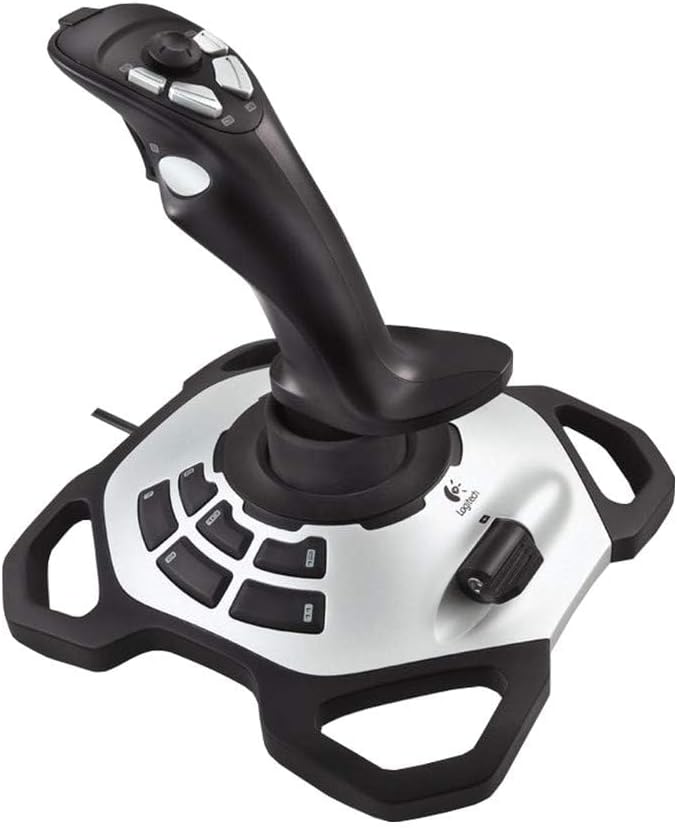
The Thrustmaster T.16000M FCS offers precision through H.E.A.R.T technology that does not degrade over time. Its fully ambidextrous design allows components to be tailored for left or right handed use.
We may earn a commission when you buy through this link, at no additional cost to you.
With 16 action buttons featuring braille style identification and an 8-way hat switch, it supports complex inputs efficiently. The four independent axes including twist rudder provide comprehensive control options.
TARGET software enables loading specific mapping profiles for each game which improves usability across multiple titles. Its USB connection ensures it works with most Windows PC configurations easily.
It is ideal for pilots seeking accuracy and flexible design. While limited to PC, its advanced technology and ergonomic options make it a reliable choice for flight sim enthusiasts.
Hall effect sensors guarantee long-term precision without signal drift.
Ambidextrous design allows full customization for left handed pilots.
We may earn a commission when you buy through this link, at no additional cost to you.
Choosing the right joystick depends on your simulation needs and budget. This guide breaks down key factors to consider.
Ensure the joystick supports Windows 11 and your preferred platform such as PC or Xbox. Some models are PC only while others offer cross platform use.
Check system requirements for drivers and USB ports to avoid connection issues.
More buttons allow better mapping of complex commands for advanced simulators. Look for programmable buttons that suit your game style.
Budget models may have fewer inputs which limits customization options.
Durable materials and stable bases reduce wear over time. Ergonomic designs improve comfort during long gaming sessions.
Avoid flimsy plastic if you plan to use the device frequently.
Hall effect sensors offer higher precision and longevity than traditional potentiometers. They reduce drift and ensure consistent performance.
Models with advanced sensors are better for accurate flight control.
Integrated throttles provide more realistic control but add complexity. Detachable options offer flexibility in desk setups.
Separate throttles may be necessary for advanced flight simulation setups.
Rumble features enhance immersion by reacting to game events. Adjustability helps tailor intensity to personal preference.
Some models lack vibration which may reduce realism in certain games.
Configuration software allows custom profiles per game improving usability. Mapping tools simplify complex command setups for efficiency.
Always check for driver support before purchasing to ensure functionality.
Entry level options cost less but offer fewer features. Premium models provide better precision and durability for enthusiasts.
Balance your budget with the features you need for specific games.
Connect your joystick to a USB port before launching any game. Many models require the device to be plugged in first for recognition by the system.
Calibrate the stick through your operating system settings if needed. This ensures movement and axes are accurately mapped to in-game controls.
Clean the buttons and stick regularly with a soft cloth. Avoid exposing the device to moisture or direct sunlight to prolong its lifespan.
Most models listed are compatible with Windows 11 though some may need drivers installed. Always check the manufacturer specifications before purchasing to confirm support.
Only specific models like the Thrustmaster T-Flight Hotas One support Xbox. Many flight sticks are PC only so verify platform compatibility carefully.
A throttle controls aircraft speed and altitude. Integrated throttles on flight sticks provide more realistic control during simulation gameplay.
Drivers are usually downloaded from the manufacturer website. Once installed plug the joystick into USB to allow auto detection by Windows.
Yes hall effect sensors reduce drift and wear. They provide more accurate and consistent input over time compared to traditional models.
Some models include a built-in throttle while others do not. Decide based on your preferred setup and simulation complexity before buying.
Yes many joysticks work with general games though some may lack support for certain genres. Check compatibility lists for specific titles.
Use the provided software to assign buttons to specific game functions. This process ensures each button triggers the desired action in sim.
The top picks offer something for every type of player from beginners to simulation experts. Each model brings unique strengths whether you value budget friendly options or premium features.
Prioritize compatibility and build quality to ensure your joystick meets long term needs. Features like sensors and software support add significant value over time.
Prices vary by model and retailer so always check current listings before buying. This guide helps narrow down choices to find the best fit for your setup.