
RisoPhy Mechanical Gaming Keyboard
4.5Editor score
Clicky blue switches for tactile feedback
Rainbow RGB backlight with nine modes
Full size 104 key layout
This expert guide compares ten top loud mechanical keyboard models for gamers and typists seeking audible feedback, tactile switches, and durable builds for
Finding a loud mechanical keyboard means you want clear audio feedback with every keystroke. These boards use clicky switches that deliver sharp tactile bumps and crisp sounds ideal for typing and gaming sessions.
We analyzed ten popular models ranging from budget-friendly options to premium builds. Each entry features distinct switch types, lighting effects, and build materials to help you find the right fit for your setup.
Each pick highlights key strengths and trade-offs so you can decide quickly. Product details and availability change often, so check current listings before purchasing to ensure you get the latest version of your chosen board.
4.5Editor score

4.6Editor score

4.6Editor score
This side-by-side comparison highlights the core features of each loud mechanical keyboard model to help you compare switch types, layouts, build quality, and special capabilities at a glance.




The Redragon Mechanical Gaming Keyboard offers an affordable entry into hot-swap customization with double-shot PBT keycaps and vivid backlighting that suits any desk setup. It rates well for build quality despite its budget price point.
We may earn a commission when you buy through this link, at no additional cost to you.
It features red linear switches that are smooth and quiet rather than loud, but the hot-swap sockets let you replace them with clicky blue switches easily. This flexibility allows you to tune the sound profile to your preference without soldering.
The red switches may feel too soft for those craving loud tactile feedback, and the backlighting lacks RGB color shifting, but these trade-offs keep costs low while preserving durability and customization potential for users.
Buy this if you value hot-swap flexibility on a budget and prefer to install your own switches later. It is a solid foundation for modding enthusiasts who want a reliable base board.
The hot-swappable design supports 3-pin or 5-pin switches so you can install clicky blues or silent reds to match your desired noise level.
Double-shot PBT keycaps resist wear and shine while providing crisp legends that remain visible under bright backlighting for long-term use.
We may earn a commission when you buy through this link, at no additional cost to you.
The RisoPhy Mechanical Gaming Keyboard delivers strong audible feedback with clicky blue switches and rainbow lighting effects that enhance your desk vibe. It earns a high rating for comfort and responsive typing performance.
We may earn a commission when you buy through this link, at no additional cost to you.
Its blue switches provide crisp tactile bumps and loud clicks that typists love, while the stair-step keycap design reduces hand fatigue during long sessions. The keyboard also includes hydrophobic spill-resistant holes for accidental protection.
While the ABS keycaps may develop shine over time and software customization is absent, these are minor issues given the low cost. The keyboard remains reliable for gaming and office work without extra configuration.
Choose this if you want loud clicky feedback at an entry price. It suits users seeking a straightforward plug-and-play experience with solid ergonomics and full-size functionality.
Blue mechanical switches deliver sharp clicks that confirm each keystroke making typing feel precise and engaging especially for touch typists who love sound.
Nine backlight modes with adjustable speed and brightness let you create ambient effects without needing RGB color shifting or complex software.
We may earn a commission when you buy through this link, at no additional cost to you.
The SteelSeries USB Apex 5 Hybrid stands out with its OLED smart display that shows game stats or messages while typing. It rates highly for durability and lighting customization with per-key RGB control.
We may earn a commission when you buy through this link, at no additional cost to you.
Hybrid blue switches blend membrane smoothness with tactile bumps, offering a balanced feel. The aircraft-grade aluminum frame ensures robustness, and the OLED panel enhances usability by displaying useful context without switching windows.
The hybrid switches may feel less loud than traditional mechanical blues, and the price is higher than budget boards. Still, the display and build quality justify the cost for serious gamers who value feedback.
Buy this if you want unique smart features and strong build materials. It is ideal for users who prioritize display customization and a premium typing experience over pure loud click feedback.
The OLED display supports gifs and game data allowing you to view Discord messages or health bars without alt-tabbing during matches.
Aircraft-grade aluminum alloy construction resists flex and scratches ensuring the keyboard stays stable and sturdy even after years of intense use.
We may earn a commission when you buy through this link, at no additional cost to you.
The RK ROYAL KLUDGE S108 combines vintage charm with performance using round keycaps inspired by classic typewriters and clicky blue switches that deliver satisfying feedback. It rates well for design and typing accuracy.
We may earn a commission when you buy through this link, at no additional cost to you.
Its metal alloy panel offers robust durability, while the retro keycaps provide a distinct tactile feel. The blue switches ensure loud clicks for precise typing and gaming, and full anti-ghosting supports rapid multi-key combos.
The board lacks hot-swap sockets and limits backlighting to yellow tones, but these constraints keep costs manageable. The unique aesthetic appeals to users seeking style alongside traditional mechanical performance features.
Choose this if you love vintage looks and loud clicky feedback. It suits typists and gamers who value distinctive keycaps and a sturdy build without modern RGB complexity.
Round keycaps mimic classic typewriters providing a nostalgic touch that enhances desk aesthetics and offers a comfortable ergonomic typing curve.
An aluminum alloy metal panel ensures scratch resistance and structural stability protecting the internals from wear during daily heavy use.
We may earn a commission when you buy through this link, at no additional cost to you.
The Redragon K668 features four dedicated hotkeys for quick access to common functions while offering hot-swap sockets for switch customization. It rates well for practical design and RGB lighting modes.
We may earn a commission when you buy through this link, at no additional cost to you.
Its layout includes mute and calculator shortcuts that improve workflow efficiency, and the hot-swap PCB supports various switch types for sound tuning. RGB effects include music sync modes that react to system audio.
The included red switches are quiet rather than loud, but you can swap them to clicky blues. While it lacks wireless connectivity, its compact footprint and ergonomic features support comfortable long sessions.
Buy this if you want practical shortcuts and switch customization. It suits users who need quick access keys and colorful lighting without spending on premium wireless features.
Dedicated hotkeys let you control volume or open calculators instantly which improves productivity during work or gaming without reaching for external controls.
RGB lighting modes sync with desktop audio creating dynamic visual effects that pulse to your music or game sounds for added immersion.
We may earn a commission when you buy through this link, at no additional cost to you.
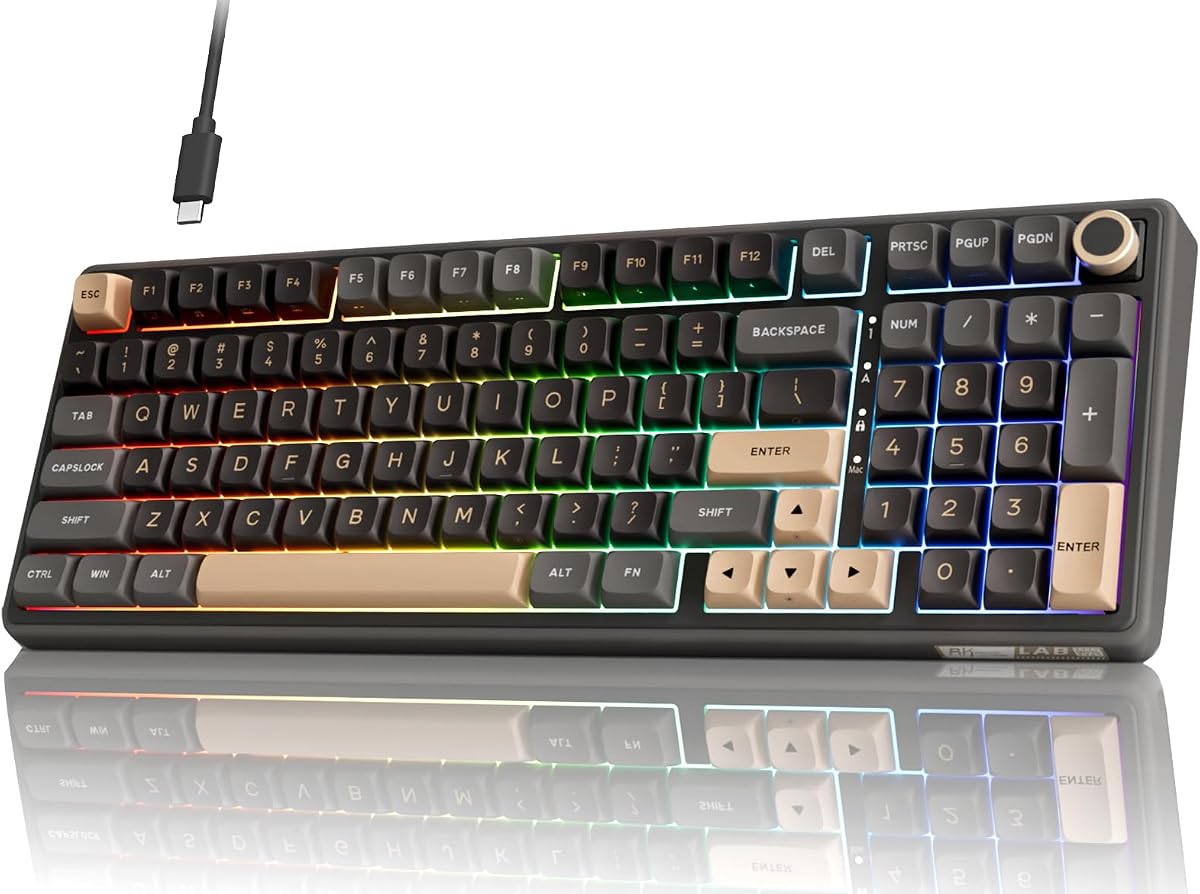
The RK ROYAL KLUDGE R98 Pro uses a gasket mount to create a softer typing feel and pre-lubed cream switches that sound smooth. It rates well for ergonomic design and compact full functionality.
We may earn a commission when you buy through this link, at no additional cost to you.
Its detachable aluminum knob offers precise volume control, and the gasket structure reduces harsh impact noises. MDA profile PBT keycaps provide comfortable wrapping around fingers during extended typing sessions.
The cream switches are linear and quiet, so you may swap them for clicky options. While not inherently loud, the gasket design ensures stability and sound dampening for a balanced acoustic profile.
Choose this if you value ergonomics and customizable switch options. It suits users who want a softer typing experience and easy control knobs without sacrificing key layout.
Five layers of foam and gasket mounting soften keystrokes reducing impact sounds and making typing feel smoother and more responsive.
A detachable CNC aluminum knob lets you adjust volume quickly without software making audio management simple during gaming or media playback.
We may earn a commission when you buy through this link, at no additional cost to you.
The Logitech G413 SE features durable PBT keycaps and a brushed aluminum frame that resists wear over time. It rates highly for build quality and reliable tactile feedback during intense gaming sessions.
We may earn a commission when you buy through this link, at no additional cost to you.
Its tactile switches provide consistent bumps with each keystroke while the magnesium aluminum alloy top case minimizes flex. The clean white LED lighting offers clarity without distracting colors for a minimal setup.
The lighting is limited to white LEDs and lacks RGB, and the tactile switches are less loud than clicky blues. Still, the board remains sturdy and responsive for users valuing durability and simplicity.
Buy this if you prioritize build quality and tactile feedback. It suits users who prefer a minimalist design with reliable performance over flashy lighting or sound customization.
Heat and wear resistant PBT keycaps keep legends clear and prevent shine ensuring the keyboard looks new even after heavy daily typing.
White LED backlighting offers clear visibility without color shifting providing a clean look that matches professional or minimalist desk setups.
We may earn a commission when you buy through this link, at no additional cost to you.
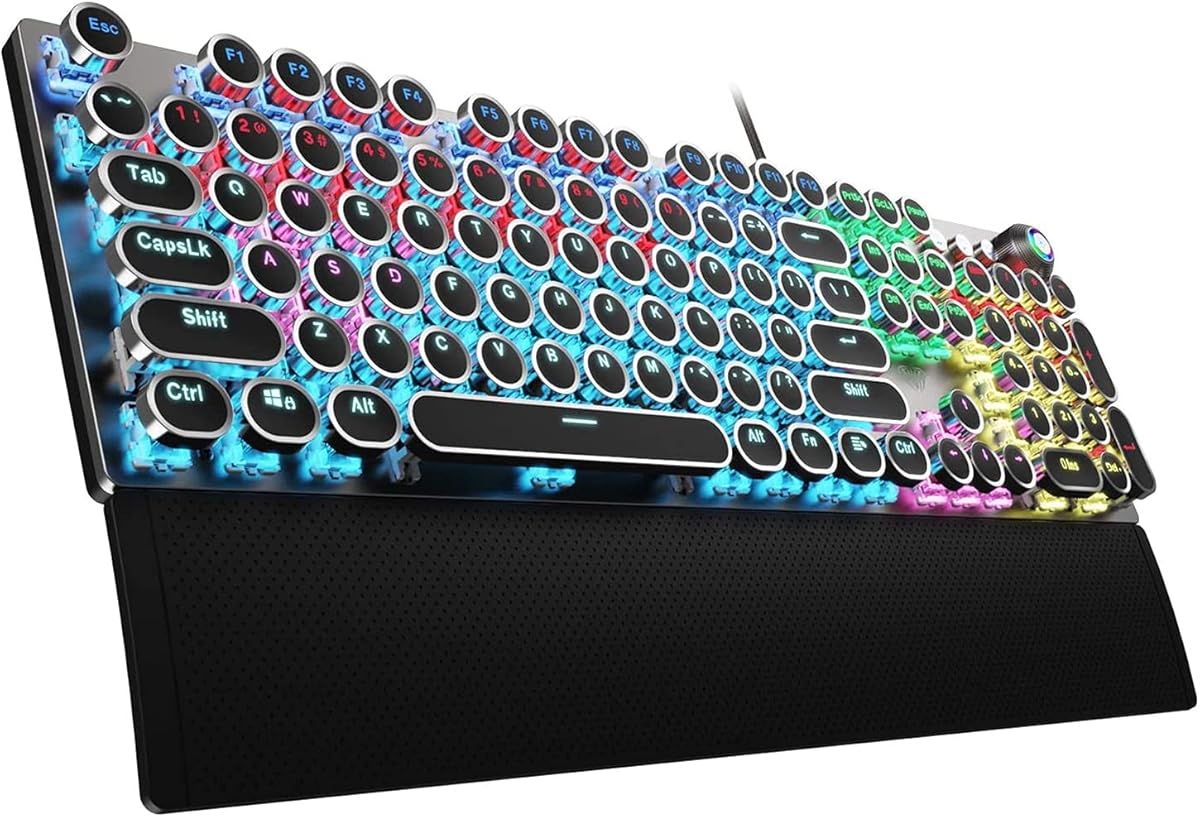
The AULA F2088 Typewriter uses round vintage keycaps and blue mechanical switches to deliver crisp audible feedback. It rates well for style and media controls that simplify volume and lighting adjustments.
We may earn a commission when you buy through this link, at no additional cost to you.
Its stepped floating keycaps reduce fatigue by providing better finger positioning while blue switches ensure loud tactile clicks. The aluminum panel protects against scratches and adds a premium feel to the desk.
Finding replacement caps may be harder since they are round and specialized. Also, the lack of software means limited macro options. Yet the design remains charming and functional for standard typing tasks.
Choose this if you love retro design and loud clicks. It suits users seeking a unique aesthetic with reliable switch feedback and convenient media control features.
A dedicated control knob adjusts volume and lighting effects quickly which simplifies task switching without using extra key combinations or software.
Top-grade aluminum alloy protects the keyboard from scratches and flex ensuring a solid and durable frame for daily use over long periods.
We may earn a commission when you buy through this link, at no additional cost to you.
The AULA F99 Wireless offers multi-device connectivity and gasket sound dampening for a softer typing feel. It rates highly for flexibility and battery life with a large 8000mAh capacity.
We may earn a commission when you buy through this link, at no additional cost to you.
Its gasket structure fills gaps to reduce hollow sounds while hot-swap sockets let you install different switches. The compact 96% layout saves desk space without sacrificing arrow keys or numpad function.
Linear switches are quiet, so swapping to clicky options is recommended for louder feedback. Charging takes time, but the battery lasts long between charges making it reliable for daily use.
Buy this if you need multi-device support and compact design. It suits users who value wireless flexibility and sound tuning without sacrificing keyboard functionality.
Bluetooth and wireless modes let you connect to five devices at once allowing quick switching between PC tablet or console with simple keystrokes.
Silicone pads and gasket structures reduce cavity noise creating a quieter and more solid typing experience even with light switch choices.
We may earn a commission when you buy through this link, at no additional cost to you.
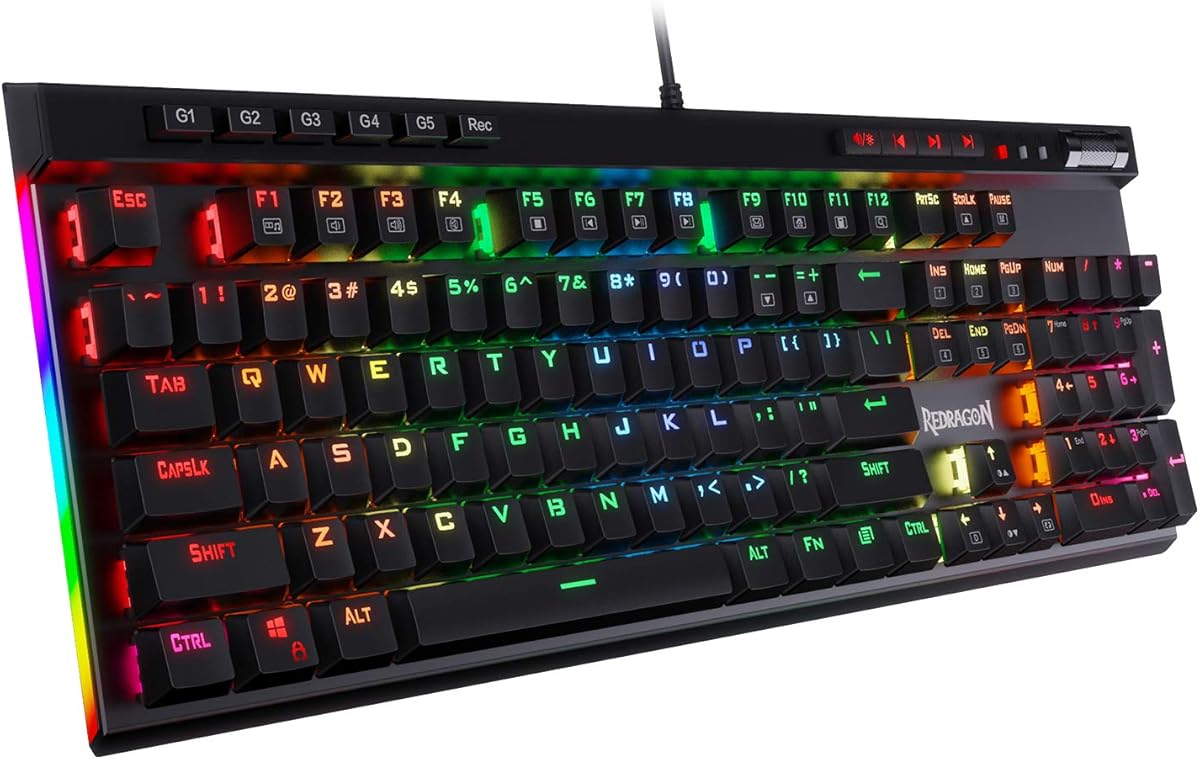
The Redragon K580 includes five dedicated macro keys that let you record combos without software. It rates well for loud clicky feedback and media controls that streamline audio adjustments.
We may earn a commission when you buy through this link, at no additional cost to you.
Its blue switches deliver distinct tactile bumps and audible clicks on every keystroke. Double-shot keycaps resist fading while the media wheel and hot-swap sockets provide flexibility for customization.
Software support is optional rather than required, but advanced RGB may be limited. The on-the-fly macro feature makes it accessible for users who want performance without complex setup steps.
Choose this if you need macro shortcuts and loud sound. It suits gamers and typists who value clicky feedback and quick macro recording on a wired keyboard.
Five dedicated macro keys allow recording combos directly on the keyboard saving time and simplifying game or work shortcuts without external software.
A dedicated media wheel adjusts volume and playback quickly making it easy to control audio without leaving your current task or game.
We may earn a commission when you buy through this link, at no additional cost to you.
Selecting the right loud mechanical keyboard involves understanding switch types, build materials, and additional features that affect sound and comfort.
Clicky switches such as blue types deliver audible feedback with each keystroke while tactile switches offer bumps without noise. Consider whether you prioritize loud sound or smoothness.
Prioritize clicky blue switches if you want audible confirmation of typing and enjoy sharp sound during gaming or work sessions.
Keyboards with aluminum frames or metal panels resist flex and scratches. PBT keycaps outlast ABS caps by reducing shine and keeping legends clear over time.
Choose aluminum or steel frames with PBT keycaps to ensure long-term durability and a stable typing base.
Full-size keyboards include numpads for productivity while tenkeyless layouts save space. Consider if you need arrow keys or function keys for your workflow.
Select a layout that balances workspace needs with compact ergonomics based on your desk size.
Hot-swap sockets let you change switches without soldering allowing you to upgrade from linear to clicky as your needs evolve.
Opt for hot-swap boards if you plan to customize switch sound or replace worn switches later.
RGB backlighting allows color customization while single-color LEDs offer simpler visuals. Look for adjustable brightness and effects that suit your desk environment.
Pick RGB for visual flexibility or static lighting for a cleaner minimalist setup.
Ergonomic features include wrist rests adjustable feet and stair-step keycaps. These reduce strain during extended typing or gaming sessions.
Choose a board with ergonomic accessories if you type or game for hours daily.
Wired keyboards offer consistent latency while wireless ones provide mobility. Some models support multiple devices via Bluetooth or dongle.
Select wired for gaming or wireless for flexibility depending on your desk setup.
Entry boards are cheaper but may lack durability or advanced features. Premium models offer better materials and customization at higher costs.
Assess your budget against desired features to find the best value for your needs.
Keep your keyboard clean by regularly dusting the keycaps and using a soft brush between switches to remove debris that may affect typing.
Use compressed air sparingly around hot-swap sockets to prevent damage while cleaning the surface of keycaps after spills.
Store your keyboard in a dry place and avoid direct sunlight to preserve keycap color and prevent warping of plastic components.
Loud mechanical keyboards can be disruptive in shared office spaces due to clicky switch feedback. If you work near others consider quieter tactile switches or a noise dampening mat.
Yes you can swap stock switches for clicky blue types if your keyboard supports hot-swap. This adds audible feedback without replacing the entire board.
No sound varies by switch type. Linear and silent switches produce minimal noise while clicky switches create sharp audible feedback.
Most mechanical switches are rated for 50 million keystrokes ensuring long life. PBT keycaps and solid frames further extend the board's usable lifespan.
Hot-swap allows easy switch changes without soldering which is useful for customization. It adds value if you plan to tune sound or replace switches later.
PBT keycaps resist shine and wear better than ABS and maintain legend clarity longer. They also provide a textured feel that improves typing grip.
Loud clicky switches provide immediate feedback on keystrokes which can improve confidence and accuracy. This is beneficial for touch typists who rely on audio cues.
You can use foam inserts dampening mats or silicone O-rings to absorb switch impact sound. These mods reduce volume while preserving tactile feedback.
This guide highlighted ten standout loud mechanical keyboards ranging from budget clicky models to premium boards with OLED displays or gasket mounts.
Prioritize switch type and build quality to ensure the board matches your desire for audible feedback and long-term durability.
Prices and availability fluctuate so verify current listings before purchasing to secure the best deal on your selected model.