
QUI Presentation Clicker with Volume Control
4.3Editor score
Bright red pointer light
328ft wireless range
Volume control included
This guide compares the top laser pointers for presentations based on visibility, battery life, range, and compatibility to help you choose the right tool for
Finding the right laser pointer for presentations can significantly impact how effectively you communicate your message to an audience. Whether you are teaching a class, delivering a business pitch, or leading a conference, having a reliable remote control is essential. Modern devices offer more than just a simple dot, providing advanced features like volume control, screen toggles, and wireless connectivity.
We have carefully evaluated ten leading products available on the market to determine which ones offer the best value and performance. Our analysis focuses on key aspects such as laser visibility, battery longevity, wireless range, and ease of use across different operating systems. By considering these factors, we aim to provide you with a comprehensive overview that simplifies your decision-making process.
Each product in our list includes detailed specifications, pros and cons, and specific use cases to help you identify the best match for your situation. Please note that availability and pricing may change over time, so we recommend verifying current details before making a purchase. Our goal is to equip you with the knowledge needed to select a high-quality presentation tool that enhances your professional or educational endeavors.
4.3Editor score

4.6Editor score

4.6Editor score
The following table provides a side-by-side comparison of all ten products to help you quickly identify key differences and similarities across features and specifications.




This presenter stands out as a top choice due to its superior green laser technology that cuts through ambient light effectively. It has received strong ratings from educators who value its reliability and ease of use in various settings. The USB-C charging feature eliminates the need for frequent battery replacements, making it a sustainable choice for daily use.
We may earn a commission when you buy through this link, at no additional cost to you.
Key strengths include the intuitive button layout that allows for seamless navigation through slides and multimedia elements. The ability to control volume directly from the remote is a significant advantage for presentations involving audio or video content. Additionally, the magnetic storage for the receiver ensures you never lose it after detaching it from your device.
While the price point is higher than some basic models, the long-term savings from not buying batteries justify the investment. Some users might find the green light less distinct in extremely bright conditions, but it generally performs better than red alternatives on most screens. The learning curve is minimal due to the straightforward design and lack of complex setup procedures.
This clicker is ideal for teachers, lecturers, and business professionals who prioritize visibility and convenience. If you are looking for a reliable tool that enhances your presentation flow without technical interruptions, this is a highly recommended option. Its compatibility with major operating systems ensures it fits into almost any existing technology setup effortlessly.
The 532nm green light provides a crisp dot that remains visible even on bright projection screens or whiteboards.
A single hour charge via USB-C powers weeks of use, reducing waste and ensuring you are always ready to present.
We may earn a commission when you buy through this link, at no additional cost to you.
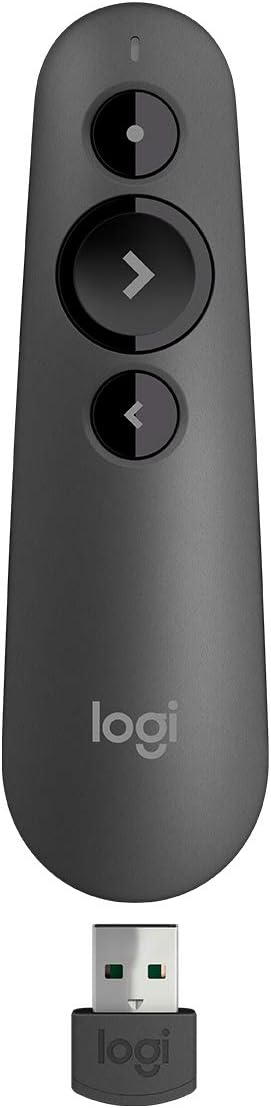
The Logitech R400 is a classic choice that has been trusted by professionals for years. Its straightforward design makes it easy for anyone to pick up and start using immediately without any technical barriers. The brand reputation ensures a certain level of durability and reliability that many users find comforting.
We may earn a commission when you buy through this link, at no additional cost to you.
Strengths include its compact form factor which fits easily in a pocket or bag for transport. The 50-foot range is sufficient for most standard conference rooms or classrooms. The red laser is bright enough for typical indoor lighting conditions, ensuring clear visibility of key points on your slides.
However, the reliance on AAA batteries means you may need to replace them occasionally depending on usage frequency. The range is also shorter compared to newer models that offer up to 100 feet of connectivity. These trade-offs are acceptable for users who prioritize simplicity and brand trust over advanced features.
This model is perfect for occasional presenters who do not need complex functionality. If you value a no-fuss tool that gets the job done reliably, the R400 is a solid choice. It works seamlessly with major presentation software and operating systems without requiring any additional drivers.
Logitech has built a reputation for quality, and this presenter continues that tradition with durable construction and consistent performance.
Its small size ensures it fits discreetly in your pocket, making it easy to carry between meetings or classes.
We may earn a commission when you buy through this link, at no additional cost to you.
This clicker offers a surprising amount of functionality for its low price point. It includes features like hyperlink navigation and volume control that are often reserved for more expensive models. The 100-foot range allows you to move freely around large rooms without losing connection to your device.
We may earn a commission when you buy through this link, at no additional cost to you.
The ergonomic design ensures that holding the device during long sessions remains comfortable. Soft rubber buttons provide tactile feedback that helps you press the correct controls without looking. The magnetic storage for the USB receiver is a thoughtful touch that prevents loss.
Some users may find the build quality slightly less robust than premium brands. The battery is not included, so you will need to purchase one separately to start using it right away. These minor issues do not significantly detract from its overall value proposition for budget-conscious buyers.
This is an excellent choice for students or small business owners who need a capable remote without breaking the bank. It supports a wide range of presentation software, ensuring compatibility with your existing workflow. The extended range makes it suitable for larger auditoriums or lecture halls.
Despite the low cost, this device offers high-end features like hyperlink control and volume adjustment that enhance presentation flow.
Move up to 100 feet away from your computer while maintaining a stable connection to your slides.
We may earn a commission when you buy through this link, at no additional cost to you.
The R800 is designed for professionals who need precise time management during presentations. The built-in timer display on the device allows you to track your speech duration without looking at a clock. This feature alone makes it invaluable for keynote speakers or conference presenters with strict time limits.
We may earn a commission when you buy through this link, at no additional cost to you.
Silent vibrating alerts ensure you know when you are approaching your time limit without distracting the audience. The green laser pointer is powerful and visible even on LCD displays or in brightly lit rooms. The ergonomic contours fit comfortably in the hand, reducing fatigue during extended use.
While it is one of the more expensive options on the list, the specialized features justify the cost for frequent presenters. Some advanced customizations may require installing software which adds a step to the setup process. However, basic slide control works out of the box without any additional configuration.
This model is best suited for corporate executives or speakers who value precision and high-quality build. If managing presentation time is a critical part of your routine, this tool offers significant advantages. The combination of laser visibility and timing functionality sets it apart from standard clickers.
The integrated timer with vibrating alerts keeps you on track without requiring you to check a wall clock or screen.
The green laser cuts through ambient light effectively, ensuring your pointer is seen clearly by all audience members.
We may earn a commission when you buy through this link, at no additional cost to you.
This presenter offers the flexibility of connecting via both USB receiver and Bluetooth technology. This dual connectivity ensures you can use it with a wide variety of devices including tablets and smartphones without needing adapters. The battery life is exceptional, lasting up to a year on a single AAA battery.
We may earn a commission when you buy through this link, at no additional cost to you.
The Logitech Presentation App allows you to customize button functions to suit your specific workflow. You can also monitor battery life and set on-screen timers through the software. Universal compatibility means it works with Windows, Mac, iOS, and Android systems seamlessly.
However, utilizing Bluetooth requires a pairing process that might be slightly more complex than plug and play USB. Some of the advanced features like app integration require installing software which might not be desired in locked-down corporate environments. Basic slide control works fine without these additions though.
This model is ideal for tech-savvy users who want flexibility across multiple device types. If you switch between a laptop and a tablet often, the dual connectivity is a major plus. The long battery life reduces the need for frequent maintenance or replacement.
Connect via USB for instant use or Bluetooth for a wireless experience with modern devices like iPads or Android tablets.
The device enters a power-saving mode when battery is low, extending useful life so you can finish your presentation.
We may earn a commission when you buy through this link, at no additional cost to you.
The QUI Presentation Clicker is one of the most budget-friendly options available without sacrificing essential features. It includes volume control which is a rare find at this price point. The wireless range extends up to 328 feet, allowing you to roam the entire hall during a presentation.
We may earn a commission when you buy through this link, at no additional cost to you.
The device is lightweight and comes with a clip for attaching to a notebook or pocket. This portability makes it easy to carry with you to meetings or classes. The red laser is bright enough to be seen clearly in most indoor lighting conditions.
While the build quality is functional, it may not feel as premium as more expensive models. The battery is not included in the package so you will need to provide your own. However for the low cost makes it an easy replacement if it gets damaged or lost.
This is a great choice for students or individuals who need a reliable clicker for occasional use. It supports major software like PowerPoint and Keynote without any driver installations. The long range ensures you can interact with your audience from any part of the room.
You get essential presentation controls and a long range at a price that fits any budget.
The included clip allows you to secure the clicker to your bag or notebook so it is always handy.
We may earn a commission when you buy through this link, at no additional cost to you.
The Norwii N95 features a rechargeable battery that supports USB-C charging for modern convenience. Its buttons can be reprogrammed to suit specific needs via the Norwii Presenter app. This customization allows you to map functions that align best with your presentation style or content type.
We may earn a commission when you buy through this link, at no additional cost to you.
The green laser pointer is significantly brighter than red alternatives ensuring visibility on various screen types. The dual connectivity options with both USB-A and USB-C make it compatible with older and newer devices. The 100-meter range is suitable for very large auditoriums or outdoor events.
Some users may find the software installation process tedious if they prefer plug and play simplicity. The charging cable is not included in the box which might be inconvenient if you do not have a compatible USB-C cable handy. Despite this, the functionality remains solid for most use cases.
This clicker is ideal for presenters who need adaptability and rechargeable power. If you use a variety of devices or prefer custom button layouts, this model offers those capabilities. The green laser ensures your points are seen clearly even in well-lit environments.
Reprogram buttons to handle specific actions like scrolling or window switching based on your unique needs.
USB-C charging means you can use the same cable as your laptop or phone for convenience.
We may earn a commission when you buy through this link, at no additional cost to you.
This remote offers both USB-A and USB-C connectors in one receiver to support multiple device types. The ergonomic design ensures it fits comfortably in your hand during use. It is compact enough to fit in a pocket without taking up much space or weight.
We may earn a commission when you buy through this link, at no additional cost to you.
The red laser pointer is effective for standard indoor presentations. It supports a wide range of operating systems including Windows, Linux, and Android. The plug and play feature makes it easy to set up quickly for last-minute presentations.
The wireless range is somewhat limited compared to other options but sufficient for most small to medium rooms. Mac users may need to complete a simple setup step which adds a slight delay to initial use. These are minor inconveniences given the overall utility and price.
This is a solid choice for those who switch between older and newer devices regularly. If you need a simple tool that works with both Mac and PC without adapters, this is effective. The compact design makes it easy to keep with your laptop bag.
The dual connector receiver supports both traditional USB ports and modern USB-C connections seamlessly.
Designed to fit naturally in your hand, reducing strain during long presentation sessions.
We may earn a commission when you buy through this link, at no additional cost to you.
This model features a built-in receiver with both USB-A and USB-C connectors for maximum compatibility. It includes volume control buttons which are often missing on standard clickers. The ergonomic body with soft touch coating ensures a comfortable grip during use.
We may earn a commission when you buy through this link, at no additional cost to you.
The 100-foot range allows for significant movement around a room or hall. It supports full screen and black screen toggles which are useful for managing focus during talks. The magnetic slot at the bottom securely holds the receiver to prevent loss.
It requires AAA batteries which are not included. The magnetic storage is convenient but may not be as secure as a docked receiver on some units. However the functionality covers most basic and advanced presentation needs effectively.
This clicker is excellent for teachers and professionals who need versatile connectivity. If you work in environments with mixed device types this eliminates the need for adapters. The volume control adds significant value for multimedia presentations.
Forget carrying multiple dongles; this single receiver adapts to both USB-A and USB-C ports.
Access volume and screen toggles directly from the remote for smoother multimedia transitions.
We may earn a commission when you buy through this link, at no additional cost to you.
This clicker is designed for simplicity and portability making it easy to carry everywhere. The ergonomic design ensures comfortable use during presentations. It weighs only 38 grams including battery which makes it nearly weightless in your pocket.
We may earn a commission when you buy through this link, at no additional cost to you.
The laser pointer is bright and visible over a range of 328 feet. It requires only one AAA battery which simplifies maintenance compared to multi-battery devices. Setup is quick with no drivers required for most operating systems.
While it lacks advanced features like volume control, it covers the essentials perfectly. The battery life is decent but depends heavily on usage frequency. The plastic build is functional but may not feel as durable as metal alternatives.
This is a great option for students or casual presenters who need a basic tool. If you want something small that fits in your bag without adding weight, this is ideal. The ease of use means less time setting up and more time presenting.
At just 38 grams, this remote adds almost no weight to your gear but delivers solid performance.
With no complex setup or software, you can start using it immediately out of the box.
We may earn a commission when you buy through this link, at no additional cost to you.
Selecting the right presentation clicker involves considering several factors that impact usability and effectiveness in different environments.
Laser color is a critical factor because different colors have varying levels of visibility depending on the ambient lighting and screen type. Green lasers generally appear brighter to the human eye than red lasers and work better on LCD screens or bright backgrounds. If you present in well-lit conference rooms or use digital displays, a green laser ensures your audience can follow your pointing clearly.
Red lasers are standard and work well on dark screens but may fade on bright whiteboards or projectors. Choose green if visibility is your top priority and red if you want a more traditional option.
Some clickers use replaceable AAA batteries while others feature rechargeable batteries via USB-C. Rechargeable models offer long-term cost savings and reduce battery waste which is beneficial for daily users. AAA batteries are convenient if you need to replace them quickly during a long series of events.
Evaluate how often you present to decide which power source suits you best. Rechargeable options are increasingly popular due to their reliability and modern charging convenience.
Wireless range determines how far you can move from your computer while maintaining a stable connection. Typical ranges vary from 50 to 300 feet depending on the model. For large auditoriums or outdoor events, you need a device with a longer range to avoid signal drops.
If you present in small meeting rooms, a shorter range is sufficient. Ensure the device uses RF technology for a reliable connection that is not easily blocked by obstacles.
Modern presentation tools should support multiple connectivity methods to ensure compatibility with various devices. Look for options with both USB-A and USB-C receivers or Bluetooth capabilities. This flexibility allows you to connect to older laptops and newer tablets without needing adapters.
Universal compatibility prevents technical issues during important presentations. Always check that the clicker supports your specific operating system and software before purchasing.
Features like volume control, hyperlinks, and screen toggles enhance your ability to manage multimedia and content smoothly. A built-in timer helps you track your speaking time without relying on a phone or computer screen. These tools reduce stress and allow you to focus more on your message than on technical controls.
Prioritize features that align with your presentation style. If you rarely use audio or video, a simple clicker may suffice.
The physical design of the clicker affects comfort during long presentation sessions. Ergonomic shapes and rubberized buttons provide better tactile feedback and reduce hand fatigue. Portability is also important if you travel frequently to different venues for work or school.
Choose a model that feels comfortable in your hand and fits easily in your pocket or bag. A compact design ensures it is always accessible when you need it most.
Price ranges vary significantly from budget-friendly options to premium models with advanced features. Determine your budget and weigh it against the features you actually need. Investing in a slightly more expensive device often pays off in durability and reliability over time.
Budget models can be effective for casual use but may lack essential features like volume control or rechargeability. Focus on total value rather than just the upfront cost.
Choosing a reputable brand often guarantees better build quality and customer support. Established manufacturers usually provide reliable warranties and easy access to replacement parts or software updates. Reviews from other users can also provide insights into real-world performance and durability.
Research the brand before buying to ensure confidence in your investment. Reliable support ensures you can resolve any issues quickly without affecting your presentations.
To begin using your wireless presenter, plug the USB receiver into your computer's USB port. For Bluetooth models, follow the pairing instructions in the device manual to connect via your system settings. Ensure the device is turned on and the battery is charged or installed correctly before starting your presentation software.
During your presentation, use the slide advance buttons to move through your content smoothly. If your device has volume controls, adjust them discreetly without stopping your speech. Use the laser pointer to highlight key points on your slides, avoiding prolonged shining at the audience to protect their eyes.
After you are done, store the USB receiver securely in the device's built-in slot to prevent loss. Clean the exterior with a soft cloth to remove dust or fingerprints. If using a rechargeable model, keep it plugged in or charged regularly to ensure it is ready for your next session.
Yes, green laser pointers are generally brighter and more visible to the human eye than red ones. This makes them more effective for use on LCD screens or in brightly lit rooms. If you present frequently in varied lighting conditions, a green laser is often the better choice.
Most modern wireless clickers are compatible with Mac computers via USB or Bluetooth connections. Some models may require simple software installation for full feature access on macOS. Always verify compatibility on the product page before purchasing to ensure it works with your specific operating system.
To extend battery life, turn off the laser when not in use and avoid leaving the device on for long periods. Some models have auto-sleep features that activate after inactivity. Using rechargeable batteries or opting for a USB-C rechargeable model can also reduce long-term costs and waste.
The typical wireless range for presentation remotes varies from 50 feet to over 300 feet depending on the model. Most standard devices offer around 100 feet which is sufficient for most conference rooms or classrooms. For large auditoriums, check the specific range specifications to ensure you can move freely.
Yes, many modern clickers support tablets via Bluetooth or USB-C connectivity. Ensure the device is compatible with your tablet's operating system and that the connection method is supported. Some apps may need to be installed to enable full functionality on tablet platforms.
If your laser pointer is not working, check that the device is turned on and the battery is properly installed. Ensure there are no physical obstructions blocking the lens or the connection. If using a wireless model, verify the receiver is connected to the computer and the device is within range.
Yes, you should avoid shining the laser directly into anyone's eyes as it can cause temporary discomfort or damage. Use the pointer to highlight content on screens rather than pointing at people. Keep the device out of reach of children to prevent misuse.
Most presentation clickers are designed to work with both PowerPoint and Keynote by default. They generally function as keyboard controls that are recognized by presentation software. If you use niche software, check the product description to confirm compatibility before buying.
Our review highlights that the best laser pointer for presentations depends on your specific needs regarding visibility, connectivity, and features. The Green Light Presentation Clicker stands out for its superior visibility and rechargeable power, making it a top choice for educators. The Logitech R800 offers premium features like a built-in timer for those who need precise time management.
When choosing a device, prioritize features that directly impact your presentation flow such as laser color, wireless range, and battery type. Budget-friendly options like the QUI Presentation Clicker provide essential functions at an affordable price for occasional users. Consider how often you present and the environment you use to in determine the best fit.
Always verify current prices and availability as these may change over time. Selecting a reliable tool ensures you can focus on your message without technical interruptions during critical moments. With the right clicker, you can enhance your audience engagement and deliver your presentations with confidence.