
Light Gaming Laptop
4.6Editor score
AMD Ryzen 7 430U Processor
16GB DDR4 RAM Included
15.6 Inch FHD Display
Choosing the right laptop for emulators requires balancing powerful processing with efficient graphics capabilities. You need a machine that can handle complex instruction sets smoothly without overheating during long sessions. This guide explores the best options available today for seamless emulation experiences.
We evaluated these devices based on processor cores memory speed and integrated graphics performance. Each laptop was selected for its ability to run diverse emulator software efficiently. Our comparison covers various price points to fit different budgets and needs.
Each pick highlights specific strengths like battery life or display quality for immersive viewing. We focus on real-world usability for students and professionals alike. Remember that prices and availability can change so verify details before purchasing.
4.6Editor score

4.4Editor score

4.4Editor score
As an Amazon Associate we earn from qualifying purchases.
This table offers a side-by-side look at the core specifications of each laptop. It helps you quickly compare processing power memory capacity and graphics capabilities across the board.

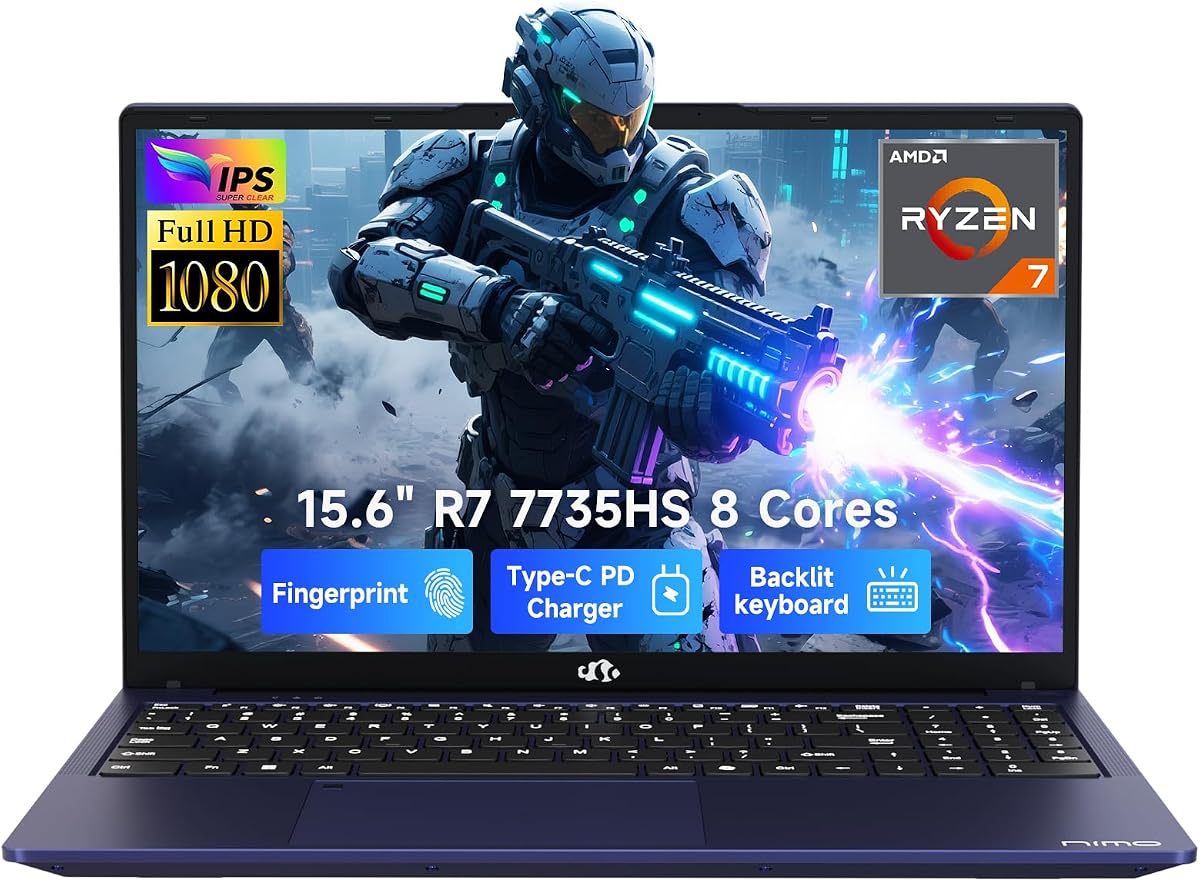


This NIMO laptop stands out as a top choice for emulator users seeking balanced performance. Its AMD Ryzen 7 7735HS processor delivers robust multitasking capabilities while the Radeon 680M graphics handle light to moderate emulation tasks smoothly. With a solid 4.4 rating from users it proves reliable for daily work and entertainment.
We may earn a commission when you buy through this link, at no additional cost to you.
The standout feature here is the dual DDR5 RAM slots which allow you to upgrade memory as needed. This ensures your system remains fluid even when running multiple emulator instances alongside other apps. The 15.6 inch FHD display provides clear visuals and the 180 degree hinge makes sharing content easy during collaborative sessions.
However this device is not designed for highend gaming workloads that demand dedicated GPUs. The integrated graphics are efficient but may struggle with the most demanding emulators at high settings. Still for casual users and students the value and portability make it a practical pick for most emulation scenarios.
If you need a reliable machine for school and casual gaming this laptop fits the bill well. Its expandability and strong processor ensure longevity while the battery life supports mobile usage. We recommend this for anyone wanting a versatile device without breaking the bank.
The dual DDR5 slots allow easy memory upgrades to keep pace with demanding apps.
Intelligent power systems optimize battery use for all day productivity on the go.
We may earn a commission when you buy through this link, at no additional cost to you.
The NIMO 17.3 inch laptop offers exceptional value with its massive 32GB DDR5 RAM included. This makes it ideal for users who need to run heavy emulation software alongside virtual machines or large game libraries. The 1TB SSD ensures fast load times and ample space for all your digital content.
We may earn a commission when you buy through this link, at no additional cost to you.
Its 17.3 inch display provides a wide workspace perfect for managing complex emulator settings and viewing game graphics. The AMD Ryzen 5 6600H processor delivers steady performance for everyday tasks and light gaming. Users appreciate the physical webcam shutter and fingerprint reader for enhanced security and privacy.
While the display size is great for immersion it adds weight to the device making it less portable. The processor is capable but not top tier for intense gaming workloads. However for the price the hardware configuration beats many competitors in this segment hands down.
This model is perfect for students or home users who prioritize screen real estate and memory over portability. The included high capacity RAM means you won't need to upgrade soon. We suggest this for anyone building a dedicated gaming station on a budget.
The large 17.3 inch screen offers more room for multitasking and detailed views.
Physical webcam shutters and fingerprint readers keep your data safe from prying eyes.
We may earn a commission when you buy through this link, at no additional cost to you.
The ASUS ROG Strix G16 is a powerhouse designed for serious emulation and gaming enthusiasts. Its Intel Core i7 14650HX processor paired with the RTX 5060 GPU ensures smooth performance even with the most demanding emulators. The 165Hz display delivers fluid visuals that enhance the gaming experience significantly.
We may earn a commission when you buy through this link, at no additional cost to you.
Key strengths include the advanced cooling system which keeps temperatures in check during extended play sessions. The build quality feels premium with customizable RGB lighting that adds a personal touch to your setup. Wi-Fi 7 connectivity ensures you stay online with minimal latency for multiplayer features.
The main trade-off is the price which is higher than other options on this list. Battery life is also shorter due to the powerful components drawing more energy. But if you need top tier performance and don't mind spending more this machine is unmatched.
This laptop is ideal for enthusiasts who want desktop level power in a portable chassis. It handles AAA games and complex emulation scenarios with ease. We recommend it for users who prioritize raw speed and display quality above all else.
Vapor chamber cooling and liquid metal keep the system running cool under heavy loads.
Wi-Fi 7 and multiple ports ensure you connect to the internet and peripherals instantly.
We may earn a commission when you buy through this link, at no additional cost to you.
This NIMO laptop offers a balanced mix of performance and portability for everyday users. The Ryzen 7 7735HS processor handles multitasking with ease while the Radeon 680M graphics provide smooth visuals for light gaming. It is designed for those who need a reliable companion for work and play alike.
We may earn a commission when you buy through this link, at no additional cost to you.
The 100W PD charging capability means you can get back to full power quickly with minimal downtime. Its lightweight chassis makes it easy to carry to campus or coffee shops. The 180 degree hinge allows for flexible viewing angles during presentations or collaboration sessions.
While it performs well for most tasks the screen brightness could be better for outdoor use. The trackpad is functional but may lack precision for detailed creative work. These trade-offs are acceptable given the competitive price and strong core performance it offers.
We recommend this for students and professionals who need a dependable device without heavy bulk. It balances cost and capability well for general emulation and office tasks. If you value mobility and quick charging this is a solid choice to consider.
100W PD charging keeps you moving without waiting hours to recharge your battery.
Multiple ports and USB-C support let you connect all your favorite peripherals easily.
We may earn a commission when you buy through this link, at no additional cost to you.
This model shines with its high capacity memory and storage which are critical for heavy emulation loads. The 32GB DDR5 RAM ensures smooth performance when running multiple applications simultaneously. The 1TB SSD provides ample room for large game files and system backups without clutter.
We may earn a commission when you buy through this link, at no additional cost to you.
Its 17.3 inch display offers a wide workspace perfect for detailed configuration and multitasking. The physical webcam shutter provides an extra layer of privacy during video calls or when not in use. Support from the manufacturer is reliable ensuring peace of mind after purchase.
However the larger size makes it less ideal for daily commuting or travel. While it handles light gaming well it is not designed for heavy graphical workloads. For users focused on productivity and emulation at home this is a practical and efficient choice.
We suggest this for home users or students who need a powerful desktop replacement. The memory and storage configuration handles complex tasks gracefully. If you prioritize function over form this laptop delivers excellent value for your money.
A 1TB SSD gives you plenty of space for games and documents without deleting files.
Built in webcam shutters and fingerprint readers keep your personal data secure at all times.
We may earn a commission when you buy through this link, at no additional cost to you.
This KAIGERR laptop focuses on efficiency and portability for users on the move. The AMD Ryzen 7 430U processor delivers solid performance for everyday tasks and light emulation workloads. Its 16GB RAM provides a good baseline for multitasking without excessive bloat or cost.
We may earn a commission when you buy through this link, at no additional cost to you.
The 15.6 inch FHD display with thin bezels offers an immersive viewing experience for media and games. WiFi 6 ensures fast and reliable connections whether you are working from home or a coffee shop. The sleek design makes it easy to slide into a backpack for daily commutes.
One limitation is that the RAM is soldered and cannot be upgraded later. The battery life is decent but may require charging during all day use away from outlets. Still the combination of speed and lightness makes it a strong contender for this price range.
We recommend this for students or freelancers who need a portable and capable machine. It handles standard emulation apps and office tasks with ease. If you want a lightweight device with modern connectivity this is a smart pick to consider.
Thin bezels maximize the screen area for a better viewing experience during use.
WiFi 6 and Bluetooth 5.2 keep your device connected to the internet and accessories seamlessly.
We may earn a commission when you buy through this link, at no additional cost to you.
This NIMO model offers impressive specs for the price with 32GB DDR5 RAM and a fast 1TB SSD. The Ryzen 7 7735HS processor ensures smooth multitasking and quick load times for applications and games. It is a solid choice for users needing performance without paying premium prices.
We may earn a commission when you buy through this link, at no additional cost to you.
The IPS display provides vibrant colors and wide viewing angles which enhance media consumption. Fingerprint unlock adds a layer of security and convenience for logging in quickly. The included 100W Type-C charger ensures you can power up rapidly when needed.
While the performance is strong the build feels somewhat basic compared to higher end models. Battery life is moderate so you may need to carry the charger for extended use. These are minor compromises given the powerful hardware inside the chassis.
We suggest this for power users who need speed and storage without overspending. It handles heavy workflows and emulation with confidence. If you want a capable machine for work and play this is a compelling option to explore.
The DDR5 RAM and PCIe 4.0 SSD deliver rapid speeds for demanding multitasking scenarios.
Fingerprint sensors allow quick and secure login to protect your personal files.
We may earn a commission when you buy through this link, at no additional cost to you.
This laptop is designed for creators and power users who need top tier specs for heavy workflows. The 64GB DDR5 RAM and 2TB SSD provide endless room for large files and complex applications. The Ryzen 7 8745HS delivers desktop class performance for editing and gaming alike.
We may earn a commission when you buy through this link, at no additional cost to you.
The Radeon 780M graphics ensure smooth visuals for modern games and media editing tasks. USB4 connectivity allows you to connect multiple high speed peripherals without cluttering your desk. The metal chassis feels durable and premium while keeping the weight manageable for travel.
Although it offers excellent performance the price is higher than entry level devices. The battery life is impressive for such a powerful machine allowing all day productivity. These features make it a robust investment for long term use and professional work.
We recommend this for professionals and students who demand high performance and reliability. It handles demanding emulation and creative projects with ease. If you need a machine that grows with your needs this is a strong candidate to consider.
With 64GB of RAM you can run dozens of tabs and apps without any slowdowns.
USB4 and HDMI 2.1 ports let you connect external drives and monitors effortlessly.
We may earn a commission when you buy through this link, at no additional cost to you.
This KAIGERR model offers reliable performance for everyday computing with its 8 core Ryzen 7 5700U processor. It handles multitasking and light gaming well due to the solid 16GB RAM and fast SSD. Users appreciate the responsiveness and build quality for the price point.
We may earn a commission when you buy through this link, at no additional cost to you.
The display features thin bezels that maximize screen space for an immersive experience. WiFi 6 ensures you stay connected with high speeds in crowded networks. The lightweight design makes it easy to carry between home and office without strain.
However the RAM is fixed and cannot be upgraded which may limit future expansion. Speaker quality is decent but not exceptional for media consumption. Despite these minor drawbacks the laptop remains a reliable choice for general use.
We suggest this for users who need a solid laptop for work and casual play. It offers good value for the hardware included. If you want a dependable machine without excessive bulk this is a smart option.
The 8 core processor delivers fast speeds for running multiple applications at once.
Thin bezels create a wide screen experience that draws you into movies and games.
We may earn a commission when you buy through this link, at no additional cost to you.
The HP OmniBook 3 is a practical choice for students and office users who need basic performance. Its Ryzen 3 30 processor handles web browsing and document editing well for everyday tasks. The 17.3 inch display provides ample space for multitasking and content viewing.
We may earn a commission when you buy through this link, at no additional cost to you.
Features like the Copilot key and advanced noise reduction enhance productivity and communication quality. Fast charging technology allows you to get hours of use from a short charging session. The overall design prioritizes comfort and ease of use for daily activities.
While it lacks high end power for heavy emulation it serves well for lighter apps. The 8GB RAM may become a bottleneck for very heavy workloads. Still for casual users the value and large screen make it an attractive option.
We recommend this for users who need a simple and reliable machine for school or work. It offers essential features without unnecessary complexity. If you want a large screen laptop for basic tasks this is a solid choice.
Noise reduction technology ensures clear voice quality during meetings and online classes.
Fast charging restores half your battery in minutes for minimal downtime during use.
We may earn a commission when you buy through this link, at no additional cost to you.
This laptop stands out by including Windows 11 Pro and Office pre-installed for immediate productivity. The Intel Core i7 processor handles common tasks smoothly while the 16GB RAM ensures fluid multitasking. It is a practical solution for professionals needing a ready to use machine.
We may earn a commission when you buy through this link, at no additional cost to you.
The 15.6 inch display provides clear text and images for document work and video calls. A backlit keyboard allows typing in dim environments without eye strain. The lightweight design makes it easy to carry to meetings or classes daily.
While the display is decent it lacks the vibrance of higher end models for gaming. Wi-Fi standards are slightly older which may impact speed in congested networks. These factors are minor trade-offs for the included software and professional features.
We recommend this for business users who need immediate setup and reliability. It covers all essential needs without extra configuration. If you want a laptop that is ready for work out of the box this is a smart choice.
Pre-installed Windows 11 Pro and Office mean you can start working immediately.
Backlit keys ensure you can type accurately in low light conditions without fatigue.
We may earn a commission when you buy through this link, at no additional cost to you.
This KAIGERR laptop offers a compact and affordable solution for everyday computing needs. The Ryzen 7 430U provides reliable performance for multitasking and light gaming. With 16GB RAM and a fast SSD it handles daily apps with responsiveness and ease.
We may earn a commission when you buy through this link, at no additional cost to you.
The 16 inch display offers clear visuals for media and work tasks. WiFi 6 ensures you stay connected with high speed internet in crowded places. A webcam privacy cover adds a valuable layer of security when you are not in calls.
While it is a solid budget option the battery life may require frequent charging during all day use. The screen color accuracy is standard for this price range. Still the performance to price ratio makes it a strong contender for general users.
We suggest this for students or home users who need a reliable and affordable laptop. It handles basic tasks and light gaming well. If you want good value without breaking the bank this is a smart pick.
Physical webcam covers give you full control over when your camera is active.
SD card slots allow you to add more storage space for media and files easily.
We may earn a commission when you buy through this link, at no additional cost to you.
Selecting the ideal laptop for emulation depends on your specific needs and budget. This guide breaks down the key factors to help you make an informed decision.
The central processing unit or CPU is the brain of your laptop. For emulation you need a processor with strong single core performance to handle the translation of game instructions. Look for recent generations from AMD or Intel with multiple cores to ensure smooth operation.
Prioritize CPUs with high clock speeds and efficient architecture to avoid lag during gameplay.
Random access memory or RAM determines how many programs you can run at once. Emulators often require substantial memory to load assets quickly. Aim for at least 16GB of RAM to ensure your system remains responsive when multitasking.
Higher capacity RAM allows for smoother emulation of older consoles and modern devices alike.
Integrated graphics have improved significantly but dedicated GPUs still offer better visuals for heavy emulation tasks. Look for laptops with Radeon or RTX series graphics if you plan to play demanding titles. Integrated options like Radeon 680M are excellent for budget friendly setups.
Choose a GPU that matches the resolution and effects you want to achieve in your games.
Solid state drives or SSDs are essential for fast boot times and quick access to game files. NVMe PCIe 4.0 SSDs provide the best performance for large game libraries. Avoid traditional hard drives as they can cause long loading times and stuttering.
Aim for at least 512GB of storage to accommodate your OS and multiple emulation titles.
A clear and vibrant screen enhances the gaming experience significantly. Look for Full HD resolution with IPS panels for better viewing angles and color accuracy. High refresh rates like 144Hz are beneficial for smooth motion in supported games.
Ensure the display is bright enough for your environment to avoid eye strain during long sessions.
If you plan to move your laptop often consider the weight and size of the device. Lighter models under 1.7kg are easier to carry but may sacrifice battery life or cooling. Balance your need for mobility with the power you require for gaming.
Check the dimensions to ensure the laptop fits comfortably in your backpack or bag.
Emulation can be power intensive so battery life varies based on usage. Look for laptops with fast charging capabilities to minimize downtime. A battery lasting at least six hours is ideal for all day productivity and travel.
Prioritize models with efficient power management to extend usage away from outlets.
Modern laptops should offer a range of ports for controllers and external monitors. USB-C with PD charging and multiple USB-A ports are essential for connecting peripherals. Wi-Fi 6 ensures stable and fast network connections for online features.
Check for HDMI or DisplayPort options if you plan to connect to a larger screen regularly.
Always use the original power adapter to ensure safe and efficient charging for your device. Avoid using cheap third party chargers that may not support fast charging standards or could damage the battery over time.
Keep your laptop in a well ventilated area while gaming to prevent overheating. Use a cooling pad if you plan on long sessions to maintain consistent performance and protect internal components.
Regularly update your operating system and drivers to fix bugs and improve compatibility. Clearing temporary files and running disk cleanup tools helps keep your storage fast and your system running smoothly.
To run emulators smoothly you need at least an Intel Core i5 or AMD Ryzen 5 processor with 8GB of RAM. A dedicated graphics card helps with more demanding titles but integrated graphics like Radeon 680M are sufficient for many games. Fast SSD storage is essential to reduce loading times.
You do not always need a dedicated GPU for emulation as modern integrated graphics have improved significantly. However for high end console emulation or high resolutions a dedicated RTX or Radeon GPU is recommended. For casual use integrated options will save you money.
Most modern laptops can run basic emulator software but performance varies based on hardware. Older or very thin laptops may struggle with more complex emulation requiring powerful CPUs. Always check the system requirements of specific emulator software before buying.
16GB of RAM is the ideal standard for running multiple emulators and applications simultaneously. While 8GB works for lighter tasks 16GB ensures smoother performance and future proofing. If you plan to use virtual machines alongside emulation aim for 32GB.
Screen size matters for immersion but higher resolution is more critical for visual clarity. A 15.6 inch screen is a good balance between portability and viewing area. Ensure the display has good color accuracy to enjoy the graphics as intended.
Gaming laptops often have better cooling and performance components which benefit emulation tasks. They typically come with dedicated GPUs and faster processors suitable for demanding software. However budget laptops with good specs can also handle emulation effectively if priced correctly.
We explored ten top laptops for emulators covering various budgets and performance levels. From the powerful ASUS ROG Strix G16 to the budget friendly Light Gaming Laptop there is something for everyone.
Prioritize processor power and memory capacity to ensure your device handles emulation tasks efficiently. Consider portability and battery life if you plan to use your laptop on the move regularly.
Remember to check current prices and availability before making your final decision. Technology evolves quickly so verify that the features match your needs at the time of purchase.