
Hard Drive Reader USB 3.0 & Type C
4.1Editor score
Universal USB 3.0 Support
High-Speed Transmission Rates
Plug and Play Setup
Finding the right laptop hard drive adapter kit is essential for accessing old storage drives without opening your computer case. These tools allow you to connect internal SATA or IDE drives to modern USB ports for quick data recovery or backup tasks.
We evaluated ten top-rated kits based on compatibility, transfer speeds, power stability, and ease of use. Each product was analyzed for its ability to handle both 2.5 inch and 3.5 inch drives while supporting legacy IDE and modern SATA interfaces seamlessly.
Each pick highlights key strengths like dual-drive support, Type-C connectivity, or robust power supplies. Remember that availability and stock can vary, so checking current listings ensures you get the right model for your specific drive types and operating system.
4.1Editor score

4.4Editor score

4.6Editor score
As an Amazon Associate we earn from qualifying purchases.
This table provides a side-by-side comparison of all ten models to help you quickly identify the best fit for your laptop data needs based on interface support and included accessories.


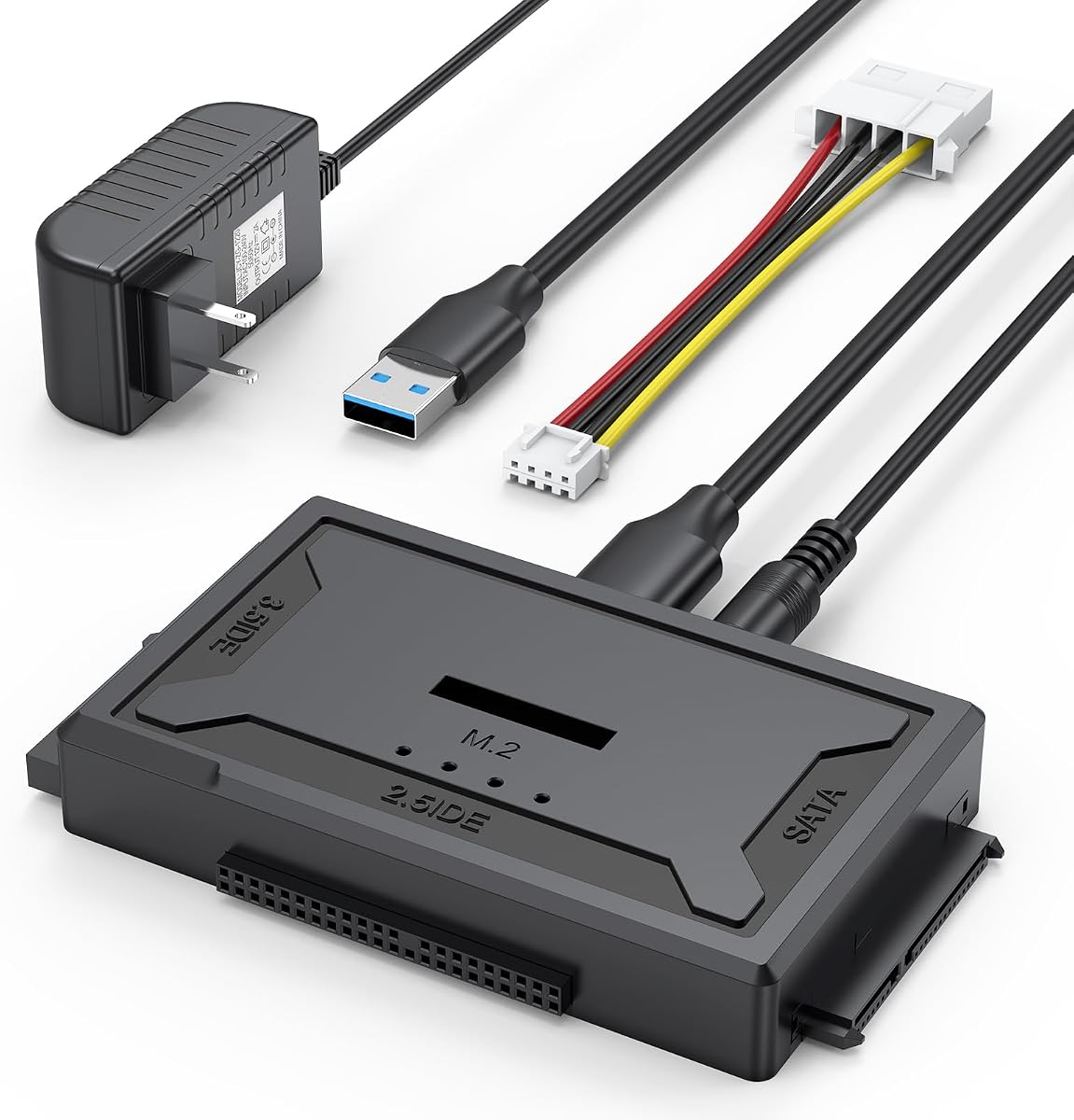
The Unitek USB 3.0 IDE/SATA Adapter stands out as a versatile solution for users needing to access legacy IDE drives alongside modern SATA storage. With a solid rating, it delivers reliable connectivity for both 2.5 and 3.5 inch drives without requiring internal mounting tools or complex configurations.
We may earn a commission when you buy through this link, at no additional cost to you.
Its standout quality is dual-drive simultaneous support, allowing you to clone data directly from one drive to another. The included 12V 2A power adapter ensures stable operation for power-hungry 3.5 inch drives, while the USB 3.0 interface enables fast transfer speeds up to 6Gbps for efficient backups.
While highly capable, users should note it relies on USB-A ports only. If your laptop only has Type-C, you will need an adapter. Also, always connect the external power when using 3.5 inch IDE drives to avoid performance drops or drive failures during data recovery tasks.
This kit is ideal for IT professionals and home users managing mixed storage environments. Whether you need to recover old files from a retired desktop or upgrade your laptop, this adapter provides the flexibility and power needed for consistent performance across different drive types.
You can connect one IDE and one SATA drive at the same time, enabling direct cloning without intermediate steps.
The included 12V 2A power supply ensures older 3.5 inch IDE drives spin up consistently without brownout issues.
We may earn a commission when you buy through this link, at no additional cost to you.
This Hard Drive Reader USB 3.0 & Type C adapter offers excellent value for users seeking broad compatibility at a budget-friendly price point. It supports both USB-A and USB-C connectivity, making it suitable for older desktops and modern laptops alike without requiring extra dongles for every setup.
We may earn a commission when you buy through this link, at no additional cost to you.
Its key strength lies in universal support for drives up to 20TB, ensuring future-proof storage access. The included USB-C to USB adapter provides flexibility for modern ports. Additionally, the on/off power switch helps prevent electrical damage during hot-swapping, protecting your data from sudden disconnects.
The IDE interface does have lower speed limits compared to SATA, but it remains sufficient for most recovery tasks. Users should consult the detailed manual thoroughly as some configurations might require jumper settings or specific port connections to ensure drives are recognized correctly by your operating system.
For budget-conscious buyers needing reliable access to old drives, this kit is a strong contender. It handles everything from small SSDs to large desktop HDDs, and the dedicated technical support team can assist if you encounter unrecognized drive issues during your data recovery projects.
The inclusion of both USB-A and USB-C connections makes this adapter usable across almost any laptop or desktop available today.
Supporting drives up to 20TB means you can use this kit for current large storage needs without worrying about capacity limits.
We may earn a commission when you buy through this link, at no additional cost to you.
With an impressive rating, this Hard Drive Reader USB 3.0 & Type C kit is designed for users who demand reliability during critical data recovery operations. It supports home users and professionals alike, offering stable performance for both SATA and IDE drives across various laptop configurations.
We may earn a commission when you buy through this link, at no additional cost to you.
Its key strengths include an extended body design that makes connecting 3.5 inch IDE ports easier, along with a softer 4-pin cable that reduces connector strain. The inclusion of a 12V 2A power supply ensures that even demanding desktop drives spin up consistently without power loss during transfers.
While the price may be slightly higher than basic kits, the build quality and included accessories justify the cost. The flexible USB 3.0 cable prevents accidental disconnections, and the LED status indicator helps you monitor activity status visually without relying solely on system notifications or file explorer indicators.
This adapter is best for users who value long-term support and ease of use. The 12-month after-sales guarantee and professional tech support provide peace of mind, making it a safe investment for recovering precious data from old or damaged hard drives stored in your office or home.
The extended body and softer cables make connecting older IDE connectors significantly easier and less prone to physical damage.
Stable power and high-speed performance reduce the risk of data loss during recovery of valuable files from failing drives.
We may earn a commission when you buy through this link, at no additional cost to you.
This Hard Drive Reader kit is designed to solve common compatibility issues when dealing with older drives and modern laptops. It supports various formats including SATA, IDE, and Blu-ray drives, making it a comprehensive tool for both home users and IT enthusiasts needing reliable data access.
We may earn a commission when you buy through this link, at no additional cost to you.
The standout quality is its stability during high-speed transfers. The extended body design ensures better alignment for 3.5 inch IDE ports, while the included 12V 2A power adapter prevents power shortages that often cause drive failures during intensive data recovery or cloning processes.
One trade-off is the need for external power when using 3.5 inch drives. However, this ensures consistent performance rather than relying on unstable USB bus power. The flexible cables also reduce physical stress on connectors, extending the lifespan of both the adapter and your older hardware components.
Ideal for users seeking a reliable all-in-one solution, this kit comes with clear safety operation guidance. Whether you are archiving office documents or recovering personal photos, the plug-and-play nature and professional support make it a dependable choice for critical storage tasks.
The dedicated power adapter ensures that even demanding desktop drives operate without interruption during long transfer sessions.
Manual guidance helps prevent accidental data loss by guiding users through proper initialization and connection protocols.
We may earn a commission when you buy through this link, at no additional cost to you.
The SABRENT USB 3.0 to SATA Hard Drive Docking Station offers a convenient tool-free solution for accessing bare SATA drives. With a solid rating, it simplifies connecting 2.5 and 3.5 inch drives via a lay-flat bay that accepts drives without needing screws or mounting brackets for quick access.
We may earn a commission when you buy through this link, at no additional cost to you.
Its key strengths include UASP support for faster data transfers and a real-world speed optimization that maximizes throughput. The included 12V power adapter ensures 3.5 inch drives spin up reliably, while the LED indicator provides clear visual feedback on drive activity and power status during use.
However, this dock supports SATA drives only, excluding IDE or M.2 options. If you have older PATA drives, you will need a different adapter. Additionally, USB hubs may cause intermittent disconnections, so plugging directly into your computer is recommended for stable performance during large file transfers.
This docking station is ideal for IT technicians who frequently swap drives. The hot-swapping capability allows changing drives without rebooting, saving valuable time during system audits or backups. Its cross-platform compatibility ensures seamless use across Windows, macOS, and Linux environments.
The lay-flat bay design lets you slide drives in and out quickly without any screws or tools, saving setup time.
You can swap drives instantly without restarting your computer, making it perfect for frequent data access tasks.
We may earn a commission when you buy through this link, at no additional cost to you.
The SABRENT USB 3.0 to 2.5in SATA Adapter Cable provides a compact and efficient way to connect laptop drives to modern systems. With an exceptional rating, it is highly regarded for its plug-and-play functionality, requiring no external drivers or complex setup on any major operating system.
We may earn a commission when you buy through this link, at no additional cost to you.
Its standout quality is the USB bus-powered design, which eliminates the need for wall power for most SSDs. The UASP support ensures faster data transfers compared to standard USB bridges. This makes it perfect for users carrying their laptops to different locations needing quick access to external storage.
One limitation is that it supports 2.5 inch drives only. Larger 3.5 inch desktop HDDs will not spin up with USB power alone. Additionally, laptops with only USB-C ports need a separate USB-C to USB-A adapter, which is not included in the package but is widely available separately.
This cable is best for laptop users who want a lightweight solution. It connects your 2.5 inch SSD or HDD instantly for backups or file transfers. The enhanced support and available firmware updates ensure optimal performance, making it a reliable tool for everyday data access on the go.
The cable design fits easily in a laptop bag, making it ideal for users who need portable access to external drives.
Designed specifically for 2.5 inch SSDs, it delivers high speeds without the bulk of a traditional docking station.
We may earn a commission when you buy through this link, at no additional cost to you.
The BENFEI 2.5 Inch SATA to USB Tool Free External Hard Drive Enclosure provides a sleek way to transform an internal drive into an external one. With a strong rating, it stands out for its tool-free installation, allowing you to push out the cover and slide in your drive instantly.
We may earn a commission when you buy through this link, at no additional cost to you.
Its key strengths include support for both USB-C and Type-A connections, ensuring compatibility across generations of laptops. The UASP protocol boosts transfer speeds by 70% compared to standard USB 3.0, making file copying significantly faster. It also handles up to 6TB drives with no capacity issues.
While limited to 2.5 inch drives, it is optimized specifically for SSDs. The enclosure adds minimal bulk while offering robust protection for your data. The 18-month unconditional warranty shows confidence in build quality, ensuring long-term protection for your investment without complex return hurdles.
Ideal for users wanting a simple protective case, this enclosure works well with most major SSD brands. Whether you are expanding storage on a console or backing up a laptop, the plug-and-play design ensures seamless integration with your existing USB ports and operating system.
You can install or remove the drive without any tools, just push the cover and slide the drive in place.
UASP support increases speed by 70%, making large file transfers quick and efficient compared to standard adapters.
We may earn a commission when you buy through this link, at no additional cost to you.
This USB 3.0 to SATA IDE Adapter Hard Drive Reader offers dual interface flexibility with both USB-A and Type-C ports. With a solid rating, it allows you to connect different drive types simultaneously, making it useful for transferring data between various storage formats quickly and easily.
We may earn a commission when you buy through this link, at no additional cost to you.
Its key strengths include the ability to work with two drives at once, one IDE and one SATA. The 2-in-1 dual interface design meets the needs of users with mixed hardware setups. The included 12V 2A power adapter ensures older 3.5 inch IDE drives receive enough power to spin up correctly.
However, some users may need to set jumper switches on older IDE drives to master or slave modes for proper recognition. New drives also need to be initialized in Disk Management before they can be recognized by the operating system.
For users seeking versatility, this adapter is a strong choice. The LED indicator provides clear status updates, and the hot swap feature lets you disconnect drives without restarting. It serves well for recovering data from mixed collections of legacy and modern drives across different computers.
With both USB-A and Type-C ports, you can connect to any laptop or desktop without needing extra adapters.
The included 12V adapter ensures old IDE drives receive enough power for stable operation during recovery tasks.
We may earn a commission when you buy through this link, at no additional cost to you.
This Hard Drive Reader supports not only HDDs but also optical drives like DVD-ROM, making it more versatile for accessing older media. With a strong rating, it connects to computers via USB 3.0 and Type-C ports, enabling fast data transfer while supporting dual-head IDE connections for 40 and 44-pin drives.
We may earn a commission when you buy through this link, at no additional cost to you.
Its key strengths include humanized design elements like the on/off switch that protects drives from unnecessary electrical wear. The stable power supply ensures reliable operation even with power-hungry desktop drives. The LED indicator clearly shows activity status so you know exactly when data is being read or written.
A trade-off is the complexity of jumper settings for older IDE drives and the need to initialize new ones before recognition. However, the detailed tips in the package help users navigate these steps safely. The rear USB port recommendation for desktops ensures maximum power stability.
Ideal for users needing to access both data and optical media, this adapter is a reliable choice. Whether recovering old photos or archiving system backups, the robust power and broad compatibility ensure your files remain safe and accessible across modern operating systems.
Unlike many kits, this supports DVD and CD drives, allowing you to recover data from old discs easily.
The on/off switch helps prevent data corruption by allowing safe disconnection without unplugging cables directly.
We may earn a commission when you buy through this link, at no additional cost to you.
The Hard Drive Reader 4-in-1 is an upgraded solution designed to handle modern M.2 drives alongside legacy SATA and IDE storage. With a high rating, it stands out for its 10Gbps transfer speed on M.2 NVMe drives, making it one of the fastest options available for current SSD technology.
We may earn a commission when you buy through this link, at no additional cost to you.
Its key strengths include the new 4-pin power cable which is softer and flexible, improving connection to older IDE drives. The dual IDE ports allow for reading both 2.5 and 3.5 inch IDE drives easily. The open design ensures compatibility with any size of M.2 drive without complex adapters.
However, it does not support mSATA or B Key protocols, which may exclude some older SSDs. Users should ensure their file system format matches their operating system format to avoid read errors. This requires checking drive settings before connecting to avoid confusion during data retrieval tasks.
For users with mixed drive types, this kit offers unmatched flexibility. The strong after-sales service ensures you get answers to any configuration questions. It is ideal for tech enthusiasts needing to retrieve data from both modern NVMe storage and decades-old mechanical drives in one package.
Supports modern NVMe protocols allowing ultra-fast data retrieval from current SSD storage formats.
The upgraded soft power cable makes connecting to older IDE drives much easier and less prone to breakage.
We may earn a commission when you buy through this link, at no additional cost to you.
Selecting the right adapter depends on your drive types, port availability, and power requirements. Here are the key factors to consider before purchasing a laptop hard drive adapter kit.
Ensure the adapter supports the specific interfaces of your drives. SATA drives are common in modern laptops, but older IDE or PATA drives require dual-support models. Some kits only support SATA while others support both SATA and IDE for broader versatility.
Always check the connector types on your existing drives before buying to avoid incompatibility issues.
Modern laptops often have USB-C ports while older kits use USB-A. Look for kits with dual interfaces or included adapters if your laptop lacks the required USB-A port. Using the wrong port can lead to connection failures or reduced speeds.
Choose an adapter that matches your laptop's available ports or includes necessary transition cables.
3.5 inch desktop drives generally require external 12V power to spin up correctly. Kits without power adapters may only work with 2.5 inch SSDs powered by USB bus power. Always verify if the kit includes a dedicated power supply if you need to access larger drives.
An included power adapter ensures stable operation and prevents drive failures during transfers.
USB 3.0 and Type-C support offer transfer speeds up to 5Gbps or higher, significantly reducing backup times. Some adapters support UASP protocol for further speed optimization on compatible systems. Check the interface speed to ensure it meets your data recovery needs.
Higher transfer speeds minimize wait times during large file migrations and backups.
Most modern kits are plug-and-play, requiring no driver installation for Windows, Mac, or Linux. However, some legacy models might require drivers for specific IDE recognition. Opting for plug-and-play kits simplifies setup and reduces technical hurdles during emergency recovery.
Prioritize kits that work out of the box to save time during critical data access needs.
Some adapters limit supported drive capacity to around 6TB, while others support up to 20TB. If you plan to use large modern drives, verify the capacity limits in the product specs to ensure full functionality without partition errors.
Check capacity limits to ensure your large drives are recognized fully by your system.
Look for features like LED indicators, on/off switches, and hot-swapping support. These add convenience and safety by letting you monitor activity and safely remove drives without restarting the computer. Some kits also include tools for optical drives or M.2 formats.
Extra features enhance usability and protect your drives from accidental damage or power loss.
Reliable technical support and warranty periods matter when dealing with hardware. Kits with dedicated support teams can help troubleshoot unrecognized drives or connection errors quickly. A longer warranty period ensures you are protected against manufacturing defects.
Choose vendors offering clear support channels to resolve potential issues quickly if they arise.
Begin by connecting the external power adapter if your drive is a 3.5 inch model. Ensure the power adapter is plugged into a wall outlet before connecting the drive to prevent brownouts. Then connect the USB cable to your laptop and turn on the drive using the on/off switch.
If using older IDE drives, check for jumper settings and configure them to master or slave as needed. For new drives, initialize them in Disk Management before accessing files to ensure proper recognition. Always wait for the LED indicator to stabilize before reading data.
After use, safely eject the drive from the operating system before unplugging the cable. Store the adapter in a dry place away from extreme heat or moisture to protect internal electronics. Regularly check cable connections for wear to maintain consistent performance over time.
Yes, some kits like the Unitek or specific dual-interface models support connecting one IDE and one SATA drive at the same time. However, others may only support one interface type at once. Always check the product description for dual-drive capabilities before purchasing.
Yes, 3.5 inch desktop drives require external 12V power to spin up and operate correctly. USB power alone is insufficient for most desktop drives. Kits that include a 12V 2A adapter are recommended to ensure stable performance without drive failures.
Some kits include a USB-C to USB-A adapter or offer dual USB-C and USB-A connectivity. If your laptop only has USB-C and your kit uses USB-A, you will need an additional adapter. Look for universal kits to ensure direct compatibility with modern laptops.
Older IDE drives often require jumper settings to be configured correctly for master or slave modes. Additionally, ensure the power adapter is connected properly. If the drive is new, you may need to initialize it in Disk Management before it appears in File Explorer.
Most adapters are designed for data transfer and recovery rather than booting an OS. Some systems may boot from them, but performance can be inconsistent. It is generally safer to use them for backup and file access rather than running your daily operating system.
Capacity limits vary by model, ranging from 6TB to 20TB. Always verify the supported capacity in the product specs before using large modern drives. Exceeding capacity limits can lead to read errors or incomplete data access during transfers.
Whether you prioritize dual-drive support, modern USB-C connectivity, or reliable power supplies, there is a kit for every need. The Unitek model offers excellent versatility for mixed drives while budget options provide solid performance for SATA access.
Focus on compatibility with your specific drive types and available ports to ensure seamless data access. Always check for included power adapters if you plan to use 3.5 inch drives regularly to avoid connection issues.
Remember to check current product listings for availability as models may vary. Selecting the right adapter ensures safe and efficient recovery of your valuable data across different generations of storage hardware.