
Harvopu Keyboard Case
4.4Editor score
7-color backlight options
Magnetic detachable design
Built-in rechargeable battery
Finding the right keyboard case for your iPad Pro 13 M4 transforms your tablet into a powerful workstation. The best options offer seamless connectivity, sturdy protection, and comfortable typing experiences for daily productivity.
We compared ten top-rated magnetic and wireless cases based on compatibility, trackpad quality, build durability, and viewing flexibility. Our analysis focuses on real-world usability for students, professionals, and creative users.
Each pick highlights unique strengths like backlit keys or detachable designs to match your workflow. Remember that availability and specifications can change, so verify details before purchasing your ideal accessory today.
4.4Editor score

4.3Editor score

3.7Editor score
As an Amazon Associate we earn from qualifying purchases.
This side-by-side comparison highlights the key specifications and unique selling points of the top ten keyboard cases available for the iPad Pro 13-inch M4 and M5 models.



The Apple iPad Magic Keyboard Case is the gold standard for iPad Pro 13 M4 users seeking a seamless laptop-like experience. With a strong rating from users who value precision, it delivers haptic feedback and a scissor mechanism that rivals traditional notebooks.
We may earn a commission when you buy through this link, at no additional cost to you.
Its standout quality lies in the integrated glass trackpad which supports full Multi-Touch gestures for smooth navigation. The two-cantilever hinge allows for smooth, adjustable viewing angles, while the function row provides quick access to essential controls without cluttering your workspace.
While the price is higher than third-party options, the build quality justifies the investment for professionals. The USB-C pass-through charging ensures your device stays powered without needing extra cables, making it a reliable companion for long work sessions.
This case is ideal for users who prioritize typing comfort and precise cursor control. If you need a durable, high-performance accessory that enhances productivity without compromising on design, this remains the top recommendation for the iPad Pro 13-inch.
The glass surface delivers precise cursor control with haptic feedback, making editing and navigation feel intuitive.
Folding into a protective shell, it safeguards your device front and back while maintaining a slim profile.
We may earn a commission when you buy through this link, at no additional cost to you.
The ESR Multi-Mode Magnetic Stand transforms your iPad into a portable productivity machine with ease. Its quick-set magnetic stand allows you to adjust viewing angles effortlessly, making it suitable for both typing and browsing tasks.
We may earn a commission when you buy through this link, at no additional cost to you.
A key strength is the detachable back cover which gives you instant hands-on access for reading or media consumption. The extended multi-touch trackpad supports gestures for precise navigation, ensuring you can move through apps and files without lifting your fingers.
Users appreciate the versatility of standing modes including raised screen view and portrait options. However, the fixed magnetic connection might be less flexible for some desk setups compared to full hinge systems. Still, it offers robust protection and comfort.
This option is perfect for users who value adaptability in their workflow. If you need a case that lets you switch between laptop mode and tablet mode quickly while maintaining security, this magnetic stand delivers excellent value.
Ultra-strong magnets combine case and tablet for easy opening and stable typing angles.
Remove the keyboard instantly for a streamlined tablet experience without losing protection.
We may earn a commission when you buy through this link, at no additional cost to you.
This ESR case stands out with its magnetic detachable design that allows instant transformation between typing and media modes. It supports both landscape and portrait views seamlessly, providing ultimate flexibility for work or entertainment needs.
We may earn a commission when you buy through this link, at no additional cost to you.
The larger click-anywhere trackpad enhances navigation with a responsive surface and full iOS gesture support. Combined with a stylus holder, it keeps your Apple Pencil safe and ready for sketching tasks. The form-fit cover offers reinforced protection against drops and scratches.
While the stand provides solid support, the angle range is optimized for specific tasks like writing or viewing. Some users might find the bulk slightly higher than ultra-slim options. However, the durability and utility make it a strong contender for daily use.
Ideal for creative professionals who need drawing capabilities alongside typing, this case balances protection with performance. If you want a versatile accessory that supports reading, watching, and writing without sacrificing style, this is a top choice.
A fully responsive surface allows smoother navigation and precise gesture control for editing.
Reinforced corners and a stylus holder keep your device and accessories safe from daily wear.
We may earn a commission when you buy through this link, at no additional cost to you.
The typecase Edge combines style and function with its 11-color backlight system that adapts to any lighting condition. Its floating cantilever design ensures smooth angle adjustments for comfortable viewing whether you are typing or browsing content.
We may earn a commission when you buy through this link, at no additional cost to you.
Navigation is streamlined with a precise, full-area trackpad that supports detailed edits and app switching. The magnetic closure secures your device safely while providing a convenient spot for your Pencil. Instant wake and sleep features help conserve battery life effectively.
Users enjoy the lightweight profile which makes it easy to carry without adding bulk. The sturdy build protects the screen and back well though some might prefer more robust protection for rough environments. Overall, it offers a balance of aesthetics and utility.
This case suits users who want personalization and portability in their setup. If you need a sleek accessory that transforms your iPad into a productive workstation while looking great, the typecase Edge is a reliable partner for on-the-go work.
Adjustable backlight levels ensure clear visuals in any setting to enhance your typing experience.
Smartly conserves energy by activating features when you open or close the case.
We may earn a commission when you buy through this link, at no additional cost to you.
The Logitech Combo Touch offers multiple use modes that let you switch between typing, watching, and reading easily. Its ultra-flexible kickstand helps you find the perfect angle for any task without removing the iPad from the case.
We may earn a commission when you buy through this link, at no additional cost to you.
A large multi-touch trackpad gives an intuitive tracking experience for seamless navigation and editing. The wireless backlit keyboard glows elegantly to support night work while the Smart Connector ensures instant secure connectivity powered by your iPad.
Although it is heavier than some alternatives, the sturdy construction keeps your device safe from scratches. Some users find the weight adds to the overall load. However, the durability and connectivity make it a strong choice for enterprise environments.
This case is ideal for professionals who need reliability and versatility in a secure package. If you require a robust solution that adapts to various tasks while protecting your investment, the Combo Touch delivers premium performance and style.
Switch between infinite possibilities for tasks without removing the iPad from the case.
Instant secure connectivity powered by your iPad without needing to charge the keyboard.
We may earn a commission when you buy through this link, at no additional cost to you.
The Harvopu Keyboard Case provides an affordable solution with a magnetic detachable design and vibrant backlighting. Its high-sensitivity trackpad supports multiple gestures for smooth scrolling and swiping enhancing your daily workflow efficiently.
We may earn a commission when you buy through this link, at no additional cost to you.
A built-in 500mAh battery ensures long life with minimal charging needs while the stain-resistant material wipes away dirt easily. Three viewing angles offer stable options for typing or video calls making it versatile for different environments.
Bluetooth pairing is simple with clear button instructions to connect to your tablet. Some users note minor adjustments for connection stability over time. Despite this, the cost savings and functional features make it a strong contender for budget-conscious buyers.
This option suits students or casual users needing reliable protection without a high price tag. If you want a budget-friendly case that still offers backlighting and trackpad navigation, the Harvopu model is a practical choice for daily tasks.
Automatically enters sleep mode after inactivity to enhance energy efficiency and charge speed.
Special PU material wipes away dirt offering a soft smooth feel for easy cleaning.
We may earn a commission when you buy through this link, at no additional cost to you.
The typecase Edge+ allows you to transform your iPad into a productivity hub with detachable wingshell design. Its lightweight back case offers protection without bulk making it easy to hold during travel or reading sessions comfortably.
We may earn a commission when you buy through this link, at no additional cost to you.
A wider hinge provides stable floating stand adjustments up to 135 degrees for flexible viewing. The 33% larger touchpad improves navigation while dedicated shortcut keys give instant control over settings like brightness and volume.
Users benefit from a 12-month warranty and responsive support for peace of mind. The magnetic lock ensures a secure connection though alignment can sometimes require care. For personalization the customizable backlight adds a touch of style.
This case is perfect for users who value mobility and design features. If you want a portable accessory that supports sketching and reading modes easily the Edge+ delivers versatility without compromising on protection or support.
Effortlessly transform your iPad into a productivity hub meeting work and entertainment needs at any time.
Weighing just 110 grams it offers protection without bulk for handheld use.
We may earn a commission when you buy through this link, at no additional cost to you.
This wireless keyboard features a built-in 360 rotating stand that allows smooth and precise angle adjustments for any task. The vibrant 7-color illumination can be fully customized to suit your mood or surrounding lighting conditions.
We may earn a commission when you buy through this link, at no additional cost to you.
A transparent hardshell design highlights the device's original style while providing defense against drops. The responsive keyboard and smooth trackpad deliver a laptop-like experience boosting productivity and creativity during work sessions.
Users appreciate the ergonomic setup that helps maintain a healthy sitting posture. Some find the transparent back may show fingerprints easily. However, the protection and adjustability make it a highly rated option for daily users.
Ideal for those who value style and flexibility this case supports various modes from typing to streaming. If you need a protective accessory that offers unique rotating capabilities and vivid lighting this keyboard case is a standout choice.
Omnidirectional rotating stand allows smooth and precise angle adjustment for any task.
Highlights your device's original design combining minimalist style with durable all-around protection.
We may earn a commission when you buy through this link, at no additional cost to you.
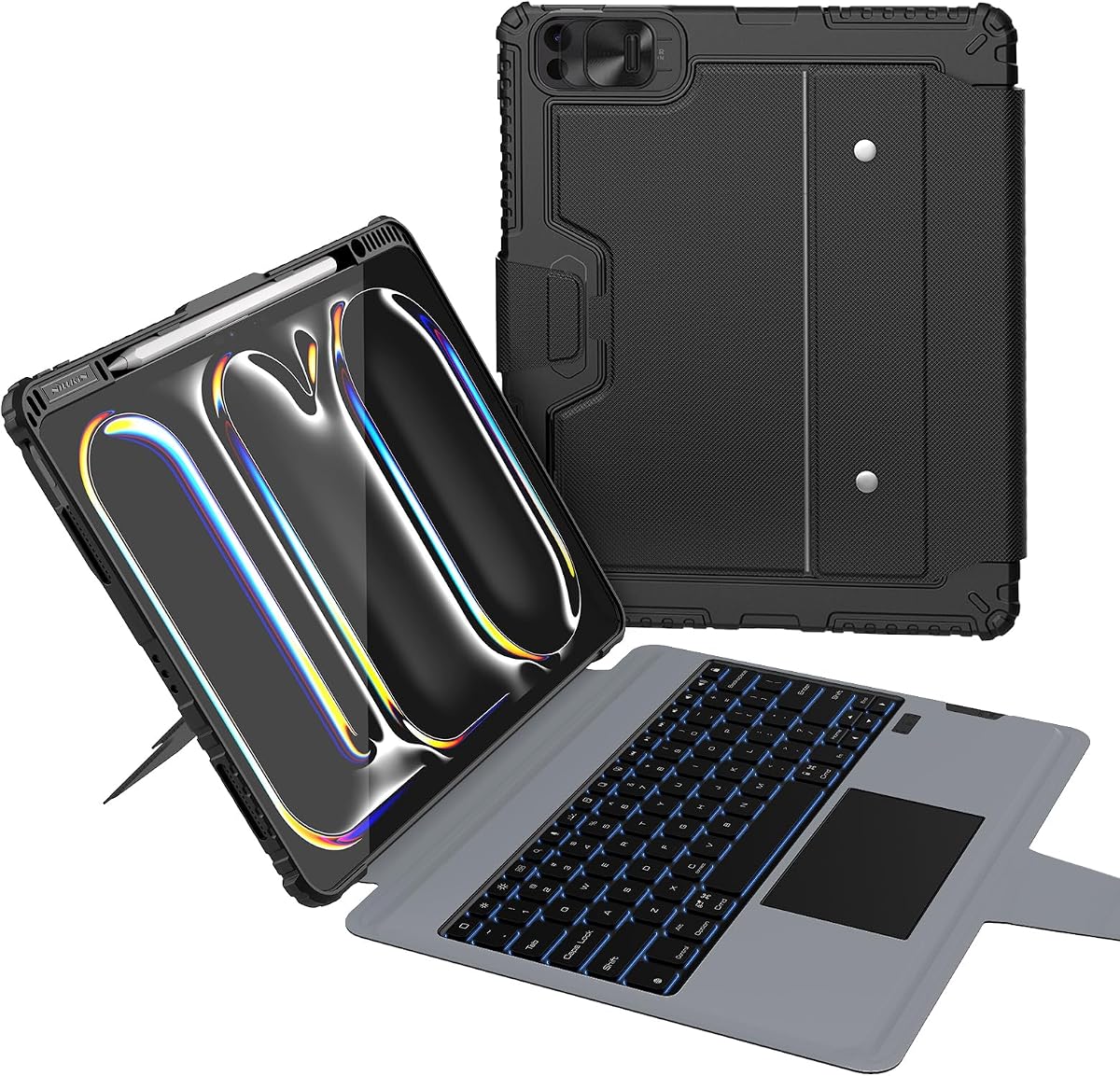
The Nillkin Rugged Case is built for durability with military-grade protection tested to withstand drops. Its 4-in-1 modes let you switch between laptop drawing and tablet tasks seamlessly making it versatile for varied workflows.
We may earn a commission when you buy through this link, at no additional cost to you.
Scissor-switch keys provide real travel feedback making typing enjoyable and accurate. The 500mAh battery delivers up to 100 hours of active typing ensuring you stay productive for weeks without frequent charging.
While the rugged build adds weight it offers robust defense against daily wear and tear. Some users prefer lighter cases for travel. However, the reliability and typing comfort make it ideal for demanding environments or field work.
This case is perfect for professionals who need tough protection without compromising on usability. If you require a durable keyboard solution that withstands harsh conditions while supporting productivity the Nillkin Rugged case is a reliable partner.
Dropped and tested on concrete to keep going with corner air-cushion bumpers.
Up to 100 hours active typing and sleep mode ensures enhanced energy efficiency.
We may earn a commission when you buy through this link, at no additional cost to you.
The TSQQST Clear Case showcases your iPad's sleek profile with a crystal-clear hard case design. Its futuristic acrylic style combined with 7-color glow keyboard adds sophistication making it perfect for late-night productivity.
We may earn a commission when you buy through this link, at no additional cost to you.
Ergonomic comfort is ensured with 360 rotating stand allowing 5 adjustable angles for optimal positioning. The responsive keyboard and smooth trackpad transform your device into a portable workstation ideal for professionals on the go.
Users appreciate the blend of style and rugged protection against drops and scratches. While the clear surface may show smudges the durability and design make it a fashionable choice. The adjustable stand aids in various working positions.
Ideal for creatives and tech enthusiasts who value aesthetics this case offers functional elegance. If you want a stylish yet protective accessory that supports multitasking and looks great the TSQQST Clear Keyboard Case is a perfect pick.
Crystal-clear hard case showcases your iPad design while guard against drops and scratches.
Switch between typing or streaming with a fluid 360 rotating base and 5 angles.
We may earn a commission when you buy through this link, at no additional cost to you.
Selecting the ideal keyboard case involves evaluating connectivity, durability, and comfort to match your professional needs.
Bluetooth models offer flexibility while Smart Connector or magnetic options provide instant power. Choose based on your battery preferences and ease of setup.
Opt for wireless if you need to detach the keyboard often or rely on Smart Connector for seamless power transfer.
Look for multi-touch support and sufficient size to handle gestures smoothly. A larger glass surface improves navigation efficiency significantly.
Prioritize cases with haptic feedback or large touch areas to mimic a laptop cursor experience accurately.
Hinge mechanisms and adjustable stands determine your ergonomic setup. Ensure the angle supports both typing and media viewing comfortably.
Choose cantilever or rotating designs to allow flexible positioning across different work environments.
Consider weight and thickness for travel. Lightweight options reduce fatigue but may sacrifice ruggedness.
Select slim designs for daily commuting while prioritizing durability if you work in harsh conditions.
Function rows and key spacing impact typing speed. Scissor mechanisms offer better feedback than membrane keys.
Ensure the layout matches your typing habits including specific shortcuts for productivity apps.
Full coverage cases protect against drops and scratches. Check for reinforced corners and material quality.
Prioritize rugged builds if you work offsite or need maximum device safety.
Backlit keys with adjustable levels support low-light work. Colors can enhance personalization.
Choose options with multi-level brightness to suit any environment effectively.
Rechargeable units must offer weeks of usage on a single charge. Check charging times and modes.
Verify battery capacity to ensure minimal interruptions during long work sessions.
Pair your device via Bluetooth or magnetic connection by following the setup guide. Ensure your iPad is compatible with the model before starting.
Clean the keyboard surface with a dry microfiber cloth to remove dust. Avoid liquids on the trackpad to maintain touch sensitivity.
Store the case flat in a cool place when not in use. Check hinge tightness regularly to ensure stable support.
Most models support Apple Pencil either through dedicated holders or compatibility during typing. Verify if the case allows Pencil attachment or use a holder slot for safety.
Battery life varies but typically lasts weeks on a single charge with sleep modes. High brightness levels may reduce usage time significantly.
Detachable models allow you to separate the keyboard for tablet use. Check the magnet strength to ensure easy removal without losing the device.
Trackpads are optimized for navigation rather than precision drawing. Use Apple Pencil directly on the screen for detailed creative tasks.
Slim cases add minimal weight while rugged ones provide heavier protection. Choose based on your need for portability versus durability.
Many cases offer 7 or 11 color options with adjustable brightness levels. Settings are usually controlled via function keys on the keyboard.
Use a soft brush to remove debris and wipe with a dry cloth. Avoid abrasive cleaners to prevent damage to the key coatings.
Most brands offer a 12-month warranty covering manufacturing defects. Check support policies before purchasing for peace of mind.
Top picks like the Apple Magic Keyboard and Logitech Combo Touch offer premium experiences for diverse needs. Each option balances protection and functionality effectively.
Prioritize factors like trackpad precision and battery life when making your decision. Ensure the case supports your specific workflow requirements fully.
Always check current availability and model compatibility before buying. Prices may vary so verify details to find the perfect fit for your iPad.