
Logitech Litra Glow
4.5Editor score
TrueSoft balanced light tech
Frameless diffuser design
USB powered plug and play
Streaming has transformed how we share ideas and entertain audiences globally. Great content needs great lighting to look professional on camera. A quality key light ensures your face is well illuminated without harsh shadows or glare.
We evaluated ten top rated lighting solutions based on brightness color accuracy and ease of use. Our analysis covers panel designs desk mounts and app controls to find the best value for every budget and setup style.
Each pick highlights specific strengths like silent cooling or wide color ranges. We include detailed reviews and a buying guide to help you decide. Please note that product availability and pricing may change over time.
4.5Editor score

4.5Editor score

3.8Editor score
As an Amazon Associate we earn from qualifying purchases.
The following table provides a side by side overview of the ten lighting solutions reviewed in this guide. It highlights key specifications and features to help you compare options at a glance.


The Elgato Key Light stands out as a professional grade solution for streamers who demand high performance. With a rating of 4.5 stars it is widely praised for its consistent illumination and build quality. This panel delivers 2800 lumens making it suitable for large spaces or dark studios.
We may earn a commission when you buy through this link, at no additional cost to you.
Its standout quality lies in the 160 OSRAM LEDs that provide impressive brightness with minimal heat. The opal glass face ensures diffusion that prevents glare on your camera lens. You can control settings via Wi-Fi from your desktop which adds convenience to your workflow.
While the price is higher than many alternatives the durability and performance justify the cost for serious creators. The only real trade-off is that it requires a wall outlet so mobility is limited unless you use additional adapters.
Streamers looking for a reliable centerpiece for their lighting rig should strongly consider this option. It sets the standard for brightness and ease of use in the home studio category.
Its Wi-Fi connectivity allows you to adjust settings without reaching for the device which keeps your hands free during recording.
The color temperature range lets you match ambient lighting perfectly so you never look washed out or too cool on screen.
The high lumen output ensures your face is well lit even in larger rooms without needing multiple fixtures.
Wi-Fi control means you can save presets and adjust light intensity from your computer interface seamlessly.
We may earn a commission when you buy through this link, at no additional cost to you.
The Logitech Litra Glow offers an accessible entry point for creators who want professional looking lighting without breaking the bank. It holds a strong 4.5 star rating due to its ability to render natural skin tones. TrueSoft technology ensures the light is balanced and full spectrum for video conferencing or streaming.
We may earn a commission when you buy through this link, at no additional cost to you.
Its frameless diffuser radiates wide soft light that eliminates harsh shadows around your eyes and chin. The 3-way monitor mount provides flexibility in placement allowing you to tilt and rotate for the perfect angle. USB power means you can run it directly from your laptop or a power bank.
While it is not as bright as larger studio lights it is perfect for desk setups and close range filming. The main limitation is the reliance on USB which might limit reach if your port is far away.
This light is ideal for students gamers or anyone starting a streaming channel who needs reliable performance. It delivers quality illumination that enhances your presence on camera significantly.
The G HUB app allows you to save your favorite brightness and color settings for quick access.
Its lightweight design makes it easy to pack and transport if you need to stream from different locations.
TrueSoft technology is designed to show your natural complexion accurately without oversaturating or washing out colors.
Powering via USB reduces cable clutter on your desk and simplifies the connection process for laptops.
We may earn a commission when you buy through this link, at no additional cost to you.
The Elgato Key Light Air MK.2 brings a modern edge-lit design to the streaming lighting market. While its rating sits slightly lower at 3.8 stars it offers unique features like MagSafe battery support and touch controls that appeal to tech focused users. It delivers up to 2100 lumens which is significantly brighter than its predecessor.
We may earn a commission when you buy through this link, at no additional cost to you.
Its slim 15-inch panel fits easily on modern desks without taking up much visual space. The edge-lit technology provides anti-glare illumination that is flattering for complexions on camera. You can control it via touch or app and even detach the panel for custom rigging.
The ability to power it via USB-C or a battery bank offers freedom that wall plugged lights lack. However the lower rating suggests some users may find the controls finicky or the light output less consistent than expected.
This model is best for creators who value sleek design and portability over raw brute force brightness. It integrates well with Stream Deck for automated lighting changes during your stream.
Touch controls allow quick adjustments without needing to open a software window on your computer.
The detachable panel design lets you mount it on different rigs for varied shooting angles and setups.
Support for MagSafe batteries and USB-C means you can use this light even when near a power outlet.
Automation support allows you to change lighting scenes with a single keystroke during your broadcasts.
We may earn a commission when you buy through this link, at no additional cost to you.
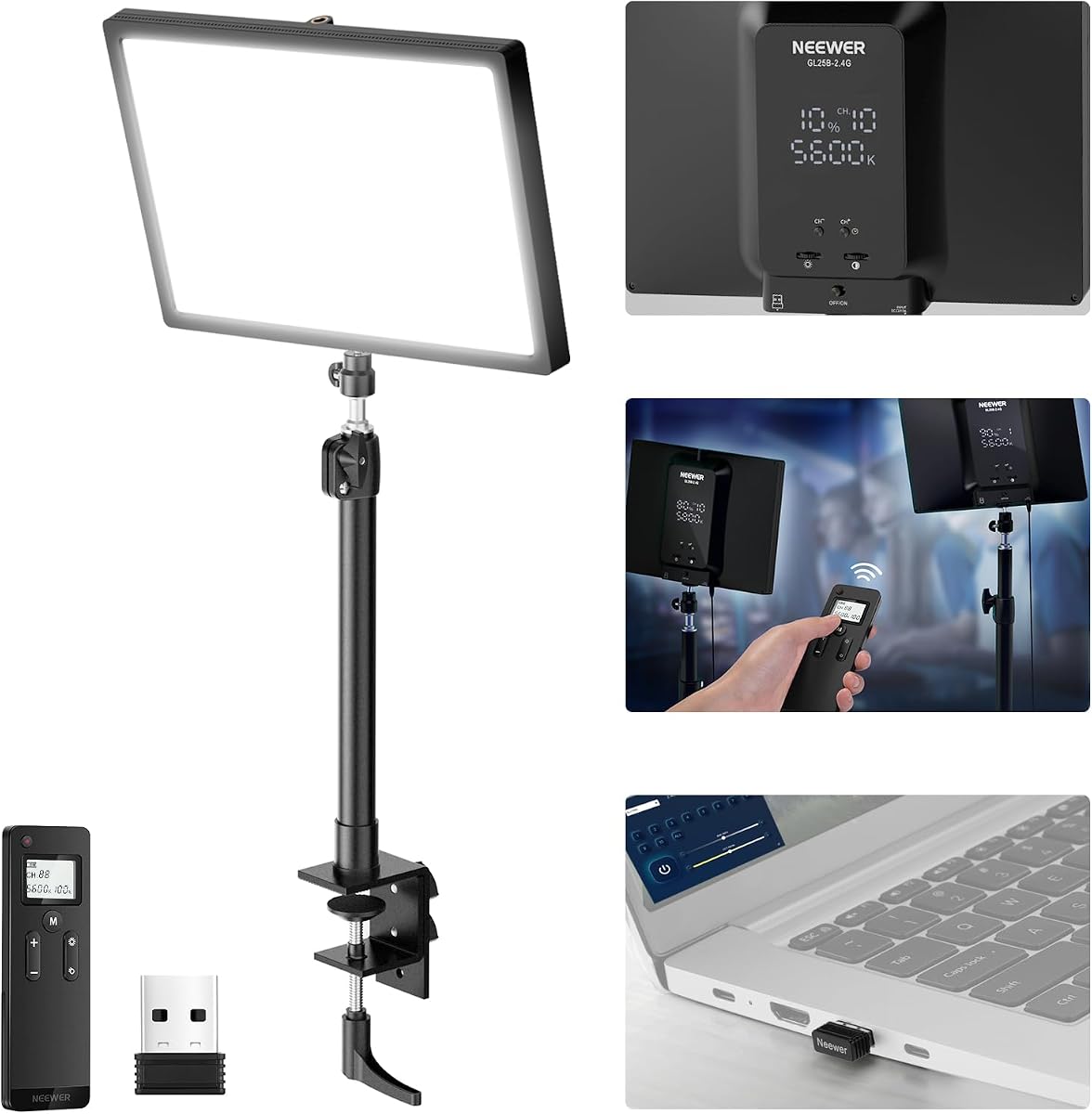
The NEEWER GL25B is a strong contender for those who prioritize color accuracy and silent operation. With a rating of 4.7 stars it excels in delivering high fidelity light thanks to a CRI of 98+. This ensures your products and skin tones look true to life on camera.
We may earn a commission when you buy through this link, at no additional cost to you.
Its edge emitting technology creates a soft glow that avoids harsh shadows and glare. The fanless cooling system is a major benefit for live streams where microphone noise must be minimized. You can control it via a remote or the Neewer Control Center app on your computer.
The 25W output provides ample brightness for desk setups and the remote allows quick adjustments. The only minor drawback is the need to insert a USB transmitter for PC control which might add cable clutter.
This light is perfect for creators who need professional color rendering without the high price tag of brand name options. It balances performance and quiet operation very well.
The silent fan design ensures your microphone picks up no cooling noise during recording sessions.
Remote control offers convenient access to brightness and temperature settings without reaching behind the monitor.
A CRI of 98+ means colors are rendered with high precision which is critical for product demonstrations.
The fanless system removes a common source of background noise that can distract viewers in live streams.
We may earn a commission when you buy through this link, at no additional cost to you.
The Weilisi 10.2 Desk Ring offers a unique ring design that is versatile for many streaming setups. It holds a 4.5 star rating and is known for its flexible movement and stable clamp. The light provides enough uniform and diffused illumination to enhance features without harsh shadows.
We may earn a commission when you buy through this link, at no additional cost to you.
Its 360 degree rotation and 180 degree head tilt allow you to position the light exactly where needed. The telescoping stand lets you adjust height to fit your desk space comfortably. It includes 10 brightness levels and 3 color temperatures for a variety of looks.
The metal C-clamp is stable and prevents scratches on your desk. The ring design is great for creating catchlights in eyes but might not be the first choice for a soft box look. However for a compact desk solution it performs very well.
This option is ideal for podcasters and streamers who need a flexible light that does not take up much space. It is easy to install and adjust for different camera angles.
The stable clamp ensures the light stays in position even after adjustments during your recording.
Multiple color temperatures let you match your room lighting or switch from warm to cool looks easily.
Full rotation capabilities allow you to pivot the light for overhead shots or side lighting angles.
A compact ring footprint leaves more room on your desk for keyboard and mouse during use.
We may earn a commission when you buy through this link, at no additional cost to you.
The NiceVeedi 2-Pack Kit provides a complete solution with two lights and stands for a comprehensive setup. With a 4.4 star rating it offers good value for those needing fill light in addition to a key light. Each panel has 356 LED beads delivering stable output and high color fidelity.
We may earn a commission when you buy through this link, at no additional cost to you.
The kit includes 60 inch tripod stands which are essential for placing lights at a proper height. You can adjust brightness and color temperature to create the atmosphere you want. The high CRI ensures your skin tones look natural under the illumination.
While the tripods are lightweight and easy to set up they may not be as robust as heavier studio gear. However for a beginner setup this kit covers all the bases without requiring separate purchases.
This package is excellent for streamers who need to fill shadows behind them or light a wider area. It simplifies the process of setting up a multi-light environment.
The included phone holder allows you to mount your phone on the stand for mobile streaming setups.
High color rendering ensures accurate tones which is vital for beauty and product content streaming.
Receiving two lights and stands means you can start setting up a full studio immediately.
Having a second light allows you to soften shadows and create depth in your video frame.
We may earn a commission when you buy through this link, at no additional cost to you.
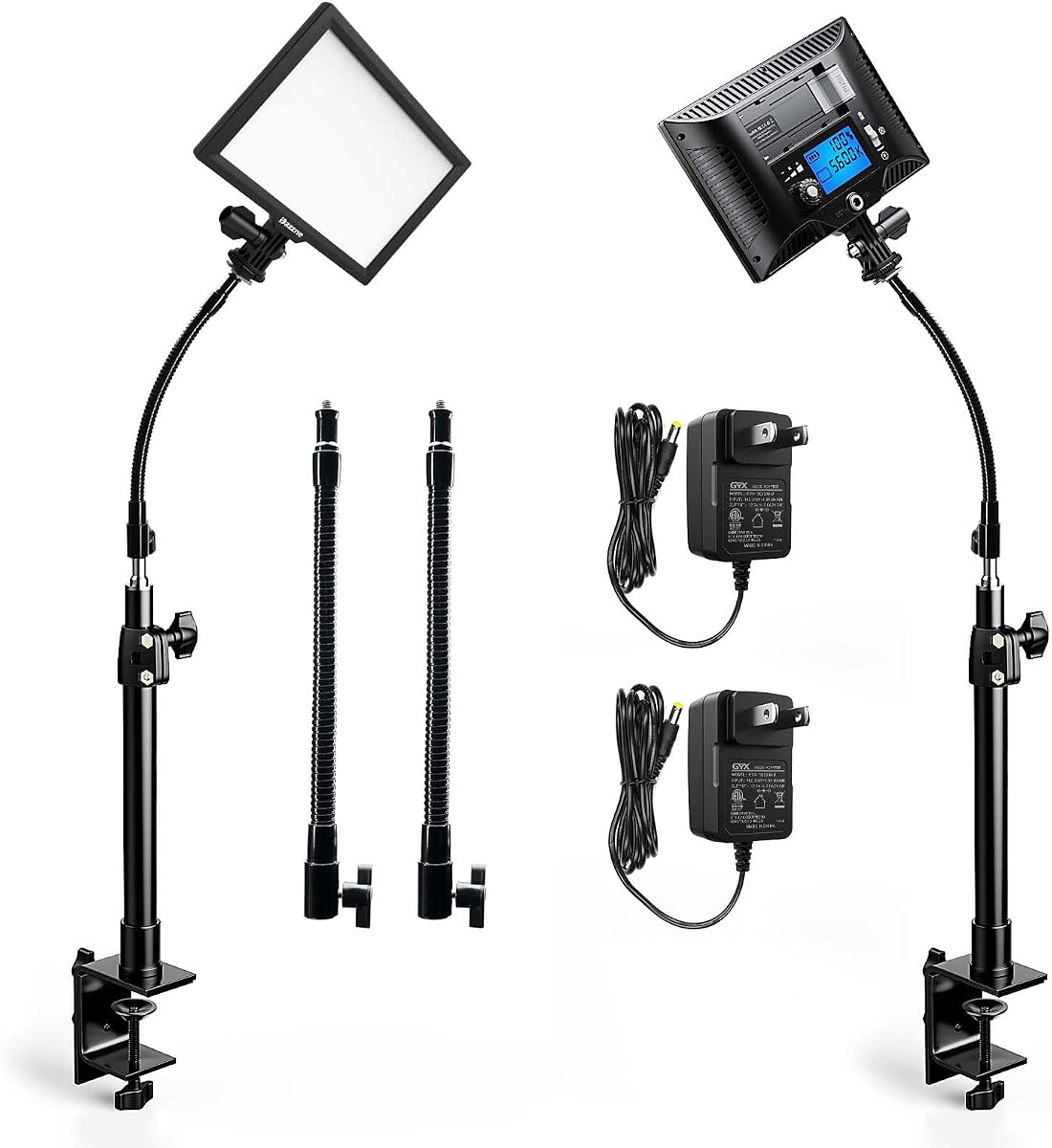
The 2 Packs LED Video Key Light set offers a unique design with gooseneck tubes for flexible placement. It has an impressive 4.8 star rating indicating high user satisfaction. The LCD display allows you to check brightness and temperature settings accurately on the panel.
We may earn a commission when you buy through this link, at no additional cost to you.
The gooseneck tubes provide multiple positioning options that a rigid arm might not. This flexibility helps you angle the light precisely to hit your face or desk. Each pack includes a stable metal C-clamp that keeps the desk clean and organized.
While the lumens are not as high as large panels the soft flicker-free light is gentle on eyes. The memory function saves your last settings which speeds up your daily setup routine. This makes it very user friendly for repetitive workflows.
This set is perfect for podcasters or streamers who need a flexible light that can tuck away easily. The dual pack ensures you can light both sides of a setup if needed.
The memory function restores your preferred settings automatically so you do not lose your tuning.
The stable clamp structure secures the unit firmly so it does not shift during intense movement.
Gooseneck tubes let you bend the light head to find the exact angle without moving the base.
An LCD screen shows numeric values so you know exactly what brightness level is active.
We may earn a commission when you buy through this link, at no additional cost to you.
The Godox ES45 Desktop brings a sleek edge-lit OLED panel with a unique magnetic remote control. It holds a 4.4 star rating and is designed to minimize harsh shadows for a glowing skin look. The remote attaches magnetically to the back which keeps it handy and charges automatically.
We may earn a commission when you buy through this link, at no additional cost to you.
Its edge-lit design ensures glare-free illumination that is gentle during long sessions. The 2.4G wireless tech lets you adjust settings without touching the light which keeps your focus on the stream. You can control multiple lights simultaneously via groups for complex setups.
The clamp stand is simple and requires no tools making setup very fast. The light range allows you to match ambient room lighting perfectly. The only limitation is that it is designed primarily for desktop use so mobility is low.
This light is great for streamers who want a tidy desk and easy control access. The magnetic remote is a thoughtful feature that solves the issue of losing the controller.
The magnetic charging ensures you never have to replace batteries which reduces long-term waste.
Group control lets you manage multiple lights if you expand your studio later.
A magnetic remote that snaps to the back ensures you never have to search for a controller.
Soft diffused panels reduce eye fatigue so you can stream longer without discomfort.
We may earn a commission when you buy through this link, at no additional cost to you.
The 2Pack Streaming Key Light set focuses on flexible tube placement and ease of use. With a 4.4 star rating it delivers soft flicker-free light suitable for long video sessions. The LCD display provides clear feedback on your current brightness and color settings.
We may earn a commission when you buy through this link, at no additional cost to you.
The gooseneck tubes allow you to adjust the light direction without moving the base. This is useful for directing light at your face or a product. The memory function saves your last settings so you can start with your preferred look every time.
Two units give you options for dual lighting setups. The CRI of 95+ ensures decent color quality for streaming and recording. The clamp is stable enough for most desks but the tube length might be limiting for very wide setups.
This kit is a solid choice for those who want flexibility and simplicity without needing smart home features. It performs well for standard streaming needs.
The dual pack offers versatility for lighting a wider workspace or creating a three-point setup.
LCD feedback ensures you are always aware of the active settings during your recording.
Bendable tubes allow for precise angle adjustments to avoid glare or shadows.
The memory function restores your previous settings instantly when you turn the light on.
We may earn a commission when you buy through this link, at no additional cost to you.
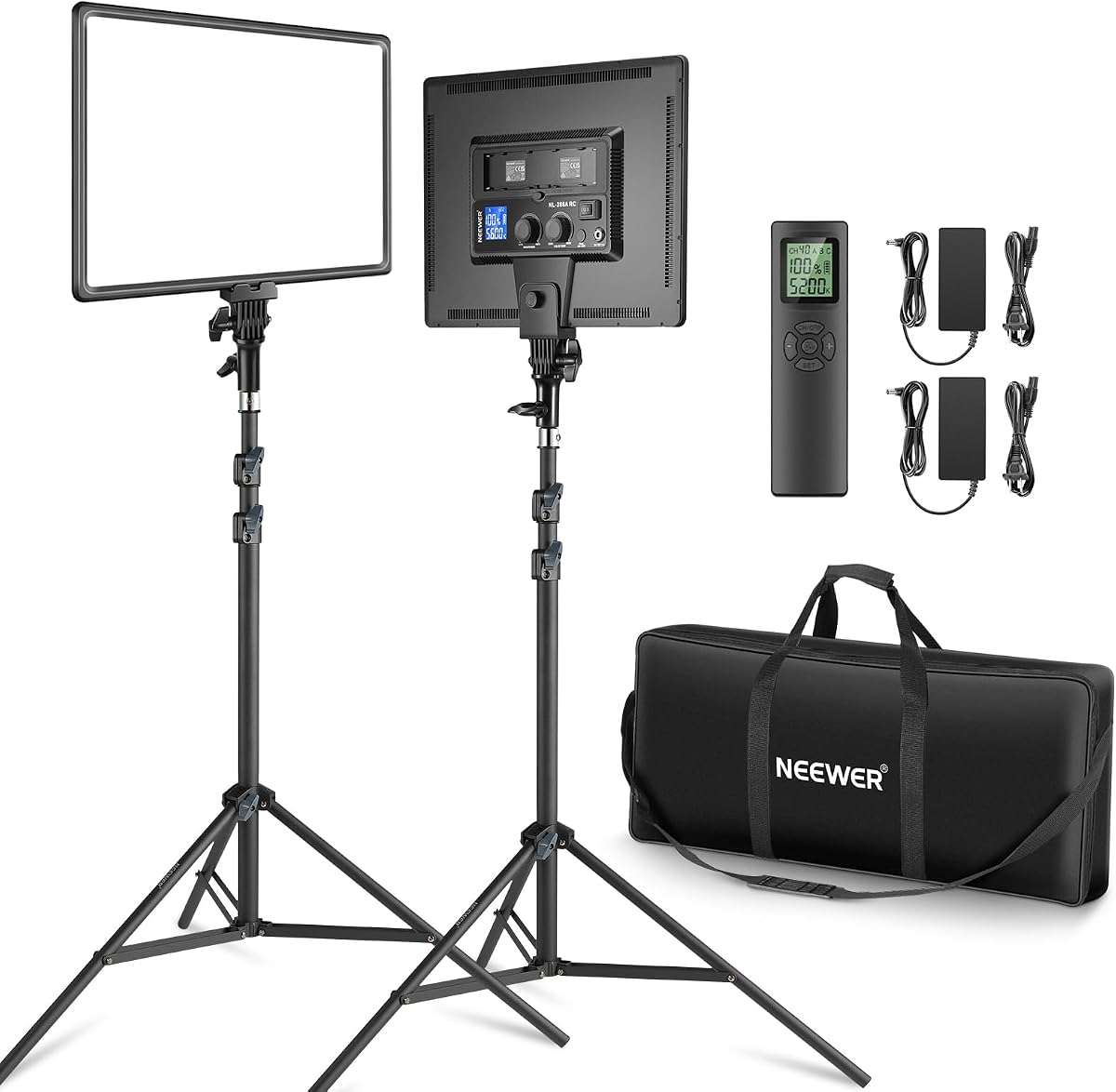
The Neewer 18 Kit Kit is a powerful dual panel set for serious creators needing high output. It holds a 4.6 star rating and delivers 45W per panel with 288 LEDs each. The brightness is significant at 4800Lux making it suitable for larger studios or dark rooms.
We may earn a commission when you buy through this link, at no additional cost to you.
Each panel supports both AC and battery power offering mobility if needed for on location shoots. The 2.4GHz remote lets you control channels and groups easily. The stands are aluminum and stable which adds weight but ensures reliability.
This kit is robust and can serve as a key fill or backlight in a three point setup. The larger size means it needs more desk space. However the brightness is unmatched by smaller options.
For streamers who want to scale up to professional lighting this is an excellent choice. It provides the flexibility of battery and AC power for uninterrupted streaming.
The remote allows quick adjustment of multiple lights without needing to access each panel manually.
Dual power options ensure you can keep streaming even if an outlet is unavailable.
The 45W power per panel provides ample illumination for large rooms or brightening dark corners.
Ability to use batteries gives you the freedom to shoot in locations with limited outlets.
We may earn a commission when you buy through this link, at no additional cost to you.
Choosing the right key light depends on your workspace space and streaming needs. This guide outlines the factors you should consider to make the best purchase.
Brightness is measured in lumens or lux and determines how well your face is illuminated. Higher brightness is useful for larger rooms or when you need to fill a background. Ensure the light is bright enough to overcome any ambient light in your room.
Look for lights with 1000 lumens or more for clear visibility on camera.
A wide color temperature range allows you to match your room lighting. Ranges from 2900K to 7000K let you switch from warm to cool tones. This flexibility ensures you do not look out of place in your video.
Check that the light supports adjustable color settings for maximum versatility.
Color Rendering Index indicates how accurately colors appear under the light. A CRI of 90 or higher is recommended for streaming. High CRI ensures your skin and products look natural on camera.
Prioritize lights with a CRI above 90 for professional looking results.
Consider how you will power your light. USB options are portable but may limit reach. AC powered lights are brighter but require a wall outlet. Some high end models support battery packs for mobility.
Choose a power source that fits your desk layout and portability needs.
Mounting options include clamps stands and monitor mounts. Clamps save desk space but require a thick table. Tripods offer flexibility but take up floor space. Choose a mount that fits your setup style.
Ensure the mount is sturdy enough to hold the light securely during use.
Control methods vary from buttons to remotes and apps. Remotes add convenience while apps offer more granular control. Touch panels are intuitive but can be hard to reach.
Select a control method that is easy to access during your streams.
Fans can generate noise that interferes with your microphone. Fanless models use heat sinks which are silent but may have lower output. Silent cooling is vital for live audio recording.
Look for fanless designs if you need noise free operation.
Price varies widely from affordable to premium. Higher prices often bring better build quality and features. Determine your budget and prioritize features you use most.
Balance cost with the features you actually need for your streaming style.
Position the light at a 45 degree angle to your face for a flattering look. Place it slightly above eye level to avoid harsh shadows under your eyes. This setup creates a balanced and professional appearance on camera.
Adjust the color temperature to match your room lighting. Using a high CRI light ensures your skin tone looks natural. Dim the light to a comfortable level to avoid glare on the screen.
Keep the lens and panel clean with a soft dry cloth to prevent dust buildup. Store the light in a cool dry place when not in use. Regularly check connections to ensure stable power during streams.
A range around 5000K to 6000K is often best for daylight balanced light. It helps skin tones look natural and bright on camera. You can adjust this based on your room lighting to avoid clashes.
High CRI is recommended if you show products or care about skin tones. It ensures colors appear true to life on your video feed. A CRI above 90 is generally considered good for streaming.
For desk streaming 1000 lumens is often sufficient. For larger rooms or darker environments 2000 lumens or more is better. The brightness should fill your face without creating hot spots.
Yes a key light improves video call quality significantly. It ensures your face is visible in low light rooms. Many lights have specific modes for video conferencing.
A key light is the main source and provides the most illumination. A fill light softens shadows created by the key light. Using both creates a more balanced and professional look.
Choose a light with efficient cooling like a fanless design. Ensure there is airflow around the unit to dissipate heat. Avoid placing it near other heat sources on your desk.
We have reviewed ten top key lights for streaming ranging from budget friendly to premium options. The Elgato Key Light offers top tier performance while the Logitech Litra Glow provides excellent value. Each option suits different needs and spaces.
Prioritize brightness and color accuracy to ensure your content looks professional. Choose a mount that fits your desk and a control method that is easy to use. These factors will improve your streaming experience.
Please check the current prices and availability before purchasing. Deals may change and stocks can vary over time. We hope this guide helps you find the perfect light for your setup.