
Lightning to HDMI Adapter for iPhone
4.4Editor score
Supports 1080P HD resolution
Includes charging port for power
Plug and play setup
Find the best HDMI Lightning adapter for iPhone with our expert review of top models, comparing compatibility, video quality, and charging support.
Connecting your iPhone to a larger display enhances entertainment and productivity significantly. Choosing the right adapter ensures smooth video streaming and reliable performance for presentations or media consumption without technical issues.
We evaluated ten top-rated adapters based on compatibility, video resolution, and user feedback. Our analysis focuses on real-world performance to help you find a device that meets your specific needs efficiently.
Each selection highlights key features and potential limitations for informed decisions. Product prices and availability fluctuate regularly, so verify current details before purchasing to ensure you get the best value available.
4.4Editor score

4.2Editor score

4.2Editor score
This table provides a quick side-by-side look at key specifications for every adapter considered in this guide to help you compare features easily.





This MFi certified adapter delivers reliable 1080P HD mirroring for iPhone and iPad users. With a 4.2 rating, it stands out for its seamless connectivity without requiring external power sources.
We may earn a commission when you buy through this link, at no additional cost to you.
The built-in lightning port allows you to charge your device while streaming video. It supports common apps like YouTube and PowerPoint but blocks protected content like Netflix due to copyright restrictions.
While the video quality is excellent for presentations and media, the lack of Netflix support is a known limitation across most adapters. Users should verify app compatibility before purchasing.
Ideal for travelers and professionals who need quick connectivity. This adapter balances performance and convenience effectively for everyday large-screen viewing needs.
Experience lag-free video mirroring perfect for presentations or watching movies on a big screen.
Keep your device powered up during long sessions with the convenient pass-through lightning port.
We may earn a commission when you buy through this link, at no additional cost to you.
This affordable adapter offers solid performance for users seeking basic screen mirroring capabilities. It delivers 1080P HD resolution and connects instantly without driver installation or extra power adapters.
We may earn a commission when you buy through this link, at no additional cost to you.
It works well with standard apps like YouTube and local videos, making it great for casual entertainment. The charging port ensures your device stays powered during extended use sessions.
Like most adapters, it cannot stream protected content from Netflix or Amazon Video. This limitation is due to Apple policy rather than a defect in the hardware.
Best suited for students or home users on a budget. It provides reliable functionality for presentations and media viewing at an accessible price.
Get reliable HDMI connectivity without overspending on expensive accessories for your iPhone or iPad.
Stream local videos and use productivity apps easily with broad compatibility across iOS devices.
We may earn a commission when you buy through this link, at no additional cost to you.
The KikoSaka adapter ensures seamless compatibility across a wide range of Apple devices with its MFi certification. It supports full HD mirroring for both older and newer models effectively.
We may earn a commission when you buy through this link, at no additional cost to you.
Users appreciate its stable connection that avoids dropouts during presentations or media streaming. The design is sleek and easily fits into travel bags or pockets.
While it lacks a charging port, the focus remains on providing a straightforward video transmission solution. It is ideal for users who prioritize reliability over extra features.
Great for frequent travelers needing consistent performance. This cable adapter keeps your content visible on big screens without technical interruptions.
Enjoy consistent video output that works seamlessly with your existing iOS device ecosystem.
Works across multiple iPhone and iPad generations ensuring long-term usability for your gear.
We may earn a commission when you buy through this link, at no additional cost to you.
This adapter features a durable 6.6ft cable allowing flexible placement between your device and TV. The MFi chip ensures stable video output for smooth presentations and media viewing.
We may earn a commission when you buy through this link, at no additional cost to you.
It supports a wide range of apps including Office and YouTube making it versatile for work or play. The construction quality is robust enough to withstand regular daily use.
While it lacks a charging port and Netflix support, its physical build quality is a standout feature. The extra length removes the need for extension cables in tight spaces.
Best for home office setups where cable management matters. This adapter offers reliability and reach for comfortable screen viewing.
The extra long cable allows you to position your device comfortably while viewing on the screen.
Designed to last with durable materials that resist wear from frequent connection and disconnection.
We may earn a commission when you buy through this link, at no additional cost to you.
The official Apple adapter guarantees the highest compatibility with all iOS devices. Its 4.2 rating reflects strong user trust in its performance and durability for professional use.
We may earn a commission when you buy through this link, at no additional cost to you.
It supports both video and audio output ensuring your presentations or media play without sound issues. Apple hardware offers peace of mind regarding software updates and long-term support.
The main drawback is the higher cost compared to third-party brands. Additionally, it does not include a pass-through charging port which some users may find limiting.
Ideal for corporate environments prioritizing reliability. This adapter delivers consistent results without unexpected connection failures.
Use with confidence knowing this accessory meets Apple strict internal standards and quality control.
Essential for critical business presentations where technical failures cannot be tolerated during meetings.
We may earn a commission when you buy through this link, at no additional cost to you.
With a 4.4 rating, this adapter excels in performance and user satisfaction. It supports up to 4K resolution for sharper images on compatible screens compared to standard 1080P options.
We may earn a commission when you buy through this link, at no additional cost to you.
The inclusion of a charging port ensures your device stays powered during long sessions. However, users must connect a separate USB power adapter for stable operation.
While Netflix remains unsupported due to copyright policies, local video playback is excellent. The high score reflects strong reliability for gaming and media streaming.
Best for users who want premium resolution. This adapter balances high performance with practical charging solutions.
Enjoy sharper and clearer images with support for higher resolution video outputs on your display.
Keep your device fully charged during long viewing sessions with the included pass-through power port.
We may earn a commission when you buy through this link, at no additional cost to you.
This adapter is trusted by thousands of verified buyers for its reliable performance. It delivers lag-free mirroring suitable for classroom presentations or conference meetings.
We may earn a commission when you buy through this link, at no additional cost to you.
The 4.3 rating confirms consistent quality across different iOS versions. Users appreciate the straightforward setup that avoids complicated configuration steps or apps.
It is limited to 1080P which is standard for Lightning technology but lacks a charging port. This is acceptable for short presentations or home media viewing.
Great for education and business users needing reliability. This adapter ensures your message reaches the audience clearly.
Experience smooth video playback without delays that could disrupt live presentations or meetings.
Join thousands of satisfied users who trust this brand for consistent screen mirroring performance.
We may earn a commission when you buy through this link, at no additional cost to you.
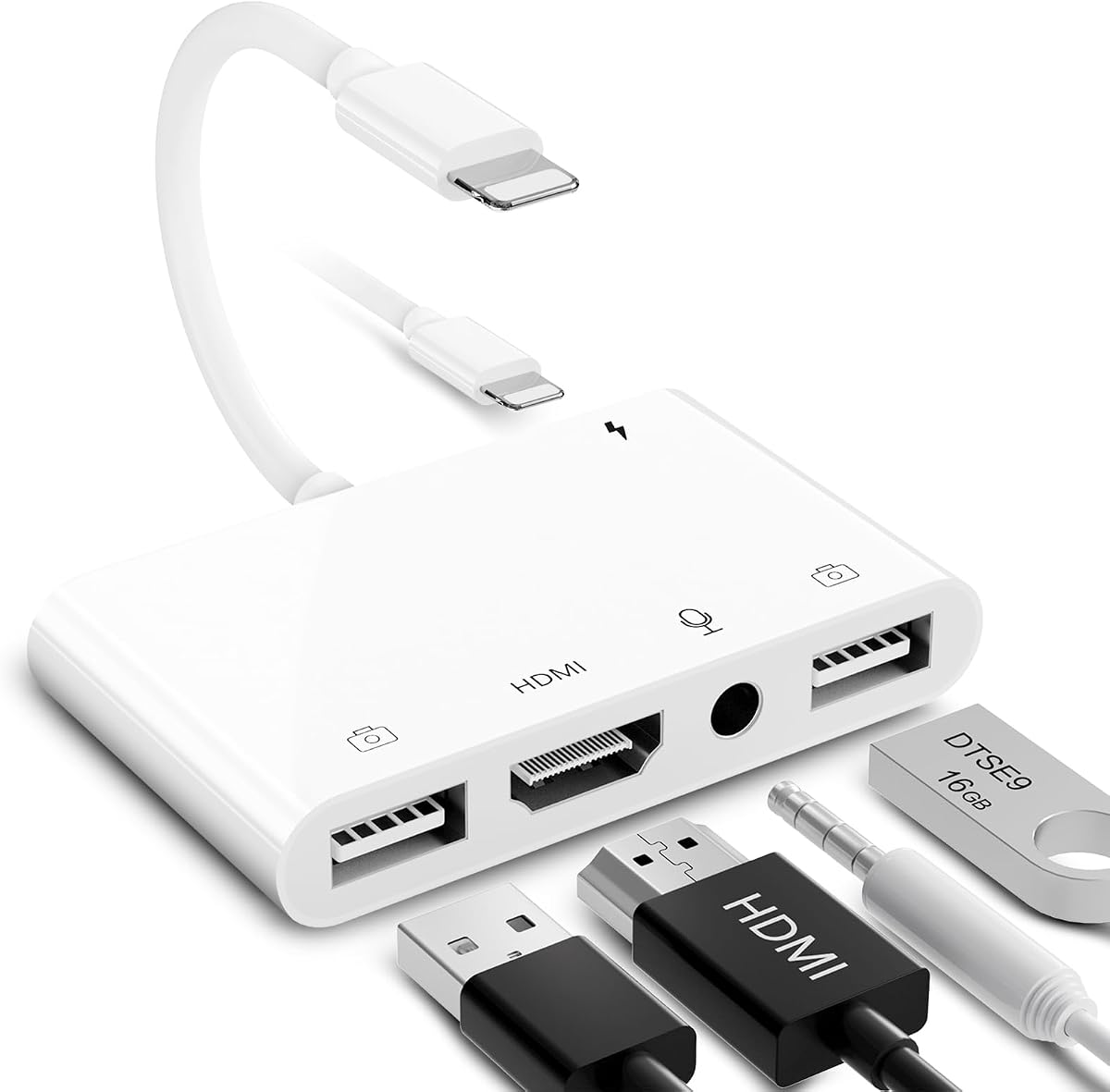
This 5-in-1 adapter expands your iPhone connectivity significantly with dual USB ports and a microphone jack. It is perfect for live streaming or presentations needing multiple peripherals.
We may earn a commission when you buy through this link, at no additional cost to you.
The USB ports allow connection to keyboards and mice making your device more productive. The headphone jack enables private audio monitoring during video sessions.
While versatile, the larger size makes it less portable than simple HDMI adapters. It suits power users needing extra functionality over minimalism.
Ideal for creators or educators needing extra I/O. This adapter turns your iPhone into a full presentation station.
Connect multiple peripherals like keyboards or storage drives while simultaneously mirroring to a TV.
Use headphones or external mics for professional streaming without needing extra splitters.
We may earn a commission when you buy through this link, at no additional cost to you.
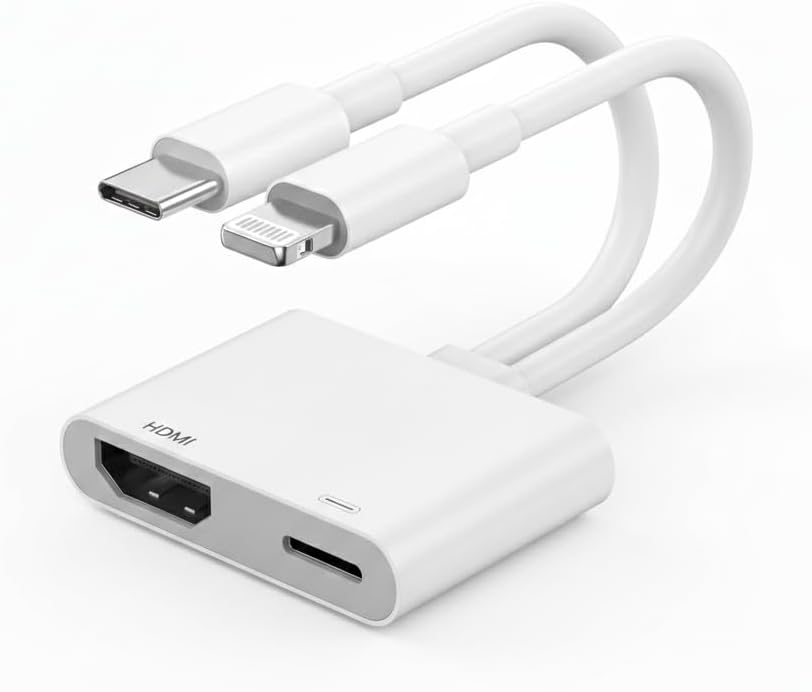
This unique 2-in-1 adapter supports both Lightning and USB-C devices making it future-proof. It offers 4K resolution and 100W charging for efficient power delivery.
We may earn a commission when you buy through this link, at no additional cost to you.
The USB-C mode supports protected content like Netflix which Lightning ports cannot. This hybrid functionality is highly rated for versatility across Apple ecosystems.
Lightning ports still have copyright restrictions so ensure you know which mode to use. The high rating reflects excellent build quality and performance.
Best for users with mixed devices. This adapter simplifies connectivity for both iPhone 14 and newer USB-C gadgets.
Stay ready for new devices as this adapter works across both old and new Apple hardware standards.
Keep high-performance devices charged during streaming with the robust 100W pass-through port.
We may earn a commission when you buy through this link, at no additional cost to you.
Another official Apple option with a 4.6 rating, this adapter offers top-tier reliability. It mirrors screens to 1080P with full audio support for presentations or media.
We may earn a commission when you buy through this link, at no additional cost to you.
Apple hardware ensures seamless updates and support which is critical for business environments. The setup is straightforward and requires no extra drivers or software.
The lack of a charging port limits long sessions unless using a separate power source. However, the build quality justifies the premium price for many users.
Best for those prioritizing guaranteed stability. This adapter provides consistent performance for critical display needs.
Benefit from direct Apple support ensuring seamless integration with iOS updates and features.
Connect instantly with plug and play functionality for quick and effortless screen mirroring.
We may earn a commission when you buy through this link, at no additional cost to you.
Choosing the right adapter involves evaluating several key factors to ensure compatibility and performance for your specific needs.
Always look for Apple MFi certification which guarantees the adapter contains the correct chip to work with your iOS device. Non-certified adapters may cause connection errors or damage your phone over time.
Most adapters support 1080P HD which is sufficient for most TVs. If you have a 4K monitor, verify if the adapter supports 4K upscaling though output is often still limited to 1080P.
Look for adapters with a lightning charging port to keep your device powered during long presentations. Without this, your battery will drain quickly when mirroring video content.
Note that most adapters block streaming services like Netflix due to copyright restrictions. If you need these services, you may need alternative methods or a USB-C adapter with different capabilities.
Check the length of the cable and the port type to ensure it reaches your TV comfortably. A longer cable offers more flexibility in where you can place your device.
Adapters with braided cables or reinforced joints last longer than those with plastic casings. Consider how often you travel or move the adapter to choose a durable option.
Ensure the adapter explicitly states support for your specific iPhone model. Some older adapters may not work well with the latest iOS versions without firmware updates.
Check if the manufacturer offers a warranty or customer support. This provides peace of mind if the adapter fails or does not work as expected with your device.
First, connect one end of an HDMI cable to your TV and the other end to the HDMI adapter. Ensure the TV is on the correct HDMI input source before connecting your device.
Plug the adapter into your iPhone and if required plug a USB charger into the adapter to charge your phone. Tap Trust when prompted and wait for the screen to appear automatically.
Store the adapter in a protective case when not in use to prevent port damage. Clean the lightning port regularly with a soft brush to avoid connection issues caused by dust.
Netflix and similar services block output on adapters due to HDCP copyright protection. This is a policy enforced by Apple and not a defect in your adapter. Use AirPlay or a different streaming device instead.
Not all adapters need extra power but many benefit from it. Check if the adapter has a charging port to plug in a charger. Without it your battery might drain faster during use.
Yes most adapters support older models with lightning ports. However newer iOS versions may require firmware updates. Always verify compatibility with your specific iPhone model before purchasing.
Most standard adapters support 1080P HD. Some newer adapters claim 4K but output may still be limited. Check the specs carefully if you need 4K resolution for your display.
Use a dry soft brush or compressed air to remove dust from the lightning port. Do not use liquids or sharp objects that could damage the internal pins or connection points.
Check if the HDMI cable is connected properly and the TV input is correct. Try restarting your iPhone or updating your iOS version. Contact support if the issue persists.
MFi certification ensures the adapter works safely with your device. Non-certified options may cause errors or hardware damage. It is highly recommended to choose MFi certified products.
No most lightning adapters only support one display at a time. For multiple displays you would need additional hardware or a USB-C hub depending on your device.
We reviewed ten adapters ranging from budget-friendly options to premium official Apple hardware. The best pick depends on whether you prioritize cost versatility or guaranteed compatibility.
Focus on MFi certification and charging capability to ensure a smooth experience. Also consider the app support needed for your specific use case before buying.
Remember that product prices change frequently so check current offers before finalizing your purchase. This guide helps you find a reliable adapter that meets your needs today.