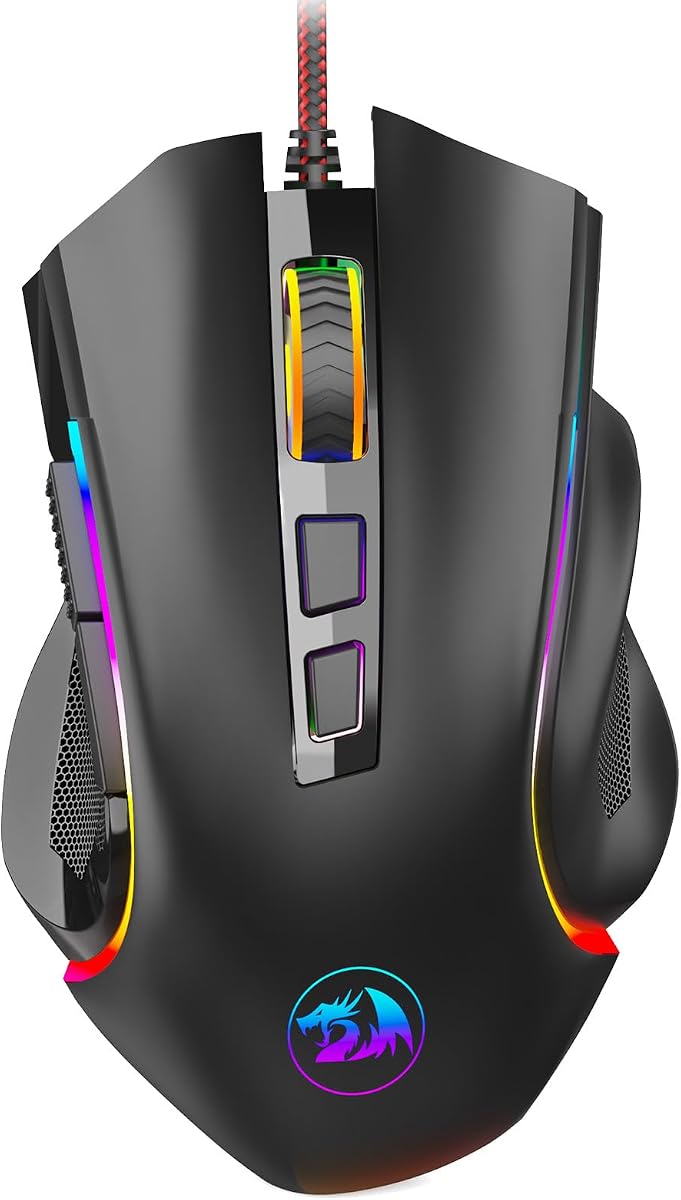
Redragon M602 Gaming Mouse
4.6Editor score
7200 Adjustable DPI
9 Programmable Buttons
Ergonomic RGB Design
This guide compares the top 10 gaming mice for Diablo 4 based on sensor precision, button layout, ergonomics, and durability to help you choose the right
Finding the right gaming mouse for Diablo 4 requires balancing precision, comfort, and customizable controls. The game demands quick skill swaps and precise targeting, so a mouse with reliable sensors and programmable buttons can significantly enhance your gameplay experience.
We evaluated ten top-rated mice focusing on sensor accuracy, button count, ergonomic design, and build quality. Each product was analyzed for its suitability in high-stakes dungeon crawls and intense boss battles where every click counts toward survival and loot.
Each pick below highlights key strengths and potential trade-offs to guide your decision. Prices and availability fluctuate frequently, so check current listings before purchasing. This guide aims to save you time and ensure you invest in a mouse that matches your play style.
4.6Editor score

4.6Editor score

4.2Editor score
The following table provides a side-by-side comparison of all ten selected mice. It highlights essential specifications such as sensor resolution, button count, connectivity type, and weight features to help you quickly identify the model that fits your specific needs for Diablo 4.






The Logitech G502 Hero is a standout choice for Diablo 4 players seeking a balance of performance and customization. With a highly rated HERO sensor and eleven programmable buttons, it delivers the precision and control needed for complex skill rotations and inventory management.
We may earn a commission when you buy through this link, at no additional cost to you.
Its HERO sensor provides tracking up to 25600 DPI with zero smoothing, ensuring your cursor moves exactly as you intend. The dual-mode hyper-fast scroll wheel allows quick item navigation, while the adjustable weights let you fine-tune the feel to match your grip style.
While the mouse is slightly heavier than minimalist options, the weight distribution is well-balanced and can be customized. The mechanical switch button tensioning ensures crisp clicks that remain consistent over time, though some users may prefer wireless connectivity for a clutter-free desk.
Ideal for players who prioritize sensor accuracy and button customization, the G502 Hero is a reliable workhorse. Its durable build and extensive software support make it a top recommendation for anyone looking to upgrade their setup for extended Diablo 4 sessions.
The HERO sensor ensures pixel-perfect accuracy during fast-paced combat scenarios in Diablo 4.
Eleven programmable buttons allow you to map skills and macros for faster reaction times.
We may earn a commission when you buy through this link, at no additional cost to you.
The Razer DeathAdder Essential offers a classic ergonomic design that suits many hand sizes comfortably. It features a reliable 6400 DPI optical sensor and mechanical switches rated for 10 million clicks, providing a solid foundation for Diablo 4 gameplay without breaking the bank.
We may earn a commission when you buy through this link, at no additional cost to you.
Its ridged rubberized scroll wheel enhances control during high-stakes situations, while the five programmable buttons allow basic macro customization through Razer Synapse. The ergonomic form factor reduces hand fatigue during long play sessions, making it a practical choice for casual gamers.
However, players seeking extensive customization might find the five-button layout limiting compared to other models. The 6400 DPI is sufficient for most needs but lacks the ultra-high sensitivity of newer sensors, though it remains responsive and accurate for typical gaming scenarios.
This mouse is best for budget-conscious gamers who value comfort and durability over advanced features. Its straightforward design and reliable performance make it a worthy option for those entering the Diablo 4 scene or upgrading from a basic office mouse.
The ergonomic shape is designed to fit naturally in your hand, reducing strain during extended use.
Durable mechanical switches ensure consistent clicks throughout thousands of gaming hours.
We may earn a commission when you buy through this link, at no additional cost to you.
The Corsair NIGHTSWORD RGB features an exclusive Smart Tunable Weight System that automatically detects the mouse's center of gravity. This allows players to adjust the weight between 119g and 141g for a perfectly balanced feel tailored to their grip style in Diablo 4.
We may earn a commission when you buy through this link, at no additional cost to you.
Equipped with a custom Pixart PMW3391 optical sensor capable of 18000 DPI, it offers ultra-accurate tracking with 1 DPI resolution steps. The ten fully programmable buttons provide ample space for macro assignments, while the contoured shape ensures professional-level comfort during long sessions.
While the weight calibration is a standout feature, the price point is higher than entry-level options. The software requires some learning to fully utilize the tuning capabilities, and the mouse is heavier than wireless alternatives, which may affect mobility for some users.
This mouse is ideal for players who want precise control over their peripheral's balance and weight. Its advanced sensor and customization options make it a strong contender for those willing to invest in a high-performance tool for competitive or casual Diablo 4 gaming.
Adjust weights to match your personal preference for speed or stability during gameplay.
The advanced optical sensor ensures accurate tracking even during rapid movement.
We may earn a commission when you buy through this link, at no additional cost to you.
The Razer Basilisk V3 is designed with an iconic ergonomic design that supports the hand with a dedicated thumb rest. It features 11 programmable buttons and a HyperScroll tilt wheel that switches between free-spin and tactile modes for precise control in Diablo 4.
We may earn a commission when you buy through this link, at no additional cost to you.
With a Focus Plus 26K DPI optical sensor, it tracks movement flawlessly without smoothing, ensuring pixel-precise accuracy. The optical switches provide crisp execution at 0.2ms actuation speed, and the 11 RGB lighting zones allow for dynamic effects that react to gameplay.
The weight may feel substantial to those preferring lightweight mice, and it relies on a wired connection. However, the durability of the optical switches and the versatility of the scroll wheel make it a top pick for players who value precision and customization.
This mouse suits players who want a feature-rich experience with advanced tactile feedback. Its combination of ergonomic design, high-end sensor, and extensive customization options makes it a compelling choice for dedicated Diablo 4 enthusiasts.
Switch between free-spin for speed and tactile mode for precision during inventory management.
Lightning-fast actuation ensures your commands are executed instantly without delay.
We may earn a commission when you buy through this link, at no additional cost to you.
The Logitech G305 Lightspeed brings wireless freedom without compromising performance or battery life. Featuring the next-generation HERO sensor with up to 12000 DPI, it delivers precise tracking and ultra-fast LIGHTSPEED wireless technology for a lag-free experience in Diablo 4.
We may earn a commission when you buy through this link, at no additional cost to you.
It boasts an incredible 250 hours of continuous gameplay on a single AA battery, and endurance mode can extend this to nine months. The lightweight design at only 3.4 ounces enhances maneuverability, making it easy to use on the go or at a desk.
While the six programmable buttons are fewer than specialized MMO mice, they are sufficient for many play styles. The requirement for a battery adds a small weight compared to rechargeable options, but the convenience of a long-lasting single AA cell is often preferred.
This mouse is perfect for players seeking reliable wireless performance at an affordable price. Its portability and efficiency make it an excellent choice for those who travel with their gaming laptop or prefer a clean setup without cables.
Enjoy long gaming sessions without worrying about charging or frequent battery changes.
The LIGHTSPEED technology provides the same responsiveness as a wired connection.
We may earn a commission when you buy through this link, at no additional cost to you.
The Corsair Scimitar RGB Elite is built for frequent actions and complex macros with 17 fully programmable buttons. Its patented Key Slider Control System allows you to reposition the 12 side buttons to fit your grip, offering unmatched customization for Diablo 4.
We may earn a commission when you buy through this link, at no additional cost to you.
Equipped with a native 18000 DPI optical sensor, it ensures highly accurate tracking. The ultra-durable construction includes 50 million click-rated Omron switches and a braided cable to withstand extended gaming sessions. The contoured shape supports your palm comfortably regardless of hand size.
The specialized layout may take time to learn, and the overall weight could be excessive for those not needing so many buttons. However, for players who rely heavily on skill macros and inventory management, the utility of the side buttons is invaluable.
This mouse is best suited for dedicated MMO enthusiasts who need extensive input options. Its robust build and adjustable design make it a powerful tool for mastering complex gameplay mechanics in Diablo 4 and other demanding titles.
Reposition side buttons to fit your hand size for more comfortable access during long sessions.
High-quality switches and cables ensure the mouse stands up to years of daily use.
We may earn a commission when you buy through this link, at no additional cost to you.
The UtechSmart Venus Pro offers dual modes with ultra-speed wireless technology and a stable wired option. It features 16 customizable buttons designed to improve gaming skills through complex macro coding, making it a strong contender for Diablo 4 roleplay.
We may earn a commission when you buy through this link, at no additional cost to you.
With an optical sensor up to 16000 DPI and a 1000Hz polling rate, it delivers precise tracking. The 1000mA battery provides up to 70 hours of wireless use and recharges quickly, while auto-sleep modes help conserve power during inactive periods.
The ergonomic design is great for comfort, but the mouse is bulkier than standard models due to the button count. Some users may find the software configuration complex, but once set up, the functionality is comprehensive for advanced gamers.
Ideal for players who need wireless freedom with MMO-level button access, this mouse bridges the gap. Its combination of dual connectivity and extensive customization offers a versatile solution for diverse gaming needs.
Switch between wireless freedom and wired stability depending on your current gaming needs.
16 programmable buttons allow you to execute complex spell combos with a single press.
We may earn a commission when you buy through this link, at no additional cost to you.
The Redragon M901K offers an impressive array of 19 programmable buttons at an accessible price point. With adjustable DPI up to 12400 and a 125Hz to 1000Hz polling rate, it supports a wide range of gaming scenarios from daily work to intense Diablo 4 raids.
We may earn a commission when you buy through this link, at no additional cost to you.
It features a unique weight tuning system with eight removable 2.4g weights to personalize balance and feel. The 16.8 million RGB color combinations and four lighting modes add visual flair, while the ergonomic design ensures comfort without fatigue.
The software is relatively basic compared to premium brands, and the mouse may feel heavy without weight adjustments. However, for those on a budget, the sheer number of buttons and customization options provide exceptional value for MMO gaming.
This mouse is perfect for players seeking high functionality without a high cost. Its extensive button count and ergonomic design make it a strong entry point into advanced gaming peripherals for Diablo 4 enthusiasts.
19 programmable buttons give you plenty of room for complex skill and macro setups.
Adjust the internal weights to find the perfect balance for your hand and play style.
We may earn a commission when you buy through this link, at no additional cost to you.
The Redragon M602 has been a popular choice since 2015 due to its durable build and positive quality sharing. It features an ergonomic shape that fits comfortably in your hand, along with nine programmable buttons for essential macro assignments in Diablo 4.
We may earn a commission when you buy through this link, at no additional cost to you.
With an adjustable DPI up to 7200 and a high-precision sensor, it ensures consistent and stable tracking. The RGB lighting modes allow for customization, and the software lets you remap functions and adjust speed for different uses.
While it lacks the high DPI of premium mice, its responsiveness is sufficient for most gaming needs. The wired connection ensures zero latency, and its classic design has proven reliable over years of use, making it a trusted option for budget shoppers.
This mouse is ideal for beginners or casual players who need reliable performance without a high investment. Its comfort and proven track record make it a great starting point for upgrading from a standard office mouse.
The ergonomic shape is designed to fit natural hand positions, reducing strain during play.
Over a decade of user feedback confirms this model remains reliable for daily gaming tasks.
We may earn a commission when you buy through this link, at no additional cost to you.
The Razer Naga V3 Pro adapts to any game genre with three swappable magnetic side plates featuring 12, 6, or 2-button layouts. This versatility allows you to customize the mouse for Diablo 4 or other genres without buying a new peripheral.
We may earn a commission when you buy through this link, at no additional cost to you.
It features the Razer Focus Pro 50K Optical Sensor with up to 50000 DPI and Frame Sync technology for accurate tracking. The HyperScroll Tilt Wheel offers dual tactile modes, and the HyperSpeed Wireless ensures low-latency gameplay with up to 155 hours of battery life.
While the premium price is a consideration, the ability to swap plates makes it a versatile long-term investment. The large size and weight might not suit everyone, but the level of control and precision offered is unmatched in the current market.
This mouse is best for serious gamers who need the ultimate in customization and performance. Its advanced technology and modular design make it the top choice for those who demand the best in Diablo 4 hardware.
Swap side plates to match the button needs of different games or personal preference.
The highest DPI sensor ensures that even minute movements are captured with absolute accuracy.
We may earn a commission when you buy through this link, at no additional cost to you.
Choosing the right gaming mouse for Diablo 4 involves balancing several key factors to ensure comfort, performance, and durability during long gaming sessions. Understanding what features matter most can help you narrow down the options to find the perfect fit for your play style.
The sensor is the heart of the mouse, responsible for tracking movement and translating it to cursor motion. For Diablo 4, high DPI and polling rate ensure that rapid movements during combat are smooth and accurate. Look for sensors that offer adjustable sensitivity and minimal acceleration or smoothing.
Prioritize sensors with high DPI ranges and consistent tracking to maintain control during intense battles.
The number and placement of buttons determine how easily you can access skills and items. MMO mice typically have side buttons ideal for complex macro chains, while standard mice may offer fewer but more accessible options. Consider how many keys you need to map for your character build.
Select a mouse with enough programmable buttons to cover your most frequently used skills without clutter.
Comfort is vital for long play sessions to prevent strain or fatigue. An ergonomic shape should fit your hand size and grip style naturally, reducing stress on your wrist and fingers. Features like thumb rests and rubberized grips enhance stability and comfort during extended use.
Choose a design that feels natural in your hand to minimize fatigue during long gaming marathons.
The weight of a mouse affects how quickly you can move it and how steady your aim remains. Some mice offer adjustable weights to let you find a balance between speed and stability. A lighter mouse allows for quick reflexes, while a heavier one provides steadier control.
Adjust the weight to match your preference for speed versus control in combat situations.
Wired mice offer consistent connection without battery concerns, while wireless mice provide flexibility and a cleaner setup. Modern wireless technology like LIGHTSPEED or HyperSpeed delivers lag-free performance comparable to wired connections. Consider your workspace needs and whether you want to manage charging.
Decide based on whether you prioritize convenience or absolute consistency in your connection.
A gaming mouse should withstand thousands of clicks and continuous use without performance degradation. Look for mechanical switches rated for millions of clicks and sturdy construction materials. Braided cables and quality buttons ensure the mouse remains functional through heavy gaming sessions.
Invest in a build quality that ensures longevity even with daily intense gaming usage.
Software allows you to remap buttons, create macros, and adjust lighting or DPI settings. Robust software support means you can tailor the mouse precisely to your needs in Diablo 4. Check if the software is intuitive and supports profile switching for different games.
Ensure the companion software is reliable and easy to use for complex macro setups.
Gaming mice range widely in price from affordable entry-level models to premium high-end options. Determine your budget while considering how often you play and what features are essential. Often, mid-range mice offer the best balance of performance and cost for most players.
Set a realistic budget that aligns with your gaming frequency and feature requirements.
To get the most out of your gaming mouse, install the recommended software and configure your buttons for common Diablo 4 actions. Set your preferred DPI level based on your monitor resolution and playing style to ensure precise cursor movement.
Clean the mouse surface regularly to remove dirt and oils that can affect tracking. Use a soft cloth or compressed air to keep sensors and buttons free of debris, ensuring consistent performance over time.
For wireless models, manage your battery life by enabling power-saving features when not in use. Store the mouse properly when not in use to avoid damage, and replace batteries or recharge as needed to maintain optimal performance.
The number depends on your play style. Casual players might only need six to eight buttons for core skills and potions. Dedicated players often prefer ten or more to map utility skills, inventory access, and macros efficiently. Assess your keybind requirements before purchasing.
Yes, modern wireless mice use low-latency technology like LIGHTSPEED or HyperSpeed that match wired performance. They offer the convenience of a clutter-free desk. Just ensure you manage battery levels to avoid interruptions during gameplay.
A DPI range of 800 to 3200 is typically sufficient for most players, allowing fast movement without losing control. High DPI sensors offer flexibility but require proper adjustment. Test different settings to find what feels comfortable for your wrist and screen.
Most gaming mice work on Mac OS, but some features like advanced macro software may require Windows. Basic functionality usually works, but check compatibility details for full customization features. Some brands offer limited macOS support via specific software.
With proper care, a gaming mouse can last several years depending on usage frequency. Switch durability and battery life for wireless models are key indicators. If performance declines or buttons become unresponsive, it may be time for an upgrade.
Yes, a quality mouse pad improves tracking and surface consistency for optical and laser sensors. It also protects your desk and provides a smoother glide for the mouse. Choosing a surface with the right texture enhances accuracy during gameplay.
The top picks in this guide highlight the best options across different categories, from the versatile Logitech G502 Hero to the specialized Razer Naga V3 Pro. Each model offers unique strengths tailored to various play styles and preferences for Diablo 4.
Prioritize features that align with your gameplay needs, such as sensor accuracy, button count, and ergonomic comfort. Investing time in understanding these factors will ensure you choose a mouse that enhances your performance and enjoyment.
Remember to check current prices and availability before purchasing, as deals and stock can vary. Select a mouse that fits your budget and delivers the performance you need for long-term success in Diablo 4.