
Redragon K556 Wired RGB Mechanical Gaming Keyboard
4.6Editor score
Brushed aluminum board construction
Hot-swappable switch sockets
Vibrant RGB lighting modes
Discover the top full metal keyboard options for durability and performance. This guide compares ten premium aluminum and steel models to help you choose the
Finding a durable typing solution often leads enthusiasts toward full metal keyboard designs. These units offer superior stability and a premium feel that plastic alternatives cannot match for serious users.
We evaluated ten top models based on construction quality, switch performance, and feature sets. Each entry was assessed for build integrity, typing comfort, and overall value within the current market.
Every pick highlights specific strengths like aluminum frames, magnetic switches, or customizable lighting. Note that pricing fluctuates frequently, so verify current costs before making your final purchasing decision today.
4.6Editor score

4.8Editor score

4.1Editor score
This side-by-side comparison reviews all ten featured models to highlight their unique construction and performance characteristics for potential buyers seeking durability.



The SteelSeries USB Apex 5 stands out as a robust option for those seeking a full metal keyboard with gaming features. With a 4.6 rating, it combines the tactile feedback of blue switches with membrane smoothness inside an aircraft grade aluminum alloy frame. This construction ensures sturdiness and durability for long term use without flexing during intense sessions.
We may earn a commission when you buy through this link, at no additional cost to you.
Its standout quality lies in the OLED smart display which allows customization with game info or messages directly on the board. The per-key RGB illumination offers reactive effects that enhance the gaming experience significantly. Users benefit from the included magnetic wrist rest that provides full palm support, ensuring comfort during extended typing or gaming marathons.
While the hybrid switches offer a unique feel, some traditional mechanical enthusiasts might find them less clicky than pure blue switches. The OLED screen is a premium touch but adds little utility for non-gaming tasks. However, these trade-offs are acceptable given the overall build quality and visual customization options available to the user.
This keyboard is ideal for gamers who value durability and visual flair over pure mechanical clickiness. It suits desks where the OLED display can show real-time data. We recommend it for anyone wanting a sturdy metal frame with advanced lighting and display features at a competitive price point.
The aircraft grade aluminum alloy frame provides a solid foundation that resists wear and tear over years of heavy use.
The integrated OLED smart display lets you view Discord messages or game stats without alt tabbing away from your main window.
We may earn a commission when you buy through this link, at no additional cost to you.
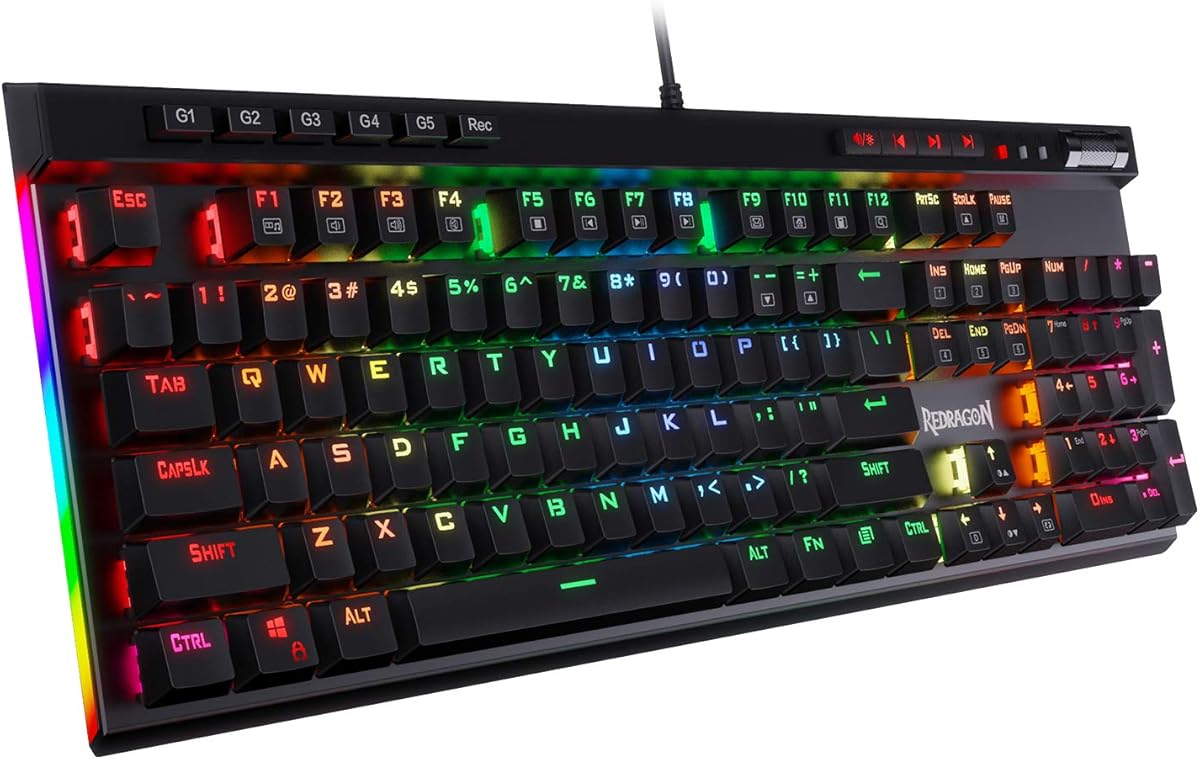
The Redragon K556 offers an exceptional value proposition for those seeking a full metal keyboard without breaking the bank. Rated 4.6 stars, it features a tank-solid brushed aluminum board that keeps every keystroke steady. Unlike many plastic alternatives, this construction prevents flex and maintains stability during intense gaming or work sessions.
We may earn a commission when you buy through this link, at no additional cost to you.
Key strengths include the upgraded socket design which accepts almost any 3-pin or 5-pin switch for customization. This means users can swap out switches without soldering, allowing for personalized typing feel over time. The vibrant RGB lighting modes provide a true eSports vibe with adjustable brightness and flow speed settings.
While the companion software allows for deeper customization like macro programming, it is not as polished as high-end competitors. The stock Brown switches are comfortable but might lack the premium feel of costlier models. These minor drawbacks are acceptable considering the price point and the solid aluminum build quality.
We recommend this keyboard for budget-conscious buyers who want durability and modularity. It suits entry-level enthusiasts and casual gamers who need a reliable input device. The ability to swap switches easily makes it a great platform for learning about mechanical keyboards.
The brushed aluminum board ensures that the keyboard remains flat and steady even when typing or playing aggressively.
Hot-swappable sockets allow you to change switches easily to tailor the tactile feel to your specific preferences.
We may earn a commission when you buy through this link, at no additional cost to you.
The Cherry KC 200 MX is designed primarily for office environments but retains the durability of a full metal keyboard build. Rated 4.2 stars, it features an anodized metal plate that provides a sturdy base for the improved CHERRY MX2A switches. These switches offer precise and noticeable typing feel without the loud click of traditional mechanical switches.
We may earn a commission when you buy through this link, at no additional cost to you.
Its key strengths include high-quality mechanical construction with over 100 million actuations per key for longevity. The practical design includes tasteful white status LEDs and extra keys for quick access to volume or calculator apps. This makes it highly functional for daily work tasks requiring efficiency and reliability.
While it lacks RGB gaming features, this simplicity is a benefit for professional settings where distraction-free typing is preferred. The molded keycaps and laser-etched lettering ensure legibility even after years of use. Some users might find the design too basic, but for office productivity, it is a robust choice.
We recommend this for corporate users who prioritize comfort and durability over flashiness. It fits well in clean office setups. The reliable wired connection and N-key rollover ensure accuracy during data entry or coding sessions.
The MX2A Brown switches deliver a tactile bump that helps reduce typing errors without distracting colleagues.
Laser-etched abrasion-resistant keycaps keep the lettering clear and readable even after extended daily use.
We may earn a commission when you buy through this link, at no additional cost to you.
The Keychron K10 HE transforms typing with advanced magnetic switch technology inside a full-size wireless chassis. With a 4.3 rating, it blends a classic mechanical feel with Hall Effect magnetic switches that detect keypresses using sensors instead of physical contact. This design reduces wear and tear for greater longevity and precision.
We may earn a commission when you buy through this link, at no additional cost to you.
Its standout feature is the tri-mode connectivity which allows seamless switching between Bluetooth, 2.4 GHz wireless, and Type-C wired modes. Users can pair up to three devices and adapt the layout for macOS or Windows systems easily. The Launcher Web Configurator enables deep customization of actuation points and rapid trigger settings.
While the price reflects the premium features, users seeking basic input might find it over-engineered. The wood sidings offer a refined look but require careful cleaning to maintain appearance. However, the durability and wireless convenience make it a top choice for power users.
We recommend this for professionals and gamers who want a versatile metal keyboard that works across multiple devices. It suits setups where cable clutter is a concern. The magnetic switches offer a unique tactile experience that stands out from traditional mechanical options.
The tri-mode connectivity ensures you stay connected to multiple devices without compromising on speed or reliability.
Hall Effect switches provide ultra-responsive performance and adjustable actuation points for tailored precision.
We may earn a commission when you buy through this link, at no additional cost to you.
The Corsair Vanguard 96 offers a full keyboard experience in a super-compact frame that saves desk space. Rated 4.4 stars, it features an optimized 96% layout with arrow keys, a tenkey pad, and programmable G-keys. This design allows users to maintain full functionality without the bulk of a standard full-size model.
We may earn a commission when you buy through this link, at no additional cost to you.
Its standout feature is the integrated 1.9 inch LCD screen that displays custom animations or system specs. Combined with 8000Hz hyper-polling, it eradicates input lag for the fastest response times. The Virtual Stream Deck integration maps functions directly to G-keys for enhanced productivity during gaming or work.
While the tight layout may feel crowded for users with large hands, the performance benefits are clear. The LCD screen adds a layer of personalization that sets it apart from standard boards. However, reliance on proprietary software for full features might be a drawback for some users.
We recommend this for gamers and streamers who need macro functions and compact efficiency. It suits competitive setups where speed matters. The combination of LCD customization and high polling rates makes it a standout in the metal keyboard category.
The 96 percent layout retains essential keys while reducing the footprint for more mouse movement space.
The vibrant LCD screen lets you personalize your setup with system data or custom animations instantly.
We may earn a commission when you buy through this link, at no additional cost to you.
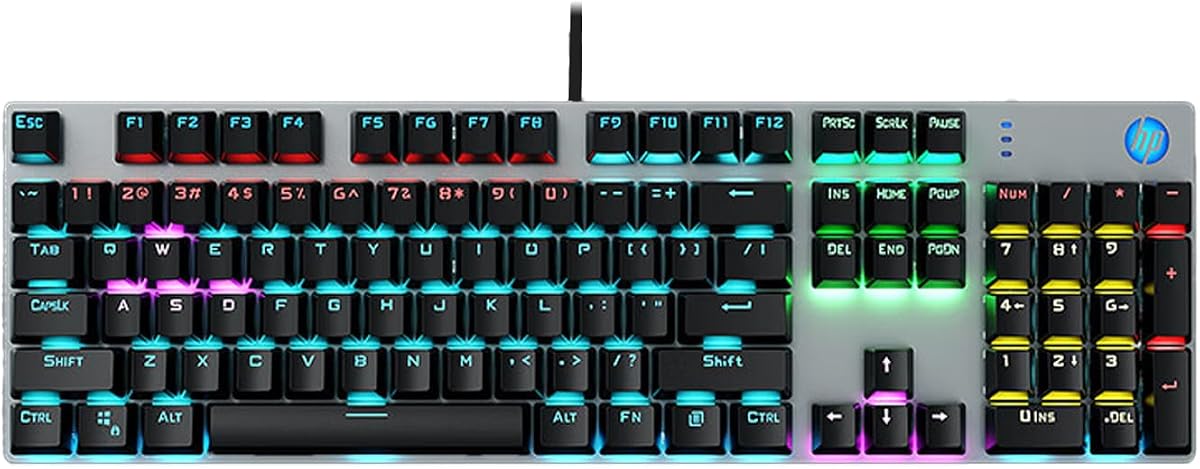
The HP GK400F is designed for versatile use in both business and gaming scenarios with a solid metal panel construction. With a 4.2 rating, it features responsive Brown Switch mechanical switches paired with Full N-key rollover. This ensures accurate and smooth input whether you are typing reports or playing fast-paced games.
We may earn a commission when you buy through this link, at no additional cost to you.
Its key strengths include the stunning Ice Blue backlight with 20 effects for visibility in low-light environments. The ergonomic design with two-stage adjustable foot supports relieves hand fatigue during prolonged sessions. Reliable wired USB connection ensures zero signal delay without complicated setup.
While ABS keycaps may show shine over time compared to PBT, the wear-resistant design holds up well. Non-hot-swappable switches limit customization but simplify maintenance. These trade-offs are acceptable given the overall stability and compatibility with desktop and laptop devices.
We recommend this for users needing a reliable workhorse for mixed usage. It fits well in home offices. The balance of tactile feedback and sturdy metal construction makes it a practical choice for daily tasks.
This keyboard meets daily office and gaming needs with a layout that works seamlessly across different usage styles.
Adjustable foot supports and anti-slip pads lock the keyboard in place to reduce fatigue during extended typing.
We may earn a commission when you buy through this link, at no additional cost to you.
The Keychron Q6 Pro delivers an unprecedented typing experience with its full-metal QMK/VIA Bluetooth wireless construction. Rated 4.1 stars, it is crafted with 6063 aluminum and includes double-gasket design for a softer feel. This custom mechanical keyboard offers a 100% full-size layout perfect for detailed workflows.
We may earn a commission when you buy through this link, at no additional cost to you.
Its standout feature is QMK VIA software support which allows remapping keys and creating macros easily. The 1000 Hz polling rate on wired mode ensures fast and responsive speed for work and gaming. Hot-swap sockets let you replace switches without soldering for infinite customization possibilities.
While the price reflects the premium materials, beginners might find VIA software complex. However, enthusiasts will appreciate the acoustic resonance reduction and PCB-mounted stabilizers. These trade-offs are acceptable given the build quality and universal compatibility across systems.
We recommend this for keyboard enthusiasts seeking high-end customization. It suits professional setups. The combination of wireless freedom and robust metal construction makes it a top tier choice for dedicated users.
QMK VIA software empowers users to remap every key and create complex macro commands tailored to their workflow.
The double-gasket design reduces acoustic resonance between metals for a smoother and quieter typing experience.
We may earn a commission when you buy through this link, at no additional cost to you.
The Logitech G413 SE is a full-size keyboard built with the durability and performance necessary to compete in gaming. With a 4.5 rating, it features a sleek black-brushed aluminum top case and heat-resistant PBT keycaps. The brushed aluminum-magnesium alloy top case serves as the backbone for minimal flex.
We may earn a commission when you buy through this link, at no additional cost to you.
Key strengths include uncompromising performance with tactile mechanical switches and reliable 6-key rollover anti-ghosting. FN key media controls let you manage volume and playback without interrupting your workflow. The white LED lighting provides a clean aesthetic that elevates gaming setups.
While lighting options are limited to white, the focus on durability makes up for it. Non-hot-swappable switches mean you cannot change them later. However, the robust build and PBT keycaps ensure long-term reliability which is a significant advantage for daily users.
We recommend this for gamers who want a durable, no-nonsense metal board. It suits competitive environments. The minimal flex design ensures consistent input even during the most intense gaming sessions.
Heat- and wear-resistant PBT keycaps ensure that the keys remain in good condition despite heavy use.
The robust body design with minimal flex keeps the typing surface steady for consistent performance.
We may earn a commission when you buy through this link, at no additional cost to you.
The OOCTPK Chilkey SF60 represents the pinnacle of metal keyboard engineering with aerospace-grade aluminum construction. Rated 4.8 stars, it features Hall Effect switches and rapid trigger precision of 0.001mm. This compact 60% layout is designed for competitive gaming where speed and accuracy are paramount.
We may earn a commission when you buy through this link, at no additional cost to you.
Its standout feature is the industry-leading polling rate of 8000Hz which delivers ultra-low latency. The metal keycaps create a unique Golden Bell acoustic chamber for a rich thock sound. A 5-layer acoustic gascket structure ensures a soft typing feel and pristine sound profile.
While the compact size may require adaptation for users used to full-size layouts, the performance gains are worth it. The AI-driven OS allows the hardware to evolve alongside game updates. These trade-offs are acceptable for competitive players seeking the ultimate edge.
We recommend this for esports athletes and enthusiasts who want top-tier tech. It suits performance-focused setups. The combination of rapid trigger and full aluminum build makes it a standout choice for serious gamers.
The 0.001mm rapid trigger allows for instant keystroke registration giving you a decisive edge in fast games.
Metal keycaps and acoustic filling create a rich thock sound that enhances the typing experience.
We may earn a commission when you buy through this link, at no additional cost to you.
The Redragon K580 offers unique features like dedicated macro keys and a media wheel for enhanced control. Rated 4.6 stars, it is built to last with double-shot keycaps and hot-swappable sockets. This allows users to save complex combos directly on the keyboard without requiring software.
We may earn a commission when you buy through this link, at no additional cost to you.
Its key strengths include the ability to swap switches easily for different tactile feels. The anti-ghosting technology ensures accurate input during rapid multi-key combos. These features make it highly functional for both gaming and productivity tasks.
While RGB customization is basic compared to high-end models, the utility of onboard macros is high. The build quality holds up well to heavy use. These trade-offs are acceptable given the versatility and ease of use for daily tasks.
We recommend this for users who need quick access to macros without complex software. It suits mixed-use setups. The durability and macro capabilities make it a practical choice for efficiency-focused users.
Onboard macro recording lets you save and play complex shortcuts instantly without needing companion apps.
Hot-swappable sockets allow you to experiment with different switches to find your perfect tactile feel.
We may earn a commission when you buy through this link, at no additional cost to you.
Selecting the right full metal keyboard requires evaluating several key factors to ensure it meets your needs for durability and performance.
Look for frames made from aircraft-grade aluminum, stainless steel, or robust alloys that prevent flexing. High-quality metal ensures the keyboard stays flat and stable even during intense typing or gaming sessions without wobbling.
Prioritize solid metal builds over mixed materials to guarantee longevity and a premium feel that lasts for years.
Evaluate switch life ratings, aiming for 50 to 100 million actuations. Tactile switches offer feedback while linear switches provide smoothness, and hot-swap options allow future upgrades without soldering.
Choose switches that match your typing style and ensure they are well-lubed for consistent performance over time.
Decide between full-size, tenkeyless, or compact 60% layouts based on available desk space. A full metal keyboard often has a heavier footprint, so ensure it fits your workspace without obstructing mouse movement.
Select a layout that retains the essential keys you need daily to avoid workflow interruptions.
Consider if you need wireless options like Bluetooth or 2.4GHz for clean setups or prefer wired for stability. Check for software support to remap keys, set macros, and adjust lighting to match your aesthetic preferences.
Ensure the keyboard supports your operating system natively to avoid driver compatibility issues.
Invest in PBT keycaps which resist shine and wear better than ABS plastic over time. Profiles like OEM or KSA can change the typing angle and comfort level significantly.
Choose keycaps that match your ergonomic needs to reduce fatigue during long work or gaming periods.
Metal cases can amplify noise unless designed with dampening features like foam or gaskets. Consider if you prefer a loud click or a muted thock sound depending on your environment.
Opt for keyboards with acoustic chambers if noise control is important for your workspace.
Look for built-in feet, wrist rests, or adjustable angles to support your wrists during long sessions. Proper ergonomics prevent strain and improve overall comfort while typing.
Verify that the keyboard is stable and does not slide during aggressive use.
Balance the price with the features provided, ensuring the keyboard offers lasting value beyond just the metal build. Check for warranty terms that cover defects in materials and workmanship.
Choose a product with reliable support to protect your investment against potential issues.
To ensure longevity, regularly clean the surface of your metal keyboard using a soft microfiber cloth and mild electronics-safe cleaner. Dust can accumulate in crevices so use compressed air to keep it free of debris without scratching the finish.
Avoid exposing the keyboard to excessive moisture or heat as this can damage internal components and finish. If you use a magnetic wrist rest, ensure it is clean and dry to prevent any residue from transferring to the metal surface.
For models with hot-swappable switches, handle them gently during replacement to prevent bending the pins. Store the keyboard in a dry environment and avoid placing heavy objects on top to prevent warping the metal frame over time.
Yes, full metal keyboards offer superior stability and durability compared to plastic alternatives. They reduce typing flex and often have a longer lifespan due to robust construction. While more expensive, the premium feel and reliability make them worth the investment for frequent users.
Yes, metal keyboards generally weigh significantly more than plastic ones. This added weight prevents the keyboard from sliding on the desk during use. However, it can make them harder to transport if you frequently move your setup around.
Use a microfiber cloth dampened with mild electronics cleaner to wipe the surface gently. Avoid harsh chemicals like ammonia or alcohol which can strip coatings. For keycaps, use compressed air to remove dust from crevices safely.
Many modern metal keyboards support hot-swappable switches allowing you to change them without soldering. Check the product specs to confirm support for 3-pin or 5-pin switches. This flexibility lets you tailor the typing feel to your preferences.
Absolutely, metal keyboards provide the stability needed for intense gaming sessions. They often feature high polling rates and anti-ghosting technology for accurate input. The rigid frame ensures every keystroke registers precisely without flex interference.
Metal conducts heat efficiently but generally remains cooler than plastic due to heat dissipation. However, prolonged use in warm environments can slightly warm the surface. Most users find the aluminum or steel remains comfortable to touch even during long sessions.
Our selection of ten full metal keyboards showcases top options ranging from the durable SteelSeries Apex 5 to the premium Keychron Q6 Pro. Each model offers unique benefits for specific needs whether you prioritize gaming performance or office productivity.
When choosing, prioritize build quality, switch durability, and layout comfort to match your daily workflow. Consider how much you value features like hot-swap or wireless connectivity to narrow down your choices effectively.
Remember that pricing fluctuates frequently so always check current costs before finalizing your purchase. This ensures you get the best value for your investment in a high-quality typing experience.