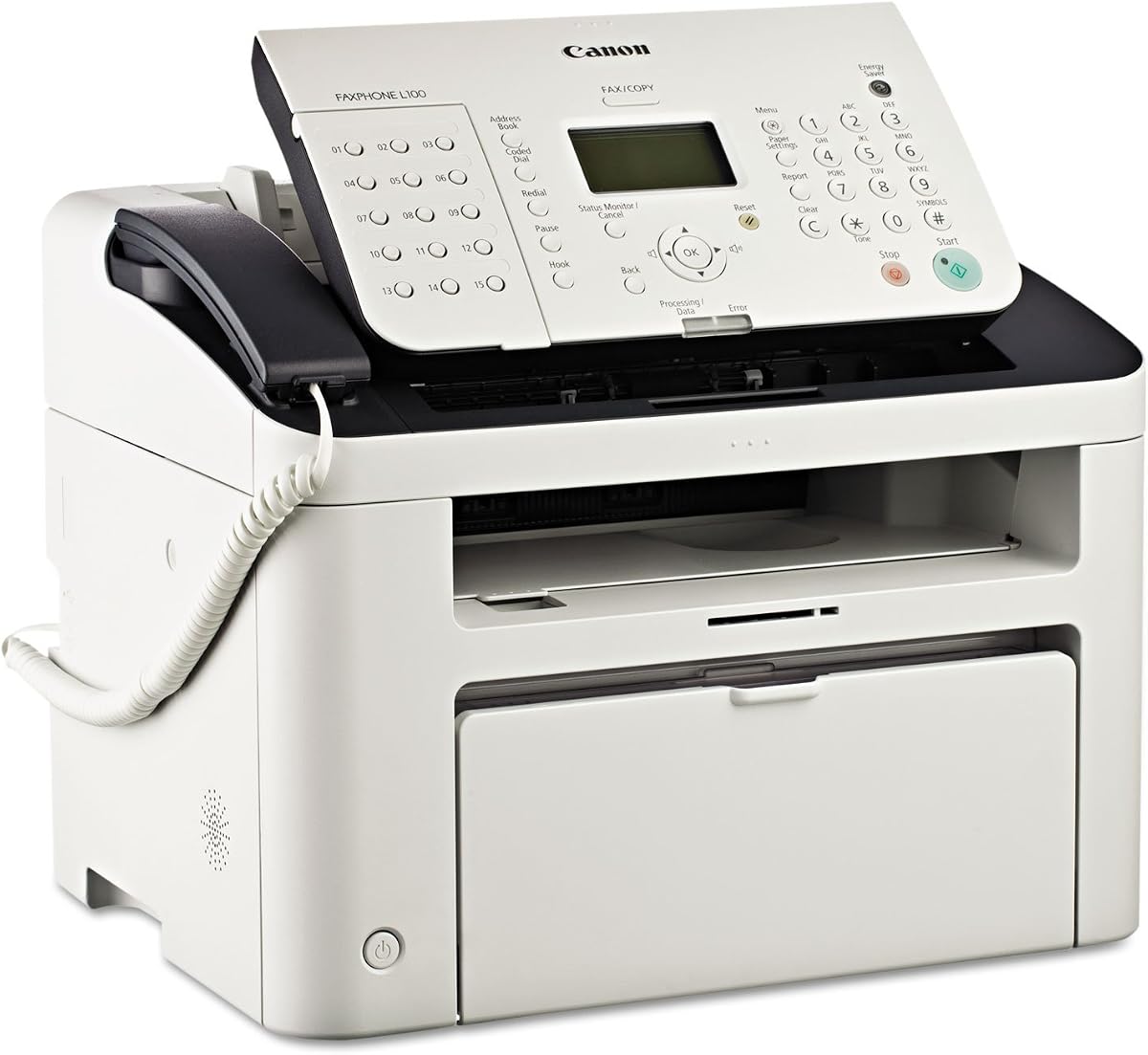
Canon FAXPHONE L100
4.1Editor score
High print speed output
Generous paper capacity
Includes telephone handset
Find the best fax machine with phone for your office. This guide compares top models for speed, memory, and reliability to help you choose wisely.
Choosing a fax machine with phone functionality remains essential for many businesses needing reliable document transmission. These devices combine printing, copying, and telephone features into one compact unit. A good model ensures clear scans and fast transmission speeds for daily office tasks.
We evaluated ten top-rated units based on performance, memory capacity, and ease of use. Our analysis focuses on real-world specs like print speed, paper handling, and modem reliability. This list covers diverse options from budget-friendly to high-performance business classes.
Each pick highlights key strengths and potential trade-offs to help you decide. Product features vary widely, so consider your specific workflow needs before purchasing. Prices and availability change frequently, so verify current details on the retailer site before ordering.
4.1Editor score
4.2Editor score

4.4Editor score
This side-by-side comparison highlights key specifications across all ten models to help you find the right fit for your office environment.


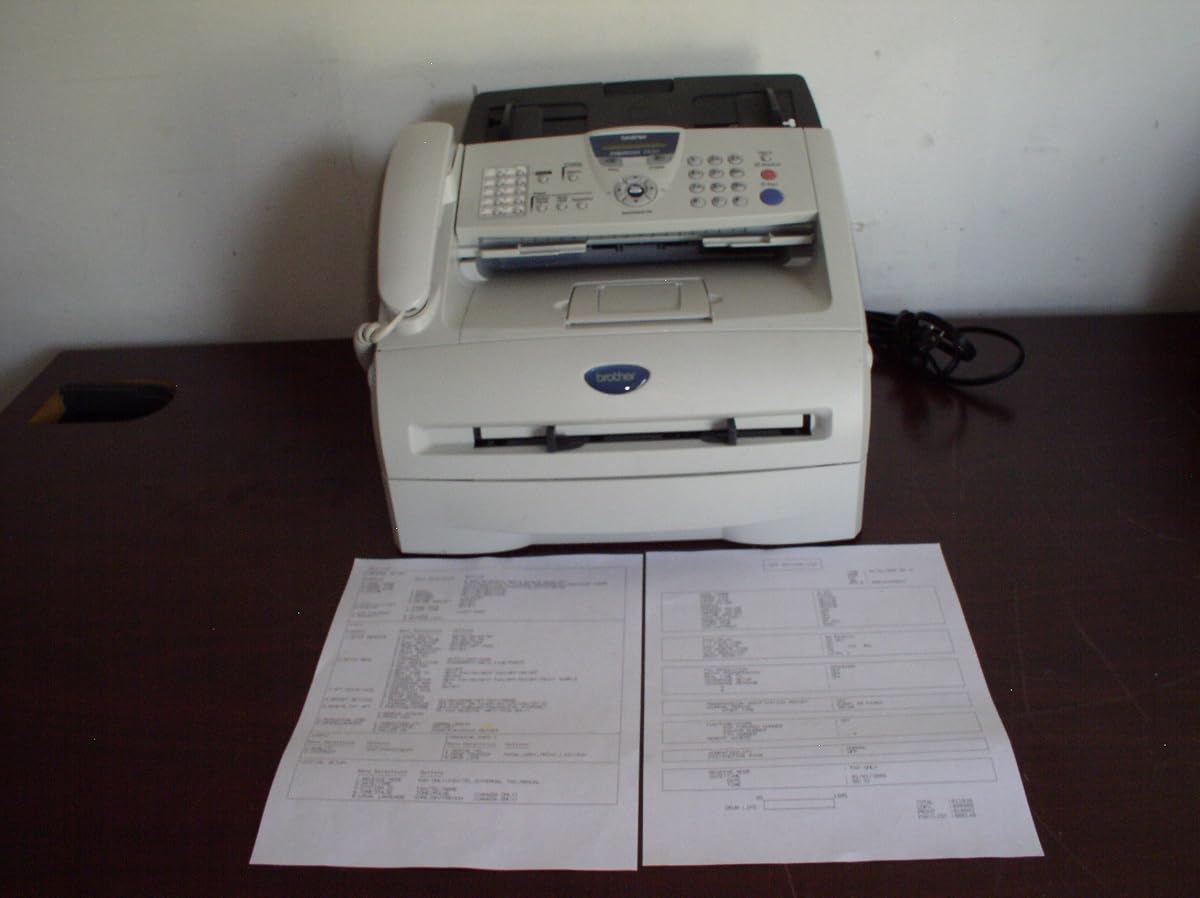
The Brother IntelliFax 2820 stands out as a top choice for offices needing reliable fax and copying combined. With a 4.2 rating, it delivers consistent performance for daily document tasks. Its laser engine ensures sharp text output on every page.
We may earn a commission when you buy through this link, at no additional cost to you.
Key strengths include the massive 8 MB memory storing up to 500 pages. This reduces manual intervention during busy periods. The 20-page auto document feeder handles multi-page jobs efficiently. Auto dialing supports 220 stations for quick broadcasting.
Trade-offs involve the lack of wireless options. Users must rely on USB 2.0 for future printing tasks. Monochrome output limits color needs. These constraints are acceptable for standard business fax and copy workflows focused on speed.
Businesses seeking a robust, no-fuss machine should buy this model. It balances memory, speed, and durability well. The 250-sheet input capacity supports high-volume use. Overall, it remains a strong recommendation for traditional fax needs.
With 8 MB memory storing up to 500 pages, this unit handles heavy fax loads without constant manual reloading.
The 20-page auto document feeder streamlines sending multi-page documents by automating the feed process.
We may earn a commission when you buy through this link, at no additional cost to you.
The Canon FAXPHONE L100 offers excellent value for small offices needing laser fax and phone. It features a 4.1 rating for solid performance. The fast print speed handles documents quickly during peak times.
We may earn a commission when you buy through this link, at no additional cost to you.
Strengths include a 512 sheet memory capacity to store multiple faxes. The 30-sheet simplex automatic document feeder simplifies multi-page tasks. Energy saver mode uses less than 2 watts. It includes a telephone handset for direct communication.
Trade-offs include a single-year limited warranty. The document feeder is simplex rather than duplex. These are minor issues for the price. Users accept them for the reliable laser output and high capacity.
Budget-conscious buyers should choose this model for speed and simplicity. It supports up to 150 sheets paper capacity. The genuine toner yields 2,100 pages. This unit balances cost and function effectively.
Print up to 19 pages per minute to keep workflows moving efficiently without long waits.
Uses less than 2 watts in Energy Saver mode to reduce power consumption when idle.
We may earn a commission when you buy through this link, at no additional cost to you.
The Brother PPF4750E is a high-performance unit for demanding business environments. It holds a 4.4 rating reflecting robust reliability. This laser fax delivers clear, sharp output every time.
We may earn a commission when you buy through this link, at no additional cost to you.
Strengths include Super G3 fax technology for fast, reliable transmission. The business-class build ensures long-term durability in busy offices. Print speed reaches up to 15 ppm for quick copies. Monochrome laser ensures consistent quality.
Trade-offs involve a higher price compared to basic units. Wireless options are not listed in core specs. These factors are acceptable for users needing top-tier performance. The reliability justifies the investment.
Enterprises needing superior fax quality should buy this model. It supports Super G3 plain paper fax type. The laser engine provides crisp text. This unit is ideal for high-volume professional settings.
Utilizes Super G3 technology for faster transmission speeds and better compatibility across networks.
Built for heavy business use with a laser monochrome engine designed for reliability.
We may earn a commission when you buy through this link, at no additional cost to you.
The Brother FAX-575 is a personal fax, phone, and copier for home offices. It holds a 4.1 rating for ease of use. This unit combines three functions in one compact device.
We may earn a commission when you buy through this link, at no additional cost to you.
Strengths include easy-to-operate faxing and 512 KB memory storing up to 25 pages. The 9,600 BPS modem transmits at about 15 seconds per page. Black-and-white copying supports up to 400 x 400 dpi resolution.
Trade-offs include lower memory than high-end models. Features are basic compared to laser units. These are acceptable for light personal use. The convenience outweighs limited capacity.
Home users needing simplicity should buy this model. The 50-sheet paper capacity handles small batches. It works well for occasional fax needs. This device offers reliable performance for individuals.
The 9,600 BPS fax modem transmits pages in about 15 seconds for fast results.
Combines fax, phone, and copier in one easy-to-operate unit for home office needs.
We may earn a commission when you buy through this link, at no additional cost to you.
The Brother FAX-575 Renewed offers a budget option with similar specs. It holds a 3.8 rating for refurbished quality. This model retains core functions for home or light office use.
We may earn a commission when you buy through this link, at no additional cost to you.
Strengths include easy-to-operate faxing and 512 KB memory storing up to 25 pages. The 9,600 BPS modem transmits at about 15 seconds per page. It supports black-and-white copying with up to 400 x 400 dpi resolution.
Trade-offs involve lower ratings due to refurbishing. Condition may vary by batch. These risks are acceptable for cost savings. Buyers should inspect upon arrival.
Budget seekers looking for similar features should buy this model. The 50-sheet paper capacity handles small batches. It works well for occasional fax needs. This device offers reliability at a lower cost.
A certified refurbished unit offering the same core functions as the new model at a lower price.
Maintains the 512 KB memory and 15-second transmission speed of the original unit.
We may earn a commission when you buy through this link, at no additional cost to you.
The Brother MFC7240 is an all-in-one monochrome printer, scanner, copier, and fax. It holds a 4.2 rating for solid performance. This unit fits well in compact office spaces.
We may earn a commission when you buy through this link, at no additional cost to you.
Strengths include print and copy speeds up to 21 ppm. The adjustable 250-sheet capacity paper tray supports high volume. The 20-page auto document feeder simplifies scanning. High-quality monochrome scanning reaches up to 19200 x 19200 dpi.
Trade-offs involve wired USB connectivity only. Wireless features are absent. These limits are acceptable for desktop setups. The speed justifies the connection type.
Office users needing scan and copy should buy this model. It supports various paper sizes including 8.50 x 14.02. The USB connectivity ensures stable data transfer. This device is reliable for daily workflows.
Print and copy at up to 21 ppm to keep up with fast-paced office demands.
An adjustable 250-sheet capacity paper tray reduces the frequency of refills.
We may earn a commission when you buy through this link, at no additional cost to you.
The Panasonic KX-FHD331 is a plain paper fax unit for basic needs. It holds a 2.8 rating reflecting limited features. This model suits small offices needing essential transmission.
We may earn a commission when you buy through this link, at no additional cost to you.
Strengths include caller ID compatible and answering machine interface support. The 9.6 Kpbs modem speed handles standard faxes. It uses plain paper for clear output. A 6-month warranty includes an exchange program.
Trade-offs involve lower ratings and shorter warranty. Performance may lag behind newer models. These are acceptable for minimal use. Buyers should verify exchange terms.
Users needing basic fax and phone should buy this model. It works with existing telephone setups. The plain paper output ensures legibility. This unit provides functional simplicity.
Compatible with caller ID systems to identify incoming callers before answering.
Uses standard plain paper instead of thermal paper for clearer, archival quality.
We may earn a commission when you buy through this link, at no additional cost to you.
The Brother PPF-2800 is a plain paper fax machine for light tasks. It holds a 3.6 rating for average performance. This unit balances speed and memory for small offices.
We may earn a commission when you buy through this link, at no additional cost to you.
Strengths include printing 10 pages per minute with an auto document feeder accepting up to 20 pages. It features 108-station auto dialing and stores up to 90 pages in memory. Makes up to 99 copies per job.
Trade-offs involve slower speed than laser units. Memory is limited to 90 pages. These are acceptable for occasional use. Buyers prioritize simplicity over volume.
Users needing basic fax and copy should buy this model. The auto dialing simplifies sending to known contacts. Plain paper ensures readable output. This device is reliable for standard workflows.
108-station auto dialing allows quick access to frequently used fax numbers.
Accepts up to 20 pages in the auto document feeder for streamlined sending.
We may earn a commission when you buy through this link, at no additional cost to you.
The CimFAX A5 Paperless offers a digital approach to faxing without paper. It holds a 4.0 rating for ease of sending. This unit targets modern users needing digital workflow.
We may earn a commission when you buy through this link, at no additional cost to you.
Strengths include sending and receiving faxes from Windows/Mac computers and Android/iOS smart phones 24/7. It auto saves faxes on local/network shared folders as PDF. Incoming faxes forward to email automatically. Right click drag and drop simplifies sending.
Trade-offs involve software dependency. Users must have a PC or mobile for operation. These are acceptable for digital users. The convenience justifies the setup.
Tech-savvy users needing paperless fax should buy this model. It supports life-time tech support with no additional fees. The PDF format ensures compatibility. This unit is ideal for remote work.
Send and receive faxes from Windows/Mac computers and Android/iOS smart phones anytime.
Auto saves faxes on local or network shared folders as PDF for easy storage.
We may earn a commission when you buy through this link, at no additional cost to you.
The Canon FAXPHONE L80 is a laser fax and printer with telephone handset. It holds a 3.6 rating for solid function. This unit provides reliable output for home or small offices.
We may earn a commission when you buy through this link, at no additional cost to you.
Strengths include a 33.6 Kbps modem for standard fax transmission. Quality laser output ensures clear text. It prints at 6 pages-per-minute for simple tasks. The USB interface supports computer connection.
Trade-offs involve slower print speed. Average ratings reflect limited features. These are acceptable for low volume. Buyers prioritize laser quality over speed.
Users needing basic laser fax should buy this model. The 1-year warranty with exchange offers protection. The telephone handset allows direct calls. This unit provides functional reliability.
Delivers quality laser output for clear, sharp fax text every time.
Includes a telephone handset for direct communication without extra devices.
We may earn a commission when you buy through this link, at no additional cost to you.
Selecting the right fax machine involves considering speed, memory, and output type to match your office needs.
Modem speed determines how quickly faxes are sent. Look for higher BPS ratings like 9,600 or 33.6 Kbps for faster results. Slower units may delay urgent documents during busy periods.
Prioritize faster modems if you send frequent documents daily.
Memory stores incoming faxes when paper runs out. Units with 512 KB to 8 MB can hold dozens to hundreds of pages. More memory reduces the need for constant manual checking.
Choose higher memory if you expect high fax volume without supervision.
Paper capacity affects refill frequency. Models range from 50 sheets to 250 sheets. Auto document feeders support multi-page jobs without manual insertion. Ensure the tray matches your typical document size.
Look for larger trays and auto feeders to minimize downtime.
Laser vs thermal or plain paper impacts quality. Laser units offer sharper text and durability. Plain paper machines use standard sheets for better archival quality. Thermal models may fade over time.
Select laser or plain paper for professional, long-lasting results.
Connectivity includes USB, wired network, or wireless. USB supports direct PC connections for printing. Some paperless models allow sending via email. Wireless offers more flexibility for networked offices.
Ensure the unit supports your current computer and network setup.
Auto dialing memory stores frequently used fax numbers. Units range from 108 stations to 270 broadcast locations. This feature speeds up sending to common contacts without reentry.
Choose higher station counts if you fax the same numbers often.
Print speeds affect how fast documents copy. Ranges vary from 6 ppm to 21 ppm. Faster units handle high-volume copying tasks efficiently. Consider daily page volume when choosing.
Opt for higher ppm if copying is a frequent daily task.
Warranty terms protect against defects. Options include 1-year limited warranties or exchange programs. Tech support availability matters for troubleshooting complex setups. Check exchange policies before purchasing.
Verify warranty duration and support options for peace of mind.
Begin by connecting the device to a working phone line and power source. Ensure the paper tray is loaded with the correct paper type and size. Place the handset in the cradle if the unit includes one.
For sending faxes, place documents in the auto document feeder face up or down as instructed. Enter the recipient number or use auto dialing. Press the start button and wait for confirmation.
To maintain performance, clean the glass and rollers regularly with a soft dry cloth. Keep the unit away from dust and direct sunlight. Replace toner or paper as needed to avoid jams.
Most fax machines use traditional phone lines but some work with VoIP adapters. Check compatibility with your provider as signal issues may occur. Analog telephone adapters often help bridge the connection.
Not all models include a built-in handset. Units like the Canon FAXPHONE L100 and L80 feature one. Others require a separate phone connected to the line.
Paperless fax sends documents via computer or email without printing. Models like the CimFAX A5 save incoming faxes as PDF files. This reduces paper use and streamlines digital archiving.
Quality units last 5 to 10 years with regular maintenance. Print speed and usage volume affect longevity. Laser engines tend to outlast inkjet or thermal options.
Many models feature document feeders for multi-page sending. Scanning speed depends on the unit. Laser models often support faster scanning for efficient workflow.
Most units in this list rely on wired USB or network connections. Wireless features vary by model. Check specs carefully if Wi-Fi is essential.
Our top picks include the Brother IntelliFax 2820 for overall reliability and the Canon FAXPHONE L100 for budget value. The Brother PPF4750E offers premium performance for businesses needing speed.
Prioritize memory capacity and transmission speed based on daily volume. Larger paper trays reduce interruptions during busy periods. Laser units provide better text quality for professional use.
Remember to check current prices and warranty terms before purchasing. Product availability changes often. Verify the latest details to ensure you get the best fit.