
Ethernet Adapter for Fire TV Stick
4.7Editor score
Micro USB to RJ45 port
10/100 Mbps speeds
Aluminum alloy casing
This guide compares the top ten Ethernet Adapter for Fire TV Devices to help you choose the best wired network connection for your streaming setup.
Streaming devices often struggle with weak Wi-Fi signals. An Ethernet Adapter for Fire TV Devices solves this by providing a stable wired connection. This improves buffering and ensures smooth playback for your favorite shows.
We evaluated ten top-rated adapters based on compatibility, speed, and build quality. Our comparison focuses on models that work seamlessly with various Fire TV generations. We also look at power requirements and ease of setup for every user.
Each pick highlights key features like connection types and cable lengths. Prices and availability can change over time on online retailers. Always verify your device port type before purchasing to ensure a perfect fit for your needs.
4.7Editor score

4.5Editor score

4.1Editor score
This side-by-side comparison highlights the key specifications and unique selling points of each adapter to help you make an informed decision for your specific Fire TV model.


This Micro-USB Ethernet Adapter is a top choice for users with compatible Fire TV devices. It holds a high rating for its reliability and ease of use. The adapter allows direct connection to a wired network for stable internet speeds.
We may earn a commission when you buy through this link, at no additional cost to you.
It works seamlessly with a wide range of Fire TV sticks and the Cube. By connecting directly to your router, it frees up bandwidth on your WiFi network. This is crucial for households with multiple streaming devices connected simultaneously.
The setup is straightforward requiring no technical expertise. You simply plug the adapter into the USB port and connect the Ethernet cable. However, you must ensure your device has a micro-USB port and not USB-C.
Anyone owning an older Fire TV model will find this adapter indispensable. It ensures smooth streaming without buffering issues caused by wireless interference. It is the best choice for reliable wired connectivity in your home theater.
Direct wired connections eliminate the signal drops often experienced with WiFi in larger homes or congested areas.
Compatible with various generations of Fire TV including the Cube and older sticks with micro-USB ports.
We may earn a commission when you buy through this link, at no additional cost to you.
This Right Angle USB-C Adapter is specifically designed for the newest Fire TV Stick HD model. It solves the challenge of connecting modern USB-C devices to wired networks. The right angle design is particularly useful in tight spaces behind televisions.
We may earn a commission when you buy through this link, at no additional cost to you.
It supports data transfer speeds up to 480 Mbps which is sufficient for HD streaming. The compact form factor ensures it does not stick out awkwardly from the back of your TV. This makes it ideal for setups where space is limited.
Compatibility is strictly for the 2nd Gen Fire TV Stick HD with USB-C. Users with older micro-USB models will need a different adapter entirely. Ensure you verify your device specifications before purchasing to avoid confusion.
This adapter is perfect for owners of the latest Fire TV Stick HD. It provides a clean and efficient way to get wired internet without clutter. It is the best budget option for users needing USB-C connectivity.
The right angle connection prevents the adapter from protruding into tight spaces behind your TV.
Enables wired internet connections for the latest Fire TV Stick HD models featuring USB-C ports.
We may earn a commission when you buy through this link, at no additional cost to you.
The ELECTOP adapter stands out with its support for up to 1000 Mbps speeds. This high-speed capability is ideal for heavy users who need fast network access. It also features a durable aluminum alloy body for effective heat dissipation during use.
We may earn a commission when you buy through this link, at no additional cost to you.
Built-in safety features like over-voltage protection make it a robust choice for daily use. The LED indicator light helps you confirm connection status at a glance. Included self-adhesive tapes allow you to mount the adapter securely near your TV.
Be aware that this adapter only works with devices having a micro-USB port. It is not suitable for newer USB-C models like the Fire Stick 4K Max. Always check your device port type to ensure it fits your needs.
Users seeking maximum speed and durability will appreciate this premium option. It delivers a smooth lag-free experience for gaming and streaming. It is the best premium choice for those needing Gigabit Ethernet performance.
Supports up to 1000 Mbps speeds providing a fast connection for data heavy streaming activities.
Constructed with aluminum alloy to manage heat and ensure longevity during extended streaming sessions.
We may earn a commission when you buy through this link, at no additional cost to you.
This Firestick Ethernet Adapter is designed to eliminate WiFi instability issues. It provides a reliable 100 Mbps wired connection for smooth streaming. The aluminum alloy build ensures the device stays cool even during long sessions.
We may earn a commission when you buy through this link, at no additional cost to you.
Users appreciate the included adhesive tapes that help secure the adapter in place. This prevents connectivity issues caused by dangling cables behind your TV. The setup is simple requiring no drivers or complex configurations to get started.
It is not compatible with USB-C devices like the Chromecast with Google TV. Ensure your Fire TV Stick has a micro-USB port before buying. This limitation is important to consider when planning your network upgrade.
Anyone tired of buffering will find this adapter solves the problem efficiently. It offers a stable connection that enhances video quality. It is a reliable choice for Fire TV Stick users needing a wired link.
A wired connection removes the variability of WiFi signals for consistent streaming performance.
Includes self-adhesive tapes to secure the adapter and prevent cable strain behind the TV.
We may earn a commission when you buy through this link, at no additional cost to you.
The ZEXMTE adapter offers instant streaming with rock-solid wired internet speeds. Its quick 1-minute setup makes it accessible for all users. The premium aluminum casing ensures the adapter stays cool during binge-watching sessions.
We may earn a commission when you buy through this link, at no additional cost to you.
Smart status lights provide instant visual confirmation that your connection is live. This feature adds a layer of convenience for monitoring your network status. It works seamlessly with a wide range of Fire TV Stick models.
While it supports up to 100 Mbps speeds this is sufficient for most streaming needs. It is not compatible with USB-C devices so check your port type first. This adapter focuses on simplicity and reliability for everyday use.
Users wanting a hassle-free way to connect their Fire TV will love this option. It reduces WiFi dropouts and provides consistent performance. It is a solid choice for standard streaming requirements.
Setup takes just a minute allowing you to get your TV online without delay.
Smart status lights give immediate feedback on the connection status for peace of mind.
We may earn a commission when you buy through this link, at no additional cost to you.
This Ethernet Adapter supports universal TV Stick compatibility with micro-USB ports. It features a plug-and-play setup that requires no drivers or complicated installs. The sleek sturdy design is made from aluminum alloy for quick heat dissipation.
We may earn a commission when you buy through this link, at no additional cost to you.
The built-in LED indicator shows the real-time working status at a glance. It includes self-adhesive tapes to securely mount the adapter and avoid loose connections. Users benefit from reliable fast wired speeds during their streaming sessions.
It is not compatible with Chromecast with Google TV due to USB-C differences. Make sure to check your device port before purchasing to ensure it works. This adapter is a great value for those with compatible Fire TVs.
Anyone looking for an affordable and reliable wired connection should consider this option. It helps ditch spotty WiFi for a steady internet stream. It is an excellent budget pick for upgrading your home network.
Works with a wide range of TV sticks having micro-USB ports for easy adoption.
Adhesive tapes included to mount the adapter securely and prevent loose cable connections.
We may earn a commission when you buy through this link, at no additional cost to you.
The UGREEN adapter features a 3.3 ft long power cable for better placement flexibility. It allows you to connect to a USB wall charger instead of the TV port. This setup ensures sufficient power for both the adapter and the TV stick.
We may earn a commission when you buy through this link, at no additional cost to you.
It provides stable 100 Mbps speeds to help you watch video smoothly. The plug and play functionality means no drivers are needed for operation. It is compatible with various FireTV Stick generations and Chromecast models.
Be aware that this adapter does not work with USB-C devices like newer Chromecasts. You must connect the power cable to a wall charger over 5W for normal use. This ensures the device operates correctly without power issues.
Users with limited wiggle room behind their TV will appreciate the long cable. It offers a practical solution for powering the stick and adapter separately. It is a durable option for consistent streaming performance.
The 3.3 ft cable allows connecting to a wall charger for reliable power management.
Delivers consistent 100 Mbps internet speeds for smooth video playback without interruptions.
We may earn a commission when you buy through this link, at no additional cost to you.
Cable Matters offers high-speed data transmission with support up to 300+ Mbps speeds. This is faster than traditional fast Ethernet and ideal for HD streaming. It includes a convenient 3-foot USB power cable for easy wall charger connection.
We may earn a commission when you buy through this link, at no additional cost to you.
The versatile compatibility extends to smart speakers and other streaming sticks. You can power your devices while maintaining a stable Ethernet connection for uninterrupted performance. Installation is easy with no drivers required for immediate use.
While this is a premium option it offers reliable speed and connectivity. It is not designed for USB-C ports so compatibility check is essential. Users who value performance and brand reputation will find this adapter worth the investment.
This adapter is perfect for those who need faster than standard Ethernet speeds. It provides a robust solution for high-quality streaming. It stands out as a premium choice for advanced home networks.
Delivers over 300 Mbps speeds enabling high definition streaming without latency issues.
No drivers or software needed for a hassle-free setup and immediate network connection.
We may earn a commission when you buy through this link, at no additional cost to you.
This adapter hard wires your internet connection to reduce buffering and lagging issues. It is a practical solution for congested WiFi or poor wireless signals at home. The driver-free plug and play design makes installation simple for everyone.
We may earn a commission when you buy through this link, at no additional cost to you.
It provides a steady internet stream that removes the cause of buffering during peak times. While WiFi can be fast it often slows down due to waves of interference. This wired connection offers more consistent reliability for streaming.
It is designed for devices with Type B Micro USB connections not Type-C oval. Ensure your device fits this description before purchasing to avoid return hassles. It is a great value option for improving network stability.
Streaming experts recommend using a wired connection for the best experience. This adapter helps you achieve that steady stream without needing new router hardware. It is the best value pick for stabilizing your TV connection.
Hard wired connections eliminate the common cause of buffering in streaming devices.
Provides consistent connectivity that does not fluctuate like wireless signals during peak hours.
We may earn a commission when you buy through this link, at no additional cost to you.
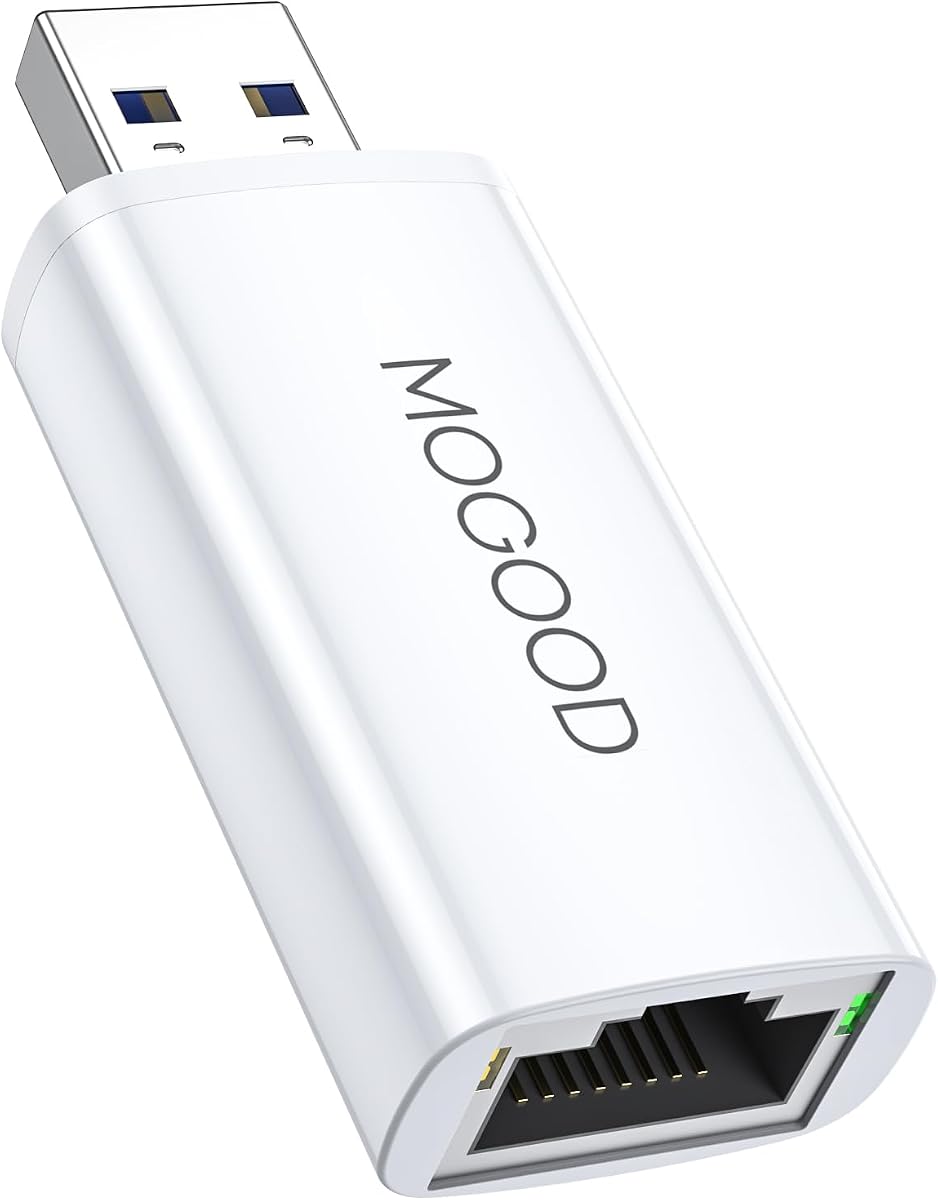
The MOGOOD adapter delivers up to 1000 Mbps wired network speed for fast connection. It works with laptops and Fire TV Cube for stable networking without Wi-Fi. Its USB 3.0 speed ensures backward compatibility with USB 2.0 ports.
We may earn a commission when you buy through this link, at no additional cost to you.
It features a plug and play design for instant wired connection on most systems. This makes it easy to set up right out of the box for daily use. Users get a reliable network link for streaming and gaming without lag.
Note that this adapter requires a USB 3.0 port which may not be standard on all devices. It is primarily compatible with Fire TV Cube rather than standard Fire TV Sticks. Verify your device ports to ensure this adapter fits your needs.
For users needing a high-speed connection for video calls and gaming this is ideal. It provides a sturdy build that lasts for daily use in home or office. It is the best versatile option for multi-device wired connections.
Delivers Gigabit speeds for fast network access on computers and TVs.
Works with Windows, Mac, and Chrome OS without requiring any driver installation.
We may earn a commission when you buy through this link, at no additional cost to you.
Selecting the right Ethernet adapter depends on your specific Fire TV model and your network needs. This guide outlines the critical factors to consider before making a purchase to ensure compatibility and performance.
The most critical factor is ensuring the adapter matches your device port. Older Fire TV Sticks use micro-USB ports while newer models use USB-C. Using the wrong connector will prevent the device from functioning or receiving power.
Always check your Fire TV model before purchasing to confirm the USB port type. This simple verification step saves time and ensures the adapter fits your device properly.
Adapters come in different speed tiers ranging from 100 Mbps to 1000 Mbps. For standard HD streaming 100 Mbps is usually sufficient but Gigabit speeds offer better future-proofing. Choose a speed that matches your internet plan to avoid bottlenecks.
Higher speeds ensure smoother streaming during times of high network usage. Consider your current internet plan and potential upgrades when selecting the adapter speed.
Some adapters require an external power source to function correctly especially when connecting multiple devices. Without sufficient power the adapter may disconnect frequently or fail to activate. Check if the adapter includes a power cable or needs a wall charger.
Ensure your setup can provide enough power for the adapter and TV stick. Proper power management prevents connection drops and extends the lifespan of your equipment.
High-quality materials like aluminum alloy help dissipate heat during extended use. Good build quality protects against damage from bending or accidental tugs. Durability is key for accessories that remain connected behind your television.
Look for solid construction that can withstand daily use. A durable adapter ensures reliable performance over time without overheating issues.
The length of the included power or network cable can impact placement flexibility. A longer cable allows you to connect to a wall charger if the TV USB port is insufficient. Ensure the cable length suits your room layout to avoid tension.
Choose an adapter with cable lengths that fit your setup. Proper cable management reduces clutter and prevents strain on the connections.
Some adapters include adhesive tapes to secure the device near your TV. This prevents the adapter from dangling and potentially damaging the port. Secure mounting ensures a stable connection that is not easily disturbed by accidental movement.
Look for accessories that offer ways to secure the adapter in place. This simple addition keeps your setup organized and protects your ports.
Verify that the adapter is explicitly compatible with your device model. Some adapters are marketed for Fire TV sticks but may exclude certain generations. Reading the product description carefully helps avoid confusion and return shipping.
Always review compatibility details provided by the manufacturer. This ensures you buy an accessory that will work with your specific device.
Plug and play adapters are preferred since they do not require driver installations. Simple setup allows you to get online immediately without technical expertise. Look for descriptions that highlight easy installation processes.
Choose an adapter that simplifies your setup process. User-friendly designs save time and reduce the complexity of connecting to a wired network.
Begin by checking your Fire TV model to confirm the USB port type. Ensure you have the correct adapter for your device to avoid connection issues. This step is essential for a successful setup.
Connect the adapter to the USB port on your Fire TV and plug in the Ethernet cable. If required connect the power cable to a wall charger for stable operation. The LED indicator should light up to show the connection is active.
Secure the adapter near your TV using any included adhesive tapes to prevent tension on the cables. Regularly check the connections to ensure they are tight and free from dust. Proper care extends the life of your adapter and ensures consistent performance.
You will need a standard Ethernet cable to connect the adapter to your router. Most adapters do not include an Ethernet cable so ensure you have one available. Using a high-quality cable ensures you get the full speed benefits.
Not all adapters work with every model due to different USB ports. Micro-USB adapters work with older models and USB-C adapters work with newer ones. Always verify your device port before buying to ensure compatibility.
An adapter improves connection stability and consistency but does not increase your internet plan speed. It eliminates Wi-Fi interference which can help you achieve your maximum plan speeds. Wired connections are generally more reliable than wireless ones.
Some adapters draw power from the TV USB port while others need a separate wall charger. Check the product description to see if a power adapter is included. Using a wall charger ensures consistent power delivery for the device.
No you cannot use a USB-C adapter with a Micro-USB TV model. The connector shapes are different and will not fit into the ports. You must buy an adapter specifically designed for your TV's USB port type.
Installation is simple and does not require any technical skills. Most adapters are plug and play meaning you just connect them and plug in the cables. You do not need to install any drivers or software to use them.
Instability can happen if the adapter is not getting enough power from the TV USB port. Try connecting the power cable to a dedicated wall charger instead. Also ensure your Ethernet cable is fully plugged into both the adapter and router.
The adapter should not negatively affect TV performance as it offloads network traffic. In fact it often improves performance by providing a faster stable connection. This leads to less buffering and smoother streaming of content.
Choosing the right adapter ensures your streaming device gets the most reliable connection possible. The top picks in this guide offer options for different models and speed needs. Whether you need micro-USB or USB-C compatibility there is a solution for you.
Prioritize compatibility and power supply when selecting your adapter to avoid setup issues. Look for durable materials that can withstand daily use without overheating. A well-chosen adapter enhances your overall streaming experience significantly.
Remember to verify current prices and availability on retailer sites before making your purchase. Product details can change over time so always double check the product specs. This ensures you get the right adapter for your home theater setup.