
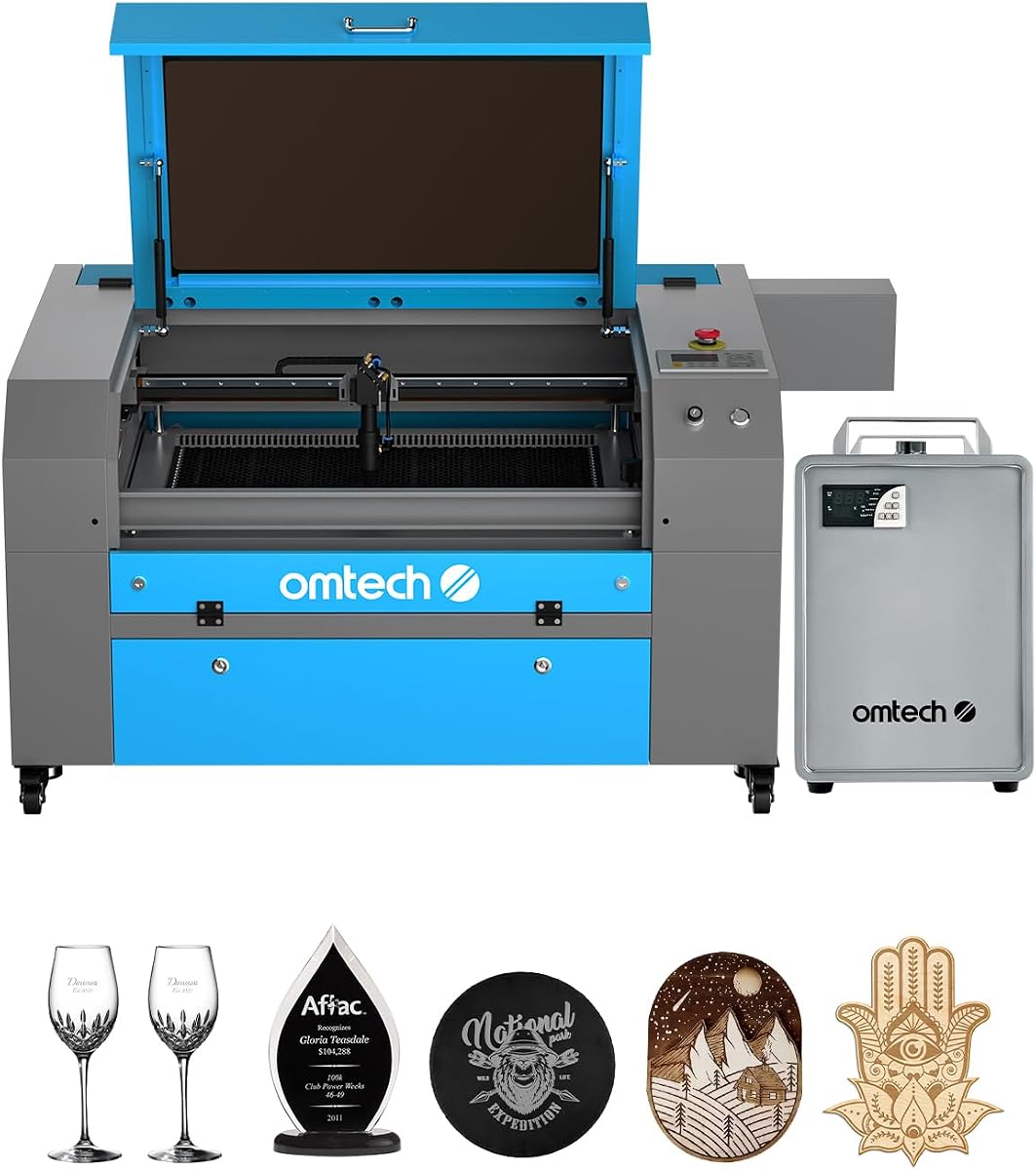
OMTech K40+ 45W Desktop CO2 Laser Engraver & Cutter
4.4Editor score
Affordable entry level price
Compact desktop design
High speed engraving
This expert guide compares the top 10 CO2 Laser Cutters of 2026 based on power, speed, safety features, and software compatibility to help you choose.
Finding the right CO2 Laser Cutter can transform your creative projects into professional results. Whether you are a hobbyist or a business owner, understanding the nuances of laser power and workspace size is essential for success.
We have evaluated the top models available this month by analyzing their technical specifications, user feedback, and real-world performance. This list covers a wide range of options to fit every budget and skill level effectively.
Each pick highlights key strengths and potential trade-offs to help you make an informed decision. Keep in mind that prices and availability can change frequently, so check the latest details before purchasing your next machine.
4.4Editor score

4.5Editor score

4.5Editor score
The following table provides a side-by-side comparison of all ten selected CO2 Laser Cutters to help you quickly identify the model that best fits your specific production needs and workspace constraints.



The xTool P3 stands out as the premier choice for those seeking industrial-grade performance in a desktop format. With a 4.5-star rating, it delivers exceptional power and precision that rivals much larger machines. Its intelligent automation features redefine what is possible with a CO2 Laser Cutter.
We may earn a commission when you buy through this link, at no additional cost to you.
Its flagship 80W laser power allows for effortless cutting of thick materials like 20mm wood and 25mm acrylic at high speeds. The dual HD camera system ensures microscopic alignment accuracy, while the automated creation system simplifies setup significantly. This level of integration reduces human error and increases productivity.
While the machine is powerful, it requires a dedicated workspace due to its larger footprint and the need for ventilation. The price point is also higher than entry-level models, but the efficiency gains often justify the cost for serious users. The safety features provide peace of mind during operation.
This cutter is ideal for professionals and serious hobbyists who need reliability and speed. If you are looking for a machine that can handle complex workflows without constant intervention, the xTool P3 is the top recommendation for 2026.
The ACS integrates LiDAR ranging and dual cameras to automate setup, making the workflow truly place and go for users.
Features a fully enclosed Class 1 safety-rated design with active detection and suppression systems for maximum protection.
We may earn a commission when you buy through this link, at no additional cost to you.
The OMTech K40+ offers an accessible entry point into the world of CO2 Laser Cutters without sacrificing essential functionality. With a 4.4-star rating, it is a favorite among DIY enthusiasts and small business owners. Its compact design makes it perfect for home offices or small workshops.
We may earn a commission when you buy through this link, at no additional cost to you.
Upgraded to 45W, this cutter slices through acrylic and wood with ease, offering speeds up to 300 mm/s. The built-in air assist system clears smoke and debris, protecting the lens and reducing fire risk. Compatibility with LightBurn and LaserGRBL ensures you have the software tools you need.
The workspace is relatively compact, which limits the size of projects you can complete in one go. Manual adjustments can be time-consuming for frequent users, but the performance per dollar remains excellent. It is a reliable workhorse for standard engraving and cutting tasks.
If you are on a budget but need professional results, this model is the best value. It balances cost and capability effectively, making it the ideal starting point for anyone new to laser engraving.
Access 24/7 global support and local demos to ensure you get the most out of your machine with expert guidance.
The honeycomb bed and optional rotary axis allow for engraving on both flat and cylindrical objects easily.
We may earn a commission when you buy through this link, at no additional cost to you.
For industrial applications, the OMTech Pro 130W delivers unmatched performance and precision. Its massive workspace and high-power tube allow for heavy-duty production. The integration of a water chiller ensures stable operation during long sessions, making it a robust choice for professionals.
We may earn a commission when you buy through this link, at no additional cost to you.
With servo motors and ball-bearing rails, this cutter achieves speeds up to 1,200 mm/s with exceptional accuracy. The Ruida touchscreen interface simplifies control, while WiFi connectivity allows for remote management. This level of technology ensures consistent results even with complex designs.
The machine requires a significant investment and adequate electrical infrastructure to run safely. The setup is more complex than desktop models, requiring careful attention to detail. However, for high-volume production, these trade-offs are well worth the increased efficiency.
This is the ultimate choice for businesses needing throughput and reliability. If you require a machine that can handle daily industrial workloads with ease, the OMTech Pro 130W is the top recommendation.
Servo motors and upgraded rails allow for rapid engraving while maintaining tight tolerances on every job.
The built-in water chiller maintains precise temperature control to prevent overheating during extended use.
We may earn a commission when you buy through this link, at no additional cost to you.
The VEVOR 100W combines power and size to offer a versatile solution for medium to large projects. With a 5.0-star rating, users appreciate its ability to handle thick materials. The 24×35 workspace provides ample room for various creative and commercial applications.
We may earn a commission when you buy through this link, at no additional cost to you.
Its 100W tube cuts through materials up to 0.59 inches thick in a single pass. The pass-through doors allow for processing longer items that exceed the frame, increasing versatility. The digital control panel works seamlessly with major software platforms for smooth operation.
While the performance is strong, the interface is relatively basic compared to smart-enabled models. Assembly can be time-consuming, requiring patience to ensure all parts are aligned correctly. These factors are minor compared to the robust capability of the machine.
For users needing a large workspace without the complexity of premium interfaces, this is an excellent choice. It is perfect for workshops that need to process a variety of materials efficiently.
The 24×35 inch bed and pass-through doors allow for handling larger projects with ease.
Supports LightBurn, CorelDRAW, and AutoCAD across multiple operating systems for flexible workflows.
We may earn a commission when you buy through this link, at no additional cost to you.
The OMTech Maker 90W is designed for extended operation thanks to its bundled water chiller. This feature keeps the laser tube cool, enabling longer engraving sessions without overheating. The 90W power provides a balanced output for various non-metallic materials.
We may earn a commission when you buy through this link, at no additional cost to you.
Equipped with a Yongli H2 tube, this cutter promises up to 8,000 hours of usage. The air assist system ensures clean cuts by removing smoke and dust. Four-way pass-through doors make it easy to load large materials without lifting them into the frame.
It lacks automated focusing, which means manual setup is required before each job. The unit is also heavy, making it less portable once set up. These aspects are standard for machines in this class and do not detract from its performance.
If you need a reliable machine for longer production runs, this is a solid option. The included chiller adds significant value for those who work for extended periods.
The bundled water chiller supports extended sessions by maintaining optimal temperatures for the laser tube.
Four-way doors allow easy access to accommodate larger or longer items seamlessly.
We may earn a commission when you buy through this link, at no additional cost to you.
This bundle offers significant value by including both a water chiller and LightBurn software. The 60W power is suitable for many standard cutting and engraving tasks. The autofocus feature streamlines setup, allowing users to jump straight into projects.
We may earn a commission when you buy through this link, at no additional cost to you.
The 20×28 workspace provides enough room for most creative projects. Safety features like the flame-retardant window and air assist ensure a clean working environment. Compatibility with major OS platforms makes it accessible to a wide range of users.
While powerful, it is not ideal for very thick materials or high-speed production. The lack of remote controls means you must be present at the machine during operation. For general users, these limitations are often negligible.
For those starting a business or serious hobby, the software inclusion makes this a strong contender. It provides the tools needed to start creating immediately without extra purchases.
The preinstalled autofocus finds the right focal distance automatically, saving setup time.
LightBurn software is included to provide intuitive navigation and precise control for your designs.
We may earn a commission when you buy through this link, at no additional cost to you.
Another variant of the K40+ model reinforces its position as a reliable entry-level machine. With a 4.5-star rating, it offers solid performance for personal projects. The compact design fits easily into home offices or small work areas.
We may earn a commission when you buy through this link, at no additional cost to you.
It features the same upgraded 45W power that cuts through standard materials efficiently. The air assist system is integrated to keep the workspace clean. Global support ensures you have help if you encounter any technical issues.
The small workspace limits the size of items you can process, but it is sufficient for most accessories. Beginners may find the manual controls manageable but less convenient than automated systems. It remains a favorite for its balance of cost and quality.
Ideal for hobbyists who want to test their skills without a large financial commitment. It provides a robust foundation for learning the intricacies of laser engraving.
Global support and local demos help ensure a smooth setup and operation experience.
The compact workspace supports standard materials while options for rotary engraving expand possibilities.
We may earn a commission when you buy through this link, at no additional cost to you.
The Pronto 100W focuses on efficiency with speeds up to 39.4 inches per second. This makes it significantly faster than traditional models, saving time on bulk orders. The large 40×24 workspace accommodates most standard project sizes comfortably.
We may earn a commission when you buy through this link, at no additional cost to you.
Autofocus technology ensures consistent results without manual adjustments. The included air pump provides superior airflow for clean cuts. A tube lifespan of 12,000 hours ensures longevity for heavy users.
Assembly requires some effort due to the size and weight of the unit. The power requirements are also higher than entry-level models. These factors are manageable with basic technical skills.
This model is perfect for small businesses needing faster turnaround times. The speed advantage offers a competitive edge for those producing custom goods.
Revolutionary speeds of up to 39.4 ips transform creative visions into reality quickly.
A powerful air pump ensures precise and clean cuts, reducing material burn effectively.
We may earn a commission when you buy through this link, at no additional cost to you.
For those needing large format capabilities, the Pronto 130W is a strong contender. With a 5.0-star rating, it is praised for its ability to handle big projects. The 51×35 workspace allows for cutting materials that would not fit on smaller machines.
We may earn a commission when you buy through this link, at no additional cost to you.
The 130W tube delivers powerful performance for deep engraving and thick cutting. Autofocus simplifies the workflow, while pass-through doors handle longer items. It supports up to 12,000 hours of tube usage for long-term reliability.
The machine is quite large and requires significant floor space. Professional installation might be beneficial to ensure safety and proper setup. However, the capability it offers justifies the space commitment.
This is ideal for makers and businesses needing large output capabilities. If you work with signage or large panels, this model meets your needs.
The large workspace allows you to engrave deep and transform artistic visions into reality.
Two-way pass-through doors make it easy to accommodate larger and longer items.
We may earn a commission when you buy through this link, at no additional cost to you.
The final model on the list is another K40+ variant, emphasizing its role as a compact desktop solution. With a 4.5-star rating, it remains a reliable choice for beginners. The compact size makes it easy to store or move when needed.
We may earn a commission when you buy through this link, at no additional cost to you.
It offers 45W power which is sufficient for light projects. Safety features include a flame-retardant panel and water protection. The support network ensures you have resources available for troubleshooting.
This model lacks the advanced sensors found in higher-end units. Users will need to perform manual focusing and monitoring during operations. These limitations are acceptable for casual or hobbyist use.
For those with limited space and budget, this is a practical option. It provides a straightforward introduction to laser engraving without unnecessary complexity.
Global support and local demos are available to ensure you receive the help you need.
Door and water protection along with an emergency stop function prioritize user safety.
We may earn a commission when you buy through this link, at no additional cost to you.
Choosing the right machine involves considering several critical factors to ensure it meets your production needs and budget constraints effectively.
Laser power determines how thick of a material you can cut and how fast you can work. Higher wattage allows for deeper cuts and faster throughput but often comes with a higher price and larger safety requirements.
Select power based on your typical material thickness to balance efficiency and cost.
The workspace determines the maximum size of your project. Desktop units are compact but limit you to smaller pieces, while larger models handle full sheets or long items.
Measure your typical material sizes to ensure the machine fits your workflow.
Speed affects how quickly you can complete projects. High-speed units with servo motors offer faster engraving but may be costlier. Precision ensures clean edges and detailed results.
Prioritize speed if you handle high-volume orders or focus on detail for custom work.
Safety is paramount when working with high-powered lasers. Look for features like enclosures, interlocks, air assists, and protective windows to prevent accidents.
Always choose a machine that meets safety standards to protect your workspace and users.
Compatible software allows you to design and control the machine effectively. Most modern machines support popular platforms like LightBurn or CorelDRAW for intuitive use.
Ensure the machine works with your preferred design tools to streamline your workflow.
Water chillers are essential for maintaining performance during long runs. Built-in units offer convenience but may have higher initial costs compared to external pumps.
Consider your run times to decide if an integrated cooling system is necessary for your needs.
Reliable customer support and a good warranty are crucial for long-term use. Look for brands that offer accessible help and comprehensive service plans.
Check the warranty terms and support availability to minimize downtime during repairs.
Automation like autofocus and camera systems reduces setup time and human error. These features add value by making the machine more user-friendly and consistent.
Invest in automation if you want a smoother workflow and higher precision with less manual effort.
Start by reading the manual thoroughly to understand all safety protocols and operational steps specific to your model. Ensure the machine is placed on a stable surface away from flammable materials.
Always check your ventilation system before operation to ensure fumes are being properly removed from the workspace. Use appropriate settings for your material to prevent burning or incomplete cuts.
Regularly clean the lens and mirrors to maintain focus and cut quality. Check water levels and coolant systems frequently to avoid overheating and extend the life of the laser tube.
CO2 Laser Cutters are versatile and can cut and engrave wood, acrylic, leather, paper, fabric, and glass. However, they cannot cut metals directly without special coatings or additional laser types.
Yes, especially for models above 40W. Water chillers prevent the laser tube from overheating during long sessions, ensuring consistent performance and extending the lifespan of the tube.
Most of the machines listed support LightBurn, but it is always good to verify compatibility with your specific model before purchasing to ensure seamless workflow integration.
The average lifespan ranges from 8,000 to 12,000 hours depending on usage and maintenance. Proper cooling and avoiding maximum power settings extend the tube life significantly.
Many modern models include autofocus features to simplify setup, but entry-level units often require manual focusing. Check the product specifications to see if this feature is included.
Desktop units require about 2×2 feet of workspace plus clearance for ventilation and material handling. Larger industrial models need significantly more floor space and dedicated electrical setups.
We have highlighted the top picks across various categories to suit different budgets and professional needs. Whether you choose the xTool P3 for automation or the OMTech K40+ for value, there is a perfect fit for everyone.
Prioritize safety features and workspace size when making your final decision to ensure the machine aligns with your specific workflow requirements effectively.
Always check the latest prices and availability before buying as these details can change frequently in the market. Happy crafting with your new tool.