
JOTO 4 Pack Cable Management Sleeve
4.6Editor score
Four sleeves per pack included
Flexible neoprene stretchy material
Zip up solution for easy access
Managing cables behind your desktop PC can become a frustrating chore quickly. The right cable sleeve transforms a tangled mess into a clean professional look. Choosing quality materials ensures durability and protection for your expensive electronics.
We evaluated ten top rated cable management solutions based on durability and ease of use. Our comparison focuses on split designs, zipper closures, and pet resistant features. Each product was assessed for fit, flexibility, and overall organization capability.
Every pick below shows specific strengths for different desktop setups and budgets. You will find options ranging from simple tubing to full kits with ties. Please note that product availability and pricing may change without prior notice.
4.6Editor score

4.5Editor score

4.2Editor score
As an Amazon Associate we earn from qualifying purchases.
This side by side comparison highlights the key specifications and unique features of each top rated cable sleeve. Use this table to quickly identify the right fit for your desktop PC setup.


The CableGeeker sleeve stands out as a top choice for desktop PC users needing reliable cable management. With a high rating from numerous verified purchasers this product offers exceptional value for its versatility and build quality.
We may earn a commission when you buy through this link, at no additional cost to you.
Its customizable nature allows you to trim the sleeve to fit exact distances between your PC and wall. The dual sided design lets you choose between black for hiding dirt or white for a cleaner aesthetic in bright rooms.
Some users find the white side fades faster than the black side in high traffic areas. However this trade-off is minor given the low cost and the option to rotate sleeves or replace them easily.
Ideal for anyone wanting a balance of cost and customization this sleeve keeps cords neat without complex tools. It is a strong recommendation for home offices and gaming setups alike.
You can cut this sleeve to any length with standard scissors for a perfect fit.
Flip the sleeve to switch between black for durability and white for style.
We may earn a commission when you buy through this link, at no additional cost to you.
For users on a tight budget this four pack offers an incredible amount of organization potential. The neoprene material is soft yet strong enough to protect cords from daily wear and tear at your desk.
We may earn a commission when you buy through this link, at no additional cost to you.
Each sleeve is flexible enough to hold up to ten cables while remaining easy to wrap. The zipper ensures that cables stay hidden but can be accessed quickly if you need to unplug one.
The main limitation is the shorter length which may require connecting two sleeves for long runs. This is manageable with included ties but adds a small step to the installation process.
This pack is perfect for smaller desks or multiple setups like a monitor and a PC. It delivers excellent organization without breaking the bank for anyone seeking affordable solutions.
The stretchy material conforms to cable bundles of varying thicknesses easily.
Having four sleeves allows you to manage multiple areas simultaneously.
We may earn a commission when you buy through this link, at no additional cost to you.
StarTech delivers professional grade quality with this neoprene sleeve designed for heavy use. The built in connectors make it easy to extend the length without buying separate adapters or tapes.
We may earn a commission when you buy through this link, at no additional cost to you.
Its rugged construction prevents wear from foot traffic or accidental bumps under a desk. The included exit holes allow you to pull out specific cables without unzipping the whole sleeve.
The price is higher than generic options but the warranty and durability justify the cost. Some find the length short for long runs though this is solvable by adding more sleeves.
Choose this if you need a reliable solution for an office workstation or high traffic area. It offers peace of mind with a solid warranty and professional finish.
This material is tough against abrasion and flexible enough for tight corners.
Buckles allow multiple sleeves to link together seamlessly for longer runs.
We may earn a commission when you buy through this link, at no additional cost to you.
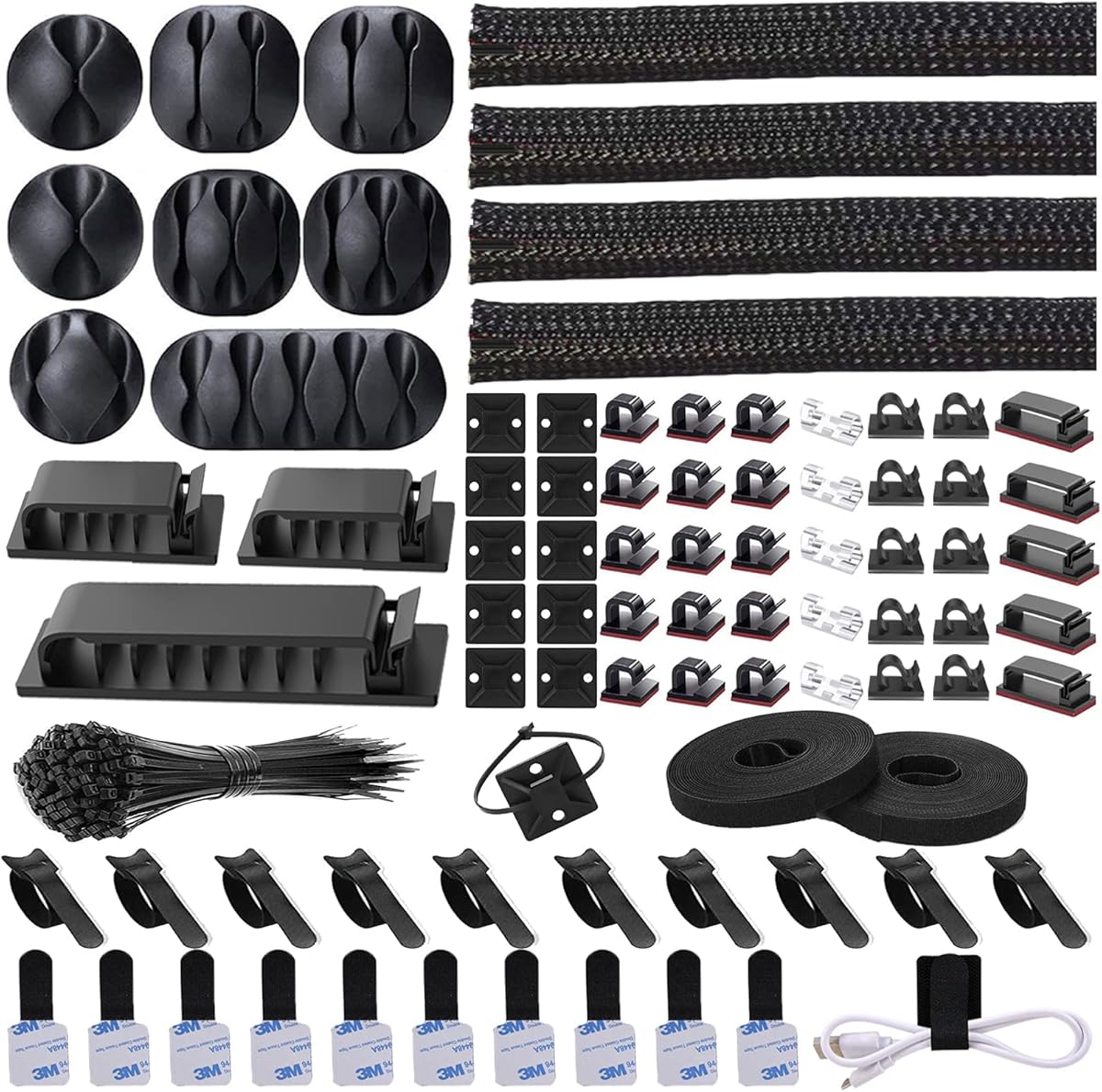
This comprehensive kit solves almost every cable management need in a single purchase. With four sleeves and numerous ties and clips you can organize entire wall runs or under desk layouts effortlessly.
We may earn a commission when you buy through this link, at no additional cost to you.
The self adhesive pads are strong enough to hold heavy bundles without drilling holes. The sleeves are split for easy loading making installation quick even if you do not want to unplug devices.
Managing the sheer volume of parts can be overwhelming at first. It is also important to clean surfaces well before applying adhesive to avoid future residue issues.
This is the best option for a full room overhaul where you need more than just sleeves. It provides a one-stop solution for complete wire management success.
Everything you need to organize cables is included in this large kit.
Split design allows you to wrap around existing wires easily.
We may earn a commission when you buy through this link, at no additional cost to you.
The zipper design makes this sleeve stand out for frequent cable changes. You can unzip the end to swap a cable without cutting or untying anything else.
We may earn a commission when you buy through this link, at no additional cost to you.
Its construction is robust enough to handle daily wear while keeping wires neatly hidden. The fabric material feels premium and resists wear better than cheap plastic alternatives.
The zipper might be a weak point if forced too quickly or with heavy loads. Also the fixed length means you cannot trim it to fit shorter distances exactly.
Ideal for offices where cables change often this sleeve offers convenience and order. It keeps your desk looking clean while allowing easy updates.
Zippers allow you to add or remove cables in seconds.
The material is strong enough to protect against daily wear.
We may earn a commission when you buy through this link, at no additional cost to you.
This sleeve is designed with safety in mind making it ideal for homes with pets. The material is non toxic and flame retardant ensuring safety even if chewed.
We may earn a commission when you buy through this link, at no additional cost to you.
Its white color blends well with light walls and desks making it nearly invisible. The split design allows you to install it without disturbing existing cable connections.
The white surface does show scuff marks over time and may require occasional cleaning. Also it is shorter than many competitors which might limit its use for long runs.
Best for households with curious cats or dogs this sleeve adds a layer of protection. It keeps your home safe while maintaining a clean aesthetic.
Made with materials that are safe for pets if accidentally chewed.
UL94 V-2 rated material provides fire resistance for safety.
We may earn a commission when you buy through this link, at no additional cost to you.
The blackout fabric of this sleeve ensures that no light leaks through to the surface. This is useful for desks near monitors where light reflection can be distracting.
We may earn a commission when you buy through this link, at no additional cost to you.
It is made from high quality material that protects cables from heat and light exposure. The zipper design allows for easy installation and removal when needed for access.
The sleeve is longer than many options allowing you to cover longer runs easily. However it is only available in white which may not match dark setups perfectly.
This is a smart choice for office setups where light control and cable protection are key. It combines durability with a professional appearance for any workspace.
The fabric prevents light leakage and protects wires from heat damage.
Built to withstand frequent use without losing shape or strength.
We may earn a commission when you buy through this link, at no additional cost to you.
This loom is perfect for smaller cable bundles that need a sleek and hidden look. Its narrow diameter ensures it does not bulk up your desk setup unnecessarily.
We may earn a commission when you buy through this link, at no additional cost to you.
The split design makes it easy to slide onto existing wires without unplugging. It is UL recognized for safety which adds peace of mind for home office use.
The narrow size means it cannot hold thick bundles like HDMI and USB together. If you need to bundle larger cables you may need a wider sleeve option.
Best for single cords or small groups this loom provides a neat finish. It is a reliable choice for hiding specific wires like keyboard or power cables.
The narrow tube keeps cables hidden without adding bulk to your desk.
Insulated material helps protect wires from chewing by pets.
We may earn a commission when you buy through this link, at no additional cost to you.
This loom offers a great balance between width and flexibility for various cable needs. Its diameter is wide enough for most standard bundles but narrow enough to stay hidden.
We may earn a commission when you buy through this link, at no additional cost to you.
The split design allows you to wrap cables quickly without tools or extra ties. It is made from non toxic materials that are safe for use around children and pets.
While durable the length may not cover very long runs from floor to desk. You may need to buy more than one pack for larger setups or longer distances.
A solid versatile choice for desktop and automotive wire management this loom works well. It provides a professional finish and keeps wires protected efficiently.
Fits most standard cable bundles without adding excessive bulk.
Safe materials ensure protection without harmful chemical emissions.
We may earn a commission when you buy through this link, at no additional cost to you.
With twenty five feet of length this sleeve is ideal for large installations. You can cover multiple monitors and towers without needing to join multiple pieces together.
We may earn a commission when you buy through this link, at no additional cost to you.
The braided material is flexible and resistant to heat making it safe for power cables. The split design ensures you can install it on existing wires with minimal effort.
The length may be excessive for a single desk and can be hard to store unused. Cutting it to size is easy but you must seal the ends to prevent fraying.
Perfect for large setups or under floor routing this sleeve offers unmatched length. It provides a clean and continuous look for complex cable management needs.
A single piece covers large areas without the need for connectors.
Resists heat up to 302 degrees Fahrenheit for safe use.
We may earn a commission when you buy through this link, at no additional cost to you.
Selecting the right cable sleeve depends on your specific setup needs and aesthetic preferences. This guide outlines key factors to consider before making your final choice.
The diameter of the sleeve determines how many cables it can hold comfortably. If you plan to bundle multiple thick HDMI or USB cables choose a wider option to avoid cramping. Narrow sleeves are better for single cords or small groups where you want a discreet look.
Measure the distance from your PC to your power source to choose the right length. Some sleeves are fixed while others can be cut to size. Flexible materials allow you to route around corners without kinking the cables inside.
Look for materials like neoprene or PET that resist wear and tear over time. Durable sleeves will not fray at the edges or lose shape after repeated use. Quality materials also provide better protection against dust and potential damage.
Zipper sleeves offer quick access for cable changes while split designs allow easy wrapping. Decide if you need frequent access or a permanent setup. Some kits include ties and clips that simplify the installation process.
Choose a color that matches your desk or wall to keep the look seamless. White sleeves blend into light backgrounds while black sleeves hide dirt better. Dual sided options give you flexibility to change the look later.
Safety features like flame retardancy or pet proof coatings are important for homes with kids or pets. Ensure the material is non toxic and certified safe. This protects both your cables and your household from potential hazards.
Consider what else comes with the sleeve such as ties, clips, or adhesive pads. Kits often offer better value if you need a complete solution for multiple areas. Check the warranty or return policy for added peace of mind.
High traffic areas require more durable materials to withstand foot or pet traffic. Under desk setups might benefit from heat resistant materials due to PC airflow. Choose a product rated for your specific environment to ensure longevity.
Start by gathering your cables into a neat bundle and measuring the required length. If the sleeve is adjustable trim it slightly longer than needed and leave room for slack.
For split sleeves simply open the channel and place the wires inside before closing it up. Zipper models require you to open the zipper first then slide the bundle in before zipping it shut.
Secure the ends of the sleeve with adhesive clips or ties to prevent movement and keep the look clean. Regularly inspect the material for wear and clean it with a damp cloth to maintain appearance.
Yes many sleeves are designed to be cut with standard scissors to fit exact distances. Always trim carefully to ensure a clean edge and consider sealing the cut ends to prevent fraying.
Most high quality sleeves are made from non toxic materials safe for households. However look for pet proof or flame retardant options for added safety around curious children or pets.
Depending on diameter a sleeve can hold from one to ten cables. Wider sleeves accommodate thicker bundles while narrower ones suit individual cords for a clean look.
Yes zipper sleeves allow you to access specific cables without removing the entire sleeve. This makes swapping or untying individual wires much more convenient over time.
Use adhesive clips or ties included in kits to anchor the ends to your desk or wall. This prevents the sleeve from shifting and keeps the installation neat and stable.
Some sleeves have connectors allowing you to link multiple pieces seamlessly. Others may require ties or clips to join ends for continuous longer cable runs.
Choosing the right cable sleeve can transform your desktop setup from chaotic to clean. Our top picks like the CableGeeker sleeve and JOTO pack offer excellent value and reliability for most users.
Prioritize materials that protect your wires and fit your specific desk layout. Safety features and flexibility are key considerations if you have pets or need frequent access.
Remember to check current availability and options before purchasing as models and features may change. Investing in quality organization today pays off in a safer and tidier workspace tomorrow.