
WWZMDiB CH341A EEPROM BIOS Programmer
4.1Editor score
Supports 24 and 25 series chips
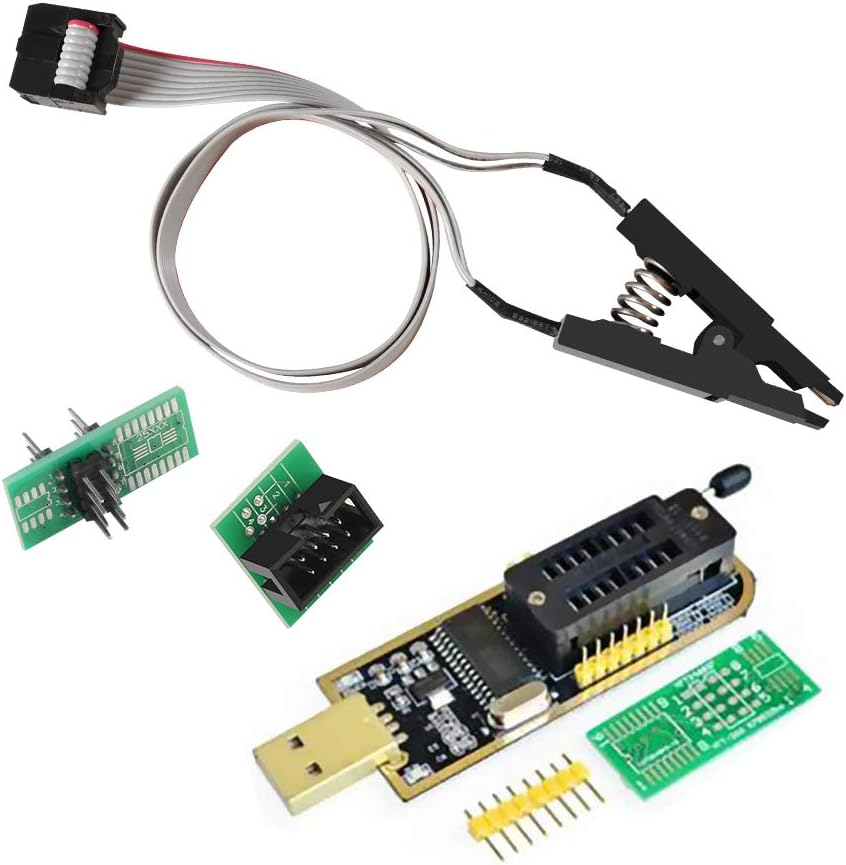
Includes SOIC8 SOP8 test clip
No soldering required for clamping
This comprehensive guide compares the top ten bios flash tools available today to help you choose the right programmer for your hardware recovery and maintenanc
Finding the right bios flash tool is essential for technicians and enthusiasts who need to repair or update system firmware. These devices allow you to read, write, and backup crucial data stored on memory chips across various electronic devices.
We evaluated ten leading products based on compatibility, speed, ease of use, and user feedback. Our analysis focuses on tools that support common chip series and offer reliable performance for both basic and advanced programming tasks.
Each pick highlights specific strengths and ideal use cases to guide your decision. Please note that availability and pricing may vary over time, so checking current listings before purchasing is always recommended for the best value.
4.1Editor score
4.4Editor score

4.3Editor score
The following table provides a side-by-side comparison of all ten selected tools to help you quickly identify the best match for your specific hardware requirements.





The WWZMDiB CH341A programmer is a top choice for those seeking an affordable entry into BIOS flashing. With a rating of 4.1 stars, it stands out for its simplicity and compatibility with common 24 and 25 series chips. The included clips eliminate the need for soldering, making it safe for quick repairs.
We may earn a commission when you buy through this link, at no additional cost to you.
Its primary strength lies in its ability to handle backup erase and programming operations without requiring advanced technical skills. The CH341A chip ensures stable connections and reliable performance across a wide range of devices. This makes it a go-to tool for hobbyists and technicians alike who need a quick solution for memory operations.
However, users must confirm chip voltage before starting to avoid potential damage. The tool supports 3.3V and 5V switching but does not handle other voltages without an adapter. This limitation is acceptable for most consumer electronics but may require additional hardware for specialized industrial boards.
If you need a reliable and budget-friendly solution for standard EEPROM tasks this programmer is an excellent investment. It provides all the necessary components to get started immediately. For most users the balance of cost and functionality makes it a strong recommendation for general maintenance work.
The included test clip allows you to clamp directly onto the chip for immediate programming without soldering. This feature significantly reduces the risk of damage to sensitive components during installation.
Designed to work with most 24 and 25 series chips it handles SOP8 and SOP16 formats seamlessly. This broad support ensures you can tackle common motherboard and device repairs effectively.
We may earn a commission when you buy through this link, at no additional cost to you.
The ACEIRMC SOIC8 SOP8 Test Clip Kit is our top pick for its superior ability to perform in-circuit programming. With a 4.4-star rating it allows users to flash BIOS chips without removing them from the motherboard. This feature saves time and reduces the risk of physical damage during repairs.
We may earn a commission when you buy through this link, at no additional cost to you.
It supports a wide array of EEPROM series including 24CXX 25CXX and 93CXX. The included CH341A programmer module ensures compatibility with most 24 and 25 series chips on the market. Users appreciate the convenience of the double clip and USB connectivity which simplifies the setup process.
Note that certain ESMT SST class 25 chips may only be read and not written with this setup. Additionally some chips affected by peripheral circuits may require removal before programming. These limitations are manageable with proper preparation and verification of chip locations on the board.
For professionals who value efficiency and ease of use this kit is an ideal solution. It combines essential tools into one package for comprehensive BIOS management. We recommend it for anyone looking to streamline their hardware repair workflow with reliable and versatile equipment.
The SOP8 clip enables in-circuit programming without disassembling the chip making flashing simpler and more efficient. This capability is crucial for minimizing downtime during critical system repairs.
Supports 24CXX 25CXX and 93CXX chips ensuring broad compatibility across various devices. This versatility allows you to handle diverse repair scenarios with a single tool set.
We may earn a commission when you buy through this link, at no additional cost to you.
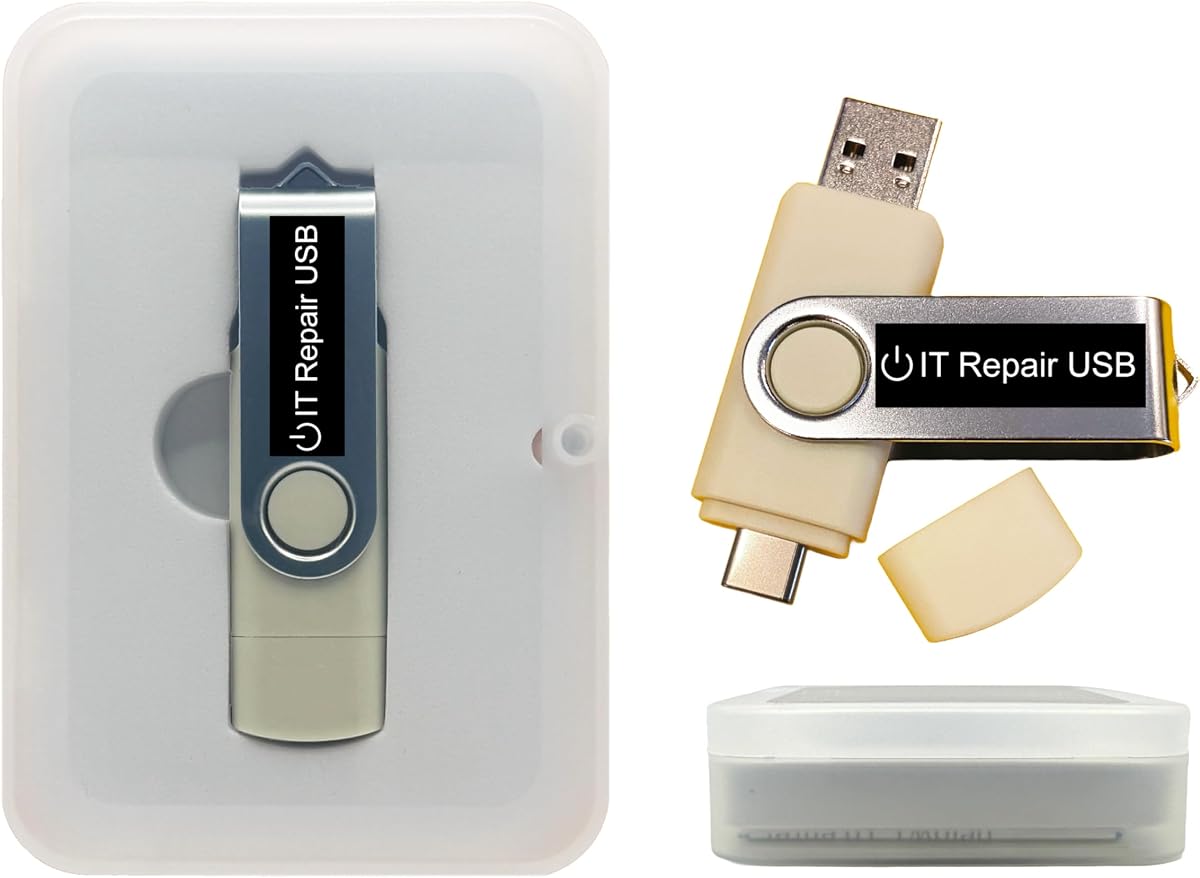
The Password Reset Bootable USB is designed specifically for system access and password recovery tasks. With a 3.6 rating it offers reliable functionality for unlocking Windows and Linux accounts without reinstalling the system. The dual USB-A and USB-C design ensures it works with nearly all modern and older devices.
We may earn a commission when you buy through this link, at no additional cost to you.
Its standout quality is the user-friendly interface that provides step-by-step guidance for non-technical users. It supports a wide range of Windows versions from 2000 to 11 as well as most Linux distributions. The drive is fully customizable allowing professionals to add or replace compatible bootable ISO apps as needed.
While it focuses on password recovery it lacks direct BIOS programming capabilities. This makes it a specialized tool rather than a general flash utility. However for IT professionals needing quick system access it remains a trusted and secure solution for restoring functionality quickly.
If your primary need is regaining access to locked systems this tool is highly effective. It eliminates the need for complex command line operations or data loss. We recommend it for technicians who frequently encounter locked accounts and need a portable reliable recovery solution.
Compatible with nearly all laptops and desktops via USB-A and USB-C connections. This ensures you can use the drive on both modern and legacy hardware without issues.
No internet connection is required to run the recovery tools ensuring privacy and speed. This offline capability is essential for secure environments where network access is restricted.
We may earn a commission when you buy through this link, at no additional cost to you.
The Bootable USB Drive for Windows 11 is designed to simplify OS installation without requiring TPM hardware. With a 4.0 rating it offers a straightforward way to setup or recover Windows on systems that do not meet standard TPM requirements. The UEFI and Legacy compatibility ensures it works on a wide range of devices.
We may earn a commission when you buy through this link, at no additional cost to you.
It is specifically intended for Windows operating system installation and recovery rather than hardware diagnostics. This focus makes it reliable for its intended purpose but users must ensure their hardware is functional before purchasing. The drive comes from a family-owned business that tests each unit in Texas for quality assurance.
However it cannot resolve issues with dead motherboards or failing hard drives. Users need to verify their PC can power on and access BIOS before using this tool. This distinction is important for setting accurate expectations about its capabilities in troubleshooting scenarios.
For those needing a clean Windows install on older or restricted hardware this drive is a practical solution. It removes common barriers to installation and provides a stable recovery option. We recommend it for users who understand the hardware requirements and need a reliable installer.
This USB reinstalls and repairs Windows without requiring TPM hardware making it accessible for more devices. This feature is crucial for systems that lack TPM support but still need OS updates.
Tested in Texas by a family-owned business to ensure reliability before shipping. This personal touch adds confidence to the product's performance and durability.
We may earn a commission when you buy through this link, at no additional cost to you.
The ACEIRMC SOIC8 SOP8 Test Clip Kit offers excellent value by including essential adapters like a 1.8V adapter and a SOP8 to DIP8 socket converter. With a 4.4 rating it is designed for amateur programmers working with 24 and 25 series flash chips. The programming speed is up to 2-3 times faster than standard ATMEGA8 programmers.
We may earn a commission when you buy through this link, at no additional cost to you.
It covers a broad range of use cases including TV set memory desktop motherboard and router repairs. The package includes a CH341A programmer plus a test clip and necessary adapters. This comprehensive setup ensures you have everything needed for backup erasing burning and checking memory chips without extra purchases.
However users should be aware that some boards may not allow online programming due to peripheral circuits. In such cases chip removal may be necessary for successful operations. This limitation is common across many programmers but requires extra care and planning before attempting repairs.
For enthusiasts looking for a complete and cost-effective solution this kit is highly recommended. It balances performance with versatility making it suitable for various electronic repair tasks. We recommend it for hobbyists who need a reliable setup for diverse chip operations.
Programming is faster than ordinary ATMEGA8 programmers with erasing speeds up to 2-3 Mbit per minute. This efficiency saves time during repeated operations or bulk tasks.
Includes 1.8V and SOP8 to DIP8 adapters to handle different chip formats and voltages. This versatility reduces the need for additional purchases and expands usability.
We may earn a commission when you buy through this link, at no additional cost to you.
The EZP2023 USB Programmer stands out as the fastest BIOS chip programmer on the market with read and write speeds that significantly reduce operation time. With a 4.3 rating it is the ideal choice for professionals who need efficiency and reliability in their workflow. It automatically identifies chip models and detects supply voltage for seamless operation.
We may earn a commission when you buy through this link, at no additional cost to you.
It fully supports 25 SPI FLASH 24 EEPROM 25 EEPROM 93 EEPROM and 95 EEPROM series chips. The package includes 15 adapters ensuring compatibility with a wide range of memory configurations. This extensive support allows users to handle diverse tasks without needing additional hardware beyond what is provided.
Although it offers superior performance it comes at a higher price point compared to entry-level tools. Additionally manual selection is needed for some EEPROM series despite automatic identification for 25 series. These trade-offs are acceptable for users who prioritize speed and accuracy in professional settings.
If you require the fastest and most versatile solution for complex programming tasks this device is worth the investment. It minimizes wait times and reduces manual configuration steps. We recommend it for technicians and businesses that need high throughput and consistent results.
Read and write speed is faster than most competitors taking only seconds for typical operations. This speed significantly boosts productivity in high-volume environments.
Full set includes 15 adapters to support 24 25 93 and 95 series chips. This ensures you can handle various board layouts without extra purchases.
We may earn a commission when you buy through this link, at no additional cost to you.
The Windows PC Repair Bootable USB is a comprehensive toolkit designed for system diagnostics and recovery. With a 3.5 rating it is ideal for technicians who need a versatile solution for troubleshooting unbootable systems. It offers a user-friendly interface that guides users through repairs like malware removal and partition fixing.
We may earn a commission when you buy through this link, at no additional cost to you.
It works with most modern and older PCs via USB-A and USB-C ports supporting both UEFI and Legacy BIOS modes. The drive is fully customizable allowing users to add or upgrade compatible bootable ISO apps as needed. This flexibility makes it a valuable asset for diverse repair scenarios.
However it is not intended for fixing failing hardware components like motherboards or hard drives. Users must understand its limits regarding hardware failures to avoid frustration. This distinction is crucial for setting realistic expectations about what the toolkit can achieve.
For those needing a portable solution for system recovery and diagnostics this tool is effective. It provides essential utilities to restore access and repair software issues quickly. We recommend it for IT professionals and resellers who need a reliable recovery OS.
Includes tools for fixing startup problems and recovering files without modifying the PC. This makes it safe for data retrieval and system checks.
Runs Live directly from USB without requiring installation on the target machine. This allows for immediate use without risking existing system data.
We may earn a commission when you buy through this link, at no additional cost to you.
The SOP16 IC Test Clip is specifically designed for refreshing and testing 25 series chips with 150MIL to 300MIL body widths. With a 4.3 rating it ensures stable connections through its hardened clip and thick gold-plated pins. The included 40cm connection line provides flexibility during operation.
We may earn a commission when you buy through this link, at no additional cost to you.
It is compatible with popular programmers like Rt809F and Tl866Cs making it a useful accessory for existing setups. The adapter allows easy conversion from SOP16 to Dip16 for programming convenience. This makes it an essential tool for users dealing with specific board layouts.
Note that chips on circuit boards may be affected by peripheral circuits preventing successful online programming. In such cases removing the chip may be necessary. This limitation is standard for in-circuit tools but requires planning for successful operations.
For users needing a reliable adapter for SOP16 chips this clip is a solid choice. It ensures consistent contact and supports common programmer models. We recommend it for technicians who work frequently with 25 series chips and require precise connectivity.
Hardened clip with thick gold-plated pins ensures stable connection during programming. This reduces the risk of errors due to poor contact or movement.
40cm connection line provides ample length for comfortable handling during testing. This improves workflow efficiency and reduces strain during prolonged use.
We may earn a commission when you buy through this link, at no additional cost to you.
This Bootable USB for Windows 11 and 10 provides a secure and official recovery solution for modern systems. It is designed to work with Secure Boot enabled without requiring BIOS changes which simplifies the process. The drive downloads genuine Windows directly from Microsoft ensuring you always get the latest official version.
We may earn a commission when you buy through this link, at no additional cost to you.
US-based support is available via live chat or email for assistance with setup and usage. It is compatible with 64-bit systems that use UEFI BIOS such as most PCs from 2013 and newer. This focus on modern standards ensures compatibility with current hardware configurations.
However Legacy BIOS is not supported in the current version which limits use on older machines. Additionally no product key is included so users must provide their own Windows license. These limitations are acceptable for users with modern UEFI systems seeking reliable recovery.
If you need a clean and official reinstall option for newer PCs this tool is highly effective. It ensures security and compliance with Microsoft standards. We recommend it for users with UEFI systems who prefer verified software sources.
Works with Secure Boot enabled without requiring BIOS changes for easier deployment. This feature ensures compatibility with modern security settings.
Downloads genuine Windows directly from Microsoft without using pirated or outdated ISOs. This guarantees system integrity and reduces security risks.
We may earn a commission when you buy through this link, at no additional cost to you.
The Kali Linux Bootable USB is a specialized tool designed for ethical hacking and cybersecurity assessments. With a 4.1 rating it includes over 600 pre-installed penetration-testing and security-analysis tools for various audits. This makes it a professional-grade platform trusted by IT experts and researchers.
We may earn a commission when you buy through this link, at no additional cost to you.
It works on almost any desktop or laptop via USB-A and USB-C supporting both Legacy BIOS and UEFI modes. The drive can be used directly from USB or installed permanently for full performance. Customizable ISO support allows you to add or replace tools as needed.
However it is specialized for security testing rather than general system repair or BIOS programming. Users typically need Linux knowledge to maximize its potential. This focus ensures deep functionality for its intended audience but limits general utility.
For security professionals and students needing a comprehensive toolkit this drive is invaluable. It streamlines access to essential tools without complex installation. We recommend it for those dedicated to cybersecurity and network auditing tasks.
Includes over 600 pre-installed penetration-testing tools for network and web auditing. This provides immediate access to essential security utilities.
Fully customizable to add or replace compatible bootable ISO apps and utilities. This flexibility ensures the platform adapts to your specific testing needs.
We may earn a commission when you buy through this link, at no additional cost to you.
Selecting the right tool depends on your specific needs regarding chip compatibility speed and ease of use. This section outlines key factors to consider before making your decision.
Ensure the tool supports the specific memory series you plan to work with such as 24 25 or 93 series. Mismatched compatibility can render the programmer useless for your tasks.
Always verify chip types on your target devices before purchasing to avoid unnecessary returns.
Decide whether you need to program chips while they are still on the board or if removal is acceptable. In-circuit options save time but may require additional precautions against peripheral interference.
Choose tools with reliable clips if you plan to avoid disassembly during repairs.
Faster read and write speeds can significantly improve your workflow efficiency especially for high-volume tasks. Look for tools that optimize these metrics without sacrificing reliability.
Higher-end models often offer better speed performance for demanding professional needs.
Verify that the tool supports the voltage required by your chips such as 3.3V or 5V. Mismatched voltage can damage components and void warranties.
Look for automatic voltage detection or adjustable adapters to ensure safe operation.
Check what adapters and clips are included with the programmer to avoid extra costs later. Comprehensive kits often provide better value for varied repair scenarios.
Ensure you have the right SOP and SOIC sizes for your specific target hardware.
Reliable customer support and clear documentation can help troubleshoot issues quickly during operation. Look for brands that offer responsive service channels and detailed guides.
Community forums and user reviews can also provide valuable insights for setup and usage.
Durable hardware with robust connections ensures longevity during frequent use in professional environments. Inspect build materials and connector quality before purchasing.
Higher-quality components often lead to more stable and reliable programming sessions.
Ensure the tool comes with compatible software for your operating system to avoid driver conflicts. Regular software updates can also extend the lifespan of your hardware.
Look for cross-platform support if you work across different system environments.
Connect the programmer to your PC via USB and install any required drivers or software. Ensure your system recognizes the device before proceeding with operations.
Connect the clip or adapter to your target chip ensuring proper pin alignment and voltage settings. Verify chip details in software to prevent accidental overwriting or damage.
Store the tool in a dry clean environment to protect pins and connectors from corrosion. Regularly check clips for loose contacts to maintain consistent performance over time.
A bios flash tool is used to read write and backup data on memory chips. It is essential for updating firmware repairing corrupted systems and recovering data from hardware devices.
Many tools come with clips that allow for programming without soldering. However some chips may require removal for safe programming depending on the motherboard design.
No tools support specific series such as 24 25 or 93 chips. Always check the device's compatibility list before attempting to program a new chip.
Confirm chip voltage settings before starting operations to avoid electrical mismatch. Also ensure secure connections to prevent interruptions during read or write processes.
Yes many tools are designed for easy use with simple software and clear instructions. Beginners should start with common chips and follow safety guidelines closely.
A power failure can corrupt data on the chip or damage the programmer. Always use a stable power source and avoid removing connections during active operations.
We have reviewed ten top tools ranging from budget-friendly options to premium models for professionals. Each offers distinct advantages based on your hardware needs and repair scenarios.
Prioritize tools that match your specific chip series and voltage requirements to ensure safe and efficient operations. Compatibility and reliability should be your main concerns over extra features.
Remember that product availability and pricing can change over time so check current listings for the most accurate information. Choose a solution that balances cost with the necessary functionality for your work.