
CyberPower CP1000PFCLCD
4.2Editor score
1000VA PFC Sinewave
10 NEMA Outlets
AVR Technology
This guide compares the top 10 battery backup units for workstation PCs, covering capacity, waveform, and reliability to help you choose the right UPS today.
Protecting your critical workstation from unexpected power outages is essential for maintaining productivity and preventing data loss. A reliable battery backup ensures your systems stay online during brief interruptions or allow for a safe shutdown during longer events.
We evaluated ten top-rated UPS units based on their power capacity, waveform quality, outlet configuration, and overall reliability features. Our selection includes models designed specifically for active PFC power supplies and general office workstations.
Each pick highlights key strengths and considerations to help you match the right unit to your specific hardware needs. Keep in mind that specifications and availability can change, so verify details before making your final purchase decision.
4.2Editor score

4.5Editor score

4.7Editor score
The following table provides a side-by-side comparison of all ten selected battery backup units, highlighting their key specifications and distinguishing features.




The CyberPower CP1500PFCLCD earns our top pick for workstation users who need a reliable PFC sinewave UPS. With a 1500VA capacity and a robust outlet count, it protects critical hardware effectively while providing useful monitoring through its color LCD.
We may earn a commission when you buy through this link, at no additional cost to you.
This model stands out because it uses a pure sine wave output specifically designed for active PFC power supplies found in many modern workstations. This ensures compatibility and avoids potential shutdowns that can occur with simulated sine wave units when paired with sensitive equipment.
While it offers excellent performance, the physical dimensions are larger than standard models, requiring adequate desk or floor space. The price is also on the higher end compared to entry-level options, but the extended warranty and equipment guarantee justify the investment for professional setups.
This unit is ideal for IT professionals and power users running high-performance workstations who cannot afford downtime. If you need a proven solution that handles modern power supplies gracefully, this model delivers outstanding value and reliability for long-term use.
The PFC sinewave output ensures seamless operation with active PFC power supplies common in modern workstation PCs, preventing unexpected shutdowns during power events.
The multifunction color LCD panel provides immediate detailed information on battery and power conditions, alerting users to issues before they affect critical equipment.
We may earn a commission when you buy through this link, at no additional cost to you.
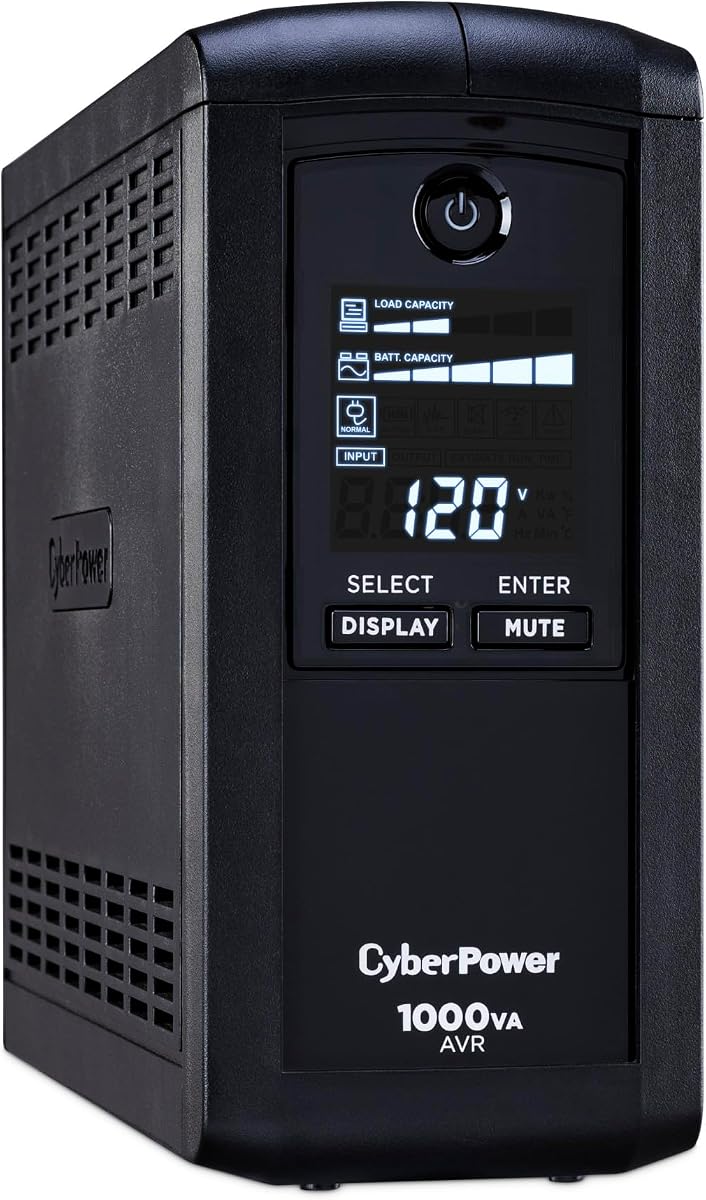
The CyberPower CP1000PFCLCD offers an accessible entry point for users who need PFC sinewave protection without breaking the budget. It provides a solid 1000VA capacity suitable for standard workstation setups while maintaining essential monitoring features.
We may earn a commission when you buy through this link, at no additional cost to you.
Key strengths include the PFC compatible sine wave output which safeguards active PFC power supplies effectively. The inclusion of AVR helps correct minor voltage fluctuations without switching to battery power, extending overall battery life and reducing stress on connected devices.
Compared to higher capacity models, the 600W limit might restrict heavy multi-monitor setups or high-draw peripherals. However, for typical office workstations or small server racks, this unit delivers reliable protection at a very competitive price point.
We recommend this model for small businesses or home offices seeking reliable PFC protection at a lower cost. It strikes a practical balance between performance and affordability, making it a smart choice for protecting essential computing equipment.
Designed specifically to support active PFC and conventional power supplies, ensuring that modern computer hardware remains protected during electrical disturbances.
AVR corrects minor power fluctuations without switching to battery power, thereby extending the life of the battery and reducing wear on internal components.
We may earn a commission when you buy through this link, at no additional cost to you.
The CyberPower BRG1500AVRLCD2 stands out with an exceptional five-year warranty and a robust 1500VA capacity tailored for demanding workstation environments. It offers a refined user experience through its color LCD and advanced connectivity options.
We may earn a commission when you buy through this link, at no additional cost to you.
One of its primary advantages is the extensive warranty coverage which provides long-term peace of mind for business users. The color display panel alerts users to potential issues proactively ensuring that critical equipment remains protected from unexpected power anomalies before damage occurs.
While it uses simulated sine wave output rather than true sinewave, it still safeguards most standard workstations effectively. However, users with high-end active PFC supplies should verify compatibility since pure sine wave models are better suited for those specific configurations.
This unit is perfect for enterprises or professionals who value long-term reliability and comprehensive support. With its strong power delivery and extensive warranty, it offers a premium experience that justifies the higher cost for mission-critical workstation protection.
A five-year warranty including the battery provides exceptional long-term value and protection for professional workstations and critical office equipment.
The color display alerts users to potential issues before they can affect critical equipment and cause downtime ensuring maximum operational continuity.
We may earn a commission when you buy through this link, at no additional cost to you.
The CyberPower CP1500AVRLCD3 provides a high-capacity solution ideal for powering multiple devices simultaneously. Its intelligent LCD panel offers clear visibility into power conditions which is helpful for managing complex workstation setups.
We may earn a commission when you buy through this link, at no additional cost to you.
It delivers 1500VA of power which is sufficient for most workstation and networking combinations. The color display is a standout feature that simplifies troubleshooting by showing immediate detailed information on battery and power conditions at a glance.
While it lacks true PFC sinewave output, it remains a solid choice for general office equipment and standard PCs. The inclusion of AVR helps stabilize voltage fluctuations which reduces the frequency of battery usage and extends the overall life of the unit.
Buyers seeking a high-capacity unit with modern display features will appreciate this model. It is well suited for environments where monitoring power status visually is important and where standard sine wave compatibility is sufficient for connected devices.
The multifunction color LCD panel displays immediate detailed information on battery and power conditions helping users maintain full control over power status.
AVR corrects minor power fluctuations without switching to battery power ensuring stable power delivery and extending the lifespan of the internal battery.
We may earn a commission when you buy through this link, at no additional cost to you.
The CyberPower EC850LCD introduces an energy-conscious approach with its ECO mode feature that automatically turns off power to peripherals when the connected computer is off. This helps reduce energy consumption and lower costs over time.
We may earn a commission when you buy through this link, at no additional cost to you.
With 850VA capacity it handles standard workstation setups but may struggle with high-draw devices. The ECO mode outlets are particularly useful for monitors and speakers that do not need to remain powered during system downtime.
It is a practical option for eco-conscious users who want to minimize standby power usage. However users with heavy graphical workloads or multiple power-hungry peripherals should consider a higher wattage unit to ensure uninterrupted operation.
This model is best suited for small offices or home workstations prioritizing energy efficiency. The ECO mode feature is a unique benefit that helps maintain operational savings while still offering essential surge protection and battery backup capabilities.
ECO mode automatically turns off power to connected peripherals when the computer is off or in sleep mode reducing power usage and lowering energy costs.
Six battery backup and surge protected outlets ensure that your critical workstation components remain safe from surges and sudden power outages.
We may earn a commission when you buy through this link, at no additional cost to you.
The CyberPower AVRG900LCD distinguishes itself with data line protection which safeguards modems and fax machines from surges traveling through telephone lines. This feature is rare among standard units and adds significant value for legacy or hybrid office setups.
We may earn a commission when you buy through this link, at no additional cost to you.
Its high rating indicates strong performance and reliability in real-world use. The unit offers a solid 900VA capacity suitable for desktop computers and basic networking equipment making it a versatile choice for small office environments.
While the wattage is modest it serves well for standard office tasks rather than intensive computing. The inclusion of AVR helps maintain stable power levels which reduces unnecessary battery cycles and extends the service life of the unit.
Choose this model if you need protection for communication lines alongside your computer equipment. It delivers reliable performance with specialized features that protect connected peripherals from electrical issues entering through phone or data lines.
Data line protection prevents power surges that travel through telephone lines from causing damage to electronics ensuring comprehensive protection for all connected devices.
AVR corrects minor power fluctuations without switching to battery power ensuring stable power delivery and extending the life of the internal battery.
We may earn a commission when you buy through this link, at no additional cost to you.
The CyberPower CP1000AVRLCD offers clear visibility into power conditions through its intelligent LCD panel which displays estimated runtime and battery capacity. This transparency helps users manage workloads during unexpected outages effectively.
We may earn a commission when you buy through this link, at no additional cost to you.
With 1000VA capacity it provides ample power for a standard workstation and a few peripherals. The unit includes AVR technology to correct minor fluctuations ensuring that your equipment runs smoothly without unnecessary battery drain during minor power issues.
Its nine outlets are functional but fewer than some larger models which may limit expandability. Users with extensive peripheral needs should consider a higher outlet count model to avoid using additional power strips which reduces safety.
This UPS is ideal for small businesses or individuals who want a straightforward reliable backup solution. The intelligent display makes it easy to monitor system status and plan for safe shutdowns if power outages occur.
The multifunction LCD panel displays immediate detailed information on battery and power conditions including estimated runtime and load capacity for easy monitoring.
Corrects minor power fluctuations without switching to battery power thereby extending the life of the battery and reducing wear on internal components.
We may earn a commission when you buy through this link, at no additional cost to you.
The GOLDENMATE 2000VA stands out with its Lithium Iron Phosphate battery offering over 3000 charge cycles and a ten year lifespan. This advanced technology reduces total cost of ownership and eliminates the need for frequent battery replacements.
We may earn a commission when you buy through this link, at no additional cost to you.
It delivers a powerful 1600W output which supports high-performance workstations that require significant power headroom. The pure sine wave output ensures compatibility with sensitive electronics making it a robust choice for professional setups demanding stable power.
Users should note that this unit is slightly larger and heavier than lead-acid models due to its advanced transformer. Additionally it supports a specific input voltage range so verifying your outlet compatibility is essential before purchase to ensure proper operation.
This UPS is perfect for users prioritizing long-term reliability and high performance. The combination of lithium technology and pure sine wave output makes it a top-tier choice for protecting critical workstation infrastructure against power interruptions.
The LiFePO4 battery offers an impressive lifespan of over 10 years and more than 3000 charge cycles reducing total cost of ownership significantly.
The 2000VA Pure Sine Wave output ensures optimal efficiency and reliability protecting computers and workstations from common electrical issues like surges and drops.
We may earn a commission when you buy through this link, at no additional cost to you.
The CyberPower ST900U features a slim profile design that saves valuable desk space while providing essential standby protection. It is designed to safeguard home office equipment and home entertainment systems effectively.
We may earn a commission when you buy through this link, at no additional cost to you.
Its high efficiency design reduces power consumption during normal operation which lowers operating costs and heat generation. The unit offers twelve outlets including widely spaced ones to accommodate larger plugs and multi-prong adapters with ease.
It is an excellent entry-level option for users with limited space and basic power needs. The slim form factor makes it easy to slide under a desk or onto a shelf without cluttering the workspace with a bulky unit.
Choose this model if space is at a premium and you need reliable standby protection for standard electronics. It balances compact design with sufficient outlet capacity to handle typical workstation and peripheral combinations efficiently.
The slim profile design provides an ultra-efficient backup power system for home and office use taking up minimal desk or floor space.
Reduces power consumption by utilizing a compact charger and power inverter creating an ultra-efficient backup power system for home and office use.
We may earn a commission when you buy through this link, at no additional cost to you.
The CyberPower CP850AVRLCD serves as a solid entry-level option for users needing basic UPS protection for a standard workstation. Its intelligent LCD panel provides clear visibility into battery capacity and load status at a glance.
We may earn a commission when you buy through this link, at no additional cost to you.
With 850VA capacity it handles standard office PCs and a monitor effectively. The automatic voltage regulation corrects minor fluctuations which helps maintain stable power without draining the battery unnecessarily during minor grid disturbances.
It is a practical choice for home offices or smaller workstations with limited power requirements. Users with heavy computing loads or large peripherals may find the wattage limit restrictive for extended runtimes during outages.
This model is recommended for those seeking essential protection without advanced features. It provides reliable surge protection and battery backup for standard equipment making it a trustworthy choice for everyday office environments.
The multifunction LCD panel displays immediate detailed information on battery and power conditions including estimated runtime and load capacity for easy monitoring.
Corrects minor power fluctuations without switching to battery power thereby extending the life of the battery and reducing wear on internal components.
We may earn a commission when you buy through this link, at no additional cost to you.
Selecting the right battery backup involves assessing power capacity, waveform compatibility, and additional features that match your workstation's needs.
Power capacity measured in VA and Watts determines how much equipment your UPS can support. Choose a unit with enough capacity to handle your total load plus room for expansion.
Ensure the wattage rating exceeds your equipment total to avoid overloading the unit during outages.
True sine wave output is required for active PFC power supplies commonly found in modern workstations. Simulated sine wave may cause shutdowns or instability with these supplies.
Select a PFC sinewave model if your workstation uses active PFC power supplies for reliable operation.
Consider the number of outlets available for battery backup versus surge protection. More outlets allow for greater flexibility in connecting peripherals and monitoring equipment.
Ensure enough outlets exist for all critical devices to avoid needing unsafe extension cords.
AVR corrects minor power fluctuations without using battery power extending battery life and ensuring stable operation. This is crucial for areas with unstable grid power.
Look for units with AVR to reduce unnecessary battery cycles and improve longevity.
LCD displays provide real-time information on battery status and load. Color panels often offer clearer alerts for issues before they become critical.
Choose a model with clear display features to simplify troubleshooting and management.
A longer warranty period indicates manufacturer confidence in the product's reliability. Look for warranties that include the battery for comprehensive coverage.
Prioritize models with robust warranties to protect your investment over the long term.
Many units now include USB ports for charging mobile devices directly from the UPS. This ensures essential devices remain powered during emergencies.
Check for Type-A and Type-C ports to charge modern smartphones and tablets without adapters.
Physical size and weight impact where you can place the UPS. Slim models save desk space while tower units offer better outlet spacing.
Ensure the unit fits your workspace and allows enough clearance for proper ventilation.
Connect your critical workstation components to the battery backup outlets and ensure all cables are secure before powering on. Avoid overloading the unit by checking the total wattage of connected devices.
Perform regular self-tests to verify that the battery and internal components are functioning correctly. Most units include a test button that simulates a power outage to confirm seamless transition.
Replace the battery every three to five years depending on usage and manufacturer guidelines to maintain reliable protection. Proper care extends the service life of the UPS and ensures it performs during actual outages.
True sine wave provides a smooth power output compatible with active PFC power supplies used in modern workstations. Simulated sine wave may cause instability or shutdowns with these sensitive power supplies.
Calculate the total wattage of all connected devices and select a UPS with a VA rating that exceeds this load. Aim for a buffer to ensure stable operation and enough runtime for a safe shutdown.
Yes but ensure you choose a pure sine wave model to avoid interference or damage to sensitive electronics. Simulated wave units may introduce noise that affects audio quality or imaging sensors.
Runtime varies based on connected load and battery capacity. Typically expect enough time to save work and shut down safely which usually means 10 to 20 minutes under normal workstation loads.
AVR is essential in areas with unstable voltage as it corrects fluctuations without draining the battery. This extends the life of the internal battery and ensures consistent power delivery to your equipment.
Yes battery performance degrades over time and typically requires replacement every three to five years. Regular checks ensure you have reliable protection when an actual power outage occurs.
Most reputable units offer a three to five year warranty including the battery and connected equipment guarantee. Always check warranty terms to understand what components are covered and how long protection lasts.
Our top picks include the CyberPower CP1500PFCLCD for true PFC support and the CyberPower BRG1500AVRLCD2 for long-term reliability with an extended warranty. These models deliver the best overall balance of power and protection.
Prioritize a unit that matches your workstation's power needs and offers compatible waveform output. Features like AVR and clear displays further enhance reliability and ease of use for everyday operations.
Remember that availability and specifications may change so verify details before finalizing your purchase. Choosing the right battery backup ensures your workstation remains protected and operational when you need it most.