
GPU Support Bracket
4.7Editor score
Durable all-aluminum build for strength
Height adjustable for universal fit
Stable and easy to install
Graphics cards have become increasingly heavy and large in recent years, posing a risk to your motherboard and PCIe slots. Without proper support, the weight of these components can cause sagging over time, leading to potential damage and reduced system stability. A quality Anti Sag GPU Support Bracket is essential for protecting your investment and ensuring long-term reliability.
We have analyzed ten leading models available on the market to help you find the right solution for your build. Our comparison focuses on material durability, ease of installation, adjustability range, and overall stability. Each product was evaluated based on user feedback and manufacturer specifications to provide an accurate and useful overview for builders.
This guide highlights the strengths and weaknesses of each bracket so you can make an informed decision. You will see detailed reviews and comparison data to understand how each option performs in real-world scenarios. Please note that product availability and pricing can change frequently, so check current listings before purchasing.
4.7Editor score
4.7Editor score
4.7Editor score
As an Amazon Associate we earn from qualifying purchases.
This side-by-side comparison lists all ten products reviewed in this guide. Each entry includes key specifications and direct links to help you evaluate options quickly. Use this table to find the model that best fits your case size and GPU weight requirements.

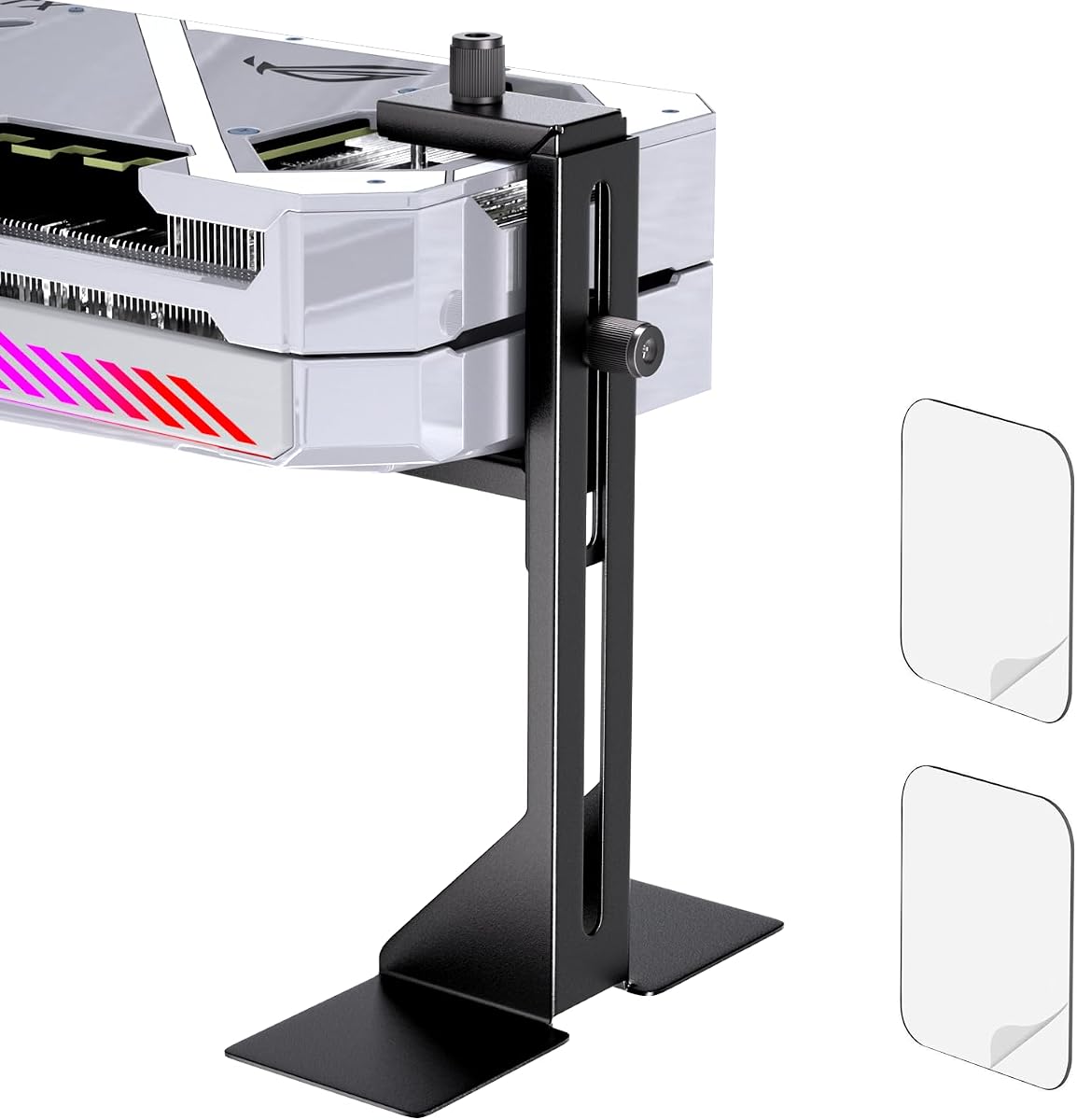


This Graphics Card GPU Brace Support is our top choice for its robust build and reliable performance. With a 4.7 rating, it stands out as a dependable solution for preventing card sag. The all-aluminum metal material ensures it lasts longer than plastic alternatives.
We may earn a commission when you buy through this link, at no additional cost to you.
The screw adjustment design allows compatibility with various chassis configurations. This makes it versatile for traditional and long power supply bays. The bottom hidden magnet provides a stable standing position within the case without needing extra tools.
Workmanship details like polished and sandblasted anode processes add to its durability. While the magnet helps with stability, users should ensure their case has a metal base. The tool-free module includes anti-scratch pads to protect your hardware.
If you need a long-term replacement that avoids plastic aging, this is the ideal pick. It supports heavy cards effectively while maintaining a sleek look. We recommend it for builders seeking strength and ease of use.
The all-aluminum build prevents aging and rust, ensuring the bracket remains strong for years of use.
Screw adjustments and magnet bases let you fit this bracket into many different case types easily.
We may earn a commission when you buy through this link, at no additional cost to you.
The acer GPU Support Bracket offers precise control with its 0.5mm increment adjustments. This feature allows for a perfect fit in various cases. The 4.8 rating reflects its high quality and reliable performance in real builds.
We may earn a commission when you buy through this link, at no additional cost to you.
Constructed from aluminum alloy with an anodized finish, it resists rust and wear. The detachable design simplifies installation significantly. A large diameter rod provides maximum load capacity for heavier graphics cards.
Magnetic design includes silicone pads to prevent damage to your card. The base magnet ensures the stand is firmly attached to the chassis. This double safety guard provides peace of mind during operation.
With an 18+18-month warranty, you are covered for extended use. Support teams are ready to assist quickly. This model is perfect for those who value precision and long-term reliability in their PC setup.
The 0.5mm increments allow you to calibrate the height to the exact millimeter for your GPU.
An 18+18-month warranty ensures you have support long after your initial purchase date.
We may earn a commission when you buy through this link, at no additional cost to you.
The California JOS GPU Support Bracket delivers great value without sacrificing durability. It prevents sag and protects your motherboard from weight stress. The 4.7 rating shows users are satisfied with its performance.
We may earn a commission when you buy through this link, at no additional cost to you.
Made from high-quality aluminum alloy, it offers superior strength compared to plastic. This ensures long-term reliability for your graphics card. The height adjustable feature makes it compatible with most ATX, M-ATX, and ITX cases.
Installation is simple and tool-free. The secure base offers stability once in place. It comes safely packed in an ESD bag for storage and shipping protection.
This is a smart choice for budget-conscious builders who need effective protection. It provides reliable support to keep your card level. Check current listings to see if it meets your case requirements today.
The aluminum build provides strong support to prevent graphics card sagging and damage over time.
Adjustability allows it to fit most standard case configurations for easy integration.
We may earn a commission when you buy through this link, at no additional cost to you.
This bracket offers horizontal and vertical use for flexibility. It supports heavy cards and prevents bending over time. The rating of 4.6 indicates solid performance for most users. It includes strong double-sided adhesive for secure attachment.
We may earn a commission when you buy through this link, at no additional cost to you.
The adhesive ensures the graphics card remains firmly in place. This prevents wobbling and enhances overall system stability. It also leaves minimal residue making cleanup effortless if you need to move it.
Compatibility is wide, supporting GPUs up to 75mm thickness. This makes it suitable for large models. The range of 35-120mm allows height adjustment for your specific setup needs.
If your case lacks a metal base for magnets, adhesive is a great alternative. It provides robust support to keep your build looking clean. Ensure your surface is clean before application for best results.
You can install it horizontally or vertically to match your case layout perfectly.
The adhesive holds strong but leaves minimal residue for easy removal later.
We may earn a commission when you buy through this link, at no additional cost to you.
This model is made from aluminum alloy with an anodized finish. This ensures durability and resistance to rust over ten years. The 4.6 rating reflects its reliable support capabilities for various users.
We may earn a commission when you buy through this link, at no additional cost to you.
Screw adjustment design allows compatibility with ATX and ITX structures. The magnetic non-slip base makes installation easy and stable. Tool-free fixing includes anti-scratch pads to protect your graphics card.
Workmanship includes polished and sandblasted processes for a high-gloss look. A level is provided to check alignment after installation. Any questions can be directed to the support email listed.
It is a strong choice for those wanting a long-lasting solution. The magnet helps it stand firm without screws. Just ensure your case bottom is metal to take advantage of the magnetic feature.
Anodized processes create a durable surface that resists rust and wear effectively.
The magnetic base and screw design let you install it without needing extra tools.
We may earn a commission when you buy through this link, at no additional cost to you.
The TEAMOLA model offers a wide height range from 4.53 to 8.27 inches. This is useful for cases with deeper chassis or larger components. Its rating of 4.5 shows it meets many users needs well.
We may earn a commission when you buy through this link, at no additional cost to you.
Updated aluminum metal material provides strong and long-lasting support. A hidden magnet in the base ensures it stands firmly. You simply twist the nut to adjust height to your needs.
Installation requires no other tools beyond your hands. If you are not satisfied, a refund or replacement is offered. This commitment to quality adds value to the purchase.
Choose this if you need extra vertical clearance in your case. The magnet helps avoid slipping during setup. It supports big and heavy cards to keep them parallel and safe.
With a range up to 8.27 inches, it fits taller cases better than standard brackets.
The hidden magnet ensures no slip when using this stand on metal surfaces.
We may earn a commission when you buy through this link, at no additional cost to you.
This stand provides reliable reinforcement to prevent sag and maintain alignment. It is engineered for long-term stability to protect your investment. The 4.6 rating confirms its effectiveness in various setups.
We may earn a commission when you buy through this link, at no additional cost to you.
It is compatible with various GPU sizes and weights for diverse builds. The adjustable mounting bracket ensures a perfect fit for gaming or workstation setups. Installation takes about 30 seconds without tools.
It eliminates stress on PCIe slots to protect against warping. The powerful magnetic base provides a strong foundation on shrouds. It works with all major brands like ASUS and NVIDIA.
Select this for a straightforward and efficient solution. It keeps your focus on your clean PC build. This is ideal for users wanting quick setup without complexity.
Compatible with major brands and sizes so you can use it with almost any card.
You can get your card level and secure in under a minute with ease.
We may earn a commission when you buy through this link, at no additional cost to you.
This X-Protector bracket adjusts from 2.9 to 5 inches for perfect GPU support. It reduces stress on the slot to prevent damage. The 4.6 rating highlights its solid design and reliability.
We may earn a commission when you buy through this link, at no additional cost to you.
It is made of solid aluminium with a soft rubber pad. This prevents vibrations and ensures safe contact with your GPU. Installation requires no tools. Just adjust the height and place it.
It provides instant support and stops sag without hassle. This is a simple fix for worried users. You get 100% satisfaction with a guarantee included in the purchase.
This is great for smaller cases or lighter cards needing quick help. The rubber pad protects your hardware from scratches. Try it if you want a hassle-free installation process.
The soft rubber pad ensures your GPU is supported without damaging the surface.
Stop sag immediately with this simple setup that requires no screws or tools.
We may earn a commission when you buy through this link, at no additional cost to you.
This bracket is special designed for 12cm fan mounts to protect expensive cards. Its CNC aluminum design offers premium quality and durability. With a 4.7 rating, it stands out as a high-end option.
We may earn a commission when you buy through this link, at no additional cost to you.
Height adjustment from 0.63 to 6.3 inch allows wide compatibility. It can be detachable into two parts for flexible fan placement. Non-slip rubber pads on base and arms keep it stable.
Installation is tool-free. Just rotate the stand and arm. Mounting screws for fans are included. It fits most cases like ITX and ATX. Check your device height before buying.
If you want a premium fan-integrated solution, this is excellent. It protects heavy cards while fitting your airflow needs. This is our pick for those seeking a sophisticated setup feature.
Designed specifically for 12cm fans to help you save space in your case.
Splitting into two parts lets you install it on top or bottom fans easily.
We may earn a commission when you buy through this link, at no additional cost to you.
The Aivalas GPU Support Bracket does a good job of preventing sag. Its unobtrusive appearance does not detract from your computer aesthetics. The 4.7 rating shows users find it effective and reliable.
We may earn a commission when you buy through this link, at no additional cost to you.
It is made of premium quality aluminum that is sturdy and not deformed. This provides strong and long-lasting support to your VGA card. The base has rubber on the ends to add a nice grip.
It is able to stick to PSU shrouds due to magnetic properties. Twist the nut to adjust height as you need. It fits most chassis like ATX and ITX to meet various user hosts.
This is a solid choice for general support needs. It balances quality and price well. Ensure you check height limits before placing to avoid issues.
The aluminum construction ensures the bracket stays sturdy and does not deform easily.
Rubber on the ends adds a nice grip to prevent any slippage.
We may earn a commission when you buy through this link, at no additional cost to you.
Selecting the right bracket requires understanding your case and GPU needs. We break down the key factors to help you choose wisely.
Choose all-aluminum or aluminum alloy brackets for long-term strength. Plastic versions can age and break over time. Durability is key to preventing sag effectively.
Look for anodized or polished finishes to resist rust and wear.
Check the minimum and maximum height limits. Ensure it fits your case floor to GPU bottom. Adjustable models offer better versatility across different builds.
A wide range helps you fine-tune the support to your specific card.
Decide between magnet, adhesive, or fan mount. Magnetic needs metal surfaces. Adhesive works on glass or plastic. Fan mounts save space.
Select the style that matches your case design and material.
Tool-free designs save time during assembly. Screw adjustments allow fine tuning without drills. Simple setups help beginners install correctly.
A smooth installation process ensures you can fix sag quickly.
Verify the bracket supports your card thickness. Some are rated for up to 75mm. Thick cards need stable contact points.
Measure your GPU width before buying to avoid mismatch.
Rubber pads prevent scratching your case. Hidden magnets offer quick placement. Strong bases keep the bracket from tipping.
Stability ensures the bracket stays in place during use.
Choose colors like black or white to match your build. Unobtrusive designs keep focus on your components. Sleek finishes enhance visual appeal.
A good look adds value to your overall PC setup.
Look for models with at least a one-year warranty. Support teams help resolve issues quickly. Satisfaction guarantees reduce risk for buyers.
Strong support ensures you are covered if problems arise.
Start by measuring the distance from your case floor to the bottom of your graphics card. Adjust the bracket height to match this gap precisely. Ensure the support touches the GPU edge evenly.
If using a magnet, place it on a metal PSU shroud or base. For adhesive, clean the surface with alcohol and let it dry. This ensures a strong bond that lasts.
Check the alignment periodically to make sure the card stays level. Avoid moving the bracket while it is under pressure. This prevents damage to the card or PCIe slot.
A GPU support bracket is a device that supports the far end of your graphics card. It prevents sagging caused by the card's weight. This protects your motherboard and PCIe slot from damage over time.
Most are designed to fit standard ATX, M-ATX, and ITX cases. However you should check height range and base type. Some may not fit if you have unique case designs or shrouds.
Magnetic models need a metal surface like a shroud to hold. Plastic cases will not stick to magnets. Consider adhesive or stand styles for these builds instead.
Most models use a screw or nut mechanism to adjust height. Twist the nut to raise or lower the support. Some use a detent or locking ring for stability.
Quality brackets include rubber pads to protect your card. These pads prevent scratches and reduce vibration. Look for anti-scratch features when choosing a model.
Yes most models are tool-free or require simple screws. This makes removal easy for maintenance. Adhesive ones can be cleaned up without much residue.
A support does not directly increase performance. It protects your hardware from sagging which can cause instability. This ensures your system runs reliably over long periods.
Place it under the far end of the card opposite the connector. It should touch the center of the card for best support. Avoid blocking air vents or fans when placing.
We reviewed ten top models to help you find the right solution. The Graphics Card GPU Brace Support offers the best balance of quality and features. Other models like the California JOS provide great value for budget builders.
Prioritize material durability and adjustability range when selecting a bracket. Ensure the base matches your case type for secure installation. A good fit prevents stress on your expensive graphics hardware.
Please check current listings to see what is available today. Prices and stock change frequently so verify before buying. With the right bracket you can keep your PC safe and stable.