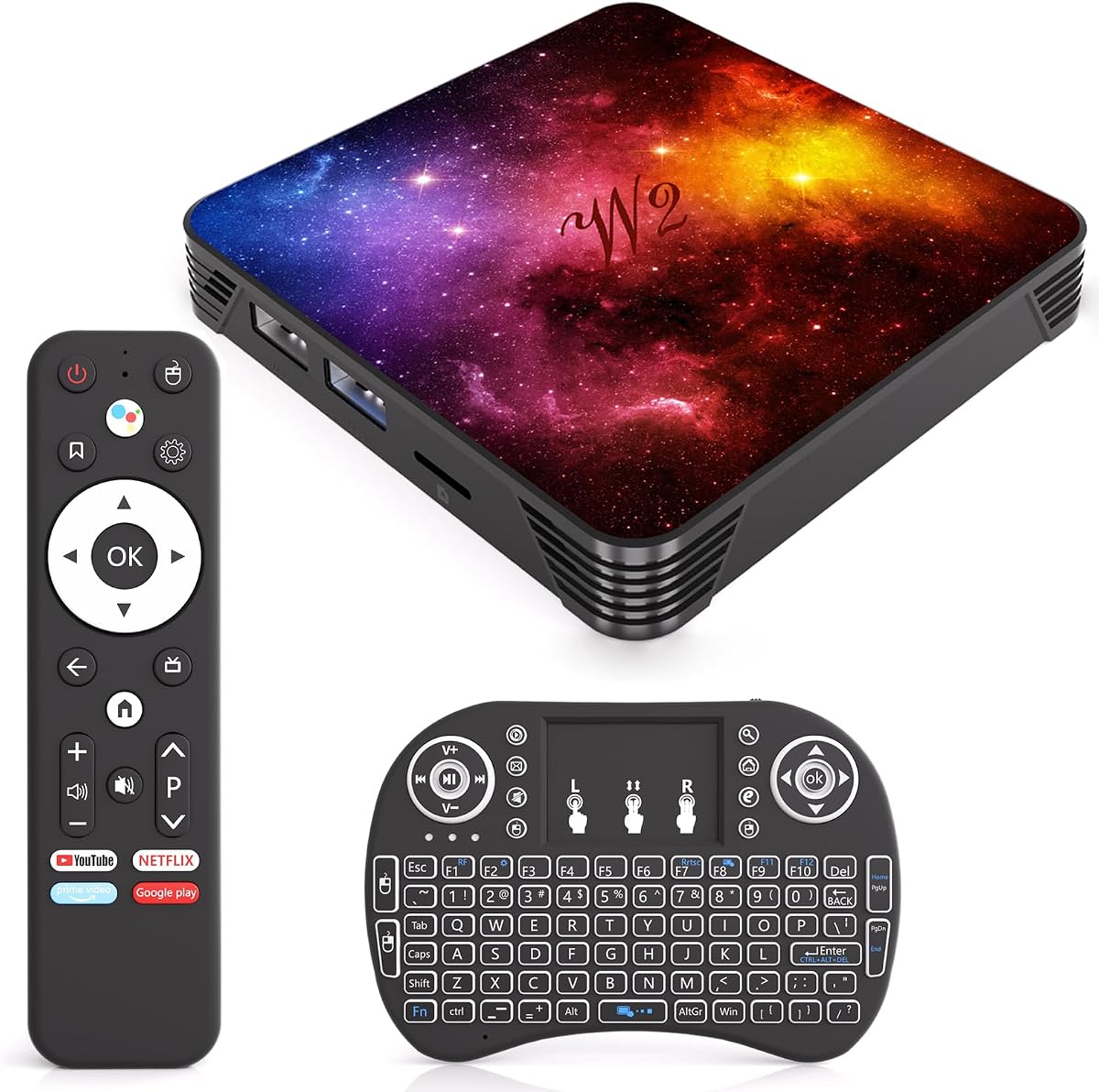
Android 14.0 TV Box
5.0Editor score
Android 14.0 OS
4GB RAM 64GB ROM
4K Ultra HD Support
This guide compares the top ten Android TV Box models available in October 2026 to help you find the best streaming device for your home entertainment setup.
Finding the right Android TV Box can transform your standard television into a powerful smart entertainment hub. With numerous options flooding the market, choosing a device that balances performance, features, and value is essential for seamless streaming.
We have evaluated ten standout models based on hardware specifications, operating system stability, connectivity options, and user feedback. This comparison covers devices ranging from budget-friendly picks to high-end units designed for serious media enthusiasts and gamers alike.
Each selection highlights unique strengths and potential trade-offs to help you make an informed decision. Please note that product availability and pricing may change frequently, so verify current details before making your final purchase decision today.
5.0Editor score

4.4Editor score

4.3Editor score
This side-by-side comparison highlights key specifications across all ten selected models to help you quickly identify the device that best matches your specific streaming and gaming requirements.





This model offers a compelling mix of performance and smart features making it ideal for most households seeking a reliable streaming upgrade.
We may earn a commission when you buy through this link, at no additional cost to you.
Its support for Dolby Vision and Atmos ensures high-quality playback while the Google TV platform provides easy access to your favorite services.
The compact footprint allows discreet placement and the included voice remote simplifies navigation across different apps and content libraries effectively.
Highly recommended for users prioritizing picture quality and ecosystem integration without needing extensive local storage or gaming capabilities.
The device supports 4K resolution at 60FPS along with HDR10+ and Dolby Vision for enhanced contrast and color accuracy during movie viewing.
Running the latest Google TV OS it offers personalized content recommendations and voice control via Google Assistant for effortless entertainment management.
We may earn a commission when you buy through this link, at no additional cost to you.
A strong contender for budget-conscious buyers this box delivers a smooth experience with the latest operating system and ample space for apps.
We may earn a commission when you buy through this link, at no additional cost to you.
The inclusion of 4GB RAM ensures multitasking remains fluid while 64GB storage lets you keep more media files locally without immediate expansion needs.
Although the hardware is generic it handles 4K streaming well and the included mini keyboard aids in text entry tasks like searching for shows.
Ideal for users needing a basic but capable device that supports modern standards without breaking the bank for premium features.
Powered by Android 14.0 it offers better optimization security and a user-friendly interface for daily entertainment needs.
The 64GB ROM allows you to download and store plenty of apps games and videos without worrying about insufficient space.
We may earn a commission when you buy through this link, at no additional cost to you.
As a Google native device this streamer offers tight ecosystem integration making it perfect for users invested in the Google smart home environment.
We may earn a commission when you buy through this link, at no additional cost to you.
It delivers captivating true-to-life detail with up to 4K HDR and allows easy access to thousands of channels and personalized watch lists.
The voice search remote simplifies finding content while the smart home control adds utility beyond simple video playback for comprehensive household management.
Best suited for those seeking a premium experience with official Google support and advanced personalization features for family entertainment.
Up to 4K HDR with Dolby Vision delivers captivating true-to-life detail for movies and TV shows.
Voice search remote allows you to dim lights and control smart home devices directly from the interface.
We may earn a commission when you buy through this link, at no additional cost to you.
This unit prioritizes audiovisual quality with support for HDR10+ and Dolby Vision ensuring sharp details and vibrant colors on compatible displays.
We may earn a commission when you buy through this link, at no additional cost to you.
The 6nm platform delivers smooth operation while Wi-Fi 6 connectivity reduces latency for faster online content playback and streaming.
A 360-degree Bluetooth remote enables convenient voice control and casting from phones making it a versatile center for smart entertainment.
Recommended for home theater enthusiasts who value high-fidelity sound and picture settings in their media consumption setup.
Exceptional clarity with HDR10+ and Dolby Vision delivers cinematic picture quality with immersive Dolby Atmos and DTS:X sound.
Supports Wi-Fi 6 technologies like OFDMA and MU-MIMO for greater bandwidth and significantly improved transmission speeds.
We may earn a commission when you buy through this link, at no additional cost to you.
Prepared for next-gen viewing this box supports 8K HDR decoding and includes ample memory for storing large games and media libraries locally.
We may earn a commission when you buy through this link, at no additional cost to you.
The mature Android 14 system ensures fluent operation while multiple USB ports allow for direct storage expansion and accessory connectivity.
WiFi 6 and Bluetooth 5.0 ensure stable wireless connections for streaming and peripheral pairing without noticeable lag or interference issues.
A solid choice for tech-forward users who want maximum storage and future-proofing even if native 8K content is still emerging.
Supports ultra-clear 8K UHD decoding and HDR color optimization for immersive cinema-level visual enjoyment.
Designed with multiple practical ports including USB 3.0 and LAN interface for diversified entertainment usage.
We may earn a commission when you buy through this link, at no additional cost to you.
This compact variant delivers similar performance to its siblings in a smaller form factor ideal for modern minimalist entertainment centers.
We may earn a commission when you buy through this link, at no additional cost to you.
It retains key features like Dolby Vision and HDMI 2.1 ensuring high-quality output without sacrificing functionality or connectivity options.
The voice-enabled remote allows quick search and playback control making it convenient for users who want to simplify their daily workflow.
Perfect for renters or users with limited shelf space who still demand premium streaming quality and smart assistant integration.
Powered by a 64-bit 6nm high-performance platform ensuring smooth operation with large memory.
Built-in Google TV integrates personalized recommendations for movies and shows from various apps.
We may earn a commission when you buy through this link, at no additional cost to you.
Designed to unify your entertainment experience this streamer allows searching across all apps simultaneously instead of switching between individual interfaces manually.
We may earn a commission when you buy through this link, at no additional cost to you.
Its recommendation engine suggests shows based on viewing habits rather than app location helping you discover new content across services seamlessly.
Compact enough to plug directly into an HDMI port it delivers 4K UHD playback with Dolby Vision and Atmos for rich color and sound.
Ideal for households that use many different streaming services and want a single screen to manage recommendations and watch lists.
Enables one centralized place for searching browsing and creating watch lists across all your streaming apps.
Recommends next favorite shows and movies based on what you love not where they live.
We may earn a commission when you buy through this link, at no additional cost to you.
Targeting power users this device features a robust Amlogic S922X-J processor and gigabit Ethernet for reliable wired network performance.
We may earn a commission when you buy through this link, at no additional cost to you.
With USB 3.0 and dual-band WiFi it supports fast data transfer and smooth streaming of heavy 4K media files without buffering issues.
Unique Ugoos settings allow deeper system adjustments and firmware updates are handled via OTA for long-term maintenance ease.
Best suited for enthusiasts who need wired connections and high-performance chips for local media playback and emulation tasks.
Adopts Amlogic S922X-J with Quad core ARM Cortex-A73 CPU for excellent heat-dissipation.
Dual-band WiFi and 1000Mbps LAN allow play 4K 60fps videos smoothly.
We may earn a commission when you buy through this link, at no additional cost to you.
This model highlights advanced decoding capabilities supporting 6K playback and 3D formats for a wider range of media file compatibility.
We may earn a commission when you buy through this link, at no additional cost to you.
The Allwinner H618 CPU ensures stable operation while the latest Android 12 OS keeps system functions secure and responsive.
Fast WiFi 6 signals and Bluetooth 5.0 enhance peripheral usability making tasks like browsing or typing more convenient for users.
A decent option for those specifically seeking higher resolution decoding support beyond standard 4K for local file playback.
Supports decoding and 3D playback of almost all popular audio and video formats.
Fast and High Quality WiFi 6 signal ensures enjoy a higher quality to browse websites.
We may earn a commission when you buy through this link, at no additional cost to you.
Offering the latest Android 13 OS this box supports 8K decoding for rich realistic colors and sharp details when compatible content is available.
We may earn a commission when you buy through this link, at no additional cost to you.
The included mini keyboard makes text search and menu navigation significantly easier than a standard remote for efficient daily use.
Multi-screen interaction allows you to cast content from mobile phones directly to your TV for a larger and more immersive viewing experience.
Recommended for users wanting modern OS features and convenient input methods without needing high-end performance for heavy gaming.
Powered by newest Android 13.0 system delivering premium-grade image output and stable performance.
Built-in feature lets you seamlessly cast and share content from your mobile phone directly to your TV.
We may earn a commission when you buy through this link, at no additional cost to you.
Selecting the right streaming device requires understanding key hardware and software factors that impact your daily viewing experience and long-term satisfaction.
Ensure the device runs a recent Android version to access latest apps and security updates. Older systems may struggle with modern streaming requirements and app compatibility over time.
Prioritize Android 12 or newer for stable performance and app access.
RAM determines how smoothly multitasking runs while storage holds your downloaded apps and files. More RAM prevents lag when switching between apps frequently during use.
Aim for at least 4GB RAM and 32GB storage for future proof performance.
Check for 4K or 8K resolution support along with HDR standards like Dolby Vision to match your TV capabilities. Audio formats like Atmos enhance sound immersion with surround experiences.
Match these specs to your TV and audio system for full quality.
Look for dual-band WiFi and Bluetooth 5.0 to connect peripherals without interference. Ethernet ports help ensure a stable wired connection for heavy streaming tasks.
Verify HDMI 2.1 and USB 3.0 ports for versatile device connectivity.
A faster processor ensures quick app launches and smooth navigation across menus and content. Modern chips with better heat dissipation reduce overheating during long sessions.
Choose quad-core or better CPUs with high clock speeds for responsiveness.
Integrated voice assistants simplify searching for content without typing on-screen. Google TV integration often provides better recommendations and easier ecosystem access.
Consider devices with voice remotes for hands-free convenience and control.
Compact units hide better behind TVs while others offer more ports for expansions. Ensure the design fits your entertainment setup without requiring extra space.
Choose discreet models if space is limited in your media center.
Compare features against price to ensure you get the best value for your needs. Reliable customer service and warranty coverage can be vital for technical support.
Select brands offering strong support for long-term peace of mind.
Connect the box securely to your TV HDMI port and plug into a power outlet. Pair the remote using Bluetooth or infrared according to setup prompts displayed on screen.
Navigate the home interface to install apps via the store and sign into your accounts. Adjust display settings to match your TVs capabilities for optimal picture quality.
Regularly clear app cache and update software to keep performance smooth over time. Place the device in a well-ventilated spot to prevent overheating during extended use.
Google TV is a newer interface built on top of Android TV offering more personalized recommendations and a unified home screen. Android TV offers basic functionality while Google TV enhances content discovery across apps.
No, any TV with an HDMI port can work with these boxes. However, to fully utilize 4K and HDR features your TV must support those resolutions and formats for best visual results.
Most users find 32GB sufficient for standard streaming apps and a few games. If you download many offline files or large games consider models with 64GB or 128GB storage.
Yes many support basic Android gaming though performance depends on RAM and processing power. For serious gaming look for models with higher specs and dedicated controllers compatibility.
Ethernet provides a stable and consistent connection ideal for 4K streaming without buffering. WiFi is convenient but can be affected by distance or interference depending on your home setup.
Lag can happen due to slow internet, low RAM, or outdated software. Ensure your network is fast enough and update the device regularly to maintain smooth performance during use.
Our top picks highlight a range of options from budget-friendly models to premium devices suited for high-fidelity home theaters.
Prioritize specs like RAM and OS version to ensure your device remains relevant and responsive as streaming apps evolve.
Remember to check current product details and pricing before purchasing to confirm the latest features and availability.