
Thrustmaster T-Flight Hotas X
4.4Editor score
Detachable throttle design
Adjustable resistance joystick
Plug and play setup
This guide compares the top 10 Airplane Controllers for PC to help you find the best flight stick, yoke, or throttle for your simulation setup.
Choosing the right Airplane Controllers for PC can transform your flight simulation experience from basic gameplay into a realistic aviation adventure. Whether you are a casual pilot or a serious enthusiast, the right hardware brings your virtual cockpit to life with precision and immersion.
We evaluated ten top-rated controllers based on build quality, accuracy, programmability, and value. Each product was assessed for its compatibility with popular simulators like Microsoft Flight Simulator and X-Plane to ensure a seamless integration with your existing rig.
Each pick highlights unique features and performance characteristics to help you decide what fits your needs. Keep in mind that pricing and availability change frequently so check the current listings before making your final decision to upgrade your setup.
4.4Editor score

4.0Editor score

4.4Editor score
This side-by-side comparison highlights the key specifications and features of each controller to help you find the best fit for your flight simulation needs.





The Logitech G X56 H.O.T.A.S stands out as a top choice for serious flight simulation enthusiasts. With a rating of 4.0 it offers military-grade precision and customizable options that meet the demands of aspiring combat pilots. Its robust build and extensive control options make it a standout in the Airplane Controllers for PC category.
We may earn a commission when you buy through this link, at no additional cost to you.
Its standout features include 189 programmable controls and RGB lighting that can be customized to match your rig. The adjustable stick force via an advanced 4-spring system ensures you can tailor the feel to your preference. The twin throttles with friction adjusters add another layer of realism to your flight setup.
One trade-off is the software setup which requires time to configure to your liking. Additionally it needs two USB ports which might be a constraint for some setups. However these are minor issues compared to the immersion and control it provides.
Ideal for VR users and those seeking deep customization this controller transforms your flight experience. The precise controls and ergonomic layout make it easy to navigate complex settings. It is a solid investment for anyone serious about flight simulation on PC.
The X56 delivers high precision controls using hall-effect sensors for accurate axis movement.
Adjustable springs and twin throttles let you tailor the controller feel to your needs.
We may earn a commission when you buy through this link, at no additional cost to you.
The Logitech G PRO Flight Yoke System offers a professional simulation experience for both new and experienced pilots. With a rating of 4.3 it provides realistic controls that help build muscle memory. The stainless steel shaft ensures robust and accurate control of your virtual aircraft.
We may earn a commission when you buy through this link, at no additional cost to you.
It features a POV hat 14 button controls and a 3-position mode switch totaling at least 54 programmable controls. The 2 position desk clamp ensures your controls stay secure during intense flight sessions. Included with the yoke is a throttle quadrant for a complete setup.
The PS/2 connector for the throttle might require adapters on newer PCs. Additionally optional software download is needed for full functionality with certain simulators. These minor limitations do not detract from the overall realism and functionality of the system.
For those seeking a realistic cockpit feel this yoke is an excellent choice. Its durable construction and wide range of controls make it ideal for serious flight simulation. It helps you build skills that translate well to real aviation contexts.
The robust shaft ensures smooth and accurate control during your virtual flights.
The included throttle quadrant provides essential control for your aircraft's speed.
We may earn a commission when you buy through this link, at no additional cost to you.
The Thrustmaster T-Flight Hotas X is a top choice for budget-conscious pilots. With a rating of 4.4 it offers comfortable ergonomic design and precision joystick control. It is ideal for those who want a reliable controller without breaking the bank.
We may earn a commission when you buy through this link, at no additional cost to you.
Features include a detachable throttle for flexible setup and an adjustable resistance dial for pinpoint accuracy. The 12 action buttons and 5 axes are fully programmable to match your preferred setup. Its plug and play design ensures you can start flying immediately.
While it lacks some advanced features of higher-end models it offers excellent value. The resistance might not be as nuanced as premium models but it is adequate for most users. Its affordability makes it accessible to a wide range of flight enthusiasts.
This controller is perfect for beginners or those seeking a cost-effective solution. Its ergonomic design ensures comfort during long flight sessions. With its ease of use and solid performance it is a reliable choice for PC flight simulation.
Separate the throttle for flexible setup or keep it connected for a compact arrangement.
Start flying immediately with preconfigured controls and built-in memory.
We may earn a commission when you buy through this link, at no additional cost to you.
The Logitech G Saitek X52 Pro is a reliable flight control system with unique features. With a rating of 3.8 it offers an illuminated LCD display and enhanced gameplay. Its progressive throttle with detents provides precise control for various flight scenarios.
We may earn a commission when you buy through this link, at no additional cost to you.
It features precision centering mechanism with no contact technology on axes for improved durability. The 5 position handle adjustment system suits all hand sizes for maximum comfort. Program your controller using the smart technology software for each game.
Some users may find the software setup complex. The design is older compared to newer models but it remains functional. These factors slightly impact the overall user experience but it still delivers solid performance.
This controller is suitable for those who value customization and durability. Its LCD display offers quick access to commands. Despite being an older model it continues to be a dependable option for flight simulation.
The illuminated buttons and LCD display enhance gameplay with intuitive control.
Adjustable resistance and detents provide precise control over aircraft speed.
We may earn a commission when you buy through this link, at no additional cost to you.
The PXN 2113PRO PC Joystick is a budget-friendly option for flight simulation. With a rating of 3.6 it provides an immersive fly experience with vibration and ergonomic design. It is compatible with many flight games and offers essential controls for casual pilots.
We may earn a commission when you buy through this link, at no additional cost to you.
It features 12 programmable buttons and 8-way hat switch for versatile control. The vibration function can be adjusted for a realistic fly experience. Setup is straightforward with a guide for Microsoft Flight Simulator provided.
It only supports Windows and not Mac or consoles which limits its versatility. The vibration may require adjustment to feel noticeable. These constraints make it best for Windows-only users seeking an affordable option.
This joystick is ideal for beginners or casual flight gamers. Its solid build and easy setup make it accessible. For those on a tight budget it offers a reliable entry into flight simulation.
Enhance realism with vibration that can be adjusted for intensity.
Comfortable grip and suction cups ensure stability during use.
We may earn a commission when you buy through this link, at no additional cost to you.
The Logitech G X52 Flight Control System offers precision with magnetic non-contact sensors. With a rating of 4.3 it provides enhanced longevity and pinpoint accuracy. The multifunction LCD display allows you to check commands easily.
We may earn a commission when you buy through this link, at no additional cost to you.
It features 282 programmable commands over 3 modes for extensive control. The 3D twist with rudder lock ensures essential simulation control. The 5-position grip system maintains ergonomic comfort during long sessions.
Some users may find the setup complex for specific games. Compatibility varies across simulators requiring configuration. These issues are manageable with patience and research.
This controller is great for enthusiasts who value precision and customization. Its durable sensors and extensive commands make it a solid choice. It delivers a high-quality flight simulation experience for dedicated users.
Non-contact sensors provide enhanced longevity and pinpoint accuracy for flight.
Extensive programmable commands put all aircraft functions under your fingertips.
We may earn a commission when you buy through this link, at no additional cost to you.
The Thrustmaster TCA Yoke Boeing Edition brings a realistic airplane simulator into your home. With a rating of 4.4 it is inspired by the Boeing 787 airliner. The pendulum mechanism replicates Dreamliner movement for smooth responsive control.
We may earn a commission when you buy through this link, at no additional cost to you.
Its adjustable spring tension and suspended mechanism give fluid precise yoke flight stick. The metal internal structure ensures durability and a premium feel. Total control with extra axes and 35 action buttons for complex maneuvers.
It is expensive and takes up significant desk space. However the realism and quality justify the investment for serious enthusiasts. It is an excellent choice for those seeking the most authentic experience.
This pack is perfect for flight sim enthusiasts and aspiring pilots. Its officially licensed design and realistic motion make it a top pick. It transforms your setup into a true flight simulator cockpit.
Replicates the pendular movement of a Dreamliner for realistic flight control.
Built with 100% metal internal structure for durability and balanced weight.
We may earn a commission when you buy through this link, at no additional cost to you.
The Thrustmaster TCA Sidestick Airbus offers an authentic cockpit experience. With a rating of 4.3 it is an officially licensed 1:1 scale replica of the Airbus A320 sidestick. Drift-free magnetic precision ensures flawless accuracy on every maneuver.
We may earn a commission when you buy through this link, at no additional cost to you.
It features fully customizable button layout with 17 action buttons and 4 swappable modules. Built-in throttle and rudder control eliminate the need for extra peripherals. Seamless setup ensures you can get airborne in minutes.
Its sidestick design may not suit those preferring traditional yokes. It is tailored for Airbus setups which limits broader use. These factors are acceptable for Airbus enthusiasts.
This controller is ideal for those seeking an Airbus-specific experience. Its magnetic sensors and ergonomic design provide a realistic feel. It makes your flight simulator setup feel like the real thing.
Contactless magnetic sensors eliminate wear and ensure unlimited lifespan.
Built-in throttle axis and rudder control offer a complete solution.
We may earn a commission when you buy through this link, at no additional cost to you.
The Turtle Beach VelocityOne Flightstick offers high-precision non-contact main axes. With a rating of 4.2 it is compatible with Xbox and PC for universal use. Customizable throttle and flap levers provide enhanced control.
We may earn a commission when you buy through this link, at no additional cost to you.
It includes an OLED flight management display and 27 programmable buttons. Ambidextrous design suits both fighter jets and airliners. Adjustable RGB lighting adds a personal touch to your setup.
It is a single unit so you might need a separate throttle. The learning curve for configuration might be steep. These are minor trade-offs for its versatility.
This controller is great for users who value versatility and precision. Its OLED display and ambidextrous design make it stand out. It is a solid choice for diverse flight simulation needs.
Integrated OLED display helps manage your flight plan efficiently.
Suits both fighter jets and airliners for versatile use.
We may earn a commission when you buy through this link, at no additional cost to you.
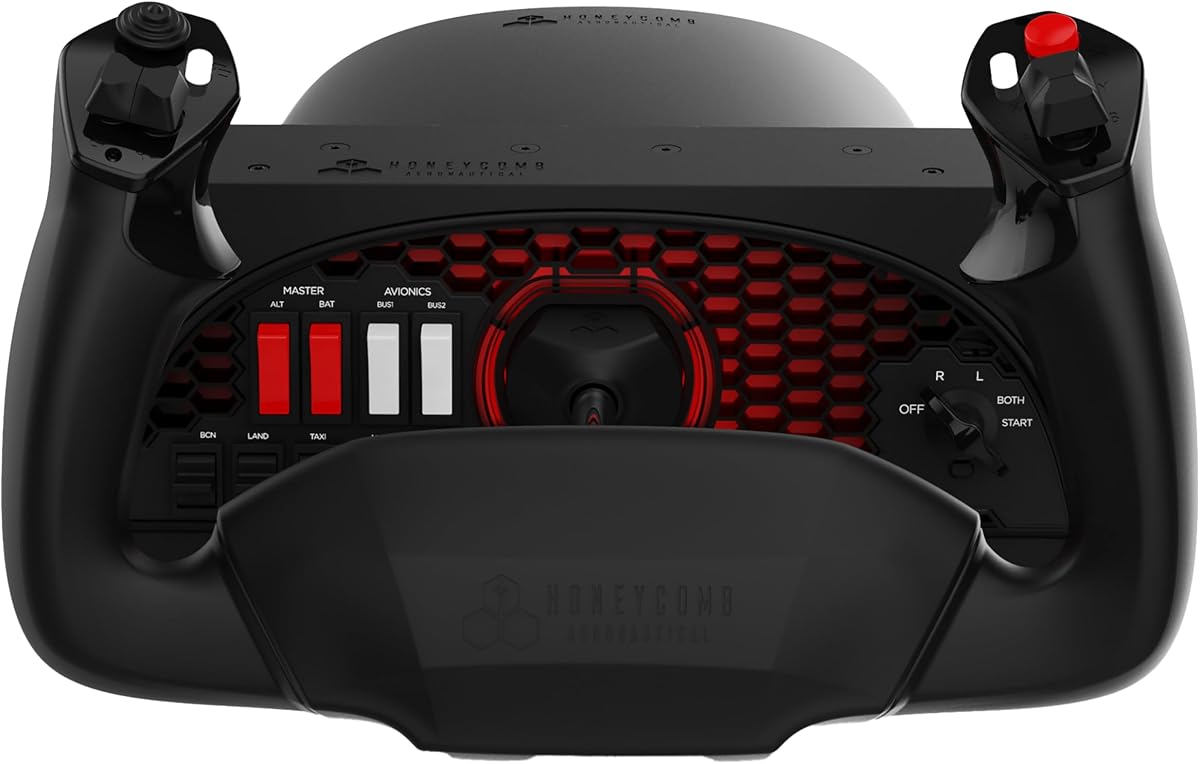
The Honeycomb Alpha Flight Controls Yoke and Switch Panel offers true-to-life flight control. With a rating of 4.6 it features 180 rotation and solid steel shaft for smooth control. Enhanced responsiveness ensures effortless accurate maneuvers.
We may earn a commission when you buy through this link, at no additional cost to you.
Its integrated switch panel adds main alternator and avionics switches for a complete cockpit setup. Multi-function yoke handles offer various switches and buttons. Dual mounting solution provides flexibility for securing your setup.
The throttle is sold separately which adds to the total cost. The premium price might be a barrier for some. However the quality and realism justify the expense for enthusiasts.
This system is ideal for those seeking a detailed cockpit setup. Its durable build and integrated panel make it a top choice. It delivers precision and reliability for dedicated flight simulators.
Features multiple switches for a complete cockpit setup.
Wide rotation range ensures smooth control and accurate maneuvers.
We may earn a commission when you buy through this link, at no additional cost to you.
Choosing the right controller involves considering your budget setup and simulation goals. This guide covers key factors to help you make an informed decision.
Airplane Controllers for PC range from affordable entry-level options to premium high-end systems. Determine your budget first to narrow down choices. Entry-level models offer basic functionality while premium ones provide realism and durability.
Decide between a yoke for airliner simulation or a stick for fighter jets. Yokes offer more realistic control while sticks are compact and precise. Your simulation focus should guide this choice.
Ensure the controller is compatible with your PC and preferred simulation software. Check system requirements like USB ports and OS version. Compatibility ensures smooth integration and performance.
Look for durable materials like metal shafts and robust buttons. Build quality affects longevity and realism. High-quality materials ensure the controller withstands frequent use.
Controllers with more programmable buttons offer greater flexibility. Consider how many functions you need direct access to. High programmability enhances immersion and convenience.
Comfort is key for long flight sessions. Check for ergonomic grips and adjustable components. Good ergonomics reduce fatigue and improve control precision.
Features like RGB lighting vibration or displays add immersion. Consider what extras enhance your experience. These features can make a difference in realism.
Choose controllers that allow adding rudder pedals or throttles later. Expandability lets you upgrade your setup over time. It ensures long-term value for your investment.
Start by installing any required drivers and configuring the controller via software. Ensure all axes and buttons are mapped correctly for your preferred simulation. This setup process ensures optimal performance and control.
Regularly clean the controller to remove dust and debris. Use a soft cloth to wipe surfaces and avoid liquids near connectors. Proper maintenance extends the controller's lifespan and ensures reliability.
Store the controller in a cool dry place when not in use. Avoid placing heavy objects on it to prevent damage. Careful storage preserves its condition and ensures it remains ready for use.
Most controllers are compatible with major simulators like Microsoft Flight Simulator and X-Plane. However check specific compatibility lists for each product. Some may require additional software or updates for full support.
Many controllers support plug and play functionality. However some advanced features may require driver installation. Always check the product manual for specific setup instructions.
Yes you can use multiple controllers for different functions. Many pilots pair a yoke with rudder pedals or throttles. Ensure your PC supports multiple USB devices simultaneously.
Warranty periods vary by brand and model typically ranging from 1 to 3 years. Check the manufacturer's details for exact coverage. Some brands offer extended warranties for premium products.
Use the provided software to calibrate axes and buttons. Follow the on-screen instructions to ensure accurate responses. Proper calibration is essential for precise control during flights.
Many controllers are designed with VR in mind. However check specific VR compatibility for your chosen model. Most major brands ensure VR support for immersive experiences.
Yes most controllers allow extensive button customization via software. You can map functions to your preference for ease of use. This flexibility enhances your simulation setup.
Check USB connections and restart your PC. Try different USB ports or update drivers. If issues persist contact the manufacturer for support.
We explored ten top Airplane Controllers for PC each offering unique strengths. From budget-friendly sticks to premium yokes there is a choice for every pilot. Consider your specific needs and simulation goals when making your selection.
Prioritize build quality compatibility and ergonomics for the best experience. These factors ensure comfort and longevity in your flight setup. The right controller can significantly enhance your immersion and realism.
Prices and availability change frequently so check current listings before buying. This ensures you get the best deal and latest features. Happy flying with your new controller setup.