
Epson Workforce Pro WF-7820
3.7Editor score
Heat free PrecisionCore technology
13 by 19 inch prints
Auto duplex scanning and fax
Large 250 sheet tray
Discover the top A3 printers for 2026 comparing speed quality and cost to help you choose the best wide format inkjet solution for your needs.
Finding the right A3 printer can transform your workflow by enabling professional wide format outputs without leaving your desk. These machines handle everything from architectural plans to vibrant marketing materials with precision.
We evaluated ten top rated models based on print quality speed connectivity and total cost of ownership. Our analysis covers tank systems cartridge options and advanced features like duplex scanning and cloud integration.
Each pick highlights key strengths ideal use cases and real world performance metrics. Note that pricing and availability fluctuate so verify current deals before purchasing to ensure the best value for your budget.
3.7Editor score

4.0Editor score

4.2Editor score
This side by side comparison highlights the core capabilities of each model to help you quickly identify the device that aligns with your specific printing volume and quality requirements.



The Epson EcoTank Photo ET-8550 stands out as a powerhouse for creative professionals seeking lab quality photos and graphics without the ongoing expense of traditional cartridges. Its rating reflects strong satisfaction among users who value long term savings and vivid color accuracy.
We may earn a commission when you buy through this link, at no additional cost to you.
This model uses a cartridge free system with high yield ink bottles that can produce up to 6200 color pages. The Claria ET Premium inks ensure sharp text and vibrant images while the precision printhead delivers consistent results across various media types.
While the initial purchase price is higher than standard inkjet models the return on investment is significant for high volume users. The ink lasts for up to 2 years which minimizes interruptions and waste compared to frequent cartridge swaps.
Ideal for photographers small businesses and artists this printer balances quality with economy. If you prioritize professional output and want to eliminate cartridge waste the EcoTank ET-8550 is the top recommendation for A3 printing needs.
Replacement ink bottles last significantly longer than cartridges saving money and reducing landfill waste for frequent printers.
The six color ink palette provides wider gamut coverage for more accurate and vibrant photo reproduction on paper.
We may earn a commission when you buy through this link, at no additional cost to you.
The Epson Workforce Pro WF-7820 offers a compelling entry point for offices needing wide format capabilities without breaking the bank. Its rating indicates mixed but generally positive feedback regarding speed and feature set for business environments.
We may earn a commission when you buy through this link, at no additional cost to you.
Powered by PrecisionCore Heat-Free Technology this printer delivers high speed prints with minimal energy consumption. It supports auto duplex printing scanning and faxing making it a complete solution for workflow efficiency.
While it relies on genuine cartridges which can increase running costs the upfront price remains attractive for small businesses. The 250-sheet paper capacity and 50-sheet ADF ensure you can handle large jobs without constant reloading.
Best for budget conscious users who need reliable wide format output this model balances cost and performance. If you prioritize fast setup and essential office features the WF-7820 is a solid affordable choice.
PrecisionCore technology enables fast first-page-out and sustained speeds ideal for busy office environments.
Integrated printing scanning copying and faxing capabilities streamline document handling tasks efficiently.
We may earn a commission when you buy through this link, at no additional cost to you.
The Brother INKvestment MFC-J6960DW delivers exceptional speed and capacity for demanding small business environments. Its high rating reflects user satisfaction with its robust performance and innovative features designed for productivity.
We may earn a commission when you buy through this link, at no additional cost to you.
With print speeds up to 31 pages per minute this machine handles heavy workloads effortlessly. The MAXIDRIVE Technology ensures consistent quality and reliability while the 500-sheet capacity keeps you printing without frequent stops.
Though it comes with a premium price tag the included ink trial and long term value justify the investment. Mobile connectivity via the Brother Connect app allows seamless printing from smartphones and tablets anywhere.
Ideal for offices prioritizing speed and volume this model is a top-tier choice. If you need rapid turnaround times and high capacity paper handling the MFC-J6960DW is the best premium option available.
Up to 31 ppm black speeds ensure documents are ready quickly for time sensitive business needs.
Multiple wireless and mobile app options provide flexible printing from any location.
We may earn a commission when you buy through this link, at no additional cost to you.
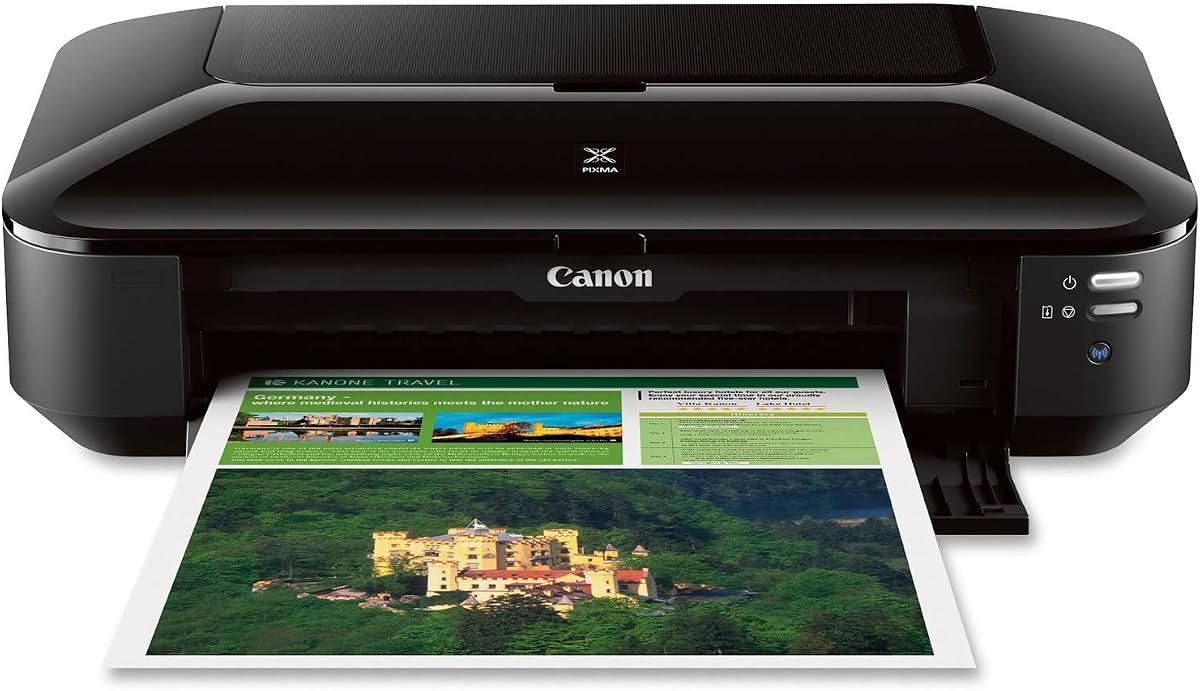
The Canon Pixma iX6820 is a solid choice for users needing high resolution outputs and cloud connectivity. Its rating highlights consistent performance for document printing and graphics in a business setting.
We may earn a commission when you buy through this link, at no additional cost to you.
Featuring fine print head technology and 9600 dpi resolution this printer produces sharp text and detailed graphics. The five individual ink tanks allow you to replace only the color you need reducing waste.
While speeds are moderate compared to newer models the reliability and print quality remain strong. Cloud compatibility via AirPrint and Google Cloud Print ensures flexibility for mobile users and remote workflows.
Best for small offices or users needing high detail on a budget this model remains relevant. If you value resolution and individual ink management over raw speed the iX6820 is a dependable business printer.
Replacing only empty ink colors reduces waste and lowers overall operating costs compared to multi-color cartridges.
Fine print head technology delivers crisp text and detailed graphics for professional presentations.
We may earn a commission when you buy through this link, at no additional cost to you.
The Epson EcoTank ET-15000 brings Supertank efficiency to wide format printing with a massive monthly duty cycle. Its rating reflects strong user approval for reliability and long term cost savings.
We may earn a commission when you buy through this link, at no additional cost to you.
This printer includes printing scanning copying and faxing capabilities with up to 33000 page monthly capacity. The ink system supports speeds up to 17 ppm in black which is fast for a tank model.
While it lacks auto duplex to and has a large physical footprint the ink longevity offsets these trade-offs. It is designed for environments with heavy printing demands where frequent maintenance is impractical.
Ideal for offices needing consistent high volume printing without cartridge dependency this model is excellent. If you prioritize long term value and fax integration the ET-15000 is a top tank pick.
Handles up to 33000 pages monthly making it suitable for high volume environments.
Integrates scanning copying and faxing for complete office document management solutions.
We may earn a commission when you buy through this link, at no additional cost to you.
The Epson Workforce Pro WF-7840 combines wide format capability with robust office features like 500-sheet capacity. Its rating indicates good performance for productivity focused users needing reliable output.
We may earn a commission when you buy through this link, at no additional cost to you.
Utilizing PrecisionCore Heat-Free technology it delivers fast prints with reduced energy costs. The built-in wireless and Epson Connect solutions enable remote printing from anywhere at any time.
Although it requires genuine cartridges and the setup can be intricate for some users the output quality is professional. The 500-sheet capacity minimizes interruptions during large batch printing jobs effectively.
Best for small business offices requiring consistent wide format throughput this model delivers. If you need speed and capacity with reliable connectivity the WF-7840 is a strong contender.
Epson Connect solutions allow you to print from anywhere enhancing team workflow flexibility.
The 500-sheet paper capacity supports heavy workloads without constant refilling.
We may earn a commission when you buy through this link, at no additional cost to you.
The HP OfficeJet Pro 9135 leverages smart technology to optimize printing formats and reduce waste. Its rating shows strong approval for AI assisted features that streamline document handling tasks.
We may earn a commission when you buy through this link, at no additional cost to you.
With speeds up to 25 ppm black and single-pass duplex scanning it handles documents quickly. The HP AI tools adjust layouts to minimize wasted pages while Instant Ink ensures you never run dry.
While firmware updates restrict cartridge compatibility this adds security against unauthorized inks. The 4.3-inch touchscreen offers a phone-like interface for easy navigation and control by users.
Best for modern offices valuing smart features and efficiency this model stands out. If you want automated formatting and reliable delivery services the 9135 is a top office choice.
HP AI optimizes web page and email layouts to reduce wasted pages and improve readability.
Automatic ink delivery ensures you never stop working due to empty cartridges.
We may earn a commission when you buy through this link, at no additional cost to you.
The Brother INKvestment MFC-J6960DW is engineered for productivity with high yield cartridges and robust paper handling. Its rating confirms strong performance in fast paced small business environments.
We may earn a commission when you buy through this link, at no additional cost to you.
This printer supports auto duplex printing and scanning with up to 11×17 pages efficiently. The MAXIDRIVE technology ensures high quality output and reliability even with heavy usage demands.
Although it requires genuine LC506 ink the high yields reduce frequency of replacement and maintenance. Mobile app integration allows easy setup and control from any connected device easily.
Best for businesses seeking long term value and reliability this model is solid. If you need high speed and quality output without constant maintenance the 6960DW is a great option.
Features like single-pass duplex and 500-sheet capacity enhance office workflow efficiency.
Connects to Google Drive Dropbox and OneDrive for seamless document management and printing.
We may earn a commission when you buy through this link, at no additional cost to you.
The Epson Workforce WF-7710 excels in high volume environments with PrecisionCore technology and large capacity trays. Its rating reflects strong user satisfaction with speed and consistent output quality.
We may earn a commission when you buy through this link, at no additional cost to you.
Capable of borderless prints up to 13×19 inches this model is versatile for graphics and documents. Auto 2-sided printing and dash replenishment ensure minimal manual intervention and continuous workflow.
While it commands a higher price the efficiency and reliability justify the investment. The 250-sheet tray handles various media types including envelopes and photo paper effectively.
Best for offices needing high capacity and wide format flexibility this model is excellent. If you value automation and speed the WF-7710 is a reliable workhorse for daily tasks.
Create stunning borderless prints up to 13×19 inches for professional looking documents.
Amazon Dash Replenishment ensures you never run out of ink by automating reordering.
We may earn a commission when you buy through this link, at no additional cost to you.
The HP OfficeJet Pro 9730 brings wide format capabilities to the office with screen accurate color accuracy. Its rating highlights strong performance for creative tasks requiring true to screen results.
We may earn a commission when you buy through this link, at no additional cost to you.
Featuring P3 wide color gamut this printer offers wider color range than standard sRGB. AI tools optimize print layouts and Instant Ink ensures convenient delivery without manual checks.
While speeds are moderate compared to top business models the quality is exceptional for detailed graphics. The 4.3-inch touchscreen provides intuitive control for various office functions and settings.
Best for design teams or offices needing wide color range this model is a great fit. If you prioritize color accuracy and convenience the 9730 is an excellent wide format choice.
P3 color gamut ensures prints match your screen colors for consistent design outputs.
HP AI adjusts content layout to minimize wasted pages and improve readability automatically.
We may earn a commission when you buy through this link, at no additional cost to you.
Selecting the right A3 printer involves evaluating several technical and practical factors to ensure the device meets your specific workflow and budget requirements.
Inkjet printers dominate the A3 market offering high quality and affordable entry prices. Look for models with PrecisionCore or similar technologies that ensure fast speeds and low energy use.
For best results prioritize models with high DPI resolution and reliable ink delivery systems for consistent output.
Tank systems offer lower cost per page and are ideal for high volume printing. Cartridge systems are convenient but often cost more over time depending on your usage volume.
Choose a tank system if you print frequently to save money on replacement inks over the years.
A3 printers often have larger trays to handle wide media without constant reloading. Check the standard tray size and the availability of additional trays for bulk printing needs.
Ensure the printer has at least 250 sheet capacity to reduce interruptions during large batch jobs.
Print speed is critical in office environments where time is valuable. Look for speeds above 20 ppm for black and color to maintain workflow efficiency.
High speeds help meet tight deadlines and improve overall productivity in busy settings.
Modern A3 printers should support wireless Wi-Fi Direct and Ethernet to accommodate diverse devices. Cloud printing and mobile apps make remote work and team collaboration seamless.
Prioritize models with multiple connectivity options to ensure flexible access for all users.
Beyond the purchase price consider the long term cost of ink and maintenance. Models with high yield cartridges or tanks offer better value despite higher upfront costs.
Evaluate ongoing ink expenses to determine the true long term value of the printer.
Auto duplex printing and scanning help save paper and improve document handling efficiency. This feature is essential for offices needing double sided documents regularly.
Ensure both printing and scanning support duplex modes to maximize resource efficiency.
For business environments security features such as secure wireless and data erase are vital. These protect sensitive information from unauthorized access or theft.
Look for robust security protocols to ensure your print data remains protected.
Proper placement is crucial for A3 printers due to their size. Ensure the unit sits on a stable flat surface with enough clearance for paper trays and output.
Regular maintenance includes running test prints and cleaning printheads to prevent clogging. Follow manufacturer guidelines for ink replacement and cartridge checks to maintain optimal performance.
Keep firmware updated to ensure security patches and feature improvements are active. Use original ink cartridges to avoid compatibility issues and preserve warranty coverage.
An A3 printer handles documents up to 11×17 inches, ideal for architectural plans, marketing materials, and large spreadsheets. It offers wide format flexibility for small offices and creative professionals without needing industrial machines.
Tank printers generally offer lower cost per page and are better for high volume users. Cartridge models are convenient and cheaper upfront but can cost more over time if you print frequently.
Most A3 inkjet printers support various media types including photo paper up to 13×19 inches. Always check the specific max thickness and media types supported by the model you choose.
Most modern A3 printers work with standard drivers and mobile apps. Many support cloud services like Apple AirPrint or Google Cloud Print for easy printing without complex software installation.
With proper maintenance and regular cleaning, an A3 printer can last for several years. High duty cycle models are designed for heavy use and offer longer lifespans for office environments.
Look for models with auto document feeders (ADF) that support A3 sizes. Epson and Brother models in this list offer strong scanning capabilities for wide format documents.
Yes most A3 printers support Ethernet and Wi-Fi for network connections. This allows multiple users to share the device easily across an office environment without cables.
Yes, most A3 printers support both macOS and Windows operating systems. Always check the specific compatibility requirements on the product page before purchasing for your OS version.
The Epson EcoTank Photo ET-8550 and Brother MFC-J6960DW offer top performance for creative and business users respectively. Each model delivers strong quality and reliability to meet diverse printing needs.
When choosing prioritize your volume needs and ink costs over initial price tags. High yield systems save money long term while high speed models improve office efficiency effectively.
Check current pricing and availability before purchasing to secure the best deal. Always verify compatibility with your existing workflow and operating system to ensure seamless integration.