
ARCTIC P9 PWM PST
4.5Editor score
Low cost value
High static pressure
Integrated cable splitter
This guide compares the top 92mm case fans for quiet cooling and performance, helping you choose the best fit for your compact PC build or upgrade.
Choosing the right 92mm case fan can significantly impact your system thermal performance and acoustic comfort. Whether you are building a compact ITX rig or upgrading an older chassis, these small form factor fans deliver efficient airflow while maintaining low noise levels for a serene workspace.
We have evaluated ten leading 92mm fans based on their static pressure, RPM range, bearing technology, and overall build quality. Our analysis focuses on real-world usability, compatibility with common coolers, and the balance between cooling power and operational silence across various price points.
Each pick below highlights unique strengths, from premium quiet operation to budget-friendly efficiency. Please note that product availability and pricing can change frequently, so verify the latest details before making your final purchase decision for your specific setup needs.
4.5Editor score

4.8Editor score

4.8Editor score
This side-by-side comparison outlines the key specifications and unique features of each selected 92mm fan to help you quickly identify which model aligns best with your specific cooling requirements and budget constraints.


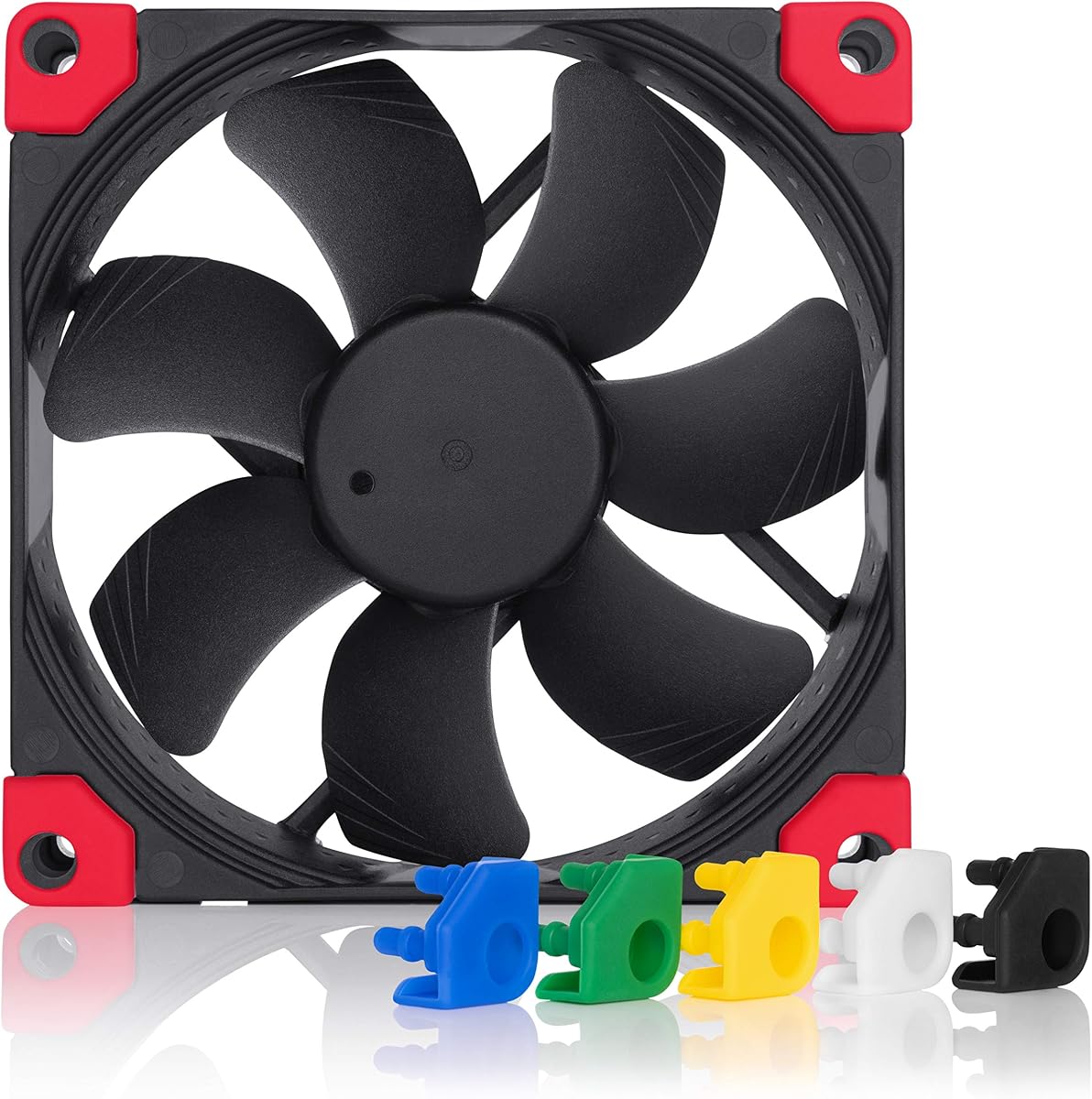


The Noctua NF-A9 PWM stands out as the premier choice for those prioritizing silent operation without sacrificing cooling efficiency. It consistently maintains low decibel levels even at higher speeds thanks to its advanced acoustic optimization frame.
We may earn a commission when you buy through this link, at no additional cost to you.
Its Flow Acceleration Channels ensure that air moves smoothly through the blades reducing turbulence and noise. The 4-pin PWM interface allows precise speed control which is essential for maintaining optimal thermal performance during intensive tasks.
While the price is higher than many competitors the included accessories like anti-vibration mounts and extension cables add significant value. The reliability is proven by an MTTF rating that suggests it will last for many years of continuous operation.
This fan is ideal for users who want a set-and-forget solution that delivers peak performance quietly. It fits perfectly in compact cases and on standard 9cm CPU coolers making it a versatile upgrade for any build.
The Advanced Acoustic Optimisation frame minimizes resonance ensuring the fan remains whisper quiet even under heavy thermal loads.
With a broad speed range and an included Low-Noise Adaptor you can fine-tune the fan to match your exact silence requirements.
We may earn a commission when you buy through this link, at no additional cost to you.
The ARCTIC P9 PWM PST offers exceptional value for budget builders who still demand solid performance. Its high static pressure makes it suitable for radiators and heat sinks where airflow resistance is a concern.
We may earn a commission when you buy through this link, at no additional cost to you.
One of its standout features is the built-in cable splitter which simplifies cabling when connecting multiple fans. The PWM control allows it to ramp up when needed and drop to a quiet baseline when the system is idle.
Although it may not be as silent as premium models at full speed it performs admirably in the mid-range where most users operate. The 0dB mode ensures it stops spinning completely when cooling demand is minimal.
This fan is a smart pick for those looking to maximize cooling capacity without breaking the bank. It provides a reliable solution for standard cases and budget-friendly upgrades where cost efficiency is key.
Designed to push air through restrictive environments this fan ensures efficient cooling even when mounted on dense heatsinks or radiators.
The integrated PST port allows daisy-chaining other fans reducing cable clutter and simplifying installation in tight spaces.
We may earn a commission when you buy through this link, at no additional cost to you.
The Noctua NF-A9x14 HS-PWM is the top choice for compact builds where space is at a premium. Its 14mm thickness allows it to fit on low-profile CPU coolers that standard 25mm fans cannot accommodate.
We may earn a commission when you buy through this link, at no additional cost to you.
Despite its slim form factor it delivers robust cooling performance comparable to thicker models. The HS-PWM control ensures it runs efficiently at low speeds while ramping up to 2500 RPM when thermal demands increase.
The chromax.black.swap edition offers an all-black aesthetic with swappable pads for color customization. This makes it a great fit for modern black-themed builds that require a minimalist and unified look.
If you are building an ITX system or using a low profile cooler this fan is almost indispensable. It balances thin dimensions with high performance and reliable operation to ensure your CPU stays cool.
At only 14mm thick this fan clears most low-profile coolers making it perfect for small form factor and compact PC builds.
The black swap edition includes multiple colored pads allowing you to match the fan to your system theme easily.
We may earn a commission when you buy through this link, at no additional cost to you.
This version of the Noctua NF-A9x14 provides a classic brown option for users who prefer the original aesthetic. It maintains the same slim 14mm profile ideal for tight clearances on low profile coolers.
We may earn a commission when you buy through this link, at no additional cost to you.
The SSO2 bearing technology ensures smooth and quiet operation over time. PWM control allows for dynamic speed adjustment which keeps noise low during everyday tasks and boosts cooling during high loads.
It offers the same high reliability that Noctua is known for but without the color customization of the chromax edition. This makes it a solid choice for those who prioritize function and simplicity.
If you need a slim fan that fits perfectly on compact coolers this is a dependable option. It delivers consistent performance and low noise levels suitable for quiet office PCs.
The self-stabilizing oil pressure bearing reduces vibration and noise ensuring long-term reliability and smooth operation.
Designed specifically for low-profile CPU coolers it fits where thicker fans would obstruct the cooler or case.
We may earn a commission when you buy through this link, at no additional cost to you.
The Thermalright TL-P9 delivers impressive performance for its low price point. It features a 7-blade design that balances airflow and noise effectively for general case cooling needs.
We may earn a commission when you buy through this link, at no additional cost to you.
S-FDB bearings provide smooth operation and durability while the silicone feet help dampen vibration during operation. This reduces resonance and helps maintain a quieter environment even at moderate speeds.
While it lacks the premium accessories of more expensive models it focuses on core functionality. The PWM control allows it to adapt to system temperature changes efficiently.
This fan is a great pick for budget builders who need reliable cooling without unnecessary frills. It works well in standard cases or as a replacement for worn out stock fans.
Silicone feet on all corners minimize vibration transmission reducing noise and improving overall stability in the case.
The optimized blade design ensures consistent airflow while keeping noise levels low during typical usage scenarios.
We may earn a commission when you buy through this link, at no additional cost to you.
The ARCTIC P9 Silent is designed for users who prefer simplicity and consistent operation. Running at a fixed 1900 RPM it provides a steady airflow without the complexity of PWM configuration.
We may earn a commission when you buy through this link, at no additional cost to you.
Despite its fixed speed the fan remains surprisingly quiet thanks to optimized blade design and quality bearings. It works well in environments where constant cooling is preferred over variable speeds.
Voltage control can be used to adjust the speed if needed adding some flexibility to the otherwise fixed design. This makes it a versatile option for basic case cooling requirements.
Choose this fan if you want a no-fuss cooling solution that runs quietly and efficiently. It is a reliable choice for standard office PCs and general home computing.
A fixed 1900 RPM ensures consistent airflow without the need for complex motherboard configuration or BIOS settings.
Optimized blade geometry and bearing quality ensure the fan stays quiet even when running at its constant speed.
We may earn a commission when you buy through this link, at no additional cost to you.
The Noctua NF-A9 PWM chromax.black.swap brings style and performance together in one package. Its all-black design fits perfectly in modern builds that reject the traditional brown color scheme.
We may earn a commission when you buy through this link, at no additional cost to you.
Users can swap the anti-vibration pads to match their case theme or add a touch of personality. The performance remains identical to the standard model ensuring quiet and reliable operation.
The PWM control allows precise speed management making it suitable for both quiet and performance focused setups. It includes all the standard accessories like screws and adapters for easy installation.
If aesthetics matter to your build this fan offers a premium look without sacrificing quality. It is an excellent choice for black-themed systems that need a reliable 92mm cooling solution.
The chromax.black.swap edition lets you customize the look with various colored anti-vibration pads.
Delivers the same award-winning cooling and acoustic performance as the classic brown models.
We may earn a commission when you buy through this link, at no additional cost to you.
This TL-9015B fan offers a slim 15mm profile that is ideal for low clearance situations. It balances thin dimensions with a high speed range up to 2700 RPM for effective cooling.
We may earn a commission when you buy through this link, at no additional cost to you.
Vibration damping pads help reduce noise ensuring a quiet operation even at higher speeds. The PWM interface allows the motherboard to control fan speed dynamically based on thermal needs.
It is a versatile option for cases where space is tight and standard fans cannot fit. The black finish provides a modern look that blends well with most PC components.
Consider this fan for tight spaces that require a slim solution without compromising cooling power. It is a solid choice for compact builds needing extra airflow capacity.
The 15mm thickness clears most narrow gaps making it perfect for compact cases and low profile hardware.
With speeds up to 2700 RPM it provides ample airflow for challenging cooling environments.
We may earn a commission when you buy through this link, at no additional cost to you.
The Noctua NF-A9 FLX offers manual speed control via three preset speeds. This makes it a great choice for users who want simplicity and quiet operation without motherboard PWM support.
We may earn a commission when you buy through this link, at no additional cost to you.
Included adaptors allow you to drop the speed further for near-silent performance. The 3-pin Molex connection ensures broad compatibility with older hardware and power supplies.
Its design focuses on extreme quietness making it ideal for media centers or sound-sensitive environments. The airflow is sufficient for most standard cooling requirements.
This fan is perfect for systems where silence is the top priority. It is a reliable replacement for older 3-pin fans that need a quiet upgrade.
Three preset speed options provide flexibility without relying on motherboard PWM headers.
With the Ultra-Low-Noise Adaptor this fan can operate at near silent levels for quiet setups.
We may earn a commission when you buy through this link, at no additional cost to you.
The ARCTIC P9 Max is built for maximum cooling performance with speeds reaching up to 4300 RPM. It delivers high static pressure and airflow for demanding cooling tasks.
We may earn a commission when you buy through this link, at no additional cost to you.
At lower speeds it remains quiet thanks to its fluid dynamic bearing design. The 0dB mode ensures the fan stops completely when idle reducing noise during light usage.
This fan is a strong performer for compact cases that need aggressive cooling. It balances high speed with reasonable noise levels at typical operating points.
Choose this fan if you need top-tier cooling performance in a 92mm form factor. It is an excellent option for high-performance small form factor builds.
With speeds up to 4300 RPM it offers the highest cooling potential in this category.
The 0dB mode ensures the fan stops when not needed for a silent user experience.
We may earn a commission when you buy through this link, at no additional cost to you.
Selecting the right 92mm case fan requires balancing airflow pressure noise and build quality to match your specific system needs.
Bearing type determines the lifespan and noise levels of your fan. Fluid dynamic bearings and SSO2 bearings offer longer life and quieter operation compared to sleeve bearings which may wear out faster and become noisy over time.
Look for fans with advanced bearing technologies like SSO2 or fluid dynamic bearings to ensure reliability and quiet performance over years of use.
PWM fans use a 4-pin connector to allow your motherboard to control speed dynamically based on temperature. 3-pin fans rely on voltage control or fixed speeds which offer less flexibility but broader compatibility with older hardware.
Choose PWM fans if your motherboard supports 4-pin headers for optimal noise and performance balance. Use 3-pin fans only if you need compatibility with older systems.
Static pressure is the fan's ability to push air through resistance like radiators or heatsinks. Airflow measures the volume of air moved. High static pressure is crucial for radiators while pure airflow suits open cases.
Prioritize static pressure if mounting fans on radiators or heatsinks. For open case cooling focus on general airflow and noise performance.
Standard 92mm fans are often 25mm thick but slim variants like 14mm or 15mm exist for tight clearances. Ensure the fan thickness will not interfere with CPU coolers or case structures.
Measure your available space carefully before buying. Slim fans are essential for low profile coolers and compact chassis.
Decibel ratings indicate how loud a fan is at full speed. However real world noise depends on speed settings vibration damping and mounting hardware. Look for fans with vibration pads and low noise adaptors for silent builds.
Check dB ratings and consider fans with vibration dampeners to minimize case resonance and noise transmission.
Quality fans include anti-vibration mounts screws and extension cables. These accessories improve noise isolation and installation ease. Cheap fans often omit these details making installation harder.
Select fans that come with complete mounting kits to ensure secure installation and reduced vibration noise.
Mean Time To Failure (MTTF) indicates expected lifespan. Premium brands offer MTTF ratings over 150000 hours ensuring long term reliability. Check reviews for build quality consistency before buying.
Aim for fans with high MTTF ratings to ensure your cooling solution lasts as long as your build.
Budget fans may save money upfront but could compromise on noise or lifespan. Premium fans cost more but offer superior durability and acoustic comfort. Balance cost with your performance needs.
Decide on a budget but prioritize build quality and acoustic performance to avoid frequent replacements.
Install your 92mm case fan with the airflow direction aligned correctly. Most fans have an arrow on the frame indicating the direction air should flow. Ensuring proper orientation helps maintain positive or negative pressure as needed.
Connect PWM fans to a 4-pin header on your motherboard for speed control. If your header is 3-pin use an adapter cable to enable full PWM functionality without losing control over the speed.
Periodically clean dust from the blades and bearing area to prevent noise and performance degradation. Use compressed air or a soft brush every few months to keep the fan running smoothly and quietly.
While 92mm fans offer higher static pressure due to smaller blades they move less total air than 120mm models. They are suitable for small cases or specific spots but cannot fully replace 120mm fans in large open chassis without multiple units.
Anti-vibration mounts isolate the fan from the case reducing noise and vibration. They are highly recommended for quiet builds. Many premium fans include these but cheaper ones may not so consider purchasing separately if needed.
PWM allows the motherboard to adjust fan speed in real time based on temperature. This means fans run slower and quieter when cooling demands are low and speed up only when needed improving overall system silence and efficiency.
Slim 14mm fans sacrifice some airflow and pressure compared to thicker 25mm models but still deliver strong performance. They are designed for tight clearances where standard thickness cannot fit making them essential for compact builds.
Look at the fan frame for an arrow indicating airflow direction. Typically the side with the logo is the intake side. Ensuring correct flow direction is key to maintaining proper pressure and cooling in your chassis.
Noctua fans are generally worth the cost due to their superior build quality acoustic performance and included accessories. They offer long-term reliability and quieter operation that justifies the higher price for many users.
Yes but you need a splitter cable to daisy chain them. Using too many fans on one header may overload it so check your motherboard specs. PWM splitters maintain control but ensure total power draw is safe.
We have highlighted ten top 92mm fans ranging from premium silent models to budget efficient options. Each choice delivers strong performance and reliability for compact builds or upgrades.
Prioritize noise levels and build quality if you need a quiet long-term solution. For tight clearances consider slim variants that fit low profile coolers without compromising cooling power.
Remember that prices and stock vary by retailer and time so verify current details before purchasing. This guide provides the insights you need to select the right 92mm fan for your system.