
Creality Laser Engraver Enclosure 2.0
4.4Editor score
Universal compatibility with most machines
Dual window blue light blocking
4000 RPM ventilation fan included
A laser engraver enclosure is essential for protecting your workspace from smoke, dust, and debris while you work on intricate projects safely and efficiently.
We compared ten top-rated models based on safety features, ventilation systems, ease of assembly, and compatibility with popular engraver brands to build this list.
Each pick highlights key strengths and trade-offs so you can choose confidently, keeping in mind that availability and pricing may change over time.
4.4Editor score
4.2Editor score

4.4Editor score
As an Amazon Associate we earn from qualifying purchases.
The following table provides a side-by-side comparison of all ten models, highlighting their core specifications and unique selling points to simplify your decision process.


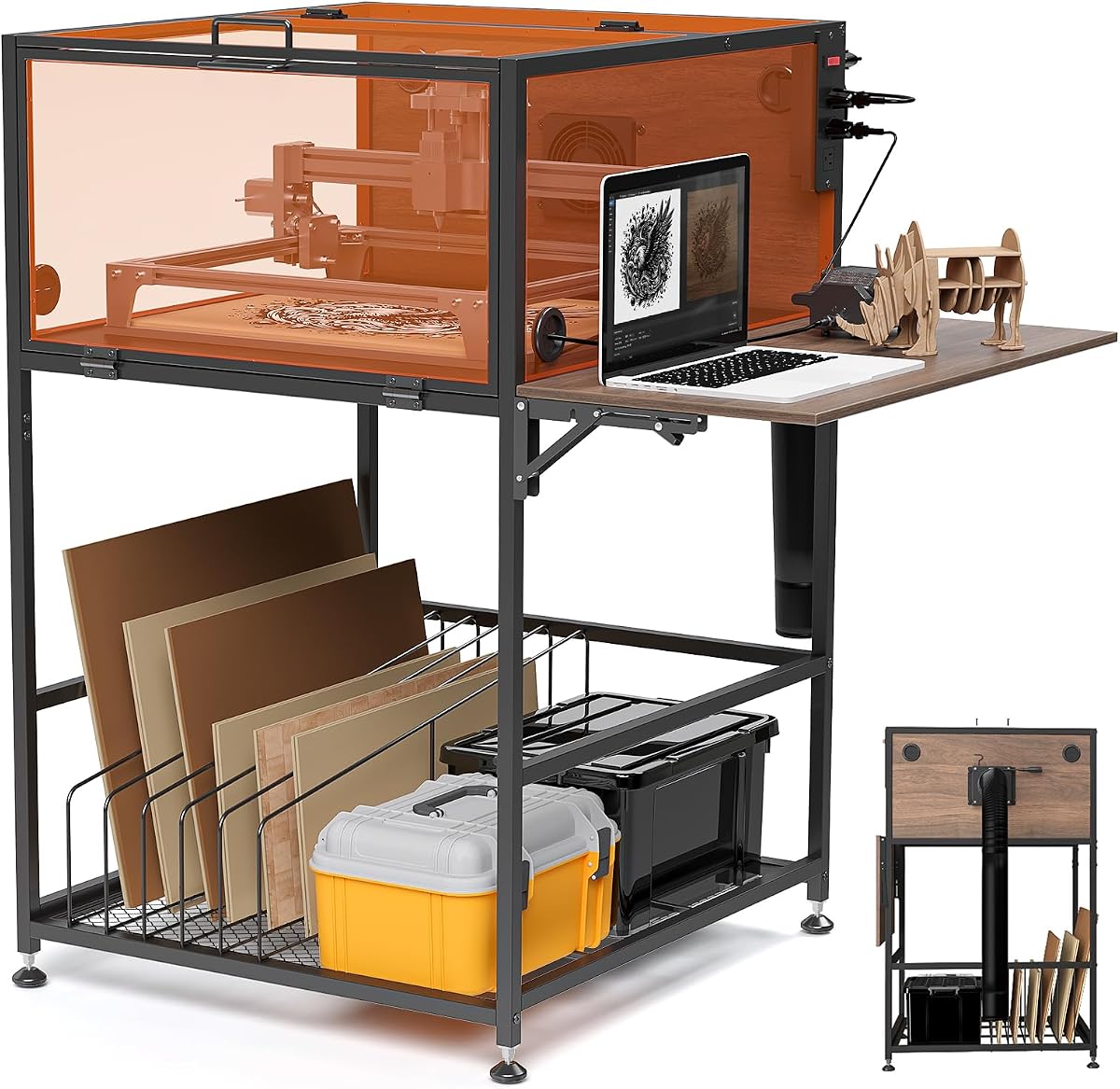
The Crafit Laser Engraver Enclosure Cabinet stands out as the Editor's Choice for those seeking a robust, permanent solution for their workspace. With a 4.2 rating from verified buyers, it balances durability and functionality effectively. Its standout quality lies in the integrated power strip and heavy-duty metal frame, which provide reliability beyond simple smoke containment.
We may earn a commission when you buy through this link, at no additional cost to you.
This cabinet features an interior space of roughly twenty four inches wide, allowing ample room for various engraver models. The ventilation system includes a high-efficiency fan and flexible exhaust pipe to manage smoke and odors efficiently. Semi-transparent panels allow real-time monitoring while filtering out harsh blue light, reducing eye strain during long sessions.
While highly effective, the enclosure requires more assembly time compared to snap-together fabric tents. The weight is also significant due to the metal and wood construction, meaning it is less portable. However, for a dedicated workshop, these trade-offs are acceptable for the added stability and noise reduction benefits.
Buy this if you need a permanent, safe workstation with built-in power management and noise reduction. It is ideal for hobbyists who want a professional-grade setup that supports long crafting sessions without compromising on air quality or visibility.
The 20W fan and flexible pipe work together to ensure smoke does not linger in the workspace.
Bottom storage racks with dividers keep blanks and tools handy while the side panel supports your laptop.
We may earn a commission when you buy through this link, at no additional cost to you.
The Creality Laser Engraver Enclosure 2.0 earns the Best Budget badge due to its impressive feature set at an accessible price. It holds a 4.4 rating, reflecting high user satisfaction with its universal compatibility and ease of use. This model prioritizes essential safety features without breaking the bank, making it perfect for entry-level users.
We may earn a commission when you buy through this link, at no additional cost to you.
Its dual-window design allows you to observe engraving progress while blocking blue light to protect your eyes. The 4000 RPM fan effectively removes smoke and odors, keeping the air fresh during operation. The flame-retardant fabric and steel pipes provide durable protection against fire hazards and accidental spills.
While the fabric construction is lighter than a metal cabinet, it may be less durable against sharp edges over years of heavy use. The assembly is straightforward but requires careful handling to avoid creasing the material. Still, for the price, the protection and convenience it offers are unmatched in this category.
Choose this if you need a cost-effective, universal cover that balances safety and performance. It is an excellent choice for those who want to improve workspace air quality and eye protection without investing in a heavy permanent structure.
Compatible with 95% of laser engravers including Falcon series and other popular brands.
The blue light-blocking PVC material allows safe visual monitoring of the laser cutting process.
We may earn a commission when you buy through this link, at no additional cost to you.
This integrated enclosure offers premium features like a full bottom seal and built-in LED lighting, justifying its placement as a top-tier option. With a 4.4 rating, users appreciate the added visibility and dust containment capabilities. The thickened PVC window and upgraded exhaust pipe ensure a safer, cleaner environment for detailed engraving work.
We may earn a commission when you buy through this link, at no additional cost to you.
The LED strip provides sufficient brightness for precise monitoring, eliminating shadows that might interfere with work. The smoke exhaust system uses a three-layer composite pipe to reduce residual odors, keeping the air clean. Upgraded aluminum mold and iron supports make the cover stable and resistant to deformation during use.
The assembly is easy, but the integrated lighting and sealed bottom mean it is slightly more complex to set up than a simple tent. The cost is also a bit higher than standard covers, but the added value of lighting and dust control makes it worth the investment for serious crafters.
Buy this if you want a balance of safety, visibility, and dust control in a portable package. It is ideal for those who need better lighting inside the enclosure and want to minimize dust fallout into their workspace without building a permanent cabinet.
The LED light strip ensures clear viewing of the engraving process even in dimly lit rooms.
The fully sealed bottom design prevents dust and debris from escaping into the environment.
We may earn a commission when you buy through this link, at no additional cost to you.
This Green Acrylic model offers a rigid, stylish enclosure that fits specific desktop laser engravers perfectly. While ratings are currently N/A, the specs highlight a durable aluminum alloy frame and thickened acrylic panels. It serves well for those prioritizing a permanent, stable structure that looks professional in a shared workshop.
We may earn a commission when you buy through this link, at no additional cost to you.
The green acrylic helps reduce smoke diffusion and material splashing effectively. A front hinged door with magnetic stop and cable threading holes improve accessibility and cable management. The assembly manual and included hardware make setup straightforward for users comfortable with building structures.
One limitation is the specific size, which requires checking machine dimensions before purchase. Additionally, there is no built-in fan, so you may need to pair it with an external venting system for optimal air quality. This is acceptable if you have your own ducting solution.
Select this if you value a sturdy, permanent look for a specific desktop machine. It is best for users who want a rigid frame and are prepared to handle ventilation separately.
Thickened acrylic panels provide robust protection against debris and splashes during cutting.
Hinged door and cable holes allow easy material placement and wire management.
We may earn a commission when you buy through this link, at no additional cost to you.
This model emphasizes smoke control and noise reduction, featuring a built-in ventilation system and transparent window. It holds a 4.2 rating, reflecting user satisfaction with its practical design. The focus on expelling smoke quickly makes it a strong candidate for indoor setups where air quality is a primary concern.
We may earn a commission when you buy through this link, at no additional cost to you.
The transparent design allows real-time observation while filtering blue light to protect eyes. The cover significantly reduces noise from cooling fans, creating a quieter environment. Assembly is quick, and the lightweight, foldable nature ensures it can be stored away when not in use.
The fabric material is durable but may show wear faster than hard plastic options if handled roughly. Ensuring the ventilation system is set up correctly requires attention to detail, which might slow initial setup. These are minor issues for the level of protection provided.
Buy this if smoke management and noise reduction are your top priorities. It suits users who want a portable solution that effectively manages fumes and keeps the workspace quiet.
The cover significantly reduces noise from laser engraver cooling fans for a calmer workspace.
Transparent design filters blue light to protect your eyes while watching engraving progress.
We may earn a commission when you buy through this link, at no additional cost to you.
This LONGER enclosure offers extra-large dimensions suitable for bigger engraving machines and projects. With a 4.4 rating, users value the spacious design and durable fire-retardant materials. The built-in fan helps circulate air and remove smoke effectively, ensuring the environment remains fresh during operation.
We may earn a commission when you buy through this link, at no additional cost to you.
The large transparent design allows you to monitor the engraving process safely. Its construction features premium materials that are easy to clean and provide long-lasting durability. The inclusion of a parts replacement warranty adds confidence to the purchase for professional users.
Due to its size, it occupies more floor space than compact tents, which may be a constraint in small rooms. The ventilation setup must be handled carefully to avoid excessive pressure on the cover body. Despite this, the protection it offers is extensive.
Choose this if you have a large machine and need ample space for rotary rollers or bulk materials. It is ideal for professionals who need a sturdy, roomy enclosure with strong warranty support.
The large interior allows for installation of rotary rollers and larger projects.
Professional support and parts replacement warranty ensure long-term reliability.
We may earn a commission when you buy through this link, at no additional cost to you.
This V2.0 model upgrades the structure with metal support rods and a 4000 RPM fan, earning a 4.5 rating from users. It focuses on ventilation and stability, ensuring smoke is extracted quickly and the enclosure remains firm during use. The square shape improves window observation and dust absorption efficiency.
We may earn a commission when you buy through this link, at no additional cost to you.
The dual-view window protects eyes with anti-blue light PVC material. Its foldable design saves space when not in use, while the higher height accommodates rotary rollers. The material quality is high, making it safe and easy to operate for daily crafting tasks.
While the fan is powerful, it may generate more noise than lower-speed units. Assembly requires care to ensure rods are tight for stability. However, the ventilation performance justifies these minor trade-offs for air-sensitive users.
Buy this if you need fast smoke extraction and a sturdy fabric tent. It is suitable for users who value ventilation speed and flexible storage options.
Upgraded metal support rods make the enclosure more stable and firm during operation.
Dual-view window with anti-blue light material protects eyes while observing work.
We may earn a commission when you buy through this link, at no additional cost to you.
This enclosure highlights strong fire protection and smoke isolation, maintaining a 4.5 rating for its safety features. The enclosed design keeps water and dust away from the engraver while isolating fumes. Its compact dimensions make it suitable for smaller desks without sacrificing essential protection.
We may earn a commission when you buy through this link, at no additional cost to you.
The large viewing design lets you observe progress through a transparent window that filters blue light. The built-in ventilation expels smoke quickly to maintain clean air. Instructions include advice on tight pipe connections to avoid pressure issues during setup.
If pipes are not connected tightly, excessive pressure might form on the cover body. However, with proper setup, the fireproof and dustproof benefits are excellent. It balances safety and size effectively for home use.
Choose this if safety is your primary concern and you need a compact unit. It is ideal for users who want reliable fire resistance without taking up too much room.
The design isolates fire, smoke, and odors to bring a comfortable engraving experience.
Large transparent window allows convenient monitoring of engraving progress.
We may earn a commission when you buy through this link, at no additional cost to you.
This model emphasizes portability and heat resistance, holding a 4.5 rating for its lightweight design. It withstands temperatures up to 1000°C effectively, preventing burning risks. The tool-free installation and foldable storage make it convenient for users who move their setup frequently.
We may earn a commission when you buy through this link, at no additional cost to you.
The transparent big window offers clear visibility while filtering blue light to protect eyes. Its high enough space allows installing rotary rollers for cylindrical items. The built-in ventilation system expels smoke and dust to keep internal air clean.
As a soft cover, it lacks the rigidity of metal cabinets, meaning care is needed during use to avoid punctures. While the heat resistance is high, direct contact with heat sources should still be avoided. These limitations are expected for such a portable unit.
Select this if you need a highly portable option that still offers strong heat resistance. It is ideal for hobbyists who need to store or move their enclosure regularly.
No tools are needed to complete the installation, taking only a few steps.
High space allows you to install rotary rollers for more engraving needs.
We may earn a commission when you buy through this link, at no additional cost to you.
The VEVOR enclosure stands out with its built-in fastener strips, earning a 4.1 rating for functionality. It offers a large square footprint that accommodates most engravers comfortably. The 4000 RPM fan efficiently eradicates smoke and noise, enhancing indoor air quality significantly.
We may earn a commission when you buy through this link, at no additional cost to you.
The hanging design allows easy access to various tools, maximizing storage efficiency. Its lightweight and foldable nature make it ideal for small studios or families needing frequent movement. The flame-retardant material ensures safety during operation.
The storage strips might limit access to the interior depending on tool placement. Fabric tension is required to keep the structure firm. Despite this, the convenience of built-in storage is a unique advantage for organized crafters.
Buy this if you want integrated storage options and a large workspace. It is best for users who need to keep tools handy and frequently adjust their setup.
Fastener strips on each side offer ample storage capacity for various tool shapes.
Folds up quickly and is easy to carry, saving time and space.
We may earn a commission when you buy through this link, at no additional cost to you.
Choosing the right enclosure depends on your workspace size, engraver dimensions, and specific safety requirements. Understanding these factors will help you select a model that maximizes performance and safety.
Always check your engraver's dimensions against the enclosure specs. Look for models labeled as universal or designed for specific series like Falcon or D1 Pro to ensure a snug fit without gaps that allow smoke escape.
Effective ventilation is crucial. Look for built-in fans with high RPM ratings and flexible exhaust pipes that can be connected to your home ventilation. Better air filtration reduces health risks associated with particulate matter and toxic fumes.
Materials range from flame-retardant fabric to acrylic or metal. Fabric is lighter and more affordable but may wear faster. Rigid materials like metal and acrylic offer better protection against physical damage and long-term stability in a busy workshop.
Measure your available floor space carefully. Larger enclosures accommodate rotary rollers and bulk materials but require more room. Consider the height to ensure you can access the interior comfortably without straining.
Enclosures with light-filtering windows protect your eyes from harsh laser light while allowing clear viewing. Some models include internal LED strips, which are helpful for dark rooms or detailed work requiring precise alignment.
Laser engravers can be loud due to cooling fans and the cutting process. Choose an enclosure that mentions noise cancellation or sound isolation features to maintain a quieter working environment, especially in shared living spaces.
If you need to move your setup, consider foldable designs that collapse flat. These are easier to store in closets or under desks when not in use. Look for lightweight materials and quick assembly features to save time.
Look for certifications or claims regarding flame resistance. Ensure the material can withstand high temperatures without catching fire, providing peace of mind during long engraving sessions and protecting your home or office.
Start by setting up the enclosure in a well-ventilated area. Connect the exhaust pipe to an external vent if possible to ensure smoke is directed away from the room efficiently. Ensure all panels are aligned correctly to prevent gaps that might let fumes escape.
Clean the interior regularly to remove dust and residue buildup. Use a soft cloth to wipe down transparent panels and check the fan for clogs. Regular cleaning maintains optimal airflow and keeps the enclosure effective over time.
Inspect the structural components periodically for wear or damage. If using fabric, check for fraying or holes and repair them with heat-resistant tape if needed. For rigid models, tighten any loose screws or brackets to maintain stability during operation.
While some enclosures filter smoke internally, connecting the exhaust pipe to an external vent is highly recommended for best results. This ensures that harmful particles and odors do not accumulate indoors. It is safer and provides a cleaner workspace.
Many models are designed to accommodate rotary rollers, but check the internal height and width before purchasing. Some enclosures have adjustable panels or extra clearance to support cylindrical objects. Always verify compatibility with your specific roller size.
Most high-quality enclosures are made from flame-retardant materials that resist ignition. However, they are not completely fireproof. Always monitor your laser during use and never leave it unattended for long periods to prevent potential hazards.
Use a soft, lint-free cloth and mild glass cleaner to wipe the windows gently. Avoid abrasive materials that might scratch the surface. Regular cleaning ensures clear visibility and prevents dust from interfering with your engraving process.
If your machine is too large, consider a larger model or a custom solution like a metal frame. For smaller machines, you can use the enclosure without modification but ensure the exhaust system remains effective. Always measure before buying to avoid fit issues.
These enclosures are primarily designed for indoor use and may not withstand weather conditions. If using outdoors, ensure the material is waterproof and place it under cover. However, indoor use is generally safer and more effective for air management.
We reviewed ten top models to help you find the perfect enclosure for your needs. From the Crafit Cabinet to the Creality V2.0, each offers unique benefits that balance safety, performance, and convenience for your workspace.
Prioritize models that fit your specific machine dimensions and ventilation requirements. Look for features like flame resistance and noise reduction to ensure a safe and comfortable working environment for your creative projects.
Remember that availability and pricing may change, so check current stock before ordering. A good enclosure protects your health and your equipment, making it a smart investment for any laser engraving enthusiast.