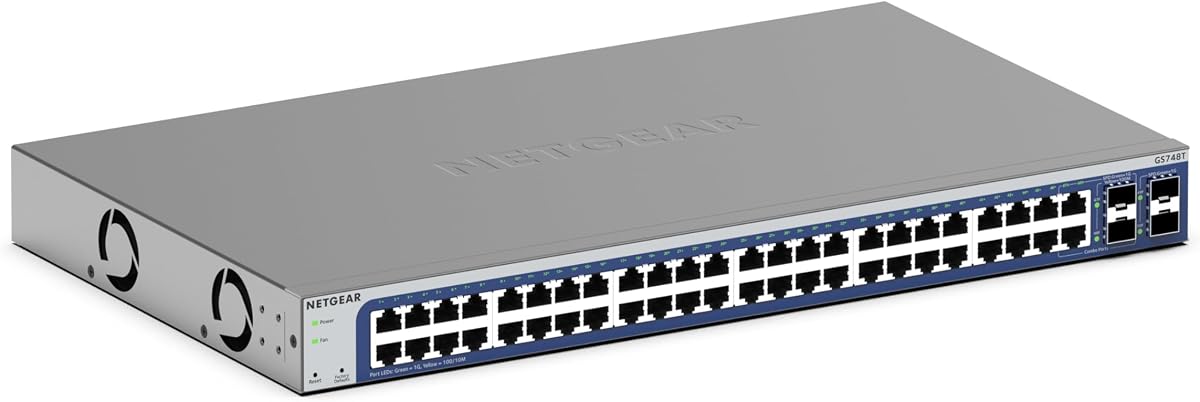
NETGEAR GS748T
4.4Editor score
4 SFP Ports
Smart Managed Software
Energy Efficient Operation
Compare the top 48 Port Gigabit Managed Switch options for 2026. This guide reviews features, performance, and value to help you choose the best networking
Choosing the right networking hardware is critical for businesses and enterprises. A 48 Port Gigabit Managed Switch provides the scalability and control needed to handle high traffic loads efficiently.
We evaluated ten top models based on management features, port configurations, and reliability. Our analysis highlights key differences to help you find the perfect fit for your specific network requirements.
Each product entry below details unique capabilities and potential trade-offs. Please note that pricing and availability can change quickly. Always verify current details before making your final purchasing decision today.
4.4Editor score

4.7Editor score

4.8Editor score
This side-by-side comparison highlights the key specifications of each switch. We focus on port counts, management types, and special features to help you differentiate between models quickly.


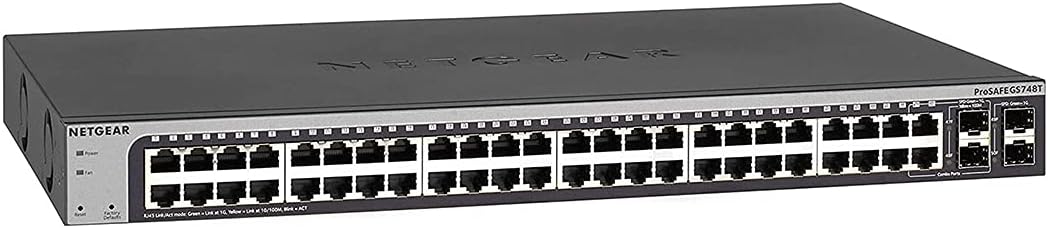


The TP-Link SG2452LP stands out as the top pick for businesses needing reliable connectivity. With a strong 4.7 rating, it delivers consistent performance across its 48 Gigabit ports.
We may earn a commission when you buy through this link, at no additional cost to you.
Its integration with the Omada Cloud Management Platform allows for remote network configuration and monitoring. The fanless design ensures it remains whisper quiet even under heavy loads.
Security is a major focus here with features like 802.1X and IP-MAC-Port binding. While setup might require some study, the benefits of centralized control outweigh the initial effort.
This switch is ideal for offices, healthcare facilities, or home setups where noise and security matter. We recommend it for users who want future-proof scalability and professional support.
The Omada platform lets you manage multiple devices from a single interface for efficient operations.
Passive cooling eliminates fan noise, making it suitable for quiet environments like conference rooms.
We may earn a commission when you buy through this link, at no additional cost to you.
The NETGEAR GS748T offers premium features for those needing flexibility and easy management. Its 4.4 rating reflects solid reliability for medium to large network deployments.
We may earn a commission when you buy through this link, at no additional cost to you.
It includes four SFP ports for fiber optic connections which is rare in this segment. The Insight cloud subscription simplifies remote management significantly without extra hardware.
While the smart software is intuitive, it might lack depth for complex routing needs. However, the energy efficiency and silent operation make it a strong contender for modern offices.
Choose this if you need fiber uplinks and want a balance between advanced control and ease of use. It remains a trustworthy option for growing networks needing expansion.
Built-in SFP ports allow direct connection to fiber optics for long-distance data transfer.
Manage your network from anywhere using the included NETGEAR Insight service.
We may earn a commission when you buy through this link, at no additional cost to you.
The NETGEAR GS348 is the top budget choice for users needing simple connectivity. With a near perfect 4.8 rating, it proves that unmanaged switches can be highly effective.
We may earn a commission when you buy through this link, at no additional cost to you.
Its plug-and-play nature means you can install it in minutes without any technical knowledge. The metal design ensures durability while the silent fanless operation fits anywhere.
The lack of management features is its main limitation but acceptable for basic setups. It avoids complex configuration entirely which reduces setup errors for non technical staff.
This is the best pick for home labs or small offices requiring just basic connectivity. Buy this if you need speed and reliability without paying for unused management features.
Just plug in the cables and it starts working immediately without any software setup.
The compact metal case protects the internals from dust and physical damage over time.
We may earn a commission when you buy through this link, at no additional cost to you.
The Omada SG3452 adds Layer 2 Plus features for more advanced traffic control. Its 4.3 rating highlights it as a capable tool for users wanting better internal routing.
We may earn a commission when you buy through this link, at no additional cost to you.
Static routing helps direct internal traffic more efficiently which saves bandwidth. The integration with Omada SDN allows seamless control across APs and gateways.
You must ensure firmware matches SDN requirements which can be tricky initially. But once configured, the centralized management offers great value for multi-device setups.
Choose this for networks needing basic routing without jumping to enterprise gear. It balances flexibility and cost well for growing small businesses.
Static routing enables more efficient internal traffic management between network segments.
Integrates smoothly with other Omada devices for a cohesive network environment.
We may earn a commission when you buy through this link, at no additional cost to you.
The NETGEAR GS748T Pro is a veteran in the smart managed switch space. With a 4.5 rating, it offers reliable performance backed by a lifetime warranty.
We may earn a commission when you buy through this link, at no additional cost to you.
The shared SFP ports allow flexibility but mean fewer total uplinks. The lifetime warranty offers peace of mind for long-term deployments.
Its smart interface is easy to use for basic management tasks. While the design is older, it remains a solid choice for stable environments.
This switch is ideal for IT managers who value long-term warranty support. Choose it if you need a proven device without needing the latest features.
Enjoy lifetime hardware protection with next business day replacement options available.
The web-based GUI provides easy access to secure setup and SNMP management.
We may earn a commission when you buy through this link, at no additional cost to you.
The TP-Link TL-SG3452P delivers massive power for powering devices over Ethernet. Its 4.7 rating reflects strong performance for surveillance and wireless setups.
We may earn a commission when you buy through this link, at no additional cost to you.
With 384W PoE budget, it can power all 48 ports at high wattages simultaneously. This is essential for IP cameras and access points requiring reliable power.
The L2+ routing and Omada integration provide advanced control options. It balances power needs with smart management effectively for unified networks.
This is the go-to for businesses deploying VoIP phones or wireless access. Choose it if you need high power delivery without separate power injectors.
Provides up to 30W per port to support high-demand devices like APs.
Integrates with Omada SDN for centralized control of your network.
We may earn a commission when you buy through this link, at no additional cost to you.
This renewed unit offers a cost-effective way to get premium managed switch features. It provides the same GS748T functionality at a lower entry cost.
We may earn a commission when you buy through this link, at no additional cost to you.
With 48 Gigabit ports and 4 SFP slots, it handles traffic well. The renewed status ensures you get a working unit with warranty protection.
While ratings vary due to the renewed nature, the hardware remains capable. It is a great option for tight budgets requiring management features.
Choose this if you need smart features but want to save money on hardware. Verify seller reviews before purchase to ensure quality standards.
Get premium switch performance at a reduced price through renewed certification.
Includes lifetime warranty support for hardware reliability and peace of mind.
We may earn a commission when you buy through this link, at no additional cost to you.
The UBIQUITI EdgeSwitch Lite offers high-performance throughput for demanding networks. Its 4.8 rating highlights excellent performance for its price class.
We may earn a commission when you buy through this link, at no additional cost to you.
With 140 Gbps switching capacity, it handles heavy traffic without bottlenecks. The non-blocking architecture ensures consistent data flow under load.
Setup requires a controller which might be a hurdle for some. But for Ubiquiti users, it integrates seamlessly into their ecosystem.
This is perfect for users already invested in Ubiquiti gear. Choose it if you need high capacity and want to avoid congestion.
Ensures full duplex performance across all ports simultaneously without delays.
Supports DC input options for backup power reliability in critical setups.
We may earn a commission when you buy through this link, at no additional cost to you.
The YuanLey switch brings L3 features and high-speed uplinks to this segment. Its 4.4 rating suggests strong performance for technical users.
We may earn a commission when you buy through this link, at no additional cost to you.
With six 10G SFP+ slots, it offers superior backhaul capability. The 460W PoE budget supports even high-power PoE devices efficiently.
Fanless design ensures it runs quietly. The L3 features provide better traffic control for complex setups.
This is a hidden gem for tech-savvy users needing 10G support. Choose it if you need speed and budget without enterprise pricing.
Six SFP+ slots provide high-speed connections for future network expansion needs.
Advanced routing and VLANs help manage complex traffic flows better.
We may earn a commission when you buy through this link, at no additional cost to you.
The NETGEAR GS348TPv2 offers a perfect 5.0 rating for reliability and performance. It is ideal for businesses needing high-end PoE solutions.
We may earn a commission when you buy through this link, at no additional cost to you.
With 380W budget, it can power many devices simultaneously. The Smart Managed interface makes configuration straightforward for IT staff.
Its design is robust and suitable for desktop or rack mounting. The 5.0 rating speaks to high user satisfaction with its functionality.
This is a premium choice for businesses needing top performance. Choose it if you want proven reliability and excellent PoE support.
Achieves a perfect rating from users praising its power and ease of use.
Supports both desktop and rack configurations for flexible physical setup.
We may earn a commission when you buy through this link, at no additional cost to you.
Selecting the right switch requires understanding your network needs and budget. We break down the key factors to consider before making a purchase decision.
Evaluate the number of Gigabit ports versus fiber uplinks you need. Ensure the switch matches your current device count and future growth.
Choose models with enough SFP ports if you require high-speed backhaul connections.
Decide between unmanaged, smart managed, or fully managed switches. Unmanaged are plug-and-play while managed offer deep control over traffic.
Smart managed switches provide a balance for small businesses needing basic VLAN support.
Check if you need to power IP cameras or access points directly. PoE models add power budget capacity which can reduce wiring costs.
Ensure the total wattage supports all connected PoE devices simultaneously.
Look for support like ACLs and port security to protect your data. Advanced switches offer features like IP-MAC binding to prevent unauthorized access.
Prioritize security options if your network handles sensitive business information.
Consider if the switch supports stacking or cloud management. This allows you to grow your network without replacing the hardware.
Cloud management platforms offer remote access which is vital for distributed teams.
Review the warranty terms and technical support availability. Brands offering lifetime warranties add long-term value to your investment.
Check if support includes remote help or just replacement services.
Consider the size and cooling method of the unit. Fanless models are quieter and better for office environments.
Ensure the mounting options fit your existing rack or desk space.
Balance your budget against the features you truly need. Higher prices often mean better support but may include unnecessary tools.
Focus on core capabilities that directly impact your business operations.
Connect your main router to one of the uplink ports to enable internet access. Ensure all cables are securely seated to avoid intermittent connection issues.
Use the provided web interface to set up VLANs and security policies. Login credentials are usually found in the user manual or on the device label.
Keep the unit in a well-ventilated area to prevent overheating. Regularly check for firmware updates to maintain security and performance levels.
Unmanaged switches simply connect devices without configuration. Managed switches allow you to control traffic, prioritize data, and secure your network. For businesses needing control, managed switches are the better choice.
Yes, a PoE switch powers IP cameras over the same Ethernet cable. This eliminates the need for separate power adapters and makes installation much easier. Ensure the total power budget meets your camera requirements.
Most smart managed switches offer remote access via cloud platforms or VPNs. You can configure settings from anywhere provided you have internet access to the device. Check the specific cloud features before buying.
SFP ports allow you to connect fiber optic cables for long-distance data transfer. They are essential if you need to link switches across different buildings. Most models include at least a few SFP slots.
Fanless switches operate silently which is ideal for quiet office environments. They rely on passive cooling which reduces mechanical parts and maintenance needs. However, they may have lower power budgets than fan models.
Most switches have a physical reset button or a web interface option. Pressing the button for ten seconds usually restores factory settings. Always backup your configuration before attempting a reset.
We have reviewed the top ten 48 Port Gigabit Managed Switch options available today. Each model offers unique strengths for different business needs and budget levels.
Prioritize your requirements like PoE needs or cloud management when deciding. A switch that fits your current setup but also allows growth is always valuable.
Prices and availability change so check current listings before buying. We hope this guide helps you build a reliable and efficient network infrastructure.