
15.6-inch laptop 8GB DDR 256GB SSD
4.5Editor score
10000mAh Long Battery Life
Full HD Display with Slim Bezel
Physical Privacy Shutter Camera
Discover the top laptops with numpad for business and data entry. We compare performance, display, and features to help you choose the right model.
Finding the right laptop with a numpad is crucial for professionals who handle spreadsheets and data entry daily. These devices offer dedicated numeric keys that streamline workflow and boost productivity significantly compared to standard models.
We compared ten top-rated business laptops featuring numeric keypads based on processor power, memory capacity, storage speed, and display quality. Each model was selected to meet diverse needs from budget-conscious users to power users requiring robust performance.
This guide highlights key strengths and trade-offs for each pick so you can match a device to your specific work requirements. Please note that product availability and pricing may change over time so check current listings before purchasing.
4.5Editor score

4.2Editor score

This table provides a side-by-side overview of all ten selected laptops to help you quickly compare essential specifications and identify the best fit for your productivity needs.


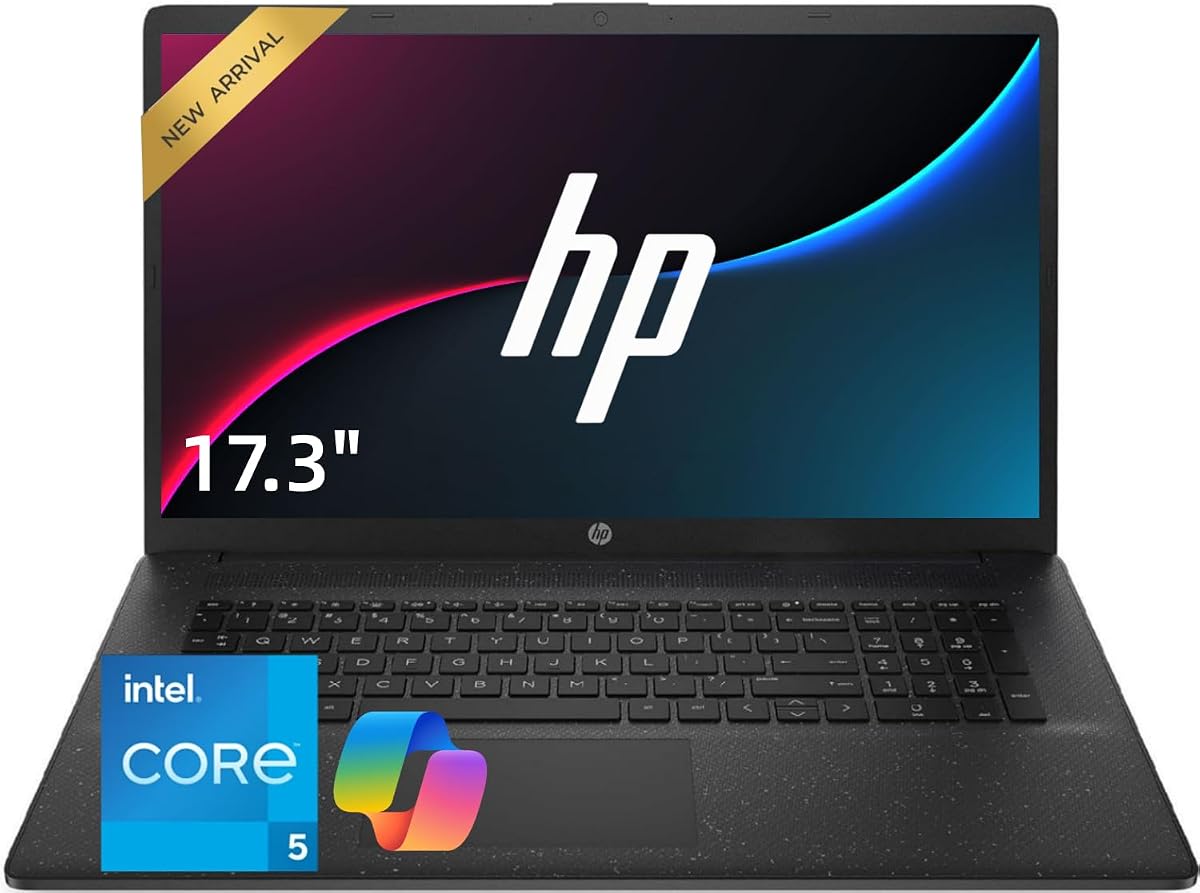


This HP model stands out for its balanced mix of performance and portability. It received a strong rating for reliability in office environments. The dedicated numeric keypad ensures efficient data entry without external peripherals.
We may earn a commission when you buy through this link, at no additional cost to you.
The AMD Ryzen 3 processor handles daily multitasking smoothly while the 16GB RAM supports multiple browser tabs and applications. Wi-Fi 6 and Bluetooth 5.3 provide stable connectivity for seamless virtual meetings and file transfers.
The display is clear but not the brightest available which may affect outdoor use. The build quality is practical but lacks a premium metal finish. These trade-offs are acceptable given the competitive price point and functional specs.
This laptop is ideal for small business owners and students who need a reliable tool for spreadsheets and documents. It offers a solid foundation for productivity tasks without overspending on unnecessary high-end features.
The combination of a quad-core CPU and ample memory ensures smooth operation during standard work tasks like email management and web browsing.
A variety of ports including USB-C HDMI and headphone jack allow easy connection to monitors and peripherals without needing dongles.
We may earn a commission when you buy through this link, at no additional cost to you.
This Lenovo model delivers exceptional power for demanding workloads thanks to its 40GB RAM and strong processor. It received high marks for speed and efficiency in multitasking environments. The numeric keypad is full-sized for comfortable typing.
We may earn a commission when you buy through this link, at no additional cost to you.
The AMD Ryzen 7 processor with eight cores handles virtual machines and heavy data processing with ease. The 1TB SSD provides ample space for large files and ensures quick access to applications and operating system files.
The added weight and higher cost may not suit everyone but the performance gains are significant for power users. The lack of premium materials on the chassis keeps costs down but sacrifices some durability and aesthetics.
Professionals requiring extensive RAM for development or engineering tasks will find this device highly capable. It is a robust choice for those who need desktop-level performance in a laptop form factor with numeric input.
With 40GB of RAM you can run multiple virtual machines or heavy applications simultaneously without slowdowns or lag.
The inclusion of an RJ45 Ethernet port ensures stable wired connectivity which is crucial for secure or bandwidth-heavy tasks.
We may earn a commission when you buy through this link, at no additional cost to you.
This HP variant upgrades the processor to a powerful Ryzen 7 model while maintaining a sleek business design. It is rated well for handling demanding office applications and light content creation smoothly. The numeric keypad is integrated effectively.
We may earn a commission when you buy through this link, at no additional cost to you.
The 7730U processor offers high performance and efficiency for all-day use. Paired with 16GB RAM and a fast SSD this machine boots quickly and handles multitasking with ease for professionals on the go.
The display quality is decent but not vibrant which limits media consumption quality. Battery life is average so carrying a charger is recommended for long work sessions away from outlets.
Ideal for accountants and analysts who need a responsive system with reliable security features. This model balances modern processing power with practical business features in a professional looking package.
The Ryzen 7 7730U ensures that complex calculations and data analysis tools run smoothly without thermal throttling issues.
Windows 11 Pro provides enterprise-grade security and management tools essential for protecting sensitive business data during remote work.
We may earn a commission when you buy through this link, at no additional cost to you.
This laptop offers a massive display ideal for side-by-side multitasking and detailed spreadsheet work. While the rating is unavailable its specs indicate high performance for office workflows. The numeric keypad is part of a full-size keyboard layout.
We may earn a commission when you buy through this link, at no additional cost to you.
The 10-core processor and 32GB RAM provide plenty of power for running multiple applications concurrently. Fast SSD storage ensures you can launch programs and access large data files without delay or frustration during work.
The large screen makes the device heavier and less suitable for frequent travel but perfect for a stationary desk. The lack of available ratings means you rely on specs to determine suitability for your needs.
Accountants and data entry specialists will appreciate the extra screen real estate and large numeric pad. This model serves as a practical mobile desktop replacement for those who prioritize workspace over portability.
The 17.3 inch display allows you to view multiple documents or spreadsheets simultaneously without needing a secondary monitor.
A 1TB SSD offers vast storage capacity for archives and projects while ensuring rapid boot times and responsive system performance.
We may earn a commission when you buy through this link, at no additional cost to you.
This Lenovo laptop brings modern DDR5 memory and a strong Intel processor to the business class. It received good ratings for handling demanding software and multitasking smoothly. The numeric keypad complements the full-size keyboard well.
We may earn a commission when you buy through this link, at no additional cost to you.
The 24GB DDR5 RAM ensures future-proof performance for upcoming software updates. A 16-inch screen with 1920×1200 resolution offers more vertical space for documents and spreadsheets compared to standard 1080p displays.
The privacy shutter on the webcam adds a layer of security that is valued by remote workers. The weight and battery life are average but the performance trade-off is worth it for productivity focused users.
Students and professionals looking for a balance of performance and screen utility will find this model compelling. It is a strong contender for general business tasks with reliable connectivity and modern memory technology.
DDR5 technology provides faster data throughput than previous generations ensuring your system remains responsive for years.
The taller screen ratio gives extra space for viewing documents and spreadsheets which enhances workflow efficiency.
We may earn a commission when you buy through this link, at no additional cost to you.
This HP model emphasizes productivity with a large display and robust processing power. While specific ratings are unavailable the high core count suggests it handles complex tasks well. The numeric keypad is included for quick data entry.
We may earn a commission when you buy through this link, at no additional cost to you.
The 10-core processor and 32GB RAM create a powerful environment for multitasking and professional applications. Fast storage ensures you spend less time waiting for files and more time working on projects and analysis.
The privacy shutter is a valuable addition for security conscious professionals working in public spaces. The bulkiness of the large screen and chassis makes it less portable but ideal for a fixed office setup.
Professionals who need a desktop replacement experience in a portable format will appreciate this device. It combines essential security features with high performance to support demanding business workflows effectively.
The 10-core processor provides ample horsepower for running virtual machines or intensive data analysis tasks simultaneously.
A large screen helps reduce eye strain and increases efficiency when working with complex spreadsheets or reports.
We may earn a commission when you buy through this link, at no additional cost to you.
This HP laptop balances screen size and battery life effectively for all-day work sessions. It has received strong ratings for reliability and user satisfaction. The numeric keypad is well-integrated into the keyboard layout for easy access.
We may earn a commission when you buy through this link, at no additional cost to you.
The Ryzen 5 processor provides solid performance for standard business applications and media consumption. A 17.3 inch display offers comfortable viewing for text and detailed graphics without needing an external monitor.
Battery life is a standout feature that supports remote work without frequent recharging. The lack of a backlit keyboard may limit use in dim environments but the performance remains consistent throughout the day.
Users seeking a reliable workhorse for home office or small business use will find this model suitable. It provides essential features and large screen real estate at a competitive price point for value seekers.
Long battery life ensures you can work uninterrupted for long periods which is essential for frequent travelers or remote workers.
High quality camera ensures you look professional during video calls enhancing communication with clients and team members.
We may earn a commission when you buy through this link, at no additional cost to you.
This budget model offers essential features for casual computing and basic data entry. It received high ratings for value and user satisfaction among price sensitive buyers. The numeric keypad is included which is rare at this price point.
We may earn a commission when you buy through this link, at no additional cost to you.
The battery life is exceptional allowing for long unplugged sessions which is great for travel. The display is clear and the slim profile makes it easy to carry in a backpack or briefcase daily.
Limited RAM and older connectivity standards may slow performance with heavy workloads but it handles daily tasks well. Build quality is functional rather than premium but sufficient for light to moderate use cases.
Students and home users needing an affordable machine for web browsing and simple spreadsheets will benefit. It provides a functional numeric keypad and solid battery life without straining your budget.
This model delivers the core essentials needed for basic tasks without unnecessary expensive features that increase the price.
Its lightweight design makes it easy to carry anywhere ensuring you can work from home cafe or office comfortably.
We may earn a commission when you buy through this link, at no additional cost to you.
This entry-level laptop is designed for basic computing tasks and students on a budget. It offers a portable form factor with essential connectivity options. The numeric keypad is integrated into the full-size keyboard layout effectively.
We may earn a commission when you buy through this link, at no additional cost to you.
The processor handles simple tasks like web browsing and document editing adequately. Windows 11 is pre-installed allowing you to start working immediately without complex setup steps or additional licenses.
Storage and memory are limited which means you may need to use cloud storage for large files. The build is lightweight making it easy to transport but less robust for rough handling or travel.
For students or casual users needing a simple machine for schoolwork and emails this is a viable option. It provides the basics for a productive experience at an accessible price point.
The pre-installed operating system ensures you can use your laptop right out of the box without technical hassles.
Lightweight construction ensures you can carry the device throughout the day without experiencing unnecessary strain.
We may earn a commission when you buy through this link, at no additional cost to you.
This HP model delivers impressive specs at a competitive price point making it a strong contender. It has received excellent ratings for value and reliability in business tasks. The numeric keypad provides efficient input for data entry.
We may earn a commission when you buy through this link, at no additional cost to you.
The 32GB RAM ensures smooth multitasking even with many applications open simultaneously. A large SSD offers plenty of space for storage and quick access to files and system applications without delay.
The smaller screen limits multitasking space but the performance compensates by keeping workflows efficient. Charging speed is fast allowing you to top up quickly between meetings or during short breaks at work.
Users needing high performance in a portable package will appreciate this configuration. It balances memory and storage effectively for users who value speed and convenience over screen size.
Ample memory ensures you can run many applications simultaneously without system slowdowns or performance drops.
Quick charging capabilities ensure your device is ready to work even after short breaks away from power outlets.
We may earn a commission when you buy through this link, at no additional cost to you.
Choosing the right laptop with a numpad requires evaluating several factors beyond just price. This section breaks down the key considerations to help you select a device that fits your professional needs.
The processor is the brain of your laptop and dictates how smoothly it handles tasks. For data entry and office work look for at least an Intel Core i3 or AMD Ryzen 3. If you run virtual machines or heavy data tools consider an i5 or Ryzen 5.
Prioritize multi-core processors for better multitasking. Modern chips ensure your system remains responsive during long work sessions without lagging.
Random Access Memory affects how many applications you can run at once. 8GB is the minimum for basic tasks but 16GB provides comfortable headroom for modern workflows. For power users 32GB or more is ideal.
Higher RAM prevents system slowdowns when managing multiple browser tabs and applications. Always choose more memory if your budget allows for future-proofing.
Solid State Drives offer faster boot times and file access compared to traditional hard drives. Look for at least 512GB to store documents and software efficiently. NVMe SSDs are preferred for speed.
Ensure the laptop supports storage expansion if you expect your file volume to grow. Many business laptops allow you to swap the drive for a larger one later.
A full HD display is essential for reading text and spreadsheets clearly. Larger screens like 17.3 inches provide more workspace for side-by-side windows. Anti-glare coatings help reduce eye strain.
Higher resolutions allow you to see more content at once without zooming. Consider brightness levels if you work in bright offices or outdoor environments.
Ensure the numeric keypad is integrated and full-sized for comfortable long-term use. Check that keys are responsive and have enough travel. A backlit keyboard helps in low-light environments.
Test the keyboard layout if possible or verify reviews for comfort. A well-designed input area reduces fatigue during data entry tasks.
Look for enough USB ports for your peripherals and an HDMI port for external displays. USB Type-C with Power Delivery adds versatility for charging. Built-in Ethernet is rare but valuable for stable networks.
Modern Wi-Fi standards ensure fast internet speeds and Bluetooth 5.0 supports wireless accessories. Ensure all your required devices can connect easily.
Battery life determines how long you can work unplugged. Aim for at least eight hours of typical use for business travel. Fast charging features are beneficial for quick top-ups between meetings.
Real-world battery performance varies by workload. Check independent reviews for accurate expectations rather than relying solely on manufacturer claims.
The build quality affects durability and the feel of the device. Aluminum chassis are sturdy but heavier while plastic builds are lighter. Weight matters if you carry the laptop daily.
Balance durability with portability based on your work style. A compact chassis is easier to carry but may limit screen size options.
Set your keyboard language correctly to ensure all keys function as expected in your region. Use the numeric keypad for quick data entry but remember Num Lock must be enabled for numbers to register.
Protect your device from heat by using it on hard surfaces. Avoid placing heavy objects on the laptop when closed to prevent screen damage and keyboard pressure.
Update your operating system and drivers regularly to maintain security and performance. Use a soft cloth to clean the screen and keyboard to prevent damage from moisture or abrasives.
Not all business laptops include a numeric keypad. It is typically found on 15-inch or larger models. Smaller laptops often omit it to save space which makes external pads necessary for data entry tasks.
Windows 11 Pro offers enhanced security and management tools for businesses. It includes features like BitLocker encryption and remote desktop access. Home versions lack these capabilities but are sufficient for individual users.
For heavy spreadsheet work 16GB of RAM is recommended. If you run complex formulas or large datasets consider 32GB to ensure smooth performance. Eight gigabytes may struggle with large files.
Many business laptops allow RAM upgrades but some models have soldered memory. Check the specific model's service manual before purchasing. Upgrading is cost-effective if you plan to keep the device for years.
SSDs are significantly faster than HDDs and essential for business laptops. They reduce boot times and improve file access speeds. Most modern laptops use SSDs exclusively due to speed and durability benefits.
Larger screens usually include space for an integrated numeric keypad. A 15-inch or 17-inch display offers more workspace for spreadsheets. Small screens force you to use an external keypad which reduces portability.
Look for a dedicated numeric section on the keyboard. It usually includes number keys from zero to nine plus math operators. Product descriptions and images should clearly show this feature.
We have highlighted the best options for professionals needing numeric input. The Lenovo V-Series offers power while the HP 17.3 provides space and the budget Lenovo is affordable.
Prioritize RAM and storage speed if you handle large datasets. If portability matters choose a 15-inch model. Always match the specs to your specific workload requirements.
Prices and stock change frequently so verify details before buying. Checking current listings ensures you get the best deal available for your budget.