As an Amazon Associate we earn from qualifying purchases. We may earn a commission when you buy through links on this page, at no additional cost to you. Read our affiliate disclosure.As an Amazon Associate we earn from qualifying purchases.Purchases through our links may earn us a commission, at no extra cost to you. Read our affiliate disclosure.
Finding the right claw grip gaming mouse for small hands can transform your experience. Lightweight designs and ergonomic shapes help prevent strain during long sessions.
We compared ten top models based on sensor performance, build quality, and grip compatibility. Each option offers unique features tailored for competitive gaming comfort.
Every pick highlights key strengths and potential trade-offs to help you decide. Prices and availability may change, so check current listings before purchasing today.
Top 3 Picks for Best Claw Grip Gaming Mouse for Small Hands
Best Budget
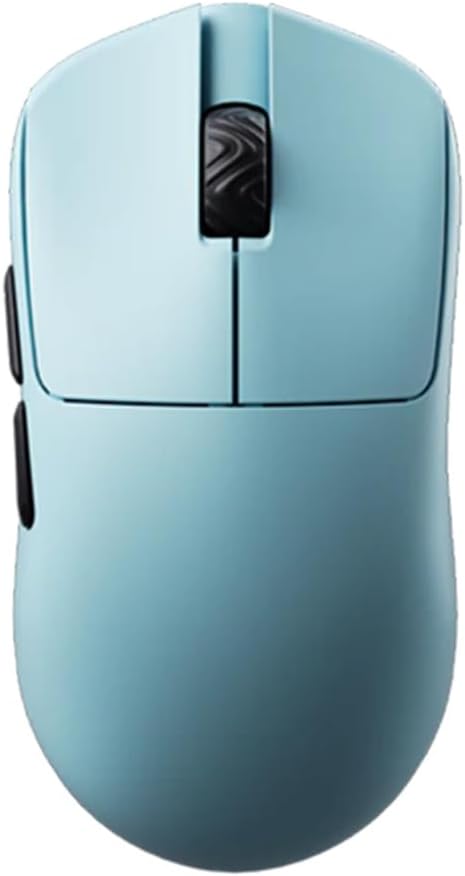
V8 Gaming Mouse, Ultra-Lightweight 36g±3g, Symmetrical Shape, Kailh Optical Switch, Nordic 52840 MCU, PAW 3950 Chip, Web Based Driver, for Claw and Fingertip Gamers, 8K Dongle Included (Yellow)
Top 10 Best Claw Grip Gaming Mouse for Small Hands in 2026 Compared
This side-by-side comparison highlights the key differences between ten popular claw grip gaming mice. Review specifications, weights, and sensor types to find your ideal match.
ProductsSpecificationsEditor scorePrice
1
Best Budget
Gwolves Skoll Mini SK-S Black 50g Ultralight Weight Honeycomb Design Ergonomic Gaming Mouse with 3389 Sensor – PTFE Skates – 16,000DPI – Detachable Cable (Black) (Small)
V6 Gaming Mouse, Ultra-Lightweight 40g, No Hole, Symmetrical Shape, Pixart PAW 3950 Chip, Web Based Driver, for Claw and Palm Gamers, 8K Dongle Included (Kailh Switch, Blue)
V8 Gaming Mouse, Ultra-Lightweight 36g±3g, Symmetrical Shape, Kailh Optical Switch, Nordic 52840 MCU, PAW 3950 Chip, Web Based Driver, for Claw and Fingertip Gamers, 8K Dongle Included (Yellow)
36g±3g ultra lightweight
PixArt PAW3950 sensor
Kailh optical switches
Web-based driver support
The V8 Gaming Mouse delivers a high-performance experience at an affordable price point. With a 4.5 rating, it offers a lightweight design that suits small hands perfectly. Its standout qualities include the use of premium optical switches and a top-tier sensor.
Pros
Ultra-lightweight design reduces fatigue
High-end PAW3950 sensor
Optical switches offer speed
Symmetrical shape fits claw grip
Cons
Build quality varies slightly
We may earn a commission when you buy through this link, at no additional cost to you.
Its PixArt PAW3950 sensor ensures precise tracking and low latency during competitive gaming. The symmetrical shape supports claw and fingertip grips effectively. The Nordic 52840 MCU provides stable wireless performance for daily use. Optical micro switches provide near-zero debounce delay for faster actuation.
One honest trade-off is that build quality can vary slightly between units. Some users note minor flexibility in the shell structure. However, these trade-offs are acceptable given the aggressive pricing. The performance features make it a strong contender for budget gamers.
This mouse is ideal for players seeking premium specs without the premium price tag. It suits those who prioritize weight and sensor quality over robust build materials. If you need a reliable claw grip mouse for small hands, this model is a top recommendation.
Premium Sensor Performance
The PixArt PAW3950 sensor delivers accurate tracking and low latency for esports-level control.
Ergonomic Symmetrical Design
The balanced shell offers comfort for various hand sizes and grip styles.
The Lamzu Atlantis Mini stands out as a top-tier option for competitive gamers. With a 4.6 rating, it combines an ultra-lightweight 51g shell with advanced internal tech. Its standout features include the 30000 DPI PAW3950 sensor and Nordic 52840 MCU.
Pros
Top-tier sensor and MCU combo
Optical switches for rapid clicks
Hourglass shape prevents cramps
High polling rate support
Cons
Higher price point
We may earn a commission when you buy through this link, at no additional cost to you.
The hourglass symmetrical design prevents finger cramps and enhances claw grip stability. Optical switches offer a lifespan of over 70 million cycles with quick tactile feedback. The Nordic 52840 MCU ensures fast response times and accurate motion detection. Dust-proof encoders further extend the device's usability.
The main trade-off is the higher price compared to other options. You pay a premium for the latest flagship components and refined ergonomics. However, the performance gains justify the cost for serious players. The build quality is consistently high.
This mouse is best for those seeking the absolute best wireless performance available. If you need reliable, lag-free gaming with premium specs, the Atlantis Mini is worth the investment. It remains a top choice for small-hand gamers wanting excellence.
Flagship Internal Components
Nordic 52840 MCU and optical switches ensure seamless wireless performance.
Ergonomic Hourglass Shape
Prevents finger cramps and supports comfortable claw grip positioning.
The Pulsar X2H Mini offers an ideal shape for aggressive claw grips. It features a higher hump and narrower waist to support small hands well. With a 4.1 rating, its renewed status makes it accessible while maintaining key performance features.
Pros
Higher hump aids aggressive claw grip
PAW3395 sensor accuracy
Nordic MCU battery life
Symmetrical design
Cons
Renewed status may vary
We may earn a commission when you buy through this link, at no additional cost to you.
The elevated rear hump improves stability during intense gaming sessions. The PAW3395 sensor offers integrated Motion-Sync Technology for smooth tracking. Optical switches and a sturdier internal structure ensure satisfying clicks. The Nordic MCU supports extended battery life at 1000Hz polling rates.
One honest trade-off is the renewed status, which means the condition may vary. Some units might show minor cosmetic wear. However, the internal tech remains robust. For budget-conscious gamers, this offers great value without sacrificing core specs.
This mouse is recommended for those needing a stable wireless option for claw grips. Its shape helps reduce fatigue during long sessions. If you want reliable specs at a lower cost, the X2H Mini is a strong pick.
Aggressive Grip Stability
The higher hump and narrower waist provide better support for small hands.
Sensor Technology
PAW3395 with Motion-Sync ensures precise tracking for fast-paced gameplay.
V6 Gaming Mouse, Ultra-Lightweight 40g, No Hole, Symmetrical Shape, Pixart PAW 3950 Chip, Web Based Driver, for Claw and Palm Gamers, 8K Dongle Included (Kailh Switch, Blue)
40g ultra lightweight design
PixArt PAW3950 sensor
Symmetrical shell shape
Web-based driver support
The V6 Gaming Mouse offers a no-hole, lightweight shell for durability. With a 4.6 rating, it supports both claw and palm grips well. Its standout feature is the combination of weight reduction and a reliable PixArt PAW3950 sensor.
Pros
40g lightweight build
PAW3950 sensor accuracy
No hole shell for durability
Symmetrical versatility
Cons
Fewer brand support options
We may earn a commission when you buy through this link, at no additional cost to you.
Weighing only around 40g, it minimizes hand fatigue during long sessions. The symmetrical design ensures versatility for different hand sizes. Reliable 2.4GHz wireless connection provides responsive performance for competitive play. Concave buttons improve click positioning and consistency.
A trade-off is the lack of extensive brand support compared to larger names. Some drivers may require web-based access rather than installed software. However, these limitations are acceptable given the performance. The build quality ensures long-term use.
This mouse suits players seeking a lightweight, durable option without compromises. Its shape helps adapt quickly for different hand sizes. If you want a reliable, low-latency wireless mouse, the V6 is a solid choice.
Durable Lightweight Build
The no-hole design maintains structural integrity while keeping weight under 40g.
Symmetrical Versatility
The shell design supports both claw and palm grips effectively.
The Pulsar X3 LHD redefines lightweight gaming with its 43g shell. With a 4.3 rating, it offers a unique hybrid ergonomic design tailored for left-handed users. Its standout qualities include the XS-1 flagship sensor and speed of light optical switches.
Pros
43g ultra-light design
XS-1 sensor precision
Palm-claw hybrid shape
Optical switches
Cons
Left-handed version only
We may earn a commission when you buy through this link, at no additional cost to you.
The hybrid design blends palm and claw comfort for lasting sessions. The XS-1 sensor delivers 32000 DPI resolution and 750 IPS tracking speed. Enhanced mouse control with DOT skates ensures smooth gliding on various surfaces. Symmetrical button height ensures consistency for different users.
A major trade-off is that this is a left-handed specific version. Right-handed players cannot use it effectively. However, for lefties seeking top-tier specs, it is rare. The build quality remains exceptional despite the minimal weight.
This mouse is ideal for left-handed gamers wanting premium performance. If you need a lightweight, ergonomic option, it meets high standards. It remains a top pick for those who prioritize weight and sensor accuracy.
Hybrid Ergonomics
The RelaxClaw shape balances comfort and control for extended sessions.
Flagship Sensor Performance
The XS-1 sensor provides unparalleled precision and speed for competitive play.
Gwolves Skoll Mini SK-S Black 50g Ultralight Weight Honeycomb Design Ergonomic Gaming Mouse with 3389 Sensor – PTFE Skates – 16,000DPI – Detachable Cable (Black) (Small)
50g ultralight weight design
3389 sensor for precision
Honeycomb ergonomic shape
Detachable cable included
The Gwolves Skoll Mini offers a 50g ultralight experience for small hands. With a 4.4 rating, its honeycomb design reduces weight while maintaining structural integrity. Its standout qualities include a reliable 3389 sensor and included PTFE skates.
Pros
50g lightweight honeycomb shell
3389 sensor accuracy
PTFE skates included
Detachable cable convenience
Cons
Honeycomb can trap dust
We may earn a commission when you buy through this link, at no additional cost to you.
The ergonomic honeycomb shell reduces strain during extended sessions. A 16000DPI sensor provides sufficient precision for most competitive games. The detachable cable ensures easy storage and portability. PTFE skates deliver smooth gliding on various surfaces.
One trade-off is that honeycomb designs can trap dust or debris easily. Cleaning requires more attention than solid-shell mice. However, the performance benefits outweigh this inconvenience for many. The value proposition is strong.
This mouse suits players seeking a balanced, light wired option. Its design helps minimize fatigue during long sessions. If you want reliable specs at a low cost, the Skoll Mini is a solid pick.
Lightweight Honeycomb Design
The shell reduces weight significantly while maintaining ergonomic comfort.
Sensor Accuracy
The 3389 sensor provides reliable tracking for competitive gaming.
Bloody V7 Ergonomic Claw Grip Gaming Mouse with Rubberized Black Coating – Macros/Scripting/Automation – 8 Programmable Buttons – 3200 DPI
3200 DPI optical sensor
8 programmable buttons total
Rubberized black coating
Macros scripting automation
The Bloody V7 provides a functional wired option for claw grip users. With a 4.4 rating, it focuses on programmability and ergonomics. Its standout qualities include 8 programmable buttons and macro scripting automation capabilities.
Pros
8 programmable buttons available
Rubberized coating grip
Macro scripting capability
Affordable wired option
Cons
Lower DPI max resolution
We may earn a commission when you buy through this link, at no additional cost to you.
The rubberized black coating ensures a secure grip during intense sessions. Adjustable report rates allow users to tune responsiveness from 125 to 1000Hz. The 3200 DPI sensor offers smooth tracking for everyday use. Compatible with Windows and Linux platforms for wide versatility.
One trade-off is the max DPI cap at 3200, which limits high-speed use. However, for general gaming and work, it remains functional. The macro features offer productivity benefits beyond just gaming. Value is high for budget-conscious users.
This mouse is best for those needing automation tools alongside gaming. It suits players who prefer wired simplicity. If you want programmability at an affordable price, the V7 is a solid pick.
Macro Functionality
Bloody 6 software allows for detailed scripting and automation tasks.
Adjustable Responsiveness
Report rates can be tuned to match different gaming preferences.
Pulsar Gaming Gears X2H Wireless Gaming Mouse, Mini, White
52g ultra lightweight weight
PAW3395 sensor tech
Higher hump narrow waist
Nordic MCU power
The Pulsar X2H in white offers a refined wireless experience. With a 4.2 rating, it features a higher hump for aggressive claw grip support. Its standout qualities include the PAW3395 sensor and Nordic MCU power.
Pros
Higher hump aids stability
PAW3395 sensor accuracy
Nordic MCU efficiency
100 hours battery life
Cons
Standard white aesthetic
We may earn a commission when you buy through this link, at no additional cost to you.
The elevated rear hump provides better stability for small hands. Upgraded internal structure ensures consistent clicks without rattling. Speed of light optical switches minimize unintended double clicks. The battery life reaches up to 100 hours of use.
One trade-off is the standard white finish, which may show wear. However, the internal tech is robust and reliable. The 1000Hz polling rate ensures hyper-responsive gaming. Performance matches top competitors.
This mouse suits players wanting a reliable wireless option. Its shape helps reduce fatigue during long sessions. If you want a solid claw grip mouse, the X2H is a strong choice.
Stable Ergonomic Shape
The higher hump design offers support for aggressive grip styles.
Extended Battery Life
Fuelled by Nordic MCU technology for efficiency and 100 hours of usage.
The Corsair IRONCLAW Wireless SE offers high-end specs. With a 3.9 rating, it focuses on performance and customization. Its standout qualities include a 26K DPI sensor and massive battery life.
Pros
26K DPI sensor resolution
Massive battery life
10 programmable buttons
RGB lighting customization
Cons
Designed for larger hands
We may earn a commission when you buy through this link, at no additional cost to you.
The IRONCLAW features 10 programmable buttons for macros. Customizable RGB lighting offers aesthetic control. The battery lasts up to 285 hours over 2.4GHz connection. Surface calibration allows the mouse to adapt to any setup.
One trade-off is that the asymmetric shape is designed for larger hands. Small-hand users may find the fit less comfortable. However, the feature set is comprehensive for power users. The build quality is solid.
This mouse suits those prioritizing battery life and customization. If you need extensive macros, it is a great option. It is better for players with larger hands than small-handed users.
Massive Battery Life
The wireless battery lasts for up to 285 hours for marathon sessions.
Precision Sensor
The CORSAIR MARKSMAN sensor provides surface calibration for accuracy.
BenQ Zowie S2-C Symmetrical Gaming Mouse | Professional Esports Performance | Driverless | Paracord Cable | Revisioned C-Features | Matte Black | Small Size
3360 optical sensor
Driverless plug and play
Paracord cable included
Small symmetrical shape
The BenQ Zowie S2-C offers a driverless esports experience. With a 4.3 rating, it focuses on plug-and-play simplicity. Its standout qualities include a small symmetrical shape and 3360 optical sensor.
Pros
Driverless ease of use
Paracord cable reduces drag
3360 optical sensor
Small symmetrical shape
Cons
No software customization
We may earn a commission when you buy through this link, at no additional cost to you.
The small size works well with palm and claw grips. The 24-step scroll wheel offers precise control. The paracord cable minimizes drag on any surface. The driverless design ensures compatibility across Windows, Linux, and MAC.
One trade-off is the lack of software for extensive customization. DPI levels are fixed at 400/800/1600/3200 without software. However, the performance remains consistent. It suits players wanting simplicity over features.
This mouse is ideal for those seeking a reliable, professional tool. It suits competitive FPS players who need consistency. If you want a simple, effective mouse, the S2-C is a top pick.
Driverless Compatibility
The driverless design ensures plug-and-play functionality across all major OS platforms.
Paracord Cable
The included paracord cable reduces drag for smoother movement.
We may earn a commission when you buy through this link, at no additional cost to you.
Buying Guide – How to Choose the Best Claw Grip Gaming Mouse for Small Hands
Selecting the right gaming mouse requires balancing weight, shape, and sensor quality. This guide outlines the critical factors to consider.
Weight and Build
Lightweight designs between 40g to 60g help reduce wrist strain during long sessions. Look for honeycomb or minimalist shells if you prefer ultra-light setups. A lightweight build ensures faster movements and better endurance.
Focus on finding a mouse that balances low weight with durability. Avoid overly fragile shells if you expect long-term use.
Ergonomic Shape
Claw grip users benefit from mice with a higher hump or narrower waist. This supports the fingers better than flat palm designs. Symmetrical or hourglass shapes are often preferred for small hands.
Choose a shape that naturally fits your fingers without forcing them into awkward positions.
Sensor Quality
The sensor is critical for accuracy. Look for top-tier sensors like Pixart PAW3950 or PAW3395. These offer low latency and high IPS tracking speeds.
Prioritize sensors with accurate motion sync and no spin-outs during fast movements.
Switch Type
Optical switches provide faster actuation and eliminate debounce delay. They also tend to have longer lifespans than mechanical switches. This is ideal for competitive shooters.
Look for optical switches for reliability and consistent click feedback.
Connection Type
Wireless mice with Nordic MCUs offer lag-free performance similar to wired options. However, if you want zero battery concerns, a wired option with a paracord cable is effective. Consider your mobility needs.
Ensure your chosen connection offers stable performance without input lag.
Battery Life
For wireless models, battery life matters significantly. Aim for at least 70 to 100 hours of usage. A good battery reduces downtime for charging.
Check battery performance specs before buying to ensure it meets your gaming schedule.
DPI Settings
While high DPI numbers are common, focus on usable DPI ranges. A range of 400 to 3200 or 26000 is standard. Ensure the sensor tracks well at your preferred DPI.
Prioritize consistent tracking over high DPI numbers that may not be used.
Price and Value
Prices vary significantly between budget and premium models. Evaluate what features you need most. Budget models can offer great sensors but may lack build quality.
Assess the cost relative to the specific features you require for your playstyle.
How to Use and Care for Your Claw Grip Gaming Mouse for Small Hands
To use a claw grip mouse correctly, rest the base of your palm on the rear and arch your fingers slightly. This allows for quick movements without dragging your wrist. Ensure your mouse height supports this arch comfortably.
Maintain clean skates for smooth gliding. Use compressed air to clear dust from sensors regularly. Check optical switches for debris to prevent missed clicks or double presses.
For wireless mice, charge fully before use and monitor battery levels. Use charging docks or cables to avoid power loss during matches. Store the mouse in a cool, dry place to preserve internal components.
Frequently Asked Questions
What defines a claw grip gaming mouse?
A claw grip gaming mouse typically features a humped back and a shape that allows users to arch their fingers. This design supports quick movements and reduces wrist strain during fast-paced gaming sessions.
Why is weight important for small hands?
Lightweight mice reduce the effort needed to move the cursor quickly. For small hands, heavy mice can cause fatigue. A lighter shell ensures better control and less strain over time.
Do optical switches last longer?
Yes, optical switches often have a higher cycle life than mechanical ones. They use light to register clicks, avoiding physical contact wear. This ensures durability for competitive players who click frequently.
What is a Pixart PAW3950 sensor?
It is a high-performance sensor known for accurate tracking and low latency. It supports high DPI and IPS speeds for smooth movement. It is considered one of the top sensors available.
Is wireless gaming better than wired?
Wireless mice with modern MCUs offer lag-free performance comparable to wired ones. They provide more freedom of movement. However, wired options offer unlimited battery life.
How do I clean my gaming mouse?
Use a microfiber cloth to wipe the exterior and compressed air for crevices. Clean the feet regularly to ensure smooth gliding. Avoid moisture near sensors or switches.
Final Thoughts on Choosing the Best Claw Grip Gaming Mouse for Small Hands
We reviewed ten top models tailored for claw grip and small hands. The Lamzu Atlantis Mini and V8 Gaming Mouse stand out for their balance of features and price. Each offers unique strengths depending on your needs.
Prioritize sensor quality, weight, and ergonomic shape when making your choice. Optical switches and reliable wireless performance are critical features for competitive play. Ensure the mouse supports your specific grip style.
Prices and availability change frequently so check current listings. Use the provided links to verify stock and offers. Select the model that best fits your budget and gaming style.
This guide compares the top CB radio with police scanner models for 2026, highlighting hybrid units that track public safety signals while maintaining clear