
ASUS Vivobook 14 Flip Laptop
4.5Editor score
MIL-STD tested hinge
Premium OLED display
Robust build quality
Finding a laptop with good hinges is essential for long-term durability and versatile usage. Strong hinges allow you to adjust the screen angle without wobble or strain, ensuring a stable typing and viewing experience.
We compared ten popular models based on hinge design, build quality, and user feedback. This list includes convertibles with 360-degree hinges and traditional laptops with sturdy, reliable mechanisms for daily tasks.
Each pick highlights specific hinge features and overall performance. Prices change frequently, so verify current deals before purchasing. These selections cover various needs from budget-friendly to premium professional laptops.
4.5Editor score

4.6Editor score

4.5Editor score
As an Amazon Associate we earn from qualifying purchases.
The following table compares key specifications and hinge features across all ten selected laptops to help you find the right fit for your needs.
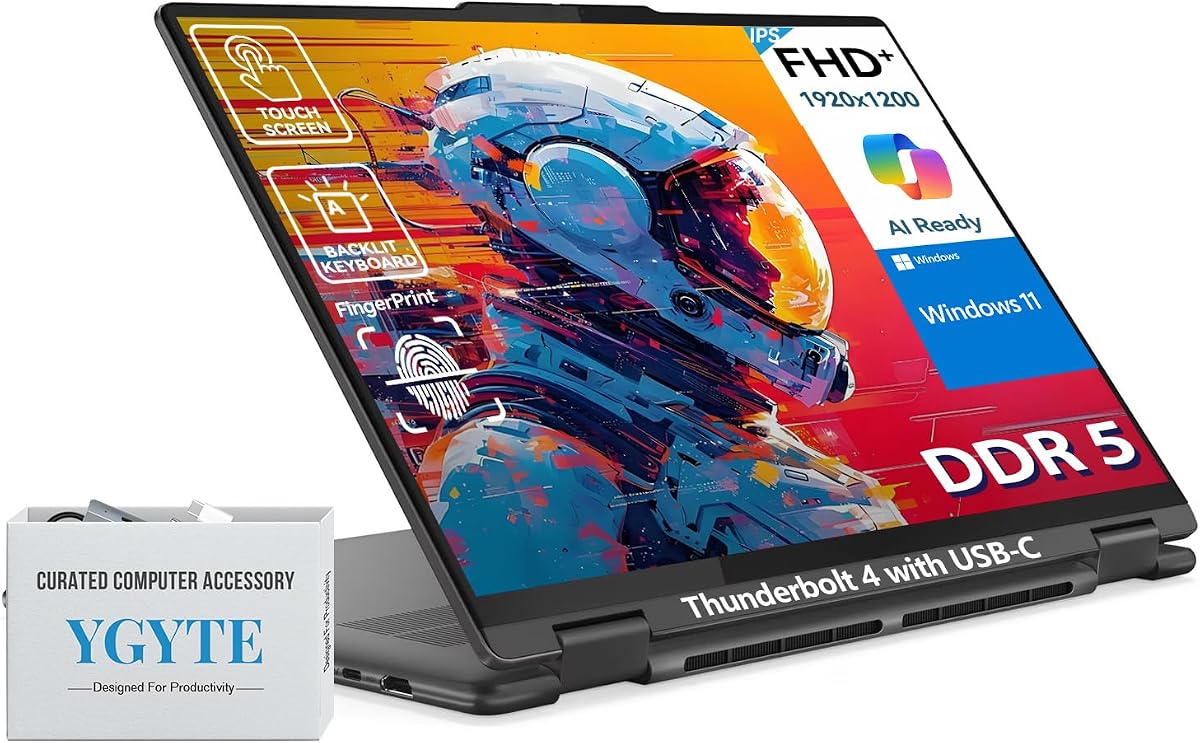


The Lenovo Yoga 7i stands out as a top choice for users needing a robust hinge. It features a 360-degree flip-and-fold design that supports laptop, tablet, tent, and stand modes. The hinge mechanism is smooth and durable, ensuring stability in any position.
We may earn a commission when you buy through this link, at no additional cost to you.
Its 16-inch 2K touchscreen provides vivid color and clarity with wide viewing angles. Powered by the Intel Core Ultra 7 155U, it handles multitasking efficiently. The connectivity includes Wi-Fi 6E and multiple ports for versatile device connections.
While the hinge is excellent, the device might feel slightly heavy for frequent travelers. However, this weight contributes to its solid build quality. The automatic transition between modes adds to the seamless user experience.
This laptop is ideal for students and professionals who value flexibility and screen quality. The hinge design ensures it withstands daily adjustments. We recommend it for those seeking a reliable convertible with good hinge support.
The 360-degree hinge allows seamless switching between laptop and tablet modes for various workflows.
Durable materials and a solid hinge mechanism ensure long-term reliability for daily use.
We may earn a commission when you buy through this link, at no additional cost to you.
This Lenovo Yoga model offers a premium hinge experience designed for business users. The 360-degree hinge is flexible and strong, supporting multiple modes. It comes with Windows 11 Pro for enhanced security features.
We may earn a commission when you buy through this link, at no additional cost to you.
The display is stunning with reduced blue light and slim bezels. It includes a fingerprint sensor and backlit keyboard for convenience. The 16GB RAM ensures smooth multitasking for demanding workloads.
The hinge is designed to be durable, but the device carries a moderate weight. This is typical for business laptops aiming for durability. The battery supports rapid charging for extended use.
Choose this if you need a secure and powerful convertible with a reliable hinge. It is ideal for corporate environments and creative professionals. The hinge quality ensures longevity during frequent adjustments.
Windows 11 Pro and fingerprint sensor provide enhanced security for sensitive business data.
High-bandwidth RAM delivers faster performance compared to standard DDR4 memory options.
We may earn a commission when you buy through this link, at no additional cost to you.
The HP OmniBook 3 provides a large display at a budget-friendly price. Its hinge is sturdy enough for standard adjustments. The 17.3-inch display offers vibrant visuals suitable for media and work.
We may earn a commission when you buy through this link, at no additional cost to you.
Battery life extends up to 14 hours with fast charge support. The processor handles everyday tasks efficiently. It includes features like AI noise reduction for better calls.
The hinge is standard, not a convertible design. This is acceptable for users who do not need 360-degree rotation. The weight and size make it less portable than smaller models.
This laptop suits home office users needing a big screen without breaking the bank. The hinge quality is consistent with budget standards. It is a solid choice for stationary productivity.
The 17.3-inch FHD display delivers clear images with wide viewing angles for comfortable viewing.
Extended battery life and fast charging keep you productive throughout the day without interruption.
We may earn a commission when you buy through this link, at no additional cost to you.
The ASUS Vivobook 14 Flip features a 360-degree hinge that meets MIL-STD durability standards. It offers an OLED display for vibrant colors and clear visuals. The device supports advanced AI capabilities and fast connectivity.
We may earn a commission when you buy through this link, at no additional cost to you.
With 32GB RAM and a 1TB SSD, multitasking is seamless. The hinge allows adaptation to different workflows. Privacy features like Windows Hello add security layers.
The hinge is tested for durability, ensuring strength. However, the premium price reflects the high-end specs. It is suitable for creative work and demanding tasks.
Invest in this if you want a rugged convertible with excellent hinge support. The OLED display enhances visual work. It stands out for those needing next-generation technology.
Meets MIL-STD 810H standards to ensure reliability in various daily environments.
OLED technology provides deep blacks and vibrant colors for an immersive visual experience.
We may earn a commission when you buy through this link, at no additional cost to you.
The HP Envy x360 features a durable 360-degree hinge suitable for creatives. The touchscreen allows precise control with a vibrant display. It includes an Intel Core i7 processor for responsive performance.
We may earn a commission when you buy through this link, at no additional cost to you.
The hinge supports flexible modes easily. Fast charge technology keeps productivity high. The aluminum chassis adds a sleek look and durability.
While the hinge is strong, the graphics are integrated. This limits high-end gaming capabilities. However, it is excellent for content creation and business use.
Buy this for a balance of portability and performance. The hinge ensures longevity during frequent adjustments. It suits professionals needing a versatile and reliable device.
The processor distributes performance efficiently for smooth operation across multiple tasks.
Aluminum chassis provides a premium look and durable protection for everyday use.
We may earn a commission when you buy through this link, at no additional cost to you.
This Dell model features lifted hinges to provide an ergonomic typing angle. The hinge is standard but designed for comfort. It includes a numeric keypad for efficient data entry.
We may earn a commission when you buy through this link, at no additional cost to you.
The screen reduces harmful blue light to protect eyes during long sessions. Battery life is efficient for daily tasks. Onsite service adds value for support.
The hinge is not convertible but functional for standard use. Weight is typical for a 15-inch model. It is built for reliable everyday computing.
Select this for home office tasks requiring ergonomic support. The hinge design aids in posture. It is a practical choice for those prioritizing comfort.
Lifted hinges elevate the keyboard for a comfortable typing angle to reduce wrist strain.
Dell ComfortView software helps reduce blue light emissions during extended viewing times.
We may earn a commission when you buy through this link, at no additional cost to you.
This HP model offers a large 17.3-inch display for extensive workspace. The hinge is standard but supports stable positioning. It includes a physical camera shutter for privacy.
We may earn a commission when you buy through this link, at no additional cost to you.
The processor advances real-world computing with efficient multitasking. The display provides crystal-clear images for various tasks. RAM ensures smooth operation with many applications.
Portability is limited due to size and weight. The hinge is not adjustable beyond standard angles. This device is best for fixed setups.
Ideal for users needing a big screen for spreadsheets or media. The hinge is adequate for regular use. Prioritize this if portability is less critical.
The 17.3-inch FHD display with wide viewing angles delivers clear images for daily tasks.
A physical camera shutter lets you close the lens for secure video chat when not in use.
We may earn a commission when you buy through this link, at no additional cost to you.
This HP 14-inch laptop is designed for mobility with a slim profile. The hinge is lightweight yet reliable for frequent adjustments. It is perfect for students and light users.
We may earn a commission when you buy through this link, at no additional cost to you.
It includes Microsoft 365 and cloud storage for convenience. The processor ensures efficient multitasking for basic tasks. The display is clear with anti-glare coating.
The hinge is basic, suitable for standard laptop use. It lacks high-end performance but offers great value. The battery supports everyday use effectively.
Choose this if you need a portable and affordable device. The hinge supports standard stability. It is best for travel and basic productivity needs.
The 0.71-inch slim profile makes it easy to carry between home, office, or school.
Multiple ports and wireless options ensure seamless connection for daily tasks.
We may earn a commission when you buy through this link, at no additional cost to you.
This HP business laptop features a durable hinge for long-term use. The display is large for productivity and multitasking. It includes a full-size keyboard with numeric keypad.
We may earn a commission when you buy through this link, at no additional cost to you.
Preloaded with Windows 11 and Office 365 for web, it supports secure work. The hinge is robust for standard laptop stability. Battery life supports all-day use.
The hinge is not 360-degree but stable for work. It offers a silver finish and portable design. The build is suitable for business environments.
Ideal for small business owners needing a reliable device. The hinge ensures longevity. It is a practical choice for office work with strong hardware.
The 17.3-inch FHD display with slim bezels is perfect for multitasking and detailed work.
Preloaded Windows 11 and Office 365 provide a secure and easy-to-manage work experience.
We may earn a commission when you buy through this link, at no additional cost to you.
This laptop features a standard hinge with reliable stability. The IPS display offers wide viewing angles and clear visuals. It is designed for students and home office use.
We may earn a commission when you buy through this link, at no additional cost to you.
It supports storage upgrades up to 1TB. The processor handles daily productivity tasks smoothly. The lightweight design makes it easy to carry.
The hinge is standard and adequate for basic adjustments. It is not a high-performance device but is functional for tasks. The RAM helps multitasking within limits.
Select this for basic needs without overspending. The hinge is sufficient for regular use. It is a practical choice for entry-level computing.
Designed for portability, this lightweight laptop is easy to carry between home, office, and travel.
The built-in M.2 SSD slot supports storage upgrades to grow with your file needs.
We may earn a commission when you buy through this link, at no additional cost to you.
Choosing a laptop with good hinges requires understanding your usage patterns and durability needs. Consider factors like hinge type, build material, and weight.
Determine if you need a standard hinge or a 360-degree convertible hinge. Convertibles allow tablet modes but may be heavier. Standard hinges are stable for typing.
Check the hinge range of motion for comfort during use.
Metal chassis usually provide better hinge support than plastic. Look for reinforced hinge areas to prevent wobbling over time.
Durable materials extend the lifespan of the hinge mechanism.
Heavier laptops often have sturdier hinges but are harder to carry. Balance stability with transport needs for your daily routine.
Choose a weight that feels manageable for your travel habits.
Larger screens require robust hinges to support the weight. 15-inch or 17-inch laptops need stronger hinge mechanisms than 14-inch models.
Ensure the hinge can support the screen without sagging.
If you frequently switch modes, prioritize a durable 360-degree hinge. For static typing, a standard hinge may suffice and offer better stability.
Align the hinge type with how often you adjust the screen.
Look for laptops with MIL-STD durability ratings for enhanced hinge quality. These certifications indicate rigorous testing for long-term reliability.
Durability ratings give confidence in the hinge's lifespan.
Higher-end models often feature superior hinge designs and materials. Set a budget that balances cost with the required hinge durability.
Invest in quality hinges to avoid repair costs later.
Check the warranty terms for hinge-related issues. Brands offering onsite service provide better support for hardware problems.
A good warranty protects your investment in the hinge mechanism.
Always open the laptop by holding the center of the screen. Avoid pulling from the corners to prevent hinge stress or misalignment.
Clean around the hinge area regularly with a dry cloth. Dust buildup can interfere with smooth movement and cause damage over time.
Use your laptop on flat surfaces to ensure stability. Avoid placing it on uneven surfaces where the hinge may experience unnecessary strain.
A good hinge provides stability without wobbling and supports the screen weight effectively. It should allow smooth adjustments and be made from durable materials like metal. Hinges tested for durability often last longer under regular use.
Not necessarily. Many modern 360-degree hinges are engineered for high durability. They undergo rigorous testing to ensure they withstand frequent switching between modes without losing support.
Yes, hinges can be replaced, but it often requires technical expertise. Check if your warranty covers hinge repairs. Some brands offer onsite service for hardware issues including hinge problems.
Often yes because heavier devices typically use more robust materials. However, lightweight models can also have excellent hinge quality. Look for design specs rather than weight alone.
Clean the hinge area every few months to prevent dust accumulation. Use a soft dry cloth to wipe around the mechanism. This helps maintain smooth movement and longevity.
MIL-STD testing certifies that a device meets military durability standards. For laptops, this includes stress tests on hinges and chassis. It ensures the laptop can handle rough conditions.
We reviewed ten laptops known for reliable hinge designs ranging from convertibles to standard models. The Lenovo Yoga 7i leads in versatility while the ASUS Vivobook offers premium durability.
Prioritize hinge type and material based on your specific needs. For frequent mode switching choose a convertible model. For stable typing a standard sturdy hinge suffices.
Prices and stock change regularly so check the provided links before purchasing. Verify current deals to get the best value for a durable laptop.