
X9 Large Print Backlit Computer Keyboard
4.5Editor score
Full size 107-key layout
Seven color LED backlighting
Plug and play USB setup
This guide compares ten top-rated backlit illuminated keyboard models for visibility and comfort featuring large print options ergonomic designs and adjustable
Finding the right backlit illuminated keyboard can transform your daily computing experience especially when visibility matters. Whether you work late at night or need larger keys for easier typing these devices offer essential features that support productivity and comfort in various lighting conditions.
We evaluated ten standout models based on build quality lighting options ergonomic design and overall usability. Our analysis focuses on how each keyboard performs in real-world scenarios ensuring you find a device that matches your specific needs without compromising on reliability or ease of use.
Each pick highlights unique strengths from senior-friendly layouts to vibrant RGB effects helping you make an informed decision. Keep in mind that availability and stock levels may shift over time so checking current listings ensures you get the most up-to-date information before purchasing.
4.5Editor score

4.9Editor score

4.1Editor score
This side-by-side comparison highlights the key specifications and unique attributes of each model to help you quickly identify the best fit for your workspace needs and typing preferences.



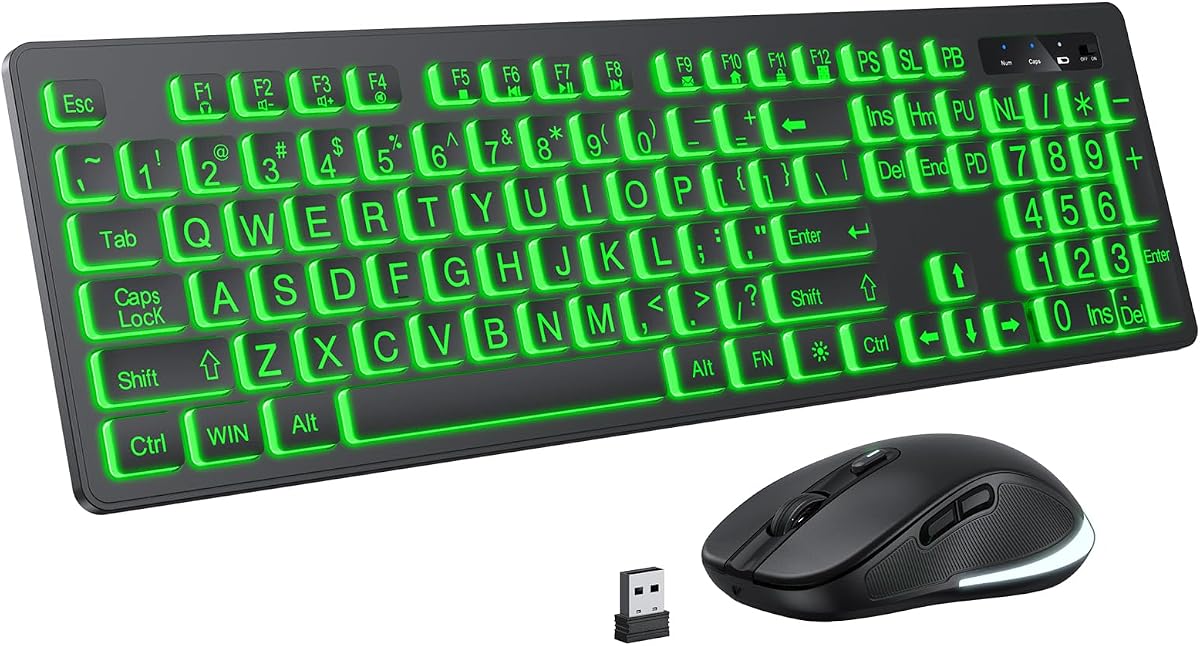


This model stands out as a top choice for users seeking clear visibility and reliable performance. With a strong rating and thoughtful design it delivers a typing experience that reduces eye strain and improves accuracy for many individuals.
We may earn a commission when you buy through this link, at no additional cost to you.
The standout feature is the oversized font which makes characters four times larger than standard keys. Combined with seven adjustable backlight levels it ensures readability in any lighting condition. The silent membrane structure adds to the comfort making it suitable for shared workspaces.
While it lacks wireless connectivity the included USB and Type C ports provide versatile plug-and-play support. Some users might prefer more premium materials but the durability and spill resistance make it a solid practical choice for daily use.
Anyone needing larger keys or better visibility will find this keyboard exceptionally helpful. Its combination of accessibility features and dependable functionality makes it a highly recommended option for home office or school environments.
The large print design ensures that every key is easily identifiable reducing mistakes and boosting confidence during typing tasks.
Support for both USB and Type C allows easy connection to modern devices while the ergonomic layout supports long sessions.
We may earn a commission when you buy through this link, at no additional cost to you.
This keyboard offers an accessible entry point for those needing illuminated keys and larger text. Its straightforward design and solid functionality make it a reliable tool for everyday computing tasks without unnecessary complexity.
We may earn a commission when you buy through this link, at no additional cost to you.
The bold print keys are easy to read and paired with seven color backlight options they provide visual variety and practical visibility. The full-size layout includes a number pad which is essential for data entry and spreadsheets.
While the materials feel standard for this price range the device holds up well under normal use. Some users may wish for more advanced features but the core functions perform consistently and meet basic needs effectively.
It is an ideal choice for students seniors or anyone looking for a simple cost-effective illuminated keyboard. The balance of visibility and affordability makes it a strong contender in the budget segment.
Large letters and colorful LEDs ensure keys are visible in low light helping users type confidently day or night.
No software is needed as the USB connection starts typing immediately which suits users who prefer hassle-free operation.
We may earn a commission when you buy through this link, at no additional cost to you.
This model brings a professional polish to illuminated keyboards with features designed for shared or hygienic environments. Its focus on cleanliness and customization sets it apart in the premium category.
We may earn a commission when you buy through this link, at no additional cost to you.
The warm white LEDs reduce glare and eye fatigue while the programmable keys allow personalized workflow shortcuts. The slim profile saves desk space and the spill-resistant sanitizable surface ensures it stays clean and ready for use.
While it carries a higher price tag the added hygiene features and build quality justify the investment for many professionals. Some users might expect more brightness levels but the current settings are sufficient for most indoor lighting.
It is especially well-suited for offices healthcare settings or any environment where cleanliness and efficiency are priorities. The blend of premium features and practical design makes it a standout choice for discerning users.
The sanitizable and spill-resistant build ensures the keyboard remains clean and functional even in high-use shared spaces.
Programable keys offer quick access to common tasks streamlining workflows and reducing repetitive keystrokes for faster work.
We may earn a commission when you buy through this link, at no additional cost to you.
This keyboard offers a slim modern profile that fits well on smaller desks while maintaining full functionality. Its design prioritizes comfort and portability making it a good choice for laptops or travel.
We may earn a commission when you buy through this link, at no additional cost to you.
The scissors X structure provides a quiet and responsive typing experience similar to laptop keys. Seven backlight colors and media hotkeys add convenience and style without complicating the layout or requiring extra software.
While it is purely wired the short cable length keeps clutter minimal and the ultra-thin design saves space. Some users may prefer more robust build materials but the lightweight frame suits mobile work habits.
It is ideal for users who value sleek aesthetics and quiet typing alongside basic illumination. The combination of media controls and compact size makes it a practical everyday solution.
Scissor switches deliver low-profile and stable keystrokes that reduce finger fatigue during extended typing sessions.
The ultra-thin profile and light weight make it easy to transport and fit into tight workspace arrangements.
We may earn a commission when you buy through this link, at no additional cost to you.
This keyboard focuses on clarity and durability offering a reliable option for users who need strong visibility and long-lasting performance. The large print keys and bright backlight support confident typing in dim environments.
We may earn a commission when you buy through this link, at no additional cost to you.
The white LED backlight is evenly distributed and adjustable while the ergonomic feet help reduce hand fatigue. Spill-proof protection adds resilience against accidents ensuring the device remains functional through daily use.
While it lacks color options the simple white light remains effective for most tasks. Some users may prefer more advanced features but the straightforward layout and sturdy build meet essential needs well.
It is a practical choice for seniors or office workers seeking a no-fuss illuminated keyboard. The emphasis on readability and protection makes it a trusted tool for consistent daily use.
Large white illuminated keys provide consistent visibility while the spill-proof design protects against accidental liquids.
Adjustable feet allow users to find a comfortable angle reducing strain during long work or gaming sessions.
We may earn a commission when you buy through this link, at no additional cost to you.
This model delivers a quiet and customizable typing experience suitable for shared or late-night work. Its focus on noise reduction and RGB effects adds both function and flair to the desktop setup.
We may earn a commission when you buy through this link, at no additional cost to you.
Low-profile membrane keys produce soft keystrokes that minimize disruption while the RGB lighting offers seven colors and multiple modes. Functional FN shortcuts and spill resistance enhance practicality and durability.
While the RGB effects are engaging some users may prefer subtler lighting. The build remains functional and reliable though it does not prioritize premium materials over performance.
It suits users who need a silent keyboard with customizable illumination for work or leisure. The lifetime warranty option adds peace of mind for long-term use.
Quiet membrane keys ensure minimal sound making this keyboard ideal for libraries offices or shared living spaces.
RGB modes and FN shortcuts let users personalize their workspace while improving access to media and system controls.
We may earn a commission when you buy through this link, at no additional cost to you.
This combo offers the freedom of wireless typing while maintaining essential visibility features like large keys and backlighting. It is a convenient solution for users who want reduced cable clutter without sacrificing readability.
We may earn a commission when you buy through this link, at no additional cost to you.
The oversized letters and seven color backlight ensure clear visibility in dim light. A single USB receiver handles both keyboard and mouse while the rechargeable battery supports extended use between charges.
While charging is necessary for operation the smart energy-saving features help extend battery life. Some users may find the shared receiver limiting but overall connectivity is stable and reliable.
It is well-suited for home users or anyone who values wireless convenience alongside accessibility features. The balance of visibility and mobility makes it a practical upgrade.
Rechargeable battery and 2.4GHz wireless connection provide a clean setup with extended usage between charges.
Oversized keys and bright backlighting support users who need extra clarity for efficient and confident typing.
We may earn a commission when you buy through this link, at no additional cost to you.
This model provides a streamlined full-size layout with strong durability and clear visibility. Its long cable and quiet keys make it a reliable choice for fixed workstations or shared offices.
We may earn a commission when you buy through this link, at no additional cost to you.
The white LED backlight is bright and even while the low-profile keys reduce noise during typing. With a cable length over five feet it offers flexibility in desk setup without needing extra extensions.
While it does not offer color lighting the focus remains on performance and clarity. Some users may find the OS support basic but it covers most Windows configurations effectively.
It is a solid option for those prioritizing cable reach and a quiet typing environment. The combination of size and durability supports consistent everyday use.
A long USB cable allows convenient positioning anywhere on the desk reducing strain and improving ergonomic comfort.
Low-profile keys reduce noise and wear ensuring long-term performance in high-use or shared environments.
We may earn a commission when you buy through this link, at no additional cost to you.
This keyboard combines large print visibility with practical accessories like a wrist rest and protective cover. It is designed for ease of use and protection ensuring longevity in busy environments.
We may earn a commission when you buy through this link, at no additional cost to you.
The white LED backlight supports clear visibility while the included wrist rest adds ergonomic support during extended typing. The protective cover shields against dust and spills extending the product's lifespan.
While the cover is separate and the lighting is basic the overall package offers excellent value. Some users may prefer integrated wrist rests but the foldable design remains convenient.
It suits seniors or users needing extra accessories for comfort and protection. The blend of visibility ergonomics and included extras makes it a thoughtful choice.
A foldable wrist rest and protective cover reduce fatigue and protect the keyboard from wear and spills.
Large clear fonts and white backlighting ensure keys are easy to identify reducing typing errors.
We may earn a commission when you buy through this link, at no additional cost to you.
This keyboard brings ergonomic comfort and visibility together with a built-in wrist rest and vibrant backlighting. It is a versatile solution for users who want both comfort and style in a single package.
We may earn a commission when you buy through this link, at no additional cost to you.
The seven color backlight and soft-touch keys create an engaging and comfortable typing environment. The integrated wrist rest supports proper hand positioning reducing strain during long sessions.
While the wrist rest cannot be removed the ergonomic design adds lasting comfort. Some users may want more durable materials but the overall feel supports daily use well.
It is an excellent pick for gamers or office workers needing support and customization. The combination of color lighting and wrist comfort makes it a standout value.
An integrated wrist rest and color backlighting enhance comfort and personalization for extended work or gaming.
Oversized letters ensure easy identification of keys reducing errors and boosting typing confidence.
We may earn a commission when you buy through this link, at no additional cost to you.
Selecting the right illuminated keyboard involves balancing visibility needs ergonomics and connectivity options for your workspace.
Many illuminated keyboards offer single-color white backlighting for clarity while others provide multiple colors and adjustable brightness levels. Consider whether you prefer a clean professional look or vibrant customization that suits your aesthetic and lighting conditions.
Prioritize models with adjustable brightness to reduce eye strain in varying environments throughout the day or night.
For users with visual challenges or those who frequently type in low light large print keys can significantly improve accuracy. Look for keyboards that explicitly mention oversized fonts or enhanced key labeling for better readability.
Check key dimensions and font size descriptions to ensure characters are clearly distinguishable from a comfortable distance.
Comfort features like wrist rests adjustable feet and low-profile key designs help maintain natural hand positions during extended typing. These elements reduce fatigue and support long-term hand health especially in home or office setups.
Look for ergonomic design details that match your preferred typing angle and hand size for optimal comfort.
Wired keyboards offer consistent performance without battery concerns whereas wireless models reduce cable clutter and support mobility. Evaluate your need for movement and power source reliability before deciding between USB connection or wireless technology.
Wired options remain ideal for stationary workstations while wireless suits portable or multi-device environments.
Spill-resistant designs and protective covers extend the life of your keyboard by guarding against accidental liquid exposure and dust. These features are especially useful in shared spaces or environments where accidental spills are possible.
Select keyboards with proven resistance ratings or included protective accessories to ensure lasting performance and cleanliness.
Full-size layouts with numeric pads support data entry and multitasking while compact designs save desk space for smaller workstations. Choose a size that aligns with your workflow and available surface area to maintain productivity.
Verify the presence of essential keys like media controls or number pads based on your daily tasks.
Most keyboards support major Windows versions but compatibility with Mac or Raspberry Pi systems may require additional verification. Confirm that all multimedia keys and shortcuts function correctly with your operating system to avoid workflow disruptions.
Check the product specifications for OS compatibility details to ensure full functionality on your devices.
Programmable keys FN shortcuts and dedicated multimedia controls enhance productivity by allowing quick access to common tasks. Evaluate whether these advanced features match your workflow needs or if a basic layout suffices.
Look for models that offer customization options aligned with your specific usage habits and productivity goals.
Connect the keyboard to your computer using the included USB or wireless receiver ensuring the connection is secure before power on. Most models will work immediately without drivers allowing you to type and test the backlight settings right away.
Adjust the brightness and color settings using the designated function keys to find a comfortable level for your environment. Avoid setting the light too high to prevent unnecessary eye strain during extended sessions.
Keep the keyboard clean by gently wiping the keys with a dry or lightly damp cloth and use the protective cover if available. Regular cleaning helps maintain key responsiveness and prolongs the device life.
Wired illuminated keyboards draw power directly from your computer so they do not affect battery life. Wireless models use internal batteries but modern designs include energy-saving features to minimize usage during idle periods.
Not all models offer color customization many use fixed white LEDs for clarity. Check product details for RGB support if you want to change colors or brightness levels beyond basic on-off options.
Most keyboards work with Macs but multimedia keys may have limited functionality. Confirm OS compatibility before purchase to ensure all keys function as expected without needing extra software.
Large print refers to significantly oversized key labels making characters easier to see. These keyboards are designed for seniors low vision users or anyone who prefers enhanced visibility during typing.
Many illuminated keyboards work well for casual gaming with responsive keys and backlighting. For high-performance needs look for models with low-latency connection and durable switches rated for heavy use.
Turn off the keyboard and unplug it then gently wipe the surface with a soft cloth. Avoid submerging the device and let it dry completely before reconnecting to prevent damage.
Most modern illuminated keyboards use integrated LEDs that cannot be replaced individually. If the backlight fails you may need to contact support or replace the keyboard depending on warranty terms.
Wireless models typically last weeks on a charge with smart power-saving modes. Charging frequency depends on usage intensity and backlight settings but most include indicators to remind you when to recharge.
This guide highlights ten well-rounded options offering everything from senior-friendly large keys to vibrant RGB lighting. Each model balances visibility functionality and ergonomics to suit a range of user needs.
Prioritize features that matter most such as backlight adjustability ergonomic support and connectivity style to ensure long-term comfort. Consider your workspace conditions and typing habits when making a final selection.
Always verify current availability and stock before purchasing as offerings may change over time. Checking up-to-date listings ensures you secure the right model for your needs today.