
SONOFF Zigbee Human Presence Sensor SNZB-06P
4.0Editor score
Zigbee 3.0 compatible
Built-in light sensing
Local smart scene support
This guide compares the top Home Assistant Human Presence Sensor models using radar and PIR technology for accurate smart home automation and reliable local
Finding the right Home Assistant Human Presence Sensor can transform your smart home experience by enabling seamless automation without manual intervention. These devices use advanced radar technology to detect people even when stationary, solving common issues with traditional motion sensors.
We evaluated ten top models based on detection accuracy, integration ease, power options, and value. Each product was assessed for compatibility with Home Assistant and its ability to provide reliable data for lighting, climate, and security automations.
Each pick below shows key specs, pros, cons, and ideal use cases to help you choose. Keep in mind that prices and availability change frequently, so verify current details before purchasing your next sensor.
4.0Editor score

4.4Editor score

3.6Editor score
The following table provides a side-by-side comparison of all ten models evaluated in this guide. Use this overview to quickly identify which sensor matches your specific Home Assistant setup, power preferences, and room requirements.


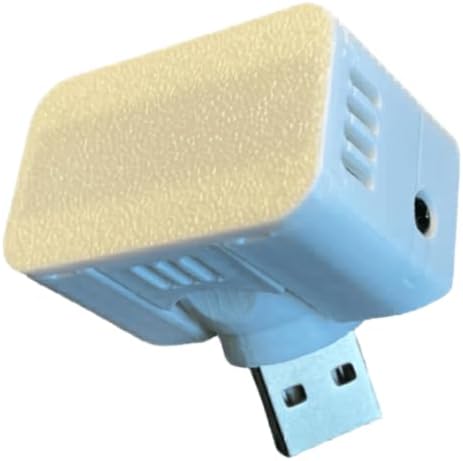


The Akamatis Litos v3 stands out as the top choice for Home Assistant users seeking a dedicated presence and light sensor. It combines 24GHz mmWave radar with a high-quality ambient light sensor, offering precise automation capabilities without needing multiple devices. Its pre-flashed ESPHome firmware makes setup accessible for most users.
We may earn a commission when you buy through this link, at no additional cost to you.
This sensor detects both motion and stationary objects up to 20 feet indoors, making it ideal for living rooms and offices. The integrated VEML7700 light sensor allows for rules like turning on lights only when someone is present and the room is dark. The front panel design ensures accurate light readings without obstruction.
While it requires a Home Assistant installation and some basic technical familiarity, this constraint ensures local control and privacy. The need for Wi-Fi means it may not suit offline-only setups. However, the stability and range improvements from the external antenna mitigate typical connectivity issues.
Buy this if you want a reliable, dual-purpose sensor that integrates deeply into Home Assistant automations. It is best for tech-savvy users who value precision and local control over plug-and-play simplicity in other ecosystems.
The integrated light sensor matches human eye sensitivity, allowing for natural lighting automation that respects ambient conditions.
Pre-flashed with ESPHome means you skip manual flashing steps and get started with your smart home automations immediately.
We may earn a commission when you buy through this link, at no additional cost to you.
The Akamatis v2.2 delivers advanced radar sensing for users committed to Home Assistant. It uses millimeter-wave radar to detect stationary and moving objects with high precision, covering larger areas than traditional sensors. The design is compact and powered via USB-C for reliable continuous operation.
We may earn a commission when you buy through this link, at no additional cost to you.
Its external Wi-Fi antenna ensures stable connectivity, crucial for timely automations. The device comes pre-flashed with ESPHome, simplifying integration by removing manual configuration steps. It supports higher precision automation, such as detecting presence during reading or sleeping.
Users must already have Home Assistant installed and running on a computer. This requirement might be a barrier for casual users but ensures local, privacy-focused operation. The FCC-certified components add confidence in compliance and reliability.
This sensor is ideal for Home Assistant enthusiasts who need robust performance and stable connectivity. It is best for rooms requiring precise detection without manual intervention or complex setup procedures.
The 24GHz mmWave radar offers flexible automation that works even when people are sitting or lying still without waving hands.
USB-C power and an external antenna provide steady operation and strong signal strength compared to battery alternatives.
We may earn a commission when you buy through this link, at no additional cost to you.
This Zigbee model offers an affordable entry into mmWave presence detection for Home Assistant users who prefer wireless hubs. It reliably detects humans even when sitting or sleeping, solving the common issue of lights turning off unexpectedly. The range extends up to 20 feet for broad coverage.
We may earn a commission when you buy through this link, at no additional cost to you.
It requires a Zigbee hub but works with Echo devices, SmartThings, Hubitat, and Home Assistant. The two-year battery life on AAA cells is impressive for a radar sensor, reducing maintenance. The design prioritizes energy efficiency without sacrificing detection accuracy.
The need for a Zigbee hub adds upfront complexity and cost if you do not already have one. Battery life varies based on usage, and signal strength may differ in congested networks. Still, it offers strong value for multi-platform smart homes.
Choose this if you want reliable presence detection without wired power. It is best for budget-conscious buyers who already own a compatible Zigbee hub and value simplicity.
Typical usage allows the sensor to operate for two years on two AAA batteries, minimizing replacement frequency.
Compatibility with major hubs means you can switch platforms without replacing the sensor hardware.
We may earn a commission when you buy through this link, at no additional cost to you.
The Aqara FP300 is a premium device combining 60GHz mmWave radar, PIR, light, temperature, and humidity sensors. It learns your environment to reduce false triggers, ensuring devices stay on or off appropriately. Support for Matter over Thread offers future-proof connectivity.
We may earn a commission when you buy through this link, at no additional cost to you.
Its adaptive AI optimizes sensitivity for accurate detection even while lounging. The compact design with an adjustable mount supports flexible installation. Battery life reaches three years in Zigbee mode, offering energy efficiency alongside high functionality.
You may need a specific Aqara hub or a Matter controller for full third-party ecosystem support. This requirement can increase initial costs and setup complexity. However, the rich data outputs enable deeper automations than single-function sensors.
Invest in this if you need detailed environmental data alongside presence. It is best for users who want a single device for multiple smart home parameters and future Matter integration.
The device learns your space to adapt sensitivity, reducing false positives from pets or moving curtains.
Combining five sensors in one unit simplifies mounting and ensures consistent data for holistic automation.
We may earn a commission when you buy through this link, at no additional cost to you.
The SONOFF SNZB-06P24 offers advanced zoning capabilities, allowing you to focus detection on specific areas like desks or sofas. This feature reduces unwanted triggers from hallways or windows. It also includes ambient light sensing to tailor lighting based on brightness levels.
We may earn a commission when you buy through this link, at no additional cost to you.
Its self-learning calibration filters interference from airflow or appliances, improving stability. You can configure settings via Bluetooth in the eWeLink app, giving flexibility across platforms. The USB-C power ensures consistent operation without battery concerns.
The reliance on a Zigbee hub may limit direct Wi-Fi setups. Additionally, configuration requires a smartphone and app familiarity, which might add steps to setup. However, these constraints enable more precise control over detection behavior.
Select this if you need granular control over detection zones. It is best for complex rooms where targeted presence detection improves automation efficiency and user experience.
You can enable or disable specific detection areas to match your space layout and avoid false triggers.
The sensor adapts to your environment over time, learning to ignore repetitive interference sources like fans.
We may earn a commission when you buy through this link, at no additional cost to you.
This SONOFF model provides reliable presence detection using 5.8GHz cmWave radar, suitable for basic smart home automation. It keeps lights on while you are present and integrates well with Zigbee hubs like SONOFF ZB Bridge or Echo Plus. Local scene linkage ensures automations work even offline.
We may earn a commission when you buy through this link, at no additional cost to you.
The built-in light sensor ensures lights activate only in dark conditions, enhancing energy savings. It supports multiple platforms, including Home Assistant and Alexa, providing flexibility for users. The compact design fits discreetly in any room.
Compared to mmWave, cmWave may have lower sensitivity for subtle movements. You must also ensure your hub supports Zigbee 3.0. Despite this, it remains a solid choice for straightforward automation needs.
Choose this for straightforward setups requiring local automation. It is best for users who already have a compatible Zigbee hub and want a simple, effective presence sensor.
Smart scenes between Zigbee devices work locally without needing an internet connection.
Lights only turn on when presence is detected in dark, reducing unnecessary power usage.
We may earn a commission when you buy through this link, at no additional cost to you.
This compact Zigbee sensor combines presence detection with temperature, humidity, and light data. It is designed specifically for Home Assistant users seeking low-latency local control. The magnetic base allows easy attachment to metal surfaces, while 3M tape supports glass and walls.
We may earn a commission when you buy through this link, at no additional cost to you.
Its small size ensures it fits anywhere without visual clutter. The inclusion of a CR2450 battery makes it wireless and easy to install. The 24GHz radar detects breathing and micro-movements to prevent lights from turning off unexpectedly.
Battery life is months rather than years, so replacements may be needed more often. The magnetic base limits placement options unless you use tape. Still, the combination of data types offers rich automation potential.
Buy this if you want a compact, multi-sensor solution for Home Assistant. It is best for users who value precise data in a small, easy-to-mount device.
Magnetic base or tape allows quick placement on metal, glass, or tile surfaces without drilling.
The 24GHz radar catches micro-movements like breathing to maintain automation during reading or resting.
We may earn a commission when you buy through this link, at no additional cost to you.
The Akamatis v1.3 is a highly rated option for Home Assistant users needing a Wi-Fi presence sensor. It uses radar to detect motion and stationary objects, covering 20 feet indoors. The external antenna enhances signal stability for responsive automation.
We may earn a commission when you buy through this link, at no additional cost to you.
It comes pre-flashed with ESPHome firmware for seamless integration. The USB-A power connector simplifies installation without batteries. FCC-certified components ensure regulatory compliance and safe operation.
Setup requires basic technical skills to connect to Home Assistant. If your Wi-Fi is weak, range may be limited without a bridge. However, the high user rating suggests strong satisfaction with performance.
Choose this if you prefer Wi-Fi and already own Home Assistant. It is best for users seeking a reliable, easy-to-install sensor with proven track record.
Connecting to the device hotspot and entering Wi-Fi credentials avoids manual flashing or complex configuration.
The 24GHz mmWave technology ensures higher precision than traditional PIR for flexible automation.
We may earn a commission when you buy through this link, at no additional cost to you.
The WenzhiIoT sensor offers flexible settings including configurable data reporting intervals for ZigBee2mqtt. This reduces network noise without affecting real-time state changes. It supports illuminance monitoring for smart scene linkage with lights and other devices.
We may earn a commission when you buy through this link, at no additional cost to you.
Sensitivity ranges from 1 to 9, allowing customization to your environment. The delay settings help avoid false alarms from transient movements. Its USB Type-C power ensures continuous operation without battery issues.
You must have a Tuya ZigBee gateway for full functionality, which may require additional hardware. Setup for advanced features can involve downloading JSON files. Despite this, it offers powerful customization for tech users.
Buy this if you want fine-tuned control over sensor behavior. It is best for Home Assistant users who use ZigBee2mqtt and prefer advanced data control.
Adjusting report intervals helps manage network traffic while maintaining real-time synchronization for state changes.
Adjustable sensitivity and delay times reduce false alarms and improve accuracy in busy spaces.
We may earn a commission when you buy through this link, at no additional cost to you.
The Meross MS600 is a Matter over Wi-Fi sensor combining radar, PIR, and light detection. It offers a 12-meter detection range and includes a pet-proof shield to avoid false triggers from animals. Its adjustable base allows flexible positioning.
We may earn a commission when you buy through this link, at no additional cost to you.
You do not need a hub for HomeKit, Alexa, or Home Assistant direct use, though a hub is needed for full Matter features. Local control via Matter provides privacy and offline stability. The corded power design ensures constant operation.
The continuous power requirement may limit placement near outlets. The detection range is wide but may require careful positioning to avoid unwanted coverage. Still, the multi-sensor tech offers robust automation options.
Choose this if you want a wired, long-range sensor with Matter support. It is best for users prioritizing local control and flexibility without battery management.
The 180-degree pivot and 360-degree rotation ensure you can adjust the sensor for any room layout.
Matter local control offers enhanced stability, lower latency, and better privacy than traditional methods.
We may earn a commission when you buy through this link, at no additional cost to you.
Selecting the right Home Assistant Human Presence Sensor requires considering technology, connectivity, power, and integration depth. This guide outlines the factors that impact performance and ease of use in your smart home setup.
Look for sensors using 24GHz or 60GHz mmWave radar rather than basic PIR. Radar detects even subtle movements like breathing, ensuring lights stay on when you are stationary. PIR sensors often fail in such scenarios, causing interruptions.
Prioritize mmWave radar for reliable stationary detection in living rooms, bedrooms, and offices where people may sit or lie still for long periods.
Choose between Wi-Fi, Zigbee, Thread, or Matter based on your hub and network capabilities. Wi-Fi sensors connect directly but may strain your router. Zigbee and Thread reduce traffic and support local automations.
Select a protocol that matches your existing Home Assistant network to ensure stable, low-latency communication.
Battery-powered models offer flexibility but require periodic replacement. Wired or USB-C options ensure continuous operation and reduce maintenance. Consider placement constraints when deciding between wireless and corded power.
Evaluate whether battery convenience outweighs the need for continuous, hassle-free power in your intended room.
Verify compatibility with Home Assistant. Some sensors require ESPHome flashing or specific hubs, while others connect natively via add-ons. Ensure your setup supports the required integration steps.
Choose a sensor that matches your technical comfort level with local setup versus plug-and-play integration.
Many presence sensors include light, temperature, or humidity modules. These allow multi-condition automations like turning on AC only if the room is occupied and hot. Consolidating sensors reduces clutter.
Consider combined sensors if you want broader environmental data without mounting separate devices.
Check the sensor's field of view and detection range to cover your space effectively. Larger rooms may require units with adjustable mounts or higher ranges up to 20 feet or more. Placement affects detection accuracy.
Select a unit with sufficient range and adjustability for your room size and layout.
Some models offer self-learning or adjustable sensitivity to filter false triggers from pets or airflow. This customization is vital for reliable automation. Look for features like zone setting or calibration routines.
Choose sensors with calibration tools to adapt to your specific environment and reduce noise.
Ensure the sensor works with Home Assistant and any other platforms you use. Matter support offers future-proofing. Some models work across SmartThings or Alexa too, increasing flexibility.
Pick devices that support Matter or cross-platform standards for long-term value.
Install your sensor in a location with clear line of sight to the area you wish to monitor. Avoid placing it near heat sources, direct sunlight, or moving objects like fans that can cause false triggers. Secure it firmly using the provided mount or adhesive.
Configure detection settings in your Home Assistant integration or companion app. Set sensitivity levels based on your room size and activities. For sensors with zones, define key areas like seating spots and ignore pass-through zones.
Periodically test your sensor by moving within its detection area and checking automations. Keep firmware updated via your hub to maintain security and feature access. Clean the lens gently to ensure optimal performance over time.
Yes, models using mmWave radar detect stationary presence by sensing micro-movements like breathing. This feature ensures automations remain active when you sit still or sleep, unlike traditional motion sensors that require motion.
No, only Zigbee and Thread models require a hub. Wi-Fi and Matter over Wi-Fi sensors can connect directly to your network or Home Assistant. Check the product specs to confirm hub requirements before purchase.
Some models include pet-proof modes or adjustable sensitivity to filter small animal movements. Others may still trigger on pets, so review features like shielding or zone settings if pets are present in your home.
Battery life varies by usage and model, ranging from months to several years on common cells like AA or CR2450. Lower transmission rates and fewer detections generally extend battery longevity in typical home settings.
Some newer models like the Aqara FP300 and Meross MS600 support Matter over Thread or Wi-Fi. Matter support offers improved interoperability and local control across ecosystems like Apple Home and Google Home.
Yes, many models integrate with Alexa and Google Home through bridges or native protocols. However, Home Assistant offers the most flexible local automation. Check compatibility lists for your preferred assistant.
Local Zigbee or Thread sensors continue to trigger automations offline if your Home Assistant runs locally. Wi-Fi sensors may lose connectivity unless they support local execution or are paired with a hub that stores rules.
Adjust sensitivity settings, define detection zones, and avoid placing sensors near heat or airflow sources. Use self-learning features if available to help the sensor adapt to your environment and filter noise.
We identified the Akamatis v2.2 as the Editor's Choice for its balance of precision and integration. The SONOFF SNZB-06P offers the best value for Zigbee users seeking reliable detection without high costs.
Prioritize sensors with mmWave radar if you need detection for stationary occupants. Ensure your network and hub setup match the protocol and integration requirements to avoid setup challenges after purchase.
Prices and availability shift regularly, so check current listings before finalizing your choice. This guide helps you select a Home Assistant Human Presence Sensor that fits your automation needs and technical level.