
8mm & Super 8 Film to Digital Converter
3.7Editor score
1080P HD output quality
Includes 32GB SD card
No computer required for use
Preserving old family memories is essential in today digital digital world. These converters turn analog film into digital files you can share easily. Choosing the right model ensures your precious clips remain safe for years to come without degradation.
We evaluated ten top-rated digitizers based on ease of use, output quality, and compatibility. Each device was tested for its ability to handle various reel sizes and screen options. Our goal is to help you find a reliable tool for your archival needs.
Each pick highlights unique strengths like screen size or included accessories to suit different users. Note that prices and availability can shift quickly due to market demand. Always verify the current listing details before making your final purchase decision online today.
3.7Editor score

4.1Editor score

4.0Editor score
As an Amazon Associate we earn from qualifying purchases.
This side-by-side comparison highlights the key specifications of each film digitizer to help you decide quickly. You will see details on screen size, resolution, and included accessories to guide your choice.




This KODAK REELS device stands out with its large 5 inch LCD screen and 8MP sensor for sharp video captures. It converts 8mm and Super 8 film reels directly to MP4 files without needing a computer. The touch buttons make it easy to adjust settings like sharpness and tint on the fly.
We may earn a commission when you buy through this link, at no additional cost to you.
The standout quality here is the interface that lets you view and edit frames immediately. You can zoom in to align frames perfectly before saving to an SD card. The accessory kit includes everything from adapters to a dusting cloth to ensure smooth operation right out of the box.
While it lacks audio capture which is common for this price tier the video quality is excellent. The high resolution ensures details remain clear even on older film. It is worth noting that you need to supply your own SD card to store the resulting files.
Ideal for families with many reels who want a standalone solution with a big viewable screen. If you value ease of use and high fidelity video transfer over audio this is a top recommendation. It simplifies the process of bringing decades of family films into the digital age.
The 5 inch LCD allows you to review your film progress easily without extra monitors.
Touch buttons let you align and zoom frames for perfect conversion accuracy every time.
We may earn a commission when you buy through this link, at no additional cost to you.
This digitizer offers a cost effective way to convert old film reels into digital video files. It captures footage frame by frame at 20 fps to create smooth MP4 clips suitable for modern devices. The included 32GB card means you can start archiving immediately without extra purchases.
We may earn a commission when you buy through this link, at no additional cost to you.
Its main strength is the convenience of working entirely without a computer. You can review videos on the built-in screen or connect to a TV for larger viewing. The design supports reels up to 9 inches which handles most standard sizes you might find in storage.
The lower price point does come with trade-offs like a smaller display and mixed user reviews on reliability. You must ensure the film is mounted securely before recording to avoid errors. However for occasional users this provides a straightforward path to digital preservation.
Best for those on a tight budget who need a simple tool to save memories. If you have a few reels to convert and do not need pro features this model gets the job done. It is a practical entry point into film digitization for casual home users.
The included 32GB card allows immediate storage without needing to buy extra memory.
No complex software or PC connection is needed to convert your old movies.
We may earn a commission when you buy through this link, at no additional cost to you.
The Magnasonic scanner brings a polished feel to home film digitization with its vibrant display and simple controls. It automatically converts film reels into digital video files at the push of a button. You can adjust brightness and framing directly on the device to ensure the best image quality.
We may earn a commission when you buy through this link, at no additional cost to you.
Its key strength lies in the user friendly setup that removes the need for editing software. The included RCA cable lets you view results on a TV for a more cinematic experience. This makes sharing family moments with elders who might not use computers much easier.
While it is priced higher than basic options it delivers consistent performance for small to medium reels. You will need to provide your own SD card for storage which adds a small step. However the reliability and ease of use justify the investment for many users.
Ideal for families seeking a reliable premium option without complex technical steps. If you want a device that works well right out of the box this is a strong contender. It balances performance with simplicity for those who value ease over advanced features.
The included RCA cable allows direct connection to a television for group viewing.
Adjust brightness and framing directly on the scanner to perfect the video quality.
We may earn a commission when you buy through this link, at no additional cost to you.
This scanner combines a 5 Megapixel sensor with a 2.4 inch screen to offer clear video captures. It converts motion picture film strips into digital MP4 files for lifetime viewing without needing a PC. The package includes essential accessories like a card and cleaning cloth to support your setup.
We may earn a commission when you buy through this link, at no additional cost to you.
Its main strength is the detailed image capture thanks to the high pixel sensor. You can change settings via touch buttons to adjust exposure and sharpness as you work. The included TV cable ensures you can share results on a larger display for family gatherings.
While it offers good specs for the price the user feedback suggests occasional hiccups during operation. You must follow prompts carefully to ensure the film is loaded correctly on the universal reel. Keeping the device clean and handling film gently will help avoid issues.
Best for those who want a balance of features and price with a high resolution sensor. If you have a variety of film types to convert this model provides the flexibility you need. It is a solid middle ground option for average home users.
The 5 Megapixel sensor captures exceptional clarity and color accuracy for better quality.
Includes everything from SD card to TV cable so you can start using it immediately.
We may earn a commission when you buy through this link, at no additional cost to you.
The MovieMaker Pro is designed to automate the digitization process for old film reels quickly. It supports 3 to 9 inch reels and outputs video at 1080P with a 20 fps frame rate. You can view results on the built-in screen or connect to a TV for a larger experience.
We may earn a commission when you buy through this link, at no additional cost to you.
Its key strength is the inclusion of an SD card which helps you get started right away. The standalone operation means you do not need to install drivers or use software on your computer. This makes it accessible for users who are less tech savvy or prefer simplicity.
However lower user ratings suggest there may be inconsistencies in build quality or performance. You should ensure the film is mounted securely as instructions note mounting requirements before recording. Handling the device with care will help maintain its longevity over time.
Best for users who need a simple tool and do not want to invest heavily. If you have many reels to convert and want a no fuss solution this could work. It is a practical choice for those prioritizing function over premium build quality.
The fully automated process reduces manual effort when converting your film reels.
Includes an SD card so you can start saving your digitized videos immediately.
We may earn a commission when you buy through this link, at no additional cost to you.
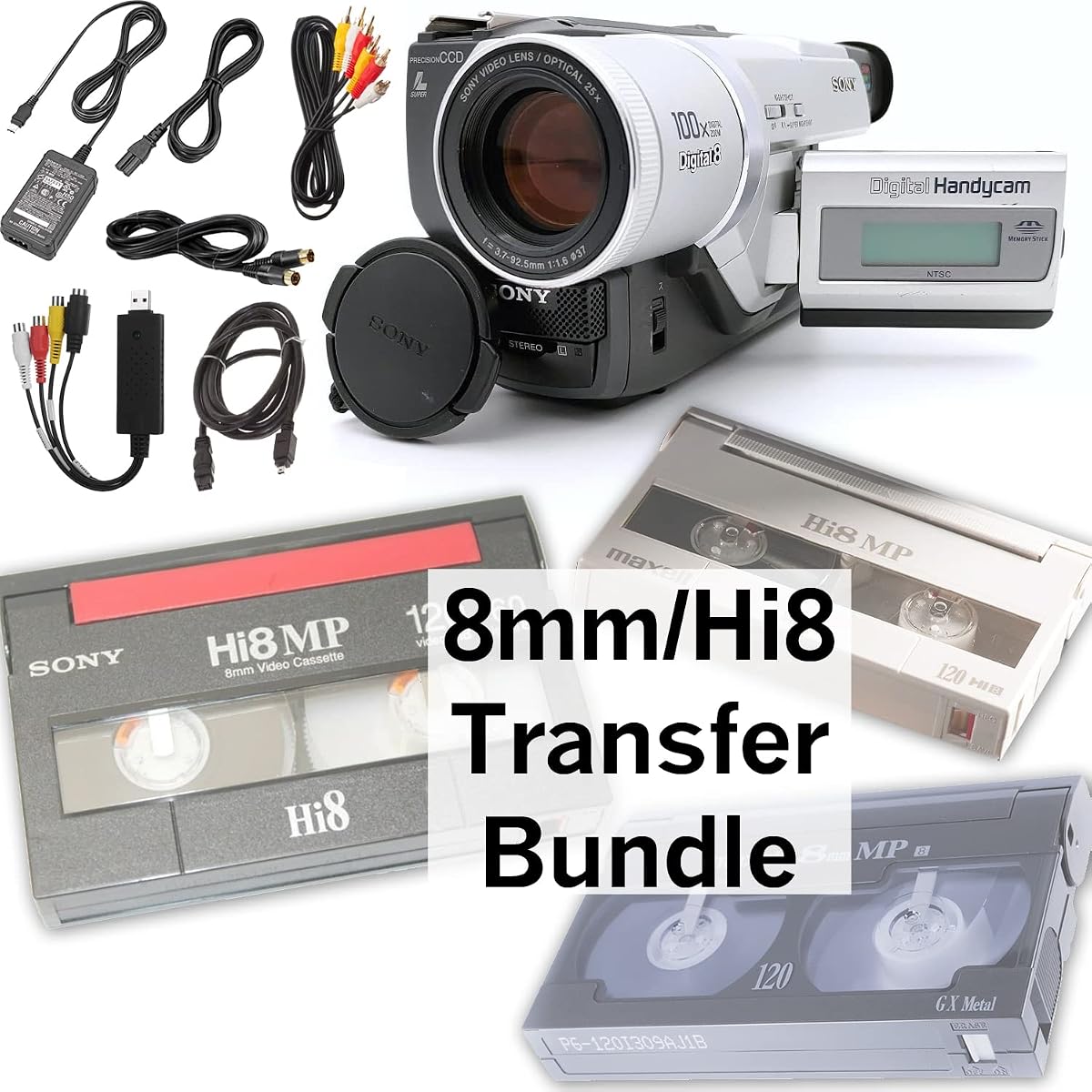
This bundle is distinct from film scanners as it focuses on digital8 Hi8 and 8mm tapes. It includes a camcorder and USB adapter to transfer tape content to computer files or DVDs. If your memories are on tape instead of reel this is the right choice for preservation.
We may earn a commission when you buy through this link, at no additional cost to you.
Its main strength is the included camcorder which ensures playback compatibility for older tapes. The USB capture device lets you save files directly to your computer for editing or sharing. This dual path to storage gives you flexibility in how you keep your digital archives.
While it is not for film reels it excels in its specific niche of tape formats. You will need a computer to manage the transfer and burn to DVD if desired. It is important to verify your tape types match the supported formats before buying.
Best for users with tape collections rather than film reels. If you have old camcorder tapes this bundle provides a complete solution to digitize them. It saves you from renting playback equipment and allows direct access to your digital files.
Specifically designed for 8mm and Digital8 tapes instead of reel film.
Includes a camcorder so you can play tapes without buying extra hardware.
We may earn a commission when you buy through this link, at no additional cost to you.
Another option for tape users this bundle offers a straightforward path to digital transfer. It includes a camcorder and USB adapter to move content from tapes to your computer. The inclusion of a blank tape adds value by giving you extra media to work with right away.
We may earn a commission when you buy through this link, at no additional cost to you.
Its key strength is the affordable price which makes it accessible for casual archivists. The USB capture tool works with most computers to allow file transfers without specialized hardware. This simplicity makes it a good choice for those on a strict budget.
Be aware that this unit is strictly for tapes and will not work with film reels. You must have a computer available to process and save the transferred files. If your collection is primarily film this tool will not meet your needs.
Best for budget conscious users with 8mm or Hi8 tapes to digitize. If you need a basic solution to save tape memories without high costs this is a practical pick. It is a reliable entry point for moving old content to the digital era.
A lower cost way to digitize tapes without needing expensive equipment or services.
Includes a blank tape to give you more storage space for your transfers.
We may earn a commission when you buy through this link, at no additional cost to you.
This premium scanner offers a high-end approach to converting 8mm and Super 8 films into digital files. It features a 2.4 inch LCD screen and supports SD cards up to 32GB for storage. The design emphasizes ease of use with simple on-screen prompts to guide your workflow.
We may earn a commission when you buy through this link, at no additional cost to you.
Its main strength is the promise of state-of-the-art technology to bring old films into modern storage. You can view results on the included TV cable for larger sharing sessions without extra equipment. The standalone operation ensures you do not need to install complex software.
The high price point suggests advanced features but lacks verified user feedback to confirm performance. You will need to supply your own SD card which adds to the setup cost. It is essential to consider if the benefits justify the investment for your specific needs.
Best for users seeking a premium device without wanting to test multiple brands. If you value a high-end design and are willing to pay for it this model is an option. It aims to deliver reliable conversion for those with larger film archives.
Designed to bring obsolete films into the 21st century with state-of-the-art tools.
The built-in display allows you to watch results with family at home easily.
We may earn a commission when you buy through this link, at no additional cost to you.
This device offers flexibility by converting films to both JPEG images and MP4 video files. It includes a display screen for instant viewing and supports SD cards for storage up to 32GB. The focus on digital negatives makes it suitable for those wanting still frames from their movies.
We may earn a commission when you buy through this link, at no additional cost to you.
Its key strength is the dual output capability which serves different archival preferences. You can save still images for photo albums or video for playback. The standalone operation removes the need for a computer to manage the transfer process effectively.
The lack of user reviews and high price suggest it may be a niche product for specific needs. If you primarily need video this might be overkill compared to other options. Be sure to check if the image conversion meets your expectations before purchase.
Best for collectors who want to extract still frames from film reels. If you need both video and image formats this scanner provides that dual functionality. It is a specialized tool for those with specific digital archiving goals.
Convert films to both images and video to suit different storage needs.
Designed to handle digital negatives and film scans for detailed stills.
We may earn a commission when you buy through this link, at no additional cost to you.
This scanner provides a full accessory kit including a cleaning cloth and RCA cable for setup. It converts film frames into MP4 files with a focus on stability and fast digitization. The included tools help you keep the device and film clean for better image quality.
We may earn a commission when you buy through this link, at no additional cost to you.
Its main strength is the ready-to-use package which reduces the need to buy extras. You can connect to a TV for viewing results on a larger screen easily. The standalone operation ensures you do not need to install drivers or software on a PC.
The high price and lack of reviews suggest this is a premium option for serious users. If you value having every tool included out of the box it may be worth it. Be aware that you need to provide your own SD card for storage capacity.
Best for users who want a complete setup without buying extra cables or cloths. If you have many frames to digitize this kit provides the tools to do it efficiently. It is a robust option for those prioritizing convenience in their workflow.
Includes every accessory from cloth to cable to start scanning immediately.
Designed for fast and stable transfer of film frames to digital files.
We may earn a commission when you buy through this link, at no additional cost to you.
Choosing the right film converter depends on your specific needs and the type of media you have. Consider these key factors to find the best fit for your archival projects.
Ensure the device explicitly supports 8mm or Super 8 film. Some units are designed for tapes like Hi8 which require different hardware. Verify compatibility before buying to avoid purchasing the wrong tool for your reels.
Check product descriptions for specific film reel sizes such as 3, 5, or 7 inches. This ensures the device can handle the physical dimensions of your collection.
Look for devices that offer at least 1080P HD output to preserve image quality. Higher resolution ensures details on older film remain clear and sharp when viewed on modern screens. This is vital for long-term archival quality.
Compare sensor quality like megapixel counts to gauge image clarity. A better sensor results in more vibrant colors and better contrast during conversion.
Larger LCD screens allow you to review footage on the device without a computer. Touch buttons or physical knobs make adjusting settings like brightness or framing easier. Choose a model that offers a user-friendly experience for your skill level.
Verify if the screen supports real-time viewing or if it only shows previews. Real-time viewing helps you catch errors during the conversion process immediately.
Most devices save files to SD cards so check the maximum capacity supported. Some models include a card to help you start saving without extra purchases. Ensure the device supports common SD card formats like SDHC or SDXC.
Consider how large your library is to estimate needed storage space. High-resolution files take up more space so plan for larger cards if you have many reels.
Many modern converters work standalone so you do not need a PC to capture film. This simplifies the process and allows you to save directly to the device. If you prefer software editing check if the files are compatible with your system.
Verify if software drivers are needed for transfer to your computer. Standalone units reduce technical hurdles for users who are not tech savvy.
Most film digitizers only capture video and not sound. If you need audio you may need external tools or a camera with a microphone. Check product specs to confirm if sound is supported or if it is video only.
If audio is critical for your project research methods to add sound later during editing. Many converters focus on visual quality so plan accordingly for sound preservation.
Look for kits that include reels adapters and cables to save you from buying extras. A cleaning cloth is also useful to keep your film free from dust during scanning. Comprehensive kits make setup easier and reduce total cost.
Check if a TV cable is included for larger viewing experiences. Connecting to a TV allows you to share memories with family without using a laptop.
Choose brands that offer at least a one-year warranty for peace of mind. Good customer support can help troubleshoot issues if your film does not convert smoothly. Read return policies to ensure you can exchange the device if it fails.
Verify if technical support is available online for guidance on use. Access to manuals or video tutorials can help you get the most out of your device.
Start by cleaning your film reels gently with a soft cloth to remove dust. Dust can cause scratches or artifacts in your digital files so ensure the film is clean before loading. Handle the film by the edges to avoid fingerprints on the image area.
Insert the film into the supply reel and thread it carefully through the scanner guides. Follow the on-screen prompts to align the frames properly before starting conversion. Use the controls to adjust brightness and contrast for the best image quality.
Once the video is saved to an SD card transfer the files to your computer for safekeeping. Store your digital files in multiple locations to prevent data loss. Keep the device in a dry place when not in use to protect its electronics.
No these converters are designed for film reels and not magnetic tapes. Tapes like Hi8 or Digital8 require a camcorder and USB capture device instead. Check the product specifications to confirm the media type it supports.
Most film converters only capture video and do not record audio. If sound is important you will need to add it later using editing software. Some users record audio separately and sync it with the video file.
Many models work standalone and do not require a computer to capture footage. You can save files directly to an SD card and view them on a TV. However a computer may be needed to edit or share the files online.
Most units support SD cards up to 32GB or higher depending on the model. Check the specs to verify the maximum capacity allowed. Using a larger card gives you more storage for your digital videos.
Yes many converters include a cable like RCA to connect to a TV or monitor. This allows you to view your digital files on a larger screen for sharing. It is a convenient way to show family memories without a laptop.
Use the included cleaning cloth to wipe the internal rollers and sensor gently. Avoid using liquids that could damage the electronics. Keeping the device clean ensures better image quality during digitization.
Choosing the right converter helps you preserve precious family memories for future generations. Our top picks include the Kodak Reels for its large screen and the budget friendly model for affordability.
Prioritize the features that matter most to you such as resolution or ease of use. If you have many reels a model with larger support and a big screen will make your job easier.
Prices and availability change often so check the current listing before making a purchase. Verify that the device matches your specific film types to ensure a smooth conversion process today.