Antelope Audio Zen Quadro
4.7Editor score
Synergy Core real-time FX
130 dB dynamic range
Dual USB-C ports
This guide compares the top audio interfaces with built in Dsp for musicians and creators, evaluating features, sound quality, and real time effects for
Audio interfaces with built in Dsp allow creators to process sound in real time without taxing your computer. This technology delivers low latency monitoring and professional effects directly on the hardware.
We evaluated ten top models based on conversion quality, preamp performance, and onboard DSP capabilities. Each product offers unique tools for recording, mixing, and streaming in various environments.
Each pick highlights key strengths and ideal use cases to help you choose the right gear. Please note that prices and availability may change over time on retailer sites.
4.7Editor score

4.0Editor score

4.6Editor score
The following table compares the key specifications and features of the ten top audio interfaces with built in Dsp to help you find the perfect match for your studio needs.




The Focusrite Scarlett Solo 4th Gen is a popular entry level interface designed for solo songwriters. It delivers studio quality sound with a 120dB dynamic range and improved Air mode for vocal presence.
We may earn a commission when you buy through this link, at no additional cost to you.
This unit uses the same high end converters found in Focusrite flagship gear. The Air mode adds rich harmonic drive which helps vocals and guitars sit forward in a mix without heavy post production.
While it lacks complex onboard DSP processing found in premium models it offers excellent analog quality. The only real limitation is the single input which restricts simultaneous recording options.
This interface is perfect for beginners or solo artists wanting professional sound without complexity. It includes major DAW software and effects making it a complete starting point for home studios.
The 120dB dynamic range ensures clean recordings even with loud sources without distortion.
Air mode adds presence and brightness to recordings helping tracks cut through the mix.
We may earn a commission when you buy through this link, at no additional cost to you.
The Elgato Wave XLR MK.2 is built specifically for streamers and podcasters who need reliable audio processing. It features a powerful DSP mixer and touch controls for instant adjustments.
We may earn a commission when you buy through this link, at no additional cost to you.
Its onboard effects include compressor EQ and voice enhancer which run on DSP to reduce CPU load. The Wave Link software allows easy routing of system audio for perfect streaming mixes.
While it has just one mic input it delivers loud clear amplification with 80dB gain. The LED ring provides instant visual feedback which is vital for monitoring levels during live broadcasts.
This interface is ideal for streamers and podcasters wanting a simple dedicated solution. It combines hardware quality with intuitive software to ensure professional audio for online content.
DSP based effects process voice signals in real time without stressing the host computer.
Customizable LED lighting gives instant status updates on gain levels and mute states.
We may earn a commission when you buy through this link, at no additional cost to you.
The Universal Audio Apollo Twin X QUAD Gen 2 is a powerhouse for musicians demanding authentic tones. Its Unison preamps let you record through virtual emulations of classic analog gear.
We may earn a commission when you buy through this link, at no additional cost to you.
You gain access to over 200 UAD plug-ins including Capitol Chambers and Distressor. These run on dedicated DSP so you can track with effects in real time without latency or CPU strain.
Thunderbolt 3 connectivity ensures high bandwidth for large sessions while monitor correction helps mix in any room. The only trade off is the requirement for a compatible computer port.
This interface is perfect for producers seeking professional analog character and flexible DSP processing. It stands out as a top choice for those who value sound quality and plugin ecosystem.
Unison technology loads plugin impedance and gain preamp stages for authentic analog emulation.
Dedicated DSP cores allow real time effects without impacting host computer performance.
We may earn a commission when you buy through this link, at no additional cost to you.
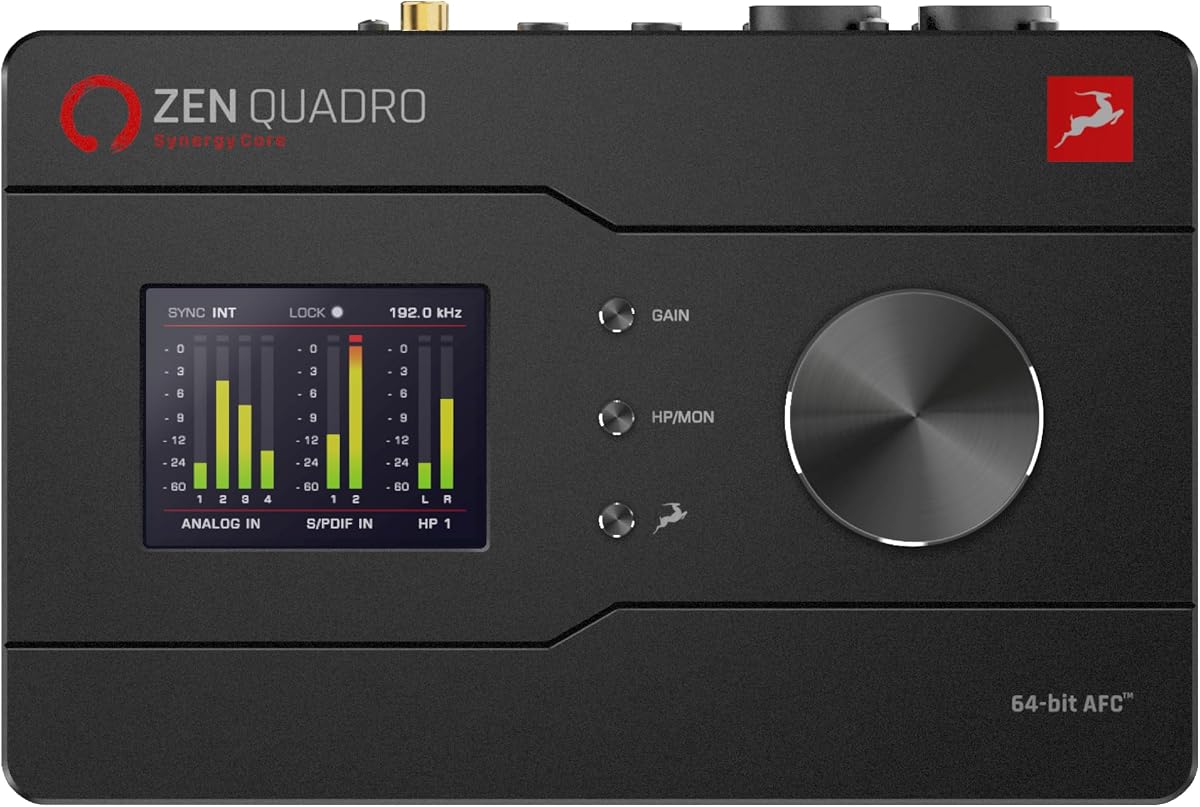
The Antelope Audio Zen Quadro brings flagship studio quality to a portable form factor. It features four discrete preamps and up to 130dB dynamic range for pristine recordings.
We may earn a commission when you buy through this link, at no additional cost to you.
Real-time Synergy Core FX run on dedicated DSP and FPGA hardware offering analog-modeled compressors and EQs with near-zero latency. You can connect a phone or tablet alongside a computer easily.
Its 64-bit AFC clocking provides world-class sound trusted by Grammy engineers. The main challenge is mastering its extensive features but the audio results justify the initial learning curve.
This interface suits engineers and creators needing multiple inputs and top tier conversion. It delivers professional studio performance with flexible routing for mobile and fixed setups.
Analog modeled effects run on dedicated hardware ensuring zero latency processing.
Dual USB-C allows connection of multiple devices or loopback for streaming.
We may earn a commission when you buy through this link, at no additional cost to you.
The Universal Audio Apollo Twin X DUO Gen 2 offers a slightly scaled down version of the QUAD with similar features. It includes the same Unison preamps and access to 200 plus UAD plug-ins.
We may earn a commission when you buy through this link, at no additional cost to you.
Realtime tracking through authentic emulations allows you to hear effects while recording. Bass management lets you add a subwoofer to your monitor setup for accurate low end mixing.
Auto Gain sets levels quickly across multiple inputs so you never miss a take. While it has less DSP power than the QUAD it remains a powerful tool for solo producers.
This interface is perfect for producers needing high quality analog tones on a budget. It balances powerful DSP capabilities with ease of use for streamlined music production.
Track through effects with zero latency thanks to onboard DSP processing.
Add a subwoofer for better low end accuracy in your monitoring setup.
We may earn a commission when you buy through this link, at no additional cost to you.
The SSL 2 MKII Plus delivers legendary studio sound in a compact bus powered design. It features discrete preamps and legacy 4K analog enhancement to add warmth and character.
We may earn a commission when you buy through this link, at no additional cost to you.
With 32-bit and 192kHz converters you capture incredibly detailed audio. Zero latency monitoring ensures you hear your dry or processed signal instantly. It comes with the SSL Production Pack software.
While it lacks extensive onboard DSP the analog quality is exceptional for its size. The 4K button is a unique feature that shapes tone effectively without plugins.
This interface is ideal for guitarists and vocalists wanting classic SSL tone. It offers high end analog performance in a portable package for mobile recording.
Legacy 4K mode adds harmonic color inspired by classic SSL consoles.
32-bit and 192kHz conversion captures every nuance of your performance.
We may earn a commission when you buy through this link, at no additional cost to you.
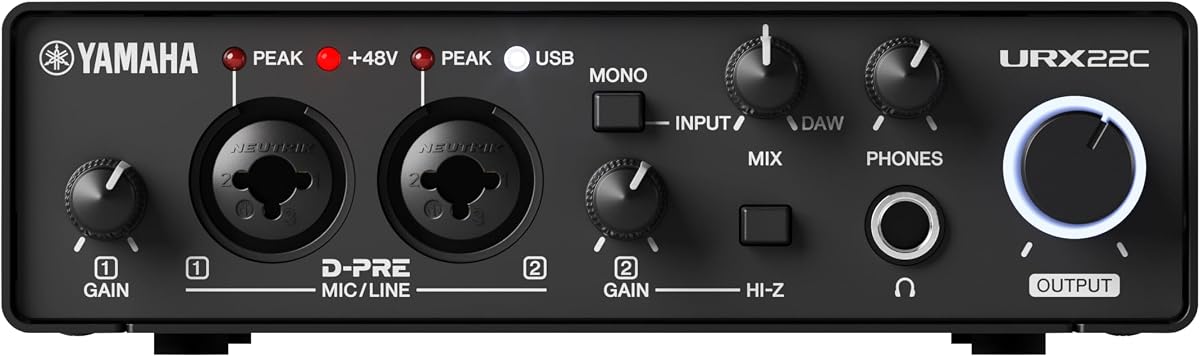
The Yamaha UR22C is a durable interface with a DSP powered monitoring system. It features Class-A D-PRE preamps and supports 32-bit integer at 192kHz for high resolution audio.
We may earn a commission when you buy through this link, at no additional cost to you.
Latency-free DSP monitoring lets you hear REV-X reverb or guitar amp classics live. The software includes Cubase AI and dspMixFx for easy control of your mix on any OS.
Its full-metal housing ensures it withstands transport while MIDI I/O adds flexibility. The main limitation is the weight compared to lighter ultramobile interfaces.
This interface is best for touring musicians needing rugged gear with onboard effects. It provides professional DSP tools directly in the box for flexible setups.
DSP-based reverb runs directly on hardware providing natural room sounds.
Class-A designs deliver clean warm tones for vocals and instruments.
We may earn a commission when you buy through this link, at no additional cost to you.
The MOTU UltraLite-mk5 offers incredible channel capacity for large sessions. With 18 in and 22 out options you can connect 40 channels simultaneously using optical and analog connections.
We may earn a commission when you buy through this link, at no additional cost to you.
DSP-driven monitor mixing lets you create separate unique mixes for each output pair. Onboard reverb and parametric EQ provide real-time effects without host CPU load.
Its high-resolution OLED display shows detailed metering for all inputs and outputs. The software includes Performer Lite which adds instruments and loops for immediate music creation.
This interface is perfect for bands needing extensive connectivity and flexible routing. It handles complex monitoring scenarios efficiently for large-scale recording projects.
Create six separate mix busses for diverse monitoring needs without latency.
Optical and analog ports allow expansion to 40 simultaneous audio channels.
We may earn a commission when you buy through this link, at no additional cost to you.
The Yamaha URX22 features a modern touchscreen interface for intuitive control. It supports up to 4 inputs and dual USB-C ports for flexible streaming and recording setups.
We may earn a commission when you buy through this link, at no additional cost to you.
Built-in DSP processing ensures latency-free monitoring during sessions. It includes Cubase AI and WaveLab Cast software for immediate content creation workflows.
Premium preamps offer 78dB gain range to handle various microphone types effectively. Since it is newer than others real-world testing data remains limited for deep performance reviews.
This interface is ideal for users wanting a modern touch-based workflow. It combines modern connectivity with solid Yamaha preamp performance for new setups.
A 4.3 inch screen provides visual control over gain levels and routing.
Supports multiple devices for simultaneous streaming and recording tasks.
We may earn a commission when you buy through this link, at no additional cost to you.
The Antelope Audio Zenith 2 is designed specifically for streaming and podcasting workflows. It features a Smart Vocal Chain that shapes your voice for broadcast ready results.
We may earn a commission when you buy through this link, at no additional cost to you.
Unique independent headphone mixes let you and a guest hear separate mixes. The interface includes a guitar rig and Bitwig Studio to expand its utility for musicians.
Its display allows direct control of DSP effects without opening computer apps. This standalone workflow ensures zero lag during live performances and interviews.
This interface is perfect for podcasters and streamers needing simple yet powerful tools. It delivers professional audio quality with specialized features for spoken word.
Smart Vocal Chain processes compression EQ and de-essing for broadcast audio.
Two independent headphone outputs allow custom mixes for each person.
We may earn a commission when you buy through this link, at no additional cost to you.
Choosing the right interface requires understanding your specific recording needs and the DSP capabilities offered.
DSP cores determine how many effects you can run simultaneously without latency. Look for interfaces with dedicated hardware cores for real-time processing.
More cores mean more complex mixes during tracking sessions.
Match the input count to your typical recording setup. Solo artists need fewer channels than bands requiring multiple simultaneous tracks.
Ensure the unit offers enough outputs for your monitoring setup.
Clean preamps with low noise floors are essential for professional sound. High gain ranges allow you to use various dynamic microphones without extra gear.
Invest in preamps with character if analog warmth matters to you.
Check that your computer supports the required connection type like USB-C or Thunderbolt. Mobile users need bus-powered units to operate on battery.
Ensure compatibility with your operating system for stable drivers.
Many interfaces include DAWs and plugins that add value to the purchase. Verify if these software tools match your workflow preferences.
Software adds long-term value beyond hardware capabilities.
Zero latency monitoring lets you hear yourself clearly during recording. Look for independent headphone outputs if you work with collaborators.
Clear meters help maintain healthy recording levels at all times.
Connect your interface to your computer using the recommended cable. Install the latest drivers to ensure optimal DSP performance.
Always check your gain settings to prevent clipping. Use the onboard knobs or software to adjust levels before recording.
Store the unit in a dry dust free environment. Use high quality cables to ensure the signal remains pristine.
Built-in DSP allows real-time processing of effects and monitoring without using your computer CPU. This ensures zero latency when recording and reduces system load.
You still need a DAW to record and arrange your audio files. DSP helps with monitoring and effects during the recording phase.
Many modern interfaces support iOS and Android via USB-C. Check specific model compatibility before buying.
48kHz is standard for video and streaming. 96kHz is better for high-fidelity music recording and offers more processing headroom.
Use Loopback features or dedicated streaming apps to mix system audio with your mic. DSP ensures your voice stays processed.
Most USB-C interfaces are backward compatible with adapters. Always check bandwidth requirements for audio fidelity.
We have reviewed ten top models ranging from budget starters to high-end professional tools. Each offers distinct DSP features to enhance your recording workflow.
Prioritize preamp quality and the number of DSP cores based on your project scale. Ensure the connectivity matches your current computer setup.
Check current pricing and availability as these models evolve quickly. Investing in the right interface ensures you start with professional sound quality.