
Hyperkin Trooper 2 Premium USB
4.1Editor score
Classic Atari feel design
Ten foot USB cable included
Six mappable buttons available
This guide compares the top ten Mac game joysticks for flight simulators, arcade fighting, and general gaming to help you find the perfect controller.
Finding the right controller for your Mac can transform your gaming experience significantly. Whether you prefer flight simulations, arcade fighters, or classic retro games, a dedicated joystick offers precision and comfort that standard gamepads cannot match. We have researched the market to identify the best options compatible with macOS.
Our team analyzed compatibility, build quality, sensor technology, and user feedback to compile this comprehensive list. We focused on devices that work seamlessly with macOS while offering unique features like Hall Effect sensors, programmable buttons, and ergonomic designs. This ensures every pick delivers reliable performance for serious gamers.
Each entry in this guide highlights specific strengths, trade-offs, and ideal use cases to help you decide. You will find detailed specifications, pros and cons, and expert insights for every product. Please note that availability and pricing fluctuate frequently, so check the latest details before purchasing.
4.1Editor score
4.6Editor score

4.0Editor score
The following table provides a side-by-side comparison of all ten products featured in this guide. It highlights key specifications to help you quickly identify which joystick meets your specific gaming needs and Mac setup requirements.


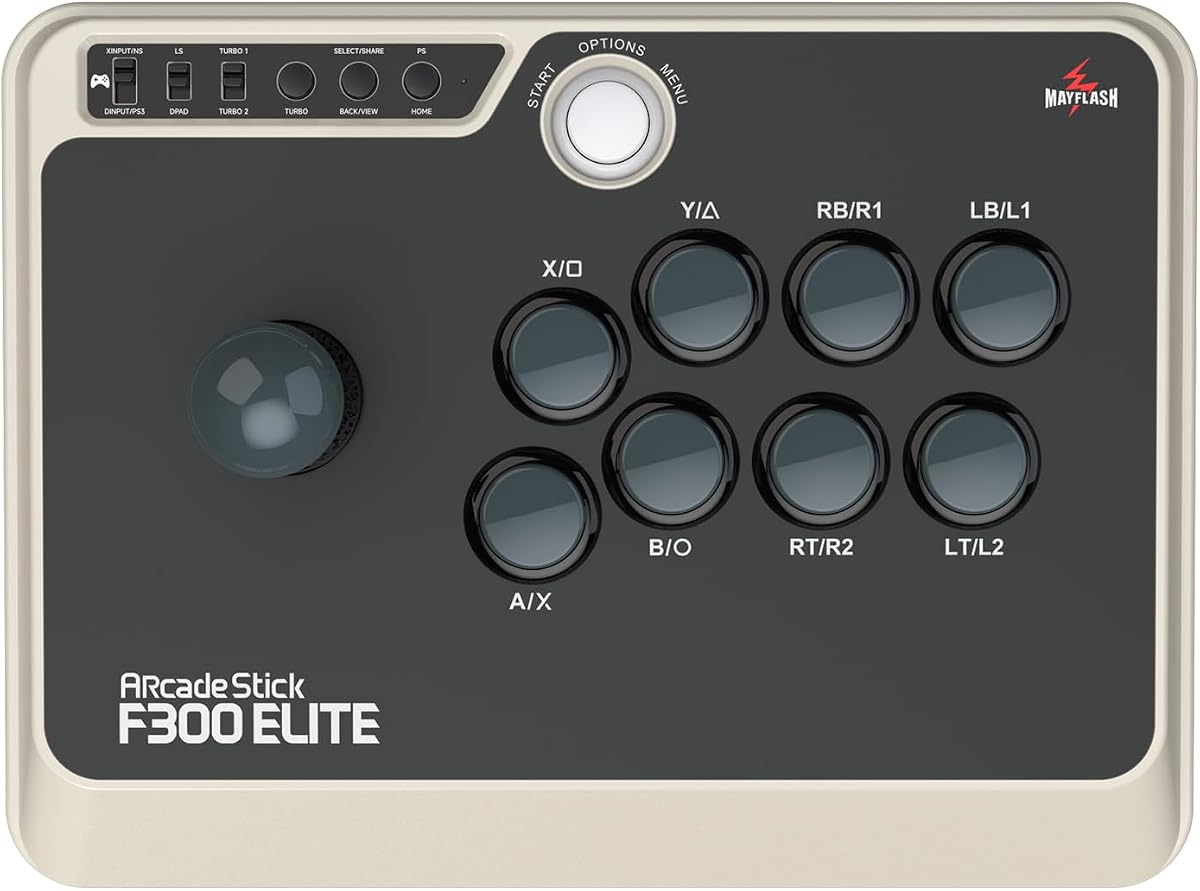
The MAYFLASH F300 Elite stands out as a premier choice for Mac users seeking a dedicated arcade fighting stick. With a rating of 4.6 stars, it delivers exceptional precision and durability for competitive play. The inclusion of genuine Sanwa components ensures that every input is registered accurately, making it ideal for fighting games like Street Fighter or Tekken.
We may earn a commission when you buy through this link, at no additional cost to you.
This controller is built for enthusiasts who value customization. The platform is accessible for further modification, allowing you to swap buttons or joysticks to suit your specific playstyle. It supports both XINPUT and DINPUT modes on PC, ensuring seamless integration with macOS gaming environments. The turbo function adds versatility for various game genres beyond just fighting titles.
While the Elite version is more expensive than the standard F300, the premium components justify the cost for serious gamers. The only minor drawback is the need for a specific adapter to use it with PlayStation 5 consoles, but for Mac and PC users, it works flawlessly. The warranty service is also noted as responsive and helpful.
If you are looking for a reliable, high-performance arcade stick that grows with your skills, this is the one to buy. It offers the perfect balance of out-of-the-box quality and potential for future upgrades. We highly recommend it for anyone serious about competitive gaming on their Mac setup.
The use of genuine Sanwa buttons and joystick ensures consistent response and longevity, preventing the wear issues common in cheaper controllers.
The open internal design allows you to swap parts easily, making this a long-term investment that can evolve with your preferences.
We may earn a commission when you buy through this link, at no additional cost to you.
The Hyperkin Trooper 2 is an excellent entry-level option for Mac gamers who want a classic joystick experience without breaking the bank. Rated at 4.1 stars, it captures the nostalgic feel of vintage arcade sticks while providing modern reliability. Its simple design makes it perfect for retro gaming enthusiasts or casual players.
We may earn a commission when you buy through this link, at no additional cost to you.
Ergonomics are a key feature here, with chamfered corners on the grips providing increased comfort during long sessions. The ten-foot USB cable gives you plenty of flexibility in how you position your controller on your desk. The joystick movement is quiet and responsive, ensuring smooth inputs for various consoles and computer games.
While it lacks the advanced features of premium models, its durability and comfort make it a strong contender in the budget category. The solid base and quality cord ensure it can withstand regular use. It is an ideal choice for those who prioritize function and nostalgia over high-tech specifications.
We recommend this joystick for anyone looking to start their collection or for retro emulation on macOS. It offers fantastic value for money and delivers a satisfying tactile experience. For the price, you cannot find a more comfortable classic-style controller for your Mac.
The design mirrors classic arcade standards, providing an authentic feel that appeals to fans of vintage gaming systems.
Chamfered corners on the grips reduce hand strain, allowing for longer play sessions without discomfort.
We may earn a commission when you buy through this link, at no additional cost to you.
For serious flight simulation enthusiasts on Mac, the Logitech G X56 H.O.T.A.S is the ultimate high-end solution. With a 4.0 rating, it offers military-grade precision with over 189 programmable controls. The advanced 4-spring system allows you to customize the force required for different maneuvers, mimicking real aircraft controls.
We may earn a commission when you buy through this link, at no additional cost to you.
Hall-effect sensors in the aileron and elevator axes ensure accurate, drift-free performance. This is crucial for complex simulations where tiny adjustments matter. RGB backlighting helps you identify controls quickly in low-light environments, enhancing the immersion. The design places controls under your fingers for easy navigation without looking.
The system requirements specify Windows primarily, but many users run flight sims on Mac via compatibility layers. The extensive customization means you can map every function to your preference. While the price is high, the build quality and feature set justify it for those who demand the best.
This stick is best suited for users who want a complete cockpit experience. If you invest time in mastering the software, you get unmatched control and realism. It is the top recommendation for pilots and space sim lovers who want the highest fidelity available.
The adjustable spring system lets you match the resistance of the stick to your flying style for better control.
RGB lighting and ergonomic placement enhance the immersive experience, making you feel like a real pilot.
We may earn a commission when you buy through this link, at no additional cost to you.
The Thrustmaster T-Flight Stick X is a reliable choice for Mac users focused on flight simulation. Its plug-and-play setup means you can start flying in seconds without driver headaches. The adjustable resistance control lets you fine-tune stick tension to match your specific flying style.
We may earn a commission when you buy through this link, at no additional cost to you.
A weighted base keeps the stick firmly planted during aggressive inputs, preventing unwanted movement. It includes an integrated throttle and rudder twist, eliminating the need for separate pedals. Twelve programmable buttons allow for extensive customization, and internal memory stores your configurations for quick switching between aircraft types.
While this is an older model, it remains a solid performer for its price. The ergonomic design ensures comfort during long flights, and the locking system for the rudder control adds precision. It offers a complete flight control system in one device, saving desk space.
We recommend this stick for those who want a full flight experience without multiple peripheral costs. It balances performance and cost effectively. For Mac flight simmers looking for a straightforward and sturdy option, this is a great choice.
Integrated throttle and rudder twist provide a full suite of flight controls in a single ergonomic device.
The weighted stability base ensures the stick does not slide, maintaining precision during high-intensity maneuvers.
We may earn a commission when you buy through this link, at no additional cost to you.
The abxylute C6 is a versatile wireless controller that works seamlessly with macOS. With a 1000Hz polling rate in wired mode, it minimizes input lag for competitive gaming. The Hall Effect joysticks and triggers prevent stick drift, ensuring precise control and a longer lifespan.
We may earn a commission when you buy through this link, at no additional cost to you.
Its wide compatibility covers Mac, Windows, Switch, and even Tesla. You can customize turbo features on any button and choose from four vibration levels for immersion. The 600mAh battery delivers up to 18 hours of gameplay, ensuring uninterrupted sessions. The gyro function is available for Switch games but adds unique control options.
While it requires the USB dongle for the best latency performance, the Bluetooth mode still offers reliable connectivity. The lightweight design reduces fatigue, and the rechargeable battery makes it convenient for travel. It is a budget-friendly way to get premium features like Hall Effect sensors.
We recommend this controller for Mac users who want wireless freedom without sacrificing performance. It is an excellent general-purpose stick for various game genres. For those who value anti-drift technology and battery life, this is a top contender.
Hall Effect sensors prevent wear and drift, delivering glitch-free performance that traditional analog sticks cannot match.
The powerful battery ensures you can play for up to 18 hours on a single charge without interruptions.
We may earn a commission when you buy through this link, at no additional cost to you.
The MAYFLASH F300 is a popular arcade stick for Mac users seeking reliable performance. With a 4.5 rating, it supports Sanwa Denshi parts, allowing for customization. It works with XINPUT and DINPUT on PC and has turbo functions with different speed settings for various gameplay needs.
We may earn a commission when you buy through this link, at no additional cost to you.
The base is solid, and the joystick provides precise inputs for fighting games. It is compatible with a wide range of consoles and systems, making it a versatile option. While it does not come with premium Sanwa parts by default, the ability to swap them is a major plus.
This stick is a great middle-ground option between budget and premium. It offers better build quality than cheap alternatives without the high cost of elite versions. The wide compatibility ensures it works with most modern games on macOS. It is suitable for beginners and casual competitive players.
We recommend the standard F300 for those who want a reliable arcade stick. It is simple, effective, and easy to upgrade if needed. For the price, it offers excellent value and performance for Mac arcade gaming.
Compatible with high-quality Sanwa parts, allowing you to upgrade components as your skills and needs grow.
Supports a wide range of consoles and systems, ensuring it works well with your Mac and other devices.
We may earn a commission when you buy through this link, at no additional cost to you.
The Thrustmaster SimTask FarmStick is designed specifically for farming simulators on Mac. With Hall Effect magnetic sensors, it delivers ultra-accurate performance without drift. The realistic 3-axis joystick allows precise control of tractors and heavy machinery, creating a lifelike experience.
We may earn a commission when you buy through this link, at no additional cost to you.
Up to 33 programmable inputs help you manage every function without relying on a keyboard. The ambidextrous design allows flexible setups with racing wheels or dual joysticks. This makes it perfect for serious farming simulator players who want a dedicated control system.
While it is expensive and niche, the specialized features justify it for farming enthusiasts. It eliminates the need for complex keyboard combos. However, it is less useful for general gaming. If you play Farming Simulator regularly, this stick enhances the immersion significantly.
We recommend this product for those who prioritize farming simulations. It offers unique functionality that standard gamepads cannot match. For dedicated players, it is a worthwhile investment to improve gameplay flow and realism.
The 3-axis joystick provides smooth control for operating tractors and construction equipment realistically.
Many programmable inputs let you manage all game functions without switching back to keyboard controls.
We may earn a commission when you buy through this link, at no additional cost to you.
The 8Bitdo Ultimate 2 is a top-tier wireless controller for Mac users. Its TMR joysticks offer higher sensitivity and durability than standard options. The 2.4G wireless connection delivers ultra-low latency, ensuring prompt responses during gameplay. It comes with a multifunctional charging dock for convenience.
We may earn a commission when you buy through this link, at no additional cost to you.
You can switch between linear Hall Effect triggers and non-linear tactile triggers for different scenarios. The controller includes two Pro back paddle buttons and extra bumpers for faster response. Customizable 6-axis motion control adds versatility to your gaming setup. It supports Turbo function and software customization.
This controller is not a full-size joystick but excels as a handheld gamepad. The build quality is excellent, and the anti-interference technology ensures stable connections. It is suitable for most Mac games that support Xbox layout controllers. The charging dock keeps your setup tidy.
We recommend this for users who want a premium wireless experience with modern tech. It combines convenience with high-end features. For Mac gamers who want reliability and low latency, this is a fantastic choice.
TMR joysticks provide greater precision and enhanced durability compared to traditional mechanical sensors.
Switch between linear and tactile triggers to suit different game genres and personal preferences.
We may earn a commission when you buy through this link, at no additional cost to you.
The Moonag Wireless PC Controller brings advanced features like Hall Effect joysticks and RGB lighting to Mac gamers. The anti-drift technology ensures smooth control and higher accuracy over time. With a 1000Hz polling rate, input lag is minimized for competitive advantage.
We may earn a commission when you buy through this link, at no additional cost to you.
The ergonomic design reduces fatigue during long sessions, and the textured grip ensures comfort. You can program macros and use turbo for rapid-fire actions. The dual vibration motors provide immersive feedback for shooting and racing games. The 800mAh battery supports long playtime.
While it is incompatible with Xbox and PS consoles, it is perfect for PC and Switch users. The RGB lighting adds an aesthetic touch to your setup. It balances modern tech with practical features like programmable buttons. The battery supports playing while charging via cable.
We recommend this for Mac users who want modern features at a reasonable price. The Hall Effect sensors and RGB make it stand out. For competitive and casual gamers alike, it offers a compelling package.
Dynamic RGB lighting around joysticks and buttons creates an immersive gaming atmosphere on your desk.
Macro programming allows for complex commands to be executed with a single press for easier gameplay.
We may earn a commission when you buy through this link, at no additional cost to you.
The SPEEDLINK SL-650212 is an anniversary edition retro arcade stick that offers a nostalgic design for Mac users. Its digital USB joystick is perfect for arcade and retro games. The package includes a collection of 20 retro games for download, making it a ready-to-play package.
We may earn a commission when you buy through this link, at no additional cost to you.
It captures the look of the original Competition Pro arcade machine stick. This is ideal for fans of retro gaming who appreciate the aesthetic. The setup is simple, and it works with PCs and Android devices. While it is a digital joystick, it suits classic games well.
The main limitation is that it uses digital inputs rather than analog, which may not suit modern titles. However, for retro emulation, it delivers a classic experience. The nostalgic design adds a unique visual element to your setup. It is a fun addition for collectors.
We recommend this for retro enthusiasts who want a dedicated arcade experience. The included games are a nice bonus. For those who value style and history, this stick is an interesting choice.
The design is taken directly from the original Competition Pro arcade machine, evoking a classic feel.
A collection of 20 retro games is included, allowing you to start playing immediately without extra purchases.
We may earn a commission when you buy through this link, at no additional cost to you.
Selecting the right joystick for your Mac requires understanding your specific gaming needs and technical requirements. This guide outlines the critical factors to consider to ensure compatibility and performance.
Most modern joysticks use USB-A or USB-C cables. Some wireless models support Bluetooth or 2.4GHz dongles. macOS generally handles wired connections best due to driver support, but wireless offers convenience.
If you want stability, choose a wired option. For flexibility, check that the Bluetooth or dongle mode works with macOS before purchasing.
Hall Effect and TMR sensors use magnetic fields to detect movement, which prevents stick drift over time. Traditional potentiometers wear out and cause drift. Premium sticks now often feature Hall Effect sensors for durability.
Opt for Hall Effect or TMR sticks if you plan to game for hours daily. They ensure consistent performance and longer lifespan.
Verify that the product explicitly lists macOS or Mac compatibility. Many flight sticks support Windows only. Check the manufacturer site for driver downloads if needed for your macOS version.
Prioritize controllers with plug-and-play macOS support to avoid driver headaches and ensure smooth integration.
A solid weighted base prevents the joystick from sliding during intense gameplay. Look for durable materials like metal internals or high-quality plastics. Joysticks with replacement parts available are ideal for longevity.
Choose a model with a sturdy base and replaceable components to withstand long gaming sessions without wear.
Many sticks allow you to remap buttons or save profiles via internal memory. This is useful for different games. Software support on macOS should be verified for advanced customization.
Ensure the controller allows easy button remapping to suit your preferred layout and playstyle effectively.
The shape and grip comfort affect fatigue during long sessions. Look for designs with textured grips or ergonomic curves. Adjustable resistance can also improve comfort for specific game types.
Select a design that fits your hand size and grip style to avoid discomfort during extended use.
Decide if you need a fighting stick, flight stick, or general controller. Flight sticks often have throttles and rudders. Fighting sticks have specific layouts. General controllers offer broad versatility.
Choose a product designed specifically for your preferred game genre to get the best performance.
Premium sticks offer more controls and better materials but cost more. Budget models provide basic functionality. Balance your budget with the features you truly need for your gaming habits.
Invest in features like Hall Effect sensors if you value longevity, but avoid overspending on unnecessary extras.
Connect your joystick to your Mac using the provided USB cable or receiver. macOS usually recognizes the device automatically as a standard input. If software is required, download it from the manufacturer's official website and follow the setup instructions.
Adjust the calibration settings in macOS System Settings if available. This ensures accurate axis mapping for your specific games. Some sticks also have onboard calibration buttons to reset the center point quickly without software.
Clean your joystick regularly with a dry cloth to prevent dust buildup on sensors and sticks. Avoid excessive force on the joystick stick to maintain durability. If it uses replaceable parts, keep them on hand for future maintenance.
Yes, all products listed in this guide explicitly support macOS. However, always check the product specifications to ensure compatibility with your specific Mac model and OS version. Some advanced flight sticks may require specific drivers for full functionality.
Hall Effect technology uses magnetic fields to detect the movement of the joystick stick instead of physical contact. This prevents mechanical wear and ensures that the stick does not drift over time, providing consistent and accurate control.
Most modern controllers are plug-and-play on macOS and do not require drivers. However, complex flight sticks or sticks with advanced software features may need specific software to map all buttons correctly for your system.
You can use gamepads, but joysticks offer better precision for flight sims and arcade fighting. Gamepads lack the full range of motion and button layout that dedicated joysticks provide for specific genres.
To fix drift, try recalibrating the stick in system settings. If it is a mechanical stick, cleaning the sensors might help. Hall Effect joysticks generally do not suffer from drift and are recommended for long-term use.
The Logitech G X56 or Thrustmaster T-Flight Stick X are excellent for flight sims. They offer throttle controls and high precision. Choose one based on your budget and need for customization features.
In summary, the MAYFLASH F300 Elite is our top pick for fighting games, while the Logitech G X56 is ideal for flight simulations. The Hyperkin Trooper 2 offers great value for budget-conscious retro gamers. Each product has been selected for its compatibility and performance on Mac.
When choosing a joystick, prioritize sensor technology and compatibility. Hall Effect sticks offer longevity, and proper macOS support ensures smooth gameplay. Consider your specific game needs to avoid overspending on unused features.
Always check the current prices and availability on the official product pages before making a purchase. Prices can change frequently, and newer models may become available. This ensures you get the best deal for your Mac gaming setup.