
ASRock B550M-HDV Socket AM4 Micro-ATX Motherboard, Supports AMD Ryzen 5000/4000/3000 Series Processors, DDR4 4733+(OC), PCIe 4.0, Gigabit LAN
4.5Editor score
AMD Ryzen 5000 Support
PCIe 4.0 Ready
Affordable Price Point
Discover the best low power motherboard options for energy efficient builds, NAS systems, and compact PCs with detailed comparisons of features performance and
Selecting the right low power motherboard is essential for building energy efficient systems that reduce electricity costs while maintaining reliable performance for daily tasks and specialized workloads.
We compared ten top rated models based on their processor support power efficiency network capabilities storage options and overall build quality to help you find the ideal fit for your needs.
Each pick highlights specific strengths and use cases so you can choose confidently though keep in mind that pricing and availability may change over time as markets evolve.
4.5Editor score

4.5Editor score

4.1Editor score
This side by side comparison outlines the key specifications and capabilities of each model to help you quickly identify which board aligns with your performance and efficiency goals.





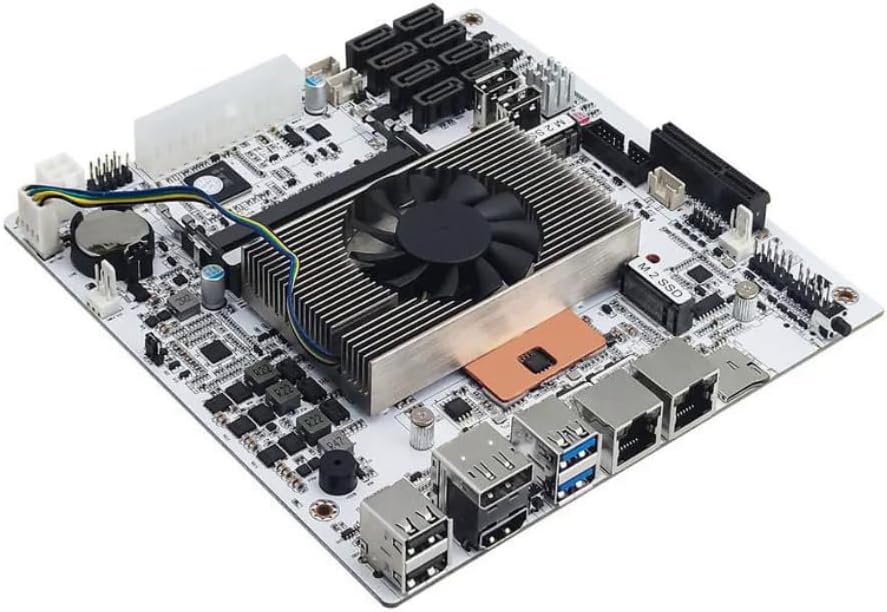
This industrial grade motherboard stands out as the top choice for users seeking a balance of performance and energy efficiency in home server or network appliance builds.
We may earn a commission when you buy through this link, at no additional cost to you.
Its Intel Celeron N5105 processor delivers solid multitasking capability while the four 2.5GbE ports ensure robust network throughput for demanding tasks like virtualization or media serving.
While the need for dual power connections and initial memory read delays may slightly complicate setup these are minor trade-offs for the stability and connectivity this board provides.
If you are building a dedicated NAS firewall or compact workstation this board offers the features and efficiency needed for continuous operation without excessive power draw.
With four i226 2.5GbE ports this board supports link aggregation and VLANs making it ideal for professional network security appliances and high throughput NAS systems.
The quad core processor and efficient design ensure smooth operation for virtualization and file serving while keeping power consumption low for 24 7 usage.
We may earn a commission when you buy through this link, at no additional cost to you.
This older model offers an entry point for users needing basic low power functionality without the cost of modern components despite its age and legacy specifications.
We may earn a commission when you buy through this link, at no additional cost to you.
The J1800 processor provides adequate power for light tasks while the micro ATX form factor fits compact cases and supports legacy interfaces like VGA and DVI.
Limited memory and storage capabilities may restrict future upgrades but this board remains useful for simple kiosks retro builds or budget constrained projects.
Consider this if you prioritize low cost and minimal power needs over modern performance and expansion capabilities for your specific use case.
Supporting VGA DVI and HDMI ensures compatibility with older monitors making it suitable for industrial displays or retro computing setups.
With multiple USB 2.0 and one USB 3.0 port plus two SATA2 ports this board handles essential peripherals and storage for light duty tasks.
We may earn a commission when you buy through this link, at no additional cost to you.
This micro ATX board brings AMD Ryzen power to budget builds with support for modern processors and PCIe 4.0 enabling efficient performance for mainstream tasks.
We may earn a commission when you buy through this link, at no additional cost to you.
The digital VRM and heatsink design deliver stable power delivery while the dual M.2 slots provide fast storage options for operating systems and applications.
While it lacks premium features like Wi-Fi or extensive USB connectivity it covers essential needs for cost effective desktops and compact home servers.
It is an excellent choice for users who want reliable AMD performance without breaking the bank on a motherboard platform.
Supporting Ryzen 5000 series allows for substantial performance gains in productivity and light gaming while maintaining energy efficiency.
Dual M.2 slots enable high speed NVMe storage for quick boot times and responsive application loading on modern systems.
We may earn a commission when you buy through this link, at no additional cost to you.
This motherboard focuses on thermal management and memory performance making it a strong candidate for systems where heat and responsiveness are priorities.
We may earn a commission when you buy through this link, at no additional cost to you.
The Frozr AI cooling adjusts fans automatically while the Core Boost technology ensures stable power to Ryzen CPUs enabling efficient performance under load.
Memory supports high overclocking speeds and the Gen4 M.2 slot delivers fast storage access though network and port counts remain modest for cost reasons.
Ideal for compact gaming or workstation builds this board provides reliable performance and cooling without unnecessary premium features.
Frozr AI cooling monitors temperatures to adjust fan speeds dynamically reducing noise while maintaining optimal thermal performance.
DDR4 memory supports overclocking up to 4400 plus MT/s for faster data processing and improved system responsiveness.
We may earn a commission when you buy through this link, at no additional cost to you.
A small form factor board with an integrated J4125 processor this model suits compact devices and low power applications where size matters most.
We may earn a commission when you buy through this link, at no additional cost to you.
It supports DDR4 memory and offers an M.2 key E slot for WiFi expansion making it versatile for thin clients or embedded systems.
While some users report mixed experiences it remains a solid option for basic computing tasks requiring minimal power consumption and physical footprint.
Consider this for projects where space is limited and advanced performance is not the primary concern for the build.
The Mini ITX form factor allows installation in small enclosures ideal for HTPC or portable workstation builds.
M.2 key E slot supports WiFi cards enabling wireless connectivity without external adapters for clean cable management.
We may earn a commission when you buy through this link, at no additional cost to you.
This model delivers strong value for budget conscious builders needing modern Ryzen support without paying premium prices for extra features.
We may earn a commission when you buy through this link, at no additional cost to you.
It supports the latest AMD CPUs and offers legacy VGA DVI and HDMI outputs making it versatile for diverse monitor setups in office or home environments.
Power and network specs are sufficient for daily use though advanced users may want more robust VRM or onboard wireless connectivity for heavier workloads.
If you need a cost effective platform for standard computing this board balances performance and affordability well.
Multiple video outputs ensure compatibility with older and newer monitors without needing adapters for seamless display setup.
Six USB 3.2 Gen 1 ports provide fast data transfer for peripherals and external drives essential for productivity.
We may earn a commission when you buy through this link, at no additional cost to you.
For compact builds requiring wireless connectivity and robust power delivery this Mini ITX board offers premium features in a small package.
We may earn a commission when you buy through this link, at no additional cost to you.
Its digital PWM and DrMOS components ensure stable power to CPUs while Intel WiFi and Bluetooth provide convenience for cable free setups.
While PCIe 3.0 limits maximum storage speeds compared to Gen4 this board remains powerful for mainstream computing and home media centers.
Choose this if you value wireless convenience and build quality in a space constrained environment for your next project.
Integrated Intel WiFi and Bluetooth eliminate the need for external dongles keeping your system clean and functional.
Six phase VRM design delivers stable power even in a Mini ITX layout supporting efficient CPU performance reliably.
We may earn a commission when you buy through this link, at no additional cost to you.
This model brings advanced wireless capability to standard micro ATX builds with top rated performance and extensive connectivity for diverse needs.
We may earn a commission when you buy through this link, at no additional cost to you.
Wi-Fi 6E provides low latency connectivity while the eight USB 3.2 ports support multiple peripherals and drives without adapters.
Support for Ryzen 3000 to 5000 series CPUs ensures long term usability though cooling is standard without special enhancements.
Ideal for users needing reliable wireless and ample ports this board delivers excellent value and user satisfaction.
Wi-Fi 6E supports the 6GHz band for faster speeds and reduced interference in congested wireless environments.
Eight USB 3.2 ports offer abundant connectivity for keyboards mice storage and other peripherals simultaneously.
We may earn a commission when you buy through this link, at no additional cost to you.
This board excels for home servers and network appliances offering rare features like eight SATA ports and dual high speed network interfaces in a compact size.
We may earn a commission when you buy through this link, at no additional cost to you.
The quad core eight thread CPU supports virtualization and multitasking efficiently while the dual ball bearing fan cooler maintains stable temperatures.
Sleep mode quirks and power requirements may complicate setup but the storage and networking capabilities are unmatched for dedicated appliances.
Choose this if you need a powerful yet small form factor board for advanced storage or network security projects.
Eight SATA ports allow connecting multiple drives for large storage arrays without additional expansion cards or controllers.
Dual 2.5GbE ports enable link aggregation and traffic separation for improved network performance and reliability.
We may earn a commission when you buy through this link, at no additional cost to you.
This model targets high capacity storage needs with a powerful Core i5 CPU and extensive connectivity for enterprise grade home or small office systems.
We may earn a commission when you buy through this link, at no additional cost to you.
Eight SATA ports and dual M.2 slots support massive storage arrays while the dual 2.5GbE LAN ensures fast network access for data transfer.
Lack of sleep mode and the use of an engineering sample CPU may limit long term support but performance remains strong for continuous operations.
Consider this for advanced NAS builds where storage capacity and network speed outweigh concerns about power management features.
Eight SATA ports plus two NVMe slots enable flexible storage configurations for massive data libraries or virtualization hosts.
Dual 2.5GbE LAN ports support high throughput for file serving and backups ensuring quick data access across the network.
We may earn a commission when you buy through this link, at no additional cost to you.
Selecting the right low power motherboard involves evaluating processor type form factor connectivity options and power efficiency to match your specific application needs.
Look for CPUs designed for low thermal design power like Intel Celeron Pentium or AMD Ryzen with G suffixes to minimize heat and power usage without sacrificing performance.
Prioritize processors with multiple cores and threads if you plan on running virtual machines or media servers that require multitasking capabilities.
Mini ITX boards save space and are ideal for compact builds while Micro ATX offers more expansion options for users needing additional PCIe slots or SATA ports.
Verify that your chosen case supports the board size and has adequate airflow to prevent overheating especially in passive cooling scenarios.
For NAS or firewall applications prioritize boards with multiple Gigabit or 2.5GbE LAN ports to ensure reliable and fast network connections for data transfer.
Ensure sufficient USB ports and video outputs match your peripheral needs including monitor support for desktop or headless server setups.
Check the number of SATA ports and M.2 slots available since high capacity storage needs require more connections for hard drives and fast NVMe SSDs.
Boards with extended SATA controllers can provide more drive bays but may impact overall bandwidth depending on PCIe lane allocation.
Some industrial low power boards require both 24pin and 4pin power connectors which may necessitate specific power supply units designed for server or NAS systems.
Confirm your power supply supports these connectors to avoid boot issues or instability during continuous operation of your system.
DDR4 memory provides better performance and efficiency compared to DDR3 ensuring smoother multitasking and faster data access for demanding applications.
Check maximum supported memory capacity and speeds to ensure the board can handle your workload especially if running virtual machines or databases.
Modern BIOS features like Q Flash or easy recovery options help maintain system stability without needing advanced technical knowledge for firmware updates.
Ensure the board supports your intended operating system including Linux or virtualization platforms if you plan on running specialized server software.
Look for boards with chipset heatsinks or built-in fan headers to manage heat dissipation efficiently especially if the system runs in enclosed spaces.
Proper cooling prolongs component life and ensures consistent performance during long periods of usage in server or storage applications.
Install the motherboard in a well ventilated case with proper cable management to ensure airflow reaches the VRM and chipset areas preventing overheating.
Update BIOS firmware upon purchase to ensure compatibility with your chosen CPU and enable any latest stability or performance features available from the manufacturer.
Monitor system temperatures regularly using software tools and clean dust from heatsinks and fans periodically to maintain optimal cooling and prevent thermal throttling.
A low power motherboard typically uses processors with reduced TDP efficient voltage regulators and minimal background power draw. It often supports DDR4 memory and includes features like fan control or sleep modes to conserve energy during idle periods.
Yes some models support discrete graphics cards and have adequate PCIe lanes for gaming though performance depends on the CPU and GPU combination. For light gaming or media playback these boards are efficient and sufficient.
Most standard ATX power supplies work fine but some industrial boards require additional 4pin connectors. Check the board manual to confirm power requirements before purchasing your power supply unit.
Many budget models do not include onboard WiFi so you may need a USB adapter or PCIe card. Higher end options often offer built-in wireless modules for convenience.
Standard boards support two to four SATA drives while NAS oriented models offer six to eight ports. Additional expansion cards can increase capacity if the PCIe slots are available.
Yes most support Windows 10 11 and Linux distributions. However older models may require updated BIOS or drivers for full compatibility with latest software and security features.
Idle power ranges from fifteen to thirty watts depending on CPU and peripherals. Under load consumption increases but remains lower than high performance desktop boards.
Our top picks highlight a range of options from budget friendly AMD boards to industrial NAS ready models ensuring you find a solution that fits your efficiency and performance needs.
Prioritize features like network ports storage capacity and CPU support based on whether you are building a home server compact desktop or specialized appliance.
Prices and availability may change so verify current stock and details before purchasing to ensure you get the best value for your specific project.