
Tripp Lite BC450
4.2Editor score
450VA compact design
8 outlets with wide spacing
Simple wall mount capability
This guide compares the top 10 battery backup units for small offices to help you choose the right UPS for protecting your critical equipment during power
Power outages can disrupt small office operations, leading to data loss and downtime. A reliable battery backup ensures your essential equipment continues running during interruptions.
We evaluated ten top-rated UPS models based on runtime, outlet count, surge protection, and features. Our analysis covers various needs from basic protection to advanced management.
Each pick highlights key strengths and ideal use cases. Prices fluctuate frequently, so verify current costs before purchasing to ensure you get the best value for your budget.
4.2Editor score

4.5Editor score
4.9Editor score
This side-by-side comparison highlights key specifications across all ten reviewed models to help you quickly identify the best fit for your specific office needs.


The CyberPower CP1500PFCLCD stands out as the top choice for small offices needing reliable power protection. Rated 4.5 stars, it combines high capacity with a true sinewave output that ensures compatibility with modern active power factor corrected equipment often found in workstations and servers.
We may earn a commission when you buy through this link, at no additional cost to you.
Its key strengths lie in versatility and monitoring. The 12 outlets allow you to plug in computers, routers, printers, and monitors without needing extra power strips. The color LCD panel displays real-time battery and load data, alerting you to issues before they impact critical operations.
While the price point is higher than entry-level units, the investment is justified by the superior protection and feature set. The inclusion of USB charging ports adds convenience for mobile devices during an outage, and the automatic voltage regulation corrects fluctuations without draining the battery.
This model is ideal for small offices running demanding workloads or sensitive electronics. If you need dependable uptime and detailed power management without breaking the bank on enterprise gear, this UPS offers the best balance of performance and features.
Unlike simulated sine wave units, this model delivers clean power that prevents overheating and potential damage to Active PFC power supplies found in modern PCs.
The color LCD and PowerPanel software allow precise tracking of battery health and runtime estimates helping you plan maintenance and usage effectively.
We may earn a commission when you buy through this link, at no additional cost to you.
The CyberPower CP1500AVRLCD3 is a robust option for offices prioritizing capacity and stability. With a 4.5-star rating, it offers 1500VA of power and intelligent LCD monitoring that keeps you informed about battery health and electrical conditions during outages.
We may earn a commission when you buy through this link, at no additional cost to you.
Its automatic voltage regulation (AVR) is a standout feature that corrects minor voltage fluctuations without switching to battery power. This extends battery life during brownouts. The color display alerts users to potential issues early, preventing unexpected downtime or equipment damage.
Note that this unit uses simulated sine wave technology. While suitable for most desktop PCs and networking gear, it is not recommended for Active PFC power supplies. Ensure your equipment is compatible before purchasing to avoid performance issues.
Choose this model if you need significant runtime and AVR protection for a standard office setup. It balances performance with cost effectively, making it a strong contender for mid-sized office environments needing reliable backup.
With 1500VA capacity you gain ample time to save work and shut down systems safely even when running multiple high-wattage devices simultaneously.
The Intelligent LCD panel provides immediate feedback on load and battery status ensuring you are never caught off guard by power events.
We may earn a commission when you buy through this link, at no additional cost to you.
The CyberPower EC850LCD focuses on efficiency, making it a great fit for eco-conscious offices. Rated 4.4 stars, it features an ECO mode that cuts power to connected peripherals when the main computer sleeps reducing unnecessary energy consumption and lowering costs.
We may earn a commission when you buy through this link, at no additional cost to you.
Its primary benefit is the energy-saving mode combined with a generous 12 outlets. This allows flexible placement of devices. The LCD panel offers essential battery and power info without overwhelming complexity, ensuring quick status checks when needed.
Be aware that the ECO mode might not be ideal if you need constant power for secondary devices like printers or security systems during office hours. Adjust settings carefully to match your workflow. The connected equipment guarantee adds peace of mind.
This UPS is perfect for small offices wanting to reduce power usage without sacrificing backup security. If energy savings and simplicity are priorities, the Ecologic model delivers reliable protection with a greener footprint.
When your main PC enters sleep mode the UPS automatically disconnects power to peripherals plugged into ECO outlets reducing idle power draw significantly.
Twelve outlets give you plenty of room to plug in computers monitors routers and other gear without needing additional power strips cluttering your desk.
We may earn a commission when you buy through this link, at no additional cost to you.
The CyberPower ST900U is designed for compact offices with limited desk space. With a 4.5-star rating, it offers a slim profile that tucks neatly under desks while still providing 900VA capacity for essential devices during short power interruptions.
We may earn a commission when you buy through this link, at no additional cost to you.
Its standout feature is the wide-spaced outlets that accommodate large power bricks or adapters without blocking adjacent sockets. The GreenPower efficiency design ensures low power consumption during operation, helping keep energy costs down over time.
While it lacks advanced features like AVR or extensive software, it covers the basics well. The battery replacement process is straightforward. Just ensure you do not exceed the 500W total load to maintain safe operation and expected runtime.
Select this UPS if you need a simple, unobtrusive backup for basic computing tasks. It is an excellent value for small offices needing reliable surge protection and short-term power without complex features.
Its slim vertical profile occupies minimal floor or desk space perfect for cramped home offices or small workstations needing discreet protection.
Wide-spaced outlets prevent bulky adapters from blocking nearby sockets ensuring you can use all eight outlets without needing extension cords.
We may earn a commission when you buy through this link, at no additional cost to you.
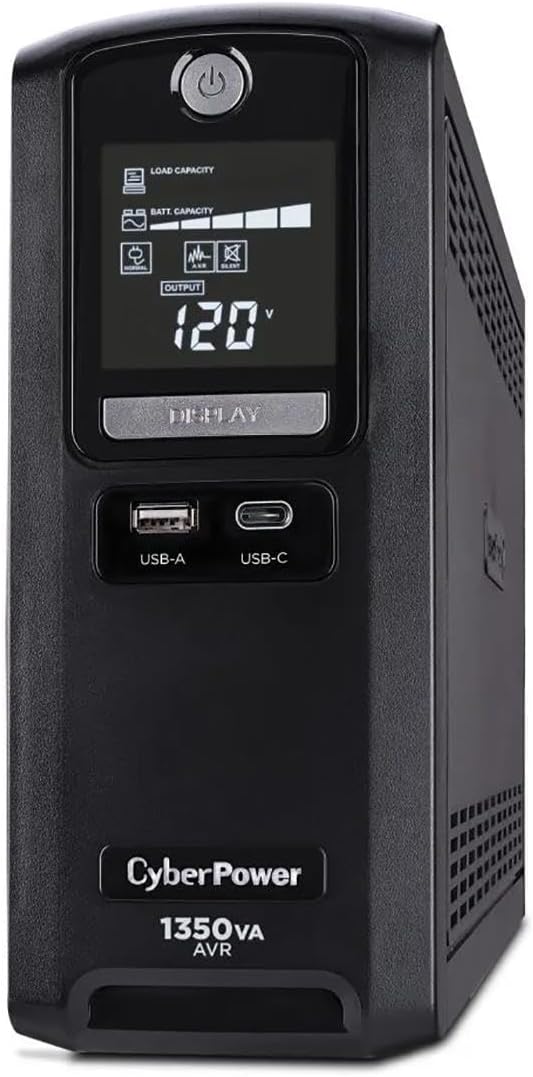
The CyberPower CST135UC is the highest-rated model on this list at 4.9 stars. It offers premium features like integrated network and coax line protection which safeguard internet and TV connections against surges traveling through data lines during storms or power issues.
We may earn a commission when you buy through this link, at no additional cost to you.
Its 1350VA capacity provides ample runtime for office setups. The Energy Star certification and GreenPower Bypass Technology minimize energy consumption. The USB ports support both Type-A and Type-C devices with high amp output for fast charging during outages.
While the price is higher, the added data protection justifies it for offices where internet connectivity is critical. Ensure your PCs are compatible with simulated sine wave outputs. The software support is robust for advanced monitoring.
This is the ideal choice for offices needing comprehensive protection for both power and data lines. If internet downtime is unacceptable, the coax and network ports make this unit worth the extra investment.
Protects both power outlets and data lines from surges ensuring your network equipment stays safe even when storms hit the telephone or cable lines.
With 1350VA you can run multiple high-wattage devices or maintain full load for longer periods giving you ample time to save and shutdown.
We may earn a commission when you buy through this link, at no additional cost to you.
The CyberPower AVRG900LCD offers strong protection features including telephone line protection. Rated 4.6 stars, it prevents surges from traveling through phone lines into your equipment which can still be relevant for fax machines or legacy modems in some offices.
We may earn a commission when you buy through this link, at no additional cost to you.
Its automatic voltage regulation stabilizes incoming power without battery use. The intelligent LCD displays battery status and load clearly. This helps you manage runtime expectations and plan for shutdowns during outages effectively.
Modern offices may find the telephone protection less critical but the AVR function remains highly useful for areas with unstable grid power. The warranty and software support add to its reliability as a mid-tier option.
Choose this if you need AVR and basic data protection. It is a versatile unit for small businesses needing stable power quality without investing in the top-tier models.
Automatic voltage regulation corrects minor power fluctuations using internal components saving battery life and ensuring consistent voltage for your devices.
The intelligent LCD provides immediate and detailed information on battery and power conditions helping you manage your backup resources efficiently.
We may earn a commission when you buy through this link, at no additional cost to you.
The Tripp Lite BC450 is the most budget-friendly option for small offices needing basic protection. Rated 4.2 stars, it offers 450VA capacity sufficient for a single PC and router. Its compact design saves desk space while delivering essential surge protection.
We may earn a commission when you buy through this link, at no additional cost to you.
Its primary strengths are simplicity and cost. The wide-spaced outlets accommodate bulky adapters. It is designed for easy wall mounting using built-in tabs. The silent operation ensures it does not distract during quiet work sessions.
Runtime is limited especially under heavy loads but this unit serves well for short outages. The internal battery is replaceable extending the unit's life. Ensure you stay within the 255W limit for safe operation.
This UPS is perfect for home offices or small setups on a tight budget. It offers the essentials without unnecessary complexity making it a practical entry point into UPS protection.
Built-in wall mount tabs let you secure the unit under a desk freeing up valuable desk space for your work and equipment.
Remains silent during normal and battery operation avoiding audible alarms unless a fault occurs keeping your work environment peaceful and focused.
We may earn a commission when you buy through this link, at no additional cost to you.
The Tripp Lite BC350R is designed for minimal power needs and small footprints. With a 4.5 rating, it provides 350VA to keep a basic system and internet connection running briefly during outages. Its automatic restart feature is handy for kiosks or unattended setups.
We may earn a commission when you buy through this link, at no additional cost to you.
Its simplicity is key. Plug in and connect devices quickly. The internal battery is easy to replace. LED indicators clearly show power and fault status. This model excels where space and budget are tight.
Given the low capacity it is best for light loads. Do not connect high-wattage devices. Ensure you monitor the battery health periodically. It is an efficient backup for routers and single PCs.
Choose this for kiosks or micro-offices needing essential protection. If you need basic backup for essential gear with minimal complexity and cost this unit fits the bill well.
Restarts automatically once power is restored regardless of battery charge ensuring your systems come back online without manual intervention or reboot.
Setup is straightforward with clear LED indicators showing power and status making it easy for anyone to monitor and maintain.
We may earn a commission when you buy through this link, at no additional cost to you.
The APC BE600M1 brings APC's trusted reliability to small offices. Rated 4.5 stars, it offers a practical design with easy battery replacement. If the battery ages out you can swap it without replacing the entire unit saving long-term costs.
We may earn a commission when you buy through this link, at no additional cost to you.
Its USB port charges phones during outages which is valuable for mobile communication. The seven outlets include ample spacing for plugs. This model is optimized to keep routers and computers alive during short outages.
The interface is simple without advanced monitoring features. However, the core protection is solid. The runtime at 100W is enough to shut down systems safely. Ensure your total load does not exceed rated limits.
Choose this if you value brand reputation and ease of maintenance. The swap battery feature makes it a practical long-term solution for offices wanting minimal hassle.
Swap the internal battery in minutes when it ages out without needing specialized tools or technical knowledge extending the unit's lifespan.
Built-in USB charging keeps your phone powered during outages ensuring you stay connected and informed even when the power is out.
We may earn a commission when you buy through this link, at no additional cost to you.
The CyberPower ST425 is a straightforward entry-level UPS for small offices. With a 4.4 rating it offers 425VA of backup capacity. It is ideal for powering a single workstation and router briefly during outages with simple LED indicators.
We may earn a commission when you buy through this link, at no additional cost to you.
Its efficiency reduces power draw when operating normally. The transformer-spaced outlets prevent bulk adapters from blocking adjacent sockets. This ensures all eight outlets remain usable without needing extra extension cords or adapters.
This model lacks advanced software or voltage regulation features. It is best for basic setups needing essential surge protection. Keep total load under 260W for safe performance and optimal runtime.
Choose this if you need a simple budget friendly backup. It provides essential protection without complexity for small workstations or home office setups with basic needs.
Transformer-spaced outlets provide clearance for bulky adapters ensuring you can utilize all eight outlets without interference or blockage.
LED status lights clearly indicate power and fault conditions making it easy to understand unit status without needing a display screen.
We may earn a commission when you buy through this link, at no additional cost to you.
Selecting the right UPS involves balancing capacity, runtime, and features. This guide explains key factors to help you choose a backup that suits your office needs.
Capacity measured in VA or watts determines how many devices you can power simultaneously. Calculate the total wattage of your equipment to ensure the UPS meets your demand.
Choose a unit with capacity exceeding your total load by at least 20 to allow for efficiency and battery longevity.
Runtime depends on load and battery condition. Higher load drains batteries faster. Look for models offering enough time to save files and shut down safely.
Consider battery replacement costs and warranties. Units with replaceable batteries extend the life of the entire system.
Pure sine wave outputs are safest for active PFC power supplies. Simulated sine wave works for most standard devices but may stress sensitive electronics.
Verify your equipment compatibility before purchase. Active PFC computers require true sine wave to avoid overheating.
Ensure enough outlets for all devices including routers and monitors. Wide spacing prevents large adapters from blocking adjacent sockets.
Select a model with more outlets than you currently need to accommodate future expansion without extra power strips.
Surge protection measured in Joules absorbs spikes from lightning or grid disturbances. Higher ratings offer better protection against damage.
Choose units with Joule ratings exceeding 1000 to ensure robust defense for critical office equipment.
Software allows monitoring battery status and managing shutdowns automatically. LCD panels provide real-time data without a computer.
Pick models with intuitive software if remote monitoring or safe shutdown scripts are important for your workflow.
A longer warranty reduces risk and indicates quality. Check if the battery is covered. Responsive support helps troubleshoot issues quickly.
Prioritize units with comprehensive warranty coverage and clear service terms for peace of mind.
Consider available desk or floor space. Slim or wall-mount designs fit tight areas. Larger units may offer better airflow and battery life.
Ensure the unit is stable and can be placed in a ventilated spot to prevent overheating during operation.
Install your UPS on a stable surface near your equipment. Avoid placing it on carpeting or in enclosed spaces that block airflow. Plug critical devices into the battery backup outlets rather than surge-only sockets.
Regularly check battery health through software or LCD panels. Replace the battery every three to five years or when runtime drops significantly. Keep the UPS charged and connected even when not in use to maintain battery life.
Test your UPS annually by unplugging it from the wall. Confirm your devices switch to battery power and shut down safely. Keep your power cords organized and avoid overloading outlets. Maintain a clean environment to protect connectors from dust and debris.
Determine total wattage of connected devices and aim for 20 percent headroom. Most small offices need at least 600VA to 1000VA capacity. This ensures enough runtime to save work and shut down safely during outages.
Sine wave delivers clean pure power safe for all electronics. Simulated sine wave approximates a wave and works for most devices but may damage Active PFC power supplies. Check your equipment requirements before choosing.
Runtime varies by load. At half load many units last 10 to 15 minutes. Higher loads reduce runtime. Always test runtime after setup to know exact times for your configuration.
Generally no. Laser printers consume high wattage during warm-up and will overload most small UPS units. Connect printers to surge-only outlets instead of battery backup sockets.
Software enables automatic shutdowns and remote monitoring. It is highly recommended for unattended setups. Many units include free software. If using a managed network device software may be essential.
Most UPS batteries last 3 to 5 years depending on usage. Replace when runtime drops noticeably or alerts indicate replacement. Keep spare batteries available if downtime must be minimized.
UPS units offer surge protection but are not lightning arrestors. They can handle small surges but a direct strike may exceed limits. Use additional whole-building surge protectors for best safety.
Basic maintenance includes keeping the unit clean and testing it yearly. Ensure proper ventilation to prevent overheating. Monitor battery status through software or indicators and replace as needed.
The top picks offer strong options across budget and performance levels. The CyberPower CP1500PFCLCD stands out as the best overall unit for its capacity and waveform quality.
Prioritize capacity and waveform compatibility to avoid equipment issues. Consider runtime needs and data protection features before selecting your model to ensure a suitable fit.
Prices and availability change frequently so always check current offers before purchasing. Verify warranty details and return policies to ensure your investment is protected.