
HHmei 7 Inch Universal Keyboard
4.4Editor score
Affordable USB interface connection
Built-in stand for viewing
Leather material protection
Finding the right keyboard case for a 7 inch tablet can transform your mobile device into a productive workstation. These versatile accessories combine protection with typing efficiency, allowing you to work or create on the go without carrying separate peripherals.
We have carefully evaluated ten distinct options available on the market to determine which models offer the best balance of build quality, connectivity, and value. Each product was selected based on user feedback, compatibility features, and specific design elements that enhance the overall tablet experience.
Each pick in this list highlights unique strengths such as wireless connectivity, durable materials, or adjustable viewing angles. Please note that product availability and pricing can fluctuate over time, so verify current details before making your final purchase decision.
4.4Editor score

4.3Editor score
4.4Editor score
As an Amazon Associate we earn from qualifying purchases.
The following comparison table provides a side-by-side overview of all ten selected keyboard cases. This summary helps you quickly identify key specifications and connectivity types to match your specific tablet model and usage needs.


The DETUOSI Universal 7.0 inch Android Tablet Case stands out as a versatile solution for users seeking a protective cover that doubles as a typing station. With a solid rating from users, it offers a reliable combination of folio protection and a detachable wireless keyboard.
We may earn a commission when you buy through this link, at no additional cost to you.
Its universal design supports a broad spectrum of 7.0 to 7.9 inch tablets across iOS, Android, and Windows systems. The inclusion of elastic pull-loop buckles ensures your device stays firmly in place without slipping or shaking during active use.
While the keyboard is lightweight and offers a ten-meter range for flexibility, the case itself does not include a rear camera hole which might limit camera access while in the case. This trade-off is acceptable for those prioritizing full-body protection over camera convenience.
This case is ideal for travelers and students who need a portable setup that transitions easily from reading to working. Its magnetic closure and strong stand function make it a top choice for everyday productivity and entertainment on your 7-inch tablet.
The case supports models like Samsung Galaxy Tab 7 inch and Lenovo Tab M7 ensuring it fits your device perfectly.
The slim five millimeter thick keyboard is lightweight enough to carry easily while providing a comfortable typing experience.
We may earn a commission when you buy through this link, at no additional cost to you.
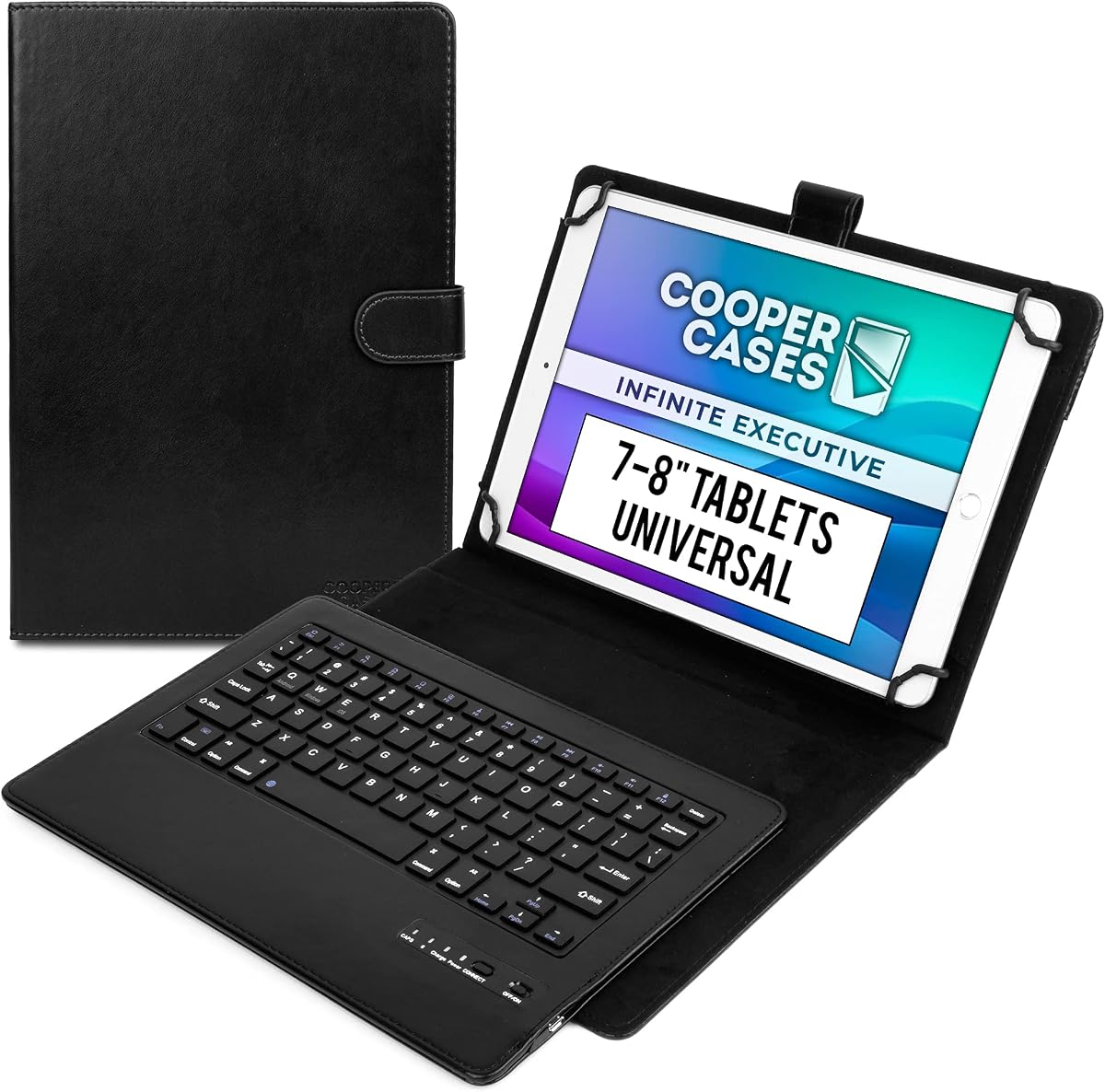
The COOPER Infinite Executive Universal Tablet Keyboard Case is designed for professionals who require a robust and efficient typing solution. It features a premium vegan leather exterior that offers a sophisticated look suitable for business environments.
We may earn a commission when you buy through this link, at no additional cost to you.
Users benefit from 14 dedicated hotkeys that streamline workflow and increase typing speed. The keyboard includes a rechargeable battery that lasts up to one hundred hours, ensuring you can work for extended periods without interruption.
Secure grip claws hold the tablet firmly in place preventing movement during typing. However, the tablet must meet specific width and length requirements to fit correctly, which may exclude some models outside the standard range.
This option is perfect for users who value durability and performance in a portable package. The combination of a protective case and an efficient keyboard makes it a strong contender for those seeking a high-end accessory for their tablet.
The 14 hotkeys allow quick access to essential functions improving your productivity while working on the go.
Scratch proof claws and microfiber interior ensure your tablet remains safe from daily wear and tear.
We may earn a commission when you buy through this link, at no additional cost to you.
For those on a strict budget, the HHmei 7 Inch Universal Keyboard provides a functional and affordable way to add typing capabilities to your tablet. It simplifies the accessory market by offering a direct plug-and-play solution without complex setup.
We may earn a commission when you buy through this link, at no additional cost to you.
The keyboard connects via a standard USB interface which ensures stable communication with your tablet. Users appreciate the responsive keys that make text entry smooth and efficient for emails and documents.
While it lacks wireless connectivity, the included stand allows you to position your tablet for comfortable viewing. The PU leather case offers basic protection against scratches though it may not be as durable as higher-end options.
This product is best suited for casual users who need an occasional typing solution without investing much. Its simplicity and low cost make it an excellent entry-level choice for transforming your tablet into a mini laptop.
The budget-friendly price makes this an accessible choice for students or casual users seeking basic typing functionality.
The included stand allows for hands-free video viewing making it useful for entertainment as well as work.
We may earn a commission when you buy through this link, at no additional cost to you.
The Sanpyl Bluetooth Keyboard Case has earned a perfect rating from users who appreciate its simplicity and effectiveness. It is designed to connect easily via Bluetooth allowing for a seamless plug-and-play experience without driver installation.
We may earn a commission when you buy through this link, at no additional cost to you.
Its design supports not just tablets but also large screen mobile phones increasing its versatility. The rechargeable battery ensures the keyboard remains ready for use over multiple sessions without frequent replacements.
While the product is highly functional, users may find that charging the keyboard adds a minor step to their routine. However, the convenience of wireless typing outweighs this small maintenance requirement for most owners.
This case is an excellent choice for users who value ease of use and broad compatibility. Whether you are using a tablet for business or leisure, this set provides a reliable typing experience with minimal fuss.
The Bluetooth connection setup is straightforward allowing you to start typing immediately after pairing.
Supporting both tablets and large screen phones makes this a versatile accessory for multiple devices.
We may earn a commission when you buy through this link, at no additional cost to you.
This Universal Folding Leather Folio Case is tailored for tablets equipped with a USB-C port providing a modern connectivity solution. It transforms your tablet into a small laptop enabling you to get real work done efficiently.
We may earn a commission when you buy through this link, at no additional cost to you.
The keyboard connects directly via a Type-C male adapter which eliminates the need for wireless pairing. This direct connection ensures stability and reduces latency during typing which is crucial for long document editing sessions.
While effective, this model requires that your tablet supports a USB host for the keyboard to function properly. Users should check their device specifications before purchasing to ensure compatibility with this wired setup.
Ideal for users with newer tablets that feature USB-C ports, this case offers a robust typing experience. The built-in kickstand adds to its utility by providing stable viewing angles for both work and media consumption.
The direct USB-C connection simplifies the setup process ensuring a stable link between tablet and keyboard.
The combination of a hard case and integrated keyboard makes this ideal for serious users on the move.
We may earn a commission when you buy through this link, at no additional cost to you.
The Universal 7 Inch Type C Keyboard Cases offers a straightforward solution for users with USB-C enabled tablets. It combines a protective leather folio with an integrated keyboard for a seamless all-in-one accessory.
We may earn a commission when you buy through this link, at no additional cost to you.
The connection is made via a Type-C cable which ensures a reliable link for typing tasks. While this limits wireless freedom, it provides a consistent connection that does not rely on battery power for the link itself.
The leather cover is designed to protect your tablet from scratches and bumps during transport. However, the wired nature of the keyboard means it must remain connected to the tablet to function which can be restrictive.
This product is a solid choice for budget-conscious users who prioritize stability over wireless features. It is particularly useful for desk-based work where the tablet remains stationary during use.
The leather folio cover ensures your tablet is shielded from daily wear and tear while being carried.
A direct cable connection provides a consistent typing experience without interruptions caused by wireless signal issues.
We may earn a commission when you buy through this link, at no additional cost to you.
The USB Keyboard & Case for 7 Tablets provides a classic and functional accessory for those with older tablet models. Its inclusion of a stylus adds extra value for users who need to navigate touch screens or take handwritten notes.
We may earn a commission when you buy through this link, at no additional cost to you.
The keyboard features LED indicators for Num lock and Caps lock which help prevent typing errors. It connects via a standard USB interface which is widely supported across many older Android and Windows devices.
While the design is simple, it includes a magnetic fastening strap to keep the case closed securely. The built-in stand allows for easy viewing though it may lack the adjustable angles found in newer models.
This accessory is suitable for users who need a no-frills typing solution with added stylus functionality. It serves as a reliable backup or travel option for those who prefer physical controls over touch-only inputs.
The included stylus allows for precise navigation and note-taking which is helpful for creative or educational use.
LED lights for lock functions help you stay aware of keyboard settings while typing.
We may earn a commission when you buy through this link, at no additional cost to you.
The Navitech Black Rotational Bluetooth Keyboard Case is tailored for users who need flexibility in how they view and type on their device. Its rotational design allows you to switch between landscape and portrait orientations easily.
We may earn a commission when you buy through this link, at no additional cost to you.
The keyboard supports multiple operating systems making it adaptable to various environments. A rechargeable battery offers up to thirty hours of active use ensuring you can work for long periods without recharging.
While specific to certain tablet models like Tonysa, the secure elastic closure keeps your device safe during movement. The inclusion of a twelve-month warranty adds a layer of confidence for the buyer regarding durability.
This case is ideal for users who value versatility and long battery life. It is a strong choice for media consumption and productivity tasks where changing screen orientations enhances the experience.
The ability to rotate the keyboard and case allows for comfortable use in both portrait and landscape modes.
Thirty hours of active use means you can rely on the keyboard for extended work sessions without interruption.
We may earn a commission when you buy through this link, at no additional cost to you.
The 7-7.9 Tablet PU Protective Case Cover is designed to support a wide range of devices including Android and iOS tablets and phones. This versatility makes it a practical choice for households with multiple devices.
We may earn a commission when you buy through this link, at no additional cost to you.
It features a plug and play Bluetooth connection that simplifies setup for all users. The keyboard is designed with fine craftsmanship ensuring a comfortable feel during extended typing sessions.
The case includes a stand function which enhances its utility for watching videos or reading content hands-free. While user feedback is limited, the design suggests a focus on practical functionality and broad compatibility.
This option is suitable for users who need a universal keyboard solution that works across different platforms. It offers a balance of protection and functionality that is well-suited for daily use.
Compatibility with both Android and iOS ensures you can use the same accessory across different devices.
The keyboard is crafted to provide a good feel making it comfortable to use for long periods.
We may earn a commission when you buy through this link, at no additional cost to you.
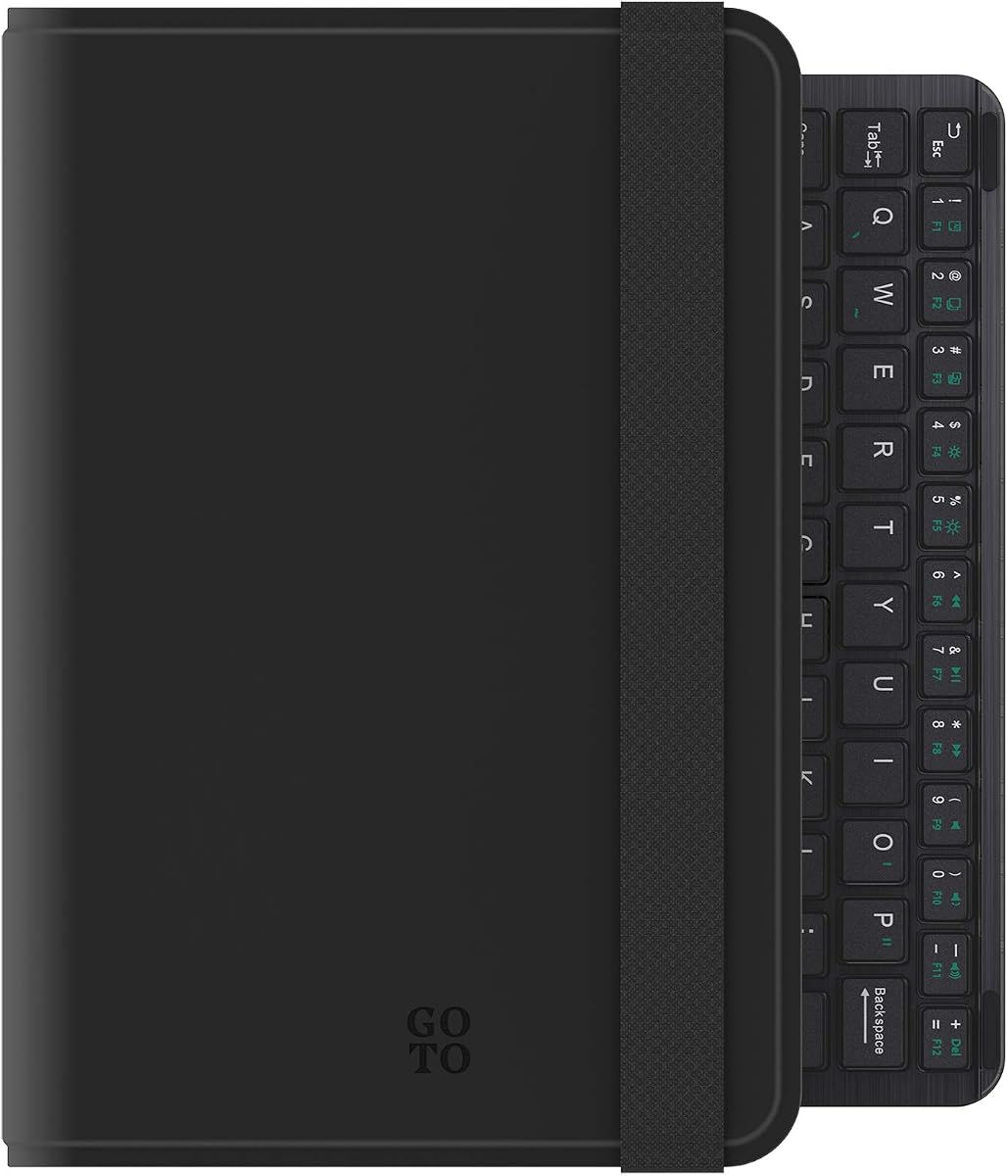
The GoTo Universal 7-8 Inch Keyboard Tablet Folio Case offers a modern approach with adjustable bands that ensure your tablet stays secure. It is designed to provide multiple viewing angles for different tasks.
We may earn a commission when you buy through this link, at no additional cost to you.
The inclusion of a pencil holder makes it a convenient choice for artists or students who use styluses. The wireless keyboard adds flexibility allowing you to type from a slight distance if needed.
Protective materials help keep your tablet safe from spills and scratches which is vital for daily use. While detailed reviews are limited, the feature set suggests a focus on versatility and accessory storage.
This case is ideal for users who value storage for their tools and flexible viewing options. It is a solid addition to your mobile setup if you need an organized and secure way to carry your tablet.
Adjustable bands allow you to tighten the case around your device ensuring it stays in place during travel.
The pencil holder provides a convenient spot for your stylus keeping it accessible and safe.
We may earn a commission when you buy through this link, at no additional cost to you.
Choosing the right keyboard case involves evaluating connectivity, material, and compatibility. This guide helps you understand the key factors to consider for your specific needs.
Connectivity is a primary consideration as it dictates how the keyboard interacts with your tablet. Wireless Bluetooth models offer freedom of movement and reduce cable clutter but require battery management. Wired USB or USB-C options provide stability and do not need a separate power source but restrict placement to a fixed position near the port.
Choose wireless for mobility and wired for reliability depending on your typical usage environment.
The material of the case determines how well it protects your device from daily wear and tear. Common materials include PU leather which offers a sleek look and reasonable durability against scratches. Harder cases may provide more shock absorption but can add weight to the overall package.
Select a material that balances protection with the weight you are comfortable carrying.
Ensuring the case fits your specific tablet model is crucial for a secure fit and full functionality. Universal cases often cover a range of sizes such as 7 to 8 inches but you must check dimensions to avoid a loose fit. Some models are designed for specific brands or operating systems which can limit versatility.
Always verify your tablet dimensions and system requirements before purchasing to ensure a perfect match.
A good keyboard case should include a stand function that allows for comfortable viewing angles. Look for cases that support multiple angles to accommodate both typing and media consumption. A sturdy stand ensures the tablet does not tip over during use.
Prioritize cases with robust stand designs to enhance your viewing and typing experience.
The quality of the keyboard keys affects your typing speed and comfort. Scissor-cut keys or full-sized keys often provide a better tactile feel than flat membrane keys. Check for features like backlighting or hotkeys if you plan to use the keyboard for work.
Opt for a keyboard layout that suits your typing style and daily workload needs.
For wireless keyboards, battery life is a significant factor for uninterrupted usage. Rechargeable batteries are convenient and reduce waste but require a charging routine. Models with long standby times can last weeks on a single charge.
Ensure the battery life meets your usage patterns to avoid frequent recharging interruptions.
Some cases come with extra features like pencil holders or secure claws that hold the tablet firmly. These additions can add value to the accessory by reducing the need for other small items. Magnetic closures also help keep the case secure when closed.
Consider features that solve specific organizational or security problems you face with your device.
Price varies based on brand and features but a higher price does not always mean better quality. Look for value where you get all necessary features at a fair cost. Budget options may lack premium materials but still offer functional typing solutions.
Compare features against price to find the best value for your specific requirements.
To start using your keyboard case place the tablet into the case and ensure the clips or bands are secure. If using a Bluetooth keyboard pair the device with your tablet through the settings menu before typing.
For wireless models keep the keyboard charged by connecting it to a power source regularly. Clean the keyboard surface with a dry cloth to remove dust and prevent debris from getting between the keys.
Store your tablet and case in a cool dry place to protect the materials from heat and humidity. Avoid placing heavy objects on the case when closed to maintain the shape of the keyboard and stand.
Universal cases are designed to fit a range of sizes typically between 7 to 8 inches. However you should measure your tablet's length and width to ensure a snug fit. Some models may have specific features like rear camera holes that limit compatibility.
Yes most Bluetooth keyboards require a manual pairing process through your tablet's Bluetooth settings. Once connected they usually remember the device for future use. Wired keyboards do not need pairing but require a connection to a compatible port.
Battery life varies by model but rechargeable keyboards often last around thirty to one hundred hours of active use. Standby time can extend to several weeks if the keyboard is not in use daily. Check specific product details for exact battery specifications.
Many universal keyboard cases support large screen mobile phones as well as tablets. Verify the compatibility list on the product page to ensure your phone size is supported. Bluetooth connections often work across both Android and iOS devices.
Most keyboard cases are water-resistant at best but not fully waterproof. It is best to keep liquids away from the device to prevent damage to the electronics and the case material. Wipe up spills immediately if they occur to ensure safety.
Check that the keyboard is paired correctly and has sufficient battery power. Restarting the Bluetooth connection on your tablet often resolves temporary issues. If problems persist contact the manufacturer or check the warranty for support options.
Typing while holding the tablet is possible but may be less stable than using the stand. The keyboard is designed to rest on a surface for the best experience. Using the built-in stand allows for hands-free viewing and typing.
Most budget and universal cases do not include backlit keys due to power constraints. Premium models might offer this feature for low-light environments. Check the product specifications to confirm if backlighting is available.
We have reviewed ten top keyboard cases ranging from budget-friendly options to premium executive designs. The DETUOSI Universal and COOPER Infinite Executive stand out as top choices for versatility and build quality respectively.
When choosing prioritize features that match your daily workflow such as connectivity type and material durability. A well-chosen case can significantly improve productivity and protect your investment from daily wear.
Prices and availability change frequently so verify the current details before purchasing. This guide aims to help you make an informed decision that suits your specific tablet and usage needs.