
HiLetgo MAX7219 Dot Matrix Module
4.4Editor score
Simple 5pin interface
Compact dimensions design
Affordable pricing point
This guide compares the top LCD Dot Matrix Modules for embedded projects. We analyze display clarity, interface options, and compatibility to help you choose
LCD Dot Matrix Modules are essential components for any electronics enthusiast or professional engineer looking to add visual feedback to their projects. Whether you need to display simple text or complex graphics, these modules provide a reliable and cost-effective solution for user interfaces in embedded systems.
We have carefully selected ten distinct options from the market today to ensure you have a comprehensive overview of what is available. Our selection process prioritized variety in size, interface type, and backlight color to cover a wide range of application scenarios from industrial control to hobbyist robotics.
Each pick in this list highlights specific strengths such as ease of integration, contrast ratios, or physical durability. Please note that while prices are accurate at the time of writing, market fluctuations may occur, so verifying current availability is always recommended before placing your order.
4.4Editor score

4.1Editor score

4.5Editor score
The following table provides a side by side comparison of all ten products featured in this guide. We have condensed key specifications into short lines to help you quickly identify the module that best fits your specific voltage and interface requirements.




The Ximimark 12864 module stands out as a top choice for projects requiring graphical output rather than just text. With a resolution of 128 by 64 dots, it offers enough screen real estate to display simple icons, charts, or custom fonts effectively. The blue backlight provides excellent contrast against the dark background, making it readable even in moderately lit environments.
We may earn a commission when you buy through this link, at no additional cost to you.
One of the strongest features of this module is the inclusion of an integrated potentiometer for adjusting display contrast. This physical control allows you to fine tune the display visibility without digging through code or software settings. Additionally, the availability of easy to use Arduino libraries and examples significantly reduces the time required to get a basic display running on your prototyping board.
While the module performs well, it does have some trade-offs. The housing is basic plastic which may not be suitable for rugged industrial environments without additional casing. Furthermore, the headers are not pre-soldered, meaning you will need to solder pins onto the board yourself before connecting it to a breadboard or controller.
This module is ideal for hobbyists and professionals who need a low-cost graphical display for status screens or user interfaces. If you are comfortable with basic soldering and want a reliable blue screen option, this is a highly recommended starting point for your embedded display needs.
The provided libraries and examples mean you can start displaying data almost immediately after connecting the power and data lines.
The built-in potentiometer gives you physical control over contrast, ensuring readability across different lighting conditions.
We may earn a commission when you buy through this link, at no additional cost to you.
This generic 12864 LCD module is an excellent alternative for those looking for graphical display capabilities without a premium price tag. It features a 128 by 64 pixel resolution which is standard for this type of module, allowing for flexible graphic rendering. The blue backlight ensures that the characters and graphics pop clearly against the background.
We may earn a commission when you buy through this link, at no additional cost to you.
The display is noted for its wide viewing angle and high contrast, which are critical factors when the device will be viewed from different positions. Compatibility with boards like the MEGA 2560 and Due makes it versatile for larger projects. The inclusion of 1×20 pin headers simplifies the connection process to your main controller.
A potential drawback is the lack of detailed documentation often associated with generic components. You might need to rely on community forums or datasheets to find the exact pinout and command set. The build materials are functional but utilitarian, focusing on performance rather than aesthetic durability.
This module is best suited for engineers or makers who already have experience with LCD drivers and want a cost-effective display for industrial prototypes or custom enclosures. It offers the core functionality needed for graphical user interfaces without the cost of branded equivalents.
The high contrast ratio ensures that text and icons are easily distinguishable even in challenging lighting conditions.
Designed to work smoothly with popular controllers like the MEGA 2560 and Due for easy integration.
We may earn a commission when you buy through this link, at no additional cost to you.
If you need multiple displays for a project or plan to sell kits, this two-pack of 1602 LCD modules is a practical choice. Each module displays 16 characters across two lines, which is the standard for many Arduino projects. The blue backlight and white text combination is a classic look that many users find familiar and easy to read.
We may earn a commission when you buy through this link, at no additional cost to you.
The modules are designed to operate at 5V, which aligns perfectly with most microcontroller logic levels like Arduino or ESP8266. They use a parallel port interface which is straightforward to wire up on a breadboard. The operating temperature range extends from -20 to 70 degrees Celsius, making them suitable for various indoor environments.
One consideration is the physical size. These modules are relatively large with a length of 80mm, which might be a constraint for small wearable projects. Also, the parallel interface requires more pins than I2C versions, which could be a limitation if you have a microcontroller with limited I/O available.
This pack is perfect for educators teaching electronics, makers building multiple stations, or anyone needing a backup display. It is a reliable option for standard text output tasks where space is not a primary constraint and you want to save on shipping or buying multiple times.
Getting two units in one package provides excellent value for projects that require multiple displays or spares.
Compatible with standard controllers and interfaces ensuring you can use it with existing libraries and code.
We may earn a commission when you buy through this link, at no additional cost to you.
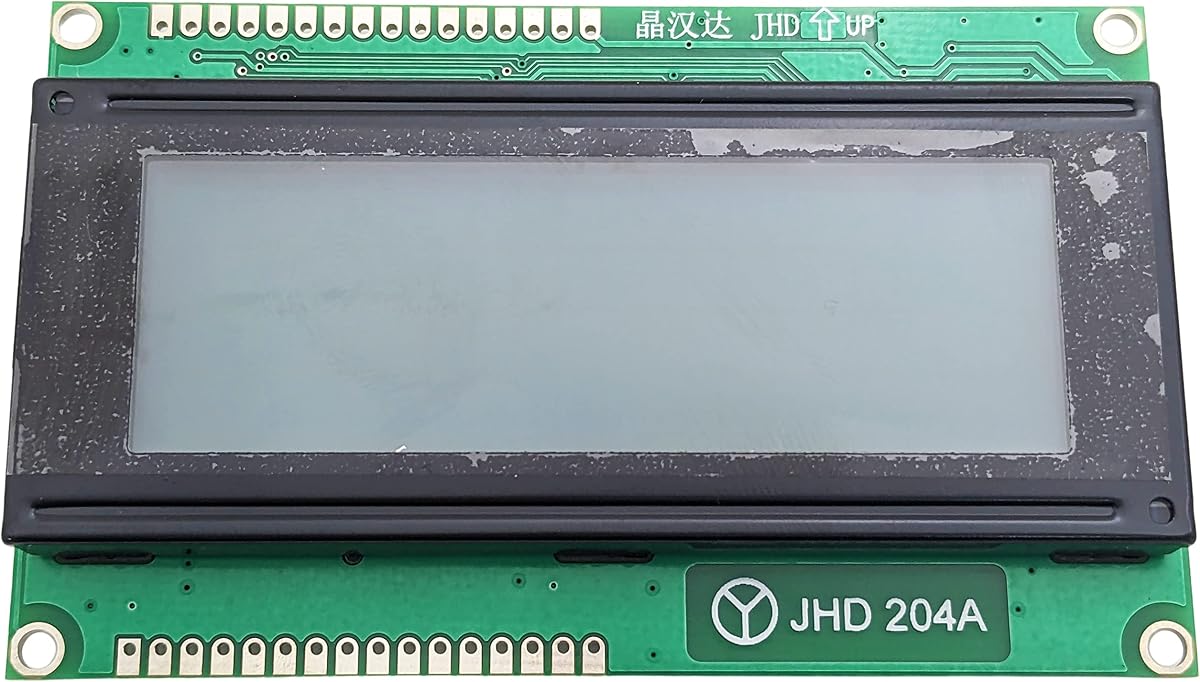
For applications that require more text space, the 20×4 format is a significant upgrade from the standard 16×2. This module offers 20 characters per line across 4 lines, allowing for substantial information display without scrolling. The reflective gray display with positive polarity ensures that it remains visible even when ambient light is present.
We may earn a commission when you buy through this link, at no additional cost to you.
The module includes an integrated driver and controller, which simplifies the external wiring required to make it function. This means you do not need to add a separate chip to drive the LCD segments. The physical dimensions are 98 by 60 by 9.5 millimeters, fitting into standard mounting holes for chassis installation.
The absence of a backlight is a key trade-off. While reflective displays are efficient, they rely entirely on external light sources which might make them hard to read in dark enclosures. The physical size is also larger and heavier, requiring a more robust mounting solution in tight spaces.
This module is best for industrial control panels, machinery displays, or any fixed installation where space allows and external lighting is available. It is a robust choice for displaying long messages or data logs where the expanded character count is a necessary requirement for your user interface.
The built-in driver removes the need for external components, reducing the complexity of your PCB design.
With 80 characters total, you can display multi-line data or longer status messages comfortably.
We may earn a commission when you buy through this link, at no additional cost to you.
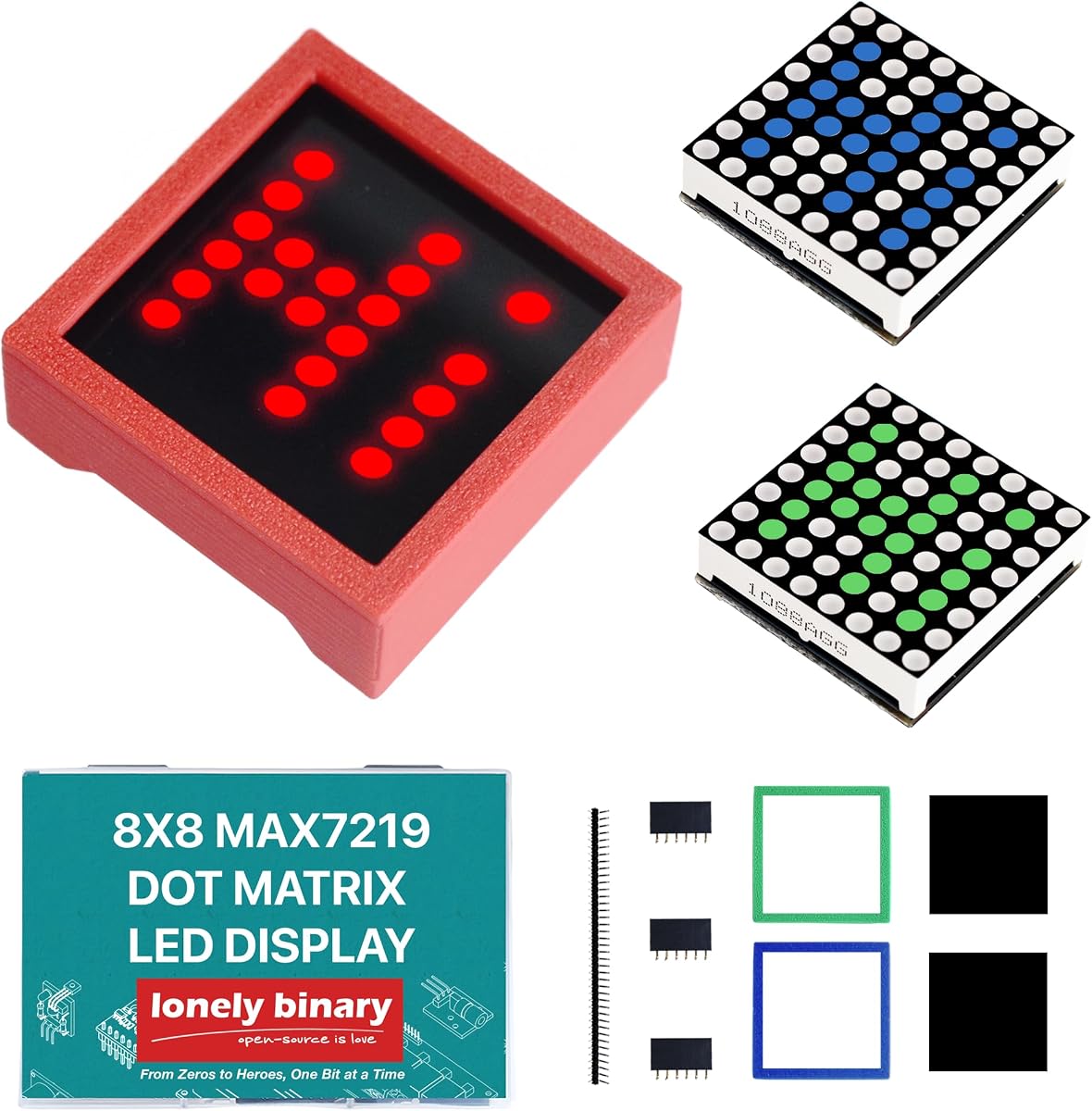
This pack offers a unique variety of red, green, and blue 8×8 LED matrices, giving you a full palette of colors for your projects. Each module is driven by a MAX7219 IC which simplifies the connection process by requiring only a serial interface. This is perfect for dynamic animations, scrolling text, or visual indicators that require bright LEDs.
We may earn a commission when you buy through this link, at no additional cost to you.
One of the standout features is the inclusion of custom 3D printed PLA enclosures for each module. This means you get a finished, professional look right out of the box without needing to design your own case. The modules are designed to be daisy chained, allowing you to build wide displays like 24×8 for wider text scrolling.
While the modules are bright, each one is a single color rather than RGB. If you need a specific color for a visual cue, you can select the appropriate module from the pack. You will still need to solder the headers for connection, but the labeling and design make this task relatively straightforward for beginners.
This set is ideal for makers, classrooms, or hobbyists who want to build retro games, visualizers, or notification panels. The combination of hardware and ready-to-use cases makes it a convenient starting point for anyone looking to add a fun and functional LED display to their build.
The included 3D printed enclosures provide a polished look that protects the PCB and looks great on a desk.
Connect multiple modules together to create wide scrolling displays for more complex text or graphic output.
We may earn a commission when you buy through this link, at no additional cost to you.
This module is a staple in the maker community for its simplicity and affordability. It features an 8×8 common cathode LED matrix driven by the MAX7219 controller. The 5V operating voltage makes it safe and easy to connect to most microcontrollers without needing logic level converters for power.
We may earn a commission when you buy through this link, at no additional cost to you.
The dimensions are compact yet standard, fitting well into typical project layouts. The 64 fixing holes allow you to secure the module to a panel or enclosure easily. It comes with a 5pin line which simplifies the wiring process for beginners who might be intimidated by complex pinouts.
While it is a great budget option, it does not come with a case or additional accessories. You will need to source your own enclosure if you want to protect the LEDs. The PCB is functional but lacks the aesthetic refinement of higher-end kits.
This is the perfect choice for budget-conscious projects, prototypes, or large scale installations where you need many displays without breaking the bank. If you just need a reliable LED matrix for testing code or basic visual feedback, this module delivers excellent value.
The low price point makes it ideal for bulk purchases or educational setups where multiple units are needed.
The drilled holes in the PCB allow for screws to be used for a firm and stable mounting in cases.
We may earn a commission when you buy through this link, at no additional cost to you.
This module is designed specifically for numeric displays, offering 8 digits in a 2×4 configuration. It uses the MAX7219 driver which supports BCD decoding, making it easier to send numbers directly from your code without converting them to segments manually. This is highly efficient for displaying counters or scores.
We may earn a commission when you buy through this link, at no additional cost to you.
The 4-wire SPI interface ensures a stable connection with your microcontroller and allows for easy chaining if you need more digits. It includes advanced features like brightness control and a scan limit setting which helps manage power consumption and display clarity effectively across different environments.
The module focuses on function over form. It is a bare board that requires you to solder headers yourself. While this keeps the cost down, it adds a step to the setup process. The bright segments are clear but rely on standard LED technology.
Choose this module for scoreboard applications, digital clocks, or counters where numeric clarity is paramount. It is a solid component for embedded systems that need to display variable numbers reliably without the complexity of full graphical displays.
BCD decoding simplifies code by allowing you to send decimal values directly rather than bit-by-bit control.
Low power shutdown modes help extend battery life in portable applications where energy saving is critical.
We may earn a commission when you buy through this link, at no additional cost to you.
SunFounder is a well respected name in the maker community and this LCD2004 module reflects their quality standards. It features 20 characters across 4 lines, providing a large area for text. The white characters on a blue background offer high contrast which is pleasing to the eye and easy to read in most lighting conditions.
We may earn a commission when you buy through this link, at no additional cost to you.
The module includes a 50K potentiometer for contrast adjustment, allowing you to tweak the display brightness to suit your environment. Its dimensions are 97 by 59 by 12 millimeters which is standard for this size. It is fully compatible with Arduino and other microcontrollers making it a plug and play option.
The size of the module is a consideration for compact designs. It is not suitable for wearable tech or very small enclosures. However, for desktop projects or industrial dashboards, the physical footprint is not an issue. The bright backlight ensures clear visibility day or night.
This is a top choice for anyone needing a large text display with high reliability. If you want a display that is easy to read and looks professional, this module offers the quality and resolution you need for serious projects.
The white on blue combination provides exceptional clarity for long periods of reading without eye strain.
SunFounder hardware is known for consistent quality, ensuring your display lasts through multiple projects.
We may earn a commission when you buy through this link, at no additional cost to you.
For scrolling text or larger animations, a wider display is often necessary. This 32×8 matrix pack provides a horizontal spread that is perfect for tickers or visualizers. Like the 8×8 version, it comes in red, green, and blue varieties and includes 3D printed cases for a finished look.
We may earn a commission when you buy through this link, at no additional cost to you.
The daisy chain feature allows you to expand this further if needed, creating a canvas for complex graphics. The MAX7219 driver handles the heavy lifting so your microcontroller can focus on sending data. The 256 LEDs per module provide bright and clear output even from a distance.
You will need to solder the headers to use these modules. The cases protect the PCBs well but you still need to handle the soldering for connection. The modules are single color so you cannot mix colors within one 32×8 unit.
This pack is excellent for building large notification panels, music visualizers, or retro game displays. If you need a wide display area and want a kit that includes protection and hardware, this is a versatile and fun solution.
The 32×8 resolution gives you more horizontal space for text and animations than standard matrices.
You can chain these with other MAX7219 boards to make even wider displays for large scale projects.
We may earn a commission when you buy through this link, at no additional cost to you.
This 2-pack offers a great way to get multiple display units at once. Each unit contains an 8×8 matrix and uses the standard 5V power input compatible with Arduino. The SPI interface allows you to connect multiple modules easily to create a larger display area.
We may earn a commission when you buy through this link, at no additional cost to you.
The compact footprint of 128mm makes it easy to fit into various project designs. The 64 mounting holes provide flexibility for securing the boards. The low power design helps save energy when displaying static images or when the display is not in use.
Similar to other bare boards, this module does not come with an enclosure. You will need to source your own case or use a breadboard for prototyping. The soldering requirement means it is better suited for those comfortable with basic electronics assembly.
This is a strong option for projects that require multiple displays or for educators teaching students how to work with LED matrices. It offers a reliable and cost effective way to integrate visual feedback into your projects.
Getting two modules in one pack saves time and money for multi-unit projects or classroom activities.
The 5pin SPI interface keeps wiring simple and allows you to daisy chain more boards easily.
We may earn a commission when you buy through this link, at no additional cost to you.
Choosing the right module depends on your specific application requirements. This guide breaks down the key factors to consider.
Decide if you need a graphical LCD for images or an LED matrix for brightness and animations. Graphical LCDs are better for text and icons, while LED matrices excel at brightness and simple motion.
Choose the display type based on your content needs and lighting environment.
Higher resolution allows for more detail. For text, 16×2 or 20×4 is common. For graphics, 128×64 provides enough space for icons and charts.
Select a resolution that fits your content without causing clutter.
Common interfaces include parallel and SPI. SPI is easier to wire for chaining, while parallel offers faster data transfer but uses more pins.
Consider your microcontroller pin availability when choosing an interface.
Backlight color and type affect readability. Blue or white backlight with dark text offers high contrast. LED backlights are brighter than standard options.
Ensure the backlight matches your lighting conditions.
Most modules run at 5V but some work at 3.3V. Check your controller logic voltage to avoid damage.
Verify voltage compatibility before connecting power.
Look for boards with mounting holes if you plan to enclose the module. Some kits include cases.
Ensure the physical size fits your enclosure.
Quality products include datasheets or library examples. This saves time during setup.
Check for available resources before buying.
Industrial projects need rugged modules. Consumer hobbyist modules may require extra protection.
Choose build quality based on environment.
Connect the power pins to a stable 5V supply and ground to ensure consistent operation. Use appropriate current limiting resistors if your module does not include them internally.
Adjust the contrast potentiometer if your module has one to optimize visibility. This step is crucial for readable text in varying lighting conditions.
Store unused modules in a dry static free environment to prevent damage to the glass or LEDs. Avoid touching the display surface to prevent scratches.
Most modules like the MAX7219 and 12864 have the driver integrated. You may need to add a library to your code but no external chip is required for standard use.
Connect VCC to 5V and GND to ground. For SPI, connect the data pins to the MOSI and clock pins on your Arduino. Refer to the datasheet for exact pin mapping.
Yes, many of these modules support daisy chaining. You connect the output of one to the input of the next to create a larger display area.
LED matrices typically last tens of thousands of hours. LCDs also have long lifespans but backlight intensity may decrease over time.
Yes, they work with Raspberry Pi but you may need level shifters if the module is 5V only and the Pi uses 3.3V logic.
Use the software function provided by the driver library. On some modules, you can adjust the contrast potentiometer manually for physical brightness control.
We have reviewed ten top options ranging from budget friendly to premium quality. The Ximimark 12864 and SunFounder LCD2004 are excellent for text and graphics while the Lonely Binary packs are great for LED animations.
Prioritize the display size and interface type that matches your project needs. If you need text choose an LCD and if you need brightness choose an LED matrix.
Always check the current price and availability as they can change quickly. Select the right module today to bring your next project to life with clear visual feedback.