
Cooling Station PS5 Slim
4.5Editor score
Auto temp sensor control
2.5 hour charge time
Nine RGB modes
Compare the top cooling stand for PS5 console models. We review fans, charging docks, RGB lights, and safety features for every PS5 Slim Pro and Standard.
Keeping your PlayStation 5 console cool is essential for long gaming sessions. A quality cooling stand for PS5 console helps dissipate heat while adding storage for controllers and accessories. These stands protect your system and keep your setup organized.
We compared ten top-rated cooling stands based on fan performance, charging speed, and design. Our list covers vertical and horizontal options compatible with Standard Slim and Pro models. Each pick includes detailed specs and real user feedback.
Every review highlights standout features like automatic fan control USB hubs and LED lights. You will see pros cons and key specs to find the right fit. Prices and availability change frequently so check current details before buying.
4.5Editor score

4.4Editor score

4.3Editor score
This comparison table lists key specs for each cooling stand for PS5 console model. Use it to quickly match fan speed charging features and compatibility to your needs.
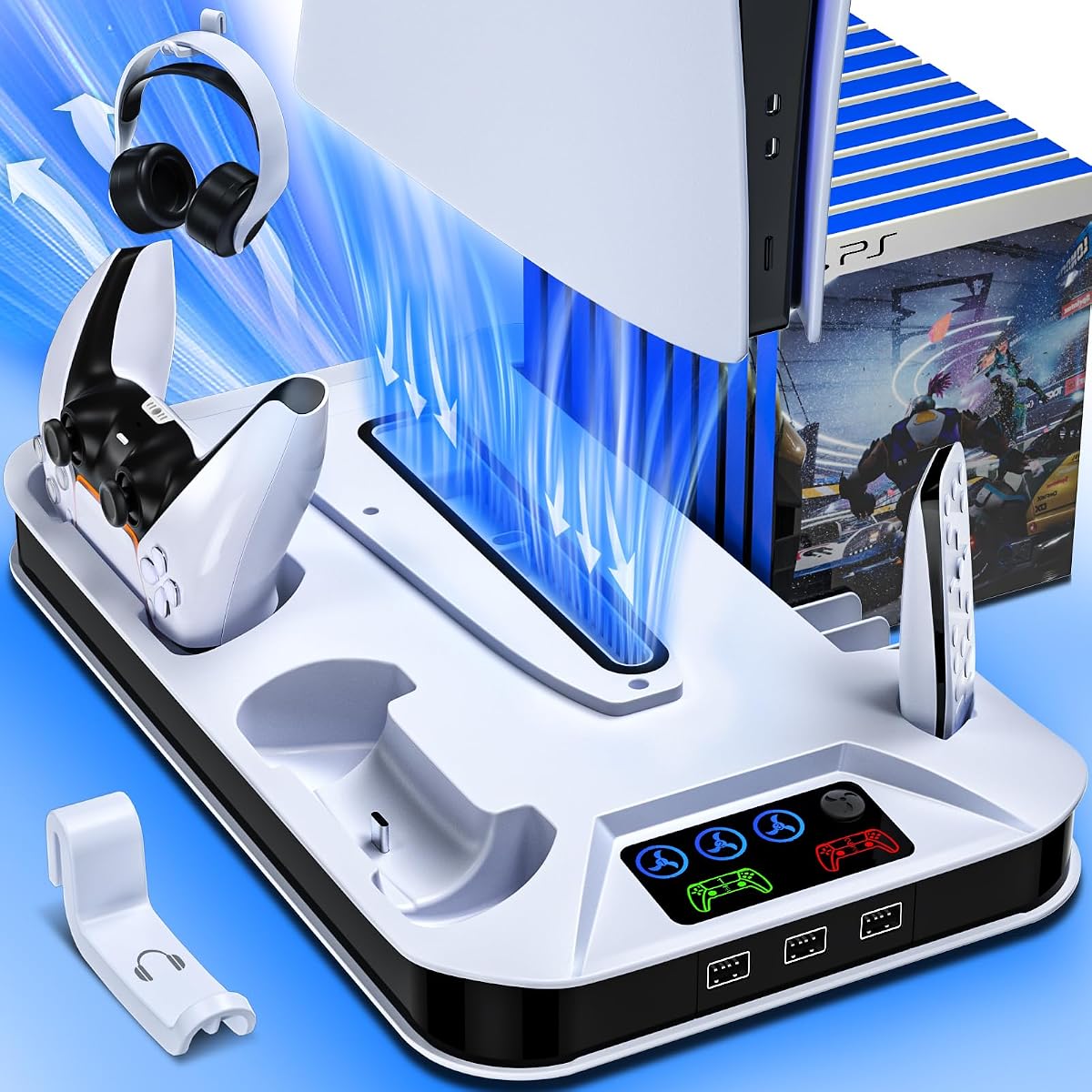


This PS5 Cooling Station delivers solid cooling and charging features for your setup. With a 4.4 rating it stands out for its three speed turbo fan and dual controller charging. The vertical design fits Standard Slim and Pro models securely.
We may earn a commission when you buy through this link, at no additional cost to you.
The standout feature is the adjustable fan which dissipates hot air from the console bottom effectively. It includes three USB hubs for charging headsets and other devices. A safety screw locks the console to the base preventing accidental slips.
Users note the panel adapter needs removal for Slim digital versions. The lack of a memory function for fan speed means you must reset the setting after power cycles. These are minor trade-offs for the price and features offered.
It suits gamers who need a one-stop solution with multiple USB ports and a sturdy stand. If you want reliable heat management and organization this unit is a strong choice for any PS5 owner.
The fan offers high medium and low speeds to match your gaming heat output.
Holds controllers a headset and up to thirteen game discs in a compact footprint.
We may earn a commission when you buy through this link, at no additional cost to you.
This horizontal stand offers a unique scalable design that fits every PS5 model. It charges dual controllers and supports Edge editions. The 4.3 rating reflects its reliability and ease of use for vertical space limited users.
We may earn a commission when you buy through this link, at no additional cost to you.
The three speed turbo fan lets you adjust cooling power via a touch switch. EVA foam ensures stability for digital consoles without a disc drive. Charging takes around three to three and a half hours per pair.
Installation is simple with no tools required but it draws power directly from the console. Some users prefer external power sources for standby charging. The LED indicators make charging status easy to see at a glance.
Choose this if you want a horizontal setup with versatile controller support. Its scalable build makes it future proof for Pro and Slim updates without needing a new stand.
The dock accepts both original and Edge controllers with a secure push design.
Complete setup takes minutes using provided foam and screws with no tools needed.
We may earn a commission when you buy through this link, at no additional cost to you.
The Tokluck station stands out with its intelligent auto fan speed control. It reads console temperature to adjust cooling automatically. With a 4.4 rating it earns Editor's Choice for combining smart tech and fast charging in one unit.
We may earn a commission when you buy through this link, at no additional cost to you.
It charges two controllers in 2.5 hours and includes nine RGB lighting modes. The fan remembers your last speed after restart which saves time. The LED indicators show charging status and fan speed clearly.
The RGB lighting adds a fun touch but some might find it bright during movie nights. You will need to remove a panel adapter for Slim digital versions. These quirks do not overshadow its smart performance.
Ideal for gamers who want set and forget cooling with style. The auto mode keeps the console cool without manual tweaks during intense sessions.
A built-in probe switches fan speeds based on real-time console heat levels.
Nine lighting modes let you match your room ambiance with the setup.
We may earn a commission when you buy through this link, at no additional cost to you.
This JAVRUNWOF station wins a 4.5 rating for its quiet performance. It cools effectively without loud fan noise. The white design blends seamlessly with most PS5 setups and offers solid accessory storage.
We may earn a commission when you buy through this link, at no additional cost to you.
Three USB hubs allow you to charge multiple accessories at once. The smart chip stops charging at 80 percent to protect battery health. A dedicated headset holder keeps headphones within reach.
It lacks auto fan control so you must set speed manually. There is no RGB lighting for those who want visual flair. Still it is an affordable and reliable choice for daily use.
Perfect for quiet rooms and budget conscious buyers. It protects your console and keeps your desk tidy without extra noise.
The turbo fan runs quietly even on high speed for peaceful gaming.
Smart protection stops charging early to prevent battery damage and overheating.
We may earn a commission when you buy through this link, at no additional cost to you.
The Rysker PS5 Stand offers Edge controller support with a 4.4 rating. It cools and charges reliably while organizing accessories. A safety screw locks your console for peace of mind.
We may earn a commission when you buy through this link, at no additional cost to you.
It includes three USB ports and a media remote slot. The fan speed remembers your choice after power off. Charging status shows via clear LED lights.
Cable management is not detailed which may leave wires exposed. There is no RGB lighting for customization. But it covers all basic needs well for a fair price.
Great for Edge controller owners needing simple organization. It works for all PS5 models without extra parts.
Works with original and Edge controllers for a wider selection.
A dedicated slot holds your PS5 media remote for easy access.
We may earn a commission when you buy through this link, at no additional cost to you.
This budget-friendly Cooling Station earns a 4.5 rating for its smart auto fan and RGB lights. It cools efficiently and charges two controllers quickly. The honeycomb light design looks premium at a lower cost.
We may earn a commission when you buy through this link, at no additional cost to you.
Fan speed adjusts automatically based on console temperature. It has a memory function to recall your settings after restart. LED lights show charging status clearly.
The build feels lighter than pricier stands. Cable management is not detailed which may leave wires visible. For the price it delivers strong performance and looks.
Choose this for a cost-effective smart cooling solution. It fits all PS5 models and keeps heat low without breaking the bank.
Fan speeds change automatically to keep your console cool during games.
Nine modes and a honeycomb pattern add style to your setup.
We may earn a commission when you buy through this link, at no additional cost to you.
This horizontal stand is Best Premium for its scalable design. It fits every PS5 model including Pro. A 4.3 rating shows consistent performance and Edge controller support.
We may earn a commission when you buy through this link, at no additional cost to you.
Three fan speeds and a dual dock simplify your setup. No tools are needed for installation. It consolidates accessories into one neat unit.
It takes up more vertical space than vertical stands. The price is higher than basic options. But its build quality and flexibility justify the cost.
Ideal for users seeking a premium horizontal setup. It grows with your console needs and organizes gear neatly.
Designed to fit all current and future PS5 models without adapters.
Setup takes minutes with foam and screws and no extra tools.
We may earn a commission when you buy through this link, at no additional cost to you.
This stand uses a larger turbo fan with auto mode for strong airflow. A 4.5 rating reflects its high performance and Type-C cable option. It holds up to 14 game discs.
We may earn a commission when you buy through this link, at no additional cost to you.
The fan adjusts speed based on temperature readings. You can charge accessories via three USB ports. Charging takes about two hours with dual controllers.
Panel removal is needed for Slim versions. The cable design is basic. But the cooling power and storage capacity are hard to match.
Best for heavy gamers who need strong cooling and storage. It keeps your system cool while keeping games within reach.
A larger turbo fan delivers better cooling than standard options.
Store up to 14 game discs on the stand for quick access.
We may earn a commission when you buy through this link, at no additional cost to you.
The heclynis stand focuses on RGB with a silent turbo fan. It earns a 4.4 rating for its visual appeal and quiet operation. Charging two controllers takes about three hours.
We may earn a commission when you buy through this link, at no additional cost to you.
It has four RGB modes with eight color options. A USB A hub powers extra devices. The stand holds consoles securely with a safety screw.
It offers only two USB hubs compared to more on other stands. You must remove a panel adapter for some models. But for RGB and sound it stands out.
Perfect for setups that prioritize lighting and quiet fans. It keeps things cool and colorful without much noise.
Powerful cooling that remains quiet even at high speed settings.
Four modes with eight colors to match your style.
We may earn a commission when you buy through this link, at no additional cost to you.
This stand offers a solid 24-month warranty with a 4.5 rating. It includes safety screws and Type-C ports for versatility. The design is simple but functional for all PS5 models.
We may earn a commission when you buy through this link, at no additional cost to you.
Three speed fan settings keep the console cool during play. It charges controllers and headsets easily. A headset holder is included for organization.
It lacks auto fan control and RGB lighting. The look is basic compared to RGB options. But the warranty and stability give long-term peace of mind.
Great for those seeking long-term support. It handles heat and charging well with no extra flair.
A 24-month warranty provides extra support beyond standard offers.
Includes Type-C for flexible charging of more devices.
We may earn a commission when you buy through this link, at no additional cost to you.
Choosing a cooling stand for PS5 console depends on fan type, compatibility, and added features. Use these factors to match your needs.
Look for a stand with multiple fan speeds or auto mode. Auto modes use sensors to adjust cooling based on temperature which reduces noise. Manual controls let you set speeds for intense sessions.
Auto or multi-speed fans offer better performance for long play.
Ensure the stand supports your specific PS5 model including Slim Pro Standard Disc or Digital. Some units need a panel adapter for Slim Digital consoles.
Check compatibility notes before buying to fit your model.
A good stand includes dual controller charging and USB hubs. Look for safety chips that prevent overcharging to protect battery life. Fast charging reduces downtime between sessions.
Dual charging and USB hubs keep all accessories powered.
Choose a stand with screws or non-slip pads to secure the console. Sturdy materials prevent shaking and protect your system. Safety features like overcharge protection extend accessory life.
Secure locks and durable build prevent slips and damage.
Stands with headset holders and disc storage save desk space. Look for slots for remotes and accessories to keep the area tidy. Organized setups make gaming easier and cleaner.
Slots and holders keep your gaming area organized.
Some stands include RGB lights to match your setup. Decide if you want visual flair or a minimal look. Lighting can enhance ambiance but may not suit all rooms.
RGB adds style while simple LED gives status info.
Turbo fans can be loud on high speed. Read reviews for noise reports especially if you game in quiet spaces. Silent modes help balance cooling and sound.
Check noise reviews if quiet operation is a priority.
A longer warranty signals confidence in durability. Look for support options if issues arise. Some stands offer two years of coverage.
Good warranty coverage helps protect your investment.
Place your PS5 console on the stand and secure it with the provided screw. Connect the stand to the console or power outlet before starting. Ensure the stand sits on a flat surface for stability.
Clean the fan vents weekly to maintain airflow. Dust can reduce cooling and increase noise. Use a soft cloth or compressed air to keep the stand tidy and safe.
Check controller charge status on the stand lights before gaming. Avoid blocking the stand vents with nearby objects. This helps the fan work efficiently and keeps your setup cool.
Most cooling stands do not void the console warranty if used properly. Ensure the stand does not modify internal parts. Using an external stand for cooling is generally safe.
Yes most stands in this list support the Slim model. Some need a panel adapter to fit the thinner design. Check product notes for Slim compatibility.
Auto fans adjust based on heat which saves noise and power. Manual fans let you control speed when you want. Choose based on your need for automation.
No these stands charge controllers via USB or console ports. They do not charge the console itself. They help keep the console cool while charging accessories.
Many stands support Edge controllers but not all. Check product specs for Edge compatibility. Look for dual docks designed to fit Edge shapes.
Most draw power from the console USB port. Some include Type-C cables for wall outlets. Check power needs before setup to match your room.
Fan noise varies by model and speed. Many have quiet low modes for media. Read user reviews for noise levels before buying.
Some stands include dedicated headset slots. Others need separate holders. Check product specs for included accessories before purchase.
You now have ten top picks for cooling stands that match different needs. The Tokluck auto stand and Gersker budget unit stand out for value. The horizontal kits suit those who want a wider base.
Prioritize auto fan control and USB hubs if you want smart charging. For visual flair look at models with RGB lights. Always check compatibility with your exact console model.
Prices and availability change often so confirm current deals before buying. Use this guide to match your setup style and cooling needs for better gaming sessions.