
Anker Prime Charging Station
4.6Editor score
250W high capacity output
LCD screen real-time monitor
Six port desktop design
Discover the top Gan Charger with Display options for 2026. We compare power, port count, smart screens, and safety features to help you choose the ideal
Modern electronics demand powerful and intelligent charging solutions. A Gan Charger with Display combines high-efficiency Gallium Nitride technology with real-time monitoring screens. This pairing ensures your devices charge safely while giving you clear visibility into power usage and temperature status.
We evaluated ten leading models based on total wattage, port flexibility, and display functionality. Our analysis covers compact travel units and robust desktop stations. Each selection balances performance with safety certifications to meet diverse needs for laptops phones and accessories.
Every pick highlights key strengths like smart power allocation and durable builds. Prices and availability shift frequently so verify current listings before buying. Use this guide to find a reliable charger that keeps your digital life powered up efficiently and securely.
4.6Editor score

4.7Editor score
4.5Editor score
This table compares key specifications across all ten selected models. Review wattage limits, port configurations, and display types to find the right fit for your setup.




The UGREEN Nexode Pro Charger leads our list with robust power and clear visual feedback. It holds a 4.7 rating from users who value performance. This unit delivers 160W total using GaN technology for efficient heat management.
We may earn a commission when you buy through this link, at no additional cost to you.
Its standout feature is the rotatable touch display showing real-time wattage and temperature. You can charge up to five devices simultaneously without clutter. The C1 port supports 140W to rapidly boost MacBooks or heavy laptops.
While the price reflects premium materials, the convenience justifies the cost for power users. The display adds a user-friendly layer that typical chargers lack. Some users note the touch panel requires care near water.
Buy this if you need a single solution for laptops and phones. It replaces multiple bricks and keeps your desk organized. For high-wattage needs and clear status monitoring, this is the top choice.
The display shows exact wattage per port to help manage load distribution efficiently.
Foldable prongs and compact shape make it easy to pack without damaging other gear.
We may earn a commission when you buy through this link, at no additional cost to you.
The Anker Prime Charger stands out for its extreme density and smart features. It is 4.6 rated for reliable performance. This model delivers 160W total in a very small frame using advanced GaN engineering.
We may earn a commission when you buy through this link, at no additional cost to you.
It features AnkerSense View for monitoring power and app access via Bluetooth. You get a stable 140W single port output which is rare. This ensures your MacBook Pro charges fast even under heavy loads.
Premium pricing is expected for Anker quality and compact build. The lack of USB-A ports limits compatibility with older accessories. However, the power density is unmatched for its size.
Choose this if portability and high wattage are your top priorities. It fits easily in bags while delivering top-tier power. For Mac users wanting the sleekest premium charger, this is ideal.
Bluetooth pairing allows custom charging modes and detailed stats via the Anker app.
Maintains full 140W output on one port so laptops charge at max speed always.
We may earn a commission when you buy through this link, at no additional cost to you.
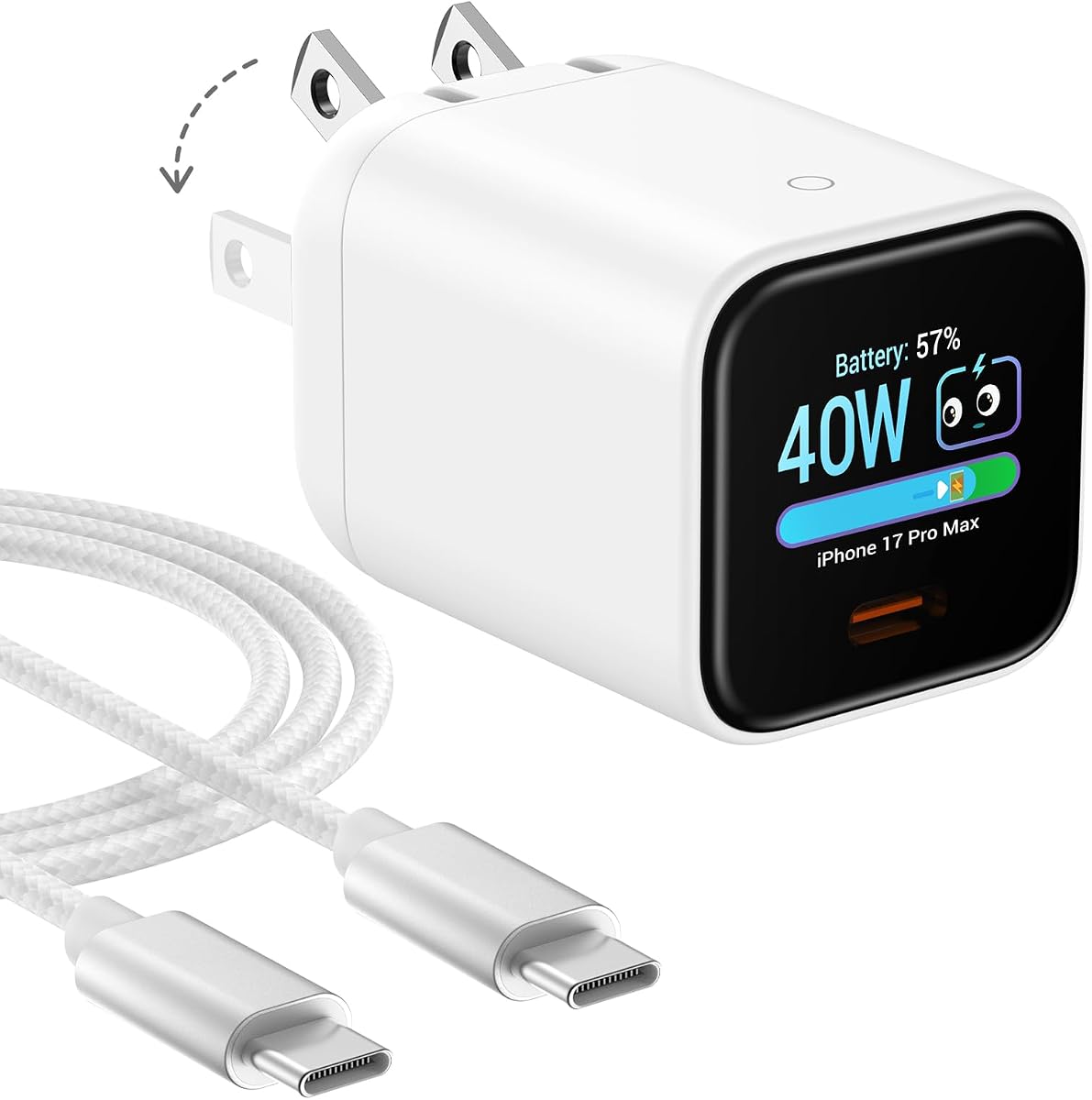
The Smart Charging Butler offers smart features at a very accessible price. It holds a 4.5 rating for effectiveness. This 45W charger uses AI to adjust speed and protect battery health automatically.
We may earn a commission when you buy through this link, at no additional cost to you.
Its display shows device models and real-time stats. A single tap switches modes and long presses rotate the screen. The included cable is durable and matches the compact build of the charger.
While it lacks high wattage for full laptops, it suits phones and small tablets perfectly. The AI care mode helps maintain battery longevity over time. Some users wish for multiple ports.
Buy this if you want smart tech without spending much. It is great for iPhone or Android daily charging. For budget conscious users needing a display, this is the best value pick.
Intelligent software monitors temperature to prevent overheating during overnight charging sessions.
Lightweight design with foldable prongs fits in pockets or small bags easily.
We may earn a commission when you buy through this link, at no additional cost to you.
The Anker Prime Charging Station is built for power users with many devices. It has a 4.6 rating for robust performance. This unit delivers 250W total across six ports with a clear LCD monitor.
We may earn a commission when you buy through this link, at no additional cost to you.
It features a control dial to adjust energy output instantly. The display updates real-time so you see exactly what is charging. With 250W you can power laptops and accessories simultaneously without slowing down.
Its size and weight make it a desktop exclusive. It is not practical for bags or travel. The price reflects its industrial grade capacity. Some users may find it overkill for small setups.
Select this if you need a single hub for a home office. It removes the need for multiple bricks. For heavy duty charging with visual feedback, this is a top tier option.
Delivers enough power to run high performance laptops and peripherals at once.
Use the dial to tweak settings for optimal speed and efficiency per device.
We may earn a commission when you buy through this link, at no additional cost to you.
The Anker 140W Charging Block balances power and port count well. It holds a 4.4 rating for consistent quality. This model offers 140W total with four USB-C ports and a detailed display.
We may earn a commission when you buy through this link, at no additional cost to you.
Its display shows temperature and port details clearly. ActiveShield 4.0 monitors safety millions of times daily. This protects devices from overheating during long charging sessions. The included cable supports high wattage.
The size is a bit bulkier than travel focused models. It fits well on desks or nightstands. The price is competitive for the features included. Some users prefer foldable plugs for travel.
Buy this if you need multiple USB-C ports safely. It suits modern laptops and phones well. For a reliable middle ground between power and size, this is a solid choice.
ActiveShield checks temperature constantly to prevent damage and ensure safe charging.
Four USB-C ports allow charging of multiple modern devices without adapters.
We may earn a commission when you buy through this link, at no additional cost to you.
The Anker 100W Phone Charger fits easily into daily carries. It has a 4.7 rating for portability. This unit delivers 100W total with a high definition screen to show status.
We may earn a commission when you buy through this link, at no additional cost to you.
Its smart low-current mode safely charges earbuds and wearables. The display gives clear visibility into charging speed. Foldable prongs make it easy to toss in a pocket. It sustains peak power effectively.
Lack of included cable means extra purchase is needed. The plug design may loosen over time with frequent use. Still, it remains strong for its size. The price is reasonable for Anker brand.
Choose this for daily travel or commuting needs. It handles phones and tablets without hassle. For a small charger that shows what is happening, this is great.
Detects small devices like earbuds and adjusts power to avoid overcharging.
HD screen shows real-time temperature and speed without needing an app.
We may earn a commission when you buy through this link, at no additional cost to you.
The MOKiN 70W Charger is a budget friendly option with a screen. It holds a 4.4 rating for reliable use. This unit offers 70W with an interactive touch display to manage ports.
We may earn a commission when you buy through this link, at no additional cost to you.
Its touch screen lets you switch views and rotate orientation. It tracks temperature and power in real time. Foldable prongs help with packing. The compact build makes it easy to store.
Display brightness might vary after extended use. Missing cables require separate purchase. Yet the price remains low. Some users report minor heating issues under heavy loads.
Buy this if you need a basic display charger on a budget. It is good for light laptops and phones. For value and visual feedback, this model performs well.
Tap or press to change views and rotate the display for better angles.
Small dimensions fit in small bags or desk drawers easily.
We may earn a commission when you buy through this link, at no additional cost to you.
The MOKiN 140W Charger delivers strong power at a good price. It has a 4.4 rating for consistent performance. This unit supports 140W total with four ports and a live screen.
We may earn a commission when you buy through this link, at no additional cost to you.
Its HD display shows power output per port instantly. Active safety monitors temperature millions of times daily. The included 140W cable adds value. This makes it a complete package.
The build is heavier than travel units but great for desk use. The cable quality is good but slightly stiff. Some users prefer lighter materials. The price is still competitive.
Select this for home or office power needs. It handles laptops and phones well. For high wattage with visual status feedback this is a great pick.
Live screen shows instant power stats for every connected port.
Includes a high-wattage cable to support fast charging right out of box.
We may earn a commission when you buy through this link, at no additional cost to you.
The DJI Power 140W Combo is perfect for drone owners and more. It holds a 4.9 rating for quality. This unit offers 140W total with a special digital display cable included.
We may earn a commission when you buy through this link, at no additional cost to you.
Its cable shows real-time power data directly. Three ports allow priority power to DJI batteries. The GaN tech keeps operation cool and steady. Safety indicators confirm connection status clearly.
General users might find it specialized. The cable is a major selling point. Some users may not need DJI features. The price fits professional or hobby needs.
Buy this if you own DJI devices or want a display cable. It works for other devices too. For unique cable feedback and fast charging this is excellent.
Cable shows power and current without needing an adapter screen.
Prioritizes DJI devices while supporting standard protocols for others.
We may earn a commission when you buy through this link, at no additional cost to you.
The Anker Nano 45W Charger is ideal for iPhone users. It has a 4.7 rating for performance. This unit offers 45W with smart display controls and foldable prongs.
We may earn a commission when you buy through this link, at no additional cost to you.
It recognizes supported iPhone models automatically for care mode. Display controls are simple with taps and long presses. The size is small enough for any pocket. It extends battery life via lower temps.
Only one port limits multi-device charging. The screen rotation is limited. Some users may need a larger power. The price suits single device owners.
Choose this for daily iPhone charging in a pocket. It is safe and efficient. For a minimal display charger for phones, this is great.
Automatically detects and adjusts power for supported iPhone models.
Tap or press to see status without complex navigation.
We may earn a commission when you buy through this link, at no additional cost to you.
Selecting a Gan Charger with Display requires evaluating power, ports, and display clarity. Follow these factors to match the right unit to your needs.
Total wattage determines how many devices you can charge at full speed. Look for 100W or more if you use laptops. Lower wattages like 45W suit phones only.
Check the number of USB-C and USB-A ports. Most chargers now use USB-C. Ensure you have enough ports for all your devices.
Displays range from simple lights to full touch screens. Choose a clear display showing wattage and temperature. Touch screens offer better control.
Size matters for travel. Compact chargers fold easily and fit bags. Desktop models are larger but offer more power and ports.
Look for certifications and active monitoring. Good chargers track temperature and power flow. This prevents overheating and extends device life.
Some models include high-wattage cables. Others require separate purchases. Check if the cable matches the charger's maximum output.
Smart features like AI battery care or app control add value. These adjust charging speed based on battery health. Useful for daily maintenance.
Stick with reputable brands like Anker or UGREEN. They offer better warranties and safety testing. This reduces risk of buying unsafe units.
Plug the charger into a wall outlet and connect devices via USB-C or USB-A. The display should light up showing active ports and power stats.
Keep the charger on a flat surface to allow heat dissipation. Avoid covering it with fabrics or placing it near liquids. Ensure vents are not blocked.
Clean the display with a soft dry cloth. Do not use liquids directly on the screen. Store it in a dry place when not in use.
The display typically shows real-time wattage, temperature, and active charging ports. It helps you monitor power usage and ensure devices are charging efficiently. Some models also show protocol info.
Yes many models support laptops with 65W or more. Look for units rated 100W or higher to ensure your laptop charges at full speed. Check port wattage distribution.
Most modern Gan chargers include safety features like overheat protection. Models with AI care mode are even safer for overnight use. Always check safety certifications.
USB-C to USB-C cables rated for high power are best. Some chargers include cables others do not. Ensure the cable supports the charger's maximum wattage.
GaN technology allows smaller sizes and less heat compared to silicon. This means faster charging and lighter chargers. It also improves overall efficiency.
Many models feature rotatable screens. Some rotate 90 degrees others 180. This lets you view stats from different angles. Check specs for rotation limits.
The top picks include UGREEN Nexode Pro for overall value and Anker Prime for premium power. Each offers unique strengths for different needs and budgets.
Prioritize total wattage and port count for your main devices. Display clarity adds convenience for monitoring safety. Choose based on your daily setup.
Prices change often so review current listings before buying. Always verify compatibility with your devices. A reliable charger protects your tech for years.