
SANSUI 27 Inch WQHD
4.4Editor score
200Hz Refresh Rate
1ms Response Time
Affordable Price
This guide compares the top 27 Inch WQHD 1440p Gaming Monitors for October 2026, evaluating performance, visuals, and value for gamers.
Finding the right display can transform your gaming setup significantly. A 27 inch WQHD 1440p monitor offers the perfect balance between screen real estate and pixel density. This resolution ensures crisp details while maintaining high frame rates for smooth gameplay across various titles and genres.
We have carefully selected ten standout models that excel in refresh rates, response times, and color accuracy. Each product brings unique features like adaptive sync, HDR support, and ergonomic stands. Our analysis focuses on how these displays perform in real-world gaming scenarios to help you decide.
Every recommendation includes detailed specifications and honest assessments of strengths and weaknesses. Prices and availability fluctuate frequently, so always verify current listings before purchasing. Use this guide to find a monitor that aligns with your specific needs and budget constraints effectively.
4.4Editor score

4.6Editor score

4.7Editor score
This side-by-side comparison highlights key specifications across all ten selected models to help you quickly identify which display fits your needs.



The Acer Nitro KG271U stands out as a top contender for gamers seeking high performance without breaking the bank. With a 4.5 rating, it delivers smooth visuals thanks to its 180Hz refresh rate and rapid response times. Its IPS panel ensures vibrant colors that remain consistent from wide viewing angles.
We may earn a commission when you buy through this link, at no additional cost to you.
Key strengths include its impressive 0.5ms gray-to-gray response time which eliminates ghosting effectively. The 95% DCI-P3 color coverage makes it suitable for content creation tasks as well. AMD FreeSync technology syncs frames seamlessly with your GPU reducing stutter during intense gaming sessions.
While it offers excellent performance, the stand lacks height adjustment which might frustrate users seeking full ergonomics. The limited ports mean you may need adapters for multiple devices. However these trade-offs are acceptable given the competitive price point and display quality offered.
This monitor is ideal for budget-conscious gamers who refuse to compromise on refresh rates or color fidelity. If you prioritize smooth motion and accurate visuals over extensive stand features, the KG271U is a solid recommendation. It balances specs and cost effectively for modern gaming needs.
The 180Hz refresh rate ensures fluid motion in fast-paced shooters and racing games reducing input lag significantly.
With 95% DCI-P3 coverage, this monitor renders accurate colors suitable for photo editing and graphic design work.
We may earn a commission when you buy through this link, at no additional cost to you.
The ASUS TUF Gaming VG27AQ3A earns its spot as a premium choice with its robust feature set and excellent build quality. Rated at 4.6 stars, it appeals to serious gamers who need reliable performance. The 180Hz refresh rate paired with 1ms response ensures crisp visuals during competitive matches.
We may earn a commission when you buy through this link, at no additional cost to you.
Its standout feature is the combination of ELMB Sync and variable refresh rates eliminating both ghosting and tearing simultaneously. The 130% sRGB coverage delivers vibrant colors that pop on the 27 inch screen. G-Sync compatibility guarantees smooth gameplay when paired with NVIDIA graphics cards.
Despite its strengths, the price is higher than many competitors which might deter budget buyers. The integrated speakers are functional but lack depth for immersive audio experiences. However, the overall performance and included software benefits justify the investment for enthusiasts.
This monitor is perfect for users seeking a high-end display with broad compatibility and advanced motion blur reduction. If you value color accuracy and seamless synchronization over cost, the VG27AQ3A is a top-tier option. It represents a strong balance of performance and premium features.
ELMB Sync allows simultaneous variable refresh rates and motion blur reduction for sharper visuals without screen tearing.
The 130% sRGB coverage ensures rich and accurate colors suitable for gaming and creative applications alike.
We may earn a commission when you buy through this link, at no additional cost to you.
The Acer Nitro XV271U offers exceptional value for gamers seeking a high refresh rate display at an accessible price. With a 4.5 rating, it delivers solid performance for competitive gaming. The 180Hz refresh rate ensures smooth motion while the IPS panel provides wide viewing angles.
We may earn a commission when you buy through this link, at no additional cost to you.
Its fully ergonomic stand stands out in this category allowing height tilt swivel and pivot adjustments. This flexibility helps maintain comfort during long sessions without needing a separate mounting arm. AMD FreeSync Premium technology ensures tear-free visuals across various frame rates effectively.
While the color gamut is standard for this price range, it may lack vibrancy for color critical work. HDR support is present but basic compared to premium models. These limitations are minor considering the extensive adjustability and performance features included in the package.
This monitor is ideal for budget gamers who need a flexible stand and high refresh rates without overspending. If you prioritize ergonomics and smooth gameplay over advanced HDR or color specs, the XV271U is a smart choice. It provides a complete gaming experience at a low cost.
The stand supports full height tilt swivel and pivot adjustments ensuring comfortable viewing angles for long sessions.
With a 180Hz refresh rate via DisplayPort, this monitor delivers ultra-smooth motion for competitive gaming titles.
We may earn a commission when you buy through this link, at no additional cost to you.
The Samsung Odyssey G5 distinguishes itself with a striking 1500R curved screen that pulls you into the action. Rated at 4.7 stars, it is praised for its immersive feel and sharp visuals. The 180Hz refresh rate ensures fluid gameplay in fast-paced titles without noticeable lag.
We may earn a commission when you buy through this link, at no additional cost to you.
Its Black Equalizer feature enhances visibility in dark game areas helping you spot enemies easily. HDR10 support adds depth to visuals with brighter highlights and deeper shadows. The curved design naturally reduces eye strain by keeping edges equidistant from your eyes.
Some users may find the curvature distracting for productivity tasks like text editing or web browsing. The stand is sturdy but takes up significant desk space which could be an issue in tight setups. However the gaming experience outweighs these minor drawbacks for most users.
This monitor is best for immersive gaming enthusiasts who prefer curved displays over flat ones. If you want a screen that wraps around your vision and offers strong contrast, the G5 is a compelling option. It delivers a unique visual experience that flat panels cannot match.
The 1500R curve matches the human eye shape reducing strain and enhancing immersion during extended gaming sessions.
Black Equalizer technology brightens dark shadows revealing enemies hiding in low-light areas effectively.
We may earn a commission when you buy through this link, at no additional cost to you.
The SANSUI 27 Inch WQHD monitor pushes boundaries with a 200Hz refresh rate at a budget-friendly price point. With a 4.4 rating, it offers competitive performance for casual and competitive gamers alike. The IPS panel ensures consistent colors across the 27 inch display effectively.
We may earn a commission when you buy through this link, at no additional cost to you.
Its 120% sRGB coverage provides vibrant visuals that enhance the gaming experience significantly. Dual HDMI and DisplayPort options allow easy connection to multiple consoles or PCs. This connectivity flexibility is rare at this price tier making it versatile for various setups.
While the stand only offers tilt adjustments, users might need a VESA mount for full ergonomics. The lack of built-in speakers means external audio is required for sound. These compromises help keep the price low while delivering high-end performance specs.
This monitor is perfect for gamers who prioritize refresh rates and color vibrancy over physical features. If you need a high-speed display for competitive titles and have your own speakers, the SANSUI is a great pick. It balances performance and cost exceptionally well.
The 200Hz refresh rate ensures ultra-smooth motion ideal for competitive shooters where split-second reactions matter.
With 120% sRGB color gamut, this monitor delivers vibrant and detailed colors for an immersive viewing experience.
We may earn a commission when you buy through this link, at no additional cost to you.
This SANSUI model stands out for its full ergonomic stand supporting pivot swivel and height adjustments. Rated at 4.4 stars, it appeals to users who value comfort and flexibility. The 200Hz refresh rate combined with 1ms response delivers smooth visuals for fast gaming scenarios.
We may earn a commission when you buy through this link, at no additional cost to you.
The 95% DCI-P3 coverage ensures rich colors that look consistent from almost any angle. Dual DisplayPort and HDMI inputs allow you to connect multiple devices without adapters. Anti-flicker and low blue light features reduce eye strain during extended sessions.
The stand mechanism might feel less robust compared to premium brands requiring careful handling during setup. Some users report initial calibration needs to optimize brightness and color settings. Despite these minor issues, the versatility remains a strong selling point for daily use.
It is ideal for users who need a flexible display for both gaming and productivity tasks. If you require full rotation options and high-speed performance without a huge price tag, this monitor fits well. It offers a complete package for versatile workspace needs.
The pivot and swivel features allow easy transition between landscape and portrait modes for multitasking or coding.
Anti-flicker and low blue light features protect your eyes during long hours of gaming or work.
We may earn a commission when you buy through this link, at no additional cost to you.
The KOORUI G2721P delivers a mix of high-speed performance and HDR support at a competitive price. With a 4.4 rating, it serves gamers looking for visual depth without premium costs. The 200Hz refresh rate ensures fluid motion in action-packed games effectively.
We may earn a commission when you buy through this link, at no additional cost to you.
Its HDR400 certification provides brighter highlights and better contrast in supported content. The 95% DCI-P3 coverage ensures colors remain vibrant and consistent across the screen. The minimal bezel design offers an immersive edge-to-edge viewing experience without distractions.
While HDR is present, the limited brightness means it is best used in dimly lit rooms. The stand offers only tilt adjustments limiting ergonomic options compared to some rivals. These trade-offs are understandable given the focus on performance specs and price.
This monitor is suitable for gamers who want HDR and high refresh rates on a budget. If you prioritize visual clarity and speed over extensive stand features, the G2721P is a solid choice. It offers a balanced experience for everyday gaming and media consumption.
The ultra-thin bezels create a seamless visual experience ideal for dual-monitor setups or focused gaming.
A three-year warranty and replacement service provide peace of mind for long-term ownership and support.
We may earn a commission when you buy through this link, at no additional cost to you.
The Acer Nitro EDA270U brings curved display benefits to a budget segment with 180Hz speed. Rated at 4.4 stars, it appeals to users wanting immersion without high costs. The 180Hz refresh rate ensures smooth gameplay while the curved screen enhances focus.
We may earn a commission when you buy through this link, at no additional cost to you.
Its zero-frame design maximizes screen space making it look sleek and modern on any desk. Included speakers provide basic sound so you don't immediately need external options. This makes it a good all-in-one option for casual setups.
The stand only allows tilt adjustments limiting ergonomic versatility for different seating positions. The VESA mount size is smaller which restricts some third-party arm compatibility. However these are minor issues for a price-focused curved display option.
This monitor is ideal for budget buyers seeking a curved experience and high refresh rates. If you want a sleek look and decent performance without spending much, the EDA270U is a good pick. It offers a complete package for entry-level curved gaming.
Minimal bezels create an edge-to-edge view that draws attention to the content and reduces distractions.
Integrated speakers offer convenient sound for casual use without needing immediate external upgrades.
We may earn a commission when you buy through this link, at no additional cost to you.
The ASUS TUF VG27AQL1A is a reliable choice for NVIDIA users needing stable G-Sync compatibility. With a 4.6 rating, it delivers consistent performance in demanding scenarios. The 170Hz refresh rate ensures smooth motion while maintaining clarity during fast action.
We may earn a commission when you buy through this link, at no additional cost to you.
Its ELMB Sync technology allows for motion blur reduction without sacrificing adaptive sync features. The 130% sRGB coverage delivers rich and vibrant visuals suitable for both gaming and creative work. Durable build quality adds to its long-term value proposition effectively.
The price is higher than competitors which might not appeal to all buyers seeking value. The lack of a USB hub limits connectivity convenience compared to some modern models. However the display performance justifies the cost for serious gamers prioritizing quality.
This monitor is perfect for those using NVIDIA graphics cards and requiring high color fidelity. If you need a stable display with proven sync technology and vibrant colors, the VG27AQL1A is a great option. It balances technical needs with practical durability for daily use.
ELMB Sync enables simultaneous motion blur reduction and variable refresh rates for sharp visuals without tearing.
With 130% sRGB coverage, this monitor produces vibrant and accurate colors for rich visual experiences.
We may earn a commission when you buy through this link, at no additional cost to you.
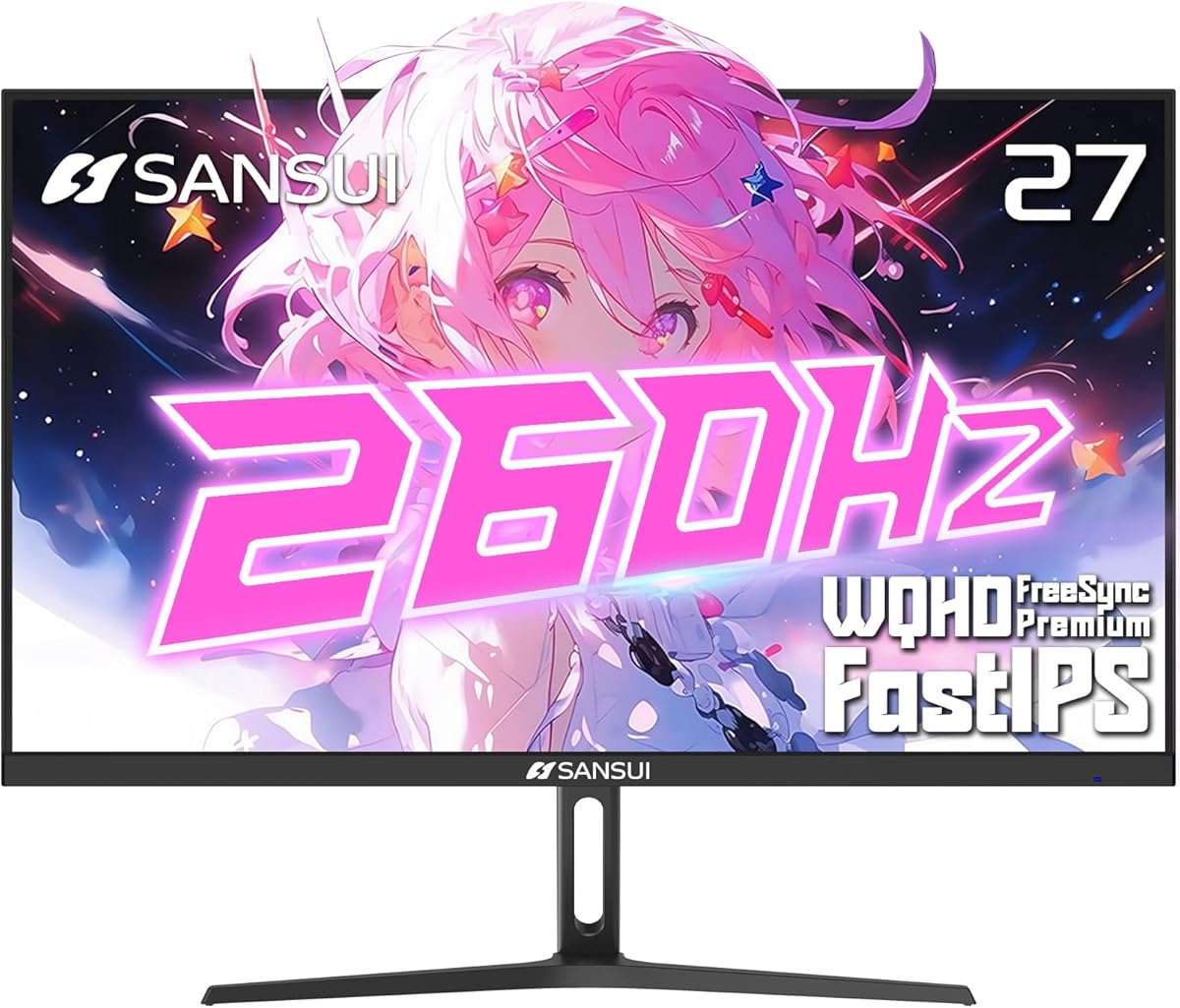
The SANSUI 27 Gaming monitor boasts an impressive 260Hz refresh rate for ultra-fast gaming. With a 4.4 rating, it suits competitive players seeking maximum smoothness. The 98% DCI-P3 coverage ensures vibrant visuals that stand out in any environment effectively.
We may earn a commission when you buy through this link, at no additional cost to you.
Features like Crosshair overlays and FPS assistants help improve gameplay performance without external software. FreeSync Premium ensures smooth synchronization with supported GPUs for tear-free sessions. This model brings top-tier specs to a competitive price point for value shoppers.
The stand only offers tilt adjustments which may limit ergonomic comfort for some users. HDR implementation is basic compared to high-end panels but acceptable for this class. These constraints allow the manufacturer to focus on refresh rate and color performance.
This monitor is ideal for competitive gamers who prioritize refresh rates above all else. If you need a fast display with good color accuracy and assistive tools, the SANSUI is a smart pick. It delivers high-end performance features at an accessible price point.
Built-in crosshair and game assistants improve accuracy and awareness during intense competitive matches.
98% DCI-P3 coverage ensures deep and vibrant colors for a visually rich gaming experience.
We may earn a commission when you buy through this link, at no additional cost to you.
Selecting the right monitor involves balancing several technical factors to match your gaming needs and setup.
Refresh rate measured in Hertz (Hz) indicates how many frames the monitor displays per second. Higher rates like 144Hz or 180Hz produce smoother motion reducing blur during fast action. For competitive gaming, prioritize rates of 144Hz or above to gain a reaction advantage.
Look for models with high refresh rates to ensure fluid visuals during gaming sessions.
Response time refers to how quickly pixels can change color measured in milliseconds. Faster times like 1ms or 0.5ms minimize ghosting and blurring in dynamic scenes. This ensures sharp clarity during quick movements which is vital for shooters and racing games.
Opt for a response time of 1ms or lower to maintain clear visuals during fast gaming.
Panel types dictate color accuracy and viewing angles. IPS panels offer superior color reproduction and wide angles making them versatile for gaming and work. TN panels are faster but suffer from poor colors while VA panels have great contrast but slower response times.
Choose an IPS panel for balanced color accuracy and viewing angle performance.
Adaptive sync technologies like AMD FreeSync or NVIDIA G-Sync synchronize the monitor with your graphics card. This eliminates screen tearing and stuttering by matching refresh rates dynamically. Both options are essential for smooth gameplay regardless of your hardware brand.
Ensure the monitor supports adaptive sync compatible with your GPU for a tear-free experience.
Ergonomic stands allow adjustments to height tilt swivel and pivot to suit your posture. Proper positioning reduces neck strain during long gaming sessions and improves comfort over time. VESA mounting compatibility offers flexibility if you prefer using a separate monitor arm.
Prioritize stands with height and tilt adjustments to maintain comfortable viewing angles.
Color accuracy is measured by color gamut coverage like sRGB or DCI-P3. Higher percentages ensure vibrant and true-to-life visuals enhancing the gaming experience. For creative work or immersive games, look for monitors with wide color gamuts.
Select models with wide color gamut coverage to enjoy vibrant and accurate display colors.
Check available ports like HDMI and DisplayPort to ensure they support your desired refresh rates. DisplayPort often supports higher refresh rates than HDMI which might limit performance. Having multiple options helps connect consoles and PCs simultaneously without adapters.
Verify that your chosen ports support the refresh rate you require for optimal performance.
High Dynamic Range (HDR) improves contrast and brightness for more realistic visuals. Look for HDR certifications like HDR400 to ensure meaningful enhancement rather than a marketing label. This feature helps deep dark scenes appear richer and brighter highlights pop on screen.
Choose a monitor with certified HDR support to enjoy improved contrast and depth.
Proper setup ensures your monitor performs at its peak and lasts longer. Start by mounting it securely using the stand or VESA arm provided. Ensure your GPU cables like DisplayPort are connected to support the maximum refresh rates.
Calibrate your display settings to match your environment for the best visual experience. Adjust brightness and contrast to reduce eye strain during long sessions. Use built-in presets for gaming modes to optimize colors and motion clarity.
Regular cleaning keeps your screen looking fresh without damage. Use a soft microfiber cloth to wipe away dust gently. Avoid harsh chemicals or wet cleaners that could harm the panel coatings or internal components.
Yes, 1440p offers sharper details and a better balance between performance and quality. It allows for larger screens without losing clarity while being less demanding than 4K. For most users, it provides the best visual experience without massive hardware upgrades.
Competitive gamers typically prefer refresh rates of 144Hz or higher. Higher rates ensure smoother motion and reduced input lag which helps in fast-paced shooters. Look for at least 144Hz to gain a tangible advantage in reflex-based games.
Yes, driving 1440p at high refresh rates requires a capable graphics card. While entry-level GPUs can handle it at lower settings, high frame rates demand stronger performance. Ensure your hardware matches the monitor's capabilities to avoid bottlenecks.
Both technologies reduce screen tearing but come from different manufacturers. FreeSync is an open standard often cheaper and works with AMD and many NVIDIA cards. G-Sync is NVIDIA proprietary and generally costs more but offers optimized performance for their GPUs.
Curved monitors on 27 inch screens enhance immersion by wrapping visuals around your view. They are popular for gaming but may be less ideal for productivity tasks like coding. Consider your primary use case before deciding on curvature.
Yes, most models include HDMI ports suitable for consoles like PlayStation or Xbox. Ensure the HDMI version supports the refresh rate you need such as HDMI 2.1 for 4K. These monitors offer great value for next-gen console gaming.
Choosing the right monitor depends on your specific gaming habits and budget constraints. Whether you seek high refresh rates for competition or vibrant colors for immersion, the options reviewed cover diverse needs. Each model brings unique strengths to enhance your setup effectively.
Prioritize specs like refresh rate and response time if you play competitive titles. For immersive experiences, consider factors like color accuracy and HDR support. Finding the right balance ensures you get the best value and performance for your setup.
Always check current pricing and stock before making a purchase to secure the best deal. Prices fluctuate regularly so timing your purchase can save money. Use this guide as a foundation to make a confident and informed decision today.