
VOYEE Switch Controllers
4.4Editor score
RGB lighting effects
10 to 15 hour runtime
Programmable buttons included
6-axis gyro sensor
This guide compares the top gaming controller for Apple TV options to help you find the perfect wireless match for your tvOS gaming experience today.
Finding the right gaming controller for Apple TV transforms your living room into a true gaming hub. You need reliable connectivity, responsive buttons, and long battery life to enjoy seamless play sessions on your favorite tvOS titles without frustrating interruptions.
We evaluated ten top-rated controllers based on compatibility, build quality, feature sets, and user feedback. Our analysis focuses on models that support tvOS natively, offering Bluetooth pairing, motion controls, and ergonomic designs that suit extended gaming marathons on the big screen.
Each pick highlights specific strengths like budget-friendly pricing, premium ergonomics, or unique programmable features. Prices and availability change frequently, so verify the latest offers before purchasing to ensure you get the best value for your Apple TV gaming setup.
4.4Editor score

4.0Editor score
4.5Editor score
This side-by-side comparison highlights key specifications across all ten selected controllers to help you quickly identify the best fit for your Apple TV setup based on your specific gaming needs and budget.


This versatile controller stands out for its broad compatibility, including robust support for Apple TV and Arcade MFi games. With a rating of 4.0 stars, it delivers reliable performance across platforms, making it a top choice for multi-device gamers seeking a unified input solution.
We may earn a commission when you buy through this link, at no additional cost to you.
Its standout qualities include programmable macros and adjustable turbo functions, allowing users to customize controls for complex tasks. The 6-axis gyro sensor enhances motion-based gameplay, while the wake-up feature ensures seamless integration with your Apple TV experience without extra steps.
Trade-offs include a slightly bulkier design compared to streamlined Apple-specific controllers and variable pairing requirements across devices. These are acceptable given the feature density and cross-platform flexibility it offers for serious gamers using Apple TV.
Buyers seeking a feature-rich controller for Apple TV and other devices should prioritize this model for its adaptability. It balances cost and performance well, delivering a solid gaming experience for those who value customization and long sessions.
The programmable operation feature allows you to map complex button combinations, enhancing efficiency in action games or RPGs on your Apple TV screen.
With up to 15 hours of battery life and USB-C charging, you can enjoy uninterrupted gaming marathons without frequent recharges interrupting your entertainment.
We may earn a commission when you buy through this link, at no additional cost to you.
Officially licensed by Apple, the SteelSeries Nimbus+ delivers premium compatibility with tvOS and Apple Arcade titles. Its 4.0-star rating reflects trust among users who value seamless integration and high-quality build materials designed specifically for Apple devices.
We may earn a commission when you buy through this link, at no additional cost to you.
Key strengths include over 50 hours of battery life on a single charge, ensuring weeks of gameplay without recharging. The tactile D-Pad and clickable joysticks provide precise input, while the included iPhone mount adapts the controller for portable play on iOS devices.
The main trade-off is a higher price compared to generic options and limited functionality outside the Apple ecosystem. These compromises are worth it for users prioritizing reliability, official support, and a polished gaming experience on Apple TV.
Apple TV enthusiasts seeking a premium, hassle-free controller should choose the Nimbus+. It justifies its cost with exceptional durability, official certification, and features tailored to enhance mobile and living room gaming sessions.
Being officially licensed ensures full compatibility with tvOS updates and Apple Arcade titles, avoiding pairing issues common with third-party controllers.
With over 50 hours of battery life and durable construction, this controller offers lasting performance that outpaces many competitors in the Apple TV market.
We may earn a commission when you buy through this link, at no additional cost to you.
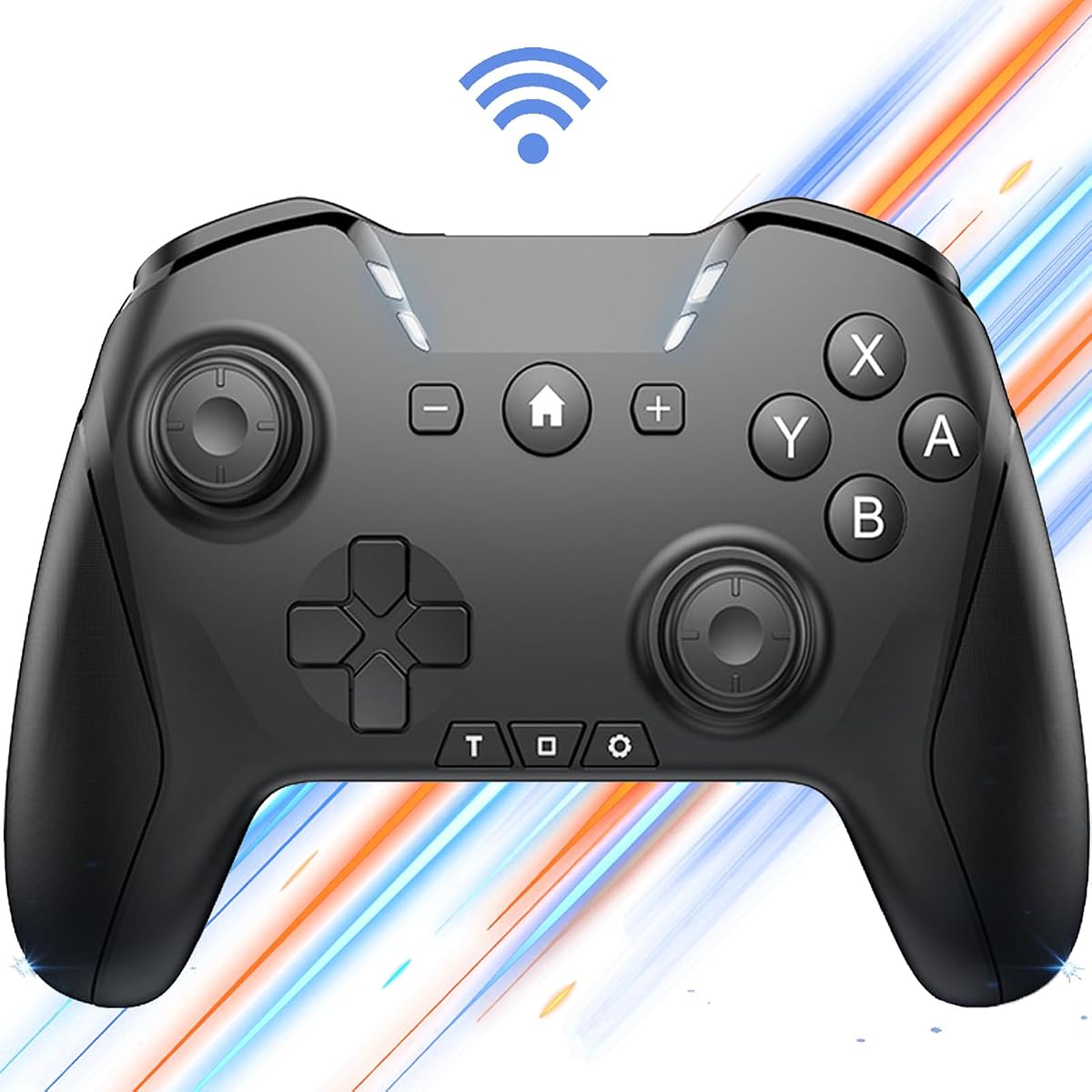
VOYEE offers an affordable option with a high 4.4-star rating, appealing to budget-conscious gamers. While primarily designed for Switch, it supports iOS and Apple TV through Bluetooth, delivering solid performance for the price.
We may earn a commission when you buy through this link, at no additional cost to you.
Its RGB lighting and programmable M1/M2 keys add customization rarely found at this price tier. The 4-level vibration and 6-axis gyro enhance immersion, while the 10 to 15-hour runtime supports extended Apple TV gaming sessions.
Trade-offs include inconsistent build quality and potential compatibility limitations on newer Apple TV models. These are acceptable for users prioritizing cost over premium materials, making it a smart entry-level choice.
Budget gamers looking for customizable features without breaking the bank should consider this controller. It delivers strong value with essential gaming functions, making Apple TV play accessible and engaging.
The M1/M2 programmable keys allow you to map frequent actions, reducing finger strain during long sessions on Apple TV games.
RGB lighting effects add a fun visual element to your controller, enhancing the gaming atmosphere when used in low-light living room setups.
We may earn a commission when you buy through this link, at no additional cost to you.
The 8Bitdo SN30 Pro earns a 4.7-star rating for its retro design and advanced Hall Effect joysticks. Officially supported by Apple TV, it blends nostalgic aesthetics with modern performance for classic and indie games.
We may earn a commission when you buy through this link, at no additional cost to you.
Hall Effect technology prevents stick drift, ensuring precise movement. The 18-hour battery and motion controls enhance immersion, while the compact size suits handheld or couch gaming on Apple TV without sacrificing comfort.
Trade-offs include smaller triggers and a compact form factor that may not suit large hands. These are acceptable given the high build quality and unique retro appeal for emulation or classic titles.
Fans of retro gaming or precision control should choose this controller. It delivers exceptional performance with a distinct style, making it a standout option for Apple TV enthusiasts seeking reliability and flair.
Hall Effect joysticks use magnetic sensors instead of physical contacts, eliminating stick drift for consistent, long-term accuracy on Apple TV games.
Its small footprint makes it easy to store and travel with, ideal for gamers who switch between Apple TV and other devices regularly.
We may earn a commission when you buy through this link, at no additional cost to you.
This renewed version of the Nimbus+ offers official Apple features at a lower cost. Its 3.6-star rating reflects mixed user experiences, but Amazon Renewed standards ensure functional quality for budget-focused Apple TV gamers.
We may earn a commission when you buy through this link, at no additional cost to you.
It retains key strengths like wireless connectivity and rechargeable batteries, providing responsive gameplay. The Renewed status allows access to premium features without full retail pricing, making it accessible for casual users.
Trade-offs include variability in cosmetic condition and potential wear that might affect long-term use. These are acceptable if you prioritize saving money while still accessing reliable Apple TV controller features.
Value seekers wanting premium Apple TV controller features should consider this Renewed option. It balances cost savings with official performance, offering a practical path to enhanced living room gaming.
Renewed models provide access to high-end features like long battery life and official support at a fraction of the original price.
Wireless pairing with Apple TV remains seamless, ensuring you can focus on gameplay without dealing with cable clutter or lag.
We may earn a commission when you buy through this link, at no additional cost to you.
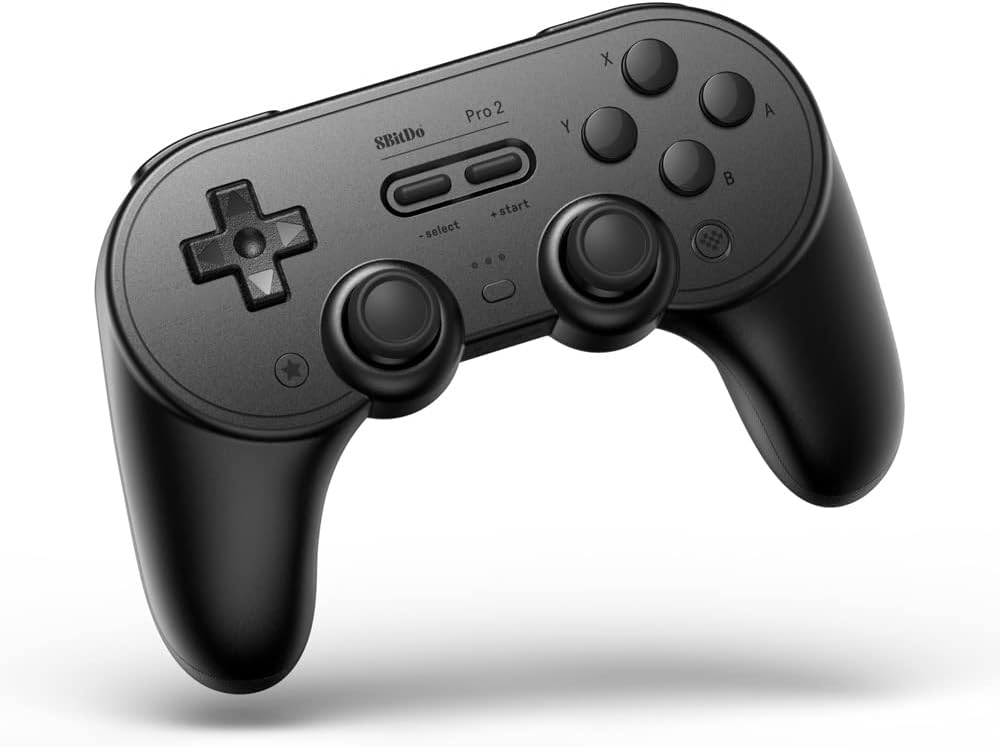
The 8BitDo Pro 2 earns a 4.5-star rating for its premium build and Apple TV support. It combines professional features like back buttons and an enhanced grip with the versatility of multi-platform compatibility.
We may earn a commission when you buy through this link, at no additional cost to you.
Its 20-hour battery and customizable profiles via Ultimate Software provide advanced control. The 4-Way mode switch simplifies device switching, while the ergonomic design ensures comfort during extended Apple TV gaming sessions.
Trade-offs include a higher price and software complexity for full customization. These are acceptable for serious gamers who value precision and multi-device flexibility on their Apple TV.
Pros gamers seeking a professional-grade controller for Apple TV should choose the Pro 2. It delivers superior ergonomics and features that elevate gameplay beyond standard options.
The two programmable back buttons allow complex inputs without removing fingers from the main controls, improving reaction times in competitive games.
Enhanced grip and contoured design reduce hand fatigue, making it ideal for marathon Apple TV gaming sessions on the couch.
We may earn a commission when you buy through this link, at no additional cost to you.
Another iteration of the Nimbus+ offers a 4.1-star rating for consistent Apple TV performance. Its reliable wireless connectivity and rechargeable battery make it a trusted choice for players prioritizing stability and ease of use.
We may earn a commission when you buy through this link, at no additional cost to you.
The tactile buttons and responsive triggers ensure precise gameplay, while the design supports extended sessions comfortably. As a dedicated Apple controller, it avoids compatibility issues common with generic alternatives.
Trade-offs include a higher price and focus on Apple devices only. These are acceptable for users invested in the Apple ecosystem who want guaranteed compatibility and premium build quality.
Apple TV users seeking a dependable, no-compromise controller should opt for this model. It delivers consistent performance and official support, making it a safe bet for quality gaming.
Designed specifically for Apple devices, this controller pairs effortlessly with Apple TV, ensuring zero lag or connection drops during gameplay.
Reliable wireless transmission and robust build quality provide steady performance, ideal for competitive or casual gaming sessions on your TV.
We may earn a commission when you buy through this link, at no additional cost to you.
The AceGamer Aurora II offers a 4.2-star rating with advanced features like Hall Effect joysticks and customizable back keys. While primarily PC-focused, Bluetooth pairing enables Apple TV use with robust gaming capabilities.
We may earn a commission when you buy through this link, at no additional cost to you.
Its 1000mAh battery supports long sessions, and RGB lighting adds style. The 2.4G wireless option provides low latency, and programmable keys enhance gameplay flexibility on Apple TV games.
Trade-offs include complex setup steps and limited Apple TV documentation. These are acceptable for users comfortable with technical configuration who want high-end features at a competitive price.
Tech-savvy gamers seeking customizable, high-performance options should consider this controller. It balances features like drift-free joysticks and large capacity for a versatile Apple TV experience.
The 1000mAh battery ensures hours of continuous play, reducing interruptions during extended Apple TV gaming sessions.
Hall Effect joysticks deliver precise, drift-free movement, critical for accurate aiming and navigation in action games on Apple TV.
We may earn a commission when you buy through this link, at no additional cost to you.
With a 4.4-star rating, the Official Luna Controller excels in cloud gaming scenarios. While optimized for Amazon Luna, its Bluetooth mode enables Apple TV use, delivering responsive controls and seamless screen switching capabilities.
We may earn a commission when you buy through this link, at no additional cost to you.
Its Cloud Direct technology ensures low latency on Luna, and USB connectivity adds flexibility. The ergonomic design supports long sessions, and cross-device continuity enhances user experience across Apple TV and mobile.
Trade-offs include limited optimization for local Apple TV apps and reliance on Luna for full features. These are acceptable for cloud gamers who value seamless streaming performance.
Cloud gamers using Luna on Apple TV should prioritize this controller. It delivers high performance and unique continuity features that enhance modern cloud gaming experiences.
The screen switching feature lets you move between devices mid-game, ensuring uninterrupted gameplay when switching from Apple TV to mobile.
Cloud Direct technology optimizes connection speed on compatible services, minimizing lag for a smooth streaming experience on your Apple TV.
We may earn a commission when you buy through this link, at no additional cost to you.
The GMBACK controller offers a 4.1-star rating with unique loop macro features useful for repetitive tasks. Supporting Apple devices and Apple TV, it provides essential gaming functions with added productivity tools for specific game types.
We may earn a commission when you buy through this link, at no additional cost to you.
Its loop macro function automates sequences, while the wake-up feature streamlines access to Apple TV. The 15-20 hour battery and RGB lighting add practical and visual appeal, enhancing the overall experience.
Trade-offs include complex macro setup and modest build quality. These are acceptable for players needing automation tools who prioritize function over premium materials.
Gamers needing automation tools for Apple TV should consider this controller. It offers unique macro features and strong battery life, making it a practical choice for repetitive gameplay.
The loop macro function records and replays button sequences, ideal for repetitive tasks like farming or grinding in RPGs on Apple TV.
The wake-up feature allows instant console access with a single button press, reducing wait times when starting Apple TV games.
We may earn a commission when you buy through this link, at no additional cost to you.
Selecting the right controller involves balancing compatibility, features, and budget. This guide breaks down essential factors to help you make an informed decision for your Apple TV setup.
Ensure the controller officially supports tvOS or has robust Bluetooth pairing for Apple Arcade. Licensed controllers like SteelSeries Nimbus+ guarantee seamless updates and app compatibility, avoiding common connectivity issues that arise with generic models on newer tvOS versions.
Look for explicit mentions of tvOS or iOS support in product descriptions to ensure reliable long-term use on your Apple TV.
Extended gameplay requires long battery life, ideally 15 hours or more. Rechargeable controllers with USB-C charging are convenient for quick top-ups between sessions, ensuring you never face interruptions during a gaming marathon on your living room TV.
Prioritize models with high mAh capacity and fast charging to minimize downtime and maximize your entertainment time.
Comfort is critical for long sessions. Look for ergonomic designs with textured grips and well-placed buttons to reduce hand strain. Durable materials like rubberized coatings ensure the controller withstands regular use without losing button responsiveness over time.
Test the feel if possible, or check user reviews for comments on comfort during extended gameplay to avoid fatigue.
Features like programmable buttons, turbo modes, and gyro sensors add versatility. Controllers with back buttons or macro support allow for complex inputs without removing fingers from the main controls, enhancing performance in competitive or action-heavy Apple Arcade titles.
Weigh these advanced features against your specific needs, as they may increase complexity and cost if you prefer simple gaming experiences.
Low latency is vital for responsive gameplay. Bluetooth is standard, but some controllers offer 2.4G wireless or USB options for reduced lag. Ensure the connection method suits your setup to avoid input delays that can frustrate fast-paced gaming sessions.
Check for independent testing or user feedback on response times to verify the controller performs smoothly on Apple TV.
Controllers range from budget to premium. Consider what features matter most to you; a budget option may lack official licensing but offer solid performance, while premium models provide guaranteed compatibility. Balance cost against the longevity and reliability expected for Apple TV use.
Read reviews to assess whether the price aligns with the build quality and feature set to ensure you get good value for your money.
If you game on multiple devices, choose a controller that supports Apple TV alongside PC, iOS, or consoles. This versatility reduces clutter and cost, allowing you to use one device across platforms without sacrificing specific TV gaming functionality.
Verify that the controller can switch modes easily to avoid cumbersome reconnection processes when moving between devices.
A solid warranty indicates manufacturer confidence. Brands offering 60 days or more provide peace of mind against defects. Good customer support ensures quick resolution for pairing issues or hardware problems that may arise during your Apple TV gaming journey.
Check the return policy and warranty terms before purchasing to protect your investment and ensure reliable service if needed.
Pairing typically involves enabling Bluetooth on Apple TV, then holding the controller's pairing button until the LED flashes. For controllers with dedicated apps like SteelSeries Engine, install them to update firmware and customize button mappings for optimal Apple Arcade performance.
Maintain battery health by avoiding complete drains; charge when levels drop to 20 percent. Store controllers in cool, dry places away from direct sunlight to prevent material degradation and preserve sensor accuracy over time.
Regularly clean buttons and sticks with a soft, dry cloth to remove dust and oils. Avoid harsh chemicals that could damage coatings, and inspect cables for wear to ensure consistent connectivity and safe charging practices.
No, any Bluetooth controller compatible with tvOS works. However, Apple-licensed controllers offer better reliability and full feature support for Apple Arcade. Generic controllers may lack access to specific motion or button features.
Yes, the PS5 DualSense supports tvOS via Bluetooth pairing. It offers good battery life and features, though it may lack official customization tools. Ensure your tvOS version supports the controller for smooth connection.
Reset the controller to pairing mode and ensure Bluetooth is active on Apple TV. Update controller firmware via its app and restart the TV if needed. Check for nearby interference that might block the signal.
Rechargeable controllers reduce waste and cost over time. They offer convenience without buying AA batteries. Ensure they support charging while playing for uninterrupted use, which is ideal for Apple TV gaming sessions.
Prioritize Bluetooth compatibility with tvOS, long battery life, ergonomic design, and responsive buttons. Advanced features like gyro sensors or programmable buttons enhance gameplay but depend on the game you play on Apple TV.
Quality controllers last several years with proper care. Battery life degrades over time, but rechargeable ones can be replaced or maintained. Check warranty terms and user reviews for durability insights before buying.
The SteelSeries Nimbus+ leads for official support and battery life, while VOYEE offers budget-friendly customization. The 8Bitdo Pro 2 brings premium features to serious gamers. Each pick balances performance and value for Apple TV gaming.
Prioritize compatibility, battery, and ergonomics to ensure comfort and reliability. Choose based on your primary needs: simplicity, customization, or advanced tools. A well-chosen controller elevates your Apple Arcade experience on the big screen.
Always check current prices and availability before purchasing as deals change frequently. Verify tvOS compatibility and warranty terms to ensure you get the best value for your gaming setup today.