
Big Button Universal Remote for All TV Remote, for All Samsung/LG/VIZIO/Sony/Hisense/Philips/Panasonic TVs and More
4.4Editor score
No programming required setup
Works with most major brands
Extra large enter button design
This guide compares the easiest TV remotes for seniors with large buttons and simple layouts to help elderly users control their entertainment without
Finding the right television remote can be a challenge for older adults who face vision or dexterity issues. A good remote should have large buttons, clear labeling, and a simple layout that reduces confusion and makes daily use comfortable for everyone at home.
We compared ten top-rated universal remotes designed specifically for seniors and those with low vision or limited mobility. Our analysis focused on button size, ease of programming, compatibility with major TV brands, and features that support independence and ease of use.
Each pick highlights key strengths, pros, cons, and ideal use cases to help you choose the best fit for your needs. Please note that product availability and details may change over time so check current listings before purchasing for the most accurate information.
4.4Editor score

4.3Editor score
4.2Editor score
The following table provides a side by side comparison of all ten remotes reviewed in this guide to help you quickly identify the best option based on key features and compatibility.


The GE BigEZ OneTouch remote earns our top pick with a rating of 4.3 stars thanks to its fully backlit buttons and color blind friendly layout. It simplifies TV control for seniors by offering preset device buttons for Samsung LG Vizio Sony and Roku TVs alongside an AUX button for additional devices.
We may earn a commission when you buy through this link, at no additional cost to you.
Its standout qualities include the extra large white remote control that is hard to lose and the large blue volume and orange channel buttons that are easy to see. The simple setup requires just pressing the TV button for your brand and then the power button making it accessible for anyone.
A trade off is that it only presets five major brands and an extra device so users with many connected devices may need to reprogram the AUX button occasionally. The remote is not voice controlled which keeps it simple but limits advanced streaming navigation for some smart TV users.
Seniors who want a straightforward reliable remote with clear visibility and basic multi device control should buy this model. The included U.S. based technical support and online programming videos make it a secure choice for households needing assistance during setup or daily use.
The fully backlit buttons ensure that seniors can see controls clearly in low light conditions without squinting or needing extra lighting.
Having preset buttons for five major brands reduces the need for complex programming and speeds up the initial setup process significantly.
We may earn a commission when you buy through this link, at no additional cost to you.
This universal remote earns the Best Budget badge with a 4.4 star rating because it delivers essential large button functionality without requiring any programming. It works right out of the box with Samsung LG Vizio Sony Hisense Philips Panasonic Sharp and more TVs making it an immediate solution for seniors who need simplicity.
We may earn a commission when you buy through this link, at no additional cost to you.
Its standout quality is the easy big button design with an extra large enter button and tactile feedback that helps users feel confident when pressing keys. The remote is universal for most TV brands so you do not need to match a specific model number which reduces confusion during purchase.
A trade off is that it is not compatible with streaming devices cable boxes or unrelated TV platforms so it only controls the TV itself. This limits its use if your senior relies heavily on streaming apps but it remains perfect for traditional broadcast cable or satellite viewing.
Seniors on a budget who want a reliable remote with clear buttons and no setup should buy this option. The 90 day warranty and free replacement service add peace of mind ensuring that any issues can be resolved quickly without extra cost or hassle.
The remote works immediately after inserting batteries which eliminates the frustration of complex pairing or code entry steps.
It supports a wide range of major TV brands so most households can find a match without needing a brand specific remote.
We may earn a commission when you buy through this link, at no additional cost to you.
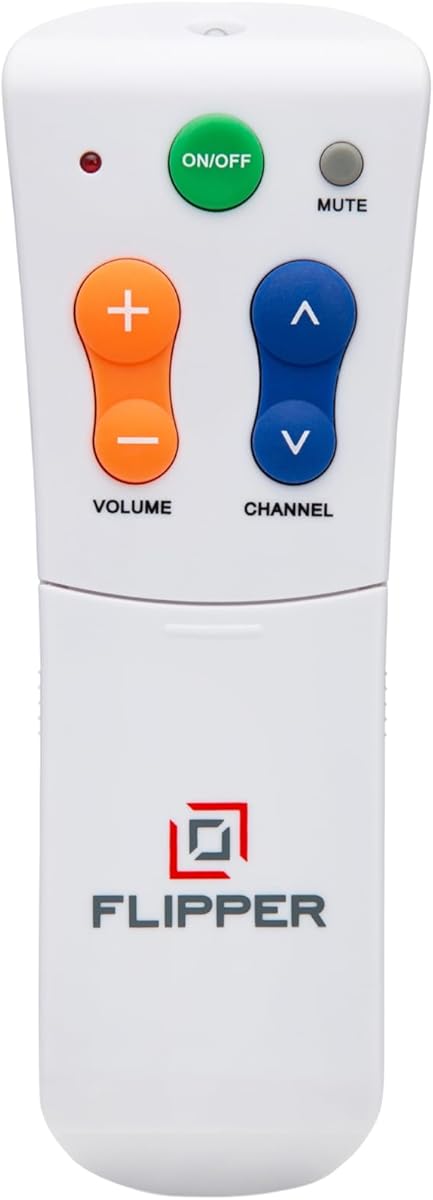
The Flipper remote earns Best Premium status with a 4.2 star rating because it is purpose built to help seniors and those with dementia regain independence through its simplified four button front layout. It was created from a personal mission to help a father with Alzheimer's access favorite content without stress or frustration.
We may earn a commission when you buy through this link, at no additional cost to you.
Its standout quality is the ability to customize up to twenty five favorite channels that can be cycled through using just the channel buttons eliminating the need to remember numbers or navigate complex menus. The color coded buttons green for power orange for volume blue for channels and gray for mute are oversized and tactile for easy identification.
A trade off is that it does not work with streaming apps like Netflix YouTube or Roku since it has no navigation buttons for app menus. This means it is best suited for households that rely on traditional broadcast cable or satellite viewing where basic TV functions are sufficient.
Caregivers and seniors who prioritize simplicity and independence should buy this remote to reduce daily confusion and frustration. The hidden buttons for customization allow personalization while keeping the main face simple and the universal compatibility with most TV brands ensures broad utility across setups.
The four button face eliminates overwhelming options and reduces stress for seniors with memory or cognitive challenges.
Pre programming up to twenty five favorite channels lets users cycle through shows easily without typing numbers or navigating guides.
We may earn a commission when you buy through this link, at no additional cost to you.
The EZclicker Extra Simple Big Button Remote scores 4.2 stars and offers a reliable black design focused on comfort and accessibility for seniors with limited dexterity or vision. It includes specialized features like tactile feedback and big button universal controls to provide a more comfortable and accessible user experience for daily TV watching.
We may earn a commission when you buy through this link, at no additional cost to you.
Its standout quality is the easy to program process where you simply turn on the TV point the remote and hold the Mute and Volume plus buttons together for up to sixty seconds. The remote measures 6 by 2 by 1 inches making it compact and lightweight for easy handling and storage in a small space.
A trade off is that it is not compatible with cable boxes Firestick or Roku devices so it works only with TVs. This means households using streaming dongles may need to find a different solution and users should check images for a full list of compatible TV models before buying.
Seniors who need a simple affordable remote for basic TV control should buy this model for its tactile feedback and easy programming. It makes a perfect gift for grandparents or elderly family members with Alzheimer's dementia or vision impairments who benefit from a simplified user interface.
The remote can be programmed in under a minute by holding volume and mute buttons until the volume changes.
Measuring 6 by 2 by 1 inches it is small enough to fit in a drawer or on a nightstand without clutter.
We may earn a commission when you buy through this link, at no additional cost to you.
The Flipper remote earns a 4.2 star rating and serves as a specialized tool for seniors with dementia or low vision to regain independence from their entertainment. Born from a founder's personal mission it gives caregivers peace of mind through simplicity and control with a design that eliminates confusing menus and overwhelming options.
We may earn a commission when you buy through this link, at no additional cost to you.
Its standout quality is the front face that shows only four buttons for everyday use with additional hidden buttons that slide to reveal for customizing favorites. The buttons are color coded green for power orange for volume blue for channels and gray for mute and are oversized tactile with clear labeling for easy visibility.
A trade off is that it cannot navigate streaming apps like Netflix YouTube Prime Video Hulu Roku Google TV Apple TV or Fire TV because it has no navigation buttons for app menus. This makes it unsuitable for households that rely primarily on streaming services for content viewing and entertainment.
Caregivers looking for a remote that prioritizes independence and simplicity for elderly loved ones should buy this model. It works with all TV types on basic functions and can control both TV and cable or satellite boxes reducing clutter and confusion for daily use at home.
Created specifically to help seniors with dementia or Alzheimer's access favorite content without stress or frustration.
Additional buttons slide to reveal for customizing favorites keeping the main face simple and uncluttered.
We may earn a commission when you buy through this link, at no additional cost to you.
This Large Button TV Remote Control earns 4.4 stars for its simple layout with large clearly marked buttons that offer effortless control of your television without complicated steps. It is designed specifically for elderly users and those with limited vision to promote independence and convenience for everyone at home who values ease of use.
We may earn a commission when you buy through this link, at no additional cost to you.
Its standout quality is the extra large buttons that reduce misclicks and make channel and volume adjustments easy to see and press ensuring stress-free use for elderly users. The ergonomic design with a lightweight body provides a comfortable grip while sturdy construction ensures long-lasting use for everyday home entertainment needs.
A trade off is that it is not compatible with DVD cable boxes or niche TV brands and does not include voice control which limits advanced functionality. This makes it ideal for traditional TV setups but less suitable for households with complex multi device or smart TV streaming environments.
Seniors who want a reliable traditional TV remote with clear visibility and comfortable handling should buy this model. It ensures broad compatibility and dependable performance as a simple replacement remote for most major TV brands without requiring technical setup or programming expertise to get started.
Oversized buttons reduce misclicks and make adjustments easy to see and press for elderly users.
Lightweight body with ergonomic design provides a comfortable grip and sturdy construction for long lasting use.
We may earn a commission when you buy through this link, at no additional cost to you.
The Philips BigEZ OneTouch remote scores 3.8 stars and provides a black remote control with a fully backlit keypad to support seniors with low vision. It features preset device buttons for Samsung LG Sony Vizio and Roku TVs along with an AUX button preset for Roku boxes that can be reset for a different device.
We may earn a commission when you buy through this link, at no additional cost to you.
Its standout quality is the innovative OneTouch setup that programs your TV with one button press after inserting two AA batteries so no complicated steps are required. The large blue volume button and large orange channel button make it colorblind friendly and easy to navigate for users with vision challenges.
A trade off is that its rating is below average at 3.8 stars and it only supports five brands and one extra device which limits flexibility for some households. The included U.S. based technical support and online programming videos help mitigate issues but users should check compatibility carefully before purchasing.
Seniors who want a fully backlit remote with simple setup and brand specific presets should consider this model for its visibility features. It operates multiple devices including set-top boxes and soundbars with a directional pad that offers play pause fast forward and rewind capability for streaming device navigation.
The keypad lights up fully so seniors can see all controls clearly even in dark rooms without extra lighting.
Programming happens with a single button press after inserting batteries eliminating complex code entry steps.
We may earn a commission when you buy through this link, at no additional cost to you.
This Big Button Universal TV Remote scores 3.0 stars and delivers a simple easy to use layout with large clearly marked buttons perfect for seniors and low vision users. It includes big button universal controls and tactile feedback to provide a comfortable and accessible user experience for daily TV control without complicated steps.
We may earn a commission when you buy through this link, at no additional cost to you.
Its standout quality is the extra large buttons that reduce misclicks and make channel and volume adjustments easy to see and press ensuring stress-free use for elderly users. The simple layout with clear markings helps those with limited dexterity or vision access control effortlessly and independently at home.
A trade off is that its rating is lower than average and it is not compatible with cable boxes Firestick Roku or streaming services so it works only with TVs. Users should verify compatibility with their specific TV model before buying to ensure it functions correctly with their setup.
Seniors who want a budget friendly simple remote with big buttons and clear layout should consider this model for its accessibility focus. It ensures broad compatibility and dependable performance as a simple replacement remote for most major TV brands though users should be aware of its lower rating.
The layout is simple with large marked buttons for effortless control without complicated steps or confusion.
Buttons are extra large to reduce misclicks and make adjustments easy to see and press for elderly users.
We may earn a commission when you buy through this link, at no additional cost to you.
This Backlit Big Button Remote scores 4.4 stars and is designed specifically for Samsung smart TVs with oversized buttons that stay lit for 30 seconds to help the elderly visually impaired or those with stiff fingers change channels easily. It includes a soft silicone protective cover and a mount hook to prevent loss and protect against spills or cracks.
We may earn a commission when you buy through this link, at no additional cost to you.
Its standout quality is the no setup required function which means it works right out of the box without pairing or programming. The upgraded chip delivers a 49-ft range and 0.1-second response so users can click and watch without delay while the ergonomic shape lets them reach every button with just one hand.
A trade off is that it is designed for Samsung smart TVs and not for streaming devices cable boxes or other TV brands which limits its universality. Users with non-Samsung TVs or complex streaming setups will need to find a different option to ensure full compatibility with their devices.
Samsung TV owners who want a backlit remote with protective accessories and no setup should buy this model for its convenience. The soft silicone buttons feel gentle under fingers and the body is textured and balanced to ensure comfort during extended use and control without struggle.
Buttons stay lit for 30 seconds so users can find them in dark rooms without needing to squint or search.
The soft silicone cover and mount hook help prevent loss and protect the remote from cracks spills and damage.
We may earn a commission when you buy through this link, at no additional cost to you.
The Anderic RR1004 remote scores 4.0 stars and features extra-large glow-in-the-dark keys for effortless use in low-light settings making it ideal for seniors or assisted living facilities. It has just the core functions needed such as Power Volume Channel Mute and Closed Captioning to eliminate complex menus and reduce confusion for caregivers.
We may earn a commission when you buy through this link, at no additional cost to you.
Its standout quality is the infrared learning technology that allows you to copy functions from your existing IR remote such as adding input or streaming buttons like Netflix. It is pre-programmed for LG TVs right out of the box and includes a setup guide for other brands to simplify initial configuration.
A trade off is that it does not work with RF or Bluetooth based systems such as Roku Fire TV or Xfinity which limits compatibility for many modern setups. Setup requires line-of-sight and proper signal strength so users must point the remote directly at the TV during programming to ensure success.
Seniors or caregivers in home healthcare or hospitality environments who want a simple remote with essential controls should buy this model. The minimalist design reduces clutter and once set up it is extremely easy to use and dependable for everyday television control without complex navigation.
Extra-large keys glow in the dark so controls are visible in low light without needing external lighting.
The remote has only core functions like Power Volume and Mute to reduce confusion and clutter for daily use.
We may earn a commission when you buy through this link, at no additional cost to you.
Choosing the right remote involves considering button size layout compatibility and features that support vision and mobility needs to ensure comfortable independent use.
Look for remotes with extra large buttons and clear spacing between keys to reduce accidental presses and improve visibility. A simple layout with fewer buttons helps prevent confusion and makes it easier to find essential controls like power volume and channels quickly.
Prioritize remotes that feature large tactile buttons with clear labels that are easy to see and feel even with arthritic hands or low vision.
Remotes with backlit keys or glow in the dark buttons help users see controls in low light without needing extra lamps. Color coded buttons such as blue for volume and orange for channels can also help colorblind users identify functions more easily.
Choose a remote with backlit or color coded keys to ensure visibility in dim environments and reduce strain on aging eyes.
Select a remote that offers simple setup methods such as preset brand buttons or one touch programming to avoid complex code entry. Some models work right out of the box without pairing which saves time and frustration for seniors who are not tech savvy.
Opt for remotes with preset brands or one touch setup to avoid complicated programming and ensure quick reliable installation.
Check that the remote supports your specific TV brand and any connected devices like cable boxes or soundbars if needed. Universal remotes that work with most major brands offer more flexibility but confirm whether streaming devices are supported since many senior remotes only control the TV itself.
Verify the remote is compatible with your TV brand and any essential external devices to ensure it can handle your daily viewing needs.
A remote with tactile feedback helps users feel when a button is pressed which reduces uncertainty during use. The build should be sturdy yet lightweight with an ergonomic shape that fits comfortably in the hand for extended periods without strain.
Choose a remote with tactile buttons and an ergonomic lightweight body for comfortable handling and reliable button confirmation.
Some remotes allow you to customize favorite channels or macros to simplify navigation and access to preferred content. This feature can be especially helpful for seniors with dementia or memory challenges by reducing the need to remember numbers or navigate complex menus.
Look for remotes with channel customization or macro features to simplify navigation and provide quick access to favorite shows.
Remotes that come with technical support or a warranty offer peace of mind in case of issues during setup or use. U.S. based support and online programming videos can help caregivers troubleshoot problems quickly and get the remote working correctly.
Prioritize models that include technical support or a warranty to ensure help is available if setup or usage problems occur.
Consider any specific needs such as mobility issues or cognitive challenges when choosing a remote. Features like simplified layouts fewer buttons and easy to press controls can make a significant difference in daily use and independence for seniors with varying abilities.
Tailor your choice to specific mobility or cognitive needs by selecting remotes with simplified controls and accessible design features.
To start using your new remote insert the required batteries into the battery compartment and ensure they are oriented correctly according to the markings. For remotes with preset brand buttons press the corresponding button for your TV brand and then press power to begin controlling the device.
If your remote requires programming follow the included instructions which often involve holding specific buttons together until the TV responds. For infrared remotes point the remote directly at the TV during setup and use to ensure a strong signal reaches the sensor.
Keep the remote clean and dry by wiping it gently with a soft cloth and avoiding exposure to moisture or extreme temperatures. Store it in a consistent location such as a bedside table or dedicated holder to prevent loss and make it easy to find when needed.
Most of the remotes in this guide only control the TV itself and not streaming devices like Roku or Fire TV. Some models allow control of cable boxes or soundbars but app navigation requires different remotes designed for streaming platforms.
Most of the remotes in this guide do not include batteries so you will need to purchase AAA or AA batteries separately. Check the product details for the exact battery type required before using the remote for the first time.
Yes several remotes like Flipper are specifically designed for seniors with dementia with simplified layouts and customizable favorites. These models reduce confusion by limiting visible buttons and allowing caregivers to set preferred channels in advance.
No most of these remotes are designed for easy setup without technical knowledge. Many offer one touch programming or preset buttons that let you get started quickly by following simple step by step instructions.
Yes many remotes feature backlit keys large buttons and high contrast labeling to support users with low vision. Some models also include glow in the dark keys to make controls visible in dimly lit rooms.
Some universal remotes can control both the TV and cable box or satellite box from one device. Check the product details to confirm if it supports multi device control for your specific setup.
If the remote stops working first check the batteries and ensure they are inserted correctly. If problems persist contact the manufacturer support many models include U.S. based support or online troubleshooting resources.
Most of the remotes in this guide are compatible with major brands including Samsung LG and Sony. Verify the compatibility list for each model to ensure it supports your specific TV model.
The ten remotes reviewed in this guide offer a range of features to meet different needs from simple layouts to backlit buttons and dementia friendly designs. Each model prioritizes ease of use large buttons and clear controls to help seniors manage their entertainment independently.
When choosing a remote prioritize features that match the user's vision and mobility needs such as backlit keys color coding or preset brand buttons. Consider whether the remote needs to control just the TV or also cable boxes and streaming devices to ensure full compatibility.
Prices and availability can change over time so check current listings on the retailer site for the most up to date information. Selecting the right remote can make a meaningful difference in daily comfort and enjoyment of television for seniors and their families.