
FLYDIGI Direwolf 4
4.5Editor score
Hall Effect Joysticks
Micro and Linear Triggers
Low Latency Response
Find the best controller for Star Wars Squadrons with our expert guide comparing top picks, flight sticks, and gamepads for immersive space combat gaming.
Choosing the right controller for Star Wars Squadrons can transform your space combat experience. The ideal device offers precise aiming, responsive triggers, and comfort during long dogfights across various gaming platforms.
We evaluated ten top-rated controllers based on build quality, feature sets, and compatibility. Our analysis covers traditional gamepads, flight sticks, and modular systems to help you find the perfect fit for your setup.
Each pick highlights key strengths and potential drawbacks to guide your decision. Note that prices and availability may change over time, so check the current listings before purchasing your new gaming gear.
4.5Editor score

4.5Editor score

4.3Editor score
This side-by-side comparison highlights the unique features and specifications of each selected controller to help you identify the best match for your Star Wars Squadrons gameplay style.




The Thrustmaster T-Flight Hotas One stands out as the top pick for Star Wars Squadrons players seeking a dedicated flight experience. It holds a strong rating from users who appreciate its realistic control layout and immediate plug-and-play functionality.
We may earn a commission when you buy through this link, at no additional cost to you.
Its standout feature is the detachable throttle, allowing you to use the joystick on your lap while placing the throttle on your desk for better reach. The adjustable resistance on the stick ensures precise movements during critical dogfights and landing sequences.
While it lacks the advanced features of higher-end models, the build quality is adequate for its price point. The lack of dedicated rudder pedals might be a minor inconvenience for hardcore simulators but remains acceptable for casual space combat enthusiasts.
This controller is ideal for gamers transitioning from standard gamepads to flight sticks without breaking the bank. We recommend it for anyone wanting an immersive Star Wars Squadrons setup with reliable performance and flexible configuration options.
The layout mimics real aircraft controls, enhancing immersion by putting critical actions like throttle and weapon fire within easy reach during combat.
The modular design lets you adapt the controller to your desk space, making it suitable for both dedicated flight sim stations and casual gaming areas.
We may earn a commission when you buy through this link, at no additional cost to you.
The FLYDIGI Direwolf 4 offers impressive performance at a budget-friendly price point. Rated highly by competitive gamers, it brings features usually found in expensive controllers to a more accessible market segment.
We may earn a commission when you buy through this link, at no additional cost to you.
Its FORCEFLEX joysticks allow you to adjust tension to suit different gaming styles, while the FORCESWITCH triggers switch between fast micro modes and precise linear modes. This versatility is perfect for the varied demands of Star Wars Squadrons gameplay.
One trade-off is the lack of native Xbox support, limiting its use to PC and other platforms. Additionally, you might need the software to unlock all customization options, which can be a hurdle for some users.
We recommend this controller for PC users looking for a high-performance gamepad without spending a fortune. It delivers excellent value and responsive controls that will enhance your space combat missions significantly.
Adjusting stick tension helps reduce fatigue and improves precision during long sessions, a crucial factor when piloting complex starfighters.
The ability to switch trigger modes ensures that both weapon firing and throttle control feel optimal for your specific play style.
We may earn a commission when you buy through this link, at no additional cost to you.
The Logitech G X52 Flight Control System represents the pinnacle of flight control technology. With a strong reputation for durability and precision, it is designed for pilots who demand every advantage in combat.
We may earn a commission when you buy through this link, at no additional cost to you.
Its magnetic sensors ensure long-term accuracy without drift, while the built-in LCD screen lets you manage commands without removing your hands from the controls. The sheer number of programmable buttons allows for total command over your ship.
The premium price and complexity might be intimidating for casual players. Setting up all the mappings requires time and patience, but the resulting control depth is unmatched in the market.
This system is best suited for serious enthusiasts who want a full cockpit experience. If you are committed to mastering Star Wars Squadrons, the X52 offers the tools to dominate the battlefield like a pro pilot.
Non-contact sensors prevent the common issue of stick drift, ensuring your aim remains true over thousands of hours of gameplay.
With hundreds of programmable inputs, you can map every maneuver to a button, eliminating the need to look at a keyboard during critical moments.
We may earn a commission when you buy through this link, at no additional cost to you.
The Controller Gear bundle brings the spirit of Star Wars directly into your hands with officially licensed art. It is a favorite for fans who want to show their allegiance while playing the game.
We may earn a commission when you buy through this link, at no additional cost to you.
It functions as a standard Xbox controller but includes a premium charging stand and offers long battery life for extended sessions. The textured grip ensures comfort, and it works seamlessly with Xbox consoles and PCs.
While it does not offer specialized flight controls, it remains a reliable and stylish option for gamers who prefer a traditional layout. The bundle packaging makes it a great gift for any Star Wars enthusiast.
We suggest this for dedicated Xbox users who value aesthetics alongside performance. It provides a solid, reliable experience that complements the game perfectly without requiring complex setups.
The unique design celebrates the game's visual identity, making every gaming session feel like part of the Star Wars universe.
Included charging stand means your controller is always ready for a sortie, reducing downtime and keeping you in the action longer.
We may earn a commission when you buy through this link, at no additional cost to you.
The ESWAP X 2 PRO combines mechanical responsiveness with modularity. It stands out for its fast mechanical buttons and precision mini-sticks, catering to players who need quick reactions.
We may earn a commission when you buy through this link, at no additional cost to you.
You can add extra buttons on the back to handle complex maneuvers quickly. The mechanical D-pad ensures accurate inputs, which is essential when navigating menus or executing precise moves in combat.
The price point is higher than standard controllers, and the software configuration can be daunting for some users. However, the performance gains justify the investment for competitive players.
We recommend this for gamers who want a hybrid experience that feels like a flight stick but fits in a standard gamepad form factor. It bridges the gap between casual and sim controls effectively.
Mechanical buttons react significantly faster than membrane ones, giving you a split-second edge in high-intensity dogfights.
The ability to remap back buttons lets you assign complex commands to your fingertips, streamlining your control scheme.
We may earn a commission when you buy through this link, at no additional cost to you.
The VelocityOne H.O.T.A.S. delivers a rich flight experience with 15 hall-effect axes and 73 inputs. It is designed to be a complete system for both Xbox and PC gamers.
We may earn a commission when you buy through this link, at no additional cost to you.
The dual throttle provides distinct detents for thrust management, while the display gives real-time data feedback. RGB lighting adds a personal touch to your cockpit environment.
The setup might require desk space and initial tuning to get right. However, the quality of feedback and control makes it worth the effort for serious pilots.
This controller is perfect for those who want a full HOTAS experience without a huge investment. It balances immersion and usability well for a range of flight simulation games.
Hall-effect sensors ensure smooth, drift-free movement, essential for maintaining stable aim during long combat scenarios.
RGB lighting and the display create a more engaging cockpit feel, helping you stay oriented during complex missions.
We may earn a commission when you buy through this link, at no additional cost to you.
The Tarantula 8K offers incredibly fast response times with its 8000Hz polling rate. It is a top choice for competitive players who cannot afford any input lag.
We may earn a commission when you buy through this link, at no additional cost to you.
The hall effect triggers provide smooth linear control or micro switches for crisp clicks. The 6-axis gyroscope helps fine-tune your aim for precise maneuvers.
The wired connection is both a strength and a limitation. While it ensures stability, it restricts movement to your desk area. It is best for stationary setups.
We recommend this for PC gamers who prioritize speed and precision. The combination of gyro and high polling rates makes it a powerful tool for space combat.
Using the gyroscope adds another dimension of control, allowing you to make small adjustments with subtle wrist movements.
The high polling rate ensures every input is registered instantly, giving you a competitive edge in fast-paced engagements.
We may earn a commission when you buy through this link, at no additional cost to you.
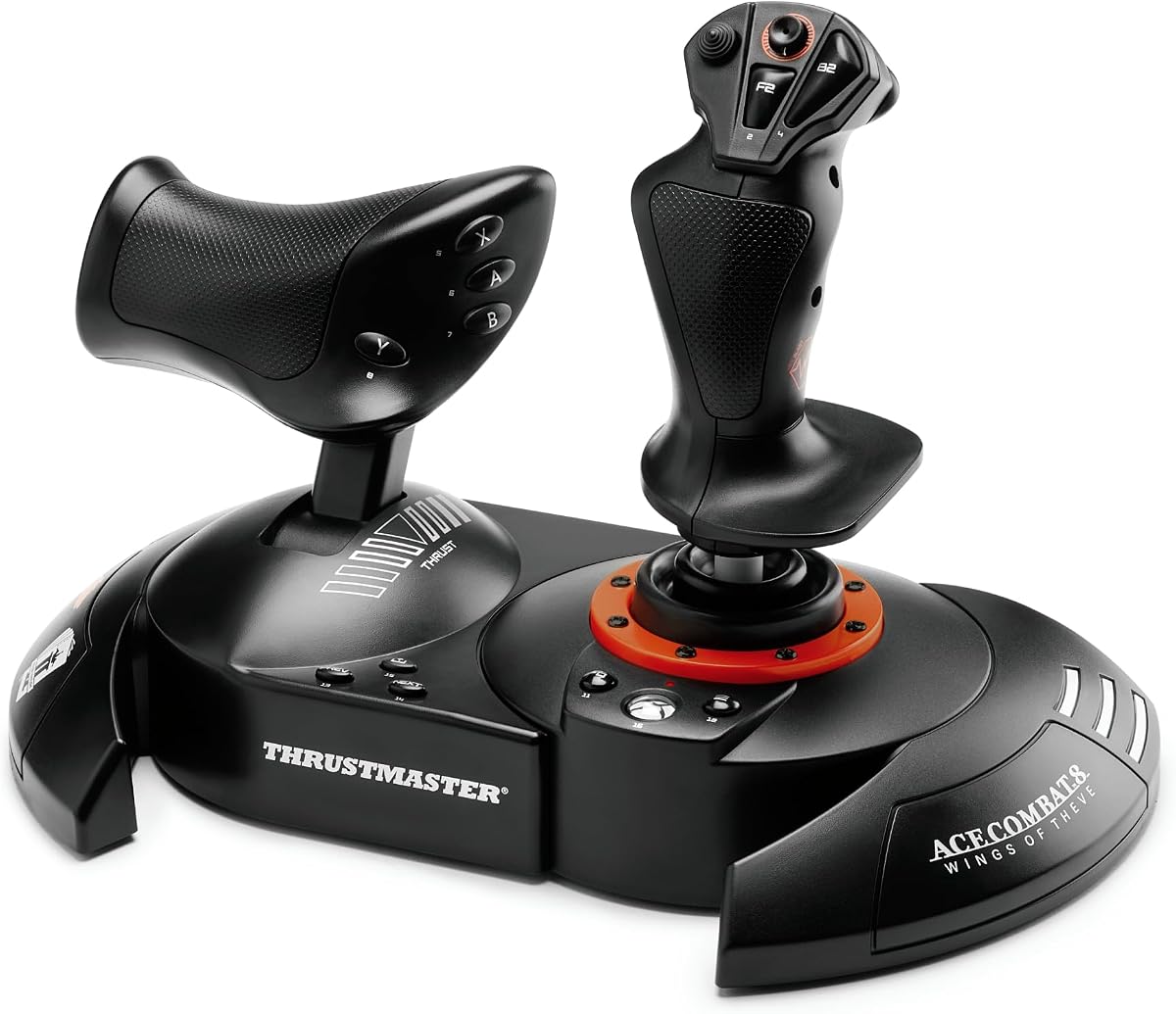
Inspired by Ace Combat, this THRustmaster controller features licensed branding and high-quality build materials. It is an excellent choice for fans of arcade-style flight games.
We may earn a commission when you buy through this link, at no additional cost to you.
Vibration feedback immerses you in the cockpit, making every explosion feel real. The dual rudder system adds flexibility for those who do not have dedicated pedals.
While it is licensed for Ace Combat, it works well with Star Wars Squadrons due to similar control schemes. The vibration motor can be disabled if preferred for other games.
This is a great option for gamers who want a blend of arcade fun and simulation features. The comfortable grip ensures you can play for hours without discomfort.
The vibration motor provides physical cues during combat, helping you react to damage and environmental effects more intuitively.
Dual rudder controls let you choose between the stick or throttle, offering versatility for different setup configurations.
We may earn a commission when you buy through this link, at no additional cost to you.
The X56 is a heavy-duty system designed for maximum control depth. With 189 programmable controls, it allows you to map almost any command imaginable.
We may earn a commission when you buy through this link, at no additional cost to you.
The 4-spring system lets you adjust stick force to your preference, while RGB lighting adds flair to your rig. The renewed version offers a budget-friendly way to try this premium hardware.
Its size and weight might be too much for smaller desks. Additionally, it relies heavily on software for configuration, which can be complex to manage.
We recommend this for users who need extensive control over complex flight systems. It is a powerhouse for simulation enthusiasts willing to invest time in setup.
Adjustable springs mean you can change the feel of the stick to match your flying style or fatigue levels.
With nearly 200 commands, you can eliminate keyboard use entirely, keeping your focus on the tactical situation.
We may earn a commission when you buy through this link, at no additional cost to you.
The Vader 5 Pro brings modern tech like low latency and adjustable tension to a standard controller form. It works on PC, Switch, and mobile, offering broad compatibility.
We may earn a commission when you buy through this link, at no additional cost to you.
The hall effect sticks prevent drift and allow tension tuning. The 4-motor vibration enhances immersion, and the extra buttons provide quick access to key commands.
It lacks Xbox support and the dock is sold separately. However, the wired performance is excellent for PC users who want a reliable and responsive controller.
This is a great choice for multi-platform gamers who need a single controller for different systems. It balances performance and versatility well for space combat and other genres.
Hall-effect technology ensures that your aim stays true over time, critical for maintaining accuracy in long sessions.
Works across PC and Switch, allowing you to switch games easily without needing different hardware.
We may earn a commission when you buy through this link, at no additional cost to you.
Selecting the right controller involves considering your play style, platform, and desired level of immersion.
Ensure the controller supports your primary gaming system. Most flight sticks work on PC and Xbox, but some only support PC or Switch.
Always verify system requirements before purchasing to avoid connectivity issues.
Decide between a standard gamepad or a HOTAS setup. Gamepads are versatile, while HOTAS offers realistic throttle and joystick control.
HOTAS is recommended for sim enthusiasts who want deep immersion.
Comfort is crucial for long sessions. Look for designs that fit your hand size and provide soft grips or adjustable resistance.
Test the feel if possible or check user reviews for comfort details.
Durability matters when flying constantly. Look for hall-effect sensors to prevent drift and robust buttons that won't wear out quickly.
High-quality materials ensure the controller lasts through intense combat sessions.
Programmable buttons allow you to map actions to your preference. More buttons mean more control over ship systems without menus.
Look for software support that lets you create and switch profiles easily.
Low latency ensures your actions are registered instantly. Wired connections generally offer lower latency than wireless ones.
For competitive play, prioritize controllers with high polling rates and stable connections.
Flight sticks vary in price. Set a budget that balances your needs with cost, considering that basic gamepads are cheaper than premium HOTAS units.
You can often find great value in mid-range options that offer most essential features.
Some controllers allow adding pedals or wheels later. Consider if you want to upgrade your setup in the future.
Expandable ecosystems help you build a full cockpit without replacing everything.
Start by connecting the controller to your PC or console via the provided cable or Bluetooth settings. Ensure drivers are up to date for optimal performance.
Configure the controls in the game settings or the manufacturer's software to match your preferred layout. Test all buttons and sticks before entering a match.
Store the controller in a cool, dry place when not in use. Avoid exposing it to direct sunlight or extreme temperatures to maintain battery and material health.
No, a standard gamepad works well for most players. However, a HOTAS system provides better immersion and throttle control for sim fans. Many players find the balance depends on their personal preference.
Many flight sticks support Xbox Series X through USB. Always check the product specifications to confirm compatibility, as some models are PC-only.
Yes, standard Xbox controllers are fully compatible and offer a great balance of performance and ease of use. They are often recommended for casual players.
Hall Effect sensors prevent stick drift by using magnets instead of physical contact. This ensures consistent accuracy and extends the lifespan of the controller.
Most wireless controllers support Bluetooth or a 2.4GHz dongle. Simply pair it through Windows Bluetooth settings or plug in the dongle for a stable connection.
Vibration feedback enhances immersion by providing tactile cues for in-game events. While not essential, it adds to the overall experience of being in the cockpit.
Basic functions work immediately, but software is often needed for advanced customization. Installing the software unlocks full features like remapping and profiles.
Whether you choose a standard gamepad or a full HOTAS system, the right controller can elevate your Star Wars Squadrons experience significantly.
Prioritize ergonomics and responsiveness to ensure you stay in the cockpit longer and react faster to in-game threats.
Prices and availability change often, so check the latest listings and reviews before making your final purchase decision.