
Eyoyo 3.5" Portable Digital Video Magnifier
4.6Editor score
2X to 25X zoom range
8 adjustable color modes
AV output for larger display
Finding the right digital magnifier for low vision can transform daily tasks like reading books, menus, and labels. These devices offer adjustable zoom and color modes to reduce eye strain.
We evaluated ten top-rated models based on magnification power, screen clarity, portability, and user-friendly features. Each product was selected for its ability to support various visual needs effectively.
Each pick highlights key strengths and ideal use cases to guide your decision. Please note that product availability and pricing may change over time so verify details before purchasing.
4.6Editor score

4.3Editor score
4.0Editor score
As an Amazon Associate we earn from qualifying purchases.
This side-by-side comparison highlights the key specifications and unique features of each top-rated digital magnifier to help you choose the perfect aid for your needs.


This portable digital video magnifier is a standout choice for those seeking clarity and comfort in daily reading tasks. With a 4.3 star rating it delivers reliable performance for users with macular degeneration or low vision.
We may earn a commission when you buy through this link, at no additional cost to you.
Its 5.0 inch screen and 2X to 32X zoom capability ensure crisp text visibility. The 26 color modes allow personalized viewing while the memory function saves your preferred settings for easy access.
While the price is higher than basic models the ergonomic design and high-resolution display justify the investment. The foldable handle reduces neck strain during extended reading sessions.
Ideal for users prioritizing comfort and clarity this magnifier enhances independence. It is a solid choice for home use or travel where visual aid is essential for daily activities.
The HD LCD screen restores true-to-life colors and details ensuring no distortion even at high magnification levels for a natural reading experience.
Integrated foldable bracket and handle design allow flexible positioning reducing physical strain and supporting comfortable use for both left and right-handed users.
We may earn a commission when you buy through this link, at no additional cost to you.
The Eyoyo 3.5 inch digital video magnifier offers exceptional value for budget-conscious users needing reliable visual aid. It holds a 4.6 star rating for its simplicity and effectiveness in daily tasks.
We may earn a commission when you buy through this link, at no additional cost to you.
Supporting 2X to 25X magnification it provides clear text zoom for short-term reading. The eight adjustable color modes help match your vision needs while the snapshot function lets you capture important images.
Though the screen is smaller it remains portable and ideal for quick visual aid tasks. The AV output connects to a TV for larger display options enhancing flexibility for users preferring bigger screens.
Perfect for entry-level users this device balances cost and functionality. It is recommended for those needing a lightweight companion for reading menus or labels without a large investment.
Eight color options including white on black and yellow on blue enhance contrast and visibility matching diverse visual requirements effectively.
Lightweight foldable design makes it easy to carry in bags for on-the-go visual assistance during travel or daily errands.
We may earn a commission when you buy through this link, at no additional cost to you.
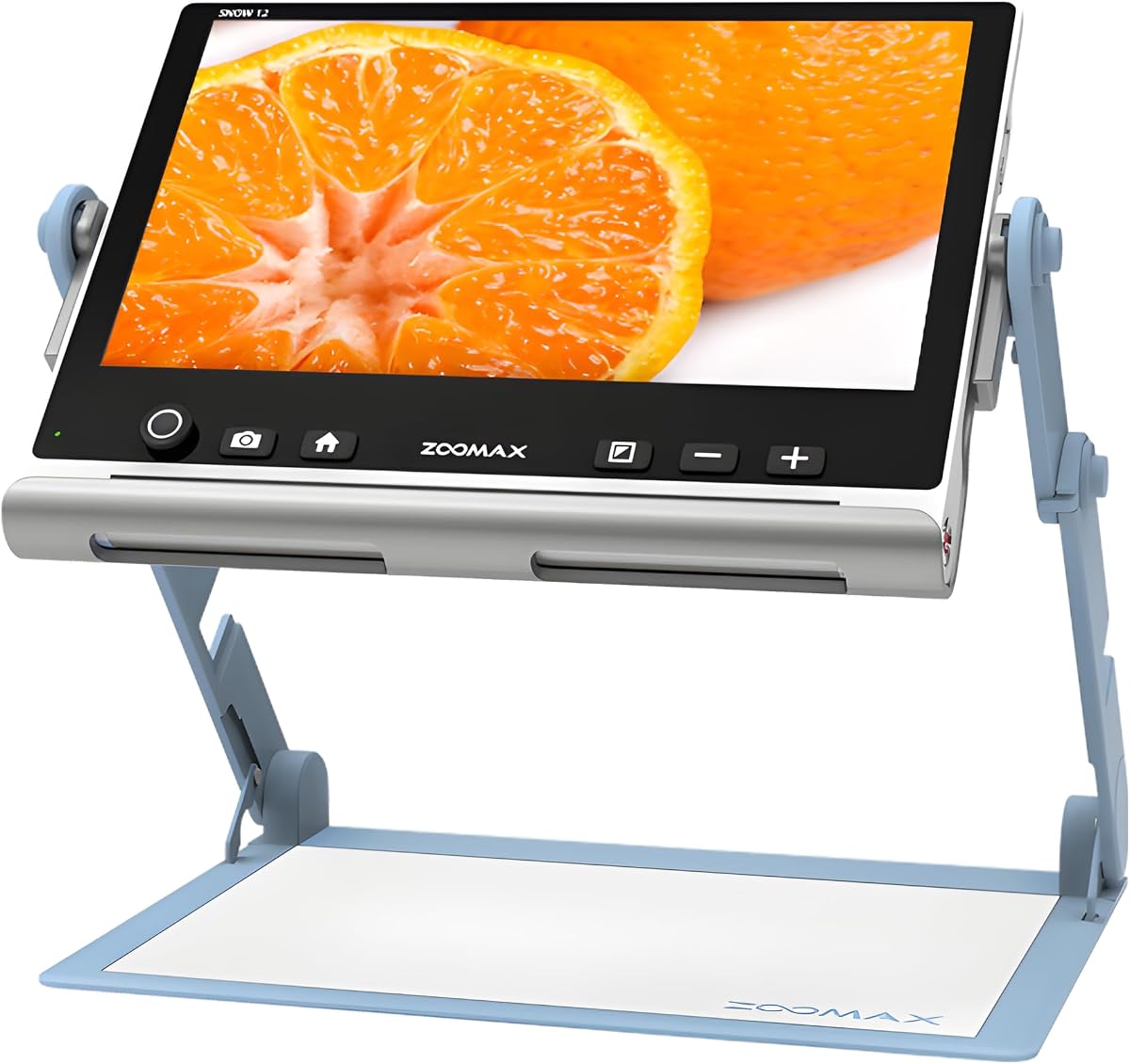
This Zoomax Snow 12 inch magnifier stands out as a premium solution offering advanced OCR and text-to-speech features for comprehensive reading assistance. It is designed for users needing high accessibility and productivity.
We may earn a commission when you buy through this link, at no additional cost to you.
The 19X magnification and HD display ensure clear visuals while OCR converts text to speech in over 20 languages. This functionality supports independence and enhances usability for diverse user needs.
Although the price reflects premium features the large screen and multilingual support justify the cost. The foldable stand adds stability and flexibility for various viewing angles.
Ideal for professionals or those requiring advanced accessibility this device elevates daily tasks. It is a top choice for users valuing large displays and speech integration.
Optical character recognition transforms printed text into speech providing genuine visual independence and accessibility for users with severe low vision.
Support for over 20 languages enables use by non-native speakers and enhances utility for international travelers or diverse households.
We may earn a commission when you buy through this link, at no additional cost to you.
This 5 inch digital magnifier focuses on simplicity and ease of use for elderly or amblyopic children. Its 3.9 rating reflects functional reliability while prioritizing a streamlined user experience.
We may earn a commission when you buy through this link, at no additional cost to you.
With simplified buttons and memory capabilities it remembers user habits to reduce adjustment needs. The 2X to 32X zoom supports various reading tasks while the HD screen restores true colors.
The reduced button count minimizes confusion but may limit advanced customization. However it remains suitable for daily needs and connects to TVs for larger visuals when needed.
Best for users prioritizing simplicity this device offers straightforward operation. It is a practical choice for seniors who need an intuitive magnification solution without complex settings.
Simplified buttons and memory function reduce operational complexity allowing users to focus on reading without frequent adjustments.
Five-inch screen provides ample viewing area while AV cable connection extends visibility to televisions for enhanced clarity.
We may earn a commission when you buy through this link, at no additional cost to you.
The VEVOR portable digital magnifier offers a versatile range with 2X to 48X zoom and dual lens options. It carries a 3.4 rating for functionality but provides unique features for diverse tasks.
We may earn a commission when you buy through this link, at no additional cost to you.
The 13MP near and far lens allow clear views of both close-up text and distant objects. HDMI and AV outputs support larger displays while the 2500mAh battery ensures lasting power.
While the rating is lower the zoom flexibility and dual lens make it practical for varied environments. The foldable handle adds portability for users needing on-the-go assistance.
Suitable for users needing high zoom and dual capabilities this device is a strong contender. It is ideal for those who require both near and far viewing options regularly.
Near and far lenses enable reading text and viewing distant signs without needing separate devices enhancing overall utility.
AV and HDMI outputs provide flexible display options on TVs or monitors for larger and clearer visual effects.
We may earn a commission when you buy through this link, at no additional cost to you.
This 5 inch electronic reading aid emphasizes simplicity and user-friendly operation for visually impaired users. It holds a 3.9 rating and focuses on daily needs with a streamlined design.
We may earn a commission when you buy through this link, at no additional cost to you.
Simplified buttons and memory capabilities ensure intuitive use without redundant controls. The 800×480 HD color LCD restores true details while the foldable handle supports comfortable positioning.
Though it lacks advanced options the design meets standard daily reading needs effectively. It connects to TVs for larger visuals and supports left or right-hand usage with its bracket.
Best for users needing basic magnification this device prioritizes ease of use. It is recommended for those who want reliable assistance without navigating complex settings or menus.
Minimalist button layout reduces confusion and allows quick access to essential functions for efficient daily reading sessions.
Integrated bracket and handle design reduce neck strain and support flexible positioning on surfaces for extended use.
We may earn a commission when you buy through this link, at no additional cost to you.
The Eyoyo 5 inch digital video magnifier offers reliable performance with a long battery life for extended reading sessions. It holds a 4.0 rating for consistent usability and user-friendly features.
We may earn a commission when you buy through this link, at no additional cost to you.
Featuring 4X to 32X zoom and 17 color modes it provides clear visuals and comfort. The 4500mAh battery ensures over 4 hours of operation while photo capture supports saving important text.
While the zoom and color options are standard the battery reliability stands out for users needing uninterrupted use. The foldable handle and AV output enhance versatility across different scenarios.
Ideal for users prioritizing battery performance this magnifier supports continuous daily tasks. It is a solid choice for those who require reliable power without frequent recharging.
4500mAh rechargeable battery supports over 4 hours of continuous operation ensuring uninterrupted reading and writing sessions.
17 color modes and 5 brightness levels enhance contrast and comfort for diverse vision needs and viewing preferences.
We may earn a commission when you buy through this link, at no additional cost to you.
This portable digital video magnifier provides a balanced mix of zoom range and color options for everyday use. It holds a 4.0 rating and features an ergonomic design that enhances readability.
We may earn a commission when you buy through this link, at no additional cost to you.
With 2X to 32X zoom and 26 color modes it offers versatile visual adjustment. The memory function saves habits while the HD screen and TV connection support larger and clearer displays.
Although the build is standard the feature set meets common low vision needs effectively. The foldable handle and left or right-hand setup add flexibility for comfortable daily reading.
Best for users seeking a balanced solution this magnifier delivers value and reliability. It is recommended for those needing consistent performance without premium pricing.
26 color modes allow customized contrast and visibility matching diverse visual needs for clearer text perception.
TV cable support extends visibility to larger screens improving overall clarity for extended reading sessions.
We may earn a commission when you buy through this link, at no additional cost to you.
The Eschenbach SmartLux magnifier is a premium handheld device focusing on high-quality video and image capture. It holds a 4.4 rating for its lightweight build and clarity for daily tasks.
We may earn a commission when you buy through this link, at no additional cost to you.
Supporting 5X to 12X magnification it offers clear HD visuals for short reading tasks. Image capture allows saving important documents while the compact design ensures portability.
Though the zoom range is limited the build quality and image features justify the investment for specific users. It includes a cleaning cloth for maintaining clarity during use.
Ideal for those valuing portability and premium materials this magnifier enhances convenience. It is best suited for users needing a lightweight aid for quick and clear reading.
HD video magnifier ensures sharp and clear visuals supporting accurate reading and image review for low vision users.
Built-in capture allows saving key text or images for future reference enhancing documentation and recall capabilities.
We may earn a commission when you buy through this link, at no additional cost to you.
This 5 inch digital magnifier offers a high zoom range from 3X to 48X for detailed viewing needs. It holds a 4.0 rating and features simplified buttons for ease of daily use.
We may earn a commission when you buy through this link, at no additional cost to you.
With memory function and external battery support it provides convenience for varied reading sessions. TV output allows larger visuals while the simplified buttons reduce operational complexity effectively.
Although the external battery limits portability the high zoom and clear screen make it practical for specific tasks. The 800×480 resolution ensures details remain sharp even at maximum magnification.
Best for users needing high zoom this device supports detailed text and label reading. It is a solid option for those prioritizing magnification power over compact design.
Up to 48X zoom enables detailed views of small text or objects providing essential clarity for severe low vision needs.
External battery design supports longer use sessions while maintaining lightweight portability for daily or travel applications.
We may earn a commission when you buy through this link, at no additional cost to you.
Selecting the right digital magnifier involves assessing several key factors that affect usability and comfort in daily life.
The magnification range determines how much text can be enlarged. A wider range like 2X to 32X allows flexibility for different tasks from reading labels to detailed work.
Choose a device with sufficient zoom to meet your most challenging visual needs without sacrificing clarity or causing screen distortion.
Screen size impacts how much text is visible at once while resolution affects clarity. Larger screens with 800×480 resolution ensure crisp visuals and reduced eye strain.
Prioritize HD screens for detailed reading tasks as they preserve text quality even at higher magnification levels.
Multiple color modes enhance contrast and comfort for users with color blindness or low vision. Options like white on black or yellow on blue can significantly improve readability.
Look for models with customizable or multiple color settings to match your specific visual preferences and needs.
An ergonomic design with foldable handles or brackets supports comfortable use over time. This reduces neck and back strain during extended reading sessions.
Select a device with adjustable angles and comfortable grips to maintain posture and comfort.
Lightweight and compact designs are essential for users who need assistance while traveling or outside the home. Check weight and size before purchasing.
Opt for models with foldable components and rechargeable batteries to ensure mobility and continuous use.
Long-lasting battery life ensures uninterrupted use during daily tasks. Rechargeable batteries with high capacity support extended reading without frequent charging.
Consider devices with external or high-capacity batteries to avoid interruptions during important reading or work sessions.
TV output options like AV or HDMI allow larger displays for better visibility. This can be crucial for users who struggle with small screens.
Ensure the device supports external connections if you need to project images on a larger monitor or television.
Simplified buttons and memory functions enhance usability especially for elderly users or those new to digital devices. These features reduce learning curves and daily frustration.
Choose a model with intuitive controls and habit memory to streamline the daily reading experience.
Start by placing the magnifier on the text at a comfortable distance. Adjust the zoom and brightness settings to match your vision needs and reduce eye strain effectively.
Utilize the color modes and contrast settings to find the combination that provides the clearest text for you. Most devices allow you to save these preferences for easy access next time.
To maintain optimal performance keep the lenses and screen clean using the included microfiber cloth. Charge the battery regularly and store the device in a dry place to extend its lifespan.
Yes digital magnifiers are designed to assist individuals with macular degeneration by providing adjustable zoom and high-contrast views. They enhance text clarity and make daily reading tasks more manageable and comfortable.
Digital magnifiers offer adjustable zoom and color settings that traditional glass magnifiers cannot provide. They also reduce eye strain and allow for features like image capture and TV connectivity enhancing overall usability and convenience.
Select a magnifier with a zoom range that covers your daily needs such as reading menus or detailed work. A range from 2X to 32X typically provides flexibility for various tasks without needing multiple devices.
Many digital magnifiers include color modes designed to enhance contrast and clarity for color blindness. Features like yellow on blue or high-contrast text options help users see text and images more clearly.
Battery life varies but most portable models offer between 4 to 6 hours on a single charge. Look for devices with rechargeable batteries and power-saving settings to ensure continuous use throughout the day.
Yes many digital magnifiers support AV or HDMI outputs to connect to a TV or monitor. This allows you to display magnified content on a larger screen for improved visibility and comfort.
Choosing the right digital magnifier involves balancing zoom power screen size and user-friendly features. The top picks reviewed provide reliable assistance for various visual needs and budgets effectively.
Prioritize features like adjustable color modes ergonomic design and battery life to ensure comfort during extended use. A well-selected device can significantly improve independence and daily reading comfort.
Prices and availability change frequently so always verify product details before purchasing. We hope this guide helps you find the perfect magnifier to support your visual needs.