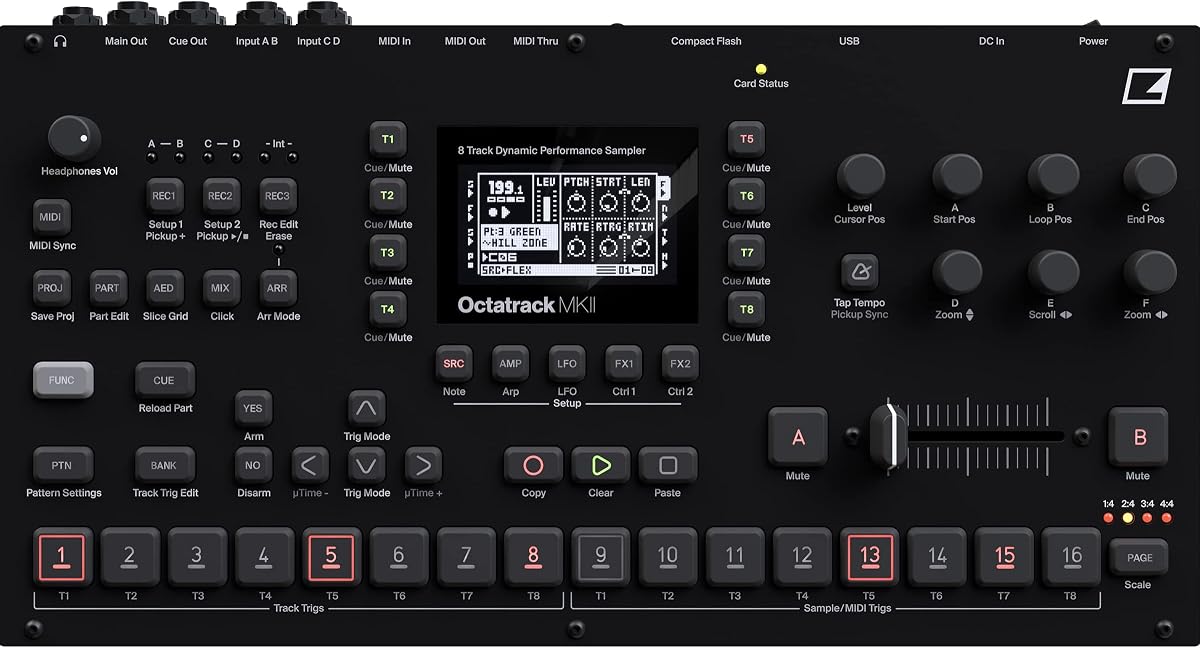
Elektron Octatrack MKII 8-track Performance Sampling Workstation/Sequencer – Black
4.5Editor score
Eight stereo audio tracks
Real-time pitch shifting
OLED screen navigation
Ultra-smooth crossfader
This guide compares the top ten groovebox for live performance models, evaluating their portability, sound engines, and workflow features for musicians.
Finding the right groovebox for live performance means balancing portability with powerful sound generation and sequencing. You need a device that inspires creativity while standing up to the rigors of touring or regular gigs without constant computer dependence.
We evaluated ten leading models based on their standalone capabilities, interface design, sound libraries, and connectivity options. Our analysis focuses on how well each unit supports spontaneous creation and reliable playback during actual stage performances.
Each pick highlights specific strengths for different performance styles, from electronic producers to hybrid bands. Note that availability and specific bundle contents can change over time so verify current details before purchasing any hardware.
4.5Editor score

4.8Editor score

4.8Editor score
The following table provides a side-by-side technical comparison of all ten selected groovebox units for live performance scenarios.



The Akai Professional MPC Sample Portable Sampler is the top recommendation for musicians needing a complete groovebox for live performance. It scores highly for its ability to run entirely on battery power with a built-in speaker and intuitive workflow.
We may earn a commission when you buy through this link, at no additional cost to you.
Its standout qualities include the legendary MPC workflow compressed into a portable unit. Users can record edit and play anywhere thanks to the rechargeable battery and microSD card storage. The 16 responsive pads offer precise finger drumming capabilities essential for live sets.
While it lacks a physical MIDI DIN port in the box, the USB-C connectivity covers most modern integration needs. The onboard effects processors provide enough sonic shaping for performance without needing external gear or a laptop connection.
We recommend this device for beatmakers finger drummers and any artist seeking inspiration during travel or on stage. Its balance of legacy features and modern convenience makes it the most versatile choice in this comparison.
The device operates without any computer or external software enabling pure focus on music creation and live playback anywhere you go.
Features like Instant Sample Chop Mode and real-time timestretch allow users to turn raw sounds into finished grooves instantly.
We may earn a commission when you buy through this link, at no additional cost to you.
The Ableton Move Standalone Instrument with Live 12 Intro offers a unique approach to portable performance by integrating tightly with the popular DAW ecosystem. It provides a standalone experience that feels familiar to existing Ableton users.
We may earn a commission when you buy through this link, at no additional cost to you.
Key strengths include the 32 velocity-sensitive backlit silicone pads which allow for expressive playing of chords and melodies. The built-in Wi-Fi and Ableton Cloud features enable seamless set management and remote control capabilities.
The device does rely on the included software Intro version which has limitations on track counts. However for sketching ideas and performing shorter sets the onboard storage and sample slicing capabilities are surprisingly robust and flexible.
We recommend this groovebox for producers who already work within the Ableton environment. It bridges the gap between laptop based production and hardware performance effectively without requiring complex external setups.
The 32 backlit pads support polyphonic aftertouch allowing for nuanced dynamic performance during live shows.
Capture sound directly through the built-in microphone or inputs to instantly slice and rework samples on the device.
We may earn a commission when you buy through this link, at no additional cost to you.
The Elektron Octatrack MKII 8-track Performance Sampling Workstation/Sequencer – Black is a powerhouse for artists needing deep performance control and complex sequencing. Its robust build and feature set make it a top tier choice.
We may earn a commission when you buy through this link, at no additional cost to you.
Its strengths include eight dedicated stereo audio tracks and MIDI tracks offering significant routing flexibility. The ultra-smooth contactless crossfader and high-resolution encoders allow for precise manipulation during live improvisation.
The learning curve is notably steep compared to more consumer-focused units. Users must invest time to master the parameter locks and dynamic layers to unlock the full potential of this hardware workstation.
We recommend this unit for seasoned performers and composers who need total control over their sound architecture. It remains one of the most capable standalone grooveboxes available for complex electronic performances.
The 16-track sequencer combined with real-time time stretching allows for complex arrangements and manipulation.
Equipped with buttons rated for 50 million presses ensuring reliability during frequent touring and gigging.
We may earn a commission when you buy through this link, at no additional cost to you.
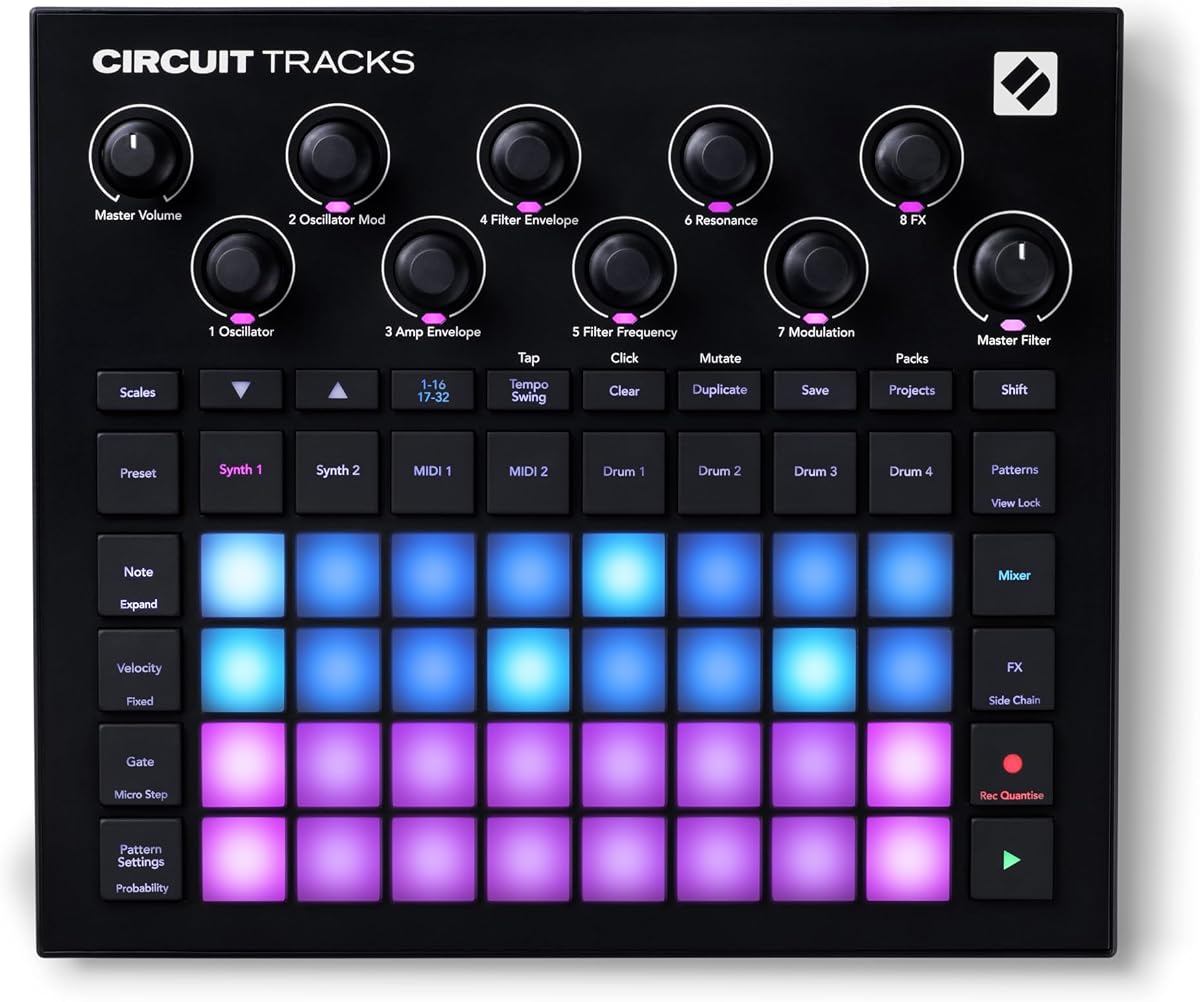
The Novation Circuit Tracks Groovebox Sequencer and Synthesizer offers a streamlined approach to creating full songs with strong synthesis capabilities. It focuses on speed and ease of use for live musicians.
We may earn a commission when you buy through this link, at no additional cost to you.
Its key strengths are the two refined polyphonic digital synth tracks which provide rich sounds for melodies and bass. The four dedicated drum tracks allow for tight rhythmic patterns that are easy to manipulate during a performance.
While it allows loading of own samples the workflow prioritizes artist templates and ready-made patches. This means less setup time but potentially less customization for very niche sound design needs.
We recommend this device for producers who want immediate sonic results without deep menu diving. It is particularly well suited for those who want to integrate MIDI hardware via the robust connectivity options.
Probability and pattern mutate functions ensure your music evolves continuously without manual repetition during sets.
Full-size MIDI in out and thru ports allow for control of external synthesizers and drum machines.
We may earn a commission when you buy through this link, at no additional cost to you.
The Roland MC-707 Groovebox Professional Music Production Workstation is a massive device designed for comprehensive live set creation. It aims to provide everything needed to create a full song without a computer.
We may earn a commission when you buy through this link, at no additional cost to you.
Its strengths include multiple track types including Tones Drums and Looper tracks for versatile arrangements. The 8 tracks and 128 clips support complex arrangements while the extensive effects processing adds depth to the sound.
The sheer number of features can make the interface feel cluttered to new users. Learning to navigate the menus effectively requires patience but the resulting control over sound design is unmatched in its class.
We recommend this workstation for artists who need maximum flexibility for live performance setups. It serves best for those who prioritize sound variety and effect depth over a simplified interface.
Track and Master effects including EQ and Reverb provide studio quality processing directly on the hardware.
The included SD card allows for extensive saving of project data and audio libraries for travel.
We may earn a commission when you buy through this link, at no additional cost to you.
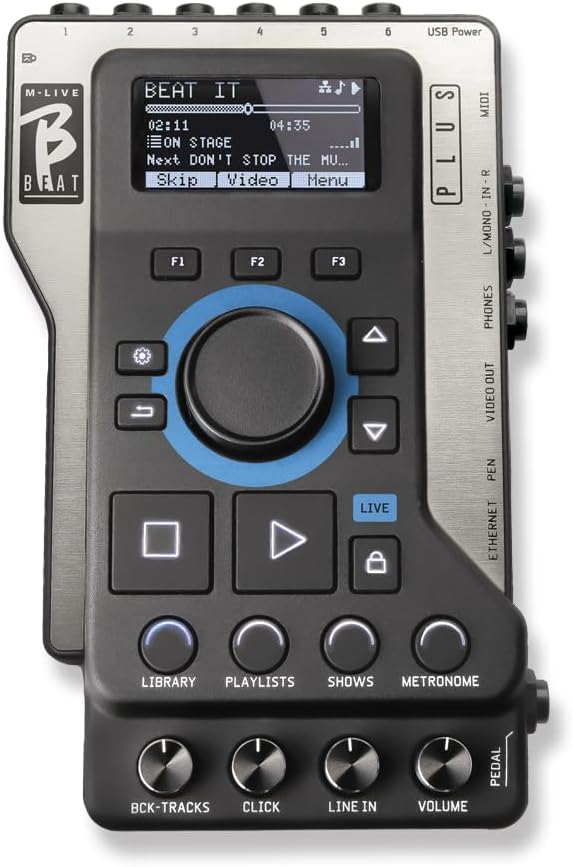
The M-Live B.Beat Plus 256GB Backing Track Player – Multitrack Video Sync offers a specialized solution for artists who need reliable multitrack playback. It replaces bulky laptop rigs with a dedicated stage solution.
We may earn a commission when you buy through this link, at no additional cost to you.
Its key strengths include the ability to manage up to 16 mono or 8 stereo tracks with precise markers and loops. This allows performers to adapt song sections on the fly without stopping the music.
While it is not a traditional synthesizer the integrated amp sim MIDI control makes it incredibly useful for guitarists. It automates scene changes for guitar modelers ensuring your sound matches the backing track perfectly.
We recommend this device for solo artists and bands needing a reliable playback system. It simplifies the live rig significantly allowing musicians to focus entirely on their performance.
Define song sections and markers to jump between parts or extend loops seamlessly during live shows.
256GB of internal memory allows you to store your entire show library without needing external drives.
We may earn a commission when you buy through this link, at no additional cost to you.
The Elektron Digitakt II 16-Track Drum Computer and Sampler focuses on detailed rhythmic production and sampling. It brings the robust Elektron workflow to a more focused device for percussion.
We may earn a commission when you buy through this link, at no additional cost to you.
Its strengths include 16 tracks ready for stereo or mono samples providing extensive routing options. The 128-step sequencer allows for precise programming while swappable filters offer dynamic tone shaping.
The device prioritizes sound depth over user friendliness meaning loading custom samples can require external steps. This trade off ensures the best possible audio fidelity and processing power for live drum programming.
We recommend this unit for producers focused on percussion and sampling. It is a powerful tool for those who want to push rhythmic ideas in performance with high quality sound processing.
Choose from Base-width Multi-mode or Legacy filters to shape your samples with unique characteristics.
Create edit and play full compositions easily using the dedicated song mode for structured performance.
We may earn a commission when you buy through this link, at no additional cost to you.
The myTRACKS Groovebox – Sequencer Sampler Drum Machine is designed for immediate music creation without any technical barriers. It simplifies the process of making songs for those new to performance gear.
We may earn a commission when you buy through this link, at no additional cost to you.
Its strengths include automatic note compatibility which ensures every combination of instruments sounds good instantly. The built-in sampler allows you to capture voices or everyday sounds to transform them into music.
While it offers endless ways to play the simplicity may limit advanced performers needing deep editing. The focus is on exploration and fun rather than technical customization or professional mixing capabilities.
We recommend this device for beginners or those seeking casual creative inspiration. It lowers the entry barrier for music making ensuring a smooth and enjoyable experience for everyone.
Musical notes automatically work with each set making it easy to create music that sounds good right away.
Capture the world around you and transform voices or instruments into new rhythmic elements instantly.
We may earn a commission when you buy through this link, at no additional cost to you.
The Roland MC-101 Groovebox Compact Music Production Workstation Bundle offers a smaller version of the larger MC-707 with professional features. It is designed for portable production and performance on the go.
We may earn a commission when you buy through this link, at no additional cost to you.
Its strengths include the ZEN-Core Synthesis System which delivers high quality Roland sounds in a small package. The four tracks allow for focused arrangement while the onboard sample player lets you import custom sounds easily.
The battery life is limited to about five hours using AA batteries which may require frequent replacements during long gigs. Despite this the bundle includes essential cables making it ready to connect to other gear immediately.
We recommend this device for artists needing a reliable backup or travel rig. Its compact size ensures it fits in any bag while retaining enough power for professional live performance sessions.
Advanced synthesis engine delivering Roland sounds that have defined electronic and dance genres for decades.
Compact and light enough to easily design sounds and compose phrases anywhere without heavy lifting.
We may earn a commission when you buy through this link, at no additional cost to you.
The Akai Professional APC40 MKII USB MIDI Pad Controller offers hands-on control for Ableton Live users. While not standalone it remains a top performer for those who prioritize live clip launching.
We may earn a commission when you buy through this link, at no additional cost to you.
Its strengths include the 5X8 clip-launch matrix with RGB feedback which provides visual status during performance. The 9 channel faders and control knobs allow for dynamic mixing without reaching for a mouse.
It does require a computer connection which limits it for strict hardware performance styles. However for hybrid setups or studio live workflows the mapping capabilities are seamless and intuitive.
We recommend this device for producers deeply invested in Ableton Live workflows. It provides the tactile control needed for energetic live sets when laptop integration is part of the plan.
Trigger clips loops and samples using the 5X8 clip-launch matrix with visual feedback for accurate performance.
Plug-and-play USB connectivity makes setup quick and allows dynamic adjustment of lighting or audio cues.
We may earn a commission when you buy through this link, at no additional cost to you.
Selecting the right unit involves balancing workflow preferences with physical connectivity needs.
True standalone operation allows you to run without a computer which reduces failure points on stage. Look for units with internal storage and battery power to ensure reliability during gigs.
Prioritize devices that can run full sets without external software or drivers.
Consider whether you need synthesis sampling or playback capabilities. Some units excel at drum programming while others offer rich melodic sound engines.
Ensure the built-in sounds match the genre you typically perform.
Responsive pads are crucial for finger drumming and dynamic triggering. Look for velocity sensitivity and preferably aftertouch for expressive control.
Test the feel before buying if possible.
Check for audio outputs MIDI ports and USB connections. These determine how easily you integrate with other hardware like mixers or amplifiers.
Ensure it supports your existing gear setup.
If you plan to move around, a rechargeable battery is essential. Units that rely on AA batteries might be inconvenient for long performances.
Opt for a unit with at least 4 hours of battery life.
Internal storage and SD card slots allow you to bring your library with you. This is vital if you rely on custom samples for tracks.
Look for expandable storage options to keep your setlist updated.
Onboard effects like reverb or distortion can add depth to a performance. This reduces the need for external pedals during a show.
Check the number of effect types available.
The interface should match your creative style. Some units favor deep menu diving while others offer quick access knobs.
Choose a layout that feels intuitive to your hands.
Always update your firmware to the latest version to avoid glitches during critical moments.
Keep your samples organized on SD cards so you can find tracks quickly in performance.
Store the device in a padded case to prevent damage from drops or humidity.
Many modern grooveboxes offer full standalone operation allowing you to create and play back tracks without any external devices. Just load your sounds and start performing.
Yes many units provide intuitive interfaces designed for quick learning. Look for models with guided tutorials or built-in sound libraries.
A groovebox combines synthesis sampling and sequencing in one unit whereas a sampler focuses primarily on playing back audio clips.
Some units include built-in speakers for monitoring but for live performance external amplification is recommended for better volume.
Use the line output jacks typically found on the back. Connect them to the input channels of your mixing console for live sound control.
Most units are compact and portable but investing in a rugged carrying case is recommended for frequent travel to gigs.
We recommend the Akai Professional MPC Sample Portable Sampler as the top choice for its balance of portability and powerful standalone performance.
Prioritize battery life and sound quality if you plan to tour regularly with your gear.
Always check current pricing and availability on Amazon before making your final purchase decision.