
SteelSeries Apex 3 Gaming Keyboard – Black
4.6Editor score
IP32 water resistant design
Whisper quiet gaming switches
Dedicated multimedia controls included
This guide compares the top Mac gaming keyboards for performance, compatibility, and features to help you choose the perfect mechanical or membrane option for
Finding the right Mac gaming keyboard can transform your desktop experience significantly. Whether you prefer mechanical switches for tactile feedback or quiet membranes for office use, compatibility is key.
We evaluated ten top-rated models based on build quality, connectivity options, and macOS integration. Our list covers wireless and wired designs suitable for various budgets and desk spaces.
Each pick highlights specific strengths like RGB lighting, multi-device pairing, or ergonomic rests. Please note that prices fluctuate frequently so check current listings before purchasing your new gear.
4.6Editor score
4.3Editor score

4.0Editor score
This side-by-side comparison breaks down the key specifications and features of each model to help you quickly identify the right fit for your specific gaming needs.


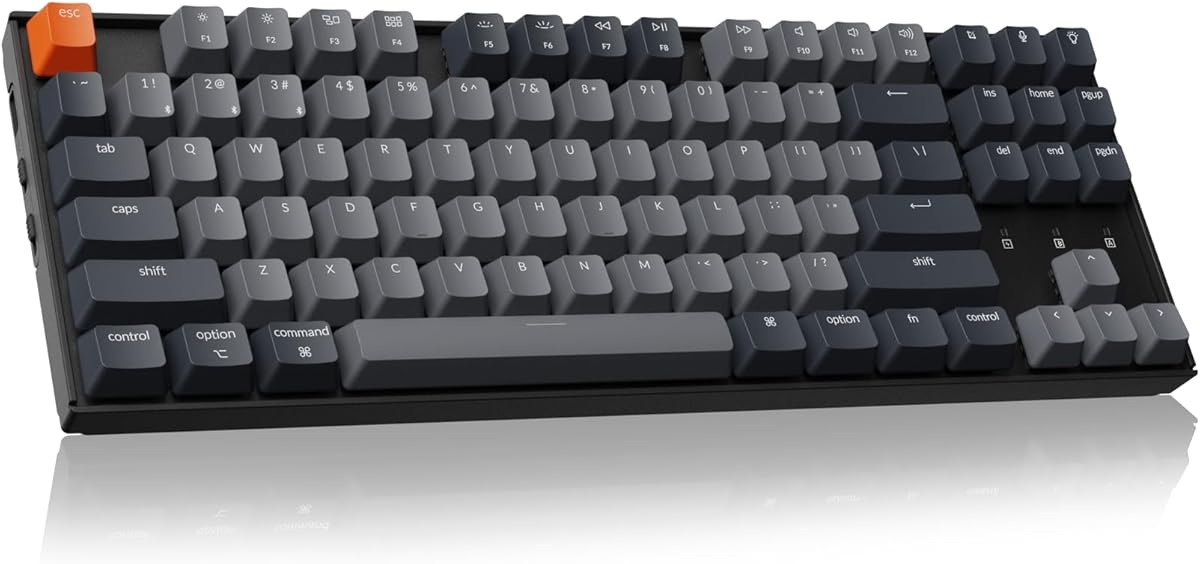
The Keychron K8 stands out as a top contender for Mac users seeking a mechanical gaming keyboard. With a 4.3 star rating it delivers a balance of performance and portability that appeals to both casual gamers and professionals.
We may earn a commission when you buy through this link, at no additional cost to you.
Its optimized layout includes essential macOS function keys and extra keycaps for seamless switching between systems. The brown switches offer tactile feedback without excessive noise, making it suitable for shared spaces while maintaining gaming responsiveness.
While the wireless mode limits key rollover to 6KRO, the wired mode supports full N-Key rollover for competitive play. The battery life is impressive, lasting up to 200 hours with backlighting off, reducing the need for frequent charging.
If you value build quality and flexibility, this keyboard is an excellent investment. It provides the perfect blend of desktop utility and gaming precision without compromising on Mac compatibility or battery endurance.
The included keycaps and dedicated function keys ensure you can switch between macOS and Windows effortlessly without losing access to essential shortcuts or media controls.
Equipped with a massive 4000 mAh battery, this keyboard offers extended usage times, making it ideal for travel or long work sessions without tethering to a power source.
We may earn a commission when you buy through this link, at no additional cost to you.
The SteelSeries Apex 3 offers incredible value for gamers on a budget who need reliable Mac compatibility. With a high 4.6 star rating, it proves you do not need to spend a fortune to get durable and feature rich peripherals.
We may earn a commission when you buy through this link, at no additional cost to you.
Its IP32 water resistance protects against spills, ensuring longevity even in busy environments. The whisper quiet switches make it perfect for dorm rooms or offices where noise might be a concern during late night gaming sessions.
The dedicated multimedia controls allow quick volume adjustments, which is convenient for multitasking. However, the proprietary software has limited support on macOS, meaning some RGB customization features may be restricted compared to Windows.
For those seeking a practical and cost effective solution, this keyboard is hard to beat. It combines essential gaming features with durability and comfort at a price point that is accessible to everyone.
The IP32 rating provides peace of mind against accidental liquid spills, ensuring your investment remains functional even in the event of a coffee mishap on your desk.
Designed with whisper quiet gaming switches, it minimizes keypress noise, making it an ideal choice for shared living spaces or quiet office environments.
We may earn a commission when you buy through this link, at no additional cost to you.
The Logitech G915 X represents the pinnacle of modern gaming keyboard engineering with a focus on speed and style. While it has a 4.0 rating due to its premium price, its performance justifies the cost for serious gamers seeking the best.
We may earn a commission when you buy through this link, at no additional cost to you.
Its low-profile mechanical switches provide an ultra-fast 1.3 mm actuation point, reducing input lag significantly. The sand-blasted aluminum top plate not only looks premium but ensures structural rigidity during intense gaming moments.
Although it lacks wireless connectivity, the wired USB connection ensures zero latency for competitive play. The LIGHTSYNC RGB system allows for deep customization, though you may need Windows for full software feature access.
If you prioritize build quality and rapid response times over budget constraints, this is an outstanding choice. It delivers a professional aesthetic and high-end performance that elevates any gaming setup instantly.
With a 1.3 mm actuation point, this keyboard allows for faster inputs and reduced lag, giving competitive players a crucial edge in reaction-based games.
The durable aluminum construction and double-shot PBT keycaps ensure long-lasting resistance to wear and tear, maintaining a premium look over years of heavy use.
We may earn a commission when you buy through this link, at no additional cost to you.
The EPOMAKER X Aula F75 MAX brings unique flair to the Mac gaming market with its integrated TFT screen and knob. Rated 4.6 stars, it appeals to enthusiasts who want to personalize their typing experience and visual setup deeply.
We may earn a commission when you buy through this link, at no additional cost to you.
Its gasket-mounted structure provides a soft, floating feel that reduces fatigue during long sessions. The factory-lubed switches produce a creamy, thocky sound that is highly satisfying, distinguishing it from standard mass-produced boards.
While the software offers extensive macro and remapping capabilities, Mac users might find some features less intuitive than on Windows. The 2.4G wireless mode ensures stable connectivity for gaming without the clutter of cables.
For tinkerers and audio-focused typists, this keyboard is a delight. It combines ergonomic comfort with innovative features that make every keystroke feel special and visually engaging on your desk.
The customizable screen allows you to display system stats or custom GIFs, adding a fun and functional layer of personalization to your keyboard setup.
The gasket-mounted design isolates the PCB from the case, delivering a softer typing feel that absorbs impact and reduces finger strain over time.
We may earn a commission when you buy through this link, at no additional cost to you.
The Logitech G413 TKL SE is a robust wired option for Mac gamers who prefer simplicity and durability. With a 4.6 rating, it delivers consistent performance without the complexity of wireless drivers or software dependencies.
We may earn a commission when you buy through this link, at no additional cost to you.
Its PBT keycaps resist shine and wear better than ABS alternatives, ensuring the text stays crisp over time. The brushed aluminum top case adds a premium look and provides structural rigidity that prevents unwanted flex during play.
While it only features white LED lighting, the single color remains vibrant and clean for those who dislike rainbow RGB. The tenkeyless layout saves desk space, allowing more room for mouse movement in games.
If you want a no-fuss, reliable keyboard that lasts, this model fits the bill perfectly. It balances cost and quality well, offering a professional look that fits both gaming and work environments seamlessly.
The PBT keycaps are heat and wear resistant, ensuring your keyboard maintains its premium appearance and texture even after years of frequent typing.
The tenkeyless layout removes the number pad to free up valuable desk space, giving you more room for wider mouse movements in competitive games.
We may earn a commission when you buy through this link, at no additional cost to you.
The Redragon K742 offers a compelling mix of productivity and gaming features tailored for modern setups. With a 4.6 rating, it stands out for its support of QMK and VIA, allowing advanced customization for power users.
We may earn a commission when you buy through this link, at no additional cost to you.
Its gasket structure and 5-layer sound dampening create a satisfying, quiet typing experience that reduces noise pollution. The compact 98 layout retains essential keys while minimizing the desk footprint significantly.
Tri-mode connectivity lets you switch between Bluetooth and wired connections instantly, which is great for multitasking across devices. However, configuring it for Mac may require some extra steps to align key mappings correctly.
For those who want total control over their keyboard layout without breaking the bank, this is a strong contender. It offers a versatile tool that adapts to your workflow while delivering solid gaming performance.
With QMK and VIA support, you can remap keys and create complex macros to suit your specific needs, offering a level of flexibility rarely found at this price point.
The compact 98 layout preserves most functionality while saving space, making it ideal for users who need efficiency without sacrificing essential keys like arrow keys.
We may earn a commission when you buy through this link, at no additional cost to you.
The Keychron K4 bridges the gap between full-size and compact designs by including a number pad in a smaller frame. With a 4.4 rating, it caters to users who need number entry without sacrificing too much desk space.
We may earn a commission when you buy through this link, at no additional cost to you.
Its unique Mac layout includes all necessary function keys, ensuring a seamless experience for macOS users. The super brown switches provide tactile feedback that is responsive for gaming yet precise enough for data entry.
Bluetooth connectivity supports pairing up to three devices, allowing quick switching between work and gaming computers. The 4000 mAh battery ensures long operation times, reducing interruptions caused by frequent recharging.
If you need numerical input capabilities in a portable form factor, this keyboard is ideal. It balances functionality and ergonomics well, making it a solid all-rounder for both office and entertainment tasks.
Designed specifically with Mac function keys and layout, this keyboard ensures that every shortcut works as expected without needing manual remapping.
Supporting both Bluetooth 5.1 and wired USB-C connections, it offers flexibility to switch between wireless freedom and stable wired performance as needed.
We may earn a commission when you buy through this link, at no additional cost to you.
The Logitech MX Mechanical is designed primarily for creators and professionals who also enjoy gaming. With a 4.2 rating, it emphasizes typing comfort and workflow efficiency over pure competitive speed.
We may earn a commission when you buy through this link, at no additional cost to you.
Its low-profile keys reduce finger travel and strain, making long typing sessions more comfortable. The smart illumination feature lights up only when you approach, saving battery and reducing distraction.
While it lacks dedicated gaming features like RGB zones, its mechanical precision is still excellent for casual gaming. The Flow feature allows seamless file transfer between devices, enhancing productivity significantly.
If you spend more time writing than playing, this is the ultimate choice. It offers a refined, premium experience that supports both high-volume typing and light gaming effectively.
The backlight automatically adjusts based on hand proximity and ambient light, ensuring visibility while conserving battery life for extended use.
Features like Logitech Flow let you control multiple computers and transfer files seamlessly, boosting your efficiency across your entire workspace.
We may earn a commission when you buy through this link, at no additional cost to you.
The GravaStar Mercury K1 stands out with its futuristic aluminum exoskeleton and flowing curves. With a 4.7 rating, it captures attention immediately and offers a solid platform for both work and play.
We may earn a commission when you buy through this link, at no additional cost to you.
Its gasket-mounted structure absorbs vibrations for a softer touch, while the custom linear switches provide smooth, consistent inputs. The dual RGB systems allow for intricate lighting effects that enhance your desk aesthetics.
Despite the strong build, it might feel heavy for some users, but the stability is excellent. The tri-mode connectivity ensures flexibility for desktops, laptops, and tablets without connectivity issues.
For those who value design as much as function, this keyboard is a standout. It transforms your workspace into a visually striking setup while delivering the performance needed for gaming.
The aluminum alloy frame and gradient finish give the keyboard a premium look that elevates the overall visual appeal of any gaming desk setup.
Five layers of sound dampening foam create a comfortable, low-noise typing environment that reduces fatigue during extended sessions.
We may earn a commission when you buy through this link, at no additional cost to you.
The Logitech G213 Prodigy is an accessible entry point for gamers wanting RGB without a high cost. With a 4.2 rating, it offers reliable performance and essential features for casual play and daily use.
We may earn a commission when you buy through this link, at no additional cost to you.
Its dedicated media controls and integrated palm rest add practical convenience that enhances comfort. The spill-resistant design protects against accidental drinks, ensuring longevity even with careless habits.
While it uses membrane switches instead of mechanical ones, the gaming matrix ensures responsive inputs. It remains a budget-friendly choice for those prioritizing features and durability over tactile switch types.
If you are just starting to build your setup, this keyboard is a safe and functional pick. It delivers essential RGB aesthetics and controls that fit well with other Logitech G peripherals.
The integrated palm rest provides extra support to reduce wrist strain during long gaming sessions, offering better ergonomics than standard keyboards.
Engineered to repel liquids and debris, this keyboard maintains functionality even when accidental spills occur, protecting your investment.
We may earn a commission when you buy through this link, at no additional cost to you.
Selecting the right keyboard involves balancing compatibility, switch type, and layout preferences to match your specific gaming style and desk environment.
Ensure the keyboard supports macOS function keys and shortcuts out of the box. Some models include extra keycaps or software tools to map Windows layouts to Mac systems seamlessly.
Check product descriptions for explicit Mac support to avoid connectivity issues or missing shortcut keys during your gaming sessions.
Mechanical switches offer tactile feedback and durability, while membrane switches are quieter and more affordable. Choose based on whether you prioritize feel or noise levels.
Linear switches are fast for gaming, whereas tactile switches provide a satisfying bump. Ensure the chosen switch type matches your preference.
Tenkeyless and 75 layouts save desk space, while full-size boards include a number pad. Consider your mouse movement needs and desk real estate before buying.
Smaller layouts are better for competitive gaming, whereas larger ones suit productivity tasks involving numerical input.
Wired connections provide zero latency, but Bluetooth offers cleaner setups. Tri-mode keyboards give you the flexibility to switch between devices instantly.
Check battery life for wireless models to ensure they can last through long gaming sessions without frequent charging.
Look for aluminum frames and PBT keycaps to ensure the keyboard withstands heavy daily use. Durability is key for long-term satisfaction.
A sturdy case prevents flex during intense gaming, maintaining consistent performance over years of use.
Customizable lighting and macros often depend on dedicated software. Verify that the companion app has full support for macOS.
Without proper software, you may miss out on RGB customization or complex gaming features like layered macros.
Prices vary widely from budget membrane boards to premium mechanical models. Set a budget range to narrow down options effectively.
Higher price points often yield better build quality and features, but affordable options can still offer solid performance.
Consider wrist rests and adjustable feet to reduce strain during long sessions. Comfort is essential for maintaining performance and health.
Ergonomic designs help prevent fatigue and repetitive strain injuries, making gaming more sustainable over time.
Connect the keyboard to your Mac via Bluetooth or USB-C and switch between device modes using the provided shortcut keys. Adjust the typing angle by tilting the feet to a comfortable height for your wrists.
Install any necessary companion software to unlock full RGB customization and macro functions. Keep your drivers updated to ensure stable connectivity and access to new features.
Clean the keys regularly with compressed air to remove dust and debris. Wipe the surface with a slightly damp cloth to maintain hygiene and prevent grime buildup.
Yes, mechanical keyboards generally work well with Mac if they support macOS layouts. Check for specific Mac function keys or included keycaps to ensure all shortcuts work properly.
Modern wireless keyboards with low latency modes are excellent for gaming. They offer freedom of movement while maintaining responsive performance comparable to wired options.
Tenkeyless layouts save desk space by removing the number pad. This allows more room for mouse movement which is crucial for competitive FPS games.
Look for an IP rating like IP32 which indicates resistance to spills. This feature protects your electronics from accidental liquid damage on your desk.
You can often swap the physical keycaps or map the keys in system settings. Most dedicated Mac keyboards include these extra caps for easy installation.
Consider whether you prefer linear smooth switches for speed or tactile bumpy switches for feedback. Choose based on your sensitivity and preference for resistance.
We explored ten top models ranging from affordable budget options to premium enthusiast boards. The Keychron K8 and SteelSeries Apex 3 offer exceptional value for different needs and preferences.
Prioritize compatibility with macOS, switch feel, and durability when making your final decision. A well chosen keyboard can significantly enhance your gaming and productivity experience.
Remember to verify current pricing and availability before purchasing. Deals change often so ensure you get the best value for your budget.