
UGREEN Ethernet Coupler 10Gbps
4.7Editor score
Supports PoE power supply function
Extends effectively up to 328 feet
Compatible with Cat8 Cat6 cables
This guide compares the top 10 Ethernet Line Extender options available in October 2026 to help you choose the perfect network extension solution.
Finding reliable network connectivity in every corner of your home or office can be challenging when walls block wireless signals or cable runs are too long. Ethernet Line Extender solutions bridge this gap effectively.
We compared ten top rated models based on speed capabilities, maximum distance support, ease of setup, and overall reliability. Our analysis covers powerline adapters, VDSL kits, and passive couplers for diverse needs.
Each pick highlights key features and real world performance metrics. Prices fluctuate regularly so verify current offers before purchasing to ensure you get the best value for your specific networking requirements today.
4.7Editor score

4.8Editor score

4.2Editor score
The following table provides a side-by-side overview of all ten selected models highlighting their core specifications and primary use cases to help you make an informed decision quickly.



The StarTech Ethernet Extender stands out as a robust solution for extending network reach up to 800 meters or half a mile easily. It holds an impressive 4.8 star rating from users who need reliable long distance connections for surveillance or remote access needs.
We may earn a commission when you buy through this link, at no additional cost to you.
This device uses standard copper cabling to overcome the typical 100 meter limit of Ethernet cables. It supports IEEE 802.1q VLAN tags ensuring your network structure remains intact across the extended distance. LED indicators help administrators monitor power and status without tools.
While it maxes out at 100Mbps speeds which might not suit high bandwidth needs, it excels in scenarios where distance is the priority over raw throughput. The configuration DIP switches allow flexibility without complex software setup.
IT administrators and facility managers managing remote equipment or IP cameras should buy this extender for its reliability and TAA compliance. It offers a straightforward way to bridge gaps where running new fiber or Cat6 isn't feasible.
Ideal for IP video surveillance where cameras are located far from the main switch or router requiring stable long distance connections.
Passes VLAN tags transparently allowing segmented networks to extend without compromising existing security policies or traffic management rules.
We may earn a commission when you buy through this link, at no additional cost to you.
The UGREEN Ethernet Coupler offers an affordable way to join cable segments without introducing signal loss or complex active hardware. It boasts a 4.7 star rating making it a favorite for budget conscious users extending short runs or combining existing cabling.
We may earn a commission when you buy through this link, at no additional cost to you.
Unlike passive splitters this coupler supports up to 10Gbps speeds and can pass PoE power through to cameras or access points. The Z shape structure ensures pin alignment remains secure reducing the risk of connection drops.
It does not regenerate signals so maximum effective range stays within standard cable limits around 328 feet. However for combining cables in a single run it removes slack management issues and keeps connections neat.
Home users and small offices needing to extend a cable past a wall or corner will find this the best value pick. It avoids the need for new wiring while supporting high speed gigabit networks.
Supports PoE power supply functions allowing network cameras to run without separate power adapters at the connection point.
Works with all Ethernet cable types from Cat5e to Cat8 ensuring flexibility for existing network infrastructure upgrades or repairs.
We may earn a commission when you buy through this link, at no additional cost to you.
TP-Link AV1000 Powerline adapters deliver fast wired connections through existing electrical outlets making them ideal for high bandwidth devices like consoles and smart TVs. Users rate it 4.2 stars valuing its reliable Gigabit port and compact form factor.
We may earn a commission when you buy through this link, at no additional cost to you.
Powered by HomePlug AV2 technology these adapters can transmit data at AV1000 speeds across distances up to 750 feet. The Gigabit port ensures full wired bandwidth for devices that need stable low latency connections.
Performance may vary based on household wiring quality and electrical circuit integrity. While not ideal for every home it outperforms many rivals in compatible environments especially for avoiding wireless interference.
Gamers and streamers needing a wired connection where Wi-Fi fails should choose this kit. It provides a stable alternative without pulling new Ethernet cables across rooms or floors.
Secure wired networks for game consoles and smart TVs ensure lag free gameplay and uninterrupted HD streaming.
Designed with advanced security requirements meeting industry standards to protect your network data during transmission.
We may earn a commission when you buy through this link, at no additional cost to you.
NETGEAR Powerline adapters promise extremely fast Gigabit speeds through your existing electrical wiring making them attractive for connecting smart TVs and streaming players. They hold a 4.2 star rating for their extra plug outlet and noise filtering capabilities.
We may earn a commission when you buy through this link, at no additional cost to you.
Using HomePlug AV2 and MIMO Beamforming technology these adapters direct signals more efficiently for improved coverage through household wiring. The included filtered outlet lets you plug in devices without losing power.
Real world speeds depend heavily on your home circuit layout and distance from the router. While marketing claims 2000Mbps actual throughput often matches your internet plan speed rather than the adapter limit.
Families with multiple streaming devices should consider this kit for expanded coverage where Wi-Fi struggles. It balances speed and convenience for households without structured cabling.
Ideal for connecting existing internet access to smart TVs game consoles and streaming players for seamless entertainment.
Beamforming technology directs the signal where you need it improving reliability across complex home electrical layouts.
We may earn a commission when you buy through this link, at no additional cost to you.
This VDSL Network Cable Extension Kit improves network range limits significantly beyond standard 328 feet constraints. It receives a 4.4 star rating for allowing phone cable or Cat5 through Cat7 usage to pass signals far beyond typical limits.
We may earn a commission when you buy through this link, at no additional cost to you.
It comes in a pair with preset settings for central and remote locations making it ready to use out of the box. The LAN Extender supports stable connections for computers cameras and VoIP phones.
While setup is generally straightforward results depend on cable quality and environmental interference. Users report success in extending LAN to remote buildings or sheds where running Ethernet is impossible.
Farmers and industrial users needing remote network access will find this kit ideal. It offers a practical bridge for twisted copper wire without complex configuration or software.
Provides stable cable connections to remote devices like modems routers and cameras in hard to reach locations.
Uses CAT5 to CAT8 or phone cable giving flexibility for existing wiring in older buildings or sheds.
We may earn a commission when you buy through this link, at no additional cost to you.
TP-Link AV600 Powerline adapters offer a budget friendly way to extend wired connections through existing electrical systems. They hold a 4.2 star rating for their ease of use and reliability in multi-story homes or basements.
We may earn a commission when you buy through this link, at no additional cost to you.
Delivering AV600 speeds up to 750 feet this kit includes a 100 Mbps port suitable for basic devices like printers or smart plugs. The power saving mode reduces consumption when idle.
Speeds are limited compared to AV1000 models but sufficient for low bandwidth tasks. Users note that plugging directly into wall outlets is essential for consistent performance.
For basic networking needs where gigabit speed isn't critical this kit offers excellent value. It avoids wiring hassles while keeping devices connected securely.
Automatic power saving mode reduces energy consumption by up to 85 percent when the device is not in use.
Provides secure wired networks for desktops smart TVs and game consoles without exposing data to wireless risks.
We may earn a commission when you buy through this link, at no additional cost to you.
TP-Link AV1000 Powerline with AX1500 Wi-Fi 6 combines wired stability with wireless coverage in one kit. It earns a 4.1 star rating for offering seamless HD streaming and online gaming across blocked areas.
We may earn a commission when you buy through this link, at no additional cost to you.
Powered by advanced HomePlug AV2 it achieves AV1000 powerline speeds across distances up to 980 feet. The dual-band Wi-Fi ensures fast wireless connections while the Gigabit port serves high bandwidth devices.
Users can clone their router settings instantly with the WiFi Clone button simplifying network expansion. However advanced features may require the mobile app which adds a step for some users.
Households wanting whole home mesh without replacing the main router should choose this kit. It bridges wired and wireless gaps effectively for modern smart homes.
Connect to any TP-Link OneMesh compatible router for seamless whole-home coverage without dead zones.
Supports up to 64 devices at a time making it ideal for crowded networks with many smart gadgets.
We may earn a commission when you buy through this link, at no additional cost to you.
This TP-Link kit delivers AV1000 powerline speeds alongside AC1200 Wi-Fi 5 coverage making it a versatile choice for homes with thick walls. Users rate it 4.0 stars valuing the passthrough design that saves outlets.
We may earn a commission when you buy through this link, at no additional cost to you.
The passthrough design allows you to simply plug a device into the integrated socket without needing a separate outlet. Wi-Fi speeds ensure seamless HD streaming and gaming while maintaining secure wired options.
Configuration is easy with no complex software required. However the reliance on the same electrical circuit limits range if circuits differ across floors.
Small businesses needing to maintain a clean outlet arrangement should buy this. It keeps the desktop tidy while extending network reach effectively.
Passthrough design allows you to plug a device into the integrated power socket saving valuable wall outlet space.
Dual-band Wi-Fi speeds ensure seamless HD streaming online gaming and large file downloads without interruption.
We may earn a commission when you buy through this link, at no additional cost to you.
This active extender kit bridges up to 2000 feet using any two copper conductors which is valuable in industrial or older buildings. It holds a 4.6 star rating for reliable regeneration without needing new high-grade cabling.
We may earn a commission when you buy through this link, at no additional cost to you.
Unlike passive couplers it regenerates signals at each unit ensuring the link stays up even on mixed wire types. It supports VLAN tags and DHCP passing them unaltered across the span.
Both units require mains power which adds to setup complexity but ensures stability. The included power adapters and screw terminals make installation manageable for technicians.
Engineers extending legacy alarm or intercom lines for network use will find this essential. It maximizes existing wiring rather than demanding new Ethernet runs.
Active signal regeneration ensures stable connections where passive couplers fail over longer mixed wire distances.
Any two copper conductors will do allowing reuse of existing alarm or intercom wires for network extensions.
We may earn a commission when you buy through this link, at no additional cost to you.
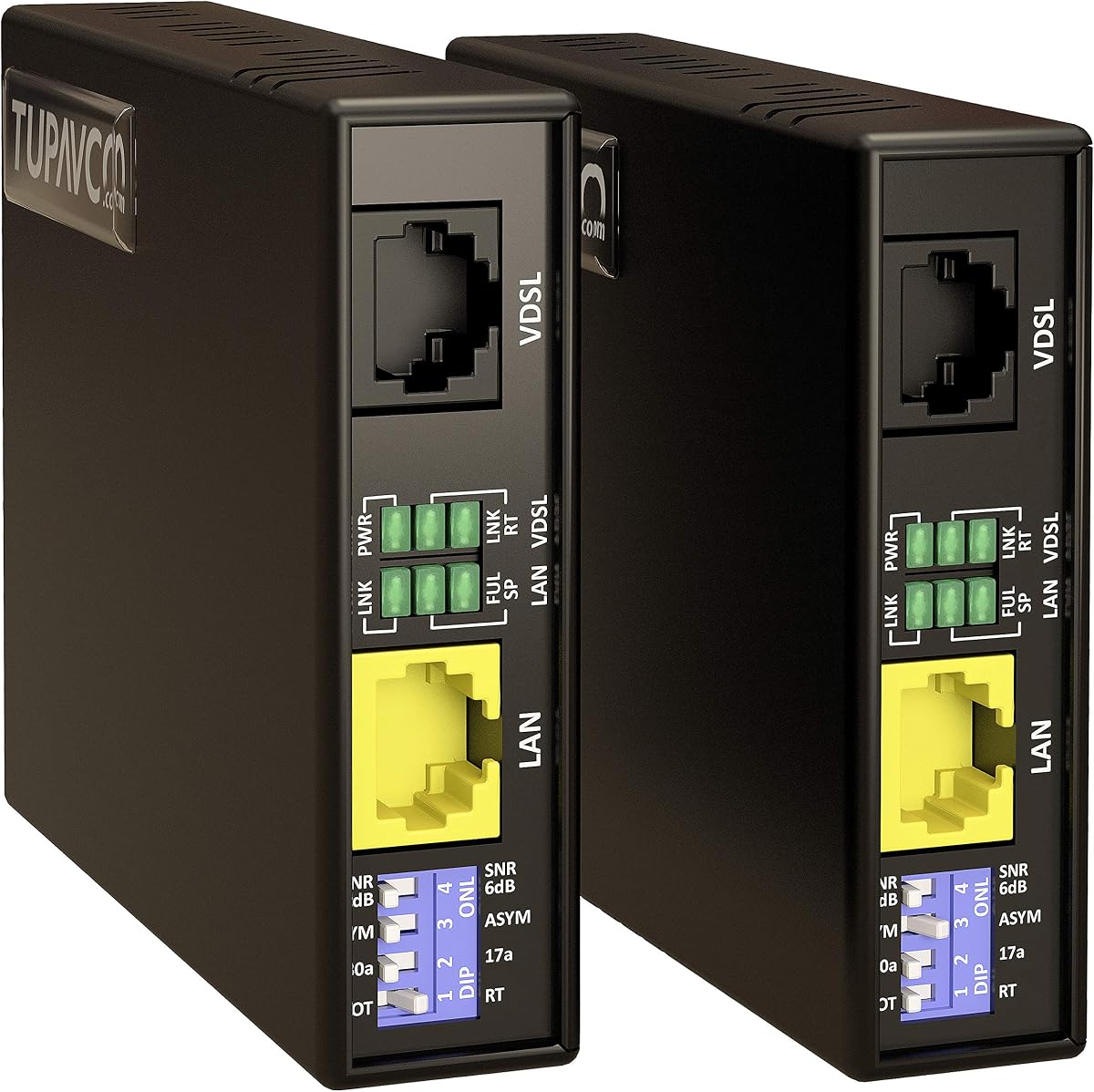
The Vavco TEX200 Kit increases effective network cabling range to over 5000 feet providing high speed connections up to 300Mbps. It receives a 4.6 star rating for cost effectiveness and clean signal support.
We may earn a commission when you buy through this link, at no additional cost to you.
G.INP support makes the signal less sensitive to noise maximizing speed even over long distances. The 4-position DIP switch offers profile settings for different environments and wire types.
While speeds top out at 300Mbps this is often sufficient for general remote access and surveillance. It avoids expensive fiber upgrades while maintaining reliable connectivity.
Small businesses extending connections to remote buildings should choose this kit. It offers a balanced solution for long range needs without complex setup.
Extends effective range from 300ft to over 5000ft providing long range high speed connections.
G.INP broadband signal significantly less sensitive to noise and interference maximizing speed over distance.
We may earn a commission when you buy through this link, at no additional cost to you.
Selecting the right Ethernet Line Extender involves understanding your specific distance requirements existing wiring, and desired speeds. This guide outlines key factors to consider before buying.
Evaluate how far you need to extend your network signal. Standard Ethernet has a 328 foot limit. VDSL kits reach thousands of feet. Powerline extenders depend on electrical circuits.
Choose VDSL for extreme range. Choose powerline for indoor multi room setups. Select couplers only for short cable joins.
Ensure the extender supports the speeds your internet plan provides. Some models max at 100Mbps while others handle Gigabit. Real world speeds often depend on wiring quality.
Opt for AV1000 powerline or VDSL if high bandwidth is needed. For basic devices 100Mbps may suffice.
Check your home wiring type. Powerline needs electrical outlets. VDSL uses twisted pairs or phone cables. Passive couplers need compatible RJ45 ends.
Match the device to existing infrastructure to avoid rewiring costs. Use powerline if walls block cables.
Active extenders regenerate signals allowing longer distances but require power. Passive couplers join cables without power but lack signal boosting.
Use active units for distances over 328 feet. Passive couplers are fine for short cable joins.
Consider technical skills available. Plug and play powerline is easiest. VDSL kits may need DIP switches. Industrial extenders require mains power.
Select plug and play if you lack technical knowledge. Check manuals before installation.
Ensure the extender supports VLANs and DHCP if you use segmented networks. Some active extenders pass these transparently.
Verify tag support if you manage network traffic. Avoid units that filter VLANs unnecessarily.
Active units need power at both ends. Powerline uses outlets. Passive units need no power. Ensure you have access to outlets for active gear.
Confirm outlet availability before buying. Use power saving modes to reduce costs.
Prices vary widely from couplers to industrial kits. Higher cost does not always mean better performance for your specific case.
Prioritize needs over features. Avoid paying for unused high-end specs.
Connect one unit to your router using a standard Ethernet cable and plug the second unit into a wall outlet near your target device. Ensure both units share the same electrical circuit if using powerline.
Check LED indicators to confirm successful connection. If lights indicate error try different outlets or check cables for damage. Avoid power strips as they often block signals.
Clean connectors occasionally to prevent dust buildup. Store unused units in cool dry places. Update firmware regularly if the manufacturer provides patches for security and stability.
Most extenders work with any standard router but some may conflict with modified firmware. Check manufacturer compatibility before buying to avoid connection issues.
Some kits include Wi-Fi capabilities while others are wired only. Choose hybrid kits if wireless coverage is also needed in the extended area.
VDSL kits can reach up to 7000 feet depending on cable quality and type. Longer distances may result in reduced speeds.
Yes wiring quality heavily affects powerline performance. Older or poor wiring can reduce speeds significantly or block signals entirely.
Standard indoor models are not weatherproof. For outdoor use choose units rated for moisture or mount active units inside sealed enclosures.
Yes most kits support connecting multiple units to expand coverage. However performance may degrade as more devices join the network.
Our top picks range from the StarTech extender for long distances to budget-friendly couplers for simple joins. Each model suits specific needs whether you prioritize speed range or cost.
Prioritize your distance requirements and existing wiring before purchasing. A solution that works for one home may not suit another due to electrical circuit differences.
Always check current pricing and availability as deals change frequently. Verify compatibility with your current setup to ensure a smooth installation experience.