
Hamile for iPad Case
4.5Editor score
Magnetically detachable keyboard
7 color backlit keys
Long life battery
Finding the right keyboard case for your 8th generation iPad can transform your device into a powerful productivity tool. These accessories offer protection, typing comfort, and often include features like trackpads or backlit keys to enhance your workflow significantly.
We have carefully evaluated the top-rated options available in November 2026 to bring you this comprehensive guide. Our comparison focuses on compatibility, build quality, battery life, and user experience to ensure you find a match for your specific needs and budget.
Each pick in this list highlights unique strengths, from budget-friendly choices to premium tracks with advanced navigation tools. Please note that availability and specific features may change over time, so verify details before making your final purchase decision today.
4.5Editor score

4.4Editor score

4.3Editor score
As an Amazon Associate we earn from qualifying purchases.
This side-by-side comparison highlights the key specifications and unique selling points of each top-rated keyboard case to help you make an informed decision quickly.



This case stands out for offering a complete productivity bundle including a dedicated Bluetooth mouse alongside the keyboard. With a 4.4 rating it delivers reliable performance for users seeking a laptop-like experience at an affordable price point.
We may earn a commission when you buy through this link, at no additional cost to you.
The adjustable 7 color backlit keyboard ensures comfortable typing in any lighting condition while the magnetic detachable keyboard allows flexibility in positioning. Built-in slots support multiple viewing angles for various tasks from typing to watching videos.
While the case is robust it adds more weight than ultra slim options which might not suit those prioritizing portability above all else. The included mouse is convenient but users should note the pencil is sold separately for drawing tasks.
This is an excellent choice for students or professionals who need comprehensive tools for typing and navigation without breaking the bank. The included accessories make it ready for immediate use right out of the box.
Includes a rechargeable Bluetooth mouse which enhances navigation for those who prefer cursor control over touch.
Choose from seven backlight colors to match your mood or environment for a personalized typing setup.
We may earn a commission when you buy through this link, at no additional cost to you.
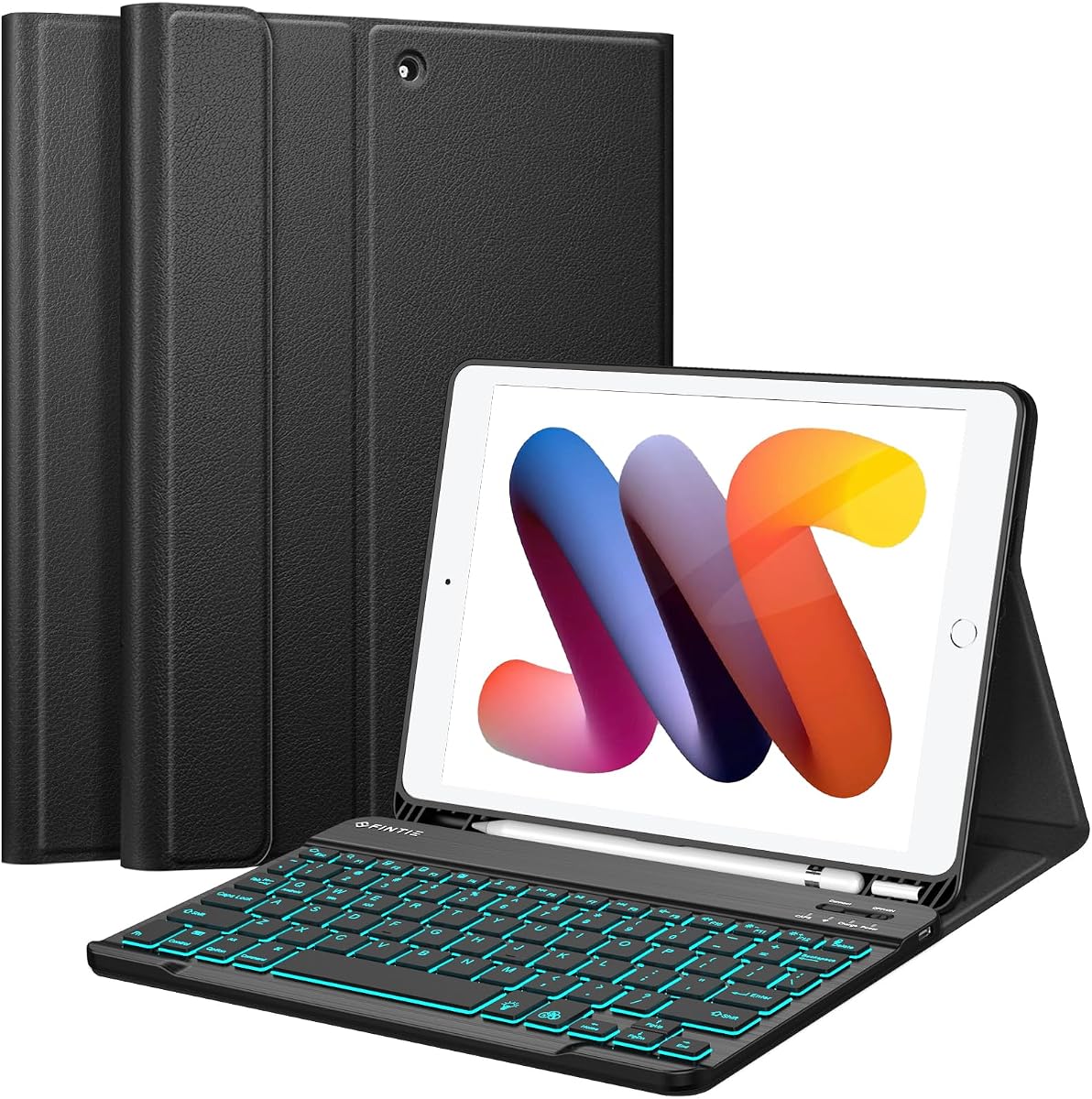
FINTIE offers a highly rated solution that balances cost and functionality effectively for budget-conscious buyers. With a 4.5 star rating it provides a solid typing experience with features that rival more expensive alternatives in the market.
We may earn a commission when you buy through this link, at no additional cost to you.
The built-in 420mAh battery supports up to 230 hours of use ensuring you wont need frequent charging sessions. Backlit keys with seven color options make typing in low light environments both practical and visually appealing for everyday use.
Users missing a trackpad may need to rely on touch gestures which could slow down navigation for heavy multitaskers. The lack of an included mouse means you might need to purchase one separately if cursor control is essential.
Ideal for writers or casual users who primarily need typing functionality without extra navigation tools this case delivers high value. Its slim profile keeps your iPad light and portable while still offering comprehensive protection.
The energy efficient design allows for extended standby times and rapid charging to keep you productive longer.
Ergonomic scissor keys provide a tactile rebound that reduces noise and fatigue during long typing sessions.
We may earn a commission when you buy through this link, at no additional cost to you.
This case elevates the iPad experience by integrating a precision trackpad that transforms navigation into a seamless laptop-like workflow. With a 4.4 rating it is built for users who demand advanced control and flexibility in their mobile setup.
We may earn a commission when you buy through this link, at no additional cost to you.
The patented 360 degree hinge allows you to use the iPad in multiple modes from typing to watching videos without removing the case. Laser-etched keys with RGB backlighting ensure accuracy and style for any environment you work in.
The price is higher than basic options and the added weight may be a consideration for users prioritizing extreme portability above all. However the build quality and multi-use modes justify the investment for power users and professionals.
Best suited for professionals who need to edit documents or browse the web efficiently this case bridges the gap between tablet and laptop. Its smart features and protection make it a top tier choice for productivity.
Multi-gesture trackpad controls allow for smooth scrolling and selection without needing to touch the screen constantly.
Seven use modes enable you to adapt the device instantly to different tasks ranging from writing to media consumption.
We may earn a commission when you buy through this link, at no additional cost to you.
Hamile delivers a sleek and functional keyboard case that prioritizes ease of transport and reliable performance. With a 4.5 star rating it is a popular choice for users seeking a balance between protection and typing capability.
We may earn a commission when you buy through this link, at no additional cost to you.
The 400mAh battery supports up to 180 hours of use ensuring you can work for days without needing to recharge. The magnetic detachable keyboard allows you to remove it easily when you want to use the iPad as a standalone tablet.
Without a trackpad or mouse you may rely on touch input which is fine for basic tasks but less efficient for complex work. The case is sturdy but lacks the advanced navigation features found in premium models available on the market.
This is a great option for students and casual users who need a reliable typing solution without extra bulk or complexity. The multiple viewing angles and pencil holder add convenience for everyday study or entertainment use.
The magnetic design lets you position the keyboard exactly where you want it or remove it entirely for reading.
High capacity battery ensures you can work for extended periods without interruption from charging requirements.
We may earn a commission when you buy through this link, at no additional cost to you.
Divufus offers a practical solution for users who switch between different operating systems and need versatile compatibility. With a 4.4 rating it provides a solid typing experience with features designed to enhance efficiency across platforms.
We may earn a commission when you buy through this link, at no additional cost to you.
The keyboard supports iOS Android and Windows systems allowing you to switch layouts with simple key combinations. A 80 hour working battery with a 130 day standby time ensures the device is ready when you need it most.
The absence of a trackpad means you will need to use on-screen navigation which can be less precise for specific tasks. It is a reliable budget-friendly option but lacks the advanced navigation tools of higher-end competitors.
This case is ideal for users managing multiple devices or who need a simple and effective typing solution for their iPad. The honeycomb design also helps keep the device cool during extended use sessions.
Switch between operating systems easily using dedicated function keys to match your specific device environment.
Automatic sleep modes extend battery life significantly ensuring your keyboard is ready for use when needed.
We may earn a commission when you buy through this link, at no additional cost to you.
Logitech is a trusted brand known for durability and efficiency offering a slim folio designed for long-term daily use. With a 4.4 rating it provides a high-quality typing experience that focuses on comfort and system integration.
We may earn a commission when you buy through this link, at no additional cost to you.
The keyboard uses replaceable coin cell batteries that can last up to four years eliminating the need for regular charging. Full iOS shortcut keys give quick access to media controls and system functions enhancing your workflow significantly.
The lack of backlighting means typing in low light conditions can be difficult without an external light source available. Users should consider the higher upfront cost against the convenience of not needing to recharge regularly.
Best for professionals who value reliability and long battery life this case offers a consistent and comfortable typing experience. It is a robust choice for those who need a dependable accessory for daily work and travel.
Replaceable batteries ensure the keyboard remains functional for years without needing to be plugged into a power source.
Dedicated iOS shortcuts streamline your access to common commands and media controls for increased efficiency.
We may earn a commission when you buy through this link, at no additional cost to you.
KBCASE provides a slim and stylish keyboard case that focuses on portability and protection for your iPad. With a 4.5 star rating it delivers a reliable typing experience without adding significant bulk to your device.
We may earn a commission when you buy through this link, at no additional cost to you.
The ultra-thin design makes it easy to carry in a briefcase or backpack while the detachable keyboard allows for flexible use modes. Honeycomb grid patterns help with heat dissipation to keep your device cool during extended sessions.
Without a trackpad you may need to rely on touch gestures for navigation which can be slower for certain workflows. It is a lightweight and practical choice for users who prioritize ease of transport over advanced features.
This case is perfect for students or travelers who need a compact typing solution that protects the device well. The comfortable typing experience and multiple viewing angles make it suitable for various daily tasks.
The ultra-thin profile ensures easy transport without adding excessive weight to your daily carry setup.
Honeycomb grid designs aid in releasing heat to keep the device running smoothly during long use.
We may earn a commission when you buy through this link, at no additional cost to you.
Dexnor offers a floating keyboard case that integrates a precision trackpad for enhanced control and navigation efficiency. With a 4.3 rating it is designed for users seeking a more comprehensive laptop-like experience on their tablet.
We may earn a commission when you buy through this link, at no additional cost to you.
The aluminum alloy hinge creates a sturdy floating cantilever stand that offers customizable angles for typing and viewing. The built-in trackpad supports multi-finger gestures making browsing and editing tasks smoother and more intuitive for daily use.
The premium features come with a higher price and additional weight which might be a consideration for users prioritizing portability. However the lifetime technical support and warranty add significant value and peace of mind for buyers.
This case is ideal for professionals or students who need precise control and a stable typing setup for productivity tasks. The backlit keys and strong magnetic connection ensure reliability and comfort in various environments.
The smart trackpad allows for precise cursor control and multi-finger gestures without needing to touch the screen.
A durable aluminum hinge provides a sturdy floating stand that can be adjusted to suit any typing preference.
We may earn a commission when you buy through this link, at no additional cost to you.
INFILAND delivers a high-performance keyboard case designed for zero-lag typing and responsive navigation tools. With a 4.5 rating it is an excellent choice for users who demand accuracy and efficiency in their daily workflow.
We may earn a commission when you buy through this link, at no additional cost to you.
The magnetic keyboard locks firmly into place ensuring it stays secure during use and stores neatly when not needed. A built-in precision trackpad enables smooth cursor control for browsing the web and managing files effectively.
The case is well-protected but lacks an included mouse so you will need to use the trackpad or touch input. It is a solid investment for those who need a reliable typing solution that keeps up with fast-paced tasks.
Best for professionals or students who write frequently this case offers a comfortable and accurate typing experience. The modern look and built-in pencil holder make it a practical and thoughtful accessory for creative work.
Zero-lag technology ensures instant key response for accurate typing without frustrating delays during work.
A built-in trackpad provides smooth cursor control for browsing and editing tasks without screen tapping.
We may earn a commission when you buy through this link, at no additional cost to you.
KBCASE provides a rotating keyboard case that offers versatile viewing angles and precise navigation controls. With a 4.4 rating it is a strong contender for users who need flexibility and control for their iPad setup.
We may earn a commission when you buy through this link, at no additional cost to you.
The 360 degree swivel design lets you rotate the device for any task whether typing viewing or reading comfortably. A precision trackpad allows you to control the cursor like a laptop making document editing and browsing easier.
While the rotation feature is versatile the case adds some weight which might be a factor for users prioritizing portability. It is a practical option for those who need a flexible setup for different work or study environments.
Best for creatives or professionals who need to switch between typing and viewing modes frequently this case is a great choice. The hardshell protection and pencil holder add value to the overall design for daily use.
Supports 360 degree swivel and 180 degree flip for optimal viewing in any direction or position.
Includes a touchpad for cursor control that reduces the need to constantly reach for the screen.
We may earn a commission when you buy through this link, at no additional cost to you.
Selecting the right keyboard case involves evaluating several factors to ensure compatibility and functionality match your needs.
Always check the model number on the back of your iPad starting with A to ensure the case fits correctly. The 8th generation iPad has specific dimensions that differ from other models so verifying compatibility is the first step.
Verify the exact model number on your device before purchasing to avoid fit issues and ensure all ports align correctly.
Most modern cases use Bluetooth connectivity which is convenient but requires pairing and charging. Some models offer detachable keyboards that can be removed for tablet mode but ensure the connection is stable.
Look for reliable Bluetooth pairing features and ensure the keyboard stays connected during normal use.
A good keyboard case should have a battery that lasts for many hours or days of use. Look for cases with USB-C fast charging to minimize downtime and ensure you have power when needed.
Choose a case with a long-lasting battery and convenient charging options to keep your workflow uninterrupted.
Features like backlit keys trackpads and mouse support can significantly enhance usability in various environments. A trackpad is particularly useful for navigation while backlit keys help when working in low light.
Consider if you need extra tools like trackpads or backlit keys based on your typical work environment and tasks.
The case should offer full protection for the iPad including corners and edges. Look for materials like durable PU leather and honeycomb grids that protect against drops and help with heat dissipation.
Ensure the case offers full coverage and sturdy materials to protect your device from drops and wear.
If you use the Apple Pencil regularly a case with a dedicated holder is essential to prevent losing it. Look for designs that make it easy to access and store the pencil securely while the case is on.
Check for a secure pencil slot if you use the Apple Pencil often to keep it accessible and safe.
Heavier cases with many features may make your iPad less portable. Decide if you prioritize advanced tools or a lightweight design that is easy to carry in a bag.
Balance the need for features with portability to choose a case that fits your lifestyle and travel habits.
Look for products with clear warranty terms and responsive customer service to address any issues. Brands offering support and warranties provide peace of mind for your purchase.
Prioritize brands that offer solid warranties and responsive customer service to ensure a reliable purchase.
When you receive your keyboard case begin by pairing the Bluetooth keyboard with your iPad through the settings menu. Ensure both devices are charged before starting to avoid interruption during the pairing process.
To use the case as a laptop simply attach the keyboard to the magnetic base and adjust the viewing angle to your preference. Most cases allow you to detach the keyboard for reading or media consumption modes.
Regularly clean the keyboard and case with a soft cloth to prevent dust buildup and maintain performance. Charge the keyboard periodically to keep the battery healthy and ensure it is ready for use whenever needed.
These cases are designed specifically for the 8th generation iPad and some also support 7th and 9th generation models. Always check the compatibility list before purchasing to ensure it fits your specific model number on the back of your device.
Most of these cases include a built-in pencil holder for the Apple Pencil 1st generation. Please note that the pencil itself is not included with the package so you will need to purchase it separately if needed.
Not all cases include a trackpad as some focus on being lightweight and budget-friendly. If you need a trackpad for navigation check the specific product features or select a premium model that lists this feature explicitly.
Most keyboards in this list use a USB-C cable for charging. Ensure you use the included cable or a compatible one to charge the keyboard fully before using it for extended periods.
Yes most cases are designed to work with screen protectors but you should check the product details for confirmation. Ensure your screen protector does not add extra thickness that might interfere with the case lid closing.
Most keyboards have built-in rechargeable batteries and cannot be replaced by the user. You will need to keep the keyboard charged using the provided cable to maintain its functionality over time.
Yes these cases are compatible with the latest iOS versions as they use standard Bluetooth connectivity. Always ensure your keyboard firmware is updated via the manufacturers app if available for optimal performance.
We have reviewed ten top-rated keyboard cases for the 8th generation iPad each offering unique features for different needs. Whether you need a budget-friendly option or a premium case with a trackpad there is a choice for every user.
Prioritize compatibility and battery life first to ensure the case fits your device and keeps you productive throughout the day. Additional features like backlit keys or trackpads can be secondary factors based on your specific workflow.
Remember that prices and availability change so verify the latest details and current offers before completing your purchase. We hope this guide helps you find the perfect accessory to enhance your iPad experience effectively.