
Replacement Remote for Fire TV
4.5Editor score
Affordable price point
Supports voice commands
Wide device compatibility
This guide compares the top Fire Stick Replacement Remote options for compatibility voice features and build quality to help you find the perfect match for
Finding a reliable Fire Stick Replacement Remote is essential for seamless streaming when your original remote fails or gets lost. A good replacement should offer responsive buttons, voice control capabilities, and robust battery life to ensure uninterrupted entertainment experiences.
We evaluated ten top-rated replacements based on compatibility across various Fire TV models, user feedback on build quality, and the ease of pairing with existing devices. Our analysis focuses on features that matter most for daily use and long-term reliability.
Each pick highlights specific strengths such as voice activation, shortcut buttons, and smart home integration. Please note that availability and pricing fluctuate frequently, so verify the latest details before making your final purchase decision.
4.5Editor score
4.5Editor score

4.5Editor score
This table provides a side-by-side comparison of the ten leading remote replacements to help you identify the model that best suits your specific Fire TV setup and usage needs.
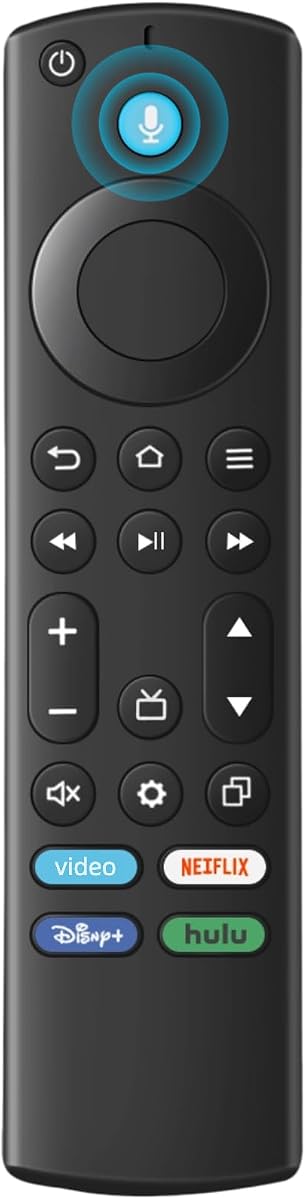


This replacement remote stands out for its extensive compatibility with various Fire TV generations. It supports voice commands effectively and works seamlessly with most Fire Stick 4K and Cube models.
We may earn a commission when you buy through this link, at no additional cost to you.
Users appreciate the responsive voice feature which allows for quick content searches. The remote integrates well with smart TVs from brands like Insignia and Toshiba. It includes dedicated shortcut buttons for popular apps.
The main limitation is the lack of backlit buttons for use in dark environments. Also, batteries are not included so you need to purchase AAA batteries separately for immediate use.
This remote is ideal for users seeking a reliable replacement without extra costs. It is best for those who primarily use voice control and do not need advanced features like backlighting.
Works with Fire Stick 4K Max and various smart TV models including Insignia and Toshiba.
Built-in microphone allows for easy voice searches and content navigation without typing.
We may earn a commission when you buy through this link, at no additional cost to you.
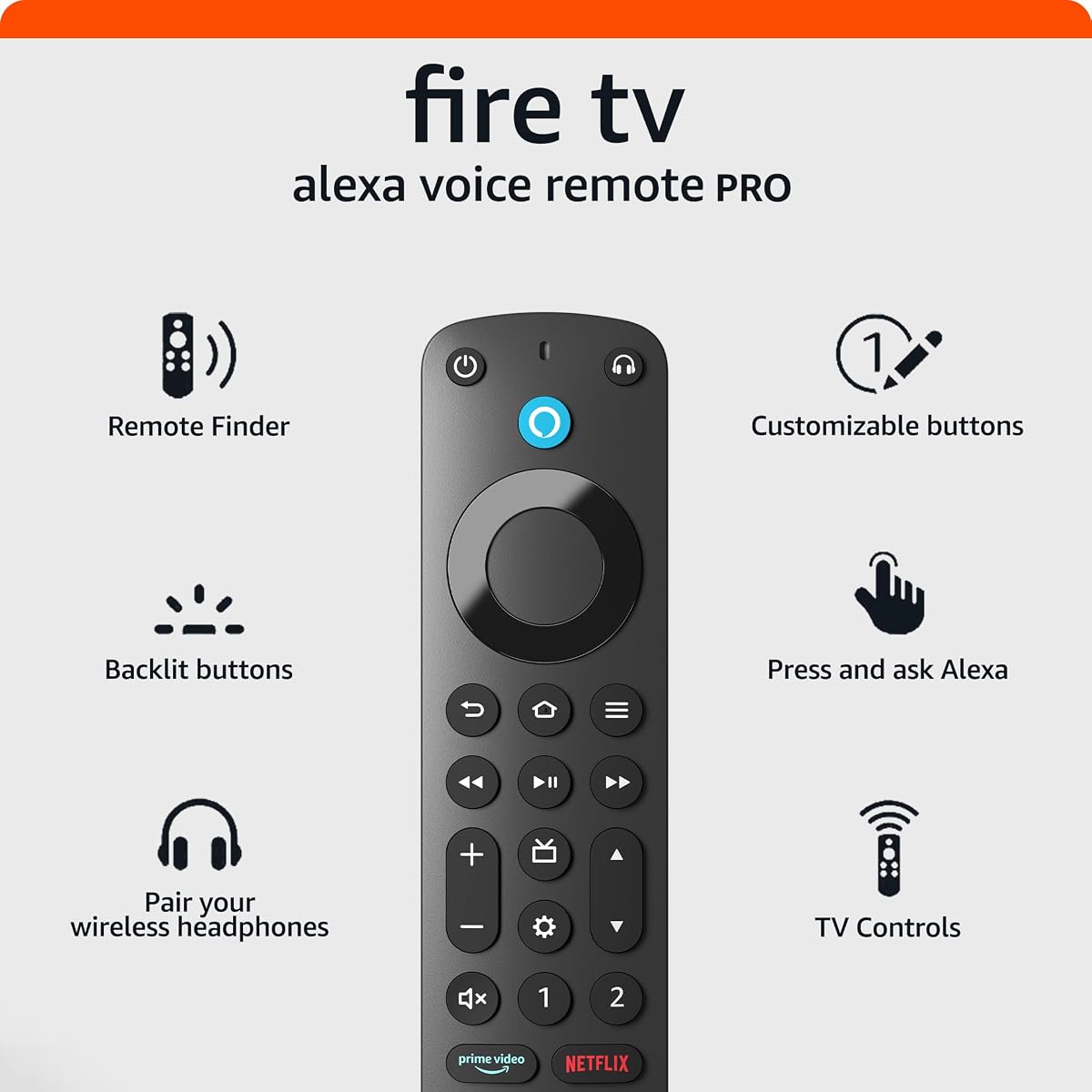
The Fire TV Alexa Voice Remote Pro is the top choice for users seeking premium features. It includes a remote finder function that helps locate the device quickly using an Alexa-enabled device.
We may earn a commission when you buy through this link, at no additional cost to you.
The motion-activated backlight ensures visibility in low-light conditions. Customizable buttons allow you to create shortcuts to favorite apps. A dedicated headphone button simplifies pairing wireless headphones.
It is more expensive than basic replacements but offers significant convenience. The TV controls allow management of power and volume directly from the remote.
Choose this remote if you want advanced functionality and better usability in the dark. It is perfect for power users who value extra customization and smart features.
Use your Alexa device or app to trigger a ring sound on the remote when lost.
Buttons illuminate automatically when you pick up the remote for night use.
We may earn a commission when you buy through this link, at no additional cost to you.
This remote offers excellent value for money with robust functionality. It supports voice commands and provides customization buttons for quick access to favorite services.
We may earn a commission when you buy through this link, at no additional cost to you.
The remote is compatible with a wide range of Fire TV models including Cube and Stick 4K Max. The four shortcut buttons enhance navigation efficiency significantly.
While it lacks some premium features like backlighting it performs reliably for daily tasks. The voice function is easy to activate following the provided instructions.
This is the best choice for budget-conscious buyers who still want voice control. It suits those who need a straightforward and functional remote without extra costs.
Provides essential voice control and customization at a very affordable price point.
Two customizable buttons allow you to program shortcuts for specific apps or commands.
We may earn a commission when you buy through this link, at no additional cost to you.
This remote is designed for Fire Stick Select Plus and Max models. It includes voice control and four shortcut buttons for quick app access.
We may earn a commission when you buy through this link, at no additional cost to you.
The remote supports a range of up to 12 meters ensuring reliable connectivity. It pairs automatically after powering off and on the device.
The after-sales support is a strong point offering a 60-day satisfaction guarantee. It is suitable for most modern Fire TV devices released from 2020.
This is a solid choice for users needing a direct replacement for newer models. It balances performance and reliability without significant drawbacks.
Controls work reliably up to 12 meters away from your streaming device.
Automatic pairing happens after power cycle making setup simple and quick.
We may earn a commission when you buy through this link, at no additional cost to you.
This remote syncs automatically with your streaming device or compatible smart TV. It offers instant access shortcuts for popular streaming apps.
We may earn a commission when you buy through this link, at no additional cost to you.
The voice control features enable hands-free content search and volume adjustment. It works seamlessly with Fire Stick 4K Max and smart TVs.
The setup process is straightforward without complex configuration steps. It supports devices from 2018 to 2026 models.
Ideal for users who want a hassle-free setup process. It is suitable for those who prioritize ease of use over advanced features.
Pre-programmed buttons provide one-tap access to popular streaming apps.
The remote automatically syncs with your device without needing manual pairing steps.
We may earn a commission when you buy through this link, at no additional cost to you.
This remote is compatible with all Fire Series including Stick Lite and Cube. It includes a voice controller for easy content management.
We may earn a commission when you buy through this link, at no additional cost to you.
The pairing process is simple by holding the home button for ten to fifteen seconds. Standard navigation controls help jump to favorite scenes quickly.
It supports Fire Smart TVs and various generations of Fire devices. The customer service is friendly and responsive to issues.
This is a great option for users with mixed Fire TV ecosystems. It is best for those who need broad support across different devices.
Works with Fire TV Stick Lite HD Cube and Smart TV 3rd Gen models.
Pair by holding the home button for ten to fifteen seconds until LED flashes.
We may earn a commission when you buy through this link, at no additional cost to you.
The official Amazon Alexa Voice Remote provides reliable performance for Fire TV devices. It includes dedicated TV controls for power and volume management.
We may earn a commission when you buy through this link, at no additional cost to you.
The guide button offers channel and program listings in one place. Preset app buttons allow quick access to favorite content.
It comes with two AAA batteries included in the package. This is a premium option backed by Amazon quality standards.
Best for users who prefer an official remote with built-in TV controls. It suits those who value included batteries and brand reliability.
Dedicated buttons control power volume and mute of your compatible TV.
The remote ships with two AAA batteries so you can use it immediately.
We may earn a commission when you buy through this link, at no additional cost to you.
This remote fits Fire Smart TVs Stick and Cube models from 2020. It supports voice function for easy device operation without typing.
We may earn a commission when you buy through this link, at no additional cost to you.
Pairing involves pressing the home key for ten seconds and watching the LED light flash. The pairing time is typically thirty to sixty seconds.
Users should ensure batteries are fresh before matching. The remote works well with Fire Smart TVs 3rd Gen.
This is a reliable standard remote for recent Fire TV models. It is best for those who can handle basic manual pairing steps.
The LED light flashes rapidly to indicate pairing mode is active.
Use voice commands like turn on TV without needing to press extra buttons.
We may earn a commission when you buy through this link, at no additional cost to you.
This remote supports various smart TV brands including Hisense Insignia and Pioneer. It is designed for Fire Cube and Fire Stick models.
We may earn a commission when you buy through this link, at no additional cost to you.
The remote includes preset app buttons for quick access to favorite content. Voice function allows easy searching of content.
Pairing requires removing old remote batteries to avoid interference. The process involves pressing the home button for ten to fifteen seconds.
Best for users with multiple smart TV brands under the Fire ecosystem. It is ideal for those needing broad compatibility beyond Amazon devices.
Compatible with Hisense Insignia Pioneer and other smart TV brands.
Four preset app buttons give quick access to popular streaming services.
We may earn a commission when you buy through this link, at no additional cost to you.
This remote supports Fire Stick HD Lite 2nd and 3rd Gen and 4K models. It offers voice search and four shortcut buttons for app access.
We may earn a commission when you buy through this link, at no additional cost to you.
The voice function supports commands like find action movies or skip ahead. Pairing is done by holding the home button for ten seconds.
Support team is dedicated to assist with setup or issues. It works with Omni Insignia Toshiba and Pioneer Smart TVs.
Best for users needing a versatile replacement for various Fire Stick generations. It is ideal for those who value voice search capabilities.
Say commands like find action movies to search content using voice.
Supports Fire Stick HD Lite 2nd 3rd Gen and 4K Max models.
We may earn a commission when you buy through this link, at no additional cost to you.
Choosing the right replacement requires checking compatibility model features and build quality. This guide outlines the key factors to consider before making your purchase.
Ensure the remote matches your Fire TV model and generation as not all remotes work with every device. Older models may require specific versions while newer ones like Fire Stick 4K Max support advanced features.
Check the product description for supported devices to avoid pairing issues after purchase.
Voice control enables hands-free navigation and content searches which improves convenience significantly. Look for remotes with built-in microphones that work with Alexa for seamless command execution.
A good voice function should support common commands like volume adjustment app launching and content search.
Consider the button layout for ease of use and whether it includes shortcut buttons for popular apps. Some remotes allow customization to create shortcuts to frequently used services.
Customizable buttons enhance workflow by reducing steps to access favorite content regularly.
Most remotes require standard AAA batteries so check how long they last under normal usage conditions. Longer battery life reduces the need for frequent replacements.
Some premium models offer rechargeable options or more efficient power management features.
A durable remote should withstand daily use and accidental drops without losing button responsiveness. Look for reviews mentioning material quality and structural integrity over time.
Sturdy construction ensures the remote remains functional for a longer period.
Features like backlit buttons remote finder or dedicated headphone buttons add significant convenience especially in low-light environments. Evaluate which extras align with your specific needs.
Premium features like remote finder can save time when the device is misplaced.
Simple pairing processes reduce frustration during setup. Ideally the remote should pair automatically after inserting batteries or with a few button presses.
Check user manuals or reviews for insights on how easy the initial setup is.
Balance the price with features and warranty offered to ensure value for money. Some sellers provide satisfaction guarantees or after-sales support which can be helpful if issues arise.
A reasonable warranty period adds confidence to your purchase decision.
Insert fresh AAA batteries into the remote and ensure the battery cover is securely closed. If pairing does not happen automatically follow the device instructions typically holding the home button for ten seconds.
Keep the remote clean by wiping it with a soft dry cloth and avoid using harsh chemicals that could damage the buttons. Store it in a safe place away from water or extreme temperatures.
If the remote stops responding replace the batteries or reinsert them to reset the connection. Pairing issues can often be resolved by unplugging the Fire TV device for thirty seconds and restarting.
To pair a new remote insert batteries and plug the Fire TV into power. Hold the home button for ten to fifteen seconds until the LED light flashes rapidly. Wait for the pairing to complete within sixty seconds.
Voice control may fail if the remote is not paired properly or if the microphone is blocked. Ensure your Fire TV has internet access and try restarting the remote by replacing batteries.
Yes many third-party remotes are compatible but you should check specific model support. Official remotes offer better feature support but replacements can work well for basic navigation.
Not all remotes support Fire TV Cube as it requires specific pairing and voice control features. Check the product description to confirm Cube compatibility before purchasing a replacement.
If pairing fails remove and reinsert batteries or unplug your Fire TV for thirty seconds. Restart the pairing process by holding the home button and ensure the device is within range.
Premium remotes are worth it if you need features like backlit buttons remote finder or TV controls. They offer better usability and convenience especially in low-light environments.
Most replacement remotes do not include batteries so you will need to purchase AAA batteries separately. Always check the product details to see what is included in the package.
Our top picks include the Amazon Fire TV Alexa Voice Remote Pro for premium features and the Replacement Remote for Fire TV for budget-friendly performance. Each offers reliable compatibility and voice control.
Prioritize compatibility and voice functionality based on your specific device needs. Advanced features like backlighting are beneficial but basic remotes can handle essential navigation tasks.
Remember to check the latest product details and current pricing before purchasing. Availability and features may change so verify that the remote supports your device model.