
SSYA Dementia Clock
4.6Editor score
11.5 inch HD display
Full day spelling
Automatic DST adjustment
This guide compares the best digital clock with date and day of week for seniors and busy households, evaluating display clarity, alarm features, and ease of
Finding a reliable digital clock with date and day of week can transform daily routines for seniors and anyone needing clear timekeeping. These devices eliminate confusion by showing full dates and days without abbreviations, ensuring you never miss an appointment or medication schedule.
We compared ten top-rated models based on screen size, readability, alarm customization, and special features like voice announcements. Our analysis focuses on real-world usability, brightness control, and how well each clock adapts to changing light conditions throughout the day.
Each pick below highlights specific strengths and ideal use cases to help you choose the right model. Remember that product availability and pricing can change frequently, so verify current details before making your final purchase decision online.
4.6Editor score

4.6Editor score

4.7Editor score
The following table provides a side by side comparison of all ten selected clocks. Use this overview to quickly identify which model meets your specific requirements for display size, features, and budget.


The SSYA Dementia Clock stands out with its massive 11.5 inch HD screen that clearly spells out every day of the week without confusing abbreviations. Its 4.6 rating reflects high user satisfaction among seniors needing clear timekeeping aids.
We may earn a commission when you buy through this link, at no additional cost to you.
This clock divides the day into distinct periods like MORNING and AFTERNOON with sun and moon visuals to reinforce the time of day. It supports eight languages and includes customizable alarms for medication or appointments making it highly versatile.
While the large display offers excellent readability it requires a dedicated power outlet and occupies significant space on a table or wall. The fixed power source means it cannot operate during extended outages without battery backup options.
Ideal for individuals with dementia or memory loss this clock provides a comprehensive view of time date and period of day. It is a strong choice for those prioritizing maximum clarity over compact design.
Sun and moon icons combined with full day names help users orient themselves even when memory is declining.
Twelve customizable alarms allow caregivers to set reminders for essential tasks like taking medication.
We may earn a commission when you buy through this link, at no additional cost to you.
The Mitoart Digital Dementia Clock earns a 4.7 rating for its combination of affordability and essential features like voice announcements and large bold letters. It is designed specifically for those with poor vision or cognitive challenges.
We may earn a commission when you buy through this link, at no additional cost to you.
Lightly pressing the back or using a remote triggers a voice that reads the current time supporting nine languages. The automatic dimming feature adjusts brightness at set times to ensure comfort without manual adjustment.
Voice functionality depends on a remote or specific button press which may require additional coordination if vision is very limited. The display is smaller than premium models but still clear enough for most users.
This budget-friendly option is excellent for seniors needing basic clarity and vocal time checks without spending extra. It balances cost with critical accessibility features that support independence.
The voice announcement function allows users to hear the time without needing to read small digits.
Dimming at night and brightening in the morning ensures the screen is always easy to read.
We may earn a commission when you buy through this link, at no additional cost to you.
The DreamSky Large Digital Clock delivers a 4.6 rating with features like battery backup and a USB charging port that make it practical for bedside use. Its 7.6 inch screen displays time date and temperature clearly.
We may earn a commission when you buy through this link, at no additional cost to you.
Four levels of dimmable brightness let users customize screen light to match their comfort needs during day or night. The battery backup ensures time settings are saved during power outages avoiding frequent resets.
While it lacks advanced features like full day spelling some users may need to manually adjust for daylight saving time. The USB port adds convenience but may not be essential for all households.
This clock is ideal for users who want a balanced mix of display size practical features and reliability. It is a strong contender for those needing dependable daily timekeeping.
Battery backup keeps the clock running and settings intact when electricity fails.
The USB port allows charging phones or tablets without extra outlets.
We may earn a commission when you buy through this link, at no additional cost to you.
The Alzheimer's Dementia Clock scores a 4.4 rating for its extensive customization including twenty alarms and themes plus a unique picture playback mode. It divides the day into six distinct periods for added clarity.
We may earn a commission when you buy through this link, at no additional cost to you.
Users can adjust brightness across ten levels and use colorful themes to suit different needs or environments. Inserting a USB drive or SD card allows the device to display family photos as a secondary function.
The sheer number of features may make initial setup more complex for those with cognitive decline. Battery life is limited primarily to power outage protection so constant power is required.
This clock is best for households wanting a highly customizable device with added personal touches like photos. It serves well for those needing many reminders and visual engagement.
Twenty customizable alarms allow for detailed scheduling of daily tasks and medication.
The photo playback function adds a decorative and nostalgic element to the clock.
We may earn a commission when you buy through this link, at no additional cost to you.
The Nimukol Dementia Clock earns a 4.7 rating for its simple interface and clear large font display that avoids abbreviations. It is designed specifically to support elderly users with memory loss.
We may earn a commission when you buy through this link, at no additional cost to you.
Lightly pressing the back or using a remote announces the time aloud supporting nine languages for diverse households. The screen auto dims at night to prevent sleep disruption while staying bright during the day.
It lacks additional ports like USB charging which limits its utility as a multi-function device. The focus remains on essential timekeeping and voice accessibility features.
This model is perfect for those prioritizing straightforward voice and visual timekeeping without extra complexity. It balances affordability with key accessibility tools effectively.
Pressing the back of the clock triggers a clear voice announcement of the time.
Support for nine languages ensures it can serve diverse household needs.
We may earn a commission when you buy through this link, at no additional cost to you.
The American Lifetime Clock offers a 4.6 rating and comes with one year warranty plus direct U.S. support for peace of mind. It features a high contrast display and clear layout for easy reading.
We may earn a commission when you buy through this link, at no additional cost to you.
Custom alarms allow up to five daily reminders for medications or appointments ensuring important events are tracked. The auto-dimming feature adjusts brightness to match ambient room light for comfort.
Unlike some models it lacks voice announcement which may limit accessibility for those with severe vision loss. Alarm count is limited compared to other specialized dementia clocks.
Ideal for buyers wanting reliable quality backed by strong customer support this clock is simple and practical. It serves well for seniors needing basic clear timekeeping.
U.S.-based support and a one-year warranty provide assurance for long-term use.
Five customizable alarms cover most daily needs without overwhelming the user.
We may earn a commission when you buy through this link, at no additional cost to you.
The DIWAKREM Clock achieves a 4.5 rating with its IPS screen offering a 175 degree viewing angle so the time is visible from any direction. It supports eight languages and includes medication reminders with cartoon visuals.
We may earn a commission when you buy through this link, at no additional cost to you.
When power is restored the clock updates automatically to the current time and date requiring no manual reset. The display can be set to seven different models to suit various needs.
Without battery backup the clock will reset if power fails unexpectedly and manual input will be needed again. Wall mounting may be necessary depending on room setup for optimal viewing.
This clock is best for spaces with consistent power and those needing wide-angle visibility. Its cartoon reminders add a friendly touch for users with declining memory.
The IPS display ensures clear viewing from almost any angle in the room.
Power failure memory function avoids the hassle of re-setting time and date.
We may earn a commission when you buy through this link, at no additional cost to you.
The KOSUMOSU Alarm Clock rates 4.1 for its modern mirror clock style and dual alarm settings ideal for households with different schedules. It displays seconds date week and indoor temperature.
We may earn a commission when you buy through this link, at no additional cost to you.
Auto dimming via light sensor or manual options ensures the screen is comfortable at night while staying readable during the day. Snooze and separate alarm cycles add flexibility for daily routines.
This model lacks accessibility features like large full spelling or voice which may limit use for seniors with cognitive needs. Battery life for settings is brief relying mostly on continuous power.
Best suited for general households seeking style and functional dual alarms this clock balances aesthetics with utility. It is a good choice for modern bedrooms.
Separate alarms for workdays and weekends help manage different weekly schedules.
The mirror style design blends seamlessly into modern living spaces.
We may earn a commission when you buy through this link, at no additional cost to you.
The Peakeep Digital Clock receives a 4.6 rating for its large display and practical USB charging port that keeps phones ready for daily use. It shows time date and day of week simultaneously.
We may earn a commission when you buy through this link, at no additional cost to you.
Five alarm volume levels allow customization for different hearing preferences ensuring no one oversleeps due to inaudible alerts. Automatic Daylight Saving Time adjustments remove the need for manual seasonal updates.
Without battery backup power failures will require resetting the time making it less resilient than some rivals. Voice features are absent which may limit accessibility options.
This clock is ideal for bedside tables where charging convenience and clear display are priorities. It offers reliable performance for general household use.
The USB port eliminates the need for separate chargers at the bedside.
Displaying day and date together helps keep users informed at a glance.
We may earn a commission when you buy through this link, at no additional cost to you.
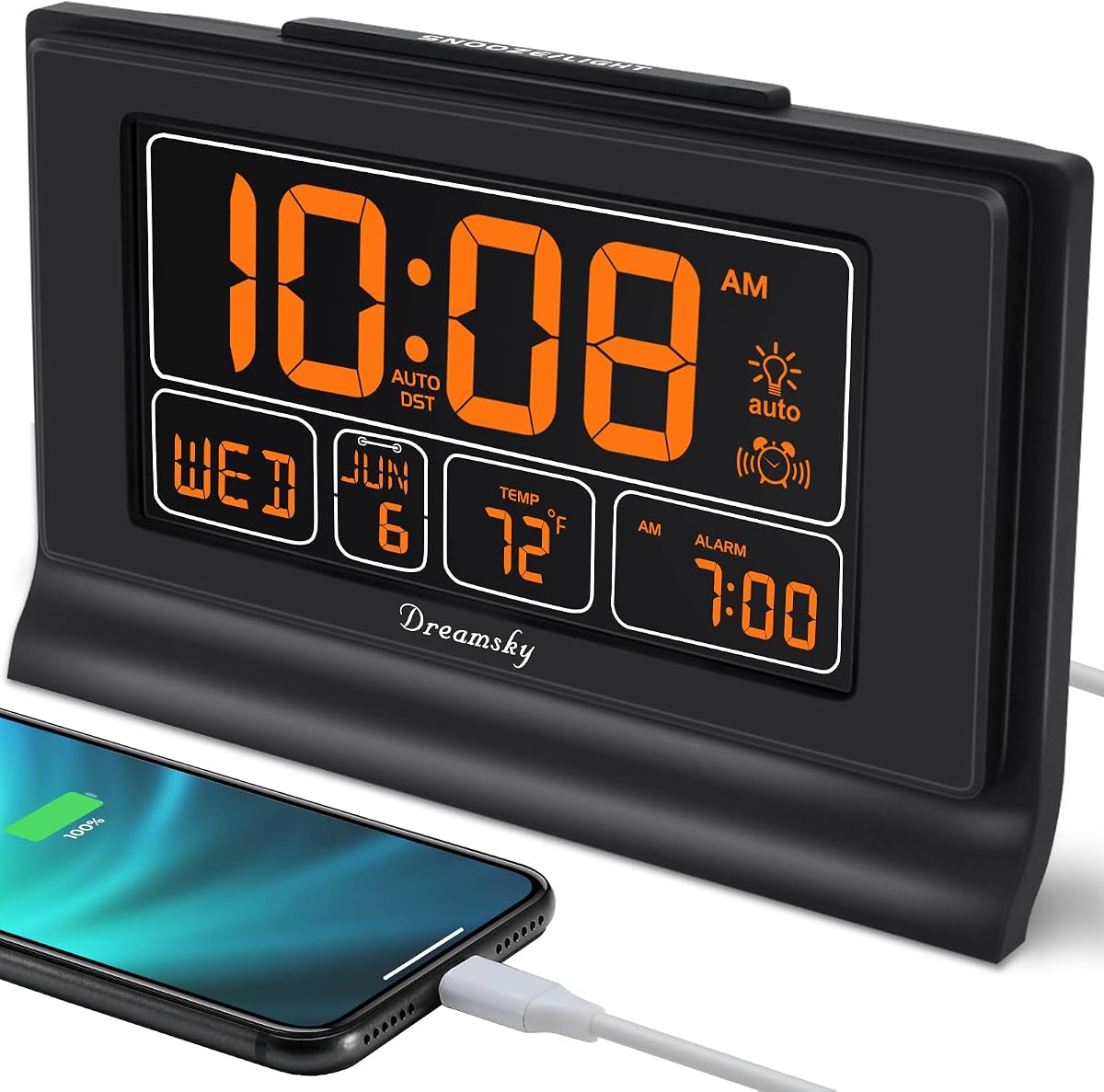
The DreamSky Alarm Clock scores 4.6 for its automatic time setting upon plugging in and a full range dimmer with six levels. It shows time date and temperature in an eye-friendly display.
We may earn a commission when you buy through this link, at no additional cost to you.
Seven time zones can be selected and DST is handled automatically. A long-lasting button cell backup keeps settings intact if power is interrupted.
The display is smaller than many senior-focused models and does not spell out the full day of week. This may limit its appeal for users needing maximum text clarity.
Best for users prioritizing simplicity and automatic setup this clock balances essential features with straightforward operation. It is a solid choice for general bedside use.
Plug in to instantly get accurate time and date without manual entry.
Six plus auto dim levels ensure comfortable viewing in any light.
We may earn a commission when you buy through this link, at no additional cost to you.
Selecting the right clock depends on balancing display clarity features like voice or alarms and ease of use. This guide breaks down key factors to ensure you pick a device that supports daily independence and routine.
Screen size plays a major role in readability especially for seniors or those with vision challenges. Larger screens like 7 inch or 11.5 inch provide more space for bold fonts and reduce eye strain when viewing from across a room.
Look for models that spell out full day names without abbreviations to avoid confusion. High contrast displays ensure numbers stand out clearly even in low light conditions.
Multiple alarms and customizable reminders are essential for managing medication schedules and appointments. Clocks with up to 20 alarms offer flexibility for different routines throughout the week.
Consider if the clock supports specific reminder types like water intake or appointments. Volume controls ensure alarms are audible without being too loud for light sleepers.
Voice features allow users to hear the time by pressing a button or using a remote. This is valuable for individuals with poor vision or cognitive impairments who need auditory cues.
Check supported languages and activation methods to ensure ease of use. Some models require a remote while others respond to a simple button press.
Adjustable brightness prevents glare at night and ensures readability during the day. Auto dimming features help maintain comfort without requiring manual adjustments.
Look for models with multiple levels or full-range dimming options. Ensure the light does not disturb sleep when placed on a nightstand.
Most clocks require a power outlet for continuous operation. Battery backup ensures settings are saved and time remains accurate during power outages.
If outages are common prioritize models with long-lasting batteries. Avoid relying solely on short-life backups that may not preserve settings.
Intuitive interfaces and clear manuals simplify initial configuration. Models with one-click setup or automatic time setting reduce frustration for users or caregivers.
Avoid clocks requiring complex menus or multiple button sequences. Simplicity is key for daily reliable use.
Extras like USB charging ports temperature displays or picture playback add convenience. Consider which features fit your lifestyle before spending extra.
Basic models often provide reliable timekeeping without overwhelming functions. Choose based on practical needs rather than novelty.
Place the clock on a stable surface near an outlet and plug it in. Allow it to automatically sync time if supported or manually set it using the provided buttons.
Adjust brightness settings based on room lighting conditions to ensure readability without glare. Use auto dimming features if available to maintain consistent comfort.
Regularly check alarms and reminders to keep schedules accurate. Keep the display clean with a soft dry cloth to maintain visibility over time.
Most models rely on continuous power but many include battery backup to save settings. Without backup the time resets when power is restored requiring manual adjustment.
Many dementia-focused clocks spell out the full day of week to avoid abbreviations. Check product details to confirm this feature is included.
Only certain models offer voice time announcements. These require pressing a button or using a remote to activate.
Use the menu buttons or dedicated alarm keys to set times and select alarm days. Follow the included manual for specific steps per model.
Most modern models include automatic DST adjustment. Manual settings may still be needed on some basic or older units.
Languages vary by model but many support up to nine languages including English French and Spanish. Confirm supported languages before purchasing.
Some clocks include USB ports for charging devices. This feature helps save outlets and keeps phones ready for daily use.
Models designed for seniors feature large displays simple interfaces and voice cues. Look for labels like dementia clock for optimized accessibility.
The SSYA Mitoart and DreamSky clocks lead the list with standout features like massive screens voice announcements and battery backup. These models offer strong reliability for daily household use.
Prioritize features that match your specific needs such as full-day spelling for memory support or multiple alarms for scheduling. Simplicity often beats extra complexity for regular use.
Prices and availability may vary so verify current product details before buying. Choose a clock that supports your routine and provides lasting clarity.